Macrium Reflect vs. EaseUS Todo Backup Home


My Computer My Computer

At a glance

Windows 10 Pro
OS
Windows 10 Pro
Do you guys BU your test rigs?
--
I BUed them (2) 1x so I would have an activated system incase the 'Shlt hits the fan' one day.
The Main Rig I BU it probably every month to the WSE2016 (Essentials) & BU that that too, to now to 4TB EVOs in a external case which I rotate.
I Keep my BU SSDs is the 90 minute gun safe & an older copy of the server BUs in the Bank/My Safe Deposit Box.
Maybe not the best way but its how I roll here.
The gun safe has a 4" door of 1/2"steel, GYP board & insulation, the sides, T&B are 2" w/ 12 - 1.5" heavy duty bolts on the door.
 

My Computers My Computers

  • At a glance

    Windows 11 Proi7-12900K @ 3.2 GHz2/16 GB Critical DDR5GeForce RTX 3060 Ti
    OS
    Windows 11 Pro
    Computer type
    PC/Desktop
    Manufacturer/Model
    Self made in 2023
    CPU
    i7-12900K @ 3.2 GHz
    Motherboard
    ASUS ROG Maximus Z790 APEX
    Memory
    2/16 GB Critical DDR5
    Graphics Card(s)
    GeForce RTX 3060 Ti
    Sound Card
    On board sound
    Monitor(s) Displays
    27 inch LED
    Hard Drives
    1 TB Samsung SSD w/ 3 partitions
    250 GB Samsung SSD for WSE 2016 BU OS
    1 TB Samsung SSD (Storage)
    PSU
    RM850x SHIFT 80 PLUS Gold Fully Modular
    Case
    Fractal Design Define 7 Compact - Mid Tower
    Browser
    EDGE
  • At a glance

    Windows 11 Pro x2Core i5-1135G716GB M.2 2280 NVMe SSDIntegrated - Intel Iris Xe Graphics
    Operating System
    Windows 11 Pro x2
    Computer type
    Laptop
    Manufacturer/Model
    LG gram 15, 15.6" Laptop
    CPU
    Core i5-1135G7
    Motherboard
    LG
    Memory
    16GB M.2 2280 NVMe SSD
    Graphics card(s)
    Integrated - Intel Iris Xe Graphics
    Sound Card
    Onboard sound
    Monitor(s) Displays
    15.6" IPS Display
    Screen Resolution
    Full HD 1920 x 1080
    Hard Drives
    512 GB
    Browser
    EDGE
Do you guys BU your test rigs?
--
I BUed them (2) 1x so I would have an activated system incase the 'Shlt hits the fan' one day.
The Main Rig I BU it probably every month to the WSE2016 (Essentials) & BU that that too, to now to 4TB EVOs in a external case which I rotate.
I Keep my BU SSDs is the 90 minute gun safe & an older copy of the server BUs in the Bank/My Safe Deposit Box.
Maybe not the best way but its how I roll here.
The gun safe has a 4" door of 1/2"steel, GYP board & insulation, the sides, T&B are 2" w/ 12 - 1.5" heavy duty bolts on the door.
I typically don't backup test rigs, because I don't have anything urgent on those. Also, the contents change so rapidly and are of such a temporary nature that it makes no sense. Besides, my Windows installations are all automated so I can stand up a new instance of Windows on a physical machine or VM in mere minutes.

I do like the idea of securing your backups, but I don't have access to a safe. As a substitute, I simply make sure that all my backups are encrypted, and I store backup copies off site (I hand backup copies to a friend who keeps them at his place).
 

My Computers My Computers

  • At a glance

    Win11 Pro 25H2 (RTM+)Intel i7-14650HX32 GBNo GPU - Built-in Intel Graphics
    OS
    Win11 Pro 25H2 (RTM+)
    Computer type
    PC/Desktop
    Manufacturer/Model
    Acemagic
    CPU
    Intel i7-14650HX
    Memory
    32 GB
    Graphics Card(s)
    No GPU - Built-in Intel Graphics
    Sound Card
    Integrated
    Monitor(s) Displays
    Varies as machine will often be moved to locations with different monitors
    Screen Resolution
    Varies
    Hard Drives
    1 x 1TB Gen 4 NVMe SSD
    PSU
    120W Power Brick
    Keyboard
    Corsair K70 Max RGB Magnetic Keyboard
    Mouse
    Logitech MX Master 3
    Internet Speed
    1Gb Up / 1 Gb Down
    Browser
    Edge
    Antivirus
    Windows Defender
  • At a glance

    Win11 Pro 25H2 (RTM+)Intel i7-1255U16 GBIntel Iris Xe Graphics
    Operating System
    Win11 Pro 25H2 (RTM+)
    Computer type
    Laptop
    Manufacturer/Model
    Lenovo ThinkBook 13x Gen 2
    CPU
    Intel i7-1255U
    Memory
    16 GB
    Graphics card(s)
    Intel Iris Xe Graphics
    Sound Card
    Realtek® ALC3306-CG codec
    Monitor(s) Displays
    13.3-inch IPS Display
    Screen Resolution
    WQXGA (2560 x 1600)
    Hard Drives
    2 TB 4 x 4 NVMe SSD
    PSU
    USB-C / Thunderbolt 4 Power / Charging
    Keyboard
    Backlit, spill resistant keyboard
    Mouse
    Buttonless Glass Precision Touchpad
    Internet Speed
    1Gb Up / 1Gb Down
    Browser
    Edge
    Antivirus
    Windows Defender
    Other Info
    WiFi 6e / Bluetooth 5.1 / Facial Recognition / Fingerprint Sensor / ToF (Time of Flight) Human Presence Sensor
But lets say you have a system that gets infected with ransomeware and hijacks your files.
Like in the movies?
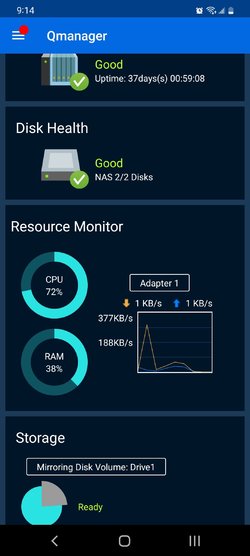
I don't know what you guys want me to do. I have a backup system that works for me for years. It is a Qnap system. It has regular updates and never had any issue whatsoever. It is RAID 1. And RAID works with backup as far as my experience is concerned.
Here is a system screenshot. 37 days uptime since the last security update.

I only use macrium for OS backups.
I am currently working in an enterprise enviromment. These days, they rely highly on Onedrive which I don't personally use. Each of us has 2TB of Onedrive space.


Screenshot_20220422-211425_Qmanager.jpg

There are also 2 external drives attached to it for other backup files separate from my important data files.

Screenshot_20220422-213534_Gallery.jpg
 
Last edited:

My Computers My Computers

  • At a glance

    Windows 11 ProAMD Ryzen 7 9800X3D32GB DDR5 CL30 Kingston FuryASUS Prime Radeon RX 9060 XT OC Edition 16GB
    OS
    Windows 11 Pro
    Computer type
    PC/Desktop
    CPU
    AMD Ryzen 7 9800X3D
    Motherboard
    MSI PRO B850-P Wifi
    Memory
    32GB DDR5 CL30 Kingston Fury
    Graphics Card(s)
    ASUS Prime Radeon RX 9060 XT OC Edition 16GB
    Monitor(s) Displays
    LG Ultrawide 34" 1440p+ MSI 27" 4K UHD
    Screen Resolution
    3440x1440
    Hard Drives
    Main Boot Drive : 512GB Adata XPG RGB Gen3x4 NVMe M.2 SSD
    PSU
    EVGA 750 Watts 80+ Gold
    Case
    Deepcool Genome II
    Cooling
    Thermalright Burst Assassin 120
    Internet Speed
    FTTH 3Gbps
    Browser
    Chrome
    Antivirus
    "Moderna"
  • At a glance

    Windows 11 Proi7-4790K16GB Corsair Vengeance ProMSI R9 290
    Operating System
    Windows 11 Pro
    Computer type
    PC/Desktop
    CPU
    i7-4790K
    Motherboard
    ASRock Xtreme6 Z97
    Memory
    16GB Corsair Vengeance Pro
    Graphics card(s)
    MSI R9 290
    Monitor(s) Displays
    LG Ultrawide 34"
    Screen Resolution
    3440x1440
    Hard Drives
    500GB Adata SSD (OS Only)
    PSU
    Thermaltake 475 Watts 80 Bronze
    Case
    Thermaltake Commander I Snow Edition
    Cooling
    Deep Cool Archer Air Cooler
    Keyboard
    Armageddon MKA-5R RGB-Hornet
    Mouse
    Logitech G402
    Internet Speed
    1Gbps
    Browser
    Chrome
    Antivirus
    Moderna :)
Do you guys BU your test rigs?
For me, yes I do (if by "test rigs" you meant insider OS). We know how destructive some new preview releases can be. It is always nice to have something to go back to when the updates go south.
 

My Computers My Computers

  • At a glance

    Windows 11 ProAMD Ryzen 7 9800X3D32GB DDR5 CL30 Kingston FuryASUS Prime Radeon RX 9060 XT OC Edition 16GB
    OS
    Windows 11 Pro
    Computer type
    PC/Desktop
    CPU
    AMD Ryzen 7 9800X3D
    Motherboard
    MSI PRO B850-P Wifi
    Memory
    32GB DDR5 CL30 Kingston Fury
    Graphics Card(s)
    ASUS Prime Radeon RX 9060 XT OC Edition 16GB
    Monitor(s) Displays
    LG Ultrawide 34" 1440p+ MSI 27" 4K UHD
    Screen Resolution
    3440x1440
    Hard Drives
    Main Boot Drive : 512GB Adata XPG RGB Gen3x4 NVMe M.2 SSD
    PSU
    EVGA 750 Watts 80+ Gold
    Case
    Deepcool Genome II
    Cooling
    Thermalright Burst Assassin 120
    Internet Speed
    FTTH 3Gbps
    Browser
    Chrome
    Antivirus
    "Moderna"
  • At a glance

    Windows 11 Proi7-4790K16GB Corsair Vengeance ProMSI R9 290
    Operating System
    Windows 11 Pro
    Computer type
    PC/Desktop
    CPU
    i7-4790K
    Motherboard
    ASRock Xtreme6 Z97
    Memory
    16GB Corsair Vengeance Pro
    Graphics card(s)
    MSI R9 290
    Monitor(s) Displays
    LG Ultrawide 34"
    Screen Resolution
    3440x1440
    Hard Drives
    500GB Adata SSD (OS Only)
    PSU
    Thermaltake 475 Watts 80 Bronze
    Case
    Thermaltake Commander I Snow Edition
    Cooling
    Deep Cool Archer Air Cooler
    Keyboard
    Armageddon MKA-5R RGB-Hornet
    Mouse
    Logitech G402
    Internet Speed
    1Gbps
    Browser
    Chrome
    Antivirus
    Moderna :)
@badrobot Impressive backup system (y) Do you switch off the QNAP and the 2 external drives when not in use? Little things like that can make it more difficult for malware to propagate, maybe you are already doing it.
 

My Computer My Computer

At a glance

Windows 10 Pro
OS
Windows 10 Pro
@badrobot Impressive backup system (y) Do you switch off the QNAP and the 2 external drives when not in use? Little things like that can make it more difficult for malware to propagate, maybe you are already doing it.
No. The Qnap runs 24/7 but goes to sleep when there's no activity. Same with the 2 external drives.
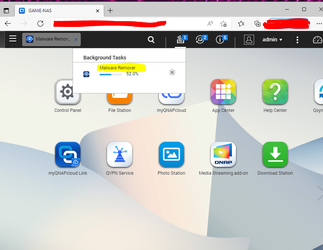
The Qnap has its own OS that you can open via web browser.I have a Malware Remover installed and runs a regular scan.

1650694126591.png


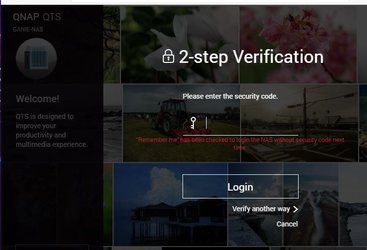
I also have the 2-step verification enabled to give hackers some challenge accessing my account.

1650693454141.jpeg

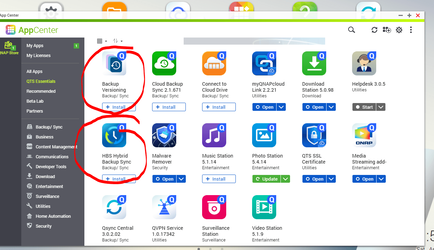
I can install backup apps if I want to create more backups. Right now, I just need a safe storage which already serves as a backup.

1650693640153.png
 

My Computers My Computers

  • At a glance

    Windows 11 ProAMD Ryzen 7 9800X3D32GB DDR5 CL30 Kingston FuryASUS Prime Radeon RX 9060 XT OC Edition 16GB
    OS
    Windows 11 Pro
    Computer type
    PC/Desktop
    CPU
    AMD Ryzen 7 9800X3D
    Motherboard
    MSI PRO B850-P Wifi
    Memory
    32GB DDR5 CL30 Kingston Fury
    Graphics Card(s)
    ASUS Prime Radeon RX 9060 XT OC Edition 16GB
    Monitor(s) Displays
    LG Ultrawide 34" 1440p+ MSI 27" 4K UHD
    Screen Resolution
    3440x1440
    Hard Drives
    Main Boot Drive : 512GB Adata XPG RGB Gen3x4 NVMe M.2 SSD
    PSU
    EVGA 750 Watts 80+ Gold
    Case
    Deepcool Genome II
    Cooling
    Thermalright Burst Assassin 120
    Internet Speed
    FTTH 3Gbps
    Browser
    Chrome
    Antivirus
    "Moderna"
  • At a glance

    Windows 11 Proi7-4790K16GB Corsair Vengeance ProMSI R9 290
    Operating System
    Windows 11 Pro
    Computer type
    PC/Desktop
    CPU
    i7-4790K
    Motherboard
    ASRock Xtreme6 Z97
    Memory
    16GB Corsair Vengeance Pro
    Graphics card(s)
    MSI R9 290
    Monitor(s) Displays
    LG Ultrawide 34"
    Screen Resolution
    3440x1440
    Hard Drives
    500GB Adata SSD (OS Only)
    PSU
    Thermaltake 475 Watts 80 Bronze
    Case
    Thermaltake Commander I Snow Edition
    Cooling
    Deep Cool Archer Air Cooler
    Keyboard
    Armageddon MKA-5R RGB-Hornet
    Mouse
    Logitech G402
    Internet Speed
    1Gbps
    Browser
    Chrome
    Antivirus
    Moderna :)
Hi there
@badrobot

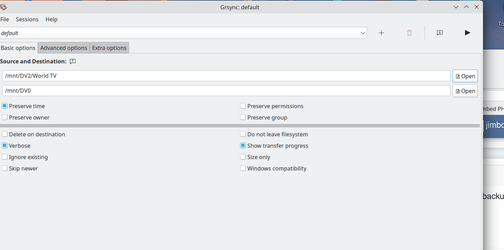
For Linux type NAS systems which include QNAP type of devices the rsync command is perfect for DATA backups. If you need a front end GUI for it then install GRSYNC.

Screenshot_20220423_072403.png

You can also add rsync jobs to crontab so they run automatically at times you want.

For disk and partition backup on linux type systems don't forget the DD command - doesn't need any disk / partition formatting - just copies the physical clusters as is. 100% mirror image.

Cheers
jimbo
 

My Computer My Computer

At a glance

Windows XP,11 Linux Fedora Rawhide pre-releas...2 X Intel i7
OS
Windows XP,11 Linux Fedora Rawhide pre-release 45
Computer type
PC/Desktop
CPU
2 X Intel i7
Screen Resolution
4KUHD X 2
Now many on this forum have Easeus Todo Home, courtesy of generous free offer., I put together a comparison of Macrium Reflect (Free and Paid) vs Easesus, and AOMEI Backupper Pro

A few Easeus items have ? as I was unable to find such a feature. That does not necessarily feature does not exist.

Overall, you can see Easeus offers little more than the free version of Macrium Reflect (incremental backups and file and folder backups).

The same is more or less true for AOMEI Backupper, but AOMEI does offer one feature not in others i.e. ability to sync files in one folder to another.

Apart from that the free version of Macrium Reflect has several features not in Easesus or AOEMI.

The paid version of Macrium Reflect (Home) offers a lot more features than Easeus Todo Home (Easesus Todo Home is slightly cheaper).


Overall, both Easeus and AOMEI have a long way to go to match Macrium Reflect's features.

I have to say (personal opinion), I cannot see it is worth buying Easeus Todo Home, as it offers so little over Macrium Reflect's free version, and significantly less than Macrium Reflect's paid version.

AOMEI has one significant differentiator that may "tip the balance in making a decision to buy" i.e. the ability to sync files and folders.

I accept beginners may find Easeus or AOMEI easier, but it does not take long to learn how to use Macrium Reflect to do basic activities like full backup and restore.

Beginners might like the simpler GUI, but once they gain experience, they may find the GUIs to be rather limiting.

It is a personal option, but I do not like the way Easeus and AOMEI categorise backups as three different entities (OS, Disk, Partition), unlike Macrium Reflect which does not differentiate. With Reflect, you just select which partitions you need to restore.

With the others, restoring is too rigid - try restoring 4 partitions when image has 5! You can restore a whole drive in Disk backups (all 5). You can backup (say) five partitions in partition mode, but you can only restore one at a time which is a truly annoying limitation.

I could not see how to open a disk backup with Easesus with 5 partitions and do partition restores. I accept there might be a way.


Macrium Reflect FreeMacrium Reflect HomeEaseus Todo Backup HomeAOMEI Backupper Pro
GUI Suitable For BeginnersDebatableDebatable
GUI Suitable For (moderately+) Experienced UsersDebatableDebatable
Full Drive Backup
OS Backup
Partition Backup
Create Rescue USB Drive
Create Rescue Boot Entry
Make Scheduled Backups
Incremental Backup on ScheduleX
Differential Backup on Demand
Incremental Backup on DemandX
Differential Backup on Demand
File and Folder BackupX
File and Folder SyncingXXX
Restore Complete Drive
Restore OS only
Restore one Partition (at a time)
Restore multiple Partitions (at a time)X
Ability to split image into small files?
Clone Whole Drive
Clone Partial DriveXX
Reorder Partions (in one restore session)XX
Rapid Delta RestoreXXX
Rapid Delta CloneXXX
Protect Image against hackersXXX
Ability to Mount Image as Virtual MachineXX
Ability to Fix Boot ProblemsXX
 
Last edited:

My Computer My Computer

At a glance

Windows 11 Pro + Win11 Canary VM.I9 13th gen i9-13900H 2.60 GHZ16 GB solderedIntegrated Intel Iris XE
OS
Windows 11 Pro + Win11 Canary VM.
Computer type
Laptop
Manufacturer/Model
ASUS Zenbook 14
CPU
I9 13th gen i9-13900H 2.60 GHZ
Motherboard
Yep, Laptop has one.
Memory
16 GB soldered
Graphics Card(s)
Integrated Intel Iris XE
Sound Card
Realtek built in
Monitor(s) Displays
laptop OLED screen
Screen Resolution
2880x1800 touchscreen
Hard Drives
1 TB NVME SSD (only weakness is only one slot)
PSU
Internal + 65W thunderbolt USB4 charger
Case
Yep, got one
Cooling
Stella Artois (UK pint cans - 568 ml) - extra cost.
Keyboard
Built in UK keybd
Mouse
Bluetooth , wireless dongled, wired
Internet Speed
900 mbs (ethernet), wifi 6 typical 350-450 mb/s both up and down
Browser
Edge
Antivirus
Defender
Other Info
TPM 2.0, 2xUSB4 thunderbolt, 1xUsb3 (usb a), 1xUsb-c, hdmi out, 3.5 mm audio out/in combo, ASUS backlit trackpad (inc. switchable number pad)

Macrium Reflect Home V8
Office 365 Family (6 users each 1TB onedrive space)
Hyper-V (a vm runs almost as fast as my older laptop)
@cereberus Great comparison, I particularly like the table (y)

Edit: The table comparing the 4 backup tools calls for another table comparing the 4 backup media below

IS = Internal Storage (still separate drive)
DAS = Direct Attached Storage
NAS = Network Attached Storage
Cloud
 
Last edited:

My Computer My Computer

At a glance

Windows 10 Pro
OS
Windows 10 Pro
Hi there
@badrobot

For Linux type NAS systems which include QNAP type of devices the rsync command is perfect for DATA backups. If you need a front end GUI for it then install GRSYNC.

View attachment 27493

You can also add rsync jobs to crontab so they run automatically at times you want.

For disk and partition backup on linux type systems don't forget the DD command - doesn't need any disk / partition formatting - just copies the physical clusters as is. 100% mirror image.

Cheers
jimbo
Tnx for the tips.
 

My Computers My Computers

  • At a glance

    Windows 11 ProAMD Ryzen 7 9800X3D32GB DDR5 CL30 Kingston FuryASUS Prime Radeon RX 9060 XT OC Edition 16GB
    OS
    Windows 11 Pro
    Computer type
    PC/Desktop
    CPU
    AMD Ryzen 7 9800X3D
    Motherboard
    MSI PRO B850-P Wifi
    Memory
    32GB DDR5 CL30 Kingston Fury
    Graphics Card(s)
    ASUS Prime Radeon RX 9060 XT OC Edition 16GB
    Monitor(s) Displays
    LG Ultrawide 34" 1440p+ MSI 27" 4K UHD
    Screen Resolution
    3440x1440
    Hard Drives
    Main Boot Drive : 512GB Adata XPG RGB Gen3x4 NVMe M.2 SSD
    PSU
    EVGA 750 Watts 80+ Gold
    Case
    Deepcool Genome II
    Cooling
    Thermalright Burst Assassin 120
    Internet Speed
    FTTH 3Gbps
    Browser
    Chrome
    Antivirus
    "Moderna"
  • At a glance

    Windows 11 Proi7-4790K16GB Corsair Vengeance ProMSI R9 290
    Operating System
    Windows 11 Pro
    Computer type
    PC/Desktop
    CPU
    i7-4790K
    Motherboard
    ASRock Xtreme6 Z97
    Memory
    16GB Corsair Vengeance Pro
    Graphics card(s)
    MSI R9 290
    Monitor(s) Displays
    LG Ultrawide 34"
    Screen Resolution
    3440x1440
    Hard Drives
    500GB Adata SSD (OS Only)
    PSU
    Thermaltake 475 Watts 80 Bronze
    Case
    Thermaltake Commander I Snow Edition
    Cooling
    Deep Cool Archer Air Cooler
    Keyboard
    Armageddon MKA-5R RGB-Hornet
    Mouse
    Logitech G402
    Internet Speed
    1Gbps
    Browser
    Chrome
    Antivirus
    Moderna :)
Now many on this forum have Easeus Todo Home, courtesy of generous free offer., I put together a comparison of Macrium Reflect (Free and Paid) vs Easesus, and AOMEI Backupper Pro

A few Easeus items have ? as I was unable to find such a feature. That does not necessarily feature does not exist.

Overall, you can see Easeus offers little more than the free version of Macrium Reflect (incremental backups and file and folder backups).

The same is more or less true for AOMEI Backupper, but AOMEI does offer one feature not in others i.e. ability to sync files in one folder to another.

Apart from that the free version of Macrium Reflect has several features not in Easesus or AOEMI.

The paid version of Macrium Reflect (Home) offers a lot more features than Easeus Todo Home (Easesus Todo Home is slightly cheaper).


Overall, both Easeus and AOMEI have a long way to go to match Macrium Reflect's features.

I have to say (personal opinion), I cannot see it is worth buying Easeus Todo Home, as it offers so little over Macrium Reflect's free version, and significantly less than Macrium Reflect's paid version.

AOMEI has one significant differentiator that may "tip the balance in making a decision to buy" i.e. the ability to sync files and folders.

I accept beginners may find Easeus or AOMEI easier, but it does not take long to learn how to use Macrium Reflect to do basic activities like full backup and restore.

Beginners might like the simpler GUI, but once they gain experience, they may find the GUIs to be rather limiting.

It is a personal option, but I do not like the way Easeus and AOMEI categorise backups as three different entities (OS, Disk, Partition), unlike Macrium Reflect which does not differentiate. With Reflect, you just select which partitions you need to restore.

With the others, restoring is too rigid - try restoring 4 partitions when image has 5! You can restore a whole drive in Disk backups (all 5). You can backup (say) five partitions in partition mode, but you can only restore one at a time which is a truly annoying limitation.

I could not see how to open a disk backup with Easesus with 5 partitions and do partition restores. I accept there might be a way.


Macrium Reflect FreeMacrium Reflect HomeEaseus Todo Backup HomeAOMEI Backupper Pro
GUI Suitable For BeginnersDebatableDebatable
GUI Suitable For (moderately+) Experienced UsersDebatableDebatable
Full Drive Backup
OS Backup
Partition Backup
Create Rescue USB Drive
Create Rescue Boot Entry
Make Scheduled Backups
Incremental Backup on ScheduleX
Differential Backup on Demand
Incremental Backup on DemandX?
Differential Backup on Demand?
File and Folder BackupX
File and Folder SyncingXXX
Restore Complete Drive
Restore OS only
Restore one Partition (at a time)
Restore multiple Partitions (at a time)X
Ability to split image into small files?
Clone Whole Drive
Clone Partial DriveXX
Reorder Partions (in one restore session)XX
Rapid Delta RestoreXXX
Rapid Delta CloneXXX
Protect Image against hackersXXX
Ability to Mount Image as Virtual MachineXX
Ability to Fix Boot ProblemsXX
Great job! I'd like to invite you to test as the first batch when EaseUS Todo Backup improves the GUI. That's really a big issue for advanced users like you. Simple operation is not equal to simple GUI. We take this wrong.
 

My Computer My Computer

At a glance

Windows 11, Windows 10, Mac OSi5 11400Kinston 8G
OS
Windows 11, Windows 10, Mac OS
Computer type
PC/Desktop
CPU
i5 11400
Motherboard
ASUS H510
Memory
Kinston 8G
Great job! I'd like to invite you to test as the first batch when EaseUS Todo Backup improves the GUI. That's really a big issue for advanced users like you. Simple operation is not equal to simple GUI. We take this wrong.
You can take it how you like, but the fact is the new gui is too simplistic with little flexibility. It needs significant development. Long way to go yet.
 

My Computer My Computer

At a glance

Windows 11 Pro + Win11 Canary VM.I9 13th gen i9-13900H 2.60 GHZ16 GB solderedIntegrated Intel Iris XE
OS
Windows 11 Pro + Win11 Canary VM.
Computer type
Laptop
Manufacturer/Model
ASUS Zenbook 14
CPU
I9 13th gen i9-13900H 2.60 GHZ
Motherboard
Yep, Laptop has one.
Memory
16 GB soldered
Graphics Card(s)
Integrated Intel Iris XE
Sound Card
Realtek built in
Monitor(s) Displays
laptop OLED screen
Screen Resolution
2880x1800 touchscreen
Hard Drives
1 TB NVME SSD (only weakness is only one slot)
PSU
Internal + 65W thunderbolt USB4 charger
Case
Yep, got one
Cooling
Stella Artois (UK pint cans - 568 ml) - extra cost.
Keyboard
Built in UK keybd
Mouse
Bluetooth , wireless dongled, wired
Internet Speed
900 mbs (ethernet), wifi 6 typical 350-450 mb/s both up and down
Browser
Edge
Antivirus
Defender
Other Info
TPM 2.0, 2xUSB4 thunderbolt, 1xUsb3 (usb a), 1xUsb-c, hdmi out, 3.5 mm audio out/in combo, ASUS backlit trackpad (inc. switchable number pad)

Macrium Reflect Home V8
Office 365 Family (6 users each 1TB onedrive space)
Hyper-V (a vm runs almost as fast as my older laptop)
You can take it how you like, but the fact is the new gui is too simplistic with little flexibility. It needs significant development. Long way to go yet.
Yes. We realized that. That's a sad thing. To make more advanced users comfortable with the GUI, we need to do a lot. Hope you won't refuse to take a look when we get that improved.
 

My Computer My Computer

At a glance

Windows 11, Windows 10, Mac OSi5 11400Kinston 8G
OS
Windows 11, Windows 10, Mac OS
Computer type
PC/Desktop
CPU
i5 11400
Motherboard
ASUS H510
Memory
Kinston 8G
Yes. We realized that. That's a sad thing. To make more advanced users comfortable with the GUI, we need to do a lot. Hope you won't refuse to take a look when we get that improved.
Sure - I always keep up to date.
 

My Computer My Computer

At a glance

Windows 11 Pro + Win11 Canary VM.I9 13th gen i9-13900H 2.60 GHZ16 GB solderedIntegrated Intel Iris XE
OS
Windows 11 Pro + Win11 Canary VM.
Computer type
Laptop
Manufacturer/Model
ASUS Zenbook 14
CPU
I9 13th gen i9-13900H 2.60 GHZ
Motherboard
Yep, Laptop has one.
Memory
16 GB soldered
Graphics Card(s)
Integrated Intel Iris XE
Sound Card
Realtek built in
Monitor(s) Displays
laptop OLED screen
Screen Resolution
2880x1800 touchscreen
Hard Drives
1 TB NVME SSD (only weakness is only one slot)
PSU
Internal + 65W thunderbolt USB4 charger
Case
Yep, got one
Cooling
Stella Artois (UK pint cans - 568 ml) - extra cost.
Keyboard
Built in UK keybd
Mouse
Bluetooth , wireless dongled, wired
Internet Speed
900 mbs (ethernet), wifi 6 typical 350-450 mb/s both up and down
Browser
Edge
Antivirus
Defender
Other Info
TPM 2.0, 2xUSB4 thunderbolt, 1xUsb3 (usb a), 1xUsb-c, hdmi out, 3.5 mm audio out/in combo, ASUS backlit trackpad (inc. switchable number pad)

Macrium Reflect Home V8
Office 365 Family (6 users each 1TB onedrive space)
Hyper-V (a vm runs almost as fast as my older laptop)

Latest Support Threads

Back
Top Bottom