JavaScript is disabled. For a better experience, please enable JavaScript in your browser before proceeding.
You are using an out of date browser. It may not display this or other websites correctly.
You should upgrade or use an
alternative browser .
Macrium with Red line on Disk C
Well-known member
Member
VIP
When I use Macrium and see the different partitions if I need more room on one, I use my cursor to try to spread out the second one, but it doesn’t move.
Last edited: Oct 20, 2024
Windows 11 pro Intel Core i9- 12900K Alder Lake 3.2 GHz LGA1700 G-Skill Ripjaws S5 32GB NVIDIA GEForce GTX1616 Super dual fan Windows 11 pro PC/Desktop ASUS built by Micro center Intel Core i9- 12900K Alder Lake 3.2 GHz LGA1700 Asus prime Z790-v WI FI Intel LGA1700 ATX G-Skill Ripjaws S5 32GB NVIDIA GEForce GTX1616 Super dual fan Samsung 500GB 860 EVO Thermalake 500 Watt V 100ATX Defender primary with MBAM free secondary
Windows 11 Pro 21H2 22000.438
Windows 11 Pro 21H2 22000.438 PC/Desktop ASUS board built Asus Tuf Z390 - Tuf Plus Gaming WI = FI
Well-known member
Guru
VIP
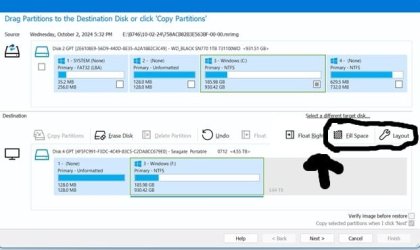
After you drag the C: partition to the new drive, you have two options. One is Fill Space and the other is Layout. Fill Space uses all of the free space to the right of the C: partition. Layout gives you the option to choose the size you want.
Windows 11 Pro 25H2 Intel Core i7-10700K 16GB (8GB PC4-19200 DDR4 SDRAM x2) NVIDIA GeForce GTX 1050 TI Windows 11 Pro 25H2 PC/Desktop PowerSpec B746 Intel Core i7-10700K ASRock Z490 Phantom Gaming 4/ax 16GB (8GB PC4-19200 DDR4 SDRAM x2) NVIDIA GeForce GTX 1050 TI Realtek Audio #1. LG ULTRAWIDE 34" #2. AOC Q32G2WG3 32" #1. 3440 X 1440 #2. 1920 x 1080 NVMe WDC WDS100T2B0C-00PXH0 1TB 750 Watts (62.5A) PowerSpec/Lian Li ATX 205 Logitech K270 Logitech M185 Microsoft Edge and Firefox Webroot SecureAnywhere CE 26.1
Windows 11 Canary Channel Intel Core i5-8400 CPU @ 2.80GHz 16 MB DDR 4-2666 Windows 11 Canary Channel PC/Desktop PowerSpec G156 Intel Core i5-8400 CPU @ 2.80GHz AsusTeK Prime B360M-A 16 MB DDR 4-2666 23" Speptre HDMI 75Hz 1920x1080 Samsung 970 EVO 500GB NVMe Logitek K270 Logitek M185 Firefox, Edge and Edge Canary Windows Defender
Well-known member
Member
VIP
So I look for fill space or layout to begin with?
Windows 11 pro Intel Core i9- 12900K Alder Lake 3.2 GHz LGA1700 G-Skill Ripjaws S5 32GB NVIDIA GEForce GTX1616 Super dual fan Windows 11 pro PC/Desktop ASUS built by Micro center Intel Core i9- 12900K Alder Lake 3.2 GHz LGA1700 Asus prime Z790-v WI FI Intel LGA1700 ATX G-Skill Ripjaws S5 32GB NVIDIA GEForce GTX1616 Super dual fan Samsung 500GB 860 EVO Thermalake 500 Watt V 100ATX Defender primary with MBAM free secondary
Windows 11 Pro 21H2 22000.438
Windows 11 Pro 21H2 22000.438 PC/Desktop ASUS board built Asus Tuf Z390 - Tuf Plus Gaming WI = FI
Well-known member
Power User
VIP
If you have Unallocated Space to the Right of the C: drive, and you want to increase the size of C: to be the full capacity choose Fill Space.
Scroll down in this web page to see pictures
knowledgebase.macrium.com
Windows 11 Pro Insider 64 bit 25H2 26200.5742 Intel Core i7 9700K 3.60 16 GB nVidia GEForce RTX 2060 Super Windows 11 Pro Insider 64 bit 25H2 26200.5742 PC/Desktop Gigabyte Z390 UD Intel Core i7 9700K 3.60 Gigabyte Z390 UD 16 GB nVidia GEForce RTX 2060 Super onboard Two 27" Dell 4K monitors 3840 x 2160 M.2 NVME SSD, 500 GB; Two 2TB Mechanical HDD's 850w PSU Cyberpower PC Water cooled Backlit Cyberpower gaming keyboard Backlit Cyberpower gaming mouse 1 GB mbps Brave Windows Security
Well-known member
Member
VIP
I cannot thank you enough for all the information now I have some studying to do. May I ask if you bought reflex subscription
Windows 11 pro Intel Core i9- 12900K Alder Lake 3.2 GHz LGA1700 G-Skill Ripjaws S5 32GB NVIDIA GEForce GTX1616 Super dual fan Windows 11 pro PC/Desktop ASUS built by Micro center Intel Core i9- 12900K Alder Lake 3.2 GHz LGA1700 Asus prime Z790-v WI FI Intel LGA1700 ATX G-Skill Ripjaws S5 32GB NVIDIA GEForce GTX1616 Super dual fan Samsung 500GB 860 EVO Thermalake 500 Watt V 100ATX Defender primary with MBAM free secondary
Windows 11 Pro 21H2 22000.438
Windows 11 Pro 21H2 22000.438 PC/Desktop ASUS board built Asus Tuf Z390 - Tuf Plus Gaming WI = FI
Well-known member
Guru
VIP
I cannot thank you enough for all the information now I have some studying to do. May I ask if you bought reflex subscription
I have 4 life time license for version 8. Still debating if I want to upgrade to version 10.
Windows 11 Pro 25H2 Intel Core i7-10700K 16GB (8GB PC4-19200 DDR4 SDRAM x2) NVIDIA GeForce GTX 1050 TI Windows 11 Pro 25H2 PC/Desktop PowerSpec B746 Intel Core i7-10700K ASRock Z490 Phantom Gaming 4/ax 16GB (8GB PC4-19200 DDR4 SDRAM x2) NVIDIA GeForce GTX 1050 TI Realtek Audio #1. LG ULTRAWIDE 34" #2. AOC Q32G2WG3 32" #1. 3440 X 1440 #2. 1920 x 1080 NVMe WDC WDS100T2B0C-00PXH0 1TB 750 Watts (62.5A) PowerSpec/Lian Li ATX 205 Logitech K270 Logitech M185 Microsoft Edge and Firefox Webroot SecureAnywhere CE 26.1
Windows 11 Canary Channel Intel Core i5-8400 CPU @ 2.80GHz 16 MB DDR 4-2666 Windows 11 Canary Channel PC/Desktop PowerSpec G156 Intel Core i5-8400 CPU @ 2.80GHz AsusTeK Prime B360M-A 16 MB DDR 4-2666 23" Speptre HDMI 75Hz 1920x1080 Samsung 970 EVO 500GB NVMe Logitek K270 Logitek M185 Firefox, Edge and Edge Canary Windows Defender
Well-known member
Member
VIP
If it will work, I may just keep version eight with my perpetual license and click update now and then.
Windows 11 pro Intel Core i9- 12900K Alder Lake 3.2 GHz LGA1700 G-Skill Ripjaws S5 32GB NVIDIA GEForce GTX1616 Super dual fan Windows 11 pro PC/Desktop ASUS built by Micro center Intel Core i9- 12900K Alder Lake 3.2 GHz LGA1700 Asus prime Z790-v WI FI Intel LGA1700 ATX G-Skill Ripjaws S5 32GB NVIDIA GEForce GTX1616 Super dual fan Samsung 500GB 860 EVO Thermalake 500 Watt V 100ATX Defender primary with MBAM free secondary
Windows 11 Pro 21H2 22000.438
Windows 11 Pro 21H2 22000.438 PC/Desktop ASUS board built Asus Tuf Z390 - Tuf Plus Gaming WI = FI
Well-known member
Member
VIP
It is with a system image. I hover my pointer at the dividing lines and try to move the edge of the partitions.
Windows 11 pro Intel Core i9- 12900K Alder Lake 3.2 GHz LGA1700 G-Skill Ripjaws S5 32GB NVIDIA GEForce GTX1616 Super dual fan Windows 11 pro PC/Desktop ASUS built by Micro center Intel Core i9- 12900K Alder Lake 3.2 GHz LGA1700 Asus prime Z790-v WI FI Intel LGA1700 ATX G-Skill Ripjaws S5 32GB NVIDIA GEForce GTX1616 Super dual fan Samsung 500GB 860 EVO Thermalake 500 Watt V 100ATX Defender primary with MBAM free secondary
Windows 11 Pro 21H2 22000.438
Windows 11 Pro 21H2 22000.438 PC/Desktop ASUS board built Asus Tuf Z390 - Tuf Plus Gaming WI = FI
Well-known member
Guru
VIP
It is with a system image. I hover my pointer at the dividing lines and try to move the edge of the partitions.
Did you try the options I have circled in the pic?
Windows 11 Pro 25H2 Intel Core i7-10700K 16GB (8GB PC4-19200 DDR4 SDRAM x2) NVIDIA GeForce GTX 1050 TI Windows 11 Pro 25H2 PC/Desktop PowerSpec B746 Intel Core i7-10700K ASRock Z490 Phantom Gaming 4/ax 16GB (8GB PC4-19200 DDR4 SDRAM x2) NVIDIA GeForce GTX 1050 TI Realtek Audio #1. LG ULTRAWIDE 34" #2. AOC Q32G2WG3 32" #1. 3440 X 1440 #2. 1920 x 1080 NVMe WDC WDS100T2B0C-00PXH0 1TB 750 Watts (62.5A) PowerSpec/Lian Li ATX 205 Logitech K270 Logitech M185 Microsoft Edge and Firefox Webroot SecureAnywhere CE 26.1
Windows 11 Canary Channel Intel Core i5-8400 CPU @ 2.80GHz 16 MB DDR 4-2666 Windows 11 Canary Channel PC/Desktop PowerSpec G156 Intel Core i5-8400 CPU @ 2.80GHz AsusTeK Prime B360M-A 16 MB DDR 4-2666 23" Speptre HDMI 75Hz 1920x1080 Samsung 970 EVO 500GB NVMe Logitek K270 Logitek M185 Firefox, Edge and Edge Canary Windows Defender
Well-known member
Guru
VIP
I forgot to mention that Fill Space will use all of the free space and Layout will let you select how much of the free space you want to use.
Last edited: Oct 24, 2024
Windows 11 Pro 25H2 Intel Core i7-10700K 16GB (8GB PC4-19200 DDR4 SDRAM x2) NVIDIA GeForce GTX 1050 TI Windows 11 Pro 25H2 PC/Desktop PowerSpec B746 Intel Core i7-10700K ASRock Z490 Phantom Gaming 4/ax 16GB (8GB PC4-19200 DDR4 SDRAM x2) NVIDIA GeForce GTX 1050 TI Realtek Audio #1. LG ULTRAWIDE 34" #2. AOC Q32G2WG3 32" #1. 3440 X 1440 #2. 1920 x 1080 NVMe WDC WDS100T2B0C-00PXH0 1TB 750 Watts (62.5A) PowerSpec/Lian Li ATX 205 Logitech K270 Logitech M185 Microsoft Edge and Firefox Webroot SecureAnywhere CE 26.1
Windows 11 Canary Channel Intel Core i5-8400 CPU @ 2.80GHz 16 MB DDR 4-2666 Windows 11 Canary Channel PC/Desktop PowerSpec G156 Intel Core i5-8400 CPU @ 2.80GHz AsusTeK Prime B360M-A 16 MB DDR 4-2666 23" Speptre HDMI 75Hz 1920x1080 Samsung 970 EVO 500GB NVMe Logitek K270 Logitek M185 Firefox, Edge and Edge Canary Windows Defender
Well-known member
Member
VIP
In creaing an image I clicked both 'image the drive' and also 'image the drives' on the left and I do not see the same picture you have with the black circirles. Are you tring to image a disk when you have the picture with the black circles or sometthing else?
Windows 11 pro Intel Core i9- 12900K Alder Lake 3.2 GHz LGA1700 G-Skill Ripjaws S5 32GB NVIDIA GEForce GTX1616 Super dual fan Windows 11 pro PC/Desktop ASUS built by Micro center Intel Core i9- 12900K Alder Lake 3.2 GHz LGA1700 Asus prime Z790-v WI FI Intel LGA1700 ATX G-Skill Ripjaws S5 32GB NVIDIA GEForce GTX1616 Super dual fan Samsung 500GB 860 EVO Thermalake 500 Watt V 100ATX Defender primary with MBAM free secondary
Windows 11 Pro 21H2 22000.438
Windows 11 Pro 21H2 22000.438 PC/Desktop ASUS board built Asus Tuf Z390 - Tuf Plus Gaming WI = FI
Well-known member
Guru
VIP
In creaing an image I clicked both 'image the drive' and also 'image the drives' on the left and I do not see the same picture you have with the black circirles. Are you tring to image a disk when you have the picture with the black circles or sometthing else?
I'm showing you how to restore an image to a new drive with drag and drop. My target drive I used in my example is larger than my sources drive. The options in the circle show how you can expand your C: partiton to take advantage ot the extra drive space. If you do expand your C: partition leave enough space on the end so you can increase the size of your Recovery Partition.
Windows 11 Pro 25H2 Intel Core i7-10700K 16GB (8GB PC4-19200 DDR4 SDRAM x2) NVIDIA GeForce GTX 1050 TI Windows 11 Pro 25H2 PC/Desktop PowerSpec B746 Intel Core i7-10700K ASRock Z490 Phantom Gaming 4/ax 16GB (8GB PC4-19200 DDR4 SDRAM x2) NVIDIA GeForce GTX 1050 TI Realtek Audio #1. LG ULTRAWIDE 34" #2. AOC Q32G2WG3 32" #1. 3440 X 1440 #2. 1920 x 1080 NVMe WDC WDS100T2B0C-00PXH0 1TB 750 Watts (62.5A) PowerSpec/Lian Li ATX 205 Logitech K270 Logitech M185 Microsoft Edge and Firefox Webroot SecureAnywhere CE 26.1
Windows 11 Canary Channel Intel Core i5-8400 CPU @ 2.80GHz 16 MB DDR 4-2666 Windows 11 Canary Channel PC/Desktop PowerSpec G156 Intel Core i5-8400 CPU @ 2.80GHz AsusTeK Prime B360M-A 16 MB DDR 4-2666 23" Speptre HDMI 75Hz 1920x1080 Samsung 970 EVO 500GB NVMe Logitek K270 Logitek M185 Firefox, Edge and Edge Canary Windows Defender
Well-known member
Member
VIP
What process are you in? When you’re doing this? Are you in creating an image or restoring an image
Windows 11 pro Intel Core i9- 12900K Alder Lake 3.2 GHz LGA1700 G-Skill Ripjaws S5 32GB NVIDIA GEForce GTX1616 Super dual fan Windows 11 pro PC/Desktop ASUS built by Micro center Intel Core i9- 12900K Alder Lake 3.2 GHz LGA1700 Asus prime Z790-v WI FI Intel LGA1700 ATX G-Skill Ripjaws S5 32GB NVIDIA GEForce GTX1616 Super dual fan Samsung 500GB 860 EVO Thermalake 500 Watt V 100ATX Defender primary with MBAM free secondary
Windows 11 Pro 21H2 22000.438
Windows 11 Pro 21H2 22000.438 PC/Desktop ASUS board built Asus Tuf Z390 - Tuf Plus Gaming WI = FI
Well-known member
Guru
VIP
What process are you in? When you’re doing this? Are you in creating an image or restoring an image
If you read the above post you will see that I was showing you an example picture of doing a restore to a larger drive. In my example that's as far as I went. I only used that external drive because there was enough free space so I could show you what to do.
Windows 11 Pro 25H2 Intel Core i7-10700K 16GB (8GB PC4-19200 DDR4 SDRAM x2) NVIDIA GeForce GTX 1050 TI Windows 11 Pro 25H2 PC/Desktop PowerSpec B746 Intel Core i7-10700K ASRock Z490 Phantom Gaming 4/ax 16GB (8GB PC4-19200 DDR4 SDRAM x2) NVIDIA GeForce GTX 1050 TI Realtek Audio #1. LG ULTRAWIDE 34" #2. AOC Q32G2WG3 32" #1. 3440 X 1440 #2. 1920 x 1080 NVMe WDC WDS100T2B0C-00PXH0 1TB 750 Watts (62.5A) PowerSpec/Lian Li ATX 205 Logitech K270 Logitech M185 Microsoft Edge and Firefox Webroot SecureAnywhere CE 26.1
Windows 11 Canary Channel Intel Core i5-8400 CPU @ 2.80GHz 16 MB DDR 4-2666 Windows 11 Canary Channel PC/Desktop PowerSpec G156 Intel Core i5-8400 CPU @ 2.80GHz AsusTeK Prime B360M-A 16 MB DDR 4-2666 23" Speptre HDMI 75Hz 1920x1080 Samsung 970 EVO 500GB NVMe Logitek K270 Logitek M185 Firefox, Edge and Edge Canary Windows Defender
Well-known member
Guru
VIP
If you read the above post you will see that I was showing you an example picture of doing a restore to a larger drive. In my example that's as far as I went. I only used that external drive because there was enough free space so I could show you what to do.
Maybe I should add that you have to make the System Image to an external drive first. You should also use a thumb drive to make a Macrium Rescue disk. That way if anything happens you can boot into Macrium. Have you made the backup System Image?
Last edited: Oct 22, 2024
Windows 11 Pro 25H2 Intel Core i7-10700K 16GB (8GB PC4-19200 DDR4 SDRAM x2) NVIDIA GeForce GTX 1050 TI Windows 11 Pro 25H2 PC/Desktop PowerSpec B746 Intel Core i7-10700K ASRock Z490 Phantom Gaming 4/ax 16GB (8GB PC4-19200 DDR4 SDRAM x2) NVIDIA GeForce GTX 1050 TI Realtek Audio #1. LG ULTRAWIDE 34" #2. AOC Q32G2WG3 32" #1. 3440 X 1440 #2. 1920 x 1080 NVMe WDC WDS100T2B0C-00PXH0 1TB 750 Watts (62.5A) PowerSpec/Lian Li ATX 205 Logitech K270 Logitech M185 Microsoft Edge and Firefox Webroot SecureAnywhere CE 26.1
Windows 11 Canary Channel Intel Core i5-8400 CPU @ 2.80GHz 16 MB DDR 4-2666 Windows 11 Canary Channel PC/Desktop PowerSpec G156 Intel Core i5-8400 CPU @ 2.80GHz AsusTeK Prime B360M-A 16 MB DDR 4-2666 23" Speptre HDMI 75Hz 1920x1080 Samsung 970 EVO 500GB NVMe Logitek K270 Logitek M185 Firefox, Edge and Edge Canary Windows Defender
Well-known member
Member
VIP
You have done more than your share to try to explain to me what you were doing to expand shrink a drive.
Windows 11 pro Intel Core i9- 12900K Alder Lake 3.2 GHz LGA1700 G-Skill Ripjaws S5 32GB NVIDIA GEForce GTX1616 Super dual fan Windows 11 pro PC/Desktop ASUS built by Micro center Intel Core i9- 12900K Alder Lake 3.2 GHz LGA1700 Asus prime Z790-v WI FI Intel LGA1700 ATX G-Skill Ripjaws S5 32GB NVIDIA GEForce GTX1616 Super dual fan Samsung 500GB 860 EVO Thermalake 500 Watt V 100ATX Defender primary with MBAM free secondary
Windows 11 Pro 21H2 22000.438
Windows 11 Pro 21H2 22000.438 PC/Desktop ASUS board built Asus Tuf Z390 - Tuf Plus Gaming WI = FI
Well-known member
Member
VIP
I bought a perpetual license with support ending in one year but it seems Macrium wants to go with a subscription which I don’t want so I’ve been looking at iDrive free.
Windows 11 pro Intel Core i9- 12900K Alder Lake 3.2 GHz LGA1700 G-Skill Ripjaws S5 32GB NVIDIA GEForce GTX1616 Super dual fan Windows 11 pro PC/Desktop ASUS built by Micro center Intel Core i9- 12900K Alder Lake 3.2 GHz LGA1700 Asus prime Z790-v WI FI Intel LGA1700 ATX G-Skill Ripjaws S5 32GB NVIDIA GEForce GTX1616 Super dual fan Samsung 500GB 860 EVO Thermalake 500 Watt V 100ATX Defender primary with MBAM free secondary
Windows 11 Pro 21H2 22000.438
Windows 11 Pro 21H2 22000.438 PC/Desktop ASUS board built Asus Tuf Z390 - Tuf Plus Gaming WI = FI
Well-known member
Guru
VIP
I bought a perpetual license with support ending in one year but it seems Macrium wants to go with a subscription which I don’t want so I’ve been looking at iDrive free.
You don't need to make a decision any time soon. Macrium will still continue work for the foreseeable future.
Windows 11 Pro 25H2 Intel Core i7-10700K 16GB (8GB PC4-19200 DDR4 SDRAM x2) NVIDIA GeForce GTX 1050 TI Windows 11 Pro 25H2 PC/Desktop PowerSpec B746 Intel Core i7-10700K ASRock Z490 Phantom Gaming 4/ax 16GB (8GB PC4-19200 DDR4 SDRAM x2) NVIDIA GeForce GTX 1050 TI Realtek Audio #1. LG ULTRAWIDE 34" #2. AOC Q32G2WG3 32" #1. 3440 X 1440 #2. 1920 x 1080 NVMe WDC WDS100T2B0C-00PXH0 1TB 750 Watts (62.5A) PowerSpec/Lian Li ATX 205 Logitech K270 Logitech M185 Microsoft Edge and Firefox Webroot SecureAnywhere CE 26.1
Windows 11 Canary Channel Intel Core i5-8400 CPU @ 2.80GHz 16 MB DDR 4-2666 Windows 11 Canary Channel PC/Desktop PowerSpec G156 Intel Core i5-8400 CPU @ 2.80GHz AsusTeK Prime B360M-A 16 MB DDR 4-2666 23" Speptre HDMI 75Hz 1920x1080 Samsung 970 EVO 500GB NVMe Logitek K270 Logitek M185 Firefox, Edge and Edge Canary Windows Defender
Well-known member
Guru
VIP
@Maranna , when I get the time I'll give you a more detailed guide to move everything from your old drive to the new drive.
Windows 11 Pro 25H2 Intel Core i7-10700K 16GB (8GB PC4-19200 DDR4 SDRAM x2) NVIDIA GeForce GTX 1050 TI Windows 11 Pro 25H2 PC/Desktop PowerSpec B746 Intel Core i7-10700K ASRock Z490 Phantom Gaming 4/ax 16GB (8GB PC4-19200 DDR4 SDRAM x2) NVIDIA GeForce GTX 1050 TI Realtek Audio #1. LG ULTRAWIDE 34" #2. AOC Q32G2WG3 32" #1. 3440 X 1440 #2. 1920 x 1080 NVMe WDC WDS100T2B0C-00PXH0 1TB 750 Watts (62.5A) PowerSpec/Lian Li ATX 205 Logitech K270 Logitech M185 Microsoft Edge and Firefox Webroot SecureAnywhere CE 26.1
Windows 11 Canary Channel Intel Core i5-8400 CPU @ 2.80GHz 16 MB DDR 4-2666 Windows 11 Canary Channel PC/Desktop PowerSpec G156 Intel Core i5-8400 CPU @ 2.80GHz AsusTeK Prime B360M-A 16 MB DDR 4-2666 23" Speptre HDMI 75Hz 1920x1080 Samsung 970 EVO 500GB NVMe Logitek K270 Logitek M185 Firefox, Edge and Edge Canary Windows Defender
Well-known member
Member
VIP
I am going to research idrive today as it reads well. I also will be looking your notes over. Maybe the light will go on.
Last edited: Oct 23, 2024
Windows 11 pro Intel Core i9- 12900K Alder Lake 3.2 GHz LGA1700 G-Skill Ripjaws S5 32GB NVIDIA GEForce GTX1616 Super dual fan Windows 11 pro PC/Desktop ASUS built by Micro center Intel Core i9- 12900K Alder Lake 3.2 GHz LGA1700 Asus prime Z790-v WI FI Intel LGA1700 ATX G-Skill Ripjaws S5 32GB NVIDIA GEForce GTX1616 Super dual fan Samsung 500GB 860 EVO Thermalake 500 Watt V 100ATX Defender primary with MBAM free secondary
Windows 11 Pro 21H2 22000.438
Windows 11 Pro 21H2 22000.438 PC/Desktop ASUS board built Asus Tuf Z390 - Tuf Plus Gaming WI = FI