Microsoft Teams Blog:
Every day, people rely on Microsoft Teams to connect with colleagues, share ideas, make decisions, and move work forward. Whether they're joining a meeting from a laptop, catching up on conversations from a mobile device, or collaborating across multiple projects throughout the day, they expect Teams to be fast, responsive, and ready when they need it.
In our June 2026 update, we shared gains across chat switching, reduced hangs and freezes, and faster people search. Since then, we’ve continued to raise the bar. From hardware-constrained devices to employees working on the go from mobile phones, delivering a consistent, high-quality experience across every platform remains a key focus for the Teams engineering team.
In this post, we'll highlight several recent performance investments that are helping make Teams faster, more efficient, and more responsive across desktop and mobile experiences.

Performance improvements at a glance
Teams Efficiency Mode: Delivering a Better Experience on Hardware-Constrained Devices |
Great collaboration experiences shouldn't depend on having the latest hardware. Many of our customers rely on older devices, entry-level laptops, or systems operating under challenging network constraints. As organizations extend device lifecycles and support increasingly diverse hardware fleets, ensuring a high-quality of experience across all configurations remains an important priority. This is why in June we launched Teams Efficiency Mode, a set of optimizations designed to reduce resource consumption and improve overall responsiveness on hardware-constrained devices.Teams Efficiency Mode gets enabled by default on devices with slower / legacy CPUs and limited amount of RAM (8GB or less). Users on such devices see a corresponding indicator in the Teams title bar. Also, on any device, Efficiency Mode can be turned on and off manually through the dedicated setting.
The benefits are visible in everyday workflows. In Efficiency Mode, Teams launches up to 20% faster on hardware-constrained devices, helping users get into conversations, meetings, and tasks more quickly. When in a meeting, Teams automatically adjusts the resolution of user’s camera to preserve the CPU headroom for the audio path. As a result, users on hardware-constrained devices can maintain a high quality of their meeting experience despite the disproportionately higher thermal throttling rates.
Encouraged by these early wins, we are actively working on expanding the set of optimizations applied in Efficiency Mode. By making Teams more efficient and resilient on a wider range of hardware, we're helping ensure that users can stay productive, collaborate confidently, and get the most out of Teams regardless of the device they're using.
Making Responsiveness Measurable – and Actionable
Responsiveness has consistently been one of the biggest sources of dissatisfaction in our Android customers’ feedback. We knew users were experiencing friction, but we lacked a single metric that could measure responsiveness across the many interactions they perform every day.To close that gap, we introduced the App Responsiveness Index (ARI). ARI connects real user actions—such as taps, scrolling, and navigation—with Android frame data. It groups frames into roughly 208 ms “blinks” and measures the perceived smoothness of each interaction and screen. More importantly, it gives teams actionable telemetry at the individual screen level.
That visibility made the main causes of poor responsiveness much clearer:
- Memory issues, responsible for approximately 60–65% of the impact
- Blocking work on the main thread
- Heavy layouts
The results were significant. Our slow-frame metric improved 40% YoY. We also brought the user-perceived ANR rate down to an all-time low of 0.12%.
Targeted memory improvements reduced total blocking garbage-collection duration by 23%. Because blocking GC pauses application work, this improvement has a direct effect on how responsive the app feels.
We also wanted to make these gains sustainable. For scenarios covered by system tests, we introduced memory regression gates that evaluate changes before they are merged. These gates have already caught several potential regressions at the pull-request stage.
In parallel, we built AI-powered pull-request guardrails to identify risky patterns even earlier. These guardrails currently operate at 93% precision, and we are evolving them into an agentic system that can detect, explain, and eventually help prevent responsiveness regressions before they reach production.
Image Thumbnails – 17% Faster Loading
Every day, people use Microsoft Teams to share screenshots, photos, files, and other visual context that keeps work moving. In media-heavy chats and channels, those images are often experienced first as thumbnails while users scroll through a conversation. When those thumbnails appear late, the conversation can feel less responsive even when the service behind it is healthy.Making media-heavy chats feel smoother
For users, the problem was simple: in some Android conversations, thumbnails did not always keep pace with scrolling. A user could reach a message and briefly see an empty placeholder before the image appeared. In other cases, multiple thumbnails appeared together after a delay, creating a bursty experience that made scrolling feel uneven.
This was especially visible in chats and channels with a lot of shared media. Images are part of the conversation, so delays in rendering them interrupt the flow of reading, reviewing, and responding. The goal of this work was to make thumbnails appear earlier and more predictably as users move through a conversation.
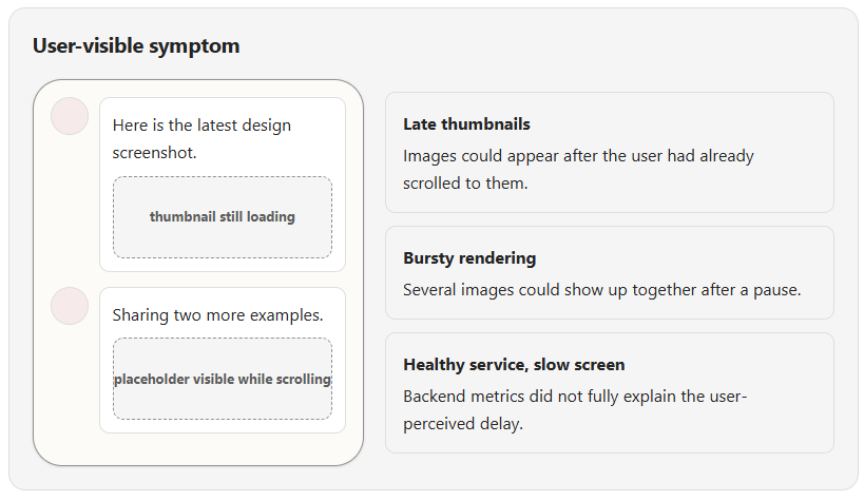
The interesting part was that the backend was not the whole story. Service-side latency could look healthy, and many images were already being served from cache. Still, the user could see delayed thumbnails. That told us we needed to look at the full client-side journey of an image, not just request and response timing.
How we did it: mapping the image journey
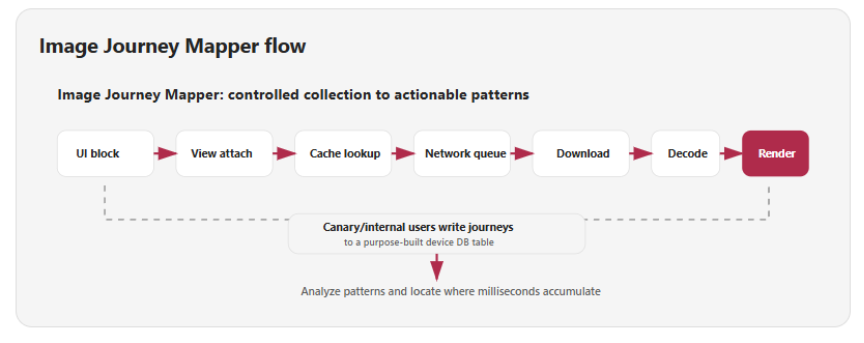
To understand the gap, the team created Image Journey Mapper for Android. This was not a feature by itself; it was a diagnostic subsystem designed to answer one question: where does time go between creating a media block and showing the thumbnail on screen?
We first identified the milestones that mattered in the lifecycle of a thumbnail: UI block creation, view attachment, cache lookup, network queueing, download, decode, and render. Then we added instrumentation across those stages and flighted the diagnostic code only to Canary users, which are Microsoft internal users. That allowed us to collect real usage data while keeping the scope controlled.
For this investigation, the journey events were written into a separate purpose-built table in the device database. Once enough data was collected from internal users viewing images in Teams, the team analyzed the patterns across many journeys. The important shift was that image rendering was no longer a single opaque interval; it became a stage-by-stage timeline.
What we found
The Journey Mapper data surfaced three important client-side bottlenecks. They were valuable because each one pointed to a different layer of the image pipeline, and each required a different kind of fix.
1. Some images were being fetched again after cache churn
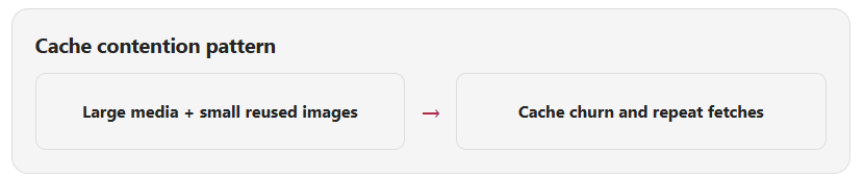
In media-heavy sessions, larger thumbnails and smaller frequently reused assets could compete for cache space. When smaller assets were evicted, the app had to fetch them again even though they were likely to be needed repeatedly. The fix was to make cache behavior more intentional by separating workloads so smaller frequently reused images were less likely to be displaced by larger media.
2. Some requests were waiting in the client network queue
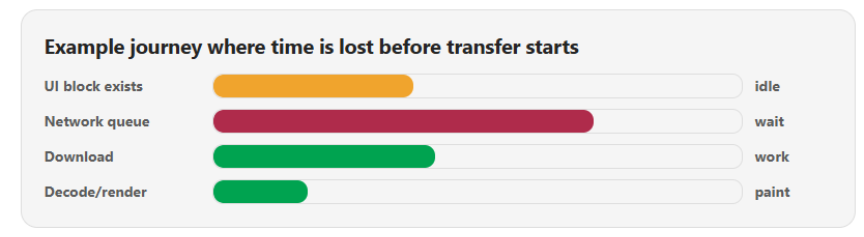
A slow thumbnail can look like a network problem from high-level telemetry. The mapped journey showed a more specific pattern: for some images, transfer had not started yet. The request was waiting in the client networking layer. That led us to tune network concurrency for image-heavy workloads so independent thumbnail requests could make better use of available device and network capacity.
3. Loading often started too close to display time
The mapper also showed that image blocks could exist before their thumbnails started loading. That meant the app had unused time before the user reached the image. To take advantage of that window, we introduced thumbnail warmup: upcoming media blocks near the viewport can be prepared before they are visible, with cache-aware checks and bounded concurrency.
What we changed
The fixes followed the diagnosis. We tuned the networking path for concurrent image requests, made cache behavior more predictable for different image sizes and reuse patterns, and added controlled thumbnail warmup so images could be prepared before the user reached them.
These changes were designed to improve perceived performance without turning prefetch into unbounded background work. Warmup remains cache-aware, concurrency is limited, and rollout is measured carefully so latency gains are balanced with responsiveness, device resource usage, and reliability.
What we have seen so far
This work is still in progress. The experience has been validated in internal rings and exposed to our private preview customers for a meaningful period. The team is using the learnings from that exposure to prepare the next broader rollout phase, with general availability as the near-term goal.
The current results show that the targeted image-pipeline changes are moving the experience in the right direction, with a measured latency reduction of approximately 17%. More importantly, the visible user impact is clearer in day-to-day use: thumbnails are pre-loaded before the user reaches them, loaders are no longer visible in the optimized path, and users do not have to pause for images to load while scrolling through media-heavy conversations.
At the same time, we continue to carefully observe the rollout to ensure that latency gains are balanced with responsiveness, device resource usage, and reliability.
Looking Forward
As Microsoft Teams continues to evolve with richer collaboration experiences and increasingly intelligent AI-powered capabilities, maintaining a fast and responsive user experience remains a foundational engineering priority.We will continue investing across desktop and mobile platforms to improve responsiveness, reduce resource consumption, accelerate content loading, and ensure Teams performs reliably across the wide range of devices and environments our customers depend on every day.
Source:

Making Microsoft Teams more responsive, reliable, and ready for work | Microsoft Community Hub
By: Ihor Lukyanenko, Harsh Nagaonkar, Vishal Ratna and Suprem Gupta Every day, people rely on Microsoft Teams to connect with colleagues, share...
 techcommunity.microsoft.com