Solved Malware, when online via ethernet, takes my desktop over


hoardtrot

New member
Local time
3:28 PM
Posts
16
OS
Windows 11
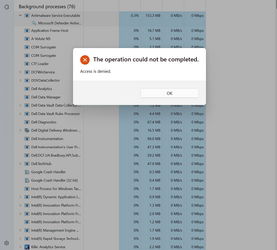
It stops immediately after I unplug it. I have ran all scans of MS Defender and nothing shows up. When doing the offline scan it only reaches 91% and restarts. While doing the full scan without ethernet connection, all numbers involved, time, items scanned, jump around randomly while my fans hit full speed and Antimalware Service exe_Microsoft defender is at 96% power. Cannot end task. Please help, Thank you

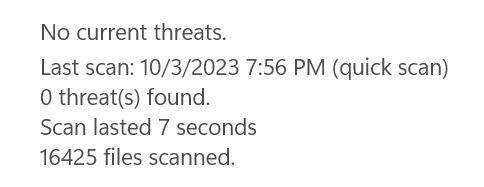
The quick scan results are impossible. I have tried a reset but I can't format drive. If I put a new hard drive in it will that solve it?
 
Windows Build/Version
22H2, 22621.2361

Attachments

  • Screenshot 2023-10-03 194741.png
    Screenshot 2023-10-03 194741.png
    67.5 KB · Views: 7
  • Screenshot 2023-10-03 195637.png
    Screenshot 2023-10-03 195637.png
    4.4 KB · Views: 5

My Computer My Computer

At a glance

Windows 11
OS
Windows 11
I don't see why you believe your computer infected if you still think that is the case scan your computer with MalwareBytes.
 

My Computer My Computer

At a glance

Windows 11AMD Ryzen 7 5700GMicron Technology DDR4-3200 16GBNVIDIA GeForce RTX 3060
OS
Windows 11
Computer type
PC/Desktop
Manufacturer/Model
HP Pavilion
CPU
AMD Ryzen 7 5700G
Motherboard
Erica6
Memory
Micron Technology DDR4-3200 16GB
Graphics Card(s)
NVIDIA GeForce RTX 3060
Sound Card
Realtek ALC671
Monitor(s) Displays
Samsung SyncMaster U28E590
Screen Resolution
3840 x 2160
Hard Drives
SAMSUNG MZVLQ1T0HALB-000H1
I specifically described why it is infected. I'm not using that.
 

My Computer My Computer

At a glance

Windows 11
OS
Windows 11
Have you ran either of these Malware programs ?

Download these 2 programs & run them, when done post the logs so we can see if that problem goes away or do i need to have you run a more stronger program ??
Malwarebytes AdwCleaner >>> Download AdwCleaner
Please download AdwCleaner and save it to your Desktop
* Close all open programs and browsers
* Right click on the icon and select Run as administrator
* Click Scan now
* Allow the program to Quarantine what it finds except for Pre-installed applications if you would like to keep those or other entries you would like to keep
* When completed click View Scan Log File
* Copy and paste the contents in your reply
* Click Skip Basic Repair if it appears then close the program

===========

Full System Scan with Malwarebytes Antimalware >>> Free Antivirus 2023 | Download Free Antivirus & Virus Scan | 100% Free & Easy Install
* If not existing, please download Malwarebytes' Anti-Malware to your desktop.
* Double-click mbam-setup.exe and follow the prompts to install the program.
* At the end, be sure a checkmark is placed next to Update Malwarebytes' Anti-Malware and Launch Malwarebytes' Anti-Malware, then click Finish.

* If the program is already installed:
* Run Malwarebytes Antimalware
* If an update is found, it will download and install the latest version.
* Once the program has loaded, select Perform fullscan, place a checkmark on all hard drives, then click Scan.
* When the scan is complete, click OK, then Show Results to view the results.
* Be sure that everything is checked, and click Remove Selected.
* When completed, a log will open in Notepad. Please save it to a convenient location.
* The log can also be found here:
C:\Documents and Settings\Username\Application Data\Malwarebytes\Malwarebytes' Anti-Malware\Logs\log-date.txt
* Or at C:\Program Files\Malwarebytes' Anti-Malware\Logs\log-date.txt
*** Post that log back here or just tell me what it found ?
If it is to long then you will have to zip it or find a site to download it to & let me know where !

Post the logs so i can read them unless nothing is found ! If they are to big then zip them up & give me a link !!

Thanks !
Chuck
 

My Computer My Computer

At a glance

Windows11 23H2 (OS Build 22631.2428)2.90 gigahertz Intel Core i7-1070016214 Megabytes Usable Installed Memor
OS
Windows11 23H2 (OS Build 22631.2428)
Computer type
PC/Desktop
Manufacturer/Model
HP HP ENVY TE01
CPU
2.90 gigahertz Intel Core i7-10700
Motherboard
Board: HP 8767 A (SMVB)
Memory
16214 Megabytes Usable Installed Memor
Hard Drives
1511.52 Gigabytes Usable Hard Drive Capacity
1418.15 Gigabytes Hard Drive Free Space
Keyboard
Logitech wireless
Mouse
M 185 wireless
Internet Speed
12 ms Jitter 8 ms Download 10.5 Mbps Upload 1.7
Browser
Edge & FF
Antivirus
Windows Defender
I specifically described why it is infected. I'm not using that.
An alternative option to scan was suggested, if you’re solely relying on Defender to treat or read your PC, you possibly wont get to the cause of the issue.
 

My Computers My Computers

  • At a glance

    Windows 11 Pro 25H2 Build 26200.8655Intel(R) Core(TM) i7-4770K CPU @ 3.50GHz32.0 GB of I forget and the box is in storage.Gigabyte nVidia GeForce GTX 1660 Super OC 6GB
    OS
    Windows 11 Pro 25H2 Build 26200.8655
    Computer type
    PC/Desktop
    Manufacturer/Model
    Sin-built 2013
    CPU
    Intel(R) Core(TM) i7-4770K CPU @ 3.50GHz
    Motherboard
    ASUS ROG Maximus VI Formula
    Memory
    32.0 GB of I forget and the box is in storage.
    Graphics Card(s)
    Gigabyte nVidia GeForce GTX 1660 Super OC 6GB
    Sound Card
    ROG SupremeFX Formula 8-Channel High Definition Audio
    Monitor(s) Displays
    5 x LG 25MS500-B - 1 x 24MK430H-B - 1 x Wacom Pro 22" Touch Screen Tablet
    Screen Resolution
    All over the place
    Hard Drives
    Too many to list. OS on Samsung 1TB 870 QVO SATA
    PSU
    Silverstone 1500
    Case
    NZXT Phantom 820 Full-Tower Case
    Cooling
    Noctua NH-D15 Elite Class Dual Tower CPU Cooler / 6 x EziDIY 120mm / 2 x Corsair 140mm somethings / 1 x 140mm Thermaltake something / 2 x 200mm Corsair.
    Keyboard
    Corsair K95 / Logitech diNovo Edge Wireless
    Mouse
    Logitech: G402 / G502 / Mx Masters / Mx Air Cordless
    Internet Speed
    2000/500Mbps
    Browser
    All sorts
    Antivirus
    Kaspersky Premium
    Other Info
    ㅤㅤㅤㅤㅤㅤㅤㅤㅤㅤㅤㅤㅤㅤㅤㅤㅤㅤㅤㅤㅤㅤㅤㅤㅤㅤㅤㅤㅤㅤㅤㅤㅤㅤㅤㅤㅤㅤㅤㅤ⠀⠀⠀⠀⠀⠀⠀⠀⠀⠀
    TP-Link BE9300 WiFi 7 Bluetooth 5.4 (Archer TBE550E)
    TP-Link TX201 V1 2.5GB Lan

    Grandstream HT812 - VoIP
    ASUS DSL-AX82U - Mesh
    ASUS RT-AC68U - Mesh
    ASUS RT-BE88U Router

    Brother MFC-L2880DW Printer

    I’m on a horse.
  • At a glance

    Windows 11 Pro 25H2 Build 26200.8655 (Wifes)13th Generation Intel® Core™ i5-1340P Process...16GB LPDDR5-52001x Intel® Iris® Xe Graphics
    Operating System
    Windows 11 Pro 25H2 Build 26200.8655 (Wifes)
    Computer type
    Laptop
    Manufacturer/Model
    LENOVO Yoga 7 14IRL8 - Type 82YL
    CPU
    13th Generation Intel® Core™ i5-1340P Processor(Core™ i5-1340P)
    Memory
    16GB LPDDR5-5200
    Graphics card(s)
    1x Intel® Iris® Xe Graphics
    Sound Card
    Optimized with Dolby Atmos®
    Screen Resolution
    QHD 2880 x 1800 OLED
    Hard Drives
    M.2 512 GB SSD PCIe
    Mouse
    Logiteck MX Master 3S
    Internet Speed
    2000/500
    Antivirus
    Defender / Malwarebytes
    Other Info
    …still on a horse.


    Wireless Network: Wi-Fi 6E 2x2 AX; Bluetooth® 5.1 or above
    Ports: 1x 1 Novo button; 2 in 1 Audio Combo jack; Micro SD Card Reader; HDMI 1.4b; 2 x USB Type-C (TBT4)
    USB 3.2 Gen 2 DP 1.4a
    PD 3.0); 1 x USB 3.2 Gen1 Type A
    Camera
    1x 1080P FHD IR/RGB Hybrid with Privacy Shutter and Dual Array Microphone
    Graphics
    1x Intel® Iris® Xe Graphics
    Monitor
    14" WUXGA
    Form Factor
    Convertible Notebook
  • Windows 11 Pro 25H2 Build 26200.8655 (Wifes)

    Yoga 7 2-in-1 14IML9 - Type 83DJ

    Processor: Intel® Core™ Ultra 7 155H Processor(Core™ Ultra 7 155H)

    Memory: 32GB LPD5X-7467

    Hard Drive: 1 TB SSD PCIe

    Wireless Network: 1x Wi-Fi 6E 2x2 AX; Bluetooth® 5.1 or above

    Ports: 1 x HDMI 2.1 TMDS; 1 x Novo Button; 1 x Combo Audio Jack
    2 x USB-C (USB 4.0)
    1 x USB-A 3.2 Gen 1

    Camera: 1080P FHD IR Hybrid with Dual Microphone

    Graphics: Intel® Arc™ Graphics

    Monitor: 14" 2.8K

    ...Where's my horse?
Have you ran either of these Malware programs ?

Download these 2 programs & run them, when done post the logs so we can see if that problem goes away or do i need to have you run a more stronger program ??
Malwarebytes AdwCleaner >>> Download AdwCleaner
Please download AdwCleaner and save it to your Desktop
* Close all open programs and browsers
* Right click on the icon and select Run as administrator
* Click Scan now
* Allow the program to Quarantine what it finds except for Pre-installed applications if you would like to keep those or other entries you would like to keep
* When completed click View Scan Log File
* Copy and paste the contents in your reply
* Click Skip Basic Repair if it appears then close the program

===========

Full System Scan with Malwarebytes Antimalware >>> Free Antivirus 2023 | Download Free Antivirus & Virus Scan | 100% Free & Easy Install
* If not existing, please download Malwarebytes' Anti-Malware to your desktop.
* Double-click mbam-setup.exe and follow the prompts to install the program.
* At the end, be sure a checkmark is placed next to Update Malwarebytes' Anti-Malware and Launch Malwarebytes' Anti-Malware, then click Finish.

* If the program is already installed:
* Run Malwarebytes Antimalware
* If an update is found, it will download and install the latest version.
* Once the program has loaded, select Perform fullscan, place a checkmark on all hard drives, then click Scan.
* When the scan is complete, click OK, then Show Results to view the results.
* Be sure that everything is checked, and click Remove Selected.
* When completed, a log will open in Notepad. Please save it to a convenient location.
* The log can also be found here:
C:\Documents and Settings\Username\Application Data\Malwarebytes\Malwarebytes' Anti-Malware\Logs\log-date.txt
* Or at C:\Program Files\Malwarebytes' Anti-Malware\Logs\log-date.txt
*** Post that log back here or just tell me what it found ?
If it is to long then you will have to zip it or find a site to download it to & let me know where !

Post the logs so i can read them unless nothing is found ! If they are to big then zip them up & give me a link !!

Thanks !
Chuck

AdwCleaner is quite useful and un-intrusive. (y)
 

My Computers My Computers

  • At a glance

    Windows 11 Pro 25H2 Build 26200.8655Intel(R) Core(TM) i7-4770K CPU @ 3.50GHz32.0 GB of I forget and the box is in storage.Gigabyte nVidia GeForce GTX 1660 Super OC 6GB
    OS
    Windows 11 Pro 25H2 Build 26200.8655
    Computer type
    PC/Desktop
    Manufacturer/Model
    Sin-built 2013
    CPU
    Intel(R) Core(TM) i7-4770K CPU @ 3.50GHz
    Motherboard
    ASUS ROG Maximus VI Formula
    Memory
    32.0 GB of I forget and the box is in storage.
    Graphics Card(s)
    Gigabyte nVidia GeForce GTX 1660 Super OC 6GB
    Sound Card
    ROG SupremeFX Formula 8-Channel High Definition Audio
    Monitor(s) Displays
    5 x LG 25MS500-B - 1 x 24MK430H-B - 1 x Wacom Pro 22" Touch Screen Tablet
    Screen Resolution
    All over the place
    Hard Drives
    Too many to list. OS on Samsung 1TB 870 QVO SATA
    PSU
    Silverstone 1500
    Case
    NZXT Phantom 820 Full-Tower Case
    Cooling
    Noctua NH-D15 Elite Class Dual Tower CPU Cooler / 6 x EziDIY 120mm / 2 x Corsair 140mm somethings / 1 x 140mm Thermaltake something / 2 x 200mm Corsair.
    Keyboard
    Corsair K95 / Logitech diNovo Edge Wireless
    Mouse
    Logitech: G402 / G502 / Mx Masters / Mx Air Cordless
    Internet Speed
    2000/500Mbps
    Browser
    All sorts
    Antivirus
    Kaspersky Premium
    Other Info
    ㅤㅤㅤㅤㅤㅤㅤㅤㅤㅤㅤㅤㅤㅤㅤㅤㅤㅤㅤㅤㅤㅤㅤㅤㅤㅤㅤㅤㅤㅤㅤㅤㅤㅤㅤㅤㅤㅤㅤㅤ⠀⠀⠀⠀⠀⠀⠀⠀⠀⠀
    TP-Link BE9300 WiFi 7 Bluetooth 5.4 (Archer TBE550E)
    TP-Link TX201 V1 2.5GB Lan

    Grandstream HT812 - VoIP
    ASUS DSL-AX82U - Mesh
    ASUS RT-AC68U - Mesh
    ASUS RT-BE88U Router

    Brother MFC-L2880DW Printer

    I’m on a horse.
  • At a glance

    Windows 11 Pro 25H2 Build 26200.8655 (Wifes)13th Generation Intel® Core™ i5-1340P Process...16GB LPDDR5-52001x Intel® Iris® Xe Graphics
    Operating System
    Windows 11 Pro 25H2 Build 26200.8655 (Wifes)
    Computer type
    Laptop
    Manufacturer/Model
    LENOVO Yoga 7 14IRL8 - Type 82YL
    CPU
    13th Generation Intel® Core™ i5-1340P Processor(Core™ i5-1340P)
    Memory
    16GB LPDDR5-5200
    Graphics card(s)
    1x Intel® Iris® Xe Graphics
    Sound Card
    Optimized with Dolby Atmos®
    Screen Resolution
    QHD 2880 x 1800 OLED
    Hard Drives
    M.2 512 GB SSD PCIe
    Mouse
    Logiteck MX Master 3S
    Internet Speed
    2000/500
    Antivirus
    Defender / Malwarebytes
    Other Info
    …still on a horse.


    Wireless Network: Wi-Fi 6E 2x2 AX; Bluetooth® 5.1 or above
    Ports: 1x 1 Novo button; 2 in 1 Audio Combo jack; Micro SD Card Reader; HDMI 1.4b; 2 x USB Type-C (TBT4)
    USB 3.2 Gen 2 DP 1.4a
    PD 3.0); 1 x USB 3.2 Gen1 Type A
    Camera
    1x 1080P FHD IR/RGB Hybrid with Privacy Shutter and Dual Array Microphone
    Graphics
    1x Intel® Iris® Xe Graphics
    Monitor
    14" WUXGA
    Form Factor
    Convertible Notebook
  • Windows 11 Pro 25H2 Build 26200.8655 (Wifes)

    Yoga 7 2-in-1 14IML9 - Type 83DJ

    Processor: Intel® Core™ Ultra 7 155H Processor(Core™ Ultra 7 155H)

    Memory: 32GB LPD5X-7467

    Hard Drive: 1 TB SSD PCIe

    Wireless Network: 1x Wi-Fi 6E 2x2 AX; Bluetooth® 5.1 or above

    Ports: 1 x HDMI 2.1 TMDS; 1 x Novo Button; 1 x Combo Audio Jack
    2 x USB-C (USB 4.0)
    1 x USB-A 3.2 Gen 1

    Camera: 1080P FHD IR Hybrid with Dual Microphone

    Graphics: Intel® Arc™ Graphics

    Monitor: 14" 2.8K

    ...Where's my horse?
I agree with @flashh4 about the proper way to deal with malware, but I have a question about the first screenshot you posted.
Do you get the "access is denied message" as soon as you open task manager WHEN the internet is connected but you DON'T get that message if the internet is disconnected?

Do you get the same message when doing anything else ie opening file explorer, control panel, etc?
 

My Computers My Computers

  • At a glance

    Windows 11 Pro 25H2 26200.8655i9-10900 10 core 20 threads32 gbnone-Intel UHD Graphics 630
    OS
    Windows 11 Pro 25H2 26200.8655
    Computer type
    PC/Desktop
    Manufacturer/Model
    Dell Optiplex 7080
    CPU
    i9-10900 10 core 20 threads
    Motherboard
    DELL 0J37VM
    Memory
    32 gb
    Graphics Card(s)
    none-Intel UHD Graphics 630
    Sound Card
    Integrated Realtek
    Monitor(s) Displays
    Benq 27
    Screen Resolution
    2560x1440
    Hard Drives
    2x1tb Solidigm m.2 nvme /External drives 512gb Samsung m.2 sata+2tb Kingston m2.nvme
    PSU
    500w
    Case
    MT
    Cooling
    Dell Premium
    Keyboard
    Logitech wired
    Mouse
    Logitech wireless
    Internet Speed
    so slow I'm too embarrassed to tell
    Browser
    #1 Edge #2 Firefox
    Antivirus
    Defender+MWB Premium
  • At a glance

    Windows 11 Pro 24H2 26200.8457AMD Ryzen 7 6800U32 gbintegrated
    Operating System
    Windows 11 Pro 24H2 26200.8457
    Computer type
    PC/Desktop
    Manufacturer/Model
    Beelink Mini PC SER5
    CPU
    AMD Ryzen 7 6800U
    Memory
    32 gb
    Graphics card(s)
    integrated
    Sound Card
    integrated
    Monitor(s) Displays
    Benq 27
    Screen Resolution
    2560x1440
    Hard Drives
    1TB Crucial nvme
    Keyboard
    Logitech wired
    Mouse
    Logitech wireless
    Internet Speed
    still too embarrassed to tell
    Browser
    Firefox
    Antivirus
    Defender
    Other Info
    System 3 is non compliant Dell 9020 i7-4770/24gb ram Win11 PRO 26200.8457
What i see from first screenshot, you are trying to terminate Windows Defender service why are you trying to do that?
 

My Computer My Computer

At a glance

Windows 11AMD Ryzen 7 5700GMicron Technology DDR4-3200 16GBNVIDIA GeForce RTX 3060
OS
Windows 11
Computer type
PC/Desktop
Manufacturer/Model
HP Pavilion
CPU
AMD Ryzen 7 5700G
Motherboard
Erica6
Memory
Micron Technology DDR4-3200 16GB
Graphics Card(s)
NVIDIA GeForce RTX 3060
Sound Card
Realtek ALC671
Monitor(s) Displays
Samsung SyncMaster U28E590
Screen Resolution
3840 x 2160
Hard Drives
SAMSUNG MZVLQ1T0HALB-000H1
@hoardtrot .......... as @FreeBooter asked why are you trying to terminate Windows Defender service ? You logs look clean, there was nothing bad removed by them ! If you want me to scan your whole computer please download & run FARBAR ! It is very important to download this to your desktop !! This may take awhile !
FARBAR (FRST)
Download Farbar Recover Scan Tool for 64 bit systems <<<< Downloading Farbar Recovery Scan Tool >>> and save it to your Desktop. <<< Important
If your computer language is other than English right click on the FRST64 icon and rename it to FRST64english
* Right click on the icon and select Run as administrator
* Note: If you receive any warning about the download it is a false positive and you can ignore it. Click on More info to get the Run anyway option
* Click Yes to the disclaimer
* Click Scan and allow the program to run
* Click OK on the Scan complete screen, then OK on the Addition.txt pop up screen

2 Notepad documents should now be open on your desktop.
Please copy and paste the contents of each report in separate reply windows !
Thanks !
 

My Computer My Computer

At a glance

Windows11 23H2 (OS Build 22631.2428)2.90 gigahertz Intel Core i7-1070016214 Megabytes Usable Installed Memor
OS
Windows11 23H2 (OS Build 22631.2428)
Computer type
PC/Desktop
Manufacturer/Model
HP HP ENVY TE01
CPU
2.90 gigahertz Intel Core i7-10700
Motherboard
Board: HP 8767 A (SMVB)
Memory
16214 Megabytes Usable Installed Memor
Hard Drives
1511.52 Gigabytes Usable Hard Drive Capacity
1418.15 Gigabytes Hard Drive Free Space
Keyboard
Logitech wireless
Mouse
M 185 wireless
Internet Speed
12 ms Jitter 8 ms Download 10.5 Mbps Upload 1.7
Browser
Edge & FF
Antivirus
Windows Defender
Because malware took over. When I do a scan in Defender the files scanned is scrolling random numbers while the time begins counting up. Then the time counts down until 0 when my system hits 100% full fans, I don't know if that matters. This continues until I cancel scan.
 

My Computer My Computer

At a glance

Windows 11
OS
Windows 11
Additional scan result of Farbar Recovery Scan Tool (x64) Version: 25-09-2023
Ran by hjstr (04-10-2023 14:41:32)
Running from C:\Users\hjstr\OneDrive\Desktop
Microsoft Windows 11 Pro Version 22H2 22621.2361 (X64) (2023-10-03 22:31:40)
Boot Mode: Normal
==========================================================


==================== Accounts: =============================


(If an entry is included in the fixlist, it will be removed.)

Administrator (S-1-5-21-4053498597-138046058-952635393-500 - Administrator - Disabled)
DefaultAccount (S-1-5-21-4053498597-138046058-952635393-503 - Limited - Disabled)
Guest (S-1-5-21-4053498597-138046058-952635393-501 - Limited - Disabled)
hjstr (S-1-5-21-4053498597-138046058-952635393-1002 - Administrator - Enabled) => C:\Users\hjstr
WDAGUtilityAccount (S-1-5-21-4053498597-138046058-952635393-504 - Limited - Disabled)

==================== Security Center ========================

(If an entry is included in the fixlist, it will be removed.)

AV: Malwarebytes (Enabled - Up to date) {0D452135-A081-B000-D6B6-132E52638543}
AV: Windows Defender (Disabled - Up to date) {D68DDC3A-831F-4fae-9E44-DA132C1ACF46}

==================== Installed Programs ======================

(Only the adware programs with "Hidden" flag could be added to the fixlist to unhide them. The adware programs should be uninstalled manually.)

Alienware Digital Delivery (HKLM-x32\...\{7B2D0B6F-F02D-4363-ACDF-00DE6247ACBC}) (Version: 3.5.2015.0 - Dell Products, LP)
Alienware SupportAssist OS Recovery Plugin for Alienware Update (HKLM\...\{0B884FA0-BBEE-4573-B696-426AA39ED913}) (Version: 5.5.7.18773 - Dell Inc.) Hidden
Alienware SupportAssist OS Recovery Plugin for Alienware Update (HKLM-x32\...\{2600102a-dac2-4b2a-8257-df60c573fc29}) (Version: 5.5.7.18773 - Dell Inc.)
Alienware SupportAssist Remediation (HKLM\...\{68D8E750-23FC-4A2B-BE01-E7A90CE23746}) (Version: 5.5.8.18837 - Dell Inc.) Hidden
Alienware SupportAssist Remediation (HKLM-x32\...\{ebc225e0-50f1-4cf7-8fff-b7be888f6915}) (Version: 5.5.8.18837 - Dell Inc.)
Alienware Update for Windows Universal (HKLM\...\{20E7100A-BADE-4287-8AAD-B498A1E51C13}) (Version: 5.0.0 - Dell Inc.)
Bitdefender Agent (HKLM\...\Bitdefender Agent) (Version: 27.0.1.260 - Bitdefender)
Dell SupportAssist (HKLM\...\{6D3561B7-19AA-438B-9C83-CD2CED199472}) (Version: 3.14.0.91 - Dell Inc.)
Docs (HKU\S-1-5-21-4053498597-138046058-952635393-1002\...\5ffdc94e7cd27ee2abdec997441a0cb4) (Version: 1.0 - Google\Chrome)
Gmail (HKU\S-1-5-21-4053498597-138046058-952635393-1002\...\3d03a9eae028761e2effd306d8adee42) (Version: 1.0 - Google\Chrome)
Google Chrome (HKLM-x32\...\Google Chrome) (Version: 117.0.5938.150 - Google LLC)
Google Drive (HKU\S-1-5-21-4053498597-138046058-952635393-1002\...\59b51bb27e1127bdfc1475084e86390c) (Version: 1.0 - Google\Chrome)
Malwarebytes version 4.6.3.282 (HKLM\...\{35065F43-4BB2-439A-BFF7-0F1014F2E0CD}_is1) (Version: 4.6.3.282 - Malwarebytes)
Microsoft .NET Host - 6.0.21 (x64) (HKLM\...\{26FF35F7-ADBB-4C9F-97DA-79120DB80EC6}) (Version: 48.87.64667 - Microsoft Corporation) Hidden
Microsoft .NET Host FX Resolver - 6.0.21 (x64) (HKLM\...\{D937EF87-F11D-4778-973C-B71E178F95D0}) (Version: 48.87.64667 - Microsoft Corporation) Hidden
Microsoft .NET Runtime - 6.0.21 (x64) (HKLM\...\{8D2EC92E-5903-4B25-9406-182B8EFA834F}) (Version: 48.87.64667 - Microsoft Corporation) Hidden
Microsoft .NET Runtime - 6.0.21 (x64) (HKLM-x32\...\{67ef3ebc-b55c-4df6-92df-944dd8c4249f}) (Version: 6.0.21.32713 - Microsoft Corporation)
Microsoft Edge (HKLM-x32\...\Microsoft Edge) (Version: 117.0.2045.47 - Microsoft Corporation)
Microsoft Edge WebView2 Runtime (HKLM-x32\...\Microsoft EdgeWebView) (Version: 117.0.2045.47 - Microsoft Corporation)
Microsoft OneDrive (HKU\S-1-5-21-4053498597-138046058-952635393-1002\...\OneDriveSetup.exe) (Version: 23.189.0910.0001 - Microsoft Corporation)
Microsoft Update Health Tools (HKLM\...\{AF47B488-9780-4AB5-A97E-762E28013CA6}) (Version: 5.71.0.0 - Microsoft Corporation)
Microsoft Visual C++ 2015 Redistributable (x64) - 14.0.24215 (HKLM-x32\...\{d992c12e-cab2-426f-bde3-fb8c53950b0d}) (Version: 14.0.24215.1 - Microsoft Corporation)
Microsoft Visual C++ 2015 x64 Additional Runtime - 14.0.24215 (HKLM\...\{EF1EC6A9-17DE-3DA9-B040-686A1E8A8B04}) (Version: 14.0.24215 - Microsoft Corporation) Hidden
Microsoft Visual C++ 2015 x64 Minimum Runtime - 14.0.24215 (HKLM\...\{50A2BC33-C9CD-3BF1-A8FF-53C10A0B183C}) (Version: 14.0.24215 - Microsoft Corporation) Hidden
NVIDIA Graphics Driver 536.19 (HKLM\...\{B2FE1952-0186-46C3-BAEC-A80AA35AC5B8}_Display.Driver) (Version: 536.19 - NVIDIA Corporation)
Sheets (HKU\S-1-5-21-4053498597-138046058-952635393-1002\...\83dbec8f42daacd63e83b7de4a1dc198) (Version: 1.0 - Google\Chrome)
Slides (HKU\S-1-5-21-4053498597-138046058-952635393-1002\...\3fcaafebb0b93efef2e2155c24226f2a) (Version: 1.0 - Google\Chrome)
SupportAssist Recovery Assistant (HKLM\...\{408B46A0-70B1-4047-BDA7-AABACAE76589}) (Version: 5.5.8.18837 - Dell Inc.)
YouTube (HKU\S-1-5-21-4053498597-138046058-952635393-1002\...\31cce6e814bf44842c4e9fe3743ec35e) (Version: 1.0 - Google\Chrome)

Packages:
=========
Alienware Update -> C:\Program Files\WindowsApps\DellInc.AlienwareUpdate_5.0.48.0_x86__htrsf667h5kn2 [2023-10-03] (Dell Inc)
Cortana -> C:\Program Files\WindowsApps\Microsoft.549981C3F5F10_4.2308.1005.0_x64__8wekyb3d8bbwe [2023-10-04] (Microsoft Corporation)
Dell SupportAssist for Home PCs -> C:\Program Files\WindowsApps\DellInc.DellSupportAssistforPCs_3.14.4.0_x64__htrsf667h5kn2 [2023-10-03] (Dell Inc)
Intel® Optane™ Memory and Storage Management -> C:\Program Files\WindowsApps\AppUp.IntelOptaneMemoryandStorageManagement_19.0.1042.0_x64__8j3eq9eme6ctt [2023-10-03] (INTEL CORP)
Killer Intelligence Center -> C:\Program Files\WindowsApps\RivetNetworks.KillerControlCenter_3.1222.608.0_x64__rh07ty8m5nkag [2023-10-03] (Rivet Networks LLC) [Startup Task]
Microsoft.MPEG2VideoExtension -> C:\Program Files\WindowsApps\Microsoft.MPEG2VideoExtension_1.0.61931.0_x64__8wekyb3d8bbwe [2023-10-04] (Microsoft Corporation)
Microsoft.WindowsAppRuntime.CBS -> C:\Windows\SystemApps\Microsoft.WindowsAppRuntime.CBS_8wekyb3d8bbwe [2023-10-03] (Microsoft Corporation)
NVIDIA Control Panel -> C:\Program Files\WindowsApps\NVIDIACorp.NVIDIAControlPanel_8.1.964.0_x64__56jybvy8sckqj [2023-10-03] (NVIDIA Corp.)
Realtek Audio Control -> C:\Program Files\WindowsApps\RealtekSemiconductorCorp.RealtekAudioControl_1.37.275.0_x64__dt26b99r8h8gj [2023-10-03] (Realtek Semiconductor Corp)
Solitaire & Casual Games -> C:\Program Files\WindowsApps\Microsoft.MicrosoftSolitaireCollection_4.17.8180.0_x64__8wekyb3d8bbwe [2023-10-04] (Microsoft Studios) [MS Ad]
Spotify Music -> C:\Program Files\WindowsApps\SpotifyAB.SpotifyMusic_1.221.1104.0_x64__zpdnekdrzrea0 [2023-10-03] (Spotify AB) [Startup Task]
Windows Feature Experience Pack -> C:\Windows\SystemApps\MicrosoftWindows.Client.FileExp_cw5n1h2txyewy [2023-10-03] (Microsoft Corporation)

==================== Custom CLSID (Whitelisted): ==============

(If an entry is included in the fixlist, it will be removed from the registry. The file will not be moved unless listed separately.)

ContextMenuHandlers3: [MBAMShlExt] -> {57CE581A-0CB6-4266-9CA0-19364C90A0B3} => C:\Program Files\Malwarebytes\Anti-Malware\mbshlext.dll [2023-10-04] (Malwarebytes Inc. -> Malwarebytes)
ContextMenuHandlers5: [NvCplDesktopContext] -> {3D1975AF-48C6-4f8e-A182-BE0E08FA86A9} => C:\Windows\System32\DriverStore\FileRepository\nvdd.inf_amd64_67b1df330bec74ef\nvshext.dll [2023-08-04] (NVIDIA Corporation -> NVIDIA Corporation)
ContextMenuHandlers6: [MBAMShlExt] -> {57CE581A-0CB6-4266-9CA0-19364C90A0B3} => C:\Program Files\Malwarebytes\Anti-Malware\mbshlext.dll [2023-10-04] (Malwarebytes Inc. -> Malwarebytes)

==================== Codecs (Whitelisted) ====================

==================== Shortcuts & WMI ========================

(The entries could be listed to be restored or removed.)

ShortcutWithArgument: C:\Users\hjstr\AppData\Roaming\Microsoft\Windows\Start Menu\Programs\Chrome Apps\Docs.lnk -> C:\Program Files\Google\Chrome\Application\chrome_proxy.exe (Google LLC) -> --profile-directory=Default --app-id=mpnpojknpmmopombnjdcgaaiekajbnjb
ShortcutWithArgument: C:\Users\hjstr\AppData\Roaming\Microsoft\Windows\Start Menu\Programs\Chrome Apps\Gmail.lnk -> C:\Program Files\Google\Chrome\Application\chrome_proxy.exe (Google LLC) -> --profile-directory=Default --app-id=fmgjjmmmlfnkbppncabfkddbjimcfncm
ShortcutWithArgument: C:\Users\hjstr\AppData\Roaming\Microsoft\Windows\Start Menu\Programs\Chrome Apps\Google Drive.lnk -> C:\Program Files\Google\Chrome\Application\chrome_proxy.exe (Google LLC) -> --profile-directory=Default --app-id=aghbiahbpaijignceidepookljebhfak
ShortcutWithArgument: C:\Users\hjstr\AppData\Roaming\Microsoft\Windows\Start Menu\Programs\Chrome Apps\Sheets.lnk -> C:\Program Files\Google\Chrome\Application\chrome_proxy.exe (Google LLC) -> --profile-directory=Default --app-id=fhihpiojkbmbpdjeoajapmgkhlnakfjf
ShortcutWithArgument: C:\Users\hjstr\AppData\Roaming\Microsoft\Windows\Start Menu\Programs\Chrome Apps\Slides.lnk -> C:\Program Files\Google\Chrome\Application\chrome_proxy.exe (Google LLC) -> --profile-directory=Default --app-id=kefjledonklijopmnomlcbpllchaibag
ShortcutWithArgument: C:\Users\hjstr\AppData\Roaming\Microsoft\Windows\Start Menu\Programs\Chrome Apps\YouTube.lnk -> C:\Program Files\Google\Chrome\Application\chrome_proxy.exe (Google LLC) -> --profile-directory=Default --app-id=agimnkijcaahngcdmfeangaknmldooml

==================== Loaded Modules (Whitelisted) =============

==================== Alternate Data Streams (Whitelisted) ========

==================== Safe Mode (Whitelisted) ==================

(If an entry is included in the fixlist, it will be removed from the registry. The "AlternateShell" will be restored.)

HKLM\SYSTEM\CurrentControlSet\Control\SafeBoot\Minimal\MBAMService => ""="Service"
HKLM\SYSTEM\CurrentControlSet\Control\SafeBoot\Network\MBAMService => ""="Service"

==================== Association (Whitelisted) =================

==================== Internet Explorer (Whitelisted) ==========


==================== Hosts content: =========================

(If needed Hosts: directive could be included in the fixlist to reset Hosts.)

2022-05-07 01:24 - 2022-05-07 01:22 - 000000824 _____ C:\Windows\system32\drivers\etc\hosts

==================== Other Areas ===========================

(Currently there is no automatic fix for this section.)

HKU\S-1-5-21-4053498597-138046058-952635393-1002\Control Panel\Desktop\\Wallpaper -> C:\Windows\web\wallpaper\Windows\img0.jpg
DNS Servers: 192.168.1.1
HKLM\SOFTWARE\Microsoft\Windows\CurrentVersion\Policies\System => (ConsentPromptBehaviorAdmin: 5) (ConsentPromptBehaviorUser: 3) (EnableLUA: 1)
HKLM\SOFTWARE\Microsoft\Windows\CurrentVersion\AppHost => (EnableWebContentEvaluation: 1)
Windows Firewall is enabled.

==================== MSCONFIG/TASK MANAGER disabled items ==

(If an entry is included in the fixlist, it will be removed.)

HKLM\...\StartupApproved\Run: => "RtkAudUService"
HKU\S-1-5-21-4053498597-138046058-952635393-1002\...\StartupApproved\Run: => "MicrosoftEdgeAutoLaunch_D85C3123B02203DA002BC196C487B449"

==================== FirewallRules (Whitelisted) ================

(If an entry is included in the fixlist, it will be removed from the registry. The file will not be moved unless listed separately.)

FirewallRules: [{BA8019A0-088A-45A6-A0BA-9D5FBC9F44E8}] => (Allow) C:\Program Files\WindowsApps\MicrosoftTeams_23195.1511.2279.823_x64__8wekyb3d8bbwe\msteams.exe => No File
FirewallRules: [{8BEB52FA-CC2C-42B8-8A59-C3A2958BB3D6}] => (Allow) C:\Program Files\WindowsApps\MicrosoftTeams_23195.1511.2279.823_x64__8wekyb3d8bbwe\msteams.exe => No File
FirewallRules: [{B9495D02-269D-4CA5-8CC8-FE73F784152D}] => (Allow) C:\Program Files (x86)\Microsoft\EdgeWebView\Application\117.0.2045.47\msedgewebview2.exe (Microsoft Corporation -> Microsoft Corporation)
FirewallRules: [{60D34208-F9F4-4103-9A4D-B4459FFC241B}] => (Allow) C:\Program Files\WindowsApps\MicrosoftTeams_23247.1113.2398.2671_x64__8wekyb3d8bbwe\msteams.exe (Microsoft Corporation -> Microsoft Corporation)
FirewallRules: [{451AE752-8DD0-4002-B802-086B6AAED110}] => (Allow) C:\Program Files\WindowsApps\MicrosoftTeams_23247.1113.2398.2671_x64__8wekyb3d8bbwe\msteams.exe (Microsoft Corporation -> Microsoft Corporation)
FirewallRules: [{661C1017-9818-444C-A071-29733CA8D688}] => (Allow) C:\Program Files\Google\Chrome\Application\chrome.exe (Google LLC -> Google LLC)
FirewallRules: [{DDCE4871-2D64-4F4F-8E39-5BB54946F9DA}] => (Allow) C:\Program Files\WindowsApps\SpotifyAB.SpotifyMusic_1.221.1104.0_x64__zpdnekdrzrea0\Spotify.exe (453637B3-4E12-4CDF-B0D3-2A3C863BF6EF -> Spotify Ltd)
FirewallRules: [{218B370B-1F02-41AE-A7B3-761E10CD2543}] => (Allow) C:\Program Files\WindowsApps\SpotifyAB.SpotifyMusic_1.221.1104.0_x64__zpdnekdrzrea0\Spotify.exe (453637B3-4E12-4CDF-B0D3-2A3C863BF6EF -> Spotify Ltd)
FirewallRules: [{EE548C0D-41F7-4650-BD2A-155D9C5BB73C}] => (Allow) C:\Program Files\WindowsApps\SpotifyAB.SpotifyMusic_1.221.1104.0_x64__zpdnekdrzrea0\Spotify.exe (453637B3-4E12-4CDF-B0D3-2A3C863BF6EF -> Spotify Ltd)
FirewallRules: [{3DDD6998-1135-48FB-9FEB-A8123BAEAC18}] => (Allow) C:\Program Files\WindowsApps\SpotifyAB.SpotifyMusic_1.221.1104.0_x64__zpdnekdrzrea0\Spotify.exe (453637B3-4E12-4CDF-B0D3-2A3C863BF6EF -> Spotify Ltd)
FirewallRules: [{F98C0DE2-083D-414E-9314-1EA725ADC1DB}] => (Allow) C:\Program Files\WindowsApps\SpotifyAB.SpotifyMusic_1.221.1104.0_x64__zpdnekdrzrea0\Spotify.exe (453637B3-4E12-4CDF-B0D3-2A3C863BF6EF -> Spotify Ltd)
FirewallRules: [{53D409E2-EF12-4B07-BAB5-5ABDCD82E075}] => (Allow) C:\Program Files\WindowsApps\SpotifyAB.SpotifyMusic_1.221.1104.0_x64__zpdnekdrzrea0\Spotify.exe (453637B3-4E12-4CDF-B0D3-2A3C863BF6EF -> Spotify Ltd)
FirewallRules: [{5ABB9F64-5666-45E3-8F1E-9AC393CEA21B}] => (Allow) C:\Program Files\WindowsApps\SpotifyAB.SpotifyMusic_1.221.1104.0_x64__zpdnekdrzrea0\Spotify.exe (453637B3-4E12-4CDF-B0D3-2A3C863BF6EF -> Spotify Ltd)
FirewallRules: [{06B61043-7DAF-4A50-94BF-881051515568}] => (Allow) C:\Program Files\WindowsApps\SpotifyAB.SpotifyMusic_1.221.1104.0_x64__zpdnekdrzrea0\Spotify.exe (453637B3-4E12-4CDF-B0D3-2A3C863BF6EF -> Spotify Ltd)
FirewallRules: [{D223AE37-DBC5-4274-8F17-F78BEE4202A6}] => (Allow) C:\Program Files\WindowsApps\SpotifyAB.SpotifyMusic_1.221.1104.0_x64__zpdnekdrzrea0\Spotify.exe (453637B3-4E12-4CDF-B0D3-2A3C863BF6EF -> Spotify Ltd)
FirewallRules: [{D2488261-CC7D-4209-A7AA-3E15ABB51ACB}] => (Allow) C:\Program Files\WindowsApps\SpotifyAB.SpotifyMusic_1.221.1104.0_x64__zpdnekdrzrea0\Spotify.exe (453637B3-4E12-4CDF-B0D3-2A3C863BF6EF -> Spotify Ltd)

==================== Restore Points =========================

03-10-2023 15:31:54 Windows Modules Installer
03-10-2023 18:18:10 Dell Client Management Service
03-10-2023 18:24:32 Alienware SupportAssist Remediation
03-10-2023 18:24:42 Microsoft Visual C++ 2015 Redistributable (x64) - 14.0.24215
03-10-2023 21:40:03 AdwCleaner_BeforeCleaning_03/10/2023_21:40:03
03-10-2023 21:41:48 AdwCleaner_BeforeCleaning_03/10/2023_21:41:48
04-10-2023 13:19:50 AdwCleaner_BeforeCleaning_04/10/2023_13:19:50

==================== Faulty Device Manager Devices ============


==================== Event log errors: ========================

Application errors:
==================
Error: (10/04/2023 02:35:50 PM) (Source: Application Error) (EventID: 1000) (User: NT AUTHORITY)
Description: Faulting application name: xTendUtility.exe, version: 2.0.11.0, time stamp: 0x610339ac
Faulting module name: xTendUtility.exe, version: 2.0.11.0, time stamp: 0x610339ac
Exception code: 0xc0000409
Fault offset: 0x000000000004d87d
Faulting process id: 0x0x17f0
Faulting application start time: 0x0x1d9f6f198010a19
Faulting application path: C:\Windows\System32\drivers\RivetNetworks\Killer\xTendUtility.exe
Faulting module path: C:\Windows\System32\drivers\RivetNetworks\Killer\xTendUtility.exe
Report Id: 5bc28e13-36dd-4b6a-87cd-62bc047b0ee4
Faulting package full name:
Faulting package-relative application ID:

Error: (10/04/2023 01:32:28 PM) (Source: Application Error) (EventID: 1000) (User: NT AUTHORITY)
Description: Faulting application name: xTendUtility.exe, version: 2.0.11.0, time stamp: 0x610339ac
Faulting module name: xTendUtility.exe, version: 2.0.11.0, time stamp: 0x610339ac
Exception code: 0xc0000409
Fault offset: 0x000000000004d87d
Faulting process id: 0x0x1220
Faulting application start time: 0x0x1d9f6e8bdb9526c
Faulting application path: C:\Windows\System32\drivers\RivetNetworks\Killer\xTendUtility.exe
Faulting module path: C:\Windows\System32\drivers\RivetNetworks\Killer\xTendUtility.exe
Report Id: 6b98f84a-23ce-4a1e-9689-dff8e02f299d
Faulting package full name:
Faulting package-relative application ID:

Error: (10/04/2023 01:16:56 PM) (Source: Application Error) (EventID: 1000) (User: NT AUTHORITY)
Description: Faulting application name: xTendUtility.exe, version: 2.0.11.0, time stamp: 0x610339ac
Faulting module name: xTendUtility.exe, version: 2.0.11.0, time stamp: 0x610339ac
Exception code: 0xc0000409
Fault offset: 0x000000000004d87d
Faulting process id: 0x0xa94
Faulting application start time: 0x0x1d9f6e6924bd349
Faulting application path: C:\Windows\System32\drivers\RivetNetworks\Killer\xTendUtility.exe
Faulting module path: C:\Windows\System32\drivers\RivetNetworks\Killer\xTendUtility.exe
Report Id: 145a635b-ee4e-431b-ba87-fabad4bbf1ce
Faulting package full name:
Faulting package-relative application ID:

Error: (10/04/2023 12:43:14 PM) (Source: Application Hang) (EventID: 1002) (User: NT AUTHORITY)
Description: The program SystemSettings.exe version 10.0.22621.2361 stopped interacting with Windows and was closed. To see if more information about the problem is available, check the problem history in the Security and Maintenance control panel.

Error: (10/04/2023 12:31:58 PM) (Source: Application Error) (EventID: 1000) (User: NT AUTHORITY)
Description: Faulting application name: xTendUtility.exe, version: 2.0.11.0, time stamp: 0x610339ac
Faulting module name: xTendUtility.exe, version: 2.0.11.0, time stamp: 0x610339ac
Exception code: 0xc0000409
Fault offset: 0x000000000004d87d
Faulting process id: 0x0x1248
Faulting application start time: 0x0x1d9f6e04a266a31
Faulting application path: C:\Windows\System32\drivers\RivetNetworks\Killer\xTendUtility.exe
Faulting module path: C:\Windows\System32\drivers\RivetNetworks\Killer\xTendUtility.exe
Report Id: 5faa7344-f2dc-480d-8b71-b5e16d64d0b7
Faulting package full name:
Faulting package-relative application ID:

Error: (10/04/2023 12:30:36 PM) (Source: Application Error) (EventID: 1000) (User: NT AUTHORITY)
Description: Faulting application name: xTendUtility.exe, version: 2.0.11.0, time stamp: 0x610339ac
Faulting module name: xTendUtility.exe, version: 2.0.11.0, time stamp: 0x610339ac
Exception code: 0xc0000409
Fault offset: 0x000000000004d87d
Faulting process id: 0x0x1264
Faulting application start time: 0x0x1d9f6e0193b66a1
Faulting application path: C:\Windows\System32\drivers\RivetNetworks\Killer\xTendUtility.exe
Faulting module path: C:\Windows\System32\drivers\RivetNetworks\Killer\xTendUtility.exe
Report Id: 625d1a86-6f9e-4637-a8f7-d6ef889ff77f
Faulting package full name:
Faulting package-relative application ID:

Error: (10/04/2023 12:29:04 PM) (Source: Application Error) (EventID: 1000) (User: NT AUTHORITY)
Description: Faulting application name: xTendUtility.exe, version: 2.0.11.0, time stamp: 0x610339ac
Faulting module name: xTendUtility.exe, version: 2.0.11.0, time stamp: 0x610339ac
Exception code: 0xc0000409
Fault offset: 0x000000000004d87d
Faulting process id: 0x0x1910
Faulting application start time: 0x0x1d9f6dfe25da63a
Faulting application path: C:\Windows\System32\drivers\RivetNetworks\Killer\xTendUtility.exe
Faulting module path: C:\Windows\System32\drivers\RivetNetworks\Killer\xTendUtility.exe
Report Id: 5ecc3a1f-e99a-4a17-a872-45fada257fc5
Faulting package full name:
Faulting package-relative application ID:

Error: (10/04/2023 12:08:00 PM) (Source: Application Error) (EventID: 1000) (User: NT AUTHORITY)
Description: Faulting application name: xTendUtility.exe, version: 2.0.11.0, time stamp: 0x610339ac
Faulting module name: xTendUtility.exe, version: 2.0.11.0, time stamp: 0x610339ac
Exception code: 0xc0000409
Fault offset: 0x000000000004d87d
Faulting process id: 0x0x1224
Faulting application start time: 0x0x1d9f6dcf0fb5157
Faulting application path: C:\Windows\System32\drivers\RivetNetworks\Killer\xTendUtility.exe
Faulting module path: C:\Windows\System32\drivers\RivetNetworks\Killer\xTendUtility.exe
Report Id: 64b5f7bb-6dcf-4428-85be-10a3022be70a
Faulting package full name:
Faulting package-relative application ID:


System errors:
=============
Error: (10/04/2023 02:37:50 PM) (Source: Service Control Manager) (EventID: 7000) (User: )
Description: The Dell SupportAssist service failed to start due to the following error:
The system cannot find the file specified.

Error: (10/04/2023 02:37:48 PM) (Source: Service Control Manager) (EventID: 7000) (User: )
Description: The Alienware Digital Delivery Service service failed to start due to the following error:
The system cannot find the file specified.

Error: (10/04/2023 02:37:48 PM) (Source: Service Control Manager) (EventID: 7000) (User: )
Description: The Alienware Client Management Service service failed to start due to the following error:
The system cannot find the file specified.

Error: (10/04/2023 02:37:48 PM) (Source: Service Control Manager) (EventID: 7000) (User: )
Description: The Alienware SupportAssist Remediation service failed to start due to the following error:
The system cannot find the file specified.

Error: (10/04/2023 02:37:27 PM) (Source: DCOM) (EventID: 10010) (User: ANIMAL)
Description: The server {8CFC164F-4BE5-4FDD-94E9-E2AF73ED4A19} did not register with DCOM within the required timeout.

Error: (10/04/2023 02:35:52 PM) (Source: Service Control Manager) (EventID: 7034) (User: )
Description: The xTendUtilityService service terminated unexpectedly. It has done this 1 time(s).

Error: (10/04/2023 02:35:47 PM) (Source: EventLog) (EventID: 6008) (User: )
Description: The previous system shutdown at 2:12:25 PM on ‎10/‎4/‎2023 was unexpected.

Error: (10/04/2023 01:34:27 PM) (Source: Service Control Manager) (EventID: 7000) (User: )
Description: The Dell SupportAssist service failed to start due to the following error:
The system cannot find the file specified.


Windows Defender:
================
Date: 2023-10-04 12:33:11
Description:
Microsoft Defender Antivirus scan has been stopped before completion.
Scan Type: Antimalware
Scan Parameters: Quick Scan

Date: 2023-10-04 11:11:11
Description:
Microsoft Defender Antivirus scan has been stopped before completion.
Scan Type: Antimalware
Scan Parameters: Full Scan

Date: 2023-10-03 21:43:49
Description:
Microsoft Defender Antivirus scan has been stopped before completion.
Scan Type: Antimalware
Scan Parameters: Full Scan

Date: 2023-10-03 19:51:36
Description:
Microsoft Defender Antivirus scan has been stopped before completion.
Scan Type: Antimalware
Scan Parameters: Full Scan

Date: 2023-10-03 19:50:45
Description:
Microsoft Defender Antivirus scan has been stopped before completion.
Scan Type: Antimalware
Scan Parameters: Full Scan
Event[0]

Date: 2023-10-03 21:48:30
Description:
Microsoft Defender Antivirus has encountered an error trying to download and configure Microsoft Defender Antivirus (offline scan).
Error code: 0x8000000a
Error description: The data necessary to complete this operation is not yet available.

Date: 2023-10-03 21:46:31
Description:
Microsoft Defender Antivirus has encountered an error trying to download and configure Microsoft Defender Antivirus (offline scan).
Error code: 0x8000000a
Error description: The data necessary to complete this operation is not yet available.

Date: 2023-10-03 21:45:58
Description:
Microsoft Defender Antivirus has encountered an error trying to download and configure Microsoft Defender Antivirus (offline scan).
Error code: 0x8000000a
Error description: The data necessary to complete this operation is not yet available.

Date: 2023-10-03 21:45:34
Description:
Microsoft Defender Antivirus has encountered an error trying to download and configure Microsoft Defender Antivirus (offline scan).
Error code: 0x8000000a
Error description: The data necessary to complete this operation is not yet available.

CodeIntegrity:
===============
Date: 2023-10-04 14:40:27
Description:
Code Integrity determined that a process (\Device\HarddiskVolume3\Program Files\Google\Chrome\Application\chrome.exe) attempted to load \Device\HarddiskVolume3\Program Files\Malwarebytes\Anti-Malware\mbae64.dll that did not meet the Microsoft signing level requirements.


==================== Memory info ===========================

BIOS: Alienware 1.15.0 08/11/2023
Motherboard: Alienware 0C92D0
Processor: 12th Gen Intel(R) Core(TM) i9-12900KF
Percentage of memory in use: 20%
Total physical RAM: 32560.16 MB
Available physical RAM: 25748.05 MB
Total Virtual: 37680.16 MB
Available Virtual: 28951.14 MB

==================== Drives ================================

Drive c: (OS) (Fixed) (Total:940.37 GB) (Free:865.19 GB) (Model: NVMe PC801 NVMe SK hynix 1TB) NTFS

\\?\Volume{2cb35dda-ec64-4cff-97c0-dcdc4af34e4b}\ (WINRETOOLS) (Fixed) (Total:1.37 GB) (Free:0.21 GB) NTFS
\\?\Volume{e3bbe84b-1951-4307-b82a-e8ecdcc1ff0a}\ (Image) (Fixed) (Total:10.43 GB) (Free:2.97 GB) NTFS
\\?\Volume{93bb09da-fec7-4031-977c-663f9e743318}\ (DELLSUPPORT) (Fixed) (Total:1.06 GB) (Free:0.07 GB) NTFS
\\?\Volume{0727dd41-18dd-47ef-8ede-6802cdd94905}\ (ESP) (Fixed) (Total:0.48 GB) (Free:0.43 GB) FAT32

==================== MBR & Partition Table ====================

==========================================================
Disk: 0 (Protective MBR) (Size: 953.9 GB) (Disk ID: 00000000)

Partition: GPT.

==================== End of Addition.txt =======================
 

My Computer My Computer

At a glance

Windows 11
OS
Windows 11
@hoardtrot .......... that looks all good ! Nothing there other than some minor clean-up !
Please run this program to clean the programs & files they created ! If you happen to find any left overs just delete them !

Please download KpRm by Kernel-panik and save to your Desktop. >>> KpRm

* Click on KpRm.exe to run the tool.
* Vista/Windows 7/8/10 users right-click and select Run As Administrator.

* Put a check mark next to these items:
- Delete tools
- Delete now

* Click the "Run" button.
When the tool has finished, it will create and open a log report and delete itself.
 

My Computer My Computer

At a glance

Windows11 23H2 (OS Build 22631.2428)2.90 gigahertz Intel Core i7-1070016214 Megabytes Usable Installed Memor
OS
Windows11 23H2 (OS Build 22631.2428)
Computer type
PC/Desktop
Manufacturer/Model
HP HP ENVY TE01
CPU
2.90 gigahertz Intel Core i7-10700
Motherboard
Board: HP 8767 A (SMVB)
Memory
16214 Megabytes Usable Installed Memor
Hard Drives
1511.52 Gigabytes Usable Hard Drive Capacity
1418.15 Gigabytes Hard Drive Free Space
Keyboard
Logitech wireless
Mouse
M 185 wireless
Internet Speed
12 ms Jitter 8 ms Download 10.5 Mbps Upload 1.7
Browser
Edge & FF
Antivirus
Windows Defender
@hoardtrot ............ it seems as tho part of the Farbar report is missing ! Could you download it & run it again ? Remember to dwnload to your desk top !
Thanks
 

My Computer My Computer

At a glance

Windows11 23H2 (OS Build 22631.2428)2.90 gigahertz Intel Core i7-1070016214 Megabytes Usable Installed Memor
OS
Windows11 23H2 (OS Build 22631.2428)
Computer type
PC/Desktop
Manufacturer/Model
HP HP ENVY TE01
CPU
2.90 gigahertz Intel Core i7-10700
Motherboard
Board: HP 8767 A (SMVB)
Memory
16214 Megabytes Usable Installed Memor
Hard Drives
1511.52 Gigabytes Usable Hard Drive Capacity
1418.15 Gigabytes Hard Drive Free Space
Keyboard
Logitech wireless
Mouse
M 185 wireless
Internet Speed
12 ms Jitter 8 ms Download 10.5 Mbps Upload 1.7
Browser
Edge & FF
Antivirus
Windows Defender
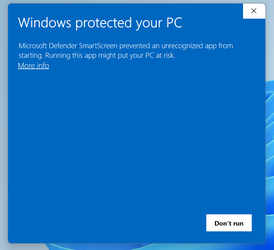
@flashh4 This is what happens when I run kprm
Is it okay to run anyway?
 

Attachments

  • Screenshot 2023-10-04 171125.png
    Screenshot 2023-10-04 171125.png
    28.3 KB · Views: 3
Last edited:

My Computer My Computer

At a glance

Windows 11
OS
Windows 11
@hoardtrot ..... just hold off on running the kprm until i read the new Farbar, that way you don't have to run it twice !!
Thanks for the new Farbar reports !!
 

My Computer My Computer

At a glance

Windows11 23H2 (OS Build 22631.2428)2.90 gigahertz Intel Core i7-1070016214 Megabytes Usable Installed Memor
OS
Windows11 23H2 (OS Build 22631.2428)
Computer type
PC/Desktop
Manufacturer/Model
HP HP ENVY TE01
CPU
2.90 gigahertz Intel Core i7-10700
Motherboard
Board: HP 8767 A (SMVB)
Memory
16214 Megabytes Usable Installed Memor
Hard Drives
1511.52 Gigabytes Usable Hard Drive Capacity
1418.15 Gigabytes Hard Drive Free Space
Keyboard
Logitech wireless
Mouse
M 185 wireless
Internet Speed
12 ms Jitter 8 ms Download 10.5 Mbps Upload 1.7
Browser
Edge & FF
Antivirus
Windows Defender
@hoardtrot ........ thanks for the new reports, they made a difference ! Now for the fix !!!

Highlight the entire content of the quote box below.
Start::
SystemRestore: On
CreateRestorePoint:
CloseProcesses:

FirewallRules: [{BA8019A0-088A-45A6-A0BA-9D5FBC9F44E8}] => (Allow) C:\Program Files\WindowsApps\MicrosoftTeams_23195.1511.2279.823_x64__8wekyb3d8bbwe\msteams.exe => No File
FirewallRules: [{8BEB52FA-CC2C-42B8-8A59-C3A2958BB3D6}] => (Allow) C:\Program Files\WindowsApps\MicrosoftTeams_23195.1511.2279.823_x64__8wekyb3d8bbwe\msteams.exe => No File
HKU\S-1-5-21-4053498597-138046058-952635393-1002\...\RunOnce: [Delete Cached Standalone Update Binary] => C:\Windows\system32\cmd.exe /q /c del /q "C:\Users\hjstr\AppData\Local\Microsoft\OneDrive\StandaloneUpdater\OneDriveSetup.exe" (No File)
HKU\S-1-5-21-4053498597-138046058-952635393-1002\...\RunOnce: [Uninstall 23.189.0910.0001] => C:\Windows\system32\cmd.exe /q /c rmdir /s /q "C:\Users\hjstr\AppData\Local\Microsoft\OneDrive\23.189.0910.0001" [0 2023-10-04] () <==== ATTENTION [zero byte File/Folder]
Task: {05d149e8-f9f6-475b-bb05-f7733c69ff3f} - no filepath. <==== ATTENTION
Task: {097aff6d-342d-45b7-8bb2-24c7b923a244} - no filepath. <==== ATTENTION
Task: {0a157d80-4367-4cbb-869f-cd3bbdd1175e} - no filepath. <==== ATTENTION
Task: {3c5883c9-b4e0-4ce0-b481-1f2acd193590} - no filepath. <==== ATTENTION
Task: {48a04660-9183-4965-ab9a-f6e7729a6c1f} - no filepath. <==== ATTENTION
Task: {5d6208e5-dd52-45c4-851f-58dbcacdaba3} - no filepath. <==== ATTENTION
Task: {781b133b-f37e-447d-9adb-31c3eda639bb} - no filepath. <==== ATTENTION
Task: {7dd0c80b-bebc-43a0-8b89-e14e023a15bf} - no filepath. <==== ATTENTION
Task: {942c5b12-03be-48a1-aa6d-6f5a2b8a03cf} - no filepath. <==== ATTENTION
Task: {9ef8d6fe-f5ce-434c-9b5f-e56eea988f9f} - no filepath. <==== ATTENTION
Task: {a29baad4-0060-4d5d-9f15-f89cb3471d18} - no filepath. <==== ATTENTION
Task: {a2d2ad33-5a77-413b-a430-2f29553da25c} - no filepath. <==== ATTENTION
Task: {a600b1d0-a751-45bd-85e3-f7acfff83043} - no filepath. <==== ATTENTION
Task: {a654142f-0c25-4621-94d2-c9c74e471622} - no filepath. <==== ATTENTION
Task: {ab7b5c27-871a-4bb6-8d35-40790cd9202c} - no filepath. <==== ATTENTION
Task: {abc5115e-968b-4cc3-a43a-55662eb8323e} - no filepath. <==== ATTENTION
Task: {af02305e-1434-4d06-a6de-99143d3a0959} - no filepath. <==== ATTENTION
Task: {affb5547-b386-4a43-b903-a40669bdf078} - no filepath. <==== ATTENTION
Task: {b1c08b83-0967-4180-a517-9ab82c6debb0} - no filepath. <==== ATTENTION
Task: {b6a56dcf-f4b1-4b54-80df-98f0a7528248} - no filepath. <==== ATTENTION
Task: {bf7eee64-1951-4064-a6bd-20b86ca9df97} - no filepath. <==== ATTENTION
Task: {d16f37fc-0c5d-44d4-8c19-683fb23fce80} - no filepath. <==== ATTENTION
Task: {d19eb115-77f1-4d50-864a-784937178897} - no filepath. <==== ATTENTION
Task: {d3f914d1-4f83-4984-a01a-b359744a0419} - no filepath. <==== ATTENTION
Task: {e9e909ae-d2a2-4a70-acad-2616448a037d} - no filepath. <==== ATTENTION
Task: {E0F10DCF-44AD-40E8-9370-FB5DA59F93FB} - System32\Tasks\Microsoft\Windows\UpdateOrchestrator\USO_UxBroker => %systemroot%\system32\MusNotification.exe (No File)
S2 Alienware SupportAssist Remediation; "C:\Program Files\Dell\SARemediation\agent\DellSupportAssistRemedationService.exe" [X]
S2 DellClientManagementService; "C:\Program Files (x86)\Dell\UpdateService\ServiceShell.exe" [X]
S2 DellDigitalDelivery; "C:\Program Files (x86)\Dell Digital Delivery\DeliveryService.exe" [X]
S2 SupportAssistAgent; "c:\Program Files\Dell\SupportAssistAgent\bin\SupportAssistAgent.exe" [X]

cmd: ipconfig /flushdns
cmd: netsh advfirewall reset
cmd: netsh advfirewall set allprofiles state ON
cmd: sfc /scannow
cmd: DISM /Online /Cleanup-Image /RestoreHealth
Emptytemp:
End::

Right click on the highlighted text and select Copy.
Start FRST (FRST64) with Administrator privileges
Press the Fix button. FRST will process the lines copied above from the clipboard.
When finished, a log file (Fixlog.txt) will pop up and saved in the same location the tool was ran from.

Please copy and paste its contents in your next reply.

 

My Computer My Computer

At a glance

Windows11 23H2 (OS Build 22631.2428)2.90 gigahertz Intel Core i7-1070016214 Megabytes Usable Installed Memor
OS
Windows11 23H2 (OS Build 22631.2428)
Computer type
PC/Desktop
Manufacturer/Model
HP HP ENVY TE01
CPU
2.90 gigahertz Intel Core i7-10700
Motherboard
Board: HP 8767 A (SMVB)
Memory
16214 Megabytes Usable Installed Memor
Hard Drives
1511.52 Gigabytes Usable Hard Drive Capacity
1418.15 Gigabytes Hard Drive Free Space
Keyboard
Logitech wireless
Mouse
M 185 wireless
Internet Speed
12 ms Jitter 8 ms Download 10.5 Mbps Upload 1.7
Browser
Edge & FF
Antivirus
Windows Defender
I did get a MACHINE_CHECK_EXCEPTION.
 

My Computer My Computer

At a glance

Windows 11
OS
Windows 11

Latest Support Threads

Back
Top Bottom