Solved Massive Event ID 153 after using Windows Update recovery of Win 11


rzn6jw

Well-known member
Member
Local time
5:52 PM
Posts
272
OS
Win 11Pro v25H2 build 26200.7171
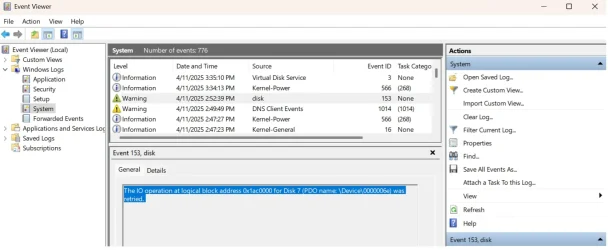
Was having issues with an update constantly running every day. Was advised to try using Windows Update recovery to see if that would resolve the problem. After 'successful' install, I was using the PC when it suddenly ground to a halt. It wasn't instantaneously but a 'stuttering' that increased quickly to lock-up. Rebooting, I was able to look at the System error log and noticed that one of my SSD drives had massive Event ID 153s which, I guess, means there's errors with the storage subsystem. My question: is this a hardware or software problem? I have never had this issue before and it started after the Update recovery install so I was wondering. Have attached a similar error from today that was against a USB flash drive. (Edit) - The drive in question was a Samsung 870 EVO 2Tb that was only in use 3 months).


1744401704641.webp
 
Last edited:

My Computer

System One

  • OS
    Win 11Pro v25H2 build 26200.7171
    Computer type
    PC/Desktop
    Manufacturer/Model
    DIY
    CPU
    AMD Ryzen 7 9800X3D
    Motherboard
    Gigabyte X670 Aorus Elite AX
    Memory
    64G DDR5 6000
    Graphics Card(s)
    ASUS RTX 4070 Ti Super OC
    Sound Card
    Soundblaster Z SE
    Monitor(s) Displays
    LG 24"
    Screen Resolution
    3480 x 2160
    Hard Drives
    C: drive SOLIDIGM P44 PRO 2TB SSD
    D: drive SOLIDIGM P44 PRO 2TB SSD
    H: drive Samsung 970 EVO Plus 2TB SSD

    PSU
    Corsair RM850X
    Case
    GameMax
    Cooling
    NZXT Kraken Elite 360 RGB 2024
    Keyboard
    Corsair
    Mouse
    Razor
    Internet Speed
    Gigabyte
    Browser
    Firefox
    Antivirus
    Norton 360
Try from the command prompt running the chkdsk /f /r command.

/f switch fixes errors on the disk
/r locates bad sectors and recovers readable information.
 

My Computers

System One System Two

  • OS
    Windows 11 Pro 25H2
    Computer type
    PC/Desktop
    Manufacturer/Model
    Homebuilt
    CPU
    Intel Core i9 13900K
    Motherboard
    Asus ProArt Z790 Creator WiFi - Bios 3107
    Memory
    Corsair Dominator Platinum 64gb 5600MT/s DDR5 Dual Channel
    Graphics Card(s)
    Sapphire NITRO+ AMD Radeon RX 7900 XTX Vapor-X 24GB
    Sound Card
    External DAC: Cambridge Audio DACMagic200M - Headphone Amp: Topping L50
    Monitor(s) Displays
    Panasonic MX950 Mini LED 55" TV 120hz
    Screen Resolution
    3840 x 2160 120hz
    Hard Drives
    Samsung 980 Pro 2TB (OS)
    Samsung 980 Pro 1TB (Files)
    Lexar NZ790 4TB
    LaCie d2 Professional 6TB external - USB 3.1
    Seagate Expansion 16TB external - USB 3.2
    Seagate One Touch 18TB external HD - USB 3.0
    PSU
    Corsair RM1200x Shift
    Case
    Corsair RGB Smart Case 5000x (white)
    Cooling
    Corsair iCue H150i Elite Capellix XT
    Keyboard
    Incase Ergonomic USB (Microsoft clone)
    Mouse
    Logitech MX Master 3S
    Internet Speed
    Fibre 900/500 Mbps
    Browser
    Microsoft Edge Chromium
    Antivirus
    Bitdefender Total Security
    Other Info
    AMD Radeon Software & Drivers 26.1.1
    Hasleo Backup Suite
    Dashlane password manager
    Kensington Verimark fingerprint reader
    Logitech Brio 4K webcam
    Orico 10-port powered USB 3.0 hub
  • Operating System
    Windows 11 Pro 25H2
    Computer type
    Laptop
    Manufacturer/Model
    Asus Vivobook X1605VA
    CPU
    Intel® Core™ i9-13900H
    Motherboard
    Asus X1605VA bios 309
    Memory
    32GB DDR4-3200 Dual channel
    Graphics card(s)
    *Intel Iris Xᵉ Graphics G7
    Sound Card
    Realtek | Intel SST Bluetooth & USB
    Monitor(s) Displays
    16.0-inch, WUXGA 16:10 aspect ratio, IPS-level Panel
    Screen Resolution
    1920 x 1200 60hz
    Hard Drives
    512GB M.2 NVMe™ PCIe® 3.0 SSD
    Mouse
    Logitech MX Ergo Trackball
    Antivirus
    Bitdefender Total Security
    Other Info
    720p Webcam
    WiFi & USB to ethernet

My Computers

System One System Two

  • OS
    Win 10 Pro / Win 11 Pro & Home, Linux Mint
    Computer type
    PC/Desktop
    Manufacturer/Model
    Custom builds
    CPU
    AMD Ryzen 7 5700X / A10-7860K
    Motherboard
    MSI PRO B550-VC / ASRock A88M-G/3.1
    Memory
    32GB / 16GB
    Graphics Card(s)
    AMD RX 6650 XT / RX 580
    Monitor(s) Displays
    Samsung 27" / LG 24"
    Screen Resolution
    1920x1080
    Hard Drives
    Toshiba 2 TB
    Toshiba 1 TB
    Toshiba 1 TB
    WD Black SN770 1TB

    PNY 1 TB
    PNY 500 GB
    WD Black SN770 200 GB
    Inland 500 GB
    Inland 256 GB
    Case
    NZXT / Lian LI
    Keyboard
    ROCCAT PYRO / Logitech 148
    Mouse
    Logitech
    Browser
    Firefox, Opera, Waterfox, Tor
  • Operating System
    Windows 11 Home
    Computer type
    Laptop
    Manufacturer/Model
    HP 17
    CPU
    Intel i5
    Memory
    16GB
    Screen Resolution
    1920 x 1080
    Hard Drives
    512 GB
    Browser
    Firefox
Clear Disk Info results (Samsung SSD 870 EVO is the problem disk):

1744410461584.webp
 

My Computer

System One

  • OS
    Win 11Pro v25H2 build 26200.7171
    Computer type
    PC/Desktop
    Manufacturer/Model
    DIY
    CPU
    AMD Ryzen 7 9800X3D
    Motherboard
    Gigabyte X670 Aorus Elite AX
    Memory
    64G DDR5 6000
    Graphics Card(s)
    ASUS RTX 4070 Ti Super OC
    Sound Card
    Soundblaster Z SE
    Monitor(s) Displays
    LG 24"
    Screen Resolution
    3480 x 2160
    Hard Drives
    C: drive SOLIDIGM P44 PRO 2TB SSD
    D: drive SOLIDIGM P44 PRO 2TB SSD
    H: drive Samsung 970 EVO Plus 2TB SSD
    PSU
    Corsair RM850X
    Case
    GameMax
    Cooling
    NZXT Kraken Elite 360 RGB 2024
    Keyboard
    Corsair
    Mouse
    Razor
    Internet Speed
    Gigabyte
    Browser
    Firefox
    Antivirus
    Norton 360
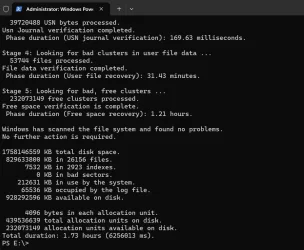
Here is the CHKDSK report on the drive in question:

1744422976308.webp
 

My Computer

System One

  • OS
    Win 11Pro v25H2 build 26200.7171
    Computer type
    PC/Desktop
    Manufacturer/Model
    DIY
    CPU
    AMD Ryzen 7 9800X3D
    Motherboard
    Gigabyte X670 Aorus Elite AX
    Memory
    64G DDR5 6000
    Graphics Card(s)
    ASUS RTX 4070 Ti Super OC
    Sound Card
    Soundblaster Z SE
    Monitor(s) Displays
    LG 24"
    Screen Resolution
    3480 x 2160
    Hard Drives
    C: drive SOLIDIGM P44 PRO 2TB SSD
    D: drive SOLIDIGM P44 PRO 2TB SSD
    H: drive Samsung 970 EVO Plus 2TB SSD
    PSU
    Corsair RM850X
    Case
    GameMax
    Cooling
    NZXT Kraken Elite 360 RGB 2024
    Keyboard
    Corsair
    Mouse
    Razor
    Internet Speed
    Gigabyte
    Browser
    Firefox
    Antivirus
    Norton 360
I'm beginning to think there was a corrupted storage driver in the Windows Update Recovery OS download because I haven't had any problems after I reinstalled Windows 11 from an ISO and plugged the SSD back in. I'm going to close this.
 

My Computer

System One

  • OS
    Win 11Pro v25H2 build 26200.7171
    Computer type
    PC/Desktop
    Manufacturer/Model
    DIY
    CPU
    AMD Ryzen 7 9800X3D
    Motherboard
    Gigabyte X670 Aorus Elite AX
    Memory
    64G DDR5 6000
    Graphics Card(s)
    ASUS RTX 4070 Ti Super OC
    Sound Card
    Soundblaster Z SE
    Monitor(s) Displays
    LG 24"
    Screen Resolution
    3480 x 2160
    Hard Drives
    C: drive SOLIDIGM P44 PRO 2TB SSD
    D: drive SOLIDIGM P44 PRO 2TB SSD
    H: drive Samsung 970 EVO Plus 2TB SSD
    PSU
    Corsair RM850X
    Case
    GameMax
    Cooling
    NZXT Kraken Elite 360 RGB 2024
    Keyboard
    Corsair
    Mouse
    Razor
    Internet Speed
    Gigabyte
    Browser
    Firefox
    Antivirus
    Norton 360

Latest Support Threads

Back
Top Bottom