Solved Mic not working


asuswin11guy

Member
Local time
2:17 AM
Posts
17
OS
windows11
Hello

Windows 11 Home
24H2
OS Build 26100.6899

Recently when using Google meet my team members told me they could not hear me. It worked fine before.
So I tried some troubleshooting . But none of these below helped.
1. In Device manager , Sound Video Game Controllers I updated the the Realtek Audio and it says device is up to date.
2. In the same Realtek Audio I was adviced to remove it and reboot the pc and after reboot it installed back the same Realtek Audio 6.0.1.8639 dated 2/19/2019
3. in System , Troubleshoot, other troubleshooters, Audio and I click run "there was a problem reaching the app"
4. updated to the latest win11 as above

Could some please advice any next steps ? its a Asus TUF Gaming FX705DT laptop. Its about 5 years old now. I'm not sure if its also a hardware issue ?

Thanks in advance
 

My Computer My Computer

At a glance

windows11TUF Gaming 705DT16GBGEForce
OS
windows11
Computer type
Laptop
Manufacturer/Model
Asus
CPU
TUF Gaming 705DT
Motherboard
AMD Ryzen7
Memory
16GB
Graphics Card(s)
GEForce
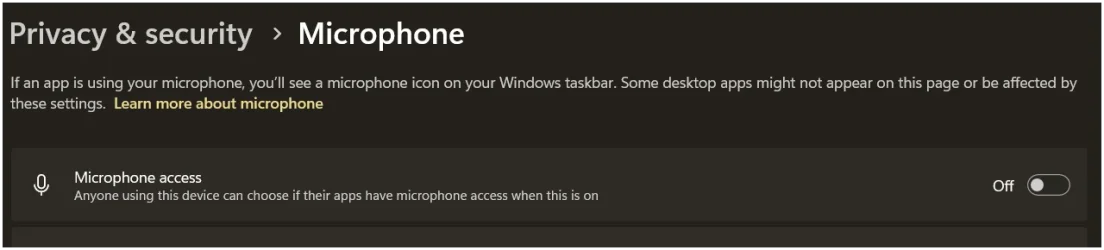
check: System>Privacy & Security> Microphone see if it's on?
 

Attachments

  • Screenshot 2025-10-21 170126.webp
    Screenshot 2025-10-21 170126.webp
    20 KB · Views: 2

My Computer My Computer

At a glance

Windows 11 25H2 (OS Build 26200.9168)Processor: 11th Gen Intel(R) Core(TM) i5-1135...12GBIntel R Iris R XE Graphics family
OS
Windows 11 25H2 (OS Build 26200.9168)
Computer type
Laptop
Manufacturer/Model
Dell
CPU
Processor: 11th Gen Intel(R) Core(TM) i5-1135G7 @ 2.40G
Motherboard
64-bit operating system Dell 0XMF7W
Memory
12GB
Graphics Card(s)
Intel R Iris R XE Graphics family
Sound Card
Cirrus Speakers High Definition Audio
Monitor(s) Displays
Generic PnP monitor
Screen Resolution
1920 x 1080
Hard Drives
NVMe 670p SSDPEKNU512GZ NVMe I NTEL 512GB
Case
cheap
Mouse
Logitech wireless mouse
Internet Speed
16 Mps download
Browser
Google Chrome
Antivirus
Security: Microsoft Defender & Malwarebytes Premium (with browser guard)
Other Info
Dell model: Inspiron 15 3511
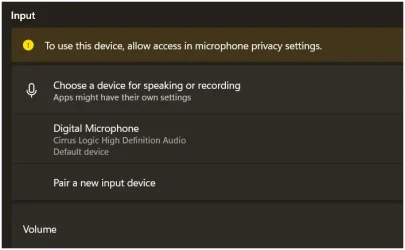
In Settings> System > Sound
 

Attachments

  • Screenshot 2025-10-21 170758.webp
    Screenshot 2025-10-21 170758.webp
    14.2 KB · Views: 1

My Computer My Computer

At a glance

Windows 11 25H2 (OS Build 26200.9168)Processor: 11th Gen Intel(R) Core(TM) i5-1135...12GBIntel R Iris R XE Graphics family
OS
Windows 11 25H2 (OS Build 26200.9168)
Computer type
Laptop
Manufacturer/Model
Dell
CPU
Processor: 11th Gen Intel(R) Core(TM) i5-1135G7 @ 2.40G
Motherboard
64-bit operating system Dell 0XMF7W
Memory
12GB
Graphics Card(s)
Intel R Iris R XE Graphics family
Sound Card
Cirrus Speakers High Definition Audio
Monitor(s) Displays
Generic PnP monitor
Screen Resolution
1920 x 1080
Hard Drives
NVMe 670p SSDPEKNU512GZ NVMe I NTEL 512GB
Case
cheap
Mouse
Logitech wireless mouse
Internet Speed
16 Mps download
Browser
Google Chrome
Antivirus
Security: Microsoft Defender & Malwarebytes Premium (with browser guard)
Other Info
Dell model: Inspiron 15 3511

My Computer My Computer

At a glance

Windows 11 25H2 (OS Build 26200.9168)Processor: 11th Gen Intel(R) Core(TM) i5-1135...12GBIntel R Iris R XE Graphics family
OS
Windows 11 25H2 (OS Build 26200.9168)
Computer type
Laptop
Manufacturer/Model
Dell
CPU
Processor: 11th Gen Intel(R) Core(TM) i5-1135G7 @ 2.40G
Motherboard
64-bit operating system Dell 0XMF7W
Memory
12GB
Graphics Card(s)
Intel R Iris R XE Graphics family
Sound Card
Cirrus Speakers High Definition Audio
Monitor(s) Displays
Generic PnP monitor
Screen Resolution
1920 x 1080
Hard Drives
NVMe 670p SSDPEKNU512GZ NVMe I NTEL 512GB
Case
cheap
Mouse
Logitech wireless mouse
Internet Speed
16 Mps download
Browser
Google Chrome
Antivirus
Security: Microsoft Defender & Malwarebytes Premium (with browser guard)
Other Info
Dell model: Inspiron 15 3511
thanks, and yes these were the first things I checked. and they were on. They worked before. now they are still on, and the mic does not work. ok. I will wait for more posts.
 

My Computer My Computer

At a glance

windows11TUF Gaming 705DT16GBGEForce
OS
windows11
Computer type
Laptop
Manufacturer/Model
Asus
CPU
TUF Gaming 705DT
Motherboard
AMD Ryzen7
Memory
16GB
Graphics Card(s)
GEForce
run
Code:
shell:::{F2DDFC82-8F12-4CDD-B7DC-D4FE1425AA4D}
go to Recording tab. does the mic show there (as enabled too)?
 

My Computer My Computer

At a glance

Windows 11 Pro
OS
Windows 11 Pro
reply to dacrone's post. This video might help: see your pm

"How To Fix Microphone Not Working on Asus Laptop": put this on the youtube search bar -
 
Last edited:

My Computer My Computer

At a glance

Windows 11 25H2 (OS Build 26200.9168)Processor: 11th Gen Intel(R) Core(TM) i5-1135...12GBIntel R Iris R XE Graphics family
OS
Windows 11 25H2 (OS Build 26200.9168)
Computer type
Laptop
Manufacturer/Model
Dell
CPU
Processor: 11th Gen Intel(R) Core(TM) i5-1135G7 @ 2.40G
Motherboard
64-bit operating system Dell 0XMF7W
Memory
12GB
Graphics Card(s)
Intel R Iris R XE Graphics family
Sound Card
Cirrus Speakers High Definition Audio
Monitor(s) Displays
Generic PnP monitor
Screen Resolution
1920 x 1080
Hard Drives
NVMe 670p SSDPEKNU512GZ NVMe I NTEL 512GB
Case
cheap
Mouse
Logitech wireless mouse
Internet Speed
16 Mps download
Browser
Google Chrome
Antivirus
Security: Microsoft Defender & Malwarebytes Premium (with browser guard)
Other Info
Dell model: Inspiron 15 3511
Could it be a hardware failure? Do you have spare sound cables, adapters or microphones?

In my life I've only used a microphone seriously during several months between 2021 and 2022, so I was seriously unexperienced in mics. I bought a web camera whose mic was defective and did not work. While needing the mic I was believing it was a web camera w/o mic (Google Meet was detecting it but I was thinking it was a cheaper camera with maybe the circuitry for it, chipset etc but not the actual microphone). Anyway I had also bought a headset and it always worked fine.

While "debugging" the sound part of this stage months afterwards, I realized the camera was meant to have mic and I got it repaired in warranty.

The "debug" was b/c upon upgrading to Windows 11 the mic stopped working. I was having problems at work (not related to any technological issue) and I wasn't needing it anymore. The W11 problem was a fixable sw problem related to hw and drivers, the maker published a fix, but my search for solutions was sloppy and I didn't get to fix it during the "stage". I got it months afterwards during this "debugging".

My "debugging" did also discover yet another hw failure: my TRRS to 2xTRS adapter had failed in the mic part. My conclusion was the feeding line had failed, b/c the mic was able to get sound at very low volume. I've even done a text about mics technology.
 

My Computer My Computer

At a glance

Windows 11Celeron J4125 (10th gen)8GB DDR4
OS
Windows 11
Manufacturer/Model
MeLE Quieter 2Q (fanless miniPC)
CPU
Celeron J4125 (10th gen)
Memory
8GB DDR4
Monitor(s) Displays
Samsung SyncMaster T260
Screen Resolution
1920x1200
Hard Drives
256GB eMMC (Windows)
2TB USB3 HDD Toshiba (Data)
Thanks I watched that youtube video and latest one and either checked or did all that and still nothing when I tested. Any other suggestions ?
 

My Computer My Computer

At a glance

windows11TUF Gaming 705DT16GBGEForce
OS
windows11
Computer type
Laptop
Manufacturer/Model
Asus
CPU
TUF Gaming 705DT
Motherboard
AMD Ryzen7
Memory
16GB
Graphics Card(s)
GEForce
i'm still hopeful there is a solution.....so far i checked everything i know and from this post, and nothing works yet. its from the system level when i test from system sound , there is nothing when i do a playback , and the volume bar doesn't move when i speak.... i'm guessing maybe its the drivers ? I never had mic issues before... and again it was working before until recently.
 

My Computer My Computer

At a glance

windows11TUF Gaming 705DT16GBGEForce
OS
windows11
Computer type
Laptop
Manufacturer/Model
Asus
CPU
TUF Gaming 705DT
Motherboard
AMD Ryzen7
Memory
16GB
Graphics Card(s)
GEForce
Thanks I watched that youtube video and latest one and either checked or did all that and still nothing when I tested. Any other suggestions ?
Win+R to run C:\Windows\SysWOW64\Speech\SpeechUX\sapi.cpl
go to Speech Recognition tab > does it detect your mic when you speak? (does the green bar move)
 

My Computer My Computer

At a glance

Windows 11 Pro
OS
Windows 11 Pro
Many thanks @dacrone that led to the solution in advanced button of the speech recognition tab and made the other selection. problem solved. Not sure why or how but happy it works now.
 

My Computer My Computer

At a glance

windows11TUF Gaming 705DT16GBGEForce
OS
windows11
Computer type
Laptop
Manufacturer/Model
Asus
CPU
TUF Gaming 705DT
Motherboard
AMD Ryzen7
Memory
16GB
Graphics Card(s)
GEForce

Latest Support Threads

Back
Top Bottom