Microphones sound distorted


robbarratt1

New member
Local time
9:14 AM
Posts
3
OS
Windows 11
Hi everyone,

I just got a new Alienware laptop with Windows 11 and just can't seem to get the microphones to work properly. I have a Blue Yeti microphone and a few other (less good) ones. Whenever I try recording anything with them or when I listen to the device, I get really distorted sound. I have tried all microphones with the same settings on my old laptop and they work with no issue. It almost sounds like something is filtering or downsampling the audio, and the mics actually sound pretty identical despite different qualities. I have however confirmed that the sound is coming from each mic and not from some default mic.

I have tried changing levels, reinstalling drivers, even reinstalling Windows 11. But no luck.

What else can I try to get this to work?
 
Windows Build/Version
Windows 11, Version 21H2 (OS Build 22000.593)

My Computer My Computer

At a glance

Windows 11
OS
Windows 11
Are all sound sources distorted?
 

My Computers My Computers

  • At a glance

    Windows 11 Pro 25H2Intel Core i7-10700K16GB (8GB PC4-19200 DDR4 SDRAM x2)NVIDIA GeForce GTX 1050 TI
    OS
    Windows 11 Pro 25H2
    Computer type
    PC/Desktop
    Manufacturer/Model
    PowerSpec B746
    CPU
    Intel Core i7-10700K
    Motherboard
    ASRock Z490 Phantom Gaming 4/ax
    Memory
    16GB (8GB PC4-19200 DDR4 SDRAM x2)
    Graphics Card(s)
    NVIDIA GeForce GTX 1050 TI
    Sound Card
    Realtek Audio
    Monitor(s) Displays
    #1. LG ULTRAWIDE 34" #2. AOC Q32G2WG3 32"
    Screen Resolution
    #1. 3440 X 1440 #2. 1920 x 1080
    Hard Drives
    NVMe WDC WDS100T2B0C-00PXH0 1TB
    Samsung SSD 860 EVO 1TB
    PSU
    750 Watts (62.5A)
    Case
    PowerSpec/Lian Li ATX 205
    Keyboard
    Logitech K270
    Mouse
    Logitech M185
    Browser
    Microsoft Edge and Firefox
    Antivirus
    Webroot SecureAnywhere CE 26.1
  • At a glance

    Windows 11 Canary ChannelIntel Core i5-8400 CPU @ 2.80GHz16 MB DDR 4-2666
    Operating System
    Windows 11 Canary Channel
    Computer type
    PC/Desktop
    Manufacturer/Model
    PowerSpec G156
    CPU
    Intel Core i5-8400 CPU @ 2.80GHz
    Motherboard
    AsusTeK Prime B360M-A
    Memory
    16 MB DDR 4-2666
    Monitor(s) Displays
    23" Speptre HDMI 75Hz
    Screen Resolution
    1920x1080
    Hard Drives
    Samsung 970 EVO 500GB NVMe
    Keyboard
    Logitek K270
    Mouse
    Logitek M185
    Browser
    Firefox, Edge and Edge Canary
    Antivirus
    Windows Defender
I had a thought... Is Mic Boost on in your audio settings?
 

My Computer My Computer

At a glance

Win 11 Pro 25H2Intel i7 13700KF32 GB Team Group DDR5 - 6000 CL 30ASUS TUF GAMING RTX 3070 Ti
OS
Win 11 Pro 25H2
Computer type
PC/Desktop
Manufacturer/Model
Self build
CPU
Intel i7 13700KF
Motherboard
Gigabyte Z790 UD AC
Memory
32 GB Team Group DDR5 - 6000 CL 30
Graphics Card(s)
ASUS TUF GAMING RTX 3070 Ti
Sound Card
On board Realtek
Monitor(s) Displays
ACER 34 inch
Screen Resolution
4K
Hard Drives
1 TB Samsung 980 Pro Nvme, 1 TB Samsung 970 EVO Nvme, 2 x Samsung 970 2TB SSD SATA
PSU
EVGA 1000Q
Case
Rosewill something or other
Cooling
Noctua NH-D15. A whole schwak of Noctua case fans. $$$
Keyboard
Logitech G815
Mouse
Logitech G502 Hero
Internet Speed
700 up, 600 down
Browser
Firefox
Antivirus
MalwareBytes
Hi Winuser and Catnip,

Thanks for the followup.Every mic I connect is distorted and sounds almost exactly the same. I did test them to make sure the audio was coming from them rather than an internal mic. I can also hear any internal audio (youtube, games etc.) with no issue.

I did consider mic boost could be an issue, but the option isn't even available under mic level.

Since posting this, someone on another forum told me to reinstall the drivers from dell website and it did fix the microphone. However, as soon as I restart or unplug the mic the audio goes bad again. I then have to reinstall the drivers, which takes two restarts and is definitely not ideal.
 

My Computer My Computer

At a glance

Windows 11
OS
Windows 11
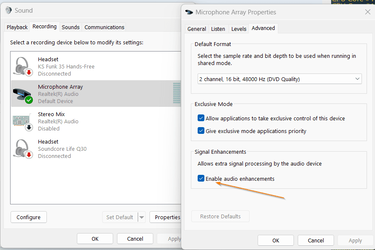
Shot in the dark here but have you tried disabling 'Enable audio enhancement'.

2022-04-04 08_46_17-Microphone Array Properties.png
 

My Computers My Computers

  • At a glance

    Win 11 ProAMD Ryzen™ 7 7730U24GB Dual-Channel DDR4 @ 1596MHz (22-22-22-52)512MB ATI AMD Radeon Graphics (ASUStek Comput...
    OS
    Win 11 Pro
    Computer type
    Laptop
    Manufacturer/Model
    ASUS Vivobook
    CPU
    AMD Ryzen™ 7 7730U
    Motherboard
    M1605YA
    Memory
    24GB Dual-Channel DDR4 @ 1596MHz (22-22-22-52)
    Graphics Card(s)
    512MB ATI AMD Radeon Graphics (ASUStek Computer Inc)
    Monitor(s) Displays
    Generic PnP Monitor (1920x1200@60Hz) - P1 PLUS (1920x1080@59Hz)
    Screen Resolution
    1920 X 1200
    Hard Drives
    953GB Western Digital WD
    PSU
    45 Watts
    Mouse
    Lenovo Bluetooth.
    Internet Speed
    500 Mbps
    Browser
    Edge
    Antivirus
    Defender
  • At a glance

    Windows 11AMD Ryzen 7 5800H / 3.2 GHz32 GB DDR4 SDRAM 3200 MHzNVIDIA GeForce RTX 3060 6 GB GDDR6 SDRAM
    Operating System
    Windows 11
    Computer type
    Laptop
    Manufacturer/Model
    ACER NITRO
    CPU
    AMD Ryzen 7 5800H / 3.2 GHz
    Motherboard
    CZ Scala_CAS (FP6)
    Memory
    32 GB DDR4 SDRAM 3200 MHz
    Graphics card(s)
    NVIDIA GeForce RTX 3060 6 GB GDDR6 SDRAM
    Sound Card
    Realtek Audio. NVIDIA High Definition Audio
    Monitor(s) Displays
    15.6" LED backlight 1920 x 1080 (Full HD) 144 Hz
    Screen Resolution
    1920 x 1080 (Full HD)
    Hard Drives
    Samsung 970 Evo Plus 2TB NVMe M.2
    PSU
    180 Watt, 19.5 V
    Mouse
    Lenovo Bluetooth
    Internet Speed
    500 Mbps
    Browser
    Edge
    Antivirus
    Defender
Hi Fabler,

Unfortunatly I have and nothing changed.
 

My Computer My Computer

At a glance

Windows 11
OS
Windows 11
Hi @robbarratt1,

have you solved your problem? I have the same. Since Windows 11, my Yeti X Mic sounds distored, like from cheap headphones. I had reinstall all drivers, GHub, changed the sound settings and so on. But nothing happened.

Could you help me?

Regards

kg_socialmedia
 

My Computer My Computer

At a glance

Windows 11
OS
Windows 11
hello, I have the same problem, my nitro 5 notebook which I have been using for a year has the same problem since the last windows 11 update, I reinstalled all the drivers and I still have the problem and if I connect the microphone to another device it works perfectly.
sorry for the wording I speak spanish and I used the translator.
 

My Computer My Computer

At a glance

windows 11
OS
windows 11
Back
Top Bottom