Microsoft Bing


Tasmania Green

Well-known member
Member
Local time
11:23 PM
Posts
560
OS
Windows 11 Pro - version 24H2
I was looking through Revo Uninstaller and noticed Microsoft Bing is on the list of things I could remove. But before I do anything, would there be any negative side effects if I uninstalled Bing? From what I understand, Windows uses Microsoft Edge, so I shouldn't uninstall that. But how about removing Bing?
 

My Computer My Computer

At a glance

Windows 11 Pro - version 24H2AMD Ryzen 5 7600X 6 Core AM5 5.3GHz CPUSilicon Power XPOWER Zenith 32GB (16GBx2) CL3...MSI GeForce RTX 4060 Ventus 2X Black 8G OC Gr...
OS
Windows 11 Pro - version 24H2
Computer type
PC/Desktop
CPU
AMD Ryzen 5 7600X 6 Core AM5 5.3GHz CPU
Motherboard
2024 MSI MAG B650 GAMING PLUS WIFI
Memory
Silicon Power XPOWER Zenith 32GB (16GBx2) CL30,1.35V UDIMM 6000MHz DDR5 RAM
Graphics Card(s)
MSI GeForce RTX 4060 Ventus 2X Black 8G OC Graphics Card
Monitor(s) Displays
Asus ROG Strix XG32WCS - 32in HDR VA 180Hz USB Type-C FreeSync Curved Gaming Monitor
Screen Resolution
2560 x 1440
Hard Drives
1) Silicon Power 1TB P34A60 Gen3x4 TLC R/W up to 2,200/1,600 MB/s PCIe M.2 NVMe SSD

2) Crucial 1TB E100 CT1000E100SSD8 Gen4 M.2 NVMe SSD
PSU
MSI 750W MAG A750GL 80+ Gold PCIe 5 ATX 3.0 Modular Power Supply
Case
SilverStone Fara R1 Pro V2 Tempered Glass ATX Case - Black
Cooling
Thermalright Peerless Assassin 120 SE ARGB Dual Loop CPU Cooler, 120mm Fan
Antivirus
Microsoft Defender
Remove Bing and Edge Chrome and use Brave and Duck Duck Go :cool:
 

My Computer My Computer

At a glance

Windows 10 19043.1149 x64
OS
Windows 10 19043.1149 x64
I was looking through Revo Uninstaller and noticed Microsoft Bing is on the list of things I could remove. But before I do anything, would there be any negative side effects if I uninstalled Bing? From what I understand, Windows uses Microsoft Edge, so I shouldn't uninstall that. But how about removing Bing?


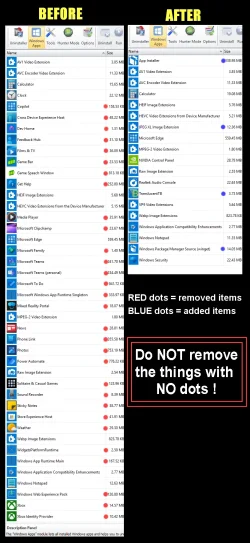
You can safely remove Bing.


00000 REVO Junk Removal.webp
 

My Computers My Computers

  • At a glance

    Win 11 Home ♦♦♦26300.9445 ♦♦♦♦♦♦♦26H2AMD Ryzen 7 3700XG.Skill (F4-3200C14D-16GTZKW)EVGA RTX 2070 (08G-P4-2171-KR)
    OS
    Win 11 Home ♦♦♦26300.9445 ♦♦♦♦♦♦♦26H2
    Computer type
    PC/Desktop
    Manufacturer/Model
    Built by Ghot® [May 2020]
    CPU
    AMD Ryzen 7 3700X
    Motherboard
    Asus Pro WS X570-ACE (BIOS 5302)
    Memory
    G.Skill (F4-3200C14D-16GTZKW)
    Graphics Card(s)
    EVGA RTX 2070 (08G-P4-2171-KR)
    Sound Card
    Realtek ALC1220P / ALC S1220A
    Monitor(s) Displays
    Dell U3011 30"
    Screen Resolution
    2560 x 1600
    Hard Drives
    2x Samsung 860 EVO 500GB,
    WD 4TB Black FZBX - SATA III,
    WD 8TB Black FZBX - SATA III,
    DRW-24B1ST CD/DVD Burner
    PSU
    PC Power & Cooling 750W Quad EPS12V
    Case
    Cooler Master ATCS 840 Tower
    Cooling
    CM Hyper 212 EVO (push/pull)
    Keyboard
    Ducky DK9008 Shine II Blue LED
    Mouse
    Logitech Optical M-100
    Internet Speed
    300/300
    Browser
    Firefox (latest)
    Antivirus
    Bitdefender Total Security
    Other Info
    Speakers: Klipsch Pro Media 2.1
  • At a glance

    Windows XP Pro 32bit w/SP3AMD Athlon 64 X2 5000+ (OC'd @ 3.2Ghz)TWIN2X2048-6400C4DHX (2 x 1GB, DDR2 800)EVGA 256-P2-N758-TR GeForce 8600GT SSC
    Operating System
    Windows XP Pro 32bit w/SP3
    Computer type
    PC/Desktop
    Manufacturer/Model
    Built by Ghot® (not in use)
    CPU
    AMD Athlon 64 X2 5000+ (OC'd @ 3.2Ghz)
    Motherboard
    ASUS M2N32-SLI Deluxe Wireless Edition
    Memory
    TWIN2X2048-6400C4DHX (2 x 1GB, DDR2 800)
    Graphics card(s)
    EVGA 256-P2-N758-TR GeForce 8600GT SSC
    Sound Card
    Onboard
    Monitor(s) Displays
    ViewSonic G90FB Black 19" Professional (CRT)
    Screen Resolution
    up to 2048 x 1536
    Hard Drives
    WD 36GB 10,000rpm Raptor SATA
    Seagate 80GB 7200rpm SATA
    Lite-On LTR-52246S CD/RW
    Lite-On LH-18A1P CD/DVD Burner
    PSU
    PC Power & Cooling Silencer 750 Quad EPS12V
    Case
    Generic Beige case, 80mm fans
    Cooling
    ZALMAN 9500A 92mm CPU Cooler
    Keyboard
    Logitech Classic Keybooard 200
    Mouse
    Logitech Optical M-BT96a
    Internet Speed
    300/300
    Browser
    Firefox 3.x ??
    Antivirus
    Symantec (Norton)
    Other Info
    Still assembled, still runs. Haven't turned it on for 15 years?
I would not uninstall either. Yes there can be adverse effects.

Something to help, please take the time to absorb the following:

You can set your own browser as a default but there are conditions...
When doing something like a taskbar search, any links in those results will open Edge and hijack your default browser. These are “Edge specific links” Basically any browser link tied to/within Windows OS, are Edge Specific Links and will open Edge.

“It's the MICROSOFT-EDGE protocol (not the HTTP or HTTPS protocol), which will totally ignore the user's default browser selection and open the link using Edge”

microsoft-edge:https://blah.balh.blah
Or
microsoft-edge://

Edge uninstalled:

IMG_4606.jpeg


So, what’s the solution? I can only give you the solution I use, Mike.


Stop Microsoft from hijacking your default browser preference and forcing you to use Edge (& Bing) with web search results in Taskbar Search, using Edge Redirect (Free) from GitHub

MSEdgeRedirect, will prevent Edge/Bing from hijacking the default browser and search preferences and other scenarios by redirecting requests from Edge/Windows due to Edge Specific Links and disabling their ability to hijack your chosen default Browser or Search preferences.

  • Download and install Edge Redirect from GitHub v0.8.0.0 (At the time of this post)
  • Agree & click Next
  • Select “Active Mode” (I would recommend)
  • Click “Next” It will require one time admin (UAC) rights.

Win-1798.webp


Win-1799.webp


Select your preferred link/browser preferences:
  • Change the following to “Google”
    • Bing Discover
    • Bing Search
    • MSN News
    • Bing Images
  • Change MSN weather to “weather.com” - If you want to
  • Leave the PDF viewer as default. - If you want to
  • Check “Redirect Windows Spotlight” - If you want to
  • Uncheck “Redirect Windows Store Apps - If you want to

If you don’t use CoPilot, you can also disable it at the bottom. However, CoPilot is now an app now and should be uninstallable via Windows or Revo.


Win-1800.webp


  • Click "Save"
 
Last edited:

My Computers My Computers

  • At a glance

    Windows 11 Pro 25H2 Build 26200.9168Intel(R) Core(TM) i7-4770K CPU @ 3.50GHz32.0 GB of I forget and the box is in storage.Gigabyte nVidia GeForce GTX 1660 Super OC 6GB
    OS
    Windows 11 Pro 25H2 Build 26200.9168
    Computer type
    PC/Desktop
    Manufacturer/Model
    Sin-built 2013
    CPU
    Intel(R) Core(TM) i7-4770K CPU @ 3.50GHz
    Motherboard
    ASUS ROG Maximus VI Formula
    Memory
    32.0 GB of I forget and the box is in storage.
    Graphics Card(s)
    Gigabyte nVidia GeForce GTX 1660 Super OC 6GB
    Sound Card
    ROG SupremeFX Formula 8-Channel High Definition Audio
    Monitor(s) Displays
    5 x LG 25MS500-B - 1 x 24MK430H-B - 1 x Wacom Pro 22" Touch Screen Tablet
    Screen Resolution
    All over the place
    Hard Drives
    Too many to list. OS on Samsung 1TB 870 QVO SATA
    PSU
    Silverstone 1500
    Case
    NZXT Phantom 820 Full-Tower Case
    Cooling
    Noctua NH-D15 Elite Class Dual Tower CPU Cooler / 6 x EziDIY 120mm / 2 x Corsair 140mm somethings / 1 x 140mm Thermaltake something / 2 x 200mm Corsair.
    Keyboard
    Corsair K95 / Logitech diNovo Edge Wireless
    Mouse
    Logitech: G402 / G502 / Mx Masters / Mx Air Cordless
    Internet Speed
    2000/500Mbps
    Browser
    All sorts
    Antivirus
    Kaspersky Premium
    Other Info
    ㅤㅤㅤㅤㅤㅤㅤㅤㅤㅤㅤㅤㅤㅤㅤㅤㅤㅤㅤㅤㅤㅤㅤㅤㅤㅤㅤㅤㅤㅤㅤㅤㅤㅤㅤㅤㅤㅤㅤㅤ⠀⠀⠀⠀⠀⠀⠀⠀⠀⠀
    TP-Link BE9300 WiFi 7 Bluetooth 5.4 (Archer TBE550E)
    TP-Link TX201 V1 2.5GB Lan

    Grandstream HT812 - VoIP
    ASUS DSL-AX82U - Mesh
    ASUS RT-AC68U - Mesh
    ASUS RT-BE88U Router

    Brother MFC-L2880DW Printer

    I’m on a horse.
  • At a glance

    Windows 11 Pro 25H2 Build 26200.9168 (Wifes)13th Generation Intel® Core™ i5-1340P Process...16GB LPDDR5-52001x Intel® Iris® Xe Graphics
    Operating System
    Windows 11 Pro 25H2 Build 26200.9168 (Wifes)
    Computer type
    Laptop
    Manufacturer/Model
    LENOVO Yoga 7 14IRL8 - Type 82YL
    CPU
    13th Generation Intel® Core™ i5-1340P Processor(Core™ i5-1340P)
    Memory
    16GB LPDDR5-5200
    Graphics card(s)
    1x Intel® Iris® Xe Graphics
    Sound Card
    Optimized with Dolby Atmos®
    Screen Resolution
    QHD 2880 x 1800 OLED
    Hard Drives
    M.2 512 GB SSD PCIe
    Mouse
    Logiteck MX Master 3S
    Internet Speed
    2000/500
    Antivirus
    Defender / Malwarebytes
    Other Info
    …still on a horse.


    Wireless Network: Wi-Fi 6E 2x2 AX; Bluetooth® 5.1 or above
    Ports: 1x 1 Novo button; 2 in 1 Audio Combo jack; Micro SD Card Reader; HDMI 1.4b; 2 x USB Type-C (TBT4)
    USB 3.2 Gen 2 DP 1.4a
    PD 3.0); 1 x USB 3.2 Gen1 Type A
    Camera
    1x 1080P FHD IR/RGB Hybrid with Privacy Shutter and Dual Array Microphone
    Graphics
    1x Intel® Iris® Xe Graphics
    Monitor
    14" WUXGA
    Form Factor
    Convertible Notebook
  • Windows 11 Pro 25H2 Build 26200.9168 (Wifes)

    Yoga 7 2-in-1 14IML9 - Type 83DJ

    Processor: Intel® Core™ Ultra 7 155H Processor(Core™ Ultra 7 155H)

    Memory: 32GB LPD5X-7467

    Hard Drive: 1 TB SSD PCIe

    Wireless Network: 1x Wi-Fi 6E 2x2 AX; Bluetooth® 5.1 or above

    Ports: 1 x HDMI 2.1 TMDS; 1 x Novo Button; 1 x Combo Audio Jack
    2 x USB-C (USB 4.0)
    1 x USB-A 3.2 Gen 1

    Camera: 1080P FHD IR Hybrid with Dual Microphone

    Graphics: Intel® Arc™ Graphics

    Monitor: 14" 2.8K

    ...Where's my horse?
While you may want to remove Bing, and Edge, maybe a different perspective could be presented, as there may be unforeseen complications to doing this!

While everyone seems to be trying to remove MS apps and other things from MS Windows 11 for whatever reasons, I finally decided to embrace MS a bit more. I have been using Google Chrome as my default browser for years. For years, it was a great simple browser that worked. They had a recent update, which alphabetized my entire bookmarks file, which is extensive, and moved everything around. Fortunately, a long time ago, I imported the Chrome bookmarks into Edge when I got my Win 11 Pro computer, and they were still in the proper order. I tried importing the bookmarks file back to Chrome to see if it would keep my formatting, but it stubbornly stays with alphabetization. So, I switched from Chrome to Edge as my default browser, and I am happier with it. I also still have Chrome on my computer, as well as Duck Duck Go. I have them all on my taskbar, and can use all of them, even at the same time. I also have a third-party anti-virus, and password manager for Chrome and Edge, which allows me to put in my password mgr. passcode in just once in each, even if I close the browser, as long as I haven't restarted or shut down the computer. Today's powerful computers with huge hard drives, lots of ram, and fast multi-core processors allow users to not have to make a svelte sparse beast out of their computers, but actually use them to do work, even if it seems to be messy. And, as far as "the powers that be" having all of our information, that boat sailed years ago with smart phones, apps, and the like. If someone wants to find out anything about you, and you have any internet footprint, they mostly can find out a lot.
 

My Computers My Computers

  • At a glance

    Windows 11 Pro Version 25H2 (OS Build 26200.9...i9 12th Generation64GBPNY 3060 12GB
    OS
    Windows 11 Pro Version 25H2 (OS Build 26200.9445)
    Computer type
    PC/Desktop
    Manufacturer/Model
    Dell 8950
    CPU
    i9 12th Generation
    Memory
    64GB
    Graphics Card(s)
    PNY 3060 12GB
    Monitor(s) Displays
    NEC EA27IU
    Screen Resolution
    3840X2160
    Hard Drives
    SSD internal, external drives
    Cooling
    Advanced Air Cooling
    Keyboard
    Microsoft
    Mouse
    Logitech
    Internet Speed
    High-Speed
    Browser
    MS Edge
    Antivirus
    Norton 360
  • At a glance

    Win 11 Pro 25H2 (OS Build 26200.9168)Intel Ultra 7 265 (20 cores) processor32GB DDR5 RamBuilt-in Intel UHD Graphics
    Operating System
    Win 11 Pro 25H2 (OS Build 26200.9168)
    Computer type
    PC/Desktop
    Manufacturer/Model
    Dell Tower ECT1250
    CPU
    Intel Ultra 7 265 (20 cores) processor
    Memory
    32GB DDR5 Ram
    Graphics card(s)
    Built-in Intel UHD Graphics
    Sound Card
    Built-in
    Screen Resolution
    1920X1080
    Hard Drives
    2TB internal SSD
    Case
    Tower
Windows does not need Edge to function properly.
Windows does need Edge to handle Edge protocols.
Some of those protocols you can change, some you can't.
 

My Computers My Computers

  • At a glance

    Windows 11 Pro
    OS
    Windows 11 Pro
    Computer type
    PC/Desktop
    Manufacturer/Model
    ASUS ROG Strix
  • At a glance

    Windows 11 Pro
    Operating System
    Windows 11 Pro
    Computer type
    Laptop
    Manufacturer/Model
    ASUS VivoBook
  • ASUS VivoBook 'Lite' ~ Windows 11 Home
I would not uninstall either. Yes there can be adverse effects.

Something to help, please take the time to absorb the following:

You can set your own browser as a default but there are conditions...
When doing something like a taskbar search, any links in those results will open Edge and hijack your default browser. These are “Edge specific links” Basically any browser link tied to/within Windows OS, are Edge Specific Links and will open Edge.

“It's the MICROSOFT-EDGE protocol (not the HTTP or HTTPS protocol), which will totally ignore the user's default browser selection and open the link using Edge”

microsoft-edge:https://blah.balh.blah
Or
microsoft-edge://

Edge uninstalled:

IMG_4606.jpeg


So, what’s the solution? I can only give you the solution I use, Mike.


Stop Microsoft from hijacking your default browser preference and forcing you to use Edge (& Bing) with web search results in Taskbar Search, using Edge Redirect (Free) from GitHub

MSEdgeRedirect, will prevent Edge/Bing from hijacking the default browser and search preferences and other scenarios by redirecting requests from Edge/Windows due to Edge Specific Links and disabling their ability to hijack your chosen default Browser or Search preferences.

  • Download and install Edge Redirect from GitHub v0.8.0.0 (At the time of this post)
  • Agree & click Next
  • Select “Active Mode” (I would recommend)
  • Click “Next” It will require one time admin (UAC) rights.

Win-1798.webp


Win-1799.webp


Select your preferred link/browser preferences:
  • Change the following to “Google”
    • Bing Discover
    • Bing Search
    • MSN News
    • Bing Images
  • Change MSN weather to “weather.com” - If you want to
  • Leave the PDF viewer as default. - If you want to
  • Check “Redirect Windows Spotlight” - If you want to
  • Uncheck “Redirect Windows Store Apps - If you want to

If you don’t use CoPilot, you can also disable it at the bottom. However, CoPilot is now an app now and should be uninstallable via Windows or Revo.


Win-1800.webp


  • Click "Save"

Nice. I like the way I can customise it. (y)
 

My Computer My Computer

At a glance

Windows 11 Pro - version 24H2AMD Ryzen 5 7600X 6 Core AM5 5.3GHz CPUSilicon Power XPOWER Zenith 32GB (16GBx2) CL3...MSI GeForce RTX 4060 Ventus 2X Black 8G OC Gr...
OS
Windows 11 Pro - version 24H2
Computer type
PC/Desktop
CPU
AMD Ryzen 5 7600X 6 Core AM5 5.3GHz CPU
Motherboard
2024 MSI MAG B650 GAMING PLUS WIFI
Memory
Silicon Power XPOWER Zenith 32GB (16GBx2) CL30,1.35V UDIMM 6000MHz DDR5 RAM
Graphics Card(s)
MSI GeForce RTX 4060 Ventus 2X Black 8G OC Graphics Card
Monitor(s) Displays
Asus ROG Strix XG32WCS - 32in HDR VA 180Hz USB Type-C FreeSync Curved Gaming Monitor
Screen Resolution
2560 x 1440
Hard Drives
1) Silicon Power 1TB P34A60 Gen3x4 TLC R/W up to 2,200/1,600 MB/s PCIe M.2 NVMe SSD

2) Crucial 1TB E100 CT1000E100SSD8 Gen4 M.2 NVMe SSD
PSU
MSI 750W MAG A750GL 80+ Gold PCIe 5 ATX 3.0 Modular Power Supply
Case
SilverStone Fara R1 Pro V2 Tempered Glass ATX Case - Black
Cooling
Thermalright Peerless Assassin 120 SE ARGB Dual Loop CPU Cooler, 120mm Fan
Antivirus
Microsoft Defender
Back
Top Bottom