Uninstall Microsoft Bing and Start Experience App through Microsoft Store


StickyBanana

New member
Local time
9:18 AM
Posts
20
OS
Windows 11
Hi,

I just clean installed my windows 11, checked the Installed app both of the microsoft bing and start experience app option to uninstall is greyed out, but when I checked through microsoft store both of them can be uninstalled, and I did uninstalled it, is there any downside to this?

Thanks!
 

My Computer

System One

  • OS
    Windows 11
    Computer type
    PC/Desktop
Re
Hi,

I just clean installed my windows 11, checked the Installed app both of the microsoft bing and start experience app option to uninstall is greyed out, but when I checked through microsoft store both of them can be uninstalled, and I did uninstalled it, is there any downside to this?

Thanks!
Not to the system, but when you use the Microsoft/Windows system to uninstall (as you've done, or the Powershell/CMD command line options) all you're doing is a superficial remove from sight of the app, the major components are still left behind on your device

RevoUninstaller (freeware version) will remove both these completely, and using the Advanced option in Revo (after the initial uninstall), will remove all leftover files, folders and registry entries

More details available if required
 

My Computers

System One System Two

  • OS
    Windows 11 2xH2 (latest update ... forever anal)
    Computer type
    PC/Desktop
    Manufacturer/Model
    HP Slim S01
    CPU
    Intel i5-12400
    Memory
    8GB
    Graphics Card(s)
    NVIDIA GeForce GT730
    Sound Card
    OOBE
    Monitor(s) Displays
    Acer 32"
    Screen Resolution
    1920x1080
    Hard Drives
    512GB KIOXIA NVMe
    1TB SATA SSD
    PSU
    OOBE
    Case
    OOBE
    Cooling
    OOBE
    Keyboard
    BT
    Mouse
    BT
    Browser
    Brave FFox Chrome Opera
    Antivirus
    KIS
  • Operating System
    Windows 11 Pro 2xH2 (latest update ... 4ever anal)
    Computer type
    Laptop
    Manufacturer/Model
    HP Pavillion 15
    CPU
    i7-1165G7 @ 2.80GHz
    Graphics card(s)
    Intel Iris Xe Graphics
    Hard Drives
    Samsung NVMe 512GB
    + numerous/multiple SSD Type C USB enclosures
    Internet Speed
    NBN FTTN 50
    Browser
    Brave
    Antivirus
    KIS
Re

Not to the system, but when you use the Microsoft/Windows system to uninstall (as you've done, or the Powershell/CMD command line options) all you're doing is a superficial remove from sight of the app, the major components are still left behind on your device

RevoUninstaller (freeware version) will remove both these completely, and using the Advanced option in Revo (after the initial uninstall), will remove all leftover files, folders and registry entries

More details available if required
Ah I see, there are 3 apps that Im uncertain its safe to remove, its Microsoft Bing, Start Experience App, and Windows App Runtime, I have uninstalled all of them though, will these apps causing any error or anything? or is it safe to uninstall these apps?
 

My Computer

System One

  • OS
    Windows 11
    Computer type
    PC/Desktop
its Microsoft Bing, Start Experience App, and Windows App Runtime
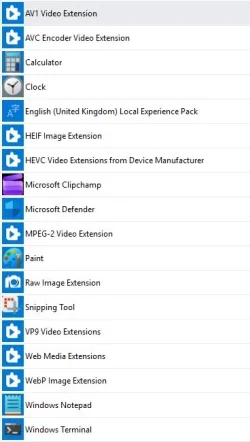
Classic examples of my target apps that I remove using Revo ... and anything/evrything else that conatains the word "Experience" (amongst many others)

This is all a leave ...

leftover apps.webp
 

My Computers

System One System Two

  • OS
    Windows 11 2xH2 (latest update ... forever anal)
    Computer type
    PC/Desktop
    Manufacturer/Model
    HP Slim S01
    CPU
    Intel i5-12400
    Memory
    8GB
    Graphics Card(s)
    NVIDIA GeForce GT730
    Sound Card
    OOBE
    Monitor(s) Displays
    Acer 32"
    Screen Resolution
    1920x1080
    Hard Drives
    512GB KIOXIA NVMe
    1TB SATA SSD
    PSU
    OOBE
    Case
    OOBE
    Cooling
    OOBE
    Keyboard
    BT
    Mouse
    BT
    Browser
    Brave FFox Chrome Opera
    Antivirus
    KIS
  • Operating System
    Windows 11 Pro 2xH2 (latest update ... 4ever anal)
    Computer type
    Laptop
    Manufacturer/Model
    HP Pavillion 15
    CPU
    i7-1165G7 @ 2.80GHz
    Graphics card(s)
    Intel Iris Xe Graphics
    Hard Drives
    Samsung NVMe 512GB
    + numerous/multiple SSD Type C USB enclosures
    Internet Speed
    NBN FTTN 50
    Browser
    Brave
    Antivirus
    KIS
Back
Top Bottom