Microsoft Edge Completely Broken on Windows 11 – Need Urgent Help


LittleTale

Member
Local time
9:56 PM
Posts
5
OS
Windows 11
Hello everyone,


I’m experiencing a major issue with Microsoft Edge on Windows 11, and nothing I’ve tried so far has fixed it. Edge seems completely broken for me.


Here are the problems I’m facing:


  • The new tab page takes about 3 seconds to load.
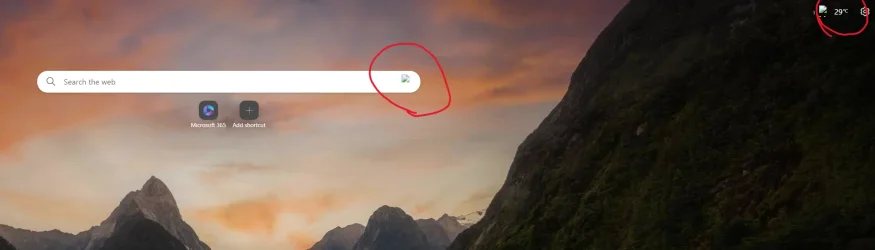
  • Icons on the new tab page are unclickable, and many appear as broken images.
  • The built-in VPN refuses to turn on — it just doesn’t work.
  • The translation feature is completely broken, always showing “Unable to translate page” errors.
  • I cannot install any extensions. Every time I try, I get the error: “An error has occurred. Download interrupted.”
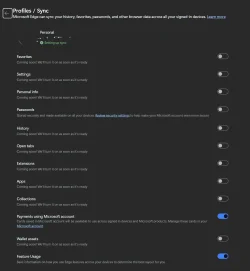
  • Syncing doesn’t work at all. Favorites, passwords, and account data do not sync, even though I’m logged into my Microsoft account. Instead, it just says: “This feature is coming soon. We’ll keep you in touch.”

What I’ve tried:


  • Uninstalled and reinstalled Microsoft Edge.
  • Completely removed Edge from my system and reinstalled it fresh (deleted all Program file X86 edge related).
  • Used the “Repair” option for Edge in "app".
  • Reset edge from the browser option.
  • Repaired Windows 11 through the Windows Update repair tool (which reinstalled Win11 creating a Windows.old folder).

Unfortunately, none of these steps have helped. The issues remain exactly the same.


Has anyone else run into this? Is there any way to fully reset or properly fix Edge? I’d greatly appreciate any guidance or solutions.


Thank you in advance!
 
Windows Build/Version
24H2
Last edited:

My Computer My Computer

At a glance

Windows 119800X3D32GB DDR5 6000M/TRTX4090
OS
Windows 11
Computer type
PC/Desktop
Manufacturer/Model
Custom
CPU
9800X3D
Motherboard
Asus Prime X870E
Memory
32GB DDR5 6000M/T
Graphics Card(s)
RTX4090
Monitor(s) Displays
Msi MEG OLED ULTRAWIDE 34"
Screen Resolution
3440x1440
Hard Drives
1TB Samsung NVMe Gen5
2TB Netac NVMe Gen4x4
4TB Teamgroup Sata SDD
8TB Seagate 7200RPM Firecuda
PSU
XPG 1000W Platinum
Case
COSMOS C700M
Cooling
SilverStone Technology IceMyst 420
Keyboard
Logitech G19S
Mouse
Razer Basilisk V3 Pro
Internet Speed
1.5 Gigas
Browser
Microsoft Edge
Antivirus
Microsoft Defender
  • Uninstalled and reinstalled Microsoft Edge.
  • Completely removed Edge from my system and reinstalled it fresh.
  • Used the “Repair” option for Edge.
  • Repaired Windows 11 through the Windows Update repair tool.
I thing you are listing twice the same procedures but I don't know what installing 'fresh' means.
Your user data folder is probably corrupt.
After stopping Edge, Delete:

Code:
C:\Users\USERNAME\AppData\Local\Microsoft\Edge\User Data
Then restart Edge & let it sync.
 

My Computers My Computers

  • At a glance

    All Branches but ReleaseAMD Ryzen 7 7735HS 3200-4500 Mhz 8 cores x 232 GB DDR5Radeon Graphic / NVIDIA GeForce RTX 4060 8 GB...
    OS
    All Branches but Release
    Computer type
    Laptop
    Manufacturer/Model
    Acer Nitro ANV15-51
    CPU
    AMD Ryzen 7 7735HS 3200-4500 Mhz 8 cores x 2
    Motherboard
    Sportage_RBH
    Memory
    32 GB DDR5
    Graphics Card(s)
    Radeon Graphic / NVIDIA GeForce RTX 4060 8 GB GDDR6
    Sound Card
    AMD/Realtek(R) Audio
    Monitor(s) Displays
    Integrated Monitor (15.3"vis)
    Screen Resolution
    FHD 1920X1080 16:9 144Hz
    Hard Drives
    KINGSTON OM8SEP4512Q-AA 1TB
    Western Digital 256GB
    PSU
    19V DC 6.32 A 120 W
    Cooling
    Dual Fans
    Mouse
    MS Bluetooth
    Internet Speed
    Fiber 1GB Cox -us & 1GB Orange-fr
    Browser
    Edge Canary- Firefox Nightly-Chrome Dev-Chrome Dev
    Antivirus
    Windows Defender
  • At a glance

    Windows 11 BetaAMD A9-94208 GB of DDR4AMD Radeon R5
    Operating System
    Windows 11 Beta
    Computer type
    Laptop
    Manufacturer/Model
    Asus X751BP
    CPU
    AMD A9-9420
    Memory
    8 GB of DDR4
    Graphics card(s)
    AMD Radeon R5
    Screen Resolution
    1600x900
    Hard Drives
    Seagate 1 TB
I see you wrote "repair edge", do you mean "reset edge". If not try this.

To reset Microsoft Edge, open the browser and navigate to Settings > Reset settings > Restore settings to their default values, then click Reset.
This will reset your browser to its original state, clearing browsing data and disabling extensions.
 

My Computers My Computers

  • At a glance

    Windows 11 Pro 25H2 26200.8894Intel® Core™ Ultra 7 265 1.8GHz to 5.3GHz (Ar...SK Hynix 32GB DDR5 5600 Desktop RAM UDIMM Non...Dell NVIDIA® GeForce RTX™ 4060 8GB GDDR6 & (i...
    OS
    Windows 11 Pro 25H2 26200.8894
    Computer type
    PC/Desktop
    Manufacturer/Model
    Dell Tower Plus EBT2250, DOB: 06/15/2025
    CPU
    Intel® Core™ Ultra 7 265 1.8GHz to 5.3GHz (Arrow Lake)
    Motherboard
    Dell Inc. 02D3NT A00 (U3E1)
    Memory
    SK Hynix 32GB DDR5 5600 Desktop RAM UDIMM Non-ECC PC5-5600B
    Graphics Card(s)
    Dell NVIDIA® GeForce RTX™ 4060 8GB GDDR6 & (iGPU) Integrated Intel® UHD Graphics
    Sound Card
    Chipset Realtek High-Definition Audio with Dolby Atmos
    Monitor(s) Displays
    Dell Ultra Sharp U2515H 25-Inch Screen LED-Lit
    Screen Resolution
    2560 X 1440
    Hard Drives
    Samsung (NVMe PM9C1a 1024GB) M.2 PCIe NVMe Solid State Drive (OS), with Samsung Piccolo (S4LY022) 6-Core 4 Channel Controller.

    Samsung T7 500GB SSD, USB-C External Drive
    PSU
    Dell 460W
    Case
    Dell Tower Plus EBT 2250
    Cooling
    Fan
    Keyboard
    Dell Wired Keyboard - KB216
    Mouse
    Logitech M510
    Internet Speed
    Intel Killer E3100G 2.5 Gigabit Ethernet Controller
    Browser
    Microsoft Edge
    Antivirus
    Microsoft Windows Security
    Other Info
    The Samsung NVMe PM9C1a 1024GB SSD does not use a Phison NAND controller. Instead, it uses Samsung's in-house developed Piccolo (S4LY022) 6-Core 4 Channel Controller. The PM9C1a utilizes a controller built using Samsung's 5-nanometer process and seventh-generation V-NAND technology. 🤔
  • At a glance

    Windows 11 Pro 25H2 26200.889410th Generation Intel Core i7-10510U Processo...16GB DDR4 RAMNVIDIA® GeForce® MX250 with 2GB GDDR5 graphic...
    Operating System
    Windows 11 Pro 25H2 26200.8894
    Computer type
    Laptop
    Manufacturer/Model
    Dell Inspiron 15 7000 (7591) 2-in-1, DOB: 11/30/2019
    CPU
    10th Generation Intel Core i7-10510U Processor (8MB Cache, up to 4.9 GHz) Comet Lake
    Motherboard
    Dell 0NNW5N
    Memory
    16GB DDR4 RAM
    Graphics card(s)
    NVIDIA® GeForce® MX250 with 2GB GDDR5 graphics memory
    Sound Card
    Chipset Realtek ALC3254 🤔
    Monitor(s) Displays
    Dell 15.6-inch UHD Truelife Touch Narrow Border WVA Display with Active Pen support
    Screen Resolution
    3840 x 2160
    Hard Drives
    Intel NVME 512GB SSD with 32GB Intel Optane Memory, M.2 80mm PCIe 3.0 RAID

    SanDisk 256GB Extreme microSDXC UHS-I Memory Card
    PSU
    Dell 4-Cell Battery, 68 Whr (Integrated), 90 Watt AC Adapter
    Case
    Dell Inspiron 15 7000 2-in-1 (7591)
    Cooling
    Standard Dell Case Fan & Havit HV-F2056 USB Powered (3 Fans) Laptop Cooling Pad.
    Keyboard
    Dell
    Mouse
    Logitech Wireless Mouse M650L
    Internet Speed
    Wireless/Wired connectivity (WiFi 6 - 802.11 ax)
    Browser
    Microsoft Edge
    Antivirus
    Microsoft Windows Security
    Other Info
    From Dell: 512GB NVME Solid State Drive accelerated by 32GB Intel Optane Memory are the fastest as compared to NAND SSDs. Intel Optane H10 with SSD offers speedy storage and accelerates opening your programs.
  • Uninstalled and reinstalled Microsoft Edge.
  • Completely removed Edge from my system and reinstalled it fresh.
  • Used the “Repair” option for Edge.
  • Repaired Windows 11 through the Windows Update repair tool.
I thing you are listing twice the same procedures but I don't know what installing 'fresh' means.
Your user data folder is probably corrupt.
After stopping Edge, Delete:

Code:
C:\Users\USERNAME\AppData\Local\Microsoft\Edge\User Data
Then restart Edge & let it sync.
I'd go as far as uninstalling Edege and deleting the whole users edge folder and reinstall, just to sure any other data is corrupt.

If that doesnt work, the only thing left is a corrupt registry.
 

My Computer My Computer

At a glance

Win117800X3D32gb G.Skill4070 Ti Super
OS
Win11
Computer type
PC/Desktop
Manufacturer/Model
Mine 1.5
CPU
7800X3D
Motherboard
ASUS B650 Tuf with wifi.
Memory
32gb G.Skill
Graphics Card(s)
4070 Ti Super
Monitor(s) Displays
1x Nixeus NX_EDG27, 2x Dell S2440L (16:9)
Screen Resolution
1440p
Hard Drives
C:\NVME (500GB), D:\Seagate (2TB), E:\ & F:\ SSD 990EVO (1TB)
PSU
Corsair HX1000i
Case
Phanteks Enthoo Primo w/10 140mm SP Fans
Cooling
Artic TF2 420
Keyboard
Corsair 1000
Mouse
Steel Series Prime Wireless
Internet Speed
20 MB/s
Browser
Firefox 64
Antivirus
not telling!
Other Info
https://i.imgur.com/aoz3vWY.jpg?2
  • Uninstalled and reinstalled Microsoft Edge.
  • Completely removed Edge from my system and reinstalled it fresh.
  • Used the “Repair” option for Edge.
  • Repaired Windows 11 through the Windows Update repair tool.
I thing you are listing twice the same procedures but I don't know what installing 'fresh' means.
Your user data folder is probably corrupt.
After stopping Edge, Delete:

Code:
C:\Users\USERNAME\AppData\Local\Microsoft\Edge\User Data
Then restart Edge & let it sync.

I'd go as far as uninstalling Edege and deleting the whole users edge folder and reinstall, just to sure any other data is corrupt.

If that doesnt work, the only thing left is a corrupt registry.
Hello again,


Thank you for the suggestion about deleting the Local AppData\Microsoft\Edge folder. I went ahead and tried it, along with all the other recommendations provided (including reinstalling Edge).


Unfortunately, the exact same problems are still happening — nothing has improved.


What’s strange is that this issue has happened on both of my desktop computers that are on the same network. It started on one, and then within a few weeks the exact same problems appeared on the other as well.


The only third-party program I’ve been using on both systems is O&O ShutUp10. I’ve had it installed since I first set up Windows 11 (over 3 months ago and 1 years for the other). I used it to disable some Windows 11 options like telemetry and data sharing with Microsoft.


At this point, I really don’t know what else to try. Do you have any other ideas or steps I could follow?


Thanks in advance for your help.
 

My Computer My Computer

At a glance

Windows 119800X3D32GB DDR5 6000M/TRTX4090
OS
Windows 11
Computer type
PC/Desktop
Manufacturer/Model
Custom
CPU
9800X3D
Motherboard
Asus Prime X870E
Memory
32GB DDR5 6000M/T
Graphics Card(s)
RTX4090
Monitor(s) Displays
Msi MEG OLED ULTRAWIDE 34"
Screen Resolution
3440x1440
Hard Drives
1TB Samsung NVMe Gen5
2TB Netac NVMe Gen4x4
4TB Teamgroup Sata SDD
8TB Seagate 7200RPM Firecuda
PSU
XPG 1000W Platinum
Case
COSMOS C700M
Cooling
SilverStone Technology IceMyst 420
Keyboard
Logitech G19S
Mouse
Razer Basilisk V3 Pro
Internet Speed
1.5 Gigas
Browser
Microsoft Edge
Antivirus
Microsoft Defender

Errors compilations
 

Attachments

  • Screenshot 2025-08-21 152200.webp
    Screenshot 2025-08-21 152200.webp
    28 KB · Views: 2
  • Screenshot 2025-08-21 152231.webp
    Screenshot 2025-08-21 152231.webp
    64.9 KB · Views: 2
  • Screenshot 2025-08-21 152338.webp
    Screenshot 2025-08-21 152338.webp
    60 KB · Views: 2
  • Screenshot 2025-08-21 152420.webp
    Screenshot 2025-08-21 152420.webp
    6 KB · Views: 2
  • Screenshot 2025-08-21 152944.webp
    Screenshot 2025-08-21 152944.webp
    10.9 KB · Views: 2

My Computer My Computer

At a glance

Windows 119800X3D32GB DDR5 6000M/TRTX4090
OS
Windows 11
Computer type
PC/Desktop
Manufacturer/Model
Custom
CPU
9800X3D
Motherboard
Asus Prime X870E
Memory
32GB DDR5 6000M/T
Graphics Card(s)
RTX4090
Monitor(s) Displays
Msi MEG OLED ULTRAWIDE 34"
Screen Resolution
3440x1440
Hard Drives
1TB Samsung NVMe Gen5
2TB Netac NVMe Gen4x4
4TB Teamgroup Sata SDD
8TB Seagate 7200RPM Firecuda
PSU
XPG 1000W Platinum
Case
COSMOS C700M
Cooling
SilverStone Technology IceMyst 420
Keyboard
Logitech G19S
Mouse
Razer Basilisk V3 Pro
Internet Speed
1.5 Gigas
Browser
Microsoft Edge
Antivirus
Microsoft Defender
According to your first screeshot, have you tried running Edge without any extension, especially uBlock Origin?

Chromium-based browsers, including Edge, no longer support or will not support uBlock Origin. At the moment, only Firefox will support it. That is why you get the error shown in the first screenshot when installing the extension. And if you already had it installed, that is why some elements of the website are not loading, you cannot click on some of them, or the new tab takes so long to load.
 

My Computer My Computer

At a glance

Win 11 Pro 23H213700K32GB DDR5 Kingston Fury Renegade @6400MSI GeForce RTX 4070 Ti Gaming X Slim White 12G
OS
Win 11 Pro 23H2
Computer type
PC/Desktop
CPU
13700K
Motherboard
MAG Z790 TOMAHAWK WIFI (7D91vHH - 0x12F)
Memory
32GB DDR5 Kingston Fury Renegade @6400
Graphics Card(s)
MSI GeForce RTX 4070 Ti Gaming X Slim White 12G
Sound Card
Creative Sound Blaster Z SE
Monitor(s) Displays
ASUS VA24DQ
Hard Drives
WD Black SN850X 2TB (main)
SAMSUNG SSD 990 Pro 2TB
WD Blue 1TB 7200rpm
PSU
Corsair RM1000x SHIFT
Case
DeepCool CH560 WH
Cooling
Noctua NH-D15S
Keyboard
Ducky One 3 Pro Nazca Line
Mouse
Logitech G403 HERO

My Computers My Computers

  • At a glance

    Windows 11 Pro 25H2Intel Core i9 13900KCorsair Dominator Platinum 64gb 5600MT/s DDR5...Sapphire NITRO+ AMD Radeon RX 7900 XTX Vapor-...
    OS
    Windows 11 Pro 25H2
    Computer type
    PC/Desktop
    Manufacturer/Model
    Homebuilt
    CPU
    Intel Core i9 13900K
    Motherboard
    Asus ProArt Z790 Creator WiFi - Bios 3107
    Memory
    Corsair Dominator Platinum 64gb 5600MT/s DDR5 Dual Channel
    Graphics Card(s)
    Sapphire NITRO+ AMD Radeon RX 7900 XTX Vapor-X 24GB
    Sound Card
    External DAC: Cambridge Audio DACMagic200M - Headphone Amp: Topping L50
    Monitor(s) Displays
    Panasonic MX950 Mini LED 55" TV 120hz
    Screen Resolution
    3840 x 2160 120hz
    Hard Drives
    Samsung 980 Pro 2TB (OS)
    Samsung 980 Pro 1TB (Files)
    Lexar NZ790 4TB
    LaCie d2 Professional 6TB external - USB 3.1
    Seagate Expansion 16TB external - USB 3.2
    Seagate One Touch 18TB external HD - USB 3.0
    PSU
    Corsair RM1200x Shift
    Case
    Corsair RGB Smart Case 5000x (white)
    Cooling
    Corsair iCue H150i Elite Capellix XT
    Keyboard
    Incase Ergonomic USB (Microsoft clone)
    Mouse
    Logitech MX Master 3S
    Internet Speed
    Fibre 900/500 Mbps
    Browser
    Microsoft Edge Chromium
    Antivirus
    Bitdefender Total Security
    Other Info
    AMD Radeon Software & Drivers 26.1.1
    Hasleo Backup Suite
    Dashlane password manager
    Kensington Verimark fingerprint reader
    Logitech Brio 4K webcam
    Orico 10-port powered USB 3.0 hub
  • At a glance

    Windows 11 Pro 25H2Intel® Core™ i9-13900H32GB DDR4-3200 Dual channel*Intel Iris Xᵉ Graphics G7
    Operating System
    Windows 11 Pro 25H2
    Computer type
    Laptop
    Manufacturer/Model
    Asus Vivobook X1605VA
    CPU
    Intel® Core™ i9-13900H
    Motherboard
    Asus X1605VA bios 309
    Memory
    32GB DDR4-3200 Dual channel
    Graphics card(s)
    *Intel Iris Xᵉ Graphics G7
    Sound Card
    Realtek | Intel SST Bluetooth & USB
    Monitor(s) Displays
    16.0-inch, WUXGA 16:10 aspect ratio, IPS-level Panel
    Screen Resolution
    1920 x 1200 60hz
    Hard Drives
    512GB M.2 NVMe™ PCIe® 3.0 SSD
    Mouse
    Logitech MX Ergo Trackball
    Antivirus
    Bitdefender Total Security
    Other Info
    720p Webcam
    WiFi & USB to ethernet
According to your first screeshot, have you tried running Edge without any extension, especially uBlock Origin?

Chromium-based browsers, including Edge, no longer support or will not support uBlock Origin. At the moment, only Firefox will support it. That is why you get the error shown in the first screenshot when installing the extension. And if you already had it installed, that is why some elements of the website are not loading, you cannot click on some of them, or the new tab takes so long to load.
That was just an exemple of an app that won't download... I don't have any because it's a fresh install and nothing will sync !


@LittleTale

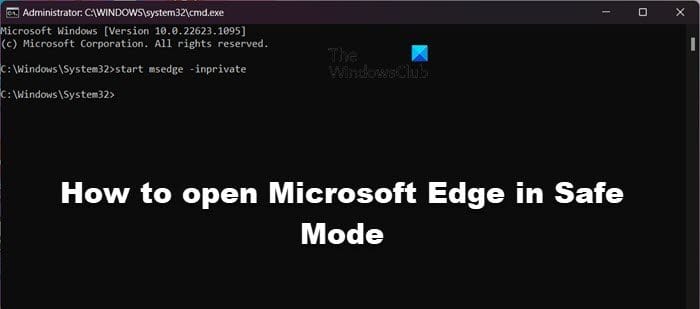
Have you tried running Edge in safe mode?


Tried it too... no change... translator won't work, neither vpn, and cannot add extensions
 

My Computer My Computer

At a glance

Windows 119800X3D32GB DDR5 6000M/TRTX4090
OS
Windows 11
Computer type
PC/Desktop
Manufacturer/Model
Custom
CPU
9800X3D
Motherboard
Asus Prime X870E
Memory
32GB DDR5 6000M/T
Graphics Card(s)
RTX4090
Monitor(s) Displays
Msi MEG OLED ULTRAWIDE 34"
Screen Resolution
3440x1440
Hard Drives
1TB Samsung NVMe Gen5
2TB Netac NVMe Gen4x4
4TB Teamgroup Sata SDD
8TB Seagate 7200RPM Firecuda
PSU
XPG 1000W Platinum
Case
COSMOS C700M
Cooling
SilverStone Technology IceMyst 420
Keyboard
Logitech G19S
Mouse
Razer Basilisk V3 Pro
Internet Speed
1.5 Gigas
Browser
Microsoft Edge
Antivirus
Microsoft Defender

The other option is to do a repair install.


My Computers My Computers

  • At a glance

    Windows 11 Pro 25H2Intel Core i9 13900KCorsair Dominator Platinum 64gb 5600MT/s DDR5...Sapphire NITRO+ AMD Radeon RX 7900 XTX Vapor-...
    OS
    Windows 11 Pro 25H2
    Computer type
    PC/Desktop
    Manufacturer/Model
    Homebuilt
    CPU
    Intel Core i9 13900K
    Motherboard
    Asus ProArt Z790 Creator WiFi - Bios 3107
    Memory
    Corsair Dominator Platinum 64gb 5600MT/s DDR5 Dual Channel
    Graphics Card(s)
    Sapphire NITRO+ AMD Radeon RX 7900 XTX Vapor-X 24GB
    Sound Card
    External DAC: Cambridge Audio DACMagic200M - Headphone Amp: Topping L50
    Monitor(s) Displays
    Panasonic MX950 Mini LED 55" TV 120hz
    Screen Resolution
    3840 x 2160 120hz
    Hard Drives
    Samsung 980 Pro 2TB (OS)
    Samsung 980 Pro 1TB (Files)
    Lexar NZ790 4TB
    LaCie d2 Professional 6TB external - USB 3.1
    Seagate Expansion 16TB external - USB 3.2
    Seagate One Touch 18TB external HD - USB 3.0
    PSU
    Corsair RM1200x Shift
    Case
    Corsair RGB Smart Case 5000x (white)
    Cooling
    Corsair iCue H150i Elite Capellix XT
    Keyboard
    Incase Ergonomic USB (Microsoft clone)
    Mouse
    Logitech MX Master 3S
    Internet Speed
    Fibre 900/500 Mbps
    Browser
    Microsoft Edge Chromium
    Antivirus
    Bitdefender Total Security
    Other Info
    AMD Radeon Software & Drivers 26.1.1
    Hasleo Backup Suite
    Dashlane password manager
    Kensington Verimark fingerprint reader
    Logitech Brio 4K webcam
    Orico 10-port powered USB 3.0 hub
  • At a glance

    Windows 11 Pro 25H2Intel® Core™ i9-13900H32GB DDR4-3200 Dual channel*Intel Iris Xᵉ Graphics G7
    Operating System
    Windows 11 Pro 25H2
    Computer type
    Laptop
    Manufacturer/Model
    Asus Vivobook X1605VA
    CPU
    Intel® Core™ i9-13900H
    Motherboard
    Asus X1605VA bios 309
    Memory
    32GB DDR4-3200 Dual channel
    Graphics card(s)
    *Intel Iris Xᵉ Graphics G7
    Sound Card
    Realtek | Intel SST Bluetooth & USB
    Monitor(s) Displays
    16.0-inch, WUXGA 16:10 aspect ratio, IPS-level Panel
    Screen Resolution
    1920 x 1200 60hz
    Hard Drives
    512GB M.2 NVMe™ PCIe® 3.0 SSD
    Mouse
    Logitech MX Ergo Trackball
    Antivirus
    Bitdefender Total Security
    Other Info
    720p Webcam
    WiFi & USB to ethernet
I would recover from my last working backup
 

My Computer My Computer

At a glance

Windows 11 ProCore i7-13700K64 GB Kingston Fury Beast DDR5Gigabyte GeForce RTX 2060 Super Gaming OC 8G
OS
Windows 11 Pro
Computer type
PC/Desktop
Manufacturer/Model
Self build
CPU
Core i7-13700K
Motherboard
Asus TUF Gaming Plus WiFi Z790
Memory
64 GB Kingston Fury Beast DDR5
Graphics Card(s)
Gigabyte GeForce RTX 2060 Super Gaming OC 8G
Sound Card
Realtek S1200A
Monitor(s) Displays
Viewsonic VP2770 & Dell (secondary)
Screen Resolution
2560 x 1440
Hard Drives
Kingston KC3000 2TB NVME SSD & SATA HDDs & SSD
PSU
EVGA SuperNova G2 850W
Case
Nanoxia Deep Silence 1
Cooling
Noctua NH-D14
Keyboard
Microsoft Digital Media Pro
Mouse
Logitech Wireless
Internet Speed
80 Mb / s
Browser
Chrome
Antivirus
Defender, Malwarebytes Free & AdwCleaner
The other option is to do a repair install.

I did that and it changed nothing. . . Sadly still had the edge problem after the whole windows reinstallation.

I would recover from my last working backup

I tried doing that, restoring from a backup from almost 1 month ago... did not end well, got an error after like 2H of "restoring from backup" then when my computer started I had no explorer anymore ... just a grey screen with a mouse pointer.
Had to go back using windows safe mode and restore from the auto backup before the restoration...
weird is that SFC/scannow says that my windows is fine and working correctly !


Someone mention to me that it could be a firewall problem not leting microsoft services connect... Is it possible ?
 

My Computer My Computer

At a glance

Windows 119800X3D32GB DDR5 6000M/TRTX4090
OS
Windows 11
Computer type
PC/Desktop
Manufacturer/Model
Custom
CPU
9800X3D
Motherboard
Asus Prime X870E
Memory
32GB DDR5 6000M/T
Graphics Card(s)
RTX4090
Monitor(s) Displays
Msi MEG OLED ULTRAWIDE 34"
Screen Resolution
3440x1440
Hard Drives
1TB Samsung NVMe Gen5
2TB Netac NVMe Gen4x4
4TB Teamgroup Sata SDD
8TB Seagate 7200RPM Firecuda
PSU
XPG 1000W Platinum
Case
COSMOS C700M
Cooling
SilverStone Technology IceMyst 420
Keyboard
Logitech G19S
Mouse
Razer Basilisk V3 Pro
Internet Speed
1.5 Gigas
Browser
Microsoft Edge
Antivirus
Microsoft Defender

Someone mention to me that it could be a firewall problem not leting microsoft services connect... Is it possible ?
Microsoft services connection is used throughout all windows apps. Not likely the problem, I recall an app that would show whats connected and whats being block, i think it was something from Essentials and win10 tho.
 

My Computer My Computer

At a glance

Win117800X3D32gb G.Skill4070 Ti Super
OS
Win11
Computer type
PC/Desktop
Manufacturer/Model
Mine 1.5
CPU
7800X3D
Motherboard
ASUS B650 Tuf with wifi.
Memory
32gb G.Skill
Graphics Card(s)
4070 Ti Super
Monitor(s) Displays
1x Nixeus NX_EDG27, 2x Dell S2440L (16:9)
Screen Resolution
1440p
Hard Drives
C:\NVME (500GB), D:\Seagate (2TB), E:\ & F:\ SSD 990EVO (1TB)
PSU
Corsair HX1000i
Case
Phanteks Enthoo Primo w/10 140mm SP Fans
Cooling
Artic TF2 420
Keyboard
Corsair 1000
Mouse
Steel Series Prime Wireless
Internet Speed
20 MB/s
Browser
Firefox 64
Antivirus
not telling!
Other Info
https://i.imgur.com/aoz3vWY.jpg?2
In general, if a repair upgrade fails, something is so fubared, the only realistic option is to do a full clean install from scratch.

If you decide to do this, make sure you have backed up critical data, passwords/install codes and I also recommend backing up drivers.

PS stop using apps like Shutup 10.
 

My Computer My Computer

At a glance

Windows 11 Pro + Win11 Canary VM.I9 13th gen i9-13900H 2.60 GHZ16 GB solderedIntegrated Intel Iris XE
OS
Windows 11 Pro + Win11 Canary VM.
Computer type
Laptop
Manufacturer/Model
ASUS Zenbook 14
CPU
I9 13th gen i9-13900H 2.60 GHZ
Motherboard
Yep, Laptop has one.
Memory
16 GB soldered
Graphics Card(s)
Integrated Intel Iris XE
Sound Card
Realtek built in
Monitor(s) Displays
laptop OLED screen
Screen Resolution
2880x1800 touchscreen
Hard Drives
1 TB NVME SSD (only weakness is only one slot)
PSU
Internal + 65W thunderbolt USB4 charger
Case
Yep, got one
Cooling
Stella Artois (UK pint cans - 568 ml) - extra cost.
Keyboard
Built in UK keybd
Mouse
Bluetooth , wireless dongled, wired
Internet Speed
900 mbs (ethernet), wifi 6 typical 350-450 mb/s both up and down
Browser
Edge
Antivirus
Defender
Other Info
TPM 2.0, 2xUSB4 thunderbolt, 1xUsb3 (usb a), 1xUsb-c, hdmi out, 3.5 mm audio out/in combo, ASUS backlit trackpad (inc. switchable number pad)

Macrium Reflect Home V8
Office 365 Family (6 users each 1TB onedrive space)
Hyper-V (a vm runs almost as fast as my older laptop)
Hi, welcome to the forum.

Are you able to create a new user profile and test Edge behaviors there? If it works fine, the issue is likely profile-specific.

Add a local User Account to Windows 11:


Make it an Administrators Account if you like:


And/Or switch it to a Microsoft Account if you like:


You can remove it when you’re done checking:


OR If it turns out your current profile is broken or has been corrupted, you’ll have to start a thread or ask in here, how to move your stuff to the new user profile to replace your old profile. (IF you don’t feel like doing a fresh install)
 
Last edited:

My Computers My Computers

  • At a glance

    Windows 11 Pro 25H2 Build 26200.8894Intel(R) Core(TM) i7-4770K CPU @ 3.50GHz32.0 GB of I forget and the box is in storage.Gigabyte nVidia GeForce GTX 1660 Super OC 6GB
    OS
    Windows 11 Pro 25H2 Build 26200.8894
    Computer type
    PC/Desktop
    Manufacturer/Model
    Sin-built 2013
    CPU
    Intel(R) Core(TM) i7-4770K CPU @ 3.50GHz
    Motherboard
    ASUS ROG Maximus VI Formula
    Memory
    32.0 GB of I forget and the box is in storage.
    Graphics Card(s)
    Gigabyte nVidia GeForce GTX 1660 Super OC 6GB
    Sound Card
    ROG SupremeFX Formula 8-Channel High Definition Audio
    Monitor(s) Displays
    5 x LG 25MS500-B - 1 x 24MK430H-B - 1 x Wacom Pro 22" Touch Screen Tablet
    Screen Resolution
    All over the place
    Hard Drives
    Too many to list. OS on Samsung 1TB 870 QVO SATA
    PSU
    Silverstone 1500
    Case
    NZXT Phantom 820 Full-Tower Case
    Cooling
    Noctua NH-D15 Elite Class Dual Tower CPU Cooler / 6 x EziDIY 120mm / 2 x Corsair 140mm somethings / 1 x 140mm Thermaltake something / 2 x 200mm Corsair.
    Keyboard
    Corsair K95 / Logitech diNovo Edge Wireless
    Mouse
    Logitech: G402 / G502 / Mx Masters / Mx Air Cordless
    Internet Speed
    2000/500Mbps
    Browser
    All sorts
    Antivirus
    Kaspersky Premium
    Other Info
    ㅤㅤㅤㅤㅤㅤㅤㅤㅤㅤㅤㅤㅤㅤㅤㅤㅤㅤㅤㅤㅤㅤㅤㅤㅤㅤㅤㅤㅤㅤㅤㅤㅤㅤㅤㅤㅤㅤㅤㅤ⠀⠀⠀⠀⠀⠀⠀⠀⠀⠀
    TP-Link BE9300 WiFi 7 Bluetooth 5.4 (Archer TBE550E)
    TP-Link TX201 V1 2.5GB Lan

    Grandstream HT812 - VoIP
    ASUS DSL-AX82U - Mesh
    ASUS RT-AC68U - Mesh
    ASUS RT-BE88U Router

    Brother MFC-L2880DW Printer

    I’m on a horse.
  • At a glance

    Windows 11 Pro 25H2 Build 26200.8894 (Wifes)13th Generation Intel® Core™ i5-1340P Process...16GB LPDDR5-52001x Intel® Iris® Xe Graphics
    Operating System
    Windows 11 Pro 25H2 Build 26200.8894 (Wifes)
    Computer type
    Laptop
    Manufacturer/Model
    LENOVO Yoga 7 14IRL8 - Type 82YL
    CPU
    13th Generation Intel® Core™ i5-1340P Processor(Core™ i5-1340P)
    Memory
    16GB LPDDR5-5200
    Graphics card(s)
    1x Intel® Iris® Xe Graphics
    Sound Card
    Optimized with Dolby Atmos®
    Screen Resolution
    QHD 2880 x 1800 OLED
    Hard Drives
    M.2 512 GB SSD PCIe
    Mouse
    Logiteck MX Master 3S
    Internet Speed
    2000/500
    Antivirus
    Defender / Malwarebytes

    Other Info
    …still on a horse.


    Wireless Network: Wi-Fi 6E 2x2 AX; Bluetooth® 5.1 or above
    Ports: 1x 1 Novo button; 2 in 1 Audio Combo jack; Micro SD Card Reader; HDMI 1.4b; 2 x USB Type-C (TBT4)
    USB 3.2 Gen 2 DP 1.4a
    PD 3.0); 1 x USB 3.2 Gen1 Type A
    Camera
    1x 1080P FHD IR/RGB Hybrid with Privacy Shutter and Dual Array Microphone
    Graphics
    1x Intel® Iris® Xe Graphics
    Monitor
    14" WUXGA
    Form Factor
    Convertible Notebook
  • Windows 11 Pro 25H2 Build 26200.8894 (Wifes)

    Yoga 7 2-in-1 14IML9 - Type 83DJ

    Processor: Intel® Core™ Ultra 7 155H Processor(Core™ Ultra 7 155H)

    Memory: 32GB LPD5X-7467

    Hard Drive: 1 TB SSD PCIe

    Wireless Network: 1x Wi-Fi 6E 2x2 AX; Bluetooth® 5.1 or above

    Ports: 1 x HDMI 2.1 TMDS; 1 x Novo Button; 1 x Combo Audio Jack
    2 x USB-C (USB 4.0)
    1 x USB-A 3.2 Gen 1

    Camera: 1080P FHD IR Hybrid with Dual Microphone

    Graphics: Intel® Arc™ Graphics

    Monitor: 14" 2.8K

    ...Where's my horse?
Errors compilations
Did you use O&O ShutUp on a clean install and tested Edge after - or was Edge not working even on a fresh install?:unsure:

If you have issues with Edge on a clean install - the issue is elsewhere - probably a faulty driver. Try the latest Chipset drivers - released just recently (yesterday) - ROG STRIX X870E-E GAMING WIFI | ROG Strix | Gaming motherboards|ROG - Republic of Gamers|ROG Global

Also, use uBlock Origin Lite - uBlock Origin Lite - Microsoft Edge Addons - Chromium based browsers lost their support for uBlock Origin - due to changes in their infrastructure, or use Firefox.
 

My Computer My Computer

At a glance

WinDOS 25H2Intel & AMDSO-DIMM SK Hynix 15.8 GB Dual-Channel DDR4-26...nVidia RTX 2060 6GB Mobile GPU (TU106M)
OS
WinDOS 25H2
Computer type
Laptop
CPU
Intel & AMD
Memory
SO-DIMM SK Hynix 15.8 GB Dual-Channel DDR4-2666 (2 x 8 GB) 1329MHz (19-19-19-43)
Graphics Card(s)
nVidia RTX 2060 6GB Mobile GPU (TU106M)
Sound Card
Onbord Realtek ALC1220
Screen Resolution
1920 x 1080
Hard Drives
1x Samsung PM981 NVMe PCIe M.2 512GB / 1x Seagate Expansion ST1000LM035 1TB
Back
Top Bottom