Microsoft Introducing Windows Ready Print and Modernized Driver Selection on Windows 11


 Microsoft Partner News:

Introducing Windows Ready Print: a simpler, more reliable path to modern printing with modern driver selection controls.

Windows Ready Print: A clearer path to modern printing on Windows​

Printing on Windows is evolving.

As printing environments modernize, customers and partners are asking for solutions that are reliable, secure, and easy to manage across today’s devices. To reflect this shift and make the value of our platform clearer, we are evolving the Modern Print Platform under a new name: Windows Ready Print.

Windows Ready Print highlights what matters most: a streamlined, dependable printing experience built for modern Windows environments. It represents our commitment to simplifying printing, aligning modern standards, and delivering consistent, forward-looking experiences for users, IT admins, and partners.

Driving the transition to Windows Ready Print with driver selection controls​

At the core of Windows Ready Print is a transition away from legacy, third party drive-based workflows toward modern, standards-based printing with IPP (Internet Printing Protocol) using the Windows inbox IPP printer driver.

Starting in July 2026, new printer installations will default to Windows Ready Print where supported, enabling a simpler and more reliable setup experience. This change reduces the need for traditional driver management and lays the foundation for a more scalable and predictable print experience.

However, we recognize that not all environments can move to Windows Ready Print immediately. To ensure a smooth and flexible transition, we are introducing the ability for users to configure Windows to install their printers using Windows Ready Print (if supported) or the OEM printer driver during installation.

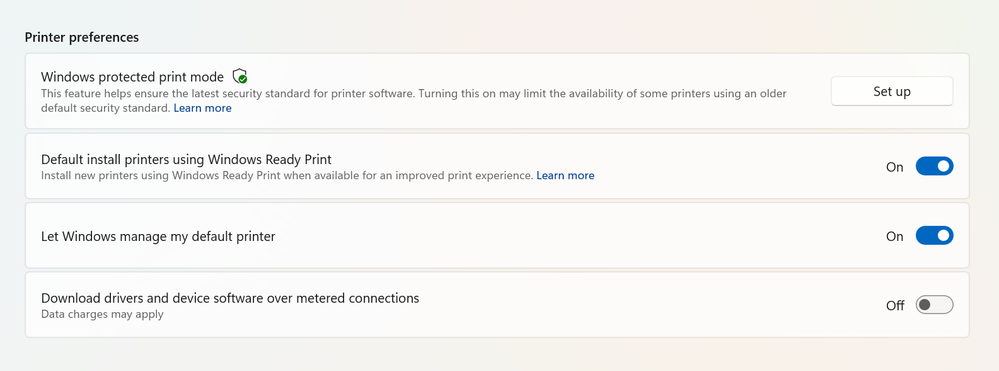
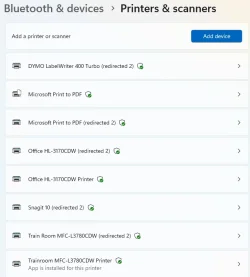
You can find this setting under Settings > Bluetooth & Devices > Printers & Scanners > Default install printer using Windows Ready Print.

“Default install printers using Windows Ready Print” enabled

Driver selection configuration in Settings

This feature enables users and IT admins to control how Windows selects drivers when installing printers:
  • When “Default install printers using Windows Ready Print” is enabled, Windows Ready Print installation is preferred
  • When “Default install printers using Windows Ready Print” is disabled, default driver selection is used
The configuration applies to new printer installations only, without affecting existing devices.

To enable/disable this feature via group policy, go to:
  1. Launch Group Policy Editor
  2. Navigate to Local Computer Policy -> Administrative Templates -> Printers
  3. Find and select 'Configure Windows Ready Print driver ranking' -> double click to open it
  4. Select 'Enabled' (if you wish to enable Windows Ready Print driver selection) or 'Disabled' (if you wish to explicitly disable Windows Ready Print driver selection).
  5. Select Apply
  6. Select OK

How driver selection configuration works with Windows protected print mode​

When you enable "Default install printers using Windows Ready Print”, new printer installations will default to Windows inbox IPP printer driver when supported.

When you enable Windows protected print mode, printers are exclusively installed with Windows Ready Print. Devices that do not support Windows Ready Print cannot be installed.

Note: When you’ve enabled Windows protected print mode, you cannot disable "Default install printers using Windows Ready Print".



 Source:

 
A universal printer driver. Third party vendor-specific printer drivers are being phased out.
 

My Computers My Computers

  • At a glance

    Windows 11 Education For 25H2Intel® Core i7 5500u8 GBIntel HD Family Graphics 5500 AMD Firepro 4150M
    OS
    Windows 11 Education For 25H2
    Computer type
    Laptop
    Manufacturer/Model
    HP ZBook G2
    CPU
    Intel® Core i7 5500u
    Motherboard
    HP
    Memory
    8 GB
    Graphics Card(s)
    Intel HD Family Graphics 5500 AMD Firepro 4150M
    Sound Card
    Realtek High Audio
    Hard Drives
    1 TB SSD
    Mouse
    HP USB Mouse
    Antivirus
    Windows Defender
  • At a glance

    Windows 11 Pro For Workstations 25H2Xeon 1535m v632 GBAMD Quadro Pro 4100
    Operating System
    Windows 11 Pro For Workstations 25H2
    Computer type
    Laptop
    Manufacturer/Model
    HP Zbook G4
    CPU
    Xeon 1535m v6
    Motherboard
    HP
    Memory
    32 GB
    Graphics card(s)
    AMD Quadro Pro 4100
    Sound Card
    Bang and Olufson Audio
    Hard Drives
    1TB SSD
    Mouse
    HP USB Mouse
    Antivirus
    Windows Defender
A universal printer driver. Third party vendor-specific printer drivers are being phased out.
And scanners in AIO printers?

Will printer manufacturers have to release firmware updates?

No middle ground, where a vendor can do "add-ons" to the universal printer driver?

I could be wrong, but I see a very large can, say an oil barrel, just full of squirmy worms
 

My Computer My Computer

At a glance

Windows 11 2H25AMD 9900X64 GBAMD 9070 XT
OS
Windows 11 2H25
Computer type
PC/Desktop
Manufacturer/Model
DIY
CPU
AMD 9900X
Motherboard
MSI X870E Carbon
Memory
64 GB
Graphics Card(s)
AMD 9070 XT
Sound Card
built-in
Monitor(s) Displays
Dell 24"
Hard Drives
Sabrent 1 TB NVMe, 4 x SSD (need to check models), 4 x 3.5" HDD, 8-16 TB, all WD
PSU
Seasonic 850
Case
Fractal Design North XL (which I likw)
Cooling
Corsair AIO for CPU, fans for case
Keyboard
Das Keyboard 4
Mouse
Corsair M65 (white)
Internet Speed
1 TB download
Browser
Firefox
Antivirus
Bitdefender
Other Info
Also have Lenovo T14S laptop (me) and Lenovo Slim 71 (wife)
Fine provided it doesn't screw up my Epson ET855o photo printer
 

My Computer My Computer

At a glance

Windows 11 ProCore i7-13700K64 GB Kingston Fury Beast DDR5Gigabyte GeForce RTX 2060 Super Gaming OC 8G
OS
Windows 11 Pro
Computer type
PC/Desktop
Manufacturer/Model
Self build
CPU
Core i7-13700K
Motherboard
Asus TUF Gaming Plus WiFi Z790
Memory
64 GB Kingston Fury Beast DDR5
Graphics Card(s)
Gigabyte GeForce RTX 2060 Super Gaming OC 8G
Sound Card
Realtek S1200A
Monitor(s) Displays
Viewsonic VP2770 & Dell (secondary)
Screen Resolution
2560 x 1440
Hard Drives
Kingston KC3000 2TB NVME SSD & SATA HDDs & SSD
PSU
EVGA SuperNova G2 850W
Case
Nanoxia Deep Silence 1
Cooling
Noctua NH-D14
Keyboard
Microsoft Digital Media Pro
Mouse
Logitech Wireless
Internet Speed
80 Mb / s
Browser
Chrome
Antivirus
Defender, Malwarebytes Free & AdwCleaner

My Computer My Computer

At a glance

Windows 11 Pro 25H212th Gen Core i7-1260P64 GB Micron PC4-25600Intel Iris Xe Graphics
OS
Windows 11 Pro 25H2
Computer type
PC/Desktop
Manufacturer/Model
Intel NUC12WSHi7
CPU
12th Gen Core i7-1260P
Motherboard
NUC12WSBi7
Memory
64 GB Micron PC4-25600
Graphics Card(s)
Intel Iris Xe Graphics
Sound Card
on-board Realtek HD Audio
Monitor(s) Displays
Dell U3219Q
Screen Resolution
3840 x 2160
Hard Drives
Samsung SSD 990 PRO 1TB
Crucial MX500 2 TB
Antivirus
Microsoft Defender
I'm still running my 2009 Canon MP990 with the Canon drivers. Both scanner and printer are fully functional IN 25H2.
 

My Computer My Computer

At a glance

Windows 11 25H2Broadwell-e 6850K 4.5ghz @1.36v32GB Corsair LPM 3600 C16EVGA RTX 3080Ti FTW
OS
Windows 11 25H2
Computer type
PC/Desktop
Manufacturer/Model
EVGA home brew
CPU
Broadwell-e 6850K 4.5ghz @1.36v
Motherboard
EVGA X99 FTW K
Memory
32GB Corsair LPM 3600 C16
Graphics Card(s)
EVGA RTX 3080Ti FTW
Sound Card
Asus Centurion true 7.1 headset. (5 speakers in each earpeice)
Monitor(s) Displays
LG C4 55"
Screen Resolution
4K 144hz
Hard Drives
Various models of SSDs ~10TB No HDDs installed.
PSU
be quiet! BN516 Straight Power 12-1000w 80 Plus Platinum
Case
Corsair 780T modified to dual 200mm intake fans
Cooling
Corsair H110i
Keyboard
Corsair K95 Platinum
Mouse
Corsair M65 RGB Elite
Internet Speed
50Mbs
As a direct result of seeing this thread, I've just set up my Brother MFC-L2750DW using Windows Ready Print and everything is working just fine. (y)

I have of course uninstalled all of the Brother bloatware that I had previously installed prior to enabling Windows Ready Print.
 

My Computer My Computer

At a glance

Windows 11 Pro 25H2 26200.8737Intel i5 10400x2 8gb Corsair Vengeance LPX 3600Intel(R) UHD Graphics 630
OS
Windows 11 Pro 25H2 26200.8737
Computer type
PC/Desktop
Manufacturer/Model
MSI
CPU
Intel i5 10400
Motherboard
B560M PRO-VDH WiFi BIOS 1.A1
Memory
x2 8gb Corsair Vengeance LPX 3600
Graphics Card(s)
Intel(R) UHD Graphics 630
Sound Card
Realtek onboard AL897
Monitor(s) Displays
MSI MAG Artymis 242C
Screen Resolution
1920 x 1080
Hard Drives
Samsung 970 Evo Plus 500gb
PSU
EVGA SuperNova 650w G3
Case
Gaming case
Keyboard
MSI GK20
Mouse
MSI Versa 300
Internet Speed
500mbps
Browser
Brave
Antivirus
Bitdefender
Other Info
MSI Herald BE9400 WiFi PCIe
Printer - Brother MFC-L2750DW

Latest Support Threads

Back
Top Bottom