

Win11 24H2 26100.4351
When I right click on a folder, the section at the bottom where it shows icons for Cut, Copy, Rename or Delete on occasions has its background cut in half. Doesn't happen when those icons are shown at the top. Sometimes it work correctly and other times it does this (see screen shot)
Is there a known fix for this?
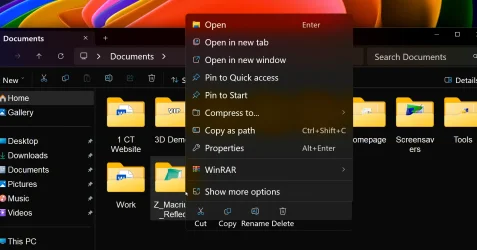
When I right click on a folder, the section at the bottom where it shows icons for Cut, Copy, Rename or Delete on occasions has its background cut in half. Doesn't happen when those icons are shown at the top. Sometimes it work correctly and other times it does this (see screen shot)
Is there a known fix for this?
My Computer
At a glance
Windows 11 Pro 25H2 26200.7922Intel Core i9 13900F2 x Kingston Fury 32gb DDR5 5600 BeastGigabyte Eagle (Nvidia) RTX 3060
- OS
- Windows 11 Pro 25H2 26200.7922
- Computer type
- PC/Desktop
- Manufacturer/Model
- Local shop built (KC Computers Ltd)
- CPU
- Intel Core i9 13900F
- Motherboard
- Gigabyte Z690 Gaming X (rev. 1.0/1.1) - (BIOS: F32 09 18 2025)
- Memory
- 2 x Kingston Fury 32gb DDR5 5600 Beast
- Graphics Card(s)
- Gigabyte Eagle (Nvidia) RTX 3060
- Sound Card
- Chord Async USB 44.1kHz - 384kHz 2Qute DAC
- Monitor(s) Displays
- Gigabyte AORUS FO32U2 32” OLED Flat Gaming Monitor, 0.03ms, KVM, 250 cd/m2, FreeSync Premium Pro, HDR True Black 400
- Screen Resolution
- 3840 x 2160 (UHD), 240Hz
- Hard Drives
- 1 x KINGSTON NVMe M.2 SSDSKC3000D2048G 2TB
1 x Samsung SSD 870 EVO 250GB
2 x Crucial CT4000MX500SSD1 4TB
2 x Crucial CT2000MX500SSD1 2TB
1 x Crucial CT250MX500SSD1 250.0 GB
- PSU
- Gigabyte 750w
- Case
- Fractal Torrent
- Cooling
- Stock Intel CPU, 2 x Fractal 180mm PWM (front), 3 x Fractal 140mm PWM (bottom)
- Keyboard
- Logitech MX Mechanical Wireless Illuminated Performance Keyboard
- Mouse
- Logitech MX Master 3S Wireless Performance Mouse
- Internet Speed
- 900 Mbps/900 Mbps Trooli FTTP
- Browser
- Firefox
- Antivirus
- Eset Nod32






