Missing options in context menu


BuckyDK

Member
Local time
11:22 AM
Posts
2
OS
w11
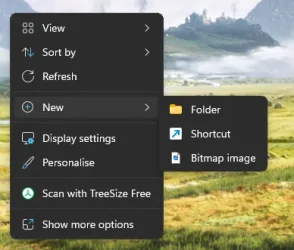
I'm unsure what I've done or how it happened but for some reason my context menu is missing a lot of options.

There's "New Folder" "New Shortcut" and "New Bitmap Image" but no "New Text File" "New Zip File" etc..

Edit: I downloaded the newest notepad from the Microsoft Store, and suddenly Notepad++ appeared in my context menu, even though I had previously set that to be the standard text editor.. so maybe my application defaults are borked?
1790058489001.webp
 
Windows Build/Version
25h2 26200.9457
Last edited:

My Computer My Computer

At a glance

w11AMD Ryzen 5 8600G Wraith StealthCorsair Vengeance DDR5-5200MSI GeForce RTX 5070 Ti 16G VENTUS 3X OC
OS
w11
Computer type
PC/Desktop
Manufacturer/Model
Selfbuilt
CPU
AMD Ryzen 5 8600G Wraith Stealth
Motherboard
ASUS TUF GAMING B650-E WIFI
Memory
Corsair Vengeance DDR5-5200
Graphics Card(s)
MSI GeForce RTX 5070 Ti 16G VENTUS 3X OC
Hard Drives
WD Black SN850X SSD
PSU
Seasonic Focus GX 750
Cooling
Thermalright Peerless Assassin 120 SE
Do you have a recent System Restore point (before the issue occurred) you can roll back to?
 

My Computer My Computer

At a glance

Windows 11 Pro 25H2
OS
Windows 11 Pro 25H2
Computer type
Laptop
Manufacturer/Model
Toshiba
Do you have a recent System Restore point (before the issue occurred) you can roll back to?
Nope, this is a fresh install of Windows (or like, 2 months old but it has been an issue since the start)
 

My Computer My Computer

At a glance

w11AMD Ryzen 5 8600G Wraith StealthCorsair Vengeance DDR5-5200MSI GeForce RTX 5070 Ti 16G VENTUS 3X OC
OS
w11
Computer type
PC/Desktop
Manufacturer/Model
Selfbuilt
CPU
AMD Ryzen 5 8600G Wraith Stealth
Motherboard
ASUS TUF GAMING B650-E WIFI
Memory
Corsair Vengeance DDR5-5200
Graphics Card(s)
MSI GeForce RTX 5070 Ti 16G VENTUS 3X OC
Hard Drives
WD Black SN850X SSD
PSU
Seasonic Focus GX 750
Cooling
Thermalright Peerless Assassin 120 SE
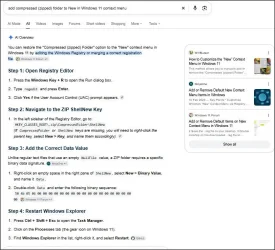
You should have 'Compressed (zipped) Folder' as an option, not "New Zip File".


1.webp

Simply repeat that search and you're offered the option of an 'automated' method (or you could request a reg file perhaps).

I've not found a tutorial that covers this on elevenforum.. but the tutorial search isn't great.
 

My Computer My Computer

At a glance

Windows 11 Proi7-8650U16GBIntel UHD 620
OS
Windows 11 Pro
Computer type
Laptop
Manufacturer/Model
Lenovo t480s
CPU
i7-8650U
Memory
16GB
Graphics Card(s)
Intel UHD 620
Screen Resolution
1920x1080
Hard Drives
C SN810 SDCPNRY-512G-1006
Browser
Edge, Firefox
Antivirus
Defender
Nope, this is a fresh install of Windows (or like, 2 months old but it has been an issue since the start)
As an aside, you need to start imaging your device on a regular basis - see here
 

My Computer My Computer

At a glance

Windows 11 Pro 26H2 (Build 26300.9539)Intel Core Ultra 9 285 5.6 GHz32.00 GBIntel Integrated Graphics (128 MB)
OS
Windows 11 Pro 26H2 (Build 26300.9539)
Computer type
PC/Desktop
Manufacturer/Model
Dell Pro Max Tower T2 FCT2250
CPU
Intel Core Ultra 9 285 5.6 GHz
Motherboard
64-bit operating system, x64-based processor
Memory
32.00 GB
Graphics Card(s)
Intel Integrated Graphics (128 MB)
Sound Card
Realtek Audio
Monitor(s) Displays
Dell P2714H Monitor
Screen Resolution
1920 x 1080
Hard Drives
1 x 512GB M.2 XG10d SED KIOXIA PCIe solid state drive (Internal)
1 x 2TB Seagate ST2000DM008-2UB102 HDD (Internal)
1 x 4TB Seagate STGX4000400 External HDD
1 x 6TB WD Elements AE 2689 External HDD
PSU
500 Watts
Cooling
Air
Keyboard
Microsoft Wired Keyboard 600
Mouse
Microsoft USB Basic Optical Mouse v2.0
Browser
Firefox
Antivirus
Windows Defender + Malwarebytes Premium
Other Info
BaseBoard Manufacturer Dell Inc.
BaseBoard Product 022RY57
BaseBoard Version A01

Latest Support Threads

Back
Top Bottom