Solved Most desktop icons disappeared -- tied to deleting OneDrive folder?


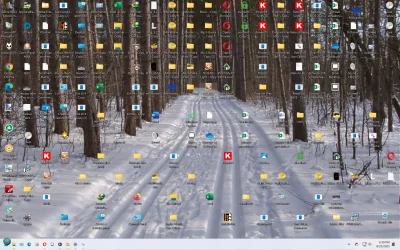
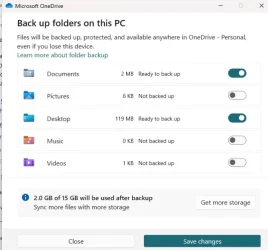
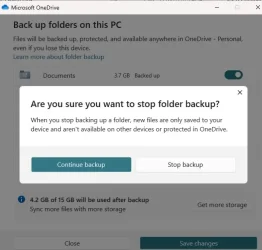
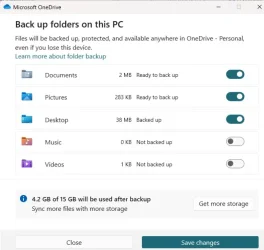
This is what my desktop looks like right now, and that's after trashing several icons. Oh, and here are screenshots I was referring to (saved to a USB flash drive). After turning off Pictures and saving, things run and then all three come back, or I stop backup and all three come back on. There are about three variations, but they end up the same way. Sometimes it takes me onto View Progress popup. That's how I must be ending up with so many icons?
 

Attachments

  • Desktop screenshot.webp
    Desktop screenshot.webp
    386.3 KB · Views: 2
  • Backup Folders on this PC -1.webp
    Backup Folders on this PC -1.webp
    26.9 KB · Views: 2
  • Stop backup dialog.webp
    Stop backup dialog.webp
    27.3 KB · Views: 2
  • Stop back up dialog - 2.webp
    Stop back up dialog - 2.webp
    27.2 KB · Views: 2

My Computers

System One System Two

  • OS
    Windows 11 Pro
    Computer type
    PC/Desktop
    CPU
    i5
    Motherboard
    Asus
    Memory
    16.0 GB
    Monitor(s) Displays
    Samsung T45F
    Screen Resolution
    1920x1200
    Hard Drives
    Samsung Evo SSDs and Western HDDs
    Keyboard
    IBM Model M
    Mouse
    Bornd
    Antivirus
    Windows and MBAM Premium
  • Operating System
    Win 11 Pro
    Computer type
    Laptop
    Manufacturer/Model
    Lenovo Thinkpad
Oh dear Lord, what a mess. I can't make head or tails of all those icons. Could you go to file explorer and open desktop folder from there. Temporarily, set your VIEW by details and SORT by name- ascending so I can get a better idea of what is duplicated. Shoot me a screenshot of it.

Since @Brink has not replied yet I will PM him.
 

My Computers

System One System Two

  • OS
    Windows 11 Pro 25H2
    Computer type
    PC/Desktop
    Manufacturer/Model
    Dell Optiplex 7080
    CPU
    i9-10900 10 core 20 threads
    Motherboard
    DELL 0J37VM
    Memory
    32 gb
    Graphics Card(s)
    none-Intel UHD Graphics 630
    Sound Card
    Integrated Realtek
    Monitor(s) Displays
    Benq 27
    Screen Resolution
    2560x1440
    Hard Drives
    2x1tb Solidigm m.2 nvme /External drives 512gb Samsung m.2 sata+2tb Kingston m2.nvme
    PSU
    500w
    Case
    MT
    Cooling
    Dell Premium
    Keyboard
    Logitech wired
    Mouse
    Logitech wireless
    Internet Speed
    so slow I'm too embarrassed to tell
    Browser
    #1 Edge #2 Firefox
    Antivirus
    Defender+MWB Premium
  • Operating System
    Windows 11 Pro 24H2 26200.8457
    Computer type
    PC/Desktop
    Manufacturer/Model
    Beelink Mini PC SER5
    CPU
    AMD Ryzen 7 6800U
    Memory
    32 gb
    Graphics card(s)
    integrated
    Sound Card
    integrated
    Monitor(s) Displays
    Benq 27
    Screen Resolution
    2560x1440
    Hard Drives
    1TB Crucial nvme
    Keyboard
    Logitech wired
    Mouse
    Logitech wireless
    Internet Speed
    still too embarrassed to tell
    Browser
    Firefox
    Antivirus
    Defender
    Other Info
    System 3 is non compliant Dell 9020 i7-4770/24gb ram Win11 PRO 26200.8457
Oh dear Lord, what a mess. I can't make head or tails of all those icons. Could you go to file explorer and open desktop folder from there. Temporarily, set your VIEW by details and SORT by name- ascending so I can get a better idea of what is duplicated. Shoot me a screenshot of it.

Since @Brink has not replied yet I will PM him.

Sorry, so I could use the computer, I deleted all the copies. Any other way to see, such as the OneDrive Desktop folder?
 

My Computers

System One System Two

  • OS
    Windows 11 Pro
    Computer type
    PC/Desktop
    CPU
    i5
    Motherboard
    Asus
    Memory
    16.0 GB
    Monitor(s) Displays
    Samsung T45F
    Screen Resolution
    1920x1200
    Hard Drives
    Samsung Evo SSDs and Western HDDs
    Keyboard
    IBM Model M
    Mouse
    Bornd
    Antivirus
    Windows and MBAM Premium
  • Operating System
    Win 11 Pro
    Computer type
    Laptop
    Manufacturer/Model
    Lenovo Thinkpad
Hello, :alien:

I'm afraid with all that has happened, it may be easier to add another admin account on the computer to use instead, and then delete the old one when everything checks out.
 

My Computers

System One System Two

  • OS
    Windows 11 Pro for Workstations
    Computer type
    PC/Desktop
    Manufacturer/Model
    Custom self build
    CPU
    Intel i7-8700K 5 GHz
    Motherboard
    ASUS ROG Maximus XI Formula Z390
    Memory
    64 GB (4x16GB) G.SKILL TridentZ RGB DDR4 3600 MHz (F4-3600C18D-32GTZR)
    Graphics Card(s)
    ASUS ROG-STRIX-GTX1080TI-O11G-GAMING (11GB GDDR5X)
    Sound Card
    Integrated Digital Audio (S/PDIF)
    Monitor(s) Displays
    2 x Samsung Odyssey G75 27"
    Screen Resolution
    2560x1440
    Hard Drives
    1TB Samsung 990 PRO M.2,
    4TB Samsung 990 PRO M.2,
    TerraMaster F8 SSD Plus NAS
    PSU
    Seasonic Prime Titanium 850W
    Case
    Thermaltake Core P3 wall mounted
    Cooling
    Corsair Hydro H115i
    Keyboard
    Amazon Basics Wired Full Keyboard MD005
    Mouse
    Logitech MX Master 4
    Internet Speed
    2 Gbps Download and 100 Mbps Upload
    Browser
    Chrome and Edge
    Antivirus
    Microsoft Defender
    Other Info
    Logitech Z625 speaker system,
    Logitech BRIO 4K Pro webcam,
    HP Color LaserJet Pro MFP M477fdn,
    CyberPower CP1500PFCLCD
    Galaxy S23 Plus phone
  • Operating System
    Windows 11 Pro
    Computer type
    Laptop
    Manufacturer/Model
    Surface Laptop 7 Copilot+ PC
    CPU
    Snapdragon X Elite (12 core) 3.42 GHz
    Memory
    16 GB LPDDR5x-7467 MHz
    Monitor(s) Displays
    15" HDR
    Screen Resolution
    2496 x 1664
    Hard Drives
    1 TB SSD
    Internet Speed
    Wi-Fi 7 and Bluetooth 5.4
    Browser
    Chrome and Edge
    Antivirus
    Microsoft Defender
Hello, :alien:

I'm afraid with all that has happened, it may be easier to add another admin account on the computer to use instead, and then delete the old one when everything checks out.

If I do that, do I have reinstall all apps and programs? Does that help solve the OneDrive issue?
 

My Computers

System One System Two

  • OS
    Windows 11 Pro
    Computer type
    PC/Desktop
    CPU
    i5
    Motherboard
    Asus
    Memory
    16.0 GB
    Monitor(s) Displays
    Samsung T45F
    Screen Resolution
    1920x1200
    Hard Drives
    Samsung Evo SSDs and Western HDDs
    Keyboard
    IBM Model M
    Mouse
    Bornd
    Antivirus
    Windows and MBAM Premium
  • Operating System
    Win 11 Pro
    Computer type
    Laptop
    Manufacturer/Model
    Lenovo Thinkpad
If I do that, do I have reinstall all apps and programs? Does that help solve the OneDrive issue?

It could be a test to see if everything is where it's suppose to be.

You will indeed need to reinstall all your apps and programs to the new account.

If you set up the new account as a local account for now, it will not have OneDrive enabled and syncing. This way you can disable and/or uninstall OneDrive first, before switching this new local account to a Microsoft account (if wanted).

⚠️ Do note, you will not be able to switch the new local account to the same Microsoft account as the old account until you delete the old account or switch it to a local account.
 

My Computers

System One System Two

  • OS
    Windows 11 Pro for Workstations
    Computer type
    PC/Desktop
    Manufacturer/Model
    Custom self build
    CPU
    Intel i7-8700K 5 GHz
    Motherboard
    ASUS ROG Maximus XI Formula Z390
    Memory
    64 GB (4x16GB) G.SKILL TridentZ RGB DDR4 3600 MHz (F4-3600C18D-32GTZR)
    Graphics Card(s)
    ASUS ROG-STRIX-GTX1080TI-O11G-GAMING (11GB GDDR5X)
    Sound Card
    Integrated Digital Audio (S/PDIF)
    Monitor(s) Displays
    2 x Samsung Odyssey G75 27"
    Screen Resolution
    2560x1440
    Hard Drives
    1TB Samsung 990 PRO M.2,
    4TB Samsung 990 PRO M.2,
    TerraMaster F8 SSD Plus NAS
    PSU
    Seasonic Prime Titanium 850W
    Case
    Thermaltake Core P3 wall mounted
    Cooling
    Corsair Hydro H115i
    Keyboard
    Amazon Basics Wired Full Keyboard MD005
    Mouse
    Logitech MX Master 4
    Internet Speed
    2 Gbps Download and 100 Mbps Upload
    Browser
    Chrome and Edge
    Antivirus
    Microsoft Defender
    Other Info
    Logitech Z625 speaker system,
    Logitech BRIO 4K Pro webcam,
    HP Color LaserJet Pro MFP M477fdn,
    CyberPower CP1500PFCLCD
    Galaxy S23 Plus phone
  • Operating System
    Windows 11 Pro
    Computer type
    Laptop
    Manufacturer/Model
    Surface Laptop 7 Copilot+ PC
    CPU
    Snapdragon X Elite (12 core) 3.42 GHz
    Memory
    16 GB LPDDR5x-7467 MHz
    Monitor(s) Displays
    15" HDR
    Screen Resolution
    2496 x 1664
    Hard Drives
    1 TB SSD
    Internet Speed
    Wi-Fi 7 and Bluetooth 5.4
    Browser
    Chrome and Edge
    Antivirus
    Microsoft Defender
Update: Thanks to glaakuter, we took a close look at my install, found some odd behavior, possibly because RAID in BIOS had been activated (under a different name). In the end, we decided to do a clean install, with me as Local-Administrator this time. OneDrive is still present for the moment, but will not be a bother anymore. So big big thanks to glasskuter for guiding me through the troubleshooting and new install. Hopefully, the third time around for Win 11 will be the charm — well, that it works out ok.
 

My Computers

System One System Two

  • OS
    Windows 11 Pro
    Computer type
    PC/Desktop
    CPU
    i5
    Motherboard
    Asus
    Memory
    16.0 GB
    Monitor(s) Displays
    Samsung T45F
    Screen Resolution
    1920x1200
    Hard Drives
    Samsung Evo SSDs and Western HDDs
    Keyboard
    IBM Model M
    Mouse
    Bornd
    Antivirus
    Windows and MBAM Premium
  • Operating System
    Win 11 Pro
    Computer type
    Laptop
    Manufacturer/Model
    Lenovo Thinkpad
There was a Netplwiz problem that came along as a result of this new install that may be of interest to the site's Tutorial makers (if it isn't already there -- I didn't find it).

With this install, Netplwiz didn't work for disabling sign-in on startup; the checkbox and explanatory sentence weren't there. Nor did the other method under Settings>...Sign-in Options work, because the key option sentence isn't there either: "For improved security, only allow Windows Hello Sign-in for Microsoft accounts on this device (Recommended). " The question was what to do. With a little searching, it turned out to be a fairly common problem and I found the following thread on the MS site that addressed it:

The main answer on page 1 is by an independent advisor (Emily), but the key to solving it for me, i.e., getting Netplwiz working correctly again, was on page 3. The first part of the reply there by Anonymous was all I needed (with the help of Glasskuter, who didn't know the solution to the problem and hadn't seen this thread):
----

"Anonymous

If "user must enter a username and password to use this computer" doesn't exist in Netplwiz, then, we have to do something in Powershell (Admin) to get it back...
Copy this:
reg ADD "HKLM\SOFTWARE\Microsoft\Windows NT\CurrentVersion\PasswordLess\Device" /v DevicePasswordLessBuildVersion /t REG_DWORD /d 0 /f

Open PowerShell(Admin)

Right click in the Powershell, and click on insert, and hit Enter. Restart the computer, and it should work... Tested on another computer, I have..."
-------

The PowerShell run worked for me. After rebooting, the checkbox and sentence for disabling sign-in were back, and another reboot verified it.

 
Last edited:

My Computers

System One System Two

  • OS
    Windows 11 Pro
    Computer type
    PC/Desktop
    CPU
    i5
    Motherboard
    Asus
    Memory
    16.0 GB
    Monitor(s) Displays
    Samsung T45F
    Screen Resolution
    1920x1200
    Hard Drives
    Samsung Evo SSDs and Western HDDs
    Keyboard
    IBM Model M
    Mouse
    Bornd
    Antivirus
    Windows and MBAM Premium
  • Operating System
    Win 11 Pro
    Computer type
    Laptop
    Manufacturer/Model
    Lenovo Thinkpad

Latest Support Threads

Back
Top Bottom