Msconfig safe mode blue screen error code 0xc000000e


blssmx

New member
Local time
2:52 AM
Posts
1
OS
Windows 11
Hi,

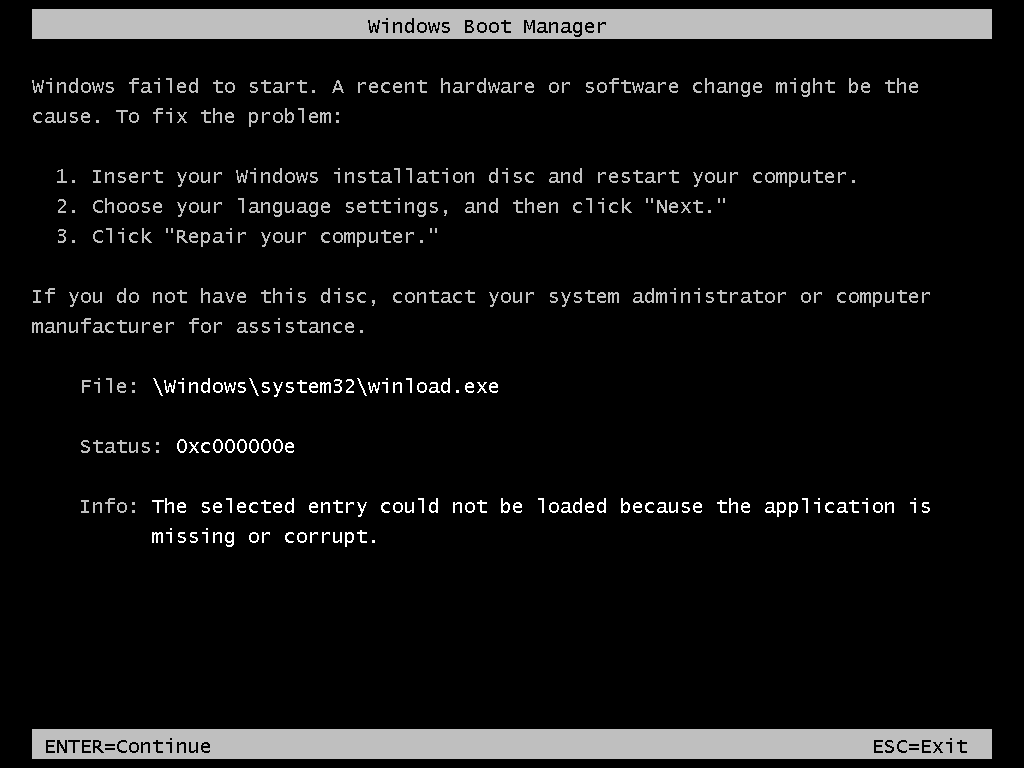
Basically I wanted to go into safe mode on windows 11 so I went into msconfig and changed the boot option to safe mode minimal and then when I restarted my PC it gives me the blue screen and the error code 0xc000000e. It won't let me reset my PC and keep files and I don't have a restore point. I have aomei backupper but my most recent backup was in Feb. Automatic repair wouldn't work either. Pressing F8 for startup settings glitches my screen and doesn't do anything. Anything to fix this?
 
Windows Build/Version
Windows 11

My Computer My Computer

At a glance

Windows 11
OS
Windows 11
In this video, i will guide you on how to fix "A Required Device Isn't Connected or Can't Be Accessed" error on Windows.


My Computer My Computer

At a glance

Windows 11AMD Ryzen 7 5700GMicron Technology DDR4-3200 16GBNVIDIA GeForce RTX 3060
OS
Windows 11
Computer type
PC/Desktop
Manufacturer/Model
HP Pavilion
CPU
AMD Ryzen 7 5700G
Motherboard
Erica6
Memory
Micron Technology DDR4-3200 16GB
Graphics Card(s)
NVIDIA GeForce RTX 3060
Sound Card
Realtek ALC671
Monitor(s) Displays
Samsung SyncMaster U28E590
Screen Resolution
3840 x 2160
Hard Drives
SAMSUNG MZVLQ1T0HALB-000H1
One option may be a custom install.

For a custom install files are backed up to Windows.old and a fresh version of Windows is installed.

Drivers and applications need to be reinstalled.


For trial and error steps see if you can run one of these commands to revert:


My Computer My Computer

At a glance

Windows 10Intel(R) Core(TM) i7-4800MQ CPU @ 2.70GHz16 GB Total: Manufacturer : Samsung MemoryTyp...NVIDIA Quadro K3100M; Intel(R) HD Graphics 4600
OS
Windows 10
Computer type
Laptop
Manufacturer/Model
HP
CPU
Intel(R) Core(TM) i7-4800MQ CPU @ 2.70GHz
Motherboard
Product : 190A Version : KBC Version 94.56
Memory
16 GB Total: Manufacturer : Samsung MemoryType : DDR3 FormFactor : SODIMM Capacity : 8GB Speed : 1600
Graphics Card(s)
NVIDIA Quadro K3100M; Intel(R) HD Graphics 4600
Sound Card
IDT High Definition Audio CODEC; PNP Device ID HDAUDIO\FUNC_01&VEN_111D&DEV_76E0
Hard Drives
Model Hitachi HTS727575A9E364
Antivirus
Microsoft Defender
Other Info
Mobile Workstation
Since apps have to be reinstalled either way, another straightforward option I've always used is to use a live Linux distro usb. I boot from it, copy all the user files, clean install windows and copy the user files into the new install. In all honesty, I've never attempted @zbook and Brink's custom install method so I've learned something here. I'll have to try this next time. My only concern would be what if this method fails. One would still have to recover files by the Linux or some other method and do a clean install anyway, so I guess it's 6 of one or half a dozen of the other.

Once you get it straightened out, to protect yourself I suggest you make backups more often. Windows is changing so fast IMO weird problems are going to jump up more often.
Good luck.
 

My Computers My Computers

  • At a glance

    Windows 11 Pro 25H2 26200.8875i9-10900 10 core 20 threads32 gbnone-Intel UHD Graphics 630
    OS
    Windows 11 Pro 25H2 26200.8875
    Computer type
    PC/Desktop
    Manufacturer/Model
    Dell Optiplex 7080
    CPU
    i9-10900 10 core 20 threads
    Motherboard
    DELL 0J37VM
    Memory
    32 gb
    Graphics Card(s)
    none-Intel UHD Graphics 630
    Sound Card
    Integrated Realtek
    Monitor(s) Displays
    Benq 27
    Screen Resolution
    2560x1440
    Hard Drives
    2x1tb Solidigm m.2 nvme /External drives 512gb Samsung m.2 sata+2tb Kingston m2.nvme
    PSU
    500w
    Case
    MT
    Cooling
    Dell Premium
    Keyboard
    Logitech wired
    Mouse
    Logitech wireless
    Internet Speed
    so slow I'm too embarrassed to tell
    Browser
    #1 Edge #2 Firefox
    Antivirus
    Defender+MWB Premium
  • At a glance

    Windows 11 Pro 24H2 26200.8875AMD Ryzen 7 6800U32 gbintegrated
    Operating System
    Windows 11 Pro 24H2 26200.8875
    Computer type
    PC/Desktop
    Manufacturer/Model
    Beelink Mini PC SER5
    CPU
    AMD Ryzen 7 6800U
    Memory
    32 gb
    Graphics card(s)
    integrated
    Sound Card
    integrated
    Monitor(s) Displays
    Benq 27
    Screen Resolution
    2560x1440
    Hard Drives
    1TB Crucial nvme
    Keyboard
    Logitech wired
    Mouse
    Logitech wireless
    Internet Speed
    still too embarrassed to tell
    Browser
    Firefox
    Antivirus
    Defender
    Other Info
    System 3 is non compliant Dell 9020 i7-4770/24gb ram Win11 PRO 26200.8875
The same thing happened to me, while I changed the boot option in msconfig while in safe-mode, I got the 0xc000000e error on boot.
Nothing I tried (recovery, various bootloader fixing commands) worked, but finally this free (for Windows 11) bootable USB drive (EasyRE software) fixed it, just select your Windows drive and "Automatic repair" and it fixes the bootloader:


I would have been in serious trouble without this tool, as I didn't want to lose any of my Windows settings.

So it's a serious bug in Windows 11, should be reported to Microsoft ASAP.
 

My Computer My Computer

At a glance

Windows 11
OS
Windows 11

Latest Support Threads

Back
Top Bottom