- Local time
- 5:20 PM
- Posts
- 78
- OS
- Windows 11 Pro 25H2
Windows 11 Pro
25H2 26200.6584
(EU Region Install)
Clean Install from RUFUS + ISO from Microsoft
Task Scheduler has the following tasks
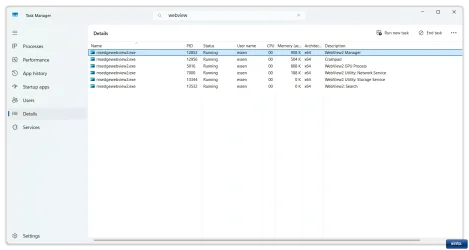
When I was running 23H2 and 24H2, after disabling Web Search none of these Edge WebView2 processes would show.
Three of the processes look like this
I do have iTunes (Standalone Installer) and Firefox on my PC as well as Chrome.
25H2 26200.6584
(EU Region Install)
Clean Install from RUFUS + ISO from Microsoft
- Web Search disabled via Group Policy.
- Co-Pilot disabled via Group Policy.
- Widgets disabled via Group Policy.
Task Scheduler has the following tasks
- MicrosoftEdgeUpdateTaskMachineCore
- MicrosoftEdgeUpdateTaskMachineUA
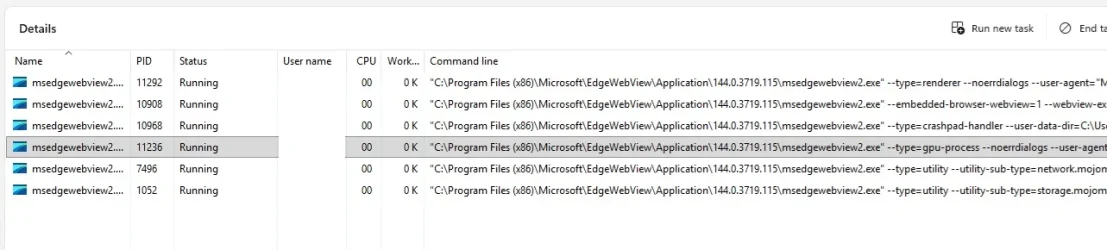
When I was running 23H2 and 24H2, after disabling Web Search none of these Edge WebView2 processes would show.
Three of the processes look like this
--type=gpu-process --noerrdialogs --user-agent ="Mozilla/5.0 (Windows NT 10.0; Win64; x64; Cortana) AppleWebKit
--type=utility --utility-sub-type=network.mojom.NetworkService --lang=en-US --service-sandbox-type=none --noerrdialogs --user-agent = Mozilla/5.0 (Windows NT 10.0 ; Win)
--type=utility --utility-sub-type==storage.mojom.StorageService --lang=en-US --service-sandbox-type=service --noerrdialogs --user-agent = Mozilla/5.0 (Windows NT 10.0 ; Win)
I do have iTunes (Standalone Installer) and Firefox on my PC as well as Chrome.
Last edited:
My Computer
At a glance
Windows 11 Pro 25H2i7 12700k64GB DDR5 [CMK64GX5M2B5200C40]MSI 4060 2x Ventus 8G
- OS
- Windows 11 Pro 25H2
- Computer type
- PC/Desktop
- Manufacturer/Model
- DIY
- CPU
- i7 12700k
- Motherboard
- 7E07vMA [Z790 Pro Max Wifi]
- Memory
- 64GB DDR5 [CMK64GX5M2B5200C40]
- Graphics Card(s)
- MSI 4060 2x Ventus 8G
- Sound Card
- Realtek® ALC4080 Codec
- Monitor(s) Displays
- ASUS VA24DQSB
- Screen Resolution
- 1920x1080 @ 75hz
- Hard Drives
- Samsung 980 Pro 1TB (OS Drive)
Samsung 980 Pro 2TB (Secondary Drive)
Samsung 980 Pro 1TB (Other)
Samsung 860 Pro 512 (Other)
WD6400AAKS (Other)
- PSU
- Corsair 850x
- Cooling
- Noctua NH-D15
- Mouse
- G502 X Lightspeed
- Browser
- Chrome, Firefox
- Antivirus
- Malwarebytes Premium, Defender