My power button no longer turns off my PC


KevTech "Explain to me how commands for Windows has anything to do with the bios."
In normal operation the shutdown command does, in fact, shut down the computer. So, you need to think through this process and ask how are these related? How does a windows command remove power from the computer motherboard? Next, ask yourself what is the BIOS and what does it control. By just going through the settings on a typical BIOS you should get the idea that the BIOS controls the components and functions on the motherboard. And there you have it - a link between a windows command and the BIOS. The shutdown command tells the BIOS to remove power from the motherboard.
One other way in which the shutdown command can help diagnosis the problem is to cast doubt on the mechanical or electrical connectivity of the computer's power button.

Scott "Not sure how the latest BIOS version would affect his power button"
See above explanation to KebTech. The original BIOS on the computer was developed by people who designed, built and tested the computer. Any updates in subsequent years come from people who often have no idea what's in the BIOS code and are "fixing" just a small portion in response to the latest vulnerability hysteria. Just like Windows Updates, there is no guarantee that a BIOS update is going to work. Just because it's the "latest" does not mean it's the best, or the most appropriate, or compatible, or that the user didn't screw up something in the BIOS installation or settings.

Scott "I say always keep you BIOS up to date. I have, and never had any problems."
You are just one lucky person out of the 2 billion people using Windows computers.
 

My Computer My Computer

At a glance

Depends on the day and my mood. Windows 10.
OS
Depends on the day and my mood. Windows 10.
Computer type
PC/Desktop
Manufacturer/Model
Dell
How does a windows command remove power from the computer motherboard?

shutdown /s tells the Advanced Configuration and Power Interface to transition the system into a low-power "Soft Off" or S5 state.

A software command relies on the operating system running.

Go ahead and see where there is a place in the bios to enter a shutdown command.
 

My Computer My Computer

At a glance

Windows 11 Pro
OS
Windows 11 Pro
Go ahead and see where there is a place in the bios to enter a shutdown command
Not sure what you're saying. The APCI code (firmware) is implemented in the BIOS/UEFI. The BIOS/UEFI does not have a shutdown command, but it has settings for power management. Yes, William654 should go through all the BIOS settings and see what is related to power management.
 

My Computer My Computer

At a glance

Depends on the day and my mood. Windows 10.
OS
Depends on the day and my mood. Windows 10.
Computer type
PC/Desktop
Manufacturer/Model
Dell
The BIOS/UEFI does not have a shutdown command, but it has settings for power management.

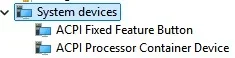
So does Windows in device manager.

Screenshot 2026-09-20 080937.webp

The BIOS does not control the Windows shutdown /s command because that command is an operating system feature managed by Windows, though the BIOS handles the final physical power-off sequence.

But your statement that if shutdown /s does not work the bios is corrupt is incorrect.
 

My Computer My Computer

At a glance

Windows 11 Pro
OS
Windows 11 Pro
At first I thought the problem was caused by a faulty power switch because the computer would not power off when in the BIOS. However, you also said the computer would also not power off when shutdown is selected in Windows. That indicates either a faulty motherboard or power supply.
 
Last edited:

My Computers My Computers

  • At a glance

    Windows 11 Pro 25H2 (26200.6901)AMD Ryzen 7 6800H with Radeon 680M GPU (486MB...Crucial DDR5-4800 (2400MHz) 32GB (2 x 16GB)NVIDIA RTX 3060 Laptop (6GB RAM)
    OS
    Windows 11 Pro 25H2 (26200.6901)
    Computer type
    Laptop
    Manufacturer/Model
    ASUS TUF Gaming A15 (2022)
    CPU
    AMD Ryzen 7 6800H with Radeon 680M GPU (486MB RAM)
    Memory
    Crucial DDR5-4800 (2400MHz) 32GB (2 x 16GB)
    Graphics Card(s)
    NVIDIA RTX 3060 Laptop (6GB RAM)
    Sound Card
    n/a
    Monitor(s) Displays
    15.6-inch
    Screen Resolution
    1920x1080 300Hz
    Hard Drives
    2 x Samsung 990 Evo Plus (2TB M.2 NVME SSD)
    PSU
    n/a
    Mouse
    Wireless Mouse M510
    Internet Speed
    2100Mbps/300Mbps
    Browser
    Firefox
    Antivirus
    Malwarebytes
  • At a glance

    Windows 11 Pro 25H2 (26200.8246)AMD Ryzen 7 5700X3DG.SKILL Flare X 32GB (2x16GB) DDR4ASUS ROG-STRIX-RTX3060TI-08G-V2-GAMING (RTX 3...
    Operating System
    Windows 11 Pro 25H2 (26200.8246)
    Computer type
    PC/Desktop
    Manufacturer/Model
    Custom build
    CPU
    AMD Ryzen 7 5700X3D
    Motherboard
    ASUS ROG Strix B550-F Gaming WiFi II
    Memory
    G.SKILL Flare X 32GB (2x16GB) DDR4
    Graphics card(s)
    ASUS ROG-STRIX-RTX3060TI-08G-V2-GAMING (RTX 3060-Ti, 8GB RAM)
    Monitor(s) Displays
    Samsung G50D IPS 27"
    Screen Resolution
    1440p/180Hz
    Hard Drives
    SAMSUNG 990 EVO Plus (2TB] M.2 NVME SSD
    SAMSUNG 990 EVO Plus (4TB) M.2 NVME SSD
    PSU
    Corsair RM750x (750 watts)
    Case
    Cooler Master MasterCase 5
    Cooling
    Scythe Mugen 6
    Keyboard
    Logitech K520 (MK540 keyboard/mouse combo)
    Mouse
    Logitech M310 (MK540 keyboard/mouse combo)
    Internet Speed
    2100 Mbps down / 300 Mbps up
    Browser
    Firefox, Edge, Chrome
    Antivirus
    Malwarebytes (Premium)
    Other Info
    ASUS Blu-ray Burner BW-16D1HT (SATA) || Western Digital Easystore 20TB USB 3.0 external hard drive used with Acronis True Image 2025 backup software || HP OfficeJet Pro 6975 Printer/Scanner
IF his power plans are corrupted (failed attempt to change earlier in the thread) could that have an impact on how his power button reacts?
 

My Computers My Computers

  • At a glance

    Windows 11 & Zorin ProIntel® Core™ Ultra 9 Processor 275HX 2.7 GHz32 gbNVIDIA® GeForce RTX™ 5060 Laptop GPU
    OS
    Windows 11 & Zorin Pro
    Computer type
    Laptop
    Manufacturer/Model
    Asus Rog Strix G16
    CPU
    Intel® Core™ Ultra 9 Processor 275HX 2.7 GHz
    Motherboard
    AsusteK Computer
    Memory
    32 gb
    Graphics Card(s)
    NVIDIA® GeForce RTX™ 5060 Laptop GPU
    Sound Card
    Realtek High Definition Audio
    Monitor(s) Displays
    Laptop 16 inch
    Screen Resolution
    2560 X 1600
    Hard Drives
    Boot: Samsung 9100 NVME 2 TB Microsoft Storage Controller: Standard NVM Express Driver: Microsoft 6/21/2006. No SATA/AHCI on my motherboard or in bios
    Mouse
    Pad
    Browser
    Google Chrome
    Antivirus
    Microsoft
    Other Info
    Printer: HP Color LaserJet MFP M477dw
  • At a glance

    Windows 11 Pro, Zorin ProIntel Nuc 8i7, Intel Nuc 8i5Intel internal
    Operating System
    Windows 11 Pro, Zorin Pro
    Computer type
    PC/Desktop
    Manufacturer/Model
    Intel
    CPU
    Intel Nuc 8i7, Intel Nuc 8i5
    Motherboard
    Intel
    Graphics card(s)
    Intel internal
    Monitor(s) Displays
    Dell U27
    Hard Drives
    Samsung 990 Pro
    Keyboard
    Dell USB
    Mouse
    Dell USB
    Antivirus
    Windows Defender
  • Dell 8500 Windows 10 Pro extended, Dell 8700 Windows 10 Pro extended , Hp Pavilion Linux
IF his power plans are corrupted (failed attempt to change earlier in the thread) could that have an impact on how his power button reacts?
The problem happens in the BIOS also. Anything in Windows like the power plan has nothing to do with that.
 

My Computers My Computers

  • At a glance

    Windows 11 Pro 25H2 (26200.6901)AMD Ryzen 7 6800H with Radeon 680M GPU (486MB...Crucial DDR5-4800 (2400MHz) 32GB (2 x 16GB)NVIDIA RTX 3060 Laptop (6GB RAM)
    OS
    Windows 11 Pro 25H2 (26200.6901)
    Computer type
    Laptop
    Manufacturer/Model
    ASUS TUF Gaming A15 (2022)
    CPU
    AMD Ryzen 7 6800H with Radeon 680M GPU (486MB RAM)
    Memory
    Crucial DDR5-4800 (2400MHz) 32GB (2 x 16GB)
    Graphics Card(s)
    NVIDIA RTX 3060 Laptop (6GB RAM)
    Sound Card
    n/a
    Monitor(s) Displays
    15.6-inch
    Screen Resolution
    1920x1080 300Hz
    Hard Drives
    2 x Samsung 990 Evo Plus (2TB M.2 NVME SSD)
    PSU
    n/a
    Mouse
    Wireless Mouse M510
    Internet Speed
    2100Mbps/300Mbps
    Browser
    Firefox
    Antivirus
    Malwarebytes
  • At a glance

    Windows 11 Pro 25H2 (26200.8246)AMD Ryzen 7 5700X3DG.SKILL Flare X 32GB (2x16GB) DDR4ASUS ROG-STRIX-RTX3060TI-08G-V2-GAMING (RTX 3...
    Operating System
    Windows 11 Pro 25H2 (26200.8246)
    Computer type
    PC/Desktop
    Manufacturer/Model
    Custom build
    CPU
    AMD Ryzen 7 5700X3D
    Motherboard
    ASUS ROG Strix B550-F Gaming WiFi II
    Memory
    G.SKILL Flare X 32GB (2x16GB) DDR4
    Graphics card(s)
    ASUS ROG-STRIX-RTX3060TI-08G-V2-GAMING (RTX 3060-Ti, 8GB RAM)
    Monitor(s) Displays
    Samsung G50D IPS 27"
    Screen Resolution
    1440p/180Hz
    Hard Drives
    SAMSUNG 990 EVO Plus (2TB] M.2 NVME SSD
    SAMSUNG 990 EVO Plus (4TB) M.2 NVME SSD
    PSU
    Corsair RM750x (750 watts)
    Case
    Cooler Master MasterCase 5
    Cooling
    Scythe Mugen 6
    Keyboard
    Logitech K520 (MK540 keyboard/mouse combo)
    Mouse
    Logitech M310 (MK540 keyboard/mouse combo)
    Internet Speed
    2100 Mbps down / 300 Mbps up
    Browser
    Firefox, Edge, Chrome
    Antivirus
    Malwarebytes (Premium)
    Other Info
    ASUS Blu-ray Burner BW-16D1HT (SATA) || Western Digital Easystore 20TB USB 3.0 external hard drive used with Acronis True Image 2025 backup software || HP OfficeJet Pro 6975 Printer/Scanner
Not fully replaceable but i also have external button i can use. I will remove the power connector and test with screw driver to short the pins and test if holding the screw driver for 5 seconds will execute normal shutdown
If you want to rule out if you have a corrupted windows install.

If you have a USB with Windows install, boot from the USB with the Bios boot menu or set USB as first boot option.
When you start windows install and you get the first box of continue... Press Shift+F10 to get the Command prompt. (on some laptops, you need to press Shift+Fn+F10)
Then in the Command prompt type: shutdown /s /f /t 0
and hit enter..
( the switches: /s shutdown the computer. /f force close without ask for confirmation. /t 0 set shutdown timeout to 0 seconds. )

if the computer shut down without any issues, you have a corrupt windows system... If it still refuse to shut down, you might have a hardware related issue.

If you have a Live Linux USB stick instead of a windows installer stick, then you can boot that Linux USB-stick the same way from Bios boot menue or set USB as first boot and from that Linux live environment click "start"menu, click shut down the computer, to see if a software shutdown works.


You say you have an UPS and the computer wont turn off until you unplug the UPS.. Do you have a USB cable between the computer and the UPS for a controlled shutdown... If you have that, unplug the USB cable and try normal windows shutdown.
 
Last edited:

My Computers My Computers

  • At a glance

    Linux: Debian, Kali-linux, Alma, Win:7,10IoT,...i3, i5 and i7 From 2gen to 9th gen... Server ...
    OS
    Linux: Debian, Kali-linux, Alma, Win:7,10IoT,2012R
    Manufacturer/Model
    HP Elitebook 840, AsusX53, Aspire E1-572. AsusUX32A, HP Pro3130mt+3010mt, HP Proliant ML150, 3xCustom-PC, i3, i5, i7
    CPU
    i3, i5 and i7 From 2gen to 9th gen... Server dual Xenon
    Hard Drives
    Sata, M.2, SAS
  • At a glance

    Retro: 2003server.XPpro, Win2000, Win98SE, Wi...Oldest intel 8088 up to P4 dual core
    Operating System
    Retro: 2003server.XPpro, Win2000, Win98SE, Win95, Win3.11, MS-DOS, IBM-DOS
    Manufacturer/Model
    Commodore, AST, Fujitsu, Compaq, etc etc. etc Around 15 desktops and 20 laptops in the collection
    CPU
    Oldest intel 8088 up to P4 dual core
    Hard Drives
    MFM, IDE, SCSI
The OP probably needs to do a reapir install to fix the corrupted power profiles. Also the OP has not yet done the PSU test - search for "PSU paper clip test"
 

My Computer My Computer

At a glance

Windows 11 ProCore i7-13700K64 GB Kingston Fury Beast DDR5Gigabyte GeForce RTX 2060 Super Gaming OC 8G
OS
Windows 11 Pro
Computer type
PC/Desktop
Manufacturer/Model
Self build
CPU
Core i7-13700K
Motherboard
Asus TUF Gaming Plus WiFi Z790
Memory
64 GB Kingston Fury Beast DDR5
Graphics Card(s)
Gigabyte GeForce RTX 2060 Super Gaming OC 8G
Sound Card
Realtek S1200A
Monitor(s) Displays
Viewsonic VP2770 & Dell (secondary)
Screen Resolution
2560 x 1440
Hard Drives
Kingston KC3000 2TB NVME SSD & SATA HDDs & SSD
PSU
EVGA SuperNova G2 850W
Case
Nanoxia Deep Silence 1
Cooling
Noctua NH-D14
Keyboard
Microsoft Digital Media Pro
Mouse
Logitech Wireless
Internet Speed
80 Mb / s
Browser
Chrome
Antivirus
Defender, Malwarebytes Free & AdwCleaner

My Computer My Computer

At a glance

Windows 115900x32 GB G.SkillRX 6800 XT
OS
Windows 11
Computer type
PC/Desktop
CPU
5900x
Motherboard
MAG X570S TOMAHAWK MAX WIFI
Memory
32 GB G.Skill
Graphics Card(s)
RX 6800 XT
Sound Card
Creative Sound Blaster Z
Monitor(s) Displays
BENQ and AOC QHD 120Hz
Screen Resolution
QHD
Hard Drives
2TB Intel 660p and 2TB Sabrent Rokect 4 plus nvme, 4TB HDD HGST
PSU
Corsair RM750
Case
Bloody rage
Cooling
Water cooling gamdias 240
Keyboard
razer ornata
Mouse
razer da v2
Browser
FF and Chrome
Antivirus
Malwarebytes
AI is good at breaking down a problem and formulating a plan to help you diagnose it:

Since the issue occurs even when pressing the power button inside the UEFI/BIOS menu before Windows boots, this is a hardware or low-level motherboard state issue rather than a software or Windows driver problem. The motherboard is failing to send or signal the PS_ON# state to the Power Supply Unit (PSU) to drop the primary power rails.

Root Causes & Solutions​

  1. Stuck System Management Bus (SMBus) / Power State (CMOS Glitch)
    • Cause: The motherboard ACPI/power state management unit can get hung up in an intermediate state, keeping the power rails active even after shutdown commands.
    • Fix: Clear CMOS completely. Turn off the PSU switch, unplug the PC from wall power/UPS, remove the CR2032 coin cell battery on the motherboard, and press and hold the case power button for 30 seconds to drain residual electricity. Reinsert the battery after 5 minutes and power back on.
    • Verification: Boot into BIOS and press the power button once. If the board shuts down cleanly within 4 seconds (or instantly), the ACPI controller state has reset properly.
  2. Power Supply Unit (PSU) Fault or PS_ON# Signal Latch
    • Cause: A malfunctioning power supply (or a failing +5VSB / standby control circuit) can remain latched on high voltage rails (+12V/+5V/+3.3V) even when the motherboard toggles PS_ON# to off.
    • Fix: Test with a secondary spare PSU if available, or test the PSU independently with a paperclip bridge test (PS_ON to GND) to see if it powers down immediately when bridged pins are disconnected.
    • Verification: If swapping the PSU resolves the hanging fans/LEDs immediately upon shutdown, the original PSU's internal control board is faulty.
  3. Faulty PCIe / USB Peripheral Back-Feeding Power
    • Cause: Powered external devices (USB hubs, powered monitors, sound cards, or UPS communication cables) can back-feed current through motherboard ground or data lines, keeping system power circuits energized.
    • Fix: Unplug all external peripherals except a single monitor (DisplayPort/HDMI) and keyboard/mouse. Disconnect any USB communication cables connected to the UPS.
    • Verification: Attempt a shutdown from BIOS. If it shuts down normally, reconnect devices one by one to isolate the culprit.
  4. Short Circuit / Front Panel Header Pin Issue
    • Cause: A shorted power switch cable, stuck front panel switch, or improper header wiring can keep the power circuit signal bridged.
    • Fix: Temporarily unplug the POWER SW header connector from the motherboard's front panel pins (JFP1) and use a screwdriver tip to momentarily short the two power pins to test power-on and power-off behavior.
    • Verification: If shorting the pins manually allows a proper shutdown while the case button does not, the case button switch or wiring is defective.
1.Perform a Full CMOS Hard Reset:Hardware.
Unplug the PC from power, remove the motherboard CR2032 battery for 5 minutes, press the power button for 30 seconds to drain capacitors, and reinstall the battery.

2.Disconnect Non-Essential Peripherals:Isolation.
Disconnect all USB devices, external hubs, sound cards, and UPS monitoring cables, leaving only keyboard and primary monitor connected.

3.Bypass Front Panel Power Button:Testing.
Unplug the case POWER SW cable from JFP1 header and bridge the power pins with a screwdriver to test manually.

Did this start happening suddenly after a specific hardware change or BIOS update, or has it been ongoing since building the system?
 

My Computers My Computers

  • At a glance

    Windows 11 & Zorin ProIntel® Core™ Ultra 9 Processor 275HX 2.7 GHz32 gbNVIDIA® GeForce RTX™ 5060 Laptop GPU
    OS
    Windows 11 & Zorin Pro
    Computer type
    Laptop
    Manufacturer/Model
    Asus Rog Strix G16
    CPU
    Intel® Core™ Ultra 9 Processor 275HX 2.7 GHz
    Motherboard
    AsusteK Computer
    Memory
    32 gb
    Graphics Card(s)
    NVIDIA® GeForce RTX™ 5060 Laptop GPU
    Sound Card
    Realtek High Definition Audio
    Monitor(s) Displays
    Laptop 16 inch
    Screen Resolution
    2560 X 1600
    Hard Drives
    Boot: Samsung 9100 NVME 2 TB Microsoft Storage Controller: Standard NVM Express Driver: Microsoft 6/21/2006. No SATA/AHCI on my motherboard or in bios
    Mouse
    Pad
    Browser
    Google Chrome
    Antivirus
    Microsoft
    Other Info
    Printer: HP Color LaserJet MFP M477dw
  • At a glance

    Windows 11 Pro, Zorin ProIntel Nuc 8i7, Intel Nuc 8i5Intel internal
    Operating System
    Windows 11 Pro, Zorin Pro
    Computer type
    PC/Desktop
    Manufacturer/Model
    Intel
    CPU
    Intel Nuc 8i7, Intel Nuc 8i5
    Motherboard
    Intel
    Graphics card(s)
    Intel internal
    Monitor(s) Displays
    Dell U27
    Hard Drives
    Samsung 990 Pro
    Keyboard
    Dell USB
    Mouse
    Dell USB
    Antivirus
    Windows Defender
  • Dell 8500 Windows 10 Pro extended, Dell 8700 Windows 10 Pro extended , Hp Pavilion Linux

My Computer My Computer

At a glance

Windows 115900x32 GB G.SkillRX 6800 XT
OS
Windows 11
Computer type
PC/Desktop
CPU
5900x
Motherboard
MAG X570S TOMAHAWK MAX WIFI
Memory
32 GB G.Skill
Graphics Card(s)
RX 6800 XT
Sound Card
Creative Sound Blaster Z
Monitor(s) Displays
BENQ and AOC QHD 120Hz
Screen Resolution
QHD
Hard Drives
2TB Intel 660p and 2TB Sabrent Rokect 4 plus nvme, 4TB HDD HGST
PSU
Corsair RM750
Case
Bloody rage
Cooling
Water cooling gamdias 240
Keyboard
razer ornata
Mouse
razer da v2
Browser
FF and Chrome
Antivirus
Malwarebytes
Short Circuit / Front Panel Header Pin Issue
  • Cause: A shorted power switch cable, stuck front panel switch, or improper header wiring can keep the power circuit signal bridged.
  • Fix: Temporarily unplug the POWER SW header connector from the motherboard's front panel pins (JFP1) and use a screwdriver tip to momentarily short the two power pins to test power-on and power-off behavior.
  • Verification: If shorting the pins manually allows a proper shutdown while the case button does not, the case button switch or wiring is defective.

Just tried now and the problem remains
 

My Computer My Computer

At a glance

Windows 115900x32 GB G.SkillRX 6800 XT
OS
Windows 11
Computer type
PC/Desktop
CPU
5900x
Motherboard
MAG X570S TOMAHAWK MAX WIFI
Memory
32 GB G.Skill
Graphics Card(s)
RX 6800 XT
Sound Card
Creative Sound Blaster Z
Monitor(s) Displays
BENQ and AOC QHD 120Hz
Screen Resolution
QHD
Hard Drives
2TB Intel 660p and 2TB Sabrent Rokect 4 plus nvme, 4TB HDD HGST
PSU
Corsair RM750
Case
Bloody rage
Cooling
Water cooling gamdias 240
Keyboard
razer ornata
Mouse
razer da v2
Browser
FF and Chrome
Antivirus
Malwarebytes
yourProblem remain
You have a hardware problem that needs to be addressed but your boot drive has problems also. Since it still boots it should be recoverable but their is a strong possibility that it could get worse by continuing to boot it. Do you have recent backups of your boot drive? Are you comfortable doing the required hardware tests?
 

My Computers My Computers

  • At a glance

    Windows 11 & Zorin ProIntel® Core™ Ultra 9 Processor 275HX 2.7 GHz32 gbNVIDIA® GeForce RTX™ 5060 Laptop GPU
    OS
    Windows 11 & Zorin Pro
    Computer type
    Laptop
    Manufacturer/Model
    Asus Rog Strix G16
    CPU
    Intel® Core™ Ultra 9 Processor 275HX 2.7 GHz
    Motherboard
    AsusteK Computer
    Memory
    32 gb
    Graphics Card(s)
    NVIDIA® GeForce RTX™ 5060 Laptop GPU
    Sound Card
    Realtek High Definition Audio
    Monitor(s) Displays
    Laptop 16 inch
    Screen Resolution
    2560 X 1600
    Hard Drives
    Boot: Samsung 9100 NVME 2 TB Microsoft Storage Controller: Standard NVM Express Driver: Microsoft 6/21/2006. No SATA/AHCI on my motherboard or in bios
    Mouse
    Pad
    Browser
    Google Chrome
    Antivirus
    Microsoft
    Other Info
    Printer: HP Color LaserJet MFP M477dw
  • At a glance

    Windows 11 Pro, Zorin ProIntel Nuc 8i7, Intel Nuc 8i5Intel internal
    Operating System
    Windows 11 Pro, Zorin Pro
    Computer type
    PC/Desktop
    Manufacturer/Model
    Intel
    CPU
    Intel Nuc 8i7, Intel Nuc 8i5
    Motherboard
    Intel
    Graphics card(s)
    Intel internal
    Monitor(s) Displays
    Dell U27
    Hard Drives
    Samsung 990 Pro
    Keyboard
    Dell USB
    Mouse
    Dell USB
    Antivirus
    Windows Defender
  • Dell 8500 Windows 10 Pro extended, Dell 8700 Windows 10 Pro extended , Hp Pavilion Linux

My Computer My Computer

At a glance

Windows 115900x32 GB G.SkillRX 6800 XT
OS
Windows 11
Computer type
PC/Desktop
CPU
5900x
Motherboard
MAG X570S TOMAHAWK MAX WIFI
Memory
32 GB G.Skill
Graphics Card(s)
RX 6800 XT
Sound Card
Creative Sound Blaster Z
Monitor(s) Displays
BENQ and AOC QHD 120Hz
Screen Resolution
QHD
Hard Drives
2TB Intel 660p and 2TB Sabrent Rokect 4 plus nvme, 4TB HDD HGST
PSU
Corsair RM750
Case
Bloody rage
Cooling
Water cooling gamdias 240
Keyboard
razer ornata
Mouse
razer da v2
Browser
FF and Chrome
Antivirus
Malwarebytes
Do this one next
  • Fix: Clear CMOS completely. Turn off the PSU switch, unplug the PC from wall power/UPS, remove the CR2032 coin cell battery on the motherboard, and press and hold the case power button for 30 seconds to drain residual electricity. Reinsert the battery after 5 minutes and power back on.
  • Verification: Boot into BIOS and press the power button once. If the board shuts down cleanly within 4 seconds (or instantly), the ACPI controller state has reset properly.
 

My Computers My Computers

  • At a glance

    Windows 11 & Zorin ProIntel® Core™ Ultra 9 Processor 275HX 2.7 GHz32 gbNVIDIA® GeForce RTX™ 5060 Laptop GPU
    OS
    Windows 11 & Zorin Pro
    Computer type
    Laptop
    Manufacturer/Model
    Asus Rog Strix G16
    CPU
    Intel® Core™ Ultra 9 Processor 275HX 2.7 GHz
    Motherboard
    AsusteK Computer
    Memory
    32 gb
    Graphics Card(s)
    NVIDIA® GeForce RTX™ 5060 Laptop GPU
    Sound Card
    Realtek High Definition Audio
    Monitor(s) Displays
    Laptop 16 inch
    Screen Resolution
    2560 X 1600
    Hard Drives
    Boot: Samsung 9100 NVME 2 TB Microsoft Storage Controller: Standard NVM Express Driver: Microsoft 6/21/2006. No SATA/AHCI on my motherboard or in bios
    Mouse
    Pad
    Browser
    Google Chrome
    Antivirus
    Microsoft
    Other Info
    Printer: HP Color LaserJet MFP M477dw
  • At a glance

    Windows 11 Pro, Zorin ProIntel Nuc 8i7, Intel Nuc 8i5Intel internal
    Operating System
    Windows 11 Pro, Zorin Pro
    Computer type
    PC/Desktop
    Manufacturer/Model
    Intel
    CPU
    Intel Nuc 8i7, Intel Nuc 8i5
    Motherboard
    Intel
    Graphics card(s)
    Intel internal
    Monitor(s) Displays
    Dell U27
    Hard Drives
    Samsung 990 Pro
    Keyboard
    Dell USB
    Mouse
    Dell USB
    Antivirus
    Windows Defender
  • Dell 8500 Windows 10 Pro extended, Dell 8700 Windows 10 Pro extended , Hp Pavilion Linux
How is your case to work in?
 

My Computers My Computers

  • At a glance

    Windows 11 & Zorin ProIntel® Core™ Ultra 9 Processor 275HX 2.7 GHz32 gbNVIDIA® GeForce RTX™ 5060 Laptop GPU
    OS
    Windows 11 & Zorin Pro
    Computer type
    Laptop
    Manufacturer/Model
    Asus Rog Strix G16
    CPU
    Intel® Core™ Ultra 9 Processor 275HX 2.7 GHz
    Motherboard
    AsusteK Computer
    Memory
    32 gb
    Graphics Card(s)
    NVIDIA® GeForce RTX™ 5060 Laptop GPU
    Sound Card
    Realtek High Definition Audio
    Monitor(s) Displays
    Laptop 16 inch
    Screen Resolution
    2560 X 1600
    Hard Drives
    Boot: Samsung 9100 NVME 2 TB Microsoft Storage Controller: Standard NVM Express Driver: Microsoft 6/21/2006. No SATA/AHCI on my motherboard or in bios
    Mouse
    Pad
    Browser
    Google Chrome
    Antivirus
    Microsoft
    Other Info
    Printer: HP Color LaserJet MFP M477dw
  • At a glance

    Windows 11 Pro, Zorin ProIntel Nuc 8i7, Intel Nuc 8i5Intel internal
    Operating System
    Windows 11 Pro, Zorin Pro
    Computer type
    PC/Desktop
    Manufacturer/Model
    Intel
    CPU
    Intel Nuc 8i7, Intel Nuc 8i5
    Motherboard
    Intel
    Graphics card(s)
    Intel internal
    Monitor(s) Displays
    Dell U27
    Hard Drives
    Samsung 990 Pro
    Keyboard
    Dell USB
    Mouse
    Dell USB
    Antivirus
    Windows Defender
  • Dell 8500 Windows 10 Pro extended, Dell 8700 Windows 10 Pro extended , Hp Pavilion Linux

My Computer My Computer

At a glance

Windows 115900x32 GB G.SkillRX 6800 XT
OS
Windows 11
Computer type
PC/Desktop
CPU
5900x
Motherboard
MAG X570S TOMAHAWK MAX WIFI
Memory
32 GB G.Skill
Graphics Card(s)
RX 6800 XT
Sound Card
Creative Sound Blaster Z
Monitor(s) Displays
BENQ and AOC QHD 120Hz
Screen Resolution
QHD
Hard Drives
2TB Intel 660p and 2TB Sabrent Rokect 4 plus nvme, 4TB HDD HGST
PSU
Corsair RM750
Case
Bloody rage
Cooling
Water cooling gamdias 240
Keyboard
razer ornata
Mouse
razer da v2
Browser
FF and Chrome
Antivirus
Malwarebytes
I was hoping that would work... It's late where you are what would you like to do? We could do the next test or wait until tomorrow.

I'm available tommorow.
 

My Computers My Computers

  • At a glance

    Windows 11 & Zorin ProIntel® Core™ Ultra 9 Processor 275HX 2.7 GHz32 gbNVIDIA® GeForce RTX™ 5060 Laptop GPU
    OS
    Windows 11 & Zorin Pro
    Computer type
    Laptop
    Manufacturer/Model
    Asus Rog Strix G16
    CPU
    Intel® Core™ Ultra 9 Processor 275HX 2.7 GHz
    Motherboard
    AsusteK Computer
    Memory
    32 gb
    Graphics Card(s)
    NVIDIA® GeForce RTX™ 5060 Laptop GPU
    Sound Card
    Realtek High Definition Audio
    Monitor(s) Displays
    Laptop 16 inch
    Screen Resolution
    2560 X 1600
    Hard Drives
    Boot: Samsung 9100 NVME 2 TB Microsoft Storage Controller: Standard NVM Express Driver: Microsoft 6/21/2006. No SATA/AHCI on my motherboard or in bios
    Mouse
    Pad
    Browser
    Google Chrome
    Antivirus
    Microsoft
    Other Info
    Printer: HP Color LaserJet MFP M477dw
  • At a glance

    Windows 11 Pro, Zorin ProIntel Nuc 8i7, Intel Nuc 8i5Intel internal
    Operating System
    Windows 11 Pro, Zorin Pro
    Computer type
    PC/Desktop
    Manufacturer/Model
    Intel
    CPU
    Intel Nuc 8i7, Intel Nuc 8i5
    Motherboard
    Intel
    Graphics card(s)
    Intel internal
    Monitor(s) Displays
    Dell U27
    Hard Drives
    Samsung 990 Pro
    Keyboard
    Dell USB
    Mouse
    Dell USB
    Antivirus
    Windows Defender
  • Dell 8500 Windows 10 Pro extended, Dell 8700 Windows 10 Pro extended , Hp Pavilion Linux
You stated in the thread that your bios is current... When was the last update? How long ago did this problem start?
 

My Computers My Computers

  • At a glance

    Windows 11 & Zorin ProIntel® Core™ Ultra 9 Processor 275HX 2.7 GHz32 gbNVIDIA® GeForce RTX™ 5060 Laptop GPU
    OS
    Windows 11 & Zorin Pro
    Computer type
    Laptop
    Manufacturer/Model
    Asus Rog Strix G16
    CPU
    Intel® Core™ Ultra 9 Processor 275HX 2.7 GHz
    Motherboard
    AsusteK Computer
    Memory
    32 gb
    Graphics Card(s)
    NVIDIA® GeForce RTX™ 5060 Laptop GPU
    Sound Card
    Realtek High Definition Audio
    Monitor(s) Displays
    Laptop 16 inch
    Screen Resolution
    2560 X 1600
    Hard Drives
    Boot: Samsung 9100 NVME 2 TB Microsoft Storage Controller: Standard NVM Express Driver: Microsoft 6/21/2006. No SATA/AHCI on my motherboard or in bios
    Mouse
    Pad
    Browser
    Google Chrome
    Antivirus
    Microsoft
    Other Info
    Printer: HP Color LaserJet MFP M477dw
  • At a glance

    Windows 11 Pro, Zorin ProIntel Nuc 8i7, Intel Nuc 8i5Intel internal
    Operating System
    Windows 11 Pro, Zorin Pro
    Computer type
    PC/Desktop
    Manufacturer/Model
    Intel
    CPU
    Intel Nuc 8i7, Intel Nuc 8i5
    Motherboard
    Intel
    Graphics card(s)
    Intel internal
    Monitor(s) Displays
    Dell U27
    Hard Drives
    Samsung 990 Pro
    Keyboard
    Dell USB
    Mouse
    Dell USB
    Antivirus
    Windows Defender
  • Dell 8500 Windows 10 Pro extended, Dell 8700 Windows 10 Pro extended , Hp Pavilion Linux

Latest Support Threads

Back
Top Bottom