Navigation Pane explained?


Tasmania Green

Well-known member
Member
Local time
7:41 AM
Posts
556
OS
Windows 11 Pro - version 24H2
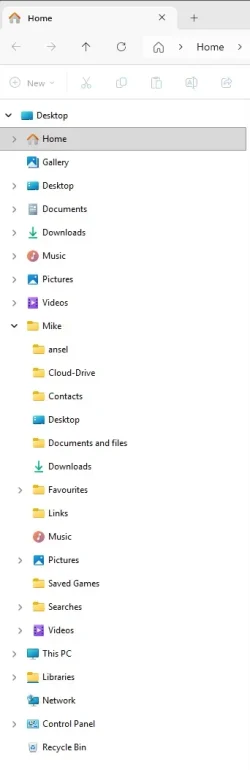
After reinstalling Windows 11, I realised that the Navigation Pane in File Explorer confuses me and I can't seem to find a single website that explains what parts there are to the pane (if such a division exists) and what each section and icon does? I looked through the other questions posted here but they don't seem to ask what I'm trying to find out. But if I have missed a question or page on this site, please tell me.

Here are some of my questions:
  1. Why is there a Home icon below the Desktop icon when I never see a home icon on the Desktop?
  2. Why are there two Desktops listed? Wouldn't it be more efficient to have just one?
  3. Since Windows is built on directories and subdirectories and so forth on to individual files, why are This PC and C:\ so far down the list?
  4. Why are the icons apparently listed in random order instead of from top down?
  5. If I want to search for a specific folder or file or program, where do I start looking? Why do I start there as opposed to higher up the list or under a different copy of the same icon, such as when I'm trying to find a file on my Desktop.
  6. I deleted the Documents folder (which I now think was a mistake) when I removed OneDrive. I replaced the Documents folder with a folder titled Documents and Files. But this listed only under below the Desktop icon under my name and not the Desktop at the top of the Navigation Pane.
  7. Why does Windows list USB flash drives twice on the Navigation Pane? And which one do click on to expand or when I want to select the location to save a file?

These are only the questions I can think of at this moment. I'm sure I'll come up with more as the day goes by. lol.

Cheers,
Mike
 

Attachments
  • Navigation Pane.webp
    Navigation Pane.webp
    17.9 KB · Views: 4

My Computer My Computer

At a glance

Windows 11 Pro - version 24H2AMD Ryzen 5 7600X 6 Core AM5 5.3GHz CPUSilicon Power XPOWER Zenith 32GB (16GBx2) CL3...MSI GeForce RTX 4060 Ventus 2X Black 8G OC Gr...
OS
Windows 11 Pro - version 24H2
Computer type
PC/Desktop
CPU
AMD Ryzen 5 7600X 6 Core AM5 5.3GHz CPU
Motherboard
2024 MSI MAG B650 GAMING PLUS WIFI
Memory
Silicon Power XPOWER Zenith 32GB (16GBx2) CL30,1.35V UDIMM 6000MHz DDR5 RAM
Graphics Card(s)
MSI GeForce RTX 4060 Ventus 2X Black 8G OC Graphics Card
Monitor(s) Displays
Asus ROG Strix XG32WCS - 32in HDR VA 180Hz USB Type-C FreeSync Curved Gaming Monitor
Screen Resolution
2560 x 1440
Hard Drives
1) Silicon Power 1TB P34A60 Gen3x4 TLC R/W up to 2,200/1,600 MB/s PCIe M.2 NVMe SSD

2) Crucial 1TB E100 CT1000E100SSD8 Gen4 M.2 NVMe SSD
PSU
MSI 750W MAG A750GL 80+ Gold PCIe 5 ATX 3.0 Modular Power Supply
Case
SilverStone Fara R1 Pro V2 Tempered Glass ATX Case - Black
Cooling
Thermalright Peerless Assassin 120 SE ARGB Dual Loop CPU Cooler, 120mm Fan
Antivirus
Microsoft Defender
Here are some of my questions:


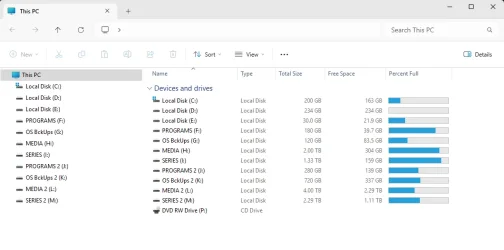
Scroll down to the File Explorer section, here...


Here's what my File Explorer looks like...


00000 Hard Drives1.webp


The first, best thing you can do for yourself, is to use backup software.
Then you can tweak all you want, and if you break something... just restore from a backup.
You won't have to reinstall Win 11 all the time.


My Computers My Computers

  • At a glance

    Win 11 Home ♦♦♦26200.8875 ♦♦♦♦♦♦♦25H2AMD Ryzen 7 3700XG.Skill (F4-3200C14D-16GTZKW)EVGA RTX 2070 (08G-P4-2171-KR)
    OS
    Win 11 Home ♦♦♦26200.8875 ♦♦♦♦♦♦♦25H2
    Computer type
    PC/Desktop
    Manufacturer/Model
    Built by Ghot® [May 2020]
    CPU
    AMD Ryzen 7 3700X
    Motherboard
    Asus Pro WS X570-ACE (BIOS 5302)
    Memory
    G.Skill (F4-3200C14D-16GTZKW)
    Graphics Card(s)
    EVGA RTX 2070 (08G-P4-2171-KR)
    Sound Card
    Realtek ALC1220P / ALC S1220A
    Monitor(s) Displays
    Dell U3011 30"
    Screen Resolution
    2560 x 1600
    Hard Drives
    2x Samsung 860 EVO 500GB,
    WD 4TB Black FZBX - SATA III,
    WD 8TB Black FZBX - SATA III,
    DRW-24B1ST CD/DVD Burner
    PSU
    PC Power & Cooling 750W Quad EPS12V
    Case
    Cooler Master ATCS 840 Tower
    Cooling
    CM Hyper 212 EVO (push/pull)
    Keyboard
    Ducky DK9008 Shine II Blue LED
    Mouse
    Logitech Optical M-100
    Internet Speed
    300/300
    Browser
    Firefox (latest)
    Antivirus
    Bitdefender Total Security
    Other Info
    Speakers: Klipsch Pro Media 2.1
  • At a glance

    Windows XP Pro 32bit w/SP3AMD Athlon 64 X2 5000+ (OC'd @ 3.2Ghz)TWIN2X2048-6400C4DHX (2 x 1GB, DDR2 800)EVGA 256-P2-N758-TR GeForce 8600GT SSC
    Operating System
    Windows XP Pro 32bit w/SP3
    Computer type
    PC/Desktop
    Manufacturer/Model
    Built by Ghot® (not in use)
    CPU
    AMD Athlon 64 X2 5000+ (OC'd @ 3.2Ghz)
    Motherboard
    ASUS M2N32-SLI Deluxe Wireless Edition
    Memory
    TWIN2X2048-6400C4DHX (2 x 1GB, DDR2 800)
    Graphics card(s)
    EVGA 256-P2-N758-TR GeForce 8600GT SSC
    Sound Card
    Onboard
    Monitor(s) Displays
    ViewSonic G90FB Black 19" Professional (CRT)
    Screen Resolution
    up to 2048 x 1536
    Hard Drives
    WD 36GB 10,000rpm Raptor SATA
    Seagate 80GB 7200rpm SATA
    Lite-On LTR-52246S CD/RW
    Lite-On LH-18A1P CD/DVD Burner
    PSU
    PC Power & Cooling Silencer 750 Quad EPS12V
    Case
    Generic Beige case, 80mm fans
    Cooling
    ZALMAN 9500A 92mm CPU Cooler
    Keyboard
    Logitech Classic Keybooard 200
    Mouse
    Logitech Optical M-BT96a
    Internet Speed
    300/300
    Browser
    Firefox 3.x ??
    Antivirus
    Symantec (Norton)
    Other Info
    Still assembled, still runs. Haven't turned it on for 15 years?
The navigation pane can be changed at the user's discretion but there are entirely too many tutorials for me to explain each one. Go here and scroll down to the "N" section and look for navigation pane. Tutorial Index

In file explorer, you can turn the navigation pane completely off if you wish. Select "view", select "Show", uncheck navigation pane.

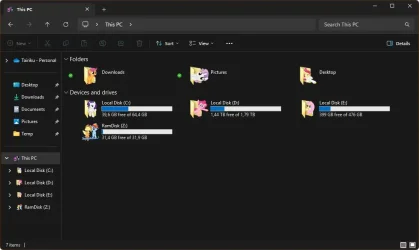
Just with those tutorials I ended up with this.
Screenshot 2025-10-05 023003.webp
 

My Computers My Computers

  • At a glance

    Windows 11 Pro 25H2 26200.8875i9-10900 10 core 20 threads32 gbnone-Intel UHD Graphics 630
    OS
    Windows 11 Pro 25H2 26200.8875
    Computer type
    PC/Desktop
    Manufacturer/Model
    Dell Optiplex 7080
    CPU
    i9-10900 10 core 20 threads
    Motherboard
    DELL 0J37VM
    Memory
    32 gb
    Graphics Card(s)
    none-Intel UHD Graphics 630
    Sound Card
    Integrated Realtek
    Monitor(s) Displays
    Benq 27
    Screen Resolution
    2560x1440
    Hard Drives
    2x1tb Solidigm m.2 nvme /External drives 512gb Samsung m.2 sata+2tb Kingston m2.nvme
    PSU
    500w
    Case
    MT
    Cooling
    Dell Premium
    Keyboard
    Logitech wired
    Mouse
    Logitech wireless
    Internet Speed
    so slow I'm too embarrassed to tell
    Browser
    #1 Edge #2 Firefox
    Antivirus
    Defender+MWB Premium
  • At a glance

    Windows 11 Pro 24H2 26200.8875AMD Ryzen 7 6800U32 gbintegrated
    Operating System
    Windows 11 Pro 24H2 26200.8875
    Computer type
    PC/Desktop
    Manufacturer/Model
    Beelink Mini PC SER5
    CPU
    AMD Ryzen 7 6800U
    Memory
    32 gb
    Graphics card(s)
    integrated
    Sound Card
    integrated
    Monitor(s) Displays
    Benq 27
    Screen Resolution
    2560x1440
    Hard Drives
    1TB Crucial nvme
    Keyboard
    Logitech wired
    Mouse
    Logitech wireless
    Internet Speed
    still too embarrassed to tell
    Browser
    Firefox
    Antivirus
    Defender
    Other Info
    System 3 is non compliant Dell 9020 i7-4770/24gb ram Win11 PRO 26200.8875
Here are some of my questions:
Basically too many cooks at MS and MS trying to make things "simpler" by adding everything, twice.
The easiest solution is to remove everything and pin folders you want. At least it is customizable.

capture_10052025_095101.webp

  1. Why are there two Desktops listed? Wouldn't it be more efficient to have just one?
For the record, there is Public Desktop and User's Desktop, not sure though, if those folders in Explorer are different.
  1. Why are the icons apparently listed in random order instead of from top down?
MS decision, you can drag and move your pinned folders at will.
 

My Computer My Computer

At a glance

Home26H2CanAMD Ryzen 5 8600G (07/24)2x32GB Kingston FURY DDR5 5600 MHz CL36 @5200...ASROCK Radeon RX 6600 Challenger D 8G @48FPS ...
OS
Home26H2Can
Computer type
PC/Desktop
CPU
AMD Ryzen 5 8600G (07/24)
Motherboard
ASROCK B650M-HDV/M.2 (07/24) BIOS 4.21 AGESA ComboAM5 1.3.0.1 (04/26)
Memory
2x32GB Kingston FURY DDR5 5600 MHz CL36 @5200 CL36 (07/24)
Graphics Card(s)
ASROCK Radeon RX 6600 Challenger D 8G @48FPS (08/24)
Sound Card
Creative Sound BlasterX AE-5 Plus (05/24)
Monitor(s) Displays
24" Philips 24M1N3200ZS/00 (05/24)
Screen Resolution
1920×1080@165Hz via DP1.4
Hard Drives
Kingston KC3000 NVMe 2TB (05/24)
ADATA XPG GAMMIX S11 Pro 512GB (07/19)
PSU
Seasonic Core GM 550 Gold (04/24)
Case
Fractal Design Define 7 Mini with 3x Noctua NF-P14s/12@555rpm (04/24)
Cooling
Noctua NH-U12S with Noctua NF-P12 (04/24)
Keyboard
HP Pavilion Wired Keyboard 300 (07/24) + Rabalux 76017 Parker (01/24)
Mouse
Logitech M330 Silent Plus (01/26)
Internet Speed
500/100 Mbps via RouterOS (05/21) & TCP Optimizer
Browser
Edge, Brave for YouTube, LibreWolf for FB
Antivirus
NextDNS blocking 1/3 Traffic
Other Info
Phone: Motorola Moto G86 (02/26)
Backup: Hasleo Backup Suite (PreOS)
Headphones: Sennheiser RS170 (09/10)
Chair: Huzaro Force 4.4 Grey Mesh (05/24)
Notifier: Xiaomi Mi Band 9 Milanese (10/24)
FlexCore USB-C 3.2 Gen 1 (M) to LAN (F) (08/25)
Scroll down to the File Explorer section, here...


Here's what my File Explorer looks like...


View attachment 147778


The first, best thing you can do for yourself, is to use backup software.
Then you can tweak all you want, and if you break something... just restore from a backup.
You won't have to reinstall Win 11 all the time.

Thanks Ghot. I bookmarked the Leader Board page since I'll probably be referring back to it for a while.

And, yes, I have backup software. Did a full system backup today. iDrive. Backed-up to their servers and then will create a local backup when I build an external SSD. Just waiting to see what prices Amazon has this week.
 

My Computer My Computer

At a glance

Windows 11 Pro - version 24H2AMD Ryzen 5 7600X 6 Core AM5 5.3GHz CPUSilicon Power XPOWER Zenith 32GB (16GBx2) CL3...MSI GeForce RTX 4060 Ventus 2X Black 8G OC Gr...
OS
Windows 11 Pro - version 24H2
Computer type
PC/Desktop
CPU
AMD Ryzen 5 7600X 6 Core AM5 5.3GHz CPU
Motherboard
2024 MSI MAG B650 GAMING PLUS WIFI
Memory
Silicon Power XPOWER Zenith 32GB (16GBx2) CL30,1.35V UDIMM 6000MHz DDR5 RAM
Graphics Card(s)
MSI GeForce RTX 4060 Ventus 2X Black 8G OC Graphics Card
Monitor(s) Displays
Asus ROG Strix XG32WCS - 32in HDR VA 180Hz USB Type-C FreeSync Curved Gaming Monitor
Screen Resolution
2560 x 1440
Hard Drives
1) Silicon Power 1TB P34A60 Gen3x4 TLC R/W up to 2,200/1,600 MB/s PCIe M.2 NVMe SSD

2) Crucial 1TB E100 CT1000E100SSD8 Gen4 M.2 NVMe SSD
PSU
MSI 750W MAG A750GL 80+ Gold PCIe 5 ATX 3.0 Modular Power Supply
Case
SilverStone Fara R1 Pro V2 Tempered Glass ATX Case - Black
Cooling
Thermalright Peerless Assassin 120 SE ARGB Dual Loop CPU Cooler, 120mm Fan
Antivirus
Microsoft Defender
Basically too many cooks at MS and MS trying to make things "simpler" by adding everything, twice.
The easiest solution is to remove everything and pin folders you want. At least it is customizable.

View attachment 147780


For the record, there is Public Desktop and User's Desktop, not sure though, if those folders in Explorer are different.

MS decision, you can drag and move your pinned folders at will.
Public and User desktops? I suppose it makes sense for some. But it's confusing for me. Yes, at least it's customizable. I've already added several quick access pins.
 

My Computer My Computer

At a glance

Windows 11 Pro - version 24H2AMD Ryzen 5 7600X 6 Core AM5 5.3GHz CPUSilicon Power XPOWER Zenith 32GB (16GBx2) CL3...MSI GeForce RTX 4060 Ventus 2X Black 8G OC Gr...
OS
Windows 11 Pro - version 24H2
Computer type
PC/Desktop
CPU
AMD Ryzen 5 7600X 6 Core AM5 5.3GHz CPU
Motherboard
2024 MSI MAG B650 GAMING PLUS WIFI
Memory
Silicon Power XPOWER Zenith 32GB (16GBx2) CL30,1.35V UDIMM 6000MHz DDR5 RAM
Graphics Card(s)
MSI GeForce RTX 4060 Ventus 2X Black 8G OC Graphics Card
Monitor(s) Displays
Asus ROG Strix XG32WCS - 32in HDR VA 180Hz USB Type-C FreeSync Curved Gaming Monitor
Screen Resolution
2560 x 1440
Hard Drives
1) Silicon Power 1TB P34A60 Gen3x4 TLC R/W up to 2,200/1,600 MB/s PCIe M.2 NVMe SSD

2) Crucial 1TB E100 CT1000E100SSD8 Gen4 M.2 NVMe SSD
PSU
MSI 750W MAG A750GL 80+ Gold PCIe 5 ATX 3.0 Modular Power Supply
Case
SilverStone Fara R1 Pro V2 Tempered Glass ATX Case - Black
Cooling
Thermalright Peerless Assassin 120 SE ARGB Dual Loop CPU Cooler, 120mm Fan
Antivirus
Microsoft Defender
Public Desktop is for app shortcuts for All Users. In previous versions of Windows this was called the All Users folder
User Folder is for you or whomever is the logged on User and only has shortcuts to apps that are only for the logged on user. Unless it is for All Users, than the shortcuts from the Public desktop will also show.

Yes, it is confusing, but that is Microsoft making it Easier for us.
 
Last edited:

My Computer My Computer

At a glance

Windows 11 Pro Insider 64 bit 25H2 26200.5742Intel Core i7 9700K 3.6016 GBnVidia GEForce RTX 2060 Super
OS
Windows 11 Pro Insider 64 bit 25H2 26200.5742
Computer type
PC/Desktop
Manufacturer/Model
Gigabyte Z390 UD
CPU
Intel Core i7 9700K 3.60
Motherboard
Gigabyte Z390 UD
Memory
16 GB
Graphics Card(s)
nVidia GEForce RTX 2060 Super
Sound Card
onboard
Monitor(s) Displays
Two 27" Dell 4K monitors
Screen Resolution
3840 x 2160
Hard Drives
M.2 NVME SSD, 500 GB; Two 2TB Mechanical HDD's
PSU
850w PSU
Case
Cyberpower PC
Cooling
Water cooled
Keyboard
Backlit Cyberpower gaming keyboard
Mouse
Backlit Cyberpower gaming mouse
Internet Speed
1 GB mbps
Browser
Brave
Antivirus
Windows Security
Public Desktop is for app shortcuts for All Users. In previous versions of Windows this was called the All Users folder
User Folder is for you or whomever is the logged on User and only has shortcuts to apps that are only for the logged on user. Unless it is for All Users, than the shortcuts from the Public desktop will also show.

Yes, it is confusing, but that is Microsoft making it Easier for us.
lol. Yes, easier. Thanks, Spunk.
 

My Computer My Computer

At a glance

Windows 11 Pro - version 24H2AMD Ryzen 5 7600X 6 Core AM5 5.3GHz CPUSilicon Power XPOWER Zenith 32GB (16GBx2) CL3...MSI GeForce RTX 4060 Ventus 2X Black 8G OC Gr...
OS
Windows 11 Pro - version 24H2
Computer type
PC/Desktop
CPU
AMD Ryzen 5 7600X 6 Core AM5 5.3GHz CPU
Motherboard
2024 MSI MAG B650 GAMING PLUS WIFI
Memory
Silicon Power XPOWER Zenith 32GB (16GBx2) CL30,1.35V UDIMM 6000MHz DDR5 RAM
Graphics Card(s)
MSI GeForce RTX 4060 Ventus 2X Black 8G OC Graphics Card
Monitor(s) Displays
Asus ROG Strix XG32WCS - 32in HDR VA 180Hz USB Type-C FreeSync Curved Gaming Monitor
Screen Resolution
2560 x 1440
Hard Drives
1) Silicon Power 1TB P34A60 Gen3x4 TLC R/W up to 2,200/1,600 MB/s PCIe M.2 NVMe SSD

2) Crucial 1TB E100 CT1000E100SSD8 Gen4 M.2 NVMe SSD
PSU
MSI 750W MAG A750GL 80+ Gold PCIe 5 ATX 3.0 Modular Power Supply
Case
SilverStone Fara R1 Pro V2 Tempered Glass ATX Case - Black
Cooling
Thermalright Peerless Assassin 120 SE ARGB Dual Loop CPU Cooler, 120mm Fan
Antivirus
Microsoft Defender
Back
Top Bottom