.Nbu explorer - .net framework not found


Hazel123

Well-known member
Pro User
VIP
Local time
6:24 PM
Posts
3,989
OS
Windows 11 Home 25H2
Sorry if the title doesn't quite explain it. I wanted to look up some old text messages to find some info from an old Nokia phone about 15 years ago. The backups are on my computer. I still had a copy of .nbu explorer to open/read them. So went to install it and it says this program requires .net framework 2.0 and 3.0 (I think it was 3.0 - might have been 3.5) do you want to install them - so accepted installation of them thinking I can always uninstall later.

Anyway now I can't find them in my list of programs to uninstall - not sure what happened there but as they are quite old I don't think I want them on the computer now I've done the job of reading the old text messages. Any ideas what happened or where to find them?
 

My Computers

System One System Two

  • OS
    Windows 11 Home 25H2
    Computer type
    Laptop
    Manufacturer/Model
    HP Pavilion 14-ce3606sa
    CPU
    Core i5-1035G1
    Memory
    32gb
    Hard Drives
    Samsung 870 evo sata ssd
    Cooling
    Could be better
    Internet Speed
    50 mbps Starlink
    Browser
    Firefox
    Other Info
    Originally came installed with a 500gb H10 Optane ssd
  • Operating System
    Windows 11 Home
    Computer type
    Laptop
    Manufacturer/Model
    HP Pavilion ce3606sa
    CPU
    Intel Core i5-1035G1
    Memory
    16gb
    Hard Drives
    Hynix Gold P31 2TB
    Internet Speed
    200mbps Starlink
    Browser
    Firefox
    Antivirus
    Defender

My Computers

System One System Two

  • OS
    Win11 Pro RTM Version 24H2 Build 26100.4202
    Computer type
    Laptop
    Manufacturer/Model
    Dell Vostro 3400
    CPU
    Intel Core i5 11th Gen. 2.40GHz
    Memory
    12GB
    Hard Drives
    256GB SSD NVMe M.2
  • Operating System
    Win11 Pro RTM Version 24H2 Build 26100.4202
    Computer type
    PC/Desktop
    Manufacturer/Model
    Dell Vostro 5890
    CPU
    Intel Core i5 10th Gen. 2.90GHz
    Memory
    16GB
    Graphics card(s)
    Onboard, no VGA, using a DisplayPort-to-VGA adapter
    Monitor(s) Displays
    24" Dell
    Hard Drives
    512GB SSD NVMe, 4TB Seagate HDD
    Browser
    Firefox, Edge
    Antivirus
    Windows Defender/Microsoft Security

My Computer

System One

  • OS
    Windows 11 Pro 25H2
    Computer type
    PC/Desktop
    Manufacturer/Model
    Intel NUC12WSHi7
    CPU
    12th Gen Core i7-1260P
    Motherboard
    NUC12WSBi7
    Memory
    64 GB Micron PC4-25600
    Graphics Card(s)
    Intel Iris Xe Graphics
    Sound Card
    on-board Realtek HD Audio
    Monitor(s) Displays
    Dell U3219Q
    Screen Resolution
    3840 x 2160
    Hard Drives
    Samsung SSD 990 PRO 1TB
    Crucial MX500 2 TB
    Antivirus
    Microsoft Defender
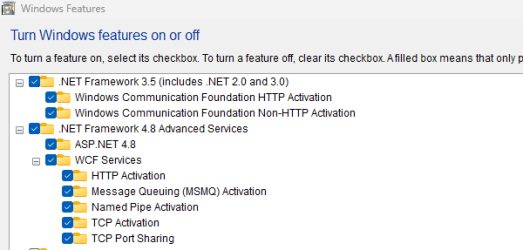
Sorry, misread the last paragraph. .NET can be turned off in Programs and Features:

1722870378249.png
 

My Computers

System One System Two

  • OS
    Win11 Pro RTM Version 24H2 Build 26100.4202
    Computer type
    Laptop
    Manufacturer/Model
    Dell Vostro 3400
    CPU
    Intel Core i5 11th Gen. 2.40GHz
    Memory
    12GB
    Hard Drives
    256GB SSD NVMe M.2
  • Operating System
    Win11 Pro RTM Version 24H2 Build 26100.4202
    Computer type
    PC/Desktop
    Manufacturer/Model
    Dell Vostro 5890
    CPU
    Intel Core i5 10th Gen. 2.90GHz
    Memory
    16GB
    Graphics card(s)
    Onboard, no VGA, using a DisplayPort-to-VGA adapter
    Monitor(s) Displays
    24" Dell
    Hard Drives
    512GB SSD NVMe, 4TB Seagate HDD
    Browser
    Firefox, Edge
    Antivirus
    Windows Defender/Microsoft Security

My Computers

System One System Two

  • OS
    Windows 11 Home 25H2
    Computer type
    Laptop
    Manufacturer/Model
    HP Pavilion 14-ce3606sa
    CPU
    Core i5-1035G1
    Memory
    32gb
    Hard Drives
    Samsung 870 evo sata ssd
    Cooling
    Could be better
    Internet Speed
    50 mbps Starlink
    Browser
    Firefox
    Other Info
    Originally came installed with a 500gb H10 Optane ssd
  • Operating System
    Windows 11 Home
    Computer type
    Laptop
    Manufacturer/Model
    HP Pavilion ce3606sa
    CPU
    Intel Core i5-1035G1
    Memory
    16gb
    Hard Drives
    Hynix Gold P31 2TB
    Internet Speed
    200mbps Starlink
    Browser
    Firefox
    Antivirus
    Defender
That's where it is, thank you. Screenshot below. So does that mean it's still installed but turned off?
Yes. But do be aware that some other program you have installed may still need it or may not work properly.
 

My Computers

System One System Two

  • OS
    Win11 Pro RTM Version 24H2 Build 26100.4202
    Computer type
    Laptop
    Manufacturer/Model
    Dell Vostro 3400
    CPU
    Intel Core i5 11th Gen. 2.40GHz
    Memory
    12GB
    Hard Drives
    256GB SSD NVMe M.2
  • Operating System
    Win11 Pro RTM Version 24H2 Build 26100.4202
    Computer type
    PC/Desktop
    Manufacturer/Model
    Dell Vostro 5890
    CPU
    Intel Core i5 10th Gen. 2.90GHz
    Memory
    16GB
    Graphics card(s)
    Onboard, no VGA, using a DisplayPort-to-VGA adapter
    Monitor(s) Displays
    24" Dell
    Hard Drives
    512GB SSD NVMe, 4TB Seagate HDD
    Browser
    Firefox, Edge
    Antivirus
    Windows Defender/Microsoft Security
IMHO, it's probably best to leave the .NET versions installed. Even the older versions as some older programs need them.

.NET 2 and 3 are deprecated, but 3.5 installs them when you install .NET 3.5. In my experience, it is best to just leave them be and not turn them off. It prevents weird errors that come up later and are hard to diagnose.

Older versions of .NET are the first thing I activate on a new Windows install as some of the software I use depends upon it.
 

My Computer

System One

  • OS
    Win 11 Pro 25H2
    Computer type
    PC/Desktop
    Manufacturer/Model
    Self build
    CPU
    Intel i7 13700KF
    Motherboard
    Gigabyte Z790 UD AC
    Memory
    32 GB Team Group DDR5 - 6000 CL 30
    Graphics Card(s)
    ASUS TUF GAMING RTX 3070 Ti
    Sound Card
    On board Realtek
    Monitor(s) Displays
    ACER 34 inch
    Screen Resolution
    4K
    Hard Drives
    1 TB Samsung 980 Pro Nvme, 1 TB Samsung 970 EVO Nvme, 2 x Samsung 970 2TB SSD SATA
    PSU
    EVGA 1000Q
    Case
    Rosewill something or other
    Cooling
    Noctua NH-D15. A whole schwak of Noctua case fans. $$$
    Keyboard
    Logitech G815
    Mouse
    Logitech G502 Hero
    Internet Speed
    700 up, 600 down
    Browser
    Firefox
    Antivirus
    MalwareBytes
That's where it is, thank you. Screenshot below. So does that mean it's still installed but turned off?
As it stands, the .Net Framework options may / may not be installed. You need to open the tree for each of these entries and ensure they are all checked -
1.png
 

My Computer

System One

  • OS
    Windows 11 Pro 25H2 (Build 26200.8728)
    Computer type
    PC/Desktop
    Manufacturer/Model
    Dell Pro Max Tower T2 FCT2250
    CPU
    Intel Core Ultra 9 285 5.6 GHz
    Motherboard
    64-bit operating system, x64-based processor
    Memory
    32.00 GB
    Graphics Card(s)
    Intel Integrated Graphics (128 MB)
    Sound Card
    Realtek Audio
    Monitor(s) Displays
    Dell P2714H Monitor
    Screen Resolution
    1920 x 1080
    Hard Drives
    1 x 512GB M.2 XG10d SED KIOXIA PCIe solid state drive (Internal)
    1 x 2TB Seagate ST2000DM008-2UB102 HDD (Internal)
    1 x 1TB Seagate STGX4000400 External HDD
    1 x 4TB Seagate STGX4000400 External HDD
    1 x 6TB WD Elements AE 2689 External HDD
    PSU
    500 Watts
    Cooling
    Air
    Keyboard
    Microsoft Wired Keyboard 600
    Mouse
    Microsoft USB Basic Optical Mouse v2.0
    Browser
    Firefox
    Antivirus
    Windows Defender + Malwarebytes Premium
    Other Info
    BaseBoard Manufacturer Dell Inc.
    BaseBoard Product 022RY57
    BaseBoard Version A01
Back
Top Bottom