
Navigation
Install the app
How to install the app on iOS
Follow along with the video below to see how to install our site as a web app on your home screen.
Note: This feature may not be available in some browsers.
More options
Style variation
System
Light
Dark
You are using an out of date browser. It may not display this or other websites correctly.
You should upgrade or use an alternative browser.
You should upgrade or use an alternative browser.
Need help running Windows 95 software
- Thread starter VCP
- Start date

- Local time
- 7:19 PM
- Posts
- 894
- OS
- Win 11 Pro 25H2
It would help us if we knew the software package you are trying to run.
Keep in mind, Windows 11 64 bit does not like to install or run 16 bit programs. You may have to do this with a virtual machine running XP or something similar that allows 16 bit program installation. I am not the biggest expert in this, but I just wanted to add these few points.
Keep in mind, Windows 11 64 bit does not like to install or run 16 bit programs. You may have to do this with a virtual machine running XP or something similar that allows 16 bit program installation. I am not the biggest expert in this, but I just wanted to add these few points.
My Computers
-
At a glance
Win 11 Pro 25H2Intel i7 13700KF32 GB Team Group DDR5 - 6000 CL 30ASUS TUF GAMING RTX 3070 Ti- OS
- Win 11 Pro 25H2
- Computer type
- PC/Desktop
- Manufacturer/Model
- Self build
- CPU
- Intel i7 13700KF
- Motherboard
- Gigabyte Z790 UD AC
- Memory
- 32 GB Team Group DDR5 - 6000 CL 30
- Graphics Card(s)
- ASUS TUF GAMING RTX 3070 Ti
- Sound Card
- On board Realtek
- Monitor(s) Displays
- ACER 34 inch
- Screen Resolution
- Not 4K like I thought. 35" wide though.
- Hard Drives
- 1 TB Samsung 980 Pro Nvme, 1 TB Samsung 970 EVO Nvme, 2 x Samsung 970 2TB SSD SATA
- PSU
- EVGA 1000Q
- Case
- Rosewill something or other
- Cooling
- Noctua NH-D15. A whole schwak of Noctua case fans. $$$
- Keyboard
- Logitech G815
- Mouse
- Logitech G502 Hero
- Internet Speed
- 700 up, 600 down
- Browser
- Firefox
- Antivirus
- MalwareBytes
-
At a glance
Widows 11 ProRyzen 2700X32 GB DDR4XFX Radeon R9 280- Operating System
- Widows 11 Pro
- Computer type
- PC/Desktop
- Manufacturer/Model
- Self build
- CPU
- Ryzen 2700X
- Motherboard
- MSI X470 Gaming Plus Max
- Memory
- 32 GB DDR4
- Graphics card(s)
- XFX Radeon R9 280
- Sound Card
- Onboard
- Monitor(s) Displays
- Two 27 inch Acer monitors
- Screen Resolution
- 1920 x 1080
- Hard Drives
- One 1 TB NVME (Samsung)
- PSU
- Corsair 750 Watt
- Case
- HAF 912
- Cooling
- Wraith cooler and case fans
- Keyboard
- Logitech G710+
- Mouse
- Generic
- Internet Speed
- 700 down, 650 up
- Browser
- Firefox, Chrome
- Antivirus
- Malware bytes

16 bit DOS-based apps can be run on a 64 bit OS using DosBox.I have a Windows 95 software application and I'm looking for help finding a simulator in which I can run it (or some other means).
DOSBox, an x86 emulator with DOS
For apps that require Windows, then Windows '95 can be run as a virtual machine in VirtualBox, as I have done here:
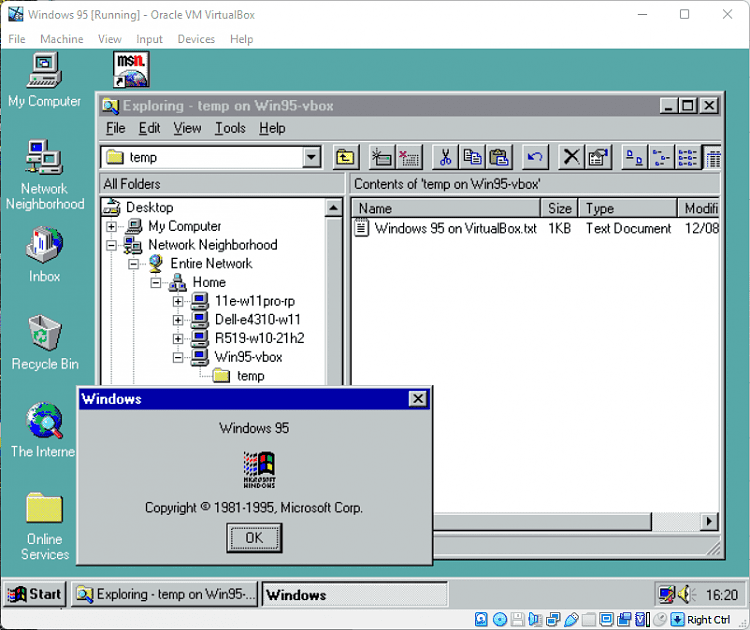
Oracle VM VirtualBox
My Computers
-
At a glance
Windows 11 HomeAMD Athlon Silver 3050U8GBRadeon Graphics- OS
- Windows 11 Home
- Computer type
- Laptop
- Manufacturer/Model
- Acer Aspire 3 A315-23-R9VY
- CPU
- AMD Athlon Silver 3050U
- Memory
- 8GB
- Graphics Card(s)
- Radeon Graphics
- Monitor(s) Displays
- laptop screen
- Screen Resolution
- 1366x768 native resolution, up to 2560x1440 with Radeon Virtual Super Resolution
- Hard Drives
- 1TB Samsung EVO 870 SSD (from April 2026: 250GB EVO 850)
- Internet Speed
- 150 Mbps
- Browser
- Edge, Firefox
- Antivirus
- Defender
- Other Info
- UPDATE - 11 April 2026: due to lid hinges starting to break up this laptop has been retired from active duty. The OS with all software and files has been migrated to my System Seven in 'Other systems' to carry on as my general purpose 'main machine'.
I've now clean installed 25H2 and used Garlin's scripts to update Secure Boot to CA 2023 and revoke the PCA 2011 certificates. It's new role is to test secure boot issues.
Info for 2021-2026:
fully 'Windows 11 ready' laptop. Windows 10 C: partition migrated from my old unsupported 'main machine' then upgraded to 11. A test migration ran Insider builds for 2 months. When 11 was released on 5th October 2021 it was re-imaged back to 10 and was offered the upgrade in Windows Update on 20th October. Windows Update offered the 22H2 Feature Update on 20th September 2022. It got the 23H2 Feature Update on 4th November 2023 through Windows Update, 24H2 on 3rd October 2024 through Windows Update by setting the Target Release Version for 24H2, and 25H2 on 30th September 2025 through Windows Update by setting the Target Release Version for 25H2.
-
At a glance
Windows 11 ProIntel® Core™ i5-520M8GB(integrated graphics) Intel HD Graphics- Operating System
- Windows 11 Pro
- Computer type
- Laptop
- Manufacturer/Model
- Dell Latitude E4310
- CPU
- Intel® Core™ i5-520M
- Motherboard
- 0T6M8G
- Memory
- 8GB
- Graphics card(s)
- (integrated graphics) Intel HD Graphics
- Screen Resolution
- 1366x768
- Hard Drives
- 500GB Crucial MX500 SSD
- Browser
- Firefox, Edge
- Antivirus
- Defender
- Other Info
- unsupported machine: Legacy bios, MBR, TPM 1.2, upgraded from W10 to W11 using W10/W11 hybrid install media workaround.
In-place upgrade to 22H2 using ISO and a workaround.
Feature Update to 23H2 by manually installing the Enablement Package.
In-place upgrade to 24H2 using hybrid 23H2/24H2 install media.
Upgraded to 25H2 by Enablement Package.
Upgraded to 26H2 by Enablement Package.
Also running Insider Experimental 263xx and 29xxx builds and Windows 10 as native boot .vhdx.
-
My SYSTEM THREE is a Dell Latitude 5410, i7-10610U, 32GB RAM, 512GB NVMe ssd, supported device running Windows 11 Pro.
My SYSTEM FOUR was a 2-in-1 convertible Lenovo Yoga 11e (1st gen) type 20DA, Celeron N2930, 8GB RAM, 256GB ssd. Unsupported device. This has now been sold. It has been replaced by my System Eight.
My SYSTEM FIVE is a Dell Latitude 3190 2-in-1, Pentium Silver N5030, 8GB RAM, 1TB NVMe ssd, supported device running Windows 11 Pro, plus Insider Beta, Experimental 263xx and 29xxx builds (and a few others) as a native boot .vhdx.
My SYSTEM SIX is a Dell Latitude 5550, Core Ultra 7 165H, 64GB RAM, 1TB NVMe SSD, supported device, Windows 11 Pro, Hyper-V host machine. Updated to 25H2 on 30th September 2025, 26H2 on 29th September 2026.
My SYSTEM SEVEN is a Lenovo Thinkpad T580, 1920x1080 touchscreen, Intel Core i7-8650U, 16GB RAM, 512GB NVMe SSD + 2nd 512GB NVMe SSD, a supported device for Windows 11. This is my current general purpose 'main machine'. The installed Windows 11 Home from my System One has been migrated to this machine. As its new home has an existing digital licence for Pro I've been able to upgrade the migrated OS from Home to Pro.
29 Sept. 2026 Feature Update to 26H2 through Windows Update.
My SYSTEM EIGHT is a 2-in-1 convertible Lenovo Yoga 11e (5th gen) type 20LN, Celeron N4120, 8GB RAM, 512GB NVMe ssd, a supported device for Windows 11. Currently running Windows 11 Pro, plus Insider Beta, Experimental 263xx and 29xxx builds as native boot vhdx.
- Local time
- 4:19 PM
- Posts
- 4,977
- OS
- Win11 Pro RTM Version 24H2 Build 26100.4202
I have 4 programs that work on Win10/Win11 from late '90s, DeltaCAD 3, DeltaCAD 4, ClarisWorks5 and a copy of the File Manager from Windows 3.1. None had to be installed, run as Portable Apps.

Last edited:
My Computers
-
At a glance
Win11 Pro RTM Version 24H2 Build 26100.4202Intel Core i5 11th Gen. 2.40GHz12GB- OS
- Win11 Pro RTM Version 24H2 Build 26100.4202
- Computer type
- Laptop
- Manufacturer/Model
- Dell Vostro 3400
- CPU
- Intel Core i5 11th Gen. 2.40GHz
- Memory
- 12GB
- Hard Drives
- 256GB SSD NVMe M.2
-
At a glance
Win11 Pro RTM Version 24H2 Build 26100.4202Intel Core i5 10th Gen. 2.90GHz16GBOnboard, no VGA, using a DisplayPort-to-VGA a...- Operating System
- Win11 Pro RTM Version 24H2 Build 26100.4202
- Computer type
- PC/Desktop
- Manufacturer/Model
- Dell Vostro 5890
- CPU
- Intel Core i5 10th Gen. 2.90GHz
- Memory
- 16GB
- Graphics card(s)
- Onboard, no VGA, using a DisplayPort-to-VGA adapter
- Monitor(s) Displays
- 24" Dell
- Hard Drives
- 512GB SSD NVMe, 4TB Seagate HDD
- Browser
- Firefox, Edge
- Antivirus
- Windows Defender/Microsoft Security

Or use the built in Hyper V if you have Windows Pro.16 bit DOS-based apps can be run on a 64 bit OS using DosBox.
DOSBox, an x86 emulator with DOS
www.dosbox.com
For apps that require Windows, then Windows '95 can be run as a virtual machine in VirtualBox, as I have done here:
Oracle VM VirtualBox
www.virtualbox.org
My Computer
At a glance
Windows 11 ProCore i7-13700K64 GB Kingston Fury Beast DDR5Gigabyte GeForce RTX 2060 Super Gaming OC 8G
- OS
- Windows 11 Pro
- Computer type
- PC/Desktop
- Manufacturer/Model
- Self build
- CPU
- Core i7-13700K
- Motherboard
- Asus TUF Gaming Plus WiFi Z790
- Memory
- 64 GB Kingston Fury Beast DDR5
- Graphics Card(s)
- Gigabyte GeForce RTX 2060 Super Gaming OC 8G
- Sound Card
- Realtek S1200A
- Monitor(s) Displays
- Viewsonic VP2770 & Dell (secondary)
- Screen Resolution
- 2560 x 1440
- Hard Drives
- Kingston KC3000 2TB NVME SSD & SATA HDDs & SSD
- PSU
- EVGA SuperNova G2 850W
- Case
- Nanoxia Deep Silence 1
- Cooling
- Noctua NH-D14
- Keyboard
- Microsoft Digital Media Pro
- Mouse
- Logitech Wireless
- Internet Speed
- 80 Mb / s
- Browser
- Chrome
- Antivirus
- Defender, Malwarebytes Free & AdwCleaner

DosBox is definitely the way to go if you want to run Windows ME and earlier OS/applications. You can even make it run Windows 2000 and earlier with a little bit (quite a lot) of fiddling. Please note that NT based Windows operating systems are NOT supported by DosBox, but it's possible to make it work too.
And yeah, another option is VirtualBox...has very good legacy support.
And yeah, another option is VirtualBox...has very good legacy support.
My Computers
-
At a glance
Win 11 Pro 26H2 26300.9818 / Linux Mint 22.3Ryzen 7 2700U Pro32GBiGPU Vega 10- OS
- Win 11 Pro 26H2 26300.9818 / Linux Mint 22.3
- Computer type
- Laptop
- Manufacturer/Model
- Lenovo A485
- CPU
- Ryzen 7 2700U Pro
- Motherboard
- Lenovo (WiFi/BT module upgraded to Intel Wireless-AC-9260)
- Memory
- 32GB
- Graphics Card(s)
- iGPU Vega 10
- Sound Card
- Realtek
- Monitor(s) Displays
- 14" FHD (built-in) + 14" Lenovo Thinkvision M14t (touch+pen) + 32" Asus PB328
- Screen Resolution
- FHD + FHD + 1440p
- Hard Drives
- Intel 660p m.2 nVME PCIe3.0 x2 512GB
- PSU
- 125W(Dock)/65W(Travel Adapter)
- Keyboard
- Thinkpad / Logitech MX Keys
- Mouse
- Logitech MX Master 2S
- Internet Speed
- 1/1Gbit
- Browser
- Firefox
- Antivirus
- Windows Defender
- Other Info
- SecureBoot: Enabled
TPM2.0: Enabled
AMD-V: Enabled
-
At a glance
Win 11 Pro 26H2 26300.9818(RP)i7-7700k @4.8GHz32GB 2x16GB 2133MHz CL15EVGA GTX1080Ti FTW 11GB- Operating System
- Win 11 Pro 26H2 26300.9818(RP)
- Computer type
- PC/Desktop
- Manufacturer/Model
- Custom
- CPU
- i7-7700k @4.8GHz
- Motherboard
- Asus PRIME Z270-A
- Memory
- 32GB 2x16GB 2133MHz CL15
- Graphics card(s)
- EVGA GTX1080Ti FTW 11GB
- Sound Card
- Integrated
- Monitor(s) Displays
- 32" 10-bit Asus PB328Q
- Screen Resolution
- WQHD 2560x1440
- Hard Drives
- 512GB ADATA SX8000NP NVMe PCIe Gen 3 x4
- PSU
- 850W
- Case
- Fractal Design Define 7
- Cooling
- Noctua NH-D15 chromax.black
- Keyboard
- Logitech MX Keys
- Mouse
- Logitech MX Master 2S
- Internet Speed
- 1/1Gbit
- Browser
- Firefox
- Antivirus
- Windows Defender
- Other Info
- AC WiFi Card
-
Asus U46SV (laptop), i5-2410M, 8GB RAM, 500GB SSD, 750GB HDD, Windows 10. (used as a local Minecraft server and data dump)

I've been playing around with 86Box. It's a machine emulator.

 86box.net
Emulator of retro x86-based machines
86box.net
My Computers
-
At a glance
Win 11 Pro 26H2 26300.9818Intel® Core™ i7-14700KG.SKILL Ripjaws S5 Series 64GB (2 x 32GB) DDR5ASUS GeForce RTX 4070 Super 12GB- OS
- Win 11 Pro 26H2 26300.9818
- Computer type
- PC/Desktop
- Manufacturer/Model
- Self Built
- CPU
- Intel® Core™ i7-14700K
- Motherboard
- ASUS TUF Z690-PLUS WIFI (BIOS 4601)
- Memory
- G.SKILL Ripjaws S5 Series 64GB (2 x 32GB) DDR5
- Graphics Card(s)
- ASUS GeForce RTX 4070 Super 12GB
- Sound Card
- Sound Blaster AE-5 Plus
- Monitor(s) Displays
- ASUS TUF Gaming 27" 2K HDR Gaming
- Screen Resolution
- 2560 x 1440
- Hard Drives
- Samsung 990 Pro 1TB NVMe (Win 11 25H2)
SK hynix P41 500GB NVMe
SK hynix P41 2TB NVMe (x3)
Crucial P3 Plus 4TB
- PSU
- Corsair RM850x Shift
- Case
- Antec Dark Phantom DP502 FLUX
- Cooling
- Corsair Nautilus 360 RS AIO
- Keyboard
- Logitech MK 320
- Mouse
- Razer Basilisk V3
- Internet Speed
- 750Mbs
- Browser
- Firefox
- Antivirus
- Winows Security
- Other Info
- MR 8.1 Home
-
At a glance
Win 11 Pro 26H2 26300.9818Intel Core i5-1140064 GB DDR4MSI GeForce RTX 3060 Ventus 2X 12GB- Operating System
- Win 11 Pro 26H2 26300.9818
- Computer type
- PC/Desktop
- Manufacturer/Model
- Self Built
- CPU
- Intel Core i5-11400
- Motherboard
- Asus TUF Gaming Z590 Plus WiFi (BIOS 2803)
- Memory
- 64 GB DDR4
- Graphics card(s)
- MSI GeForce RTX 3060 Ventus 2X 12GB
- Sound Card
- SoundBlaster Audigy Fx V2
- Monitor(s) Displays
- Samsung F27T350
- Screen Resolution
- 1920x1080
- Hard Drives
- Samsung 980 Pro 1TB
Samsung 970 EVO Plus 2TB
Samsung 870 EVO 500GB SSD
- PSU
- Corsair HX750
- Case
- Cougar MX330-G Window
- Cooling
- Thermalright Frozen Edge 240 Black AIO
- Internet Speed
- 350Mbps
- Browser
- Firefox
- Antivirus
- Windows Security
-
System Three
Win 11 Pro 26H2 26300.9818
ASUS PRIME Z370-P II BIOS 3004 7/12/21
Intel Core i7-8700 CPU @ 3.20GHz
32GB DDR4 RAM (4x8)
Samsung 980 Pro 500 GB
SK hynix P41 1 TB
EVGA RTX 2060 (used)
iGPU Intel UHD Graphics 630 (backup)
Cooler Master Hyper 212
Mid-Tower Desktop

- Local time
- 1:19 AM
- Posts
- 79
- OS
- macOS
Use VirtualBox or Hyper-V, to install Windows 95/98, and then install the program you want to run, on it.I have a Windows 95 software application and I'm looking for help finding a simulator in which I can run it (or some other means).
My Computer
At a glance
macOSApple silicon M432 GBApple silicon M4
- OS
- macOS
- Computer type
- PC/Desktop
- Manufacturer/Model
- Mac mini M4
- CPU
- Apple silicon M4
- Memory
- 32 GB
- Graphics Card(s)
- Apple silicon M4
- Monitor(s) Displays
- LG 27GN650-B IPS HDR Gaming Monitor 27" FHD
- Screen Resolution
- 1080p
- Hard Drives
- Apple SSD AP1024Z
- Internet Speed
- 1 Gbps / 1 Gbps symmetrical FTTH (GPON)
- Browser
- Microsoft Edge
No, you can't. It is impossible to install Windows '95 in Hyper-V (I know, I've tried). The oldest Windows guest Hyper-V supports is XP. Officially it isn't even supposed to support that. MS say it's for Windows Vista (SP2) or above.Or use the built in Hyper V if you have Windows Pro.

My Computers
-
At a glance
Windows 11 HomeAMD Athlon Silver 3050U8GBRadeon Graphics- OS
- Windows 11 Home
- Computer type
- Laptop
- Manufacturer/Model
- Acer Aspire 3 A315-23-R9VY
- CPU
- AMD Athlon Silver 3050U
- Memory
- 8GB
- Graphics Card(s)
- Radeon Graphics
- Monitor(s) Displays
- laptop screen
- Screen Resolution
- 1366x768 native resolution, up to 2560x1440 with Radeon Virtual Super Resolution
- Hard Drives
- 1TB Samsung EVO 870 SSD (from April 2026: 250GB EVO 850)
- Internet Speed
- 150 Mbps
- Browser
- Edge, Firefox
- Antivirus
- Defender
- Other Info
- UPDATE - 11 April 2026: due to lid hinges starting to break up this laptop has been retired from active duty. The OS with all software and files has been migrated to my System Seven in 'Other systems' to carry on as my general purpose 'main machine'.
I've now clean installed 25H2 and used Garlin's scripts to update Secure Boot to CA 2023 and revoke the PCA 2011 certificates. It's new role is to test secure boot issues.
Info for 2021-2026:
fully 'Windows 11 ready' laptop. Windows 10 C: partition migrated from my old unsupported 'main machine' then upgraded to 11. A test migration ran Insider builds for 2 months. When 11 was released on 5th October 2021 it was re-imaged back to 10 and was offered the upgrade in Windows Update on 20th October. Windows Update offered the 22H2 Feature Update on 20th September 2022. It got the 23H2 Feature Update on 4th November 2023 through Windows Update, 24H2 on 3rd October 2024 through Windows Update by setting the Target Release Version for 24H2, and 25H2 on 30th September 2025 through Windows Update by setting the Target Release Version for 25H2.
-
At a glance
Windows 11 ProIntel® Core™ i5-520M8GB(integrated graphics) Intel HD Graphics- Operating System
- Windows 11 Pro
- Computer type
- Laptop
- Manufacturer/Model
- Dell Latitude E4310
- CPU
- Intel® Core™ i5-520M
- Motherboard
- 0T6M8G
- Memory
- 8GB
- Graphics card(s)
- (integrated graphics) Intel HD Graphics
- Screen Resolution
- 1366x768
- Hard Drives
- 500GB Crucial MX500 SSD
- Browser
- Firefox, Edge
- Antivirus
- Defender
- Other Info
- unsupported machine: Legacy bios, MBR, TPM 1.2, upgraded from W10 to W11 using W10/W11 hybrid install media workaround.
In-place upgrade to 22H2 using ISO and a workaround.
Feature Update to 23H2 by manually installing the Enablement Package.
In-place upgrade to 24H2 using hybrid 23H2/24H2 install media.
Upgraded to 25H2 by Enablement Package.
Upgraded to 26H2 by Enablement Package.
Also running Insider Experimental 263xx and 29xxx builds and Windows 10 as native boot .vhdx.
-
My SYSTEM THREE is a Dell Latitude 5410, i7-10610U, 32GB RAM, 512GB NVMe ssd, supported device running Windows 11 Pro.
My SYSTEM FOUR was a 2-in-1 convertible Lenovo Yoga 11e (1st gen) type 20DA, Celeron N2930, 8GB RAM, 256GB ssd. Unsupported device. This has now been sold. It has been replaced by my System Eight.
My SYSTEM FIVE is a Dell Latitude 3190 2-in-1, Pentium Silver N5030, 8GB RAM, 1TB NVMe ssd, supported device running Windows 11 Pro, plus Insider Beta, Experimental 263xx and 29xxx builds (and a few others) as a native boot .vhdx.
My SYSTEM SIX is a Dell Latitude 5550, Core Ultra 7 165H, 64GB RAM, 1TB NVMe SSD, supported device, Windows 11 Pro, Hyper-V host machine. Updated to 25H2 on 30th September 2025, 26H2 on 29th September 2026.
My SYSTEM SEVEN is a Lenovo Thinkpad T580, 1920x1080 touchscreen, Intel Core i7-8650U, 16GB RAM, 512GB NVMe SSD + 2nd 512GB NVMe SSD, a supported device for Windows 11. This is my current general purpose 'main machine'. The installed Windows 11 Home from my System One has been migrated to this machine. As its new home has an existing digital licence for Pro I've been able to upgrade the migrated OS from Home to Pro.
29 Sept. 2026 Feature Update to 26H2 through Windows Update.
My SYSTEM EIGHT is a 2-in-1 convertible Lenovo Yoga 11e (5th gen) type 20LN, Celeron N4120, 8GB RAM, 512GB NVMe ssd, a supported device for Windows 11. Currently running Windows 11 Pro, plus Insider Beta, Experimental 263xx and 29xxx builds as native boot vhdx.
I have Windows XP working fine in Hyper VNo, you can't. It is impossible to install Windows '95 in Hyper-V (I know, I've tried). The oldest Windows guest Hyper-V supports is XP. Officially it isn't even supposed to support that. MS say it's for Windows Vista (SP2) or above.
My Computer
At a glance
Windows 11 ProCore i7-13700K64 GB Kingston Fury Beast DDR5Gigabyte GeForce RTX 2060 Super Gaming OC 8G
- OS
- Windows 11 Pro
- Computer type
- PC/Desktop
- Manufacturer/Model
- Self build
- CPU
- Core i7-13700K
- Motherboard
- Asus TUF Gaming Plus WiFi Z790
- Memory
- 64 GB Kingston Fury Beast DDR5
- Graphics Card(s)
- Gigabyte GeForce RTX 2060 Super Gaming OC 8G
- Sound Card
- Realtek S1200A
- Monitor(s) Displays
- Viewsonic VP2770 & Dell (secondary)
- Screen Resolution
- 2560 x 1440
- Hard Drives
- Kingston KC3000 2TB NVME SSD & SATA HDDs & SSD
- PSU
- EVGA SuperNova G2 850W
- Case
- Nanoxia Deep Silence 1
- Cooling
- Noctua NH-D14
- Keyboard
- Microsoft Digital Media Pro
- Mouse
- Logitech Wireless
- Internet Speed
- 80 Mb / s
- Browser
- Chrome
- Antivirus
- Defender, Malwarebytes Free & AdwCleaner
- Local time
- 1:19 AM
- Posts
- 79
- OS
- macOS
I tried to install Windows 98 second edition on Hyper-V, and it fails to install.
My Computer
At a glance
macOSApple silicon M432 GBApple silicon M4
- OS
- macOS
- Computer type
- PC/Desktop
- Manufacturer/Model
- Mac mini M4
- CPU
- Apple silicon M4
- Memory
- 32 GB
- Graphics Card(s)
- Apple silicon M4
- Monitor(s) Displays
- LG 27GN650-B IPS HDR Gaming Monitor 27" FHD
- Screen Resolution
- 1080p
- Hard Drives
- Apple SSD AP1024Z
- Internet Speed
- 1 Gbps / 1 Gbps symmetrical FTTH (GPON)
- Browser
- Microsoft Edge
So do I, but it's not on that MS list of supported guests.I have Windows XP working fine in Hyper V
My Computers
-
At a glance
Windows 11 HomeAMD Athlon Silver 3050U8GBRadeon Graphics- OS
- Windows 11 Home
- Computer type
- Laptop
- Manufacturer/Model
- Acer Aspire 3 A315-23-R9VY
- CPU
- AMD Athlon Silver 3050U
- Memory
- 8GB
- Graphics Card(s)
- Radeon Graphics
- Monitor(s) Displays
- laptop screen
- Screen Resolution
- 1366x768 native resolution, up to 2560x1440 with Radeon Virtual Super Resolution
- Hard Drives
- 1TB Samsung EVO 870 SSD (from April 2026: 250GB EVO 850)
- Internet Speed
- 150 Mbps
- Browser
- Edge, Firefox
- Antivirus
- Defender
- Other Info
- UPDATE - 11 April 2026: due to lid hinges starting to break up this laptop has been retired from active duty. The OS with all software and files has been migrated to my System Seven in 'Other systems' to carry on as my general purpose 'main machine'.
I've now clean installed 25H2 and used Garlin's scripts to update Secure Boot to CA 2023 and revoke the PCA 2011 certificates. It's new role is to test secure boot issues.
Info for 2021-2026:
fully 'Windows 11 ready' laptop. Windows 10 C: partition migrated from my old unsupported 'main machine' then upgraded to 11. A test migration ran Insider builds for 2 months. When 11 was released on 5th October 2021 it was re-imaged back to 10 and was offered the upgrade in Windows Update on 20th October. Windows Update offered the 22H2 Feature Update on 20th September 2022. It got the 23H2 Feature Update on 4th November 2023 through Windows Update, 24H2 on 3rd October 2024 through Windows Update by setting the Target Release Version for 24H2, and 25H2 on 30th September 2025 through Windows Update by setting the Target Release Version for 25H2.
-
At a glance
Windows 11 ProIntel® Core™ i5-520M8GB(integrated graphics) Intel HD Graphics- Operating System
- Windows 11 Pro
- Computer type
- Laptop
- Manufacturer/Model
- Dell Latitude E4310
- CPU
- Intel® Core™ i5-520M
- Motherboard
- 0T6M8G
- Memory
- 8GB
- Graphics card(s)
- (integrated graphics) Intel HD Graphics
- Screen Resolution
- 1366x768
- Hard Drives
- 500GB Crucial MX500 SSD
- Browser
- Firefox, Edge
- Antivirus
- Defender
- Other Info
- unsupported machine: Legacy bios, MBR, TPM 1.2, upgraded from W10 to W11 using W10/W11 hybrid install media workaround.
In-place upgrade to 22H2 using ISO and a workaround.
Feature Update to 23H2 by manually installing the Enablement Package.
In-place upgrade to 24H2 using hybrid 23H2/24H2 install media.
Upgraded to 25H2 by Enablement Package.
Upgraded to 26H2 by Enablement Package.
Also running Insider Experimental 263xx and 29xxx builds and Windows 10 as native boot .vhdx.
-
My SYSTEM THREE is a Dell Latitude 5410, i7-10610U, 32GB RAM, 512GB NVMe ssd, supported device running Windows 11 Pro.
My SYSTEM FOUR was a 2-in-1 convertible Lenovo Yoga 11e (1st gen) type 20DA, Celeron N2930, 8GB RAM, 256GB ssd. Unsupported device. This has now been sold. It has been replaced by my System Eight.
My SYSTEM FIVE is a Dell Latitude 3190 2-in-1, Pentium Silver N5030, 8GB RAM, 1TB NVMe ssd, supported device running Windows 11 Pro, plus Insider Beta, Experimental 263xx and 29xxx builds (and a few others) as a native boot .vhdx.
My SYSTEM SIX is a Dell Latitude 5550, Core Ultra 7 165H, 64GB RAM, 1TB NVMe SSD, supported device, Windows 11 Pro, Hyper-V host machine. Updated to 25H2 on 30th September 2025, 26H2 on 29th September 2026.
My SYSTEM SEVEN is a Lenovo Thinkpad T580, 1920x1080 touchscreen, Intel Core i7-8650U, 16GB RAM, 512GB NVMe SSD + 2nd 512GB NVMe SSD, a supported device for Windows 11. This is my current general purpose 'main machine'. The installed Windows 11 Home from my System One has been migrated to this machine. As its new home has an existing digital licence for Pro I've been able to upgrade the migrated OS from Home to Pro.
29 Sept. 2026 Feature Update to 26H2 through Windows Update.
My SYSTEM EIGHT is a 2-in-1 convertible Lenovo Yoga 11e (5th gen) type 20LN, Celeron N4120, 8GB RAM, 512GB NVMe ssd, a supported device for Windows 11. Currently running Windows 11 Pro, plus Insider Beta, Experimental 263xx and 29xxx builds as native boot vhdx.

- Local time
- 11:19 PM
- Posts
- 6,031
- Location
- Hafnarfjörður IS
- OS
- Windows XP,11 Linux Fedora Rawhide pre-release 46
And so what -- if it works just run it.So do I, but it's not on that MS list of supported guests.
Cheers
jimbo
My Computer
At a glance
Windows XP,11 Linux Fedora Rawhide pre-releas...2 X Intel i7
- OS
- Windows XP,11 Linux Fedora Rawhide pre-release 46
- Computer type
- PC/Desktop
- CPU
- 2 X Intel i7
- Screen Resolution
- 4KUHD X 2
Similar threads


- Replies
- 4
- Views
- 566

- Replies
- 6
- Views
- 3K

Latest Support Threads
-
 critical_process_died running macrium backup to external 2TB HDD
- Started by Ztruker
- Replies: 1
-

-
Active print queues prevent turning protected print mode on.
- Started by HoinglyDoingly
- Replies: 2
-
-


Latest Tutorials
-
 Browsers and Mail Mute or Unmute Tab in Microsoft Edge on Windows 11
- Started by Brink
- Replies: 0
-
 Browsers and Mail Enable or Disable Writing Assistance Blue Dot Hint on Blinking Cursor in Microsoft Edge
- Started by Brink
- Replies: 0
-
 Browsers and Mail Pin and Unpin Tabs in Microsoft Edge on Windows 11
- Started by Brink
- Replies: 0
-

-
 Browsers and Mail Enable or Disable Ask Before Closing window with Pinned Tabs in Edge
- Started by Brink
- Replies: 0