Need to stop this Windows update!


Morph000

Well-known member
Member
VIP
Local time
1:57 PM
Posts
250
Location
Australia (best bit)
OS
Windows 11 Pro 24H2
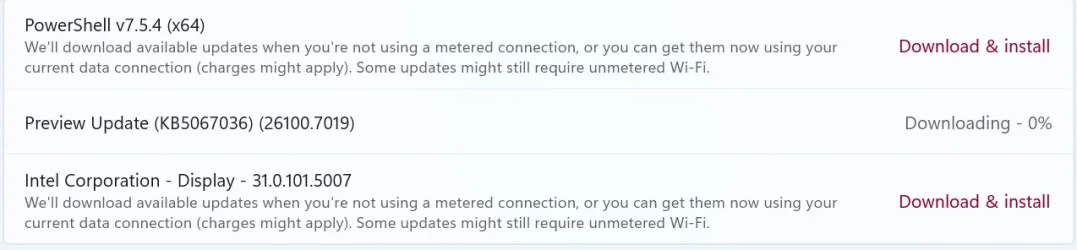
I need to stop this KB5067036 preview. Don't want it!!
Tried the Group policy OOBE tweak - changing it to to "2" for notify before downloading updates. Doesn't work. Deprecated now?
Checked the Windows \WinsXs folder for pending XML's. None.
Set wifi to metered connection. Well, that stopped the other 2 downloads anyway!
Want to ditch JUST this KB, not wipe the entire update history, so don't suggest that. :cool:
Anyone?


update.webp
 

My Computer My Computer

At a glance

Windows 11 Pro 24H2i7 Ultra16GBIntel
OS
Windows 11 Pro 24H2
Computer type
Laptop
Manufacturer/Model
LG
CPU
i7 Ultra
Memory
16GB
Graphics Card(s)
Intel
Sound Card
Intel Realtek
Monitor(s) Displays
Laptop 17" & TB4 Dell 27" QHD Ultrasharp w/integral TB4 hub
Screen Resolution
2560x1600
Hard Drives
1TB SSD, 5 external WDs
Mouse
Logitech Master MX 3S
Browser
Vivaldi
Antivirus
Kaspersky Premium Suite
Did you try:
  1. Pause the update for a week/whatever; this seems to stop the download/install.
  2. Turn off "Get the latest updates as soon as they’re available"; this should prevent automatic downloading of preview updates.
  3. Resume the update to get the options for the other twos?
 

My Computer My Computer

At a glance

Windows 11 Pro 25H2
OS
Windows 11 Pro 25H2
Computer type
PC/Desktop

My Computer My Computer

At a glance

Windows 7
OS
Windows 7
In this video, i will demonstrate how to use Update Manager for Windows (WuMgr) app to install selective updates, hide them so they won’t be installed, or remove any previously installed Windows update easily.


To obtain the portable version, open the WuMgr GitHub page and click on the latest version available on the right side of the page.

https://github.com/DavidXanatos/wumgr

To install the app version of Update Manager for Windows on your PC, open the page for WuMgr in Microsoft Store and click Get.


My Computer My Computer

At a glance

Windows 11AMD Ryzen 7 5700GMicron Technology DDR4-3200 16GBNVIDIA GeForce RTX 3060
OS
Windows 11
Computer type
PC/Desktop
Manufacturer/Model
HP Pavilion
CPU
AMD Ryzen 7 5700G
Motherboard
Erica6
Memory
Micron Technology DDR4-3200 16GB
Graphics Card(s)
NVIDIA GeForce RTX 3060
Sound Card
Realtek ALC671
Monitor(s) Displays
Samsung SyncMaster U28E590
Screen Resolution
3840 x 2160
Hard Drives
SAMSUNG MZVLQ1T0HALB-000H1
  1. Pause the update for a week/whatever; this seems to stop the download/install.
  2. Turn off "Get the latest updates as soon as they’re available"; this should prevent automatic downloading of preview updates.
  3. Resume the update to get the options for the other twos?
1. Yes - paused to stop it downloading! Unpause and it resumes...
2. Greyed out - I tweaked the registry to lock it to 24H2 for now...
3. Resume just resumes all...

OK, I installed PS 7 and Intel updates now as they're small in comparison.
Group policy update tweak undone as useless.
Paused updates. Now failed/retry, better than nothing.
David Xanatos update manager showed PS and Intel pending updates but not preview KB...
Ok, anyone know how to delete this?
 

My Computer My Computer

At a glance

Windows 11 Pro 24H2i7 Ultra16GBIntel
OS
Windows 11 Pro 24H2
Computer type
Laptop
Manufacturer/Model
LG
CPU
i7 Ultra
Memory
16GB
Graphics Card(s)
Intel
Sound Card
Intel Realtek
Monitor(s) Displays
Laptop 17" & TB4 Dell 27" QHD Ultrasharp w/integral TB4 hub
Screen Resolution
2560x1600
Hard Drives
1TB SSD, 5 external WDs
Mouse
Logitech Master MX 3S
Browser
Vivaldi
Antivirus
Kaspersky Premium Suite
@Morph000

KB5067036 is for 24H2 AND 25H2
So you can install it on 24H2.


The easiest way to protect yourself from possibly iffy updates, is to use backup software.
Make a backup before installing the update. If it causes problems just restore from your backup.


My Computers My Computers

  • At a glance

    Win 11 Home ♦♦♦26200.8737 ♦♦♦♦♦♦♦25H2AMD Ryzen 7 3700XG.Skill (F4-3200C14D-16GTZKW)EVGA RTX 2070 (08G-P4-2171-KR)
    OS
    Win 11 Home ♦♦♦26200.8737 ♦♦♦♦♦♦♦25H2
    Computer type
    PC/Desktop
    Manufacturer/Model
    Built by Ghot® [May 2020]
    CPU
    AMD Ryzen 7 3700X
    Motherboard
    Asus Pro WS X570-ACE (BIOS 5302)
    Memory
    G.Skill (F4-3200C14D-16GTZKW)
    Graphics Card(s)
    EVGA RTX 2070 (08G-P4-2171-KR)
    Sound Card
    Realtek ALC1220P / ALC S1220A
    Monitor(s) Displays
    Dell U3011 30"
    Screen Resolution
    2560 x 1600
    Hard Drives
    2x Samsung 860 EVO 500GB,
    WD 4TB Black FZBX - SATA III,
    WD 8TB Black FZBX - SATA III,
    DRW-24B1ST CD/DVD Burner
    PSU
    PC Power & Cooling 750W Quad EPS12V
    Case
    Cooler Master ATCS 840 Tower
    Cooling
    CM Hyper 212 EVO (push/pull)
    Keyboard
    Ducky DK9008 Shine II Blue LED
    Mouse
    Logitech Optical M-100
    Internet Speed
    300/300
    Browser
    Firefox (latest)
    Antivirus
    Bitdefender Total Security
    Other Info
    Speakers: Klipsch Pro Media 2.1
  • At a glance

    Windows XP Pro 32bit w/SP3AMD Athlon 64 X2 5000+ (OC'd @ 3.2Ghz)TWIN2X2048-6400C4DHX (2 x 1GB, DDR2 800)EVGA 256-P2-N758-TR GeForce 8600GT SSC
    Operating System
    Windows XP Pro 32bit w/SP3
    Computer type
    PC/Desktop
    Manufacturer/Model
    Built by Ghot® (not in use)
    CPU
    AMD Athlon 64 X2 5000+ (OC'd @ 3.2Ghz)
    Motherboard
    ASUS M2N32-SLI Deluxe Wireless Edition
    Memory
    TWIN2X2048-6400C4DHX (2 x 1GB, DDR2 800)
    Graphics card(s)
    EVGA 256-P2-N758-TR GeForce 8600GT SSC
    Sound Card
    Onboard
    Monitor(s) Displays
    ViewSonic G90FB Black 19" Professional (CRT)
    Screen Resolution
    up to 2048 x 1536
    Hard Drives
    WD 36GB 10,000rpm Raptor SATA
    Seagate 80GB 7200rpm SATA
    Lite-On LTR-52246S CD/RW
    Lite-On LH-18A1P CD/DVD Burner
    PSU
    PC Power & Cooling Silencer 750 Quad EPS12V
    Case
    Generic Beige case, 80mm fans
    Cooling
    ZALMAN 9500A 92mm CPU Cooler
    Keyboard
    Logitech Classic Keybooard 200
    Mouse
    Logitech Optical M-BT96a
    Internet Speed
    300/300
    Browser
    Firefox 3.x ??
    Antivirus
    Symantec (Norton)
    Other Info
    Still assembled, still runs. Haven't turned it on for 15 years?
Run as Administrator:
Code:
net stop wuauserv
net stop bits
net stop cryptsvc
ren %windir%\SoftwareDistribution SoftwareDistribution.old
ren %windir%\System32\catroot2 catroot2.old
net start wuauserv
net start bits
net start cryptsvc
 

My Computer My Computer

At a glance

Windows 7
OS
Windows 7
It is generally safe to delete the contents of the Software Distribution folder once all files required by it have been used for installing Windows Update. Even if you delete files otherwise, they will be automatically downloaded. If you were to delete the folder itself, it would be automatically re-created, and the required WU components would be downloaded automatically.

However, this data store also contains your Windows Update History files. If you delete them you will lose your Update history. Moreover, the next time you run Windows Update, it will result in a longer detection time.
What I -->don't<-- want to do!
 

My Computer My Computer

At a glance

Windows 11 Pro 24H2i7 Ultra16GBIntel
OS
Windows 11 Pro 24H2
Computer type
Laptop
Manufacturer/Model
LG
CPU
i7 Ultra
Memory
16GB
Graphics Card(s)
Intel
Sound Card
Intel Realtek
Monitor(s) Displays
Laptop 17" & TB4 Dell 27" QHD Ultrasharp w/integral TB4 hub
Screen Resolution
2560x1600
Hard Drives
1TB SSD, 5 external WDs
Mouse
Logitech Master MX 3S
Browser
Vivaldi
Antivirus
Kaspersky Premium Suite
Well then you're stuck with your pending update. There's no known method to clear a specific update out of WU's queue. It's all or nothing.

All of the WU blocking tools only work on the updates metadata, to prevent KB's from being tagged as eligible. But once WU starts the download process, it's too late for them to do anything useful.
 

My Computer My Computer

At a glance

Windows 7
OS
Windows 7
Well...I could roll back to a recent Reflect image. That's overkill at this stage, but may come down to doing that.
W11 has serious functionality flaws, W7 was so nice. :mad:
 

My Computer My Computer

At a glance

Windows 11 Pro 24H2i7 Ultra16GBIntel
OS
Windows 11 Pro 24H2
Computer type
Laptop
Manufacturer/Model
LG
CPU
i7 Ultra
Memory
16GB
Graphics Card(s)
Intel
Sound Card
Intel Realtek
Monitor(s) Displays
Laptop 17" & TB4 Dell 27" QHD Ultrasharp w/integral TB4 hub
Screen Resolution
2560x1600
Hard Drives
1TB SSD, 5 external WDs
Mouse
Logitech Master MX 3S
Browser
Vivaldi
Antivirus
Kaspersky Premium Suite
Well...I could roll back to a recent Reflect image. That's overkill at this stage, but may come down to doing that.
W11 has serious functionality flaws, W7 was so nice. :mad:
10 and 11 (24H2) also............ :wink:
 

My Computers My Computers

  • At a glance

    Windows11 Pro 25H2i732GBnVidia
    OS
    Windows11 Pro 25H2
    Computer type
    PC/Desktop
    Manufacturer/Model
    Asus
    CPU
    i7
    Motherboard
    z97k
    Memory
    32GB
    Graphics Card(s)
    nVidia
    Sound Card
    Realtek
    Hard Drives
    3
    Cooling
    air
    Browser
    Edge
    Antivirus
    ESET
  • At a glance

    Windows11 ProIntel i516GBIntel
    Operating System
    Windows11 Pro
    Computer type
    PC/Desktop
    Manufacturer/Model
    ASUS
    CPU
    Intel i5
    Motherboard
    ASUS Basic
    Memory
    16GB
    Graphics card(s)
    Intel
    Sound Card
    Realtek
    Monitor(s) Displays
    Samsung
    Hard Drives
    one intern , 0ne extern, OS on SSD
    Cooling
    air
    Keyboard
    wireless Logitech
    Mouse
    wireless Logitech
    Internet Speed
    1GB
    Browser
    Edge
    Antivirus
    ESET
What I -->don't<-- want to do!
I have recently done that and history stayed, there was also no problem upgrading afterwards.
 

Attachments

  • capture_11092025_145134.webp
    capture_11092025_145134.webp
    168.4 KB · Views: 2

My Computer My Computer

At a glance

Home26H2CanAMD Ryzen 5 8600G (07/24)2x32GB Kingston FURY DDR5 5600 MHz CL36 @5200...ASROCK Radeon RX 6600 Challenger D 8G @48FPS ...
OS
Home26H2Can
Computer type
PC/Desktop
CPU
AMD Ryzen 5 8600G (07/24)
Motherboard
ASROCK B650M-HDV/M.2 (07/24) BIOS 4.21 AGESA ComboAM5 1.3.0.1 (04/26)
Memory
2x32GB Kingston FURY DDR5 5600 MHz CL36 @5200 CL36 (07/24)
Graphics Card(s)
ASROCK Radeon RX 6600 Challenger D 8G @48FPS (08/24)
Sound Card
Creative Sound BlasterX AE-5 Plus (05/24)
Monitor(s) Displays
24" Philips 24M1N3200ZS/00 (05/24)
Screen Resolution
1920×1080@165Hz via DP1.4
Hard Drives
Kingston KC3000 NVMe 2TB (05/24)
ADATA XPG GAMMIX S11 Pro 512GB (07/19)
PSU
Seasonic Core GM 550 Gold (04/24)
Case
Fractal Design Define 7 Mini with 3x Noctua NF-P14s/12@555rpm (04/24)
Cooling
Noctua NH-U12S with Noctua NF-P12 (04/24)
Keyboard
HP Pavilion Wired Keyboard 300 (07/24) + Rabalux 76017 Parker (01/24)
Mouse
Logitech M330 Silent Plus (01/26)
Internet Speed
500/100 Mbps via RouterOS (05/21) & TCP Optimizer
Browser
Edge, Brave for YouTube, LibreWolf for FB
Antivirus
NextDNS blocking 1/3 Traffic
Other Info
Phone: Motorola Moto G86 (02/26)
Backup: Hasleo Backup Suite (PreOS)
Headphones: Sennheiser RS170 (09/10)
Chair: Huzaro Force 4.4 Grey Mesh (05/24)
Notifier: Xiaomi Mi Band 9 Milanese (10/24)
FlexCore USB-C 3.2 Gen 1 (M) to LAN (F) (08/25)
Hello @Morph000, :alien:

You can see if resetting Windows Update below may stop it. You'll have to set any configured group policies for Windows Update again afterwards though.


My Computers My Computers

  • At a glance

    Windows 11 Pro for WorkstationsIntel i7-8700K 5 GHz64 GB (4x16GB) G.SKILL TridentZ RGB DDR4 3600...ASUS ROG-STRIX-GTX1080TI-O11G-GAMING (11GB GD...
    OS
    Windows 11 Pro for Workstations
    Computer type
    PC/Desktop
    Manufacturer/Model
    Custom self build
    CPU
    Intel i7-8700K 5 GHz
    Motherboard
    ASUS ROG Maximus XI Formula Z390
    Memory
    64 GB (4x16GB) G.SKILL TridentZ RGB DDR4 3600 MHz (F4-3600C18D-32GTZR)
    Graphics Card(s)
    ASUS ROG-STRIX-GTX1080TI-O11G-GAMING (11GB GDDR5X)
    Sound Card
    Integrated Digital Audio (S/PDIF)
    Monitor(s) Displays
    2 x Samsung Odyssey G75 27"
    Screen Resolution
    2560x1440
    Hard Drives
    1TB Samsung 990 PRO M.2,
    4TB Samsung 990 PRO M.2,
    TerraMaster F8 SSD Plus NAS
    PSU
    Seasonic Prime Titanium 850W
    Case
    Thermaltake Core P3 wall mounted
    Cooling
    Corsair Hydro H115i
    Keyboard
    Amazon Basics Wired Full Keyboard MD005
    Mouse
    Logitech MX Master 4
    Internet Speed
    2 Gbps Download and 100 Mbps Upload
    Browser
    Chrome and Edge
    Antivirus
    Microsoft Defender
    Other Info
    Logitech Z625 speaker system,
    Logitech BRIO 4K Pro webcam,
    HP Color LaserJet Pro MFP M477fdn,
    CyberPower CP1500PFCLCD
    Galaxy S23 Plus phone
  • At a glance

    Windows 11 ProSnapdragon X Elite (12 core) 3.42 GHz16 GB LPDDR5x-7467 MHz
    Operating System
    Windows 11 Pro
    Computer type
    Laptop
    Manufacturer/Model
    Surface Laptop 7 Copilot+ PC
    CPU
    Snapdragon X Elite (12 core) 3.42 GHz
    Memory
    16 GB LPDDR5x-7467 MHz
    Monitor(s) Displays
    15" HDR
    Screen Resolution
    2496 x 1664
    Hard Drives
    1 TB SSD
    Internet Speed
    Wi-Fi 7 and Bluetooth 5.4
    Browser
    Chrome and Edge
    Antivirus
    Microsoft Defender
Simplest solution: use PowerShell to install updates - until the next Stable release (not Preview - like above Update), since that will replace the Preview Update. Use the following commands - select/copy only the content of the inline code text (on the right is the description of each command):

Set-ExecutionPolicy RemoteSigned -Force

Install-Module -Name PSWindowsUpdate -Force
* Installs the PSWindowsUpdate module from the PowerShell Gallery or another configured repository.

Import-Module PSWindowsUpdate * Loads the PSWindowsUpdate module into the current PowerShell session, making its cmdlets available.

Get-WindowsUpdate * List available updates, usually with more detailed information - allowing advanced operations for installing or hiding updates.

Install-WindowsUpdate * Install Windows Updates

Add-WUServiceManager -MicrosoftUpdate * Enables Updates for other Microsoft products (like - Office)

Get-WindowsUpdate -KBArticleID"KB1234567" -Install * Install only selected/specific Updates - replace "KB1234567" with the Update Code - specific to the update you want to install.
 

My Computer My Computer

At a glance

WinDOS 25H2Intel & AMDSO-DIMM SK Hynix 15.8 GB Dual-Channel DDR4-26...nVidia RTX 2060 6GB Mobile GPU (TU106M)
OS
WinDOS 25H2
Computer type
Laptop
CPU
Intel & AMD
Memory
SO-DIMM SK Hynix 15.8 GB Dual-Channel DDR4-2666 (2 x 8 GB) 1329MHz (19-19-19-43)
Graphics Card(s)
nVidia RTX 2060 6GB Mobile GPU (TU106M)
Sound Card
Onbord Realtek ALC1220
Screen Resolution
1920 x 1080
Hard Drives
1x Samsung PM981 NVMe PCIe M.2 512GB / 1x Seagate Expansion ST1000LM035 1TB
Yes, I did see that KB blocking approach. It can be done via the registry very easily.
I'm waiting for the final release KB and see if it deletes the preview one...
 

My Computer My Computer

At a glance

Windows 11 Pro 24H2i7 Ultra16GBIntel
OS
Windows 11 Pro 24H2
Computer type
Laptop
Manufacturer/Model
LG
CPU
i7 Ultra
Memory
16GB
Graphics Card(s)
Intel
Sound Card
Intel Realtek
Monitor(s) Displays
Laptop 17" & TB4 Dell 27" QHD Ultrasharp w/integral TB4 hub
Screen Resolution
2560x1600
Hard Drives
1TB SSD, 5 external WDs
Mouse
Logitech Master MX 3S
Browser
Vivaldi
Antivirus
Kaspersky Premium Suite
OK, today's update check showed a few more, but KB5067036 preview is now gone from pending.
However it shows in history as failed.
Microsludge update catalog only shows the preview version so I guess I'll have to wait until the final one is released.
 

My Computer My Computer

At a glance

Windows 11 Pro 24H2i7 Ultra16GBIntel
OS
Windows 11 Pro 24H2
Computer type
Laptop
Manufacturer/Model
LG
CPU
i7 Ultra
Memory
16GB
Graphics Card(s)
Intel
Sound Card
Intel Realtek
Monitor(s) Displays
Laptop 17" & TB4 Dell 27" QHD Ultrasharp w/integral TB4 hub
Screen Resolution
2560x1600
Hard Drives
1TB SSD, 5 external WDs
Mouse
Logitech Master MX 3S
Browser
Vivaldi
Antivirus
Kaspersky Premium Suite
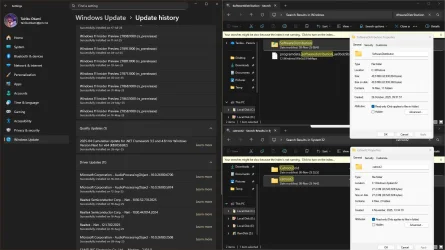
OK, I bit the bullet (grudgingly) and renamed SystemDistribution and CatRoot2, rebooted, and the stuck/failed updates resolved, and updates installed!
The KB5067036 preview is gone too!
However, there IS an issue when trying to change Catroot2 in that the Cryptographic service keeps restarting even if you disabled it via Net stop, a little known issue.
So I did it from Task manager, carefully timing my renaming Catroot2 with stopping Crypto. Interestingly too if you look at what 's locking Catroot2 it's Svchost.
Now, Get the latest updates was still greyed out despite my reverting 24H2 lock... ok got that sorted now too via policy, and put the 25H2 block back. :-)

No wonder there are so many crazy pc techs and ex-techs out there. :p
 

My Computer My Computer

At a glance

Windows 11 Pro 24H2i7 Ultra16GBIntel
OS
Windows 11 Pro 24H2
Computer type
Laptop
Manufacturer/Model
LG
CPU
i7 Ultra
Memory
16GB
Graphics Card(s)
Intel
Sound Card
Intel Realtek
Monitor(s) Displays
Laptop 17" & TB4 Dell 27" QHD Ultrasharp w/integral TB4 hub
Screen Resolution
2560x1600
Hard Drives
1TB SSD, 5 external WDs
Mouse
Logitech Master MX 3S
Browser
Vivaldi
Antivirus
Kaspersky Premium Suite

Back
Top Bottom