Solved Network problem with wifi laptop and desktop.


I was thinking of the same to switch of windows hello, but it's still strange I can connect to my laptop but not to my desktop.
 

My Computer

System One

  • OS
    Windows 11 Pro 25H2 26200.7019
    Computer type
    PC/Desktop
    Manufacturer/Model
    Self built midi tower
    CPU
    Intel Core i7-8700K
    Motherboard
    Gigabyte Z390GX
    Memory
    Corsair 32GB 4x DDR4-2998 / PC4-23900 DDR4 SDRAM UDIMM
    Graphics Card(s)
    AMD RX570
    Sound Card
    Sound Blaster Z
    Monitor(s) Displays
    2x IIyama Prolite X2380HS
    Screen Resolution
    1920x1080
    Hard Drives
    Samsung SSD 970 EVO Plus NVMe 1TB
    Samsung SSD 970 EVO Plus NVMe 500GB
    PSU
    Seasonic 550W
    Cooling
    Noctua fans
    Keyboard
    Logitech G213
    Mouse
    Logitech Marble Mouse
    Browser
    Chrome
    Antivirus
    Norton
    Other Info
    Video/Audio editting machine
You don't need to log on the other computer. You just need to access shared folders on it. Do you have shared folders on each computer?

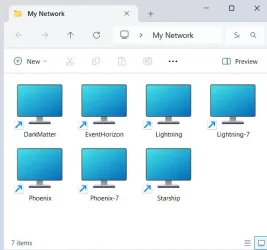
I don't depend upon seeing any computer in File Explorer > Network. I create a network shortcut for each computer. I keep the shortcuts in a folder on my desktop. As long as the other computer is turned on and not sleeping these shortcuts always work.

2025-10-19 00_57_09-My Network - File Explorer.webp

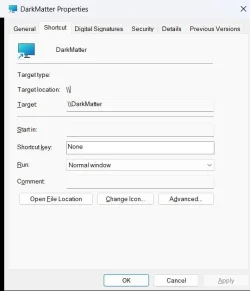
For example, the shortcut for computer Darkmatter is \\Darkmatter

1760853672061.webp
 

My Computers

System One System Two

  • OS
    Windows 11 Pro 25H2 (26200.6901)
    Computer type
    Laptop
    Manufacturer/Model
    ASUS TUF Gaming A15 (2022)
    CPU
    AMD Ryzen 7 6800H with Radeon 680M GPU (486MB RAM)
    Memory
    Crucial DDR5-4800 (2400MHz) 32GB (2 x 16GB)
    Graphics Card(s)
    NVIDIA RTX 3060 Laptop (6GB RAM)
    Sound Card
    n/a
    Monitor(s) Displays
    15.6-inch
    Screen Resolution
    1920x1080 300Hz
    Hard Drives
    2 x Samsung 990 Evo Plus (2TB M.2 NVME SSD)
    PSU
    n/a
    Mouse
    Wireless Mouse M510
    Internet Speed
    2100Mbps/300Mbps
    Browser
    Firefox
    Antivirus
    Malwarebytes
  • Operating System
    Windows 11 Pro 25H2 (26200.8246)
    Computer type
    PC/Desktop
    Manufacturer/Model
    Custom build
    CPU
    AMD Ryzen 7 5700X3D
    Motherboard
    ASUS ROG Strix B550-F Gaming WiFi II
    Memory
    G.SKILL Flare X 32GB (2x16GB) DDR4
    Graphics card(s)
    ASUS ROG-STRIX-RTX3060TI-08G-V2-GAMING (RTX 3060-Ti, 8GB RAM)
    Monitor(s) Displays
    Samsung G50D IPS 27"
    Screen Resolution
    1440p/180Hz
    Hard Drives
    SAMSUNG 990 EVO Plus (2TB] M.2 NVME SSD
    SAMSUNG 990 EVO Plus (4TB) M.2 NVME SSD
    PSU
    Corsair RM750x (750 watts)
    Case
    Cooler Master MasterCase 5
    Cooling
    Scythe Mugen 6
    Keyboard
    Logitech K520 (MK540 keyboard/mouse combo)
    Mouse
    Logitech M310 (MK540 keyboard/mouse combo)
    Internet Speed
    2100 Mbps down / 300 Mbps up
    Browser
    Firefox, Edge, Chrome
    Antivirus
    Malwarebytes (Premium)
    Other Info
    ASUS Blu-ray Burner BW-16D1HT (SATA) || Western Digital Easystore 20TB USB 3.0 external hard drive used with Acronis True Image 2025 backup software || HP OfficeJet Pro 6975 Printer/Scanner
Back to the basics.

Have you checked that both computer networks are set to Private Network and that File and Printer Sharing is enabled for both? Windows sometimes switches WiFi networks to Public after updates.
 

My Computers

System One System Two

  • OS
    Win 11 Pro 25H2 26200.8457 / Linux Mint 22.3
    Computer type
    Laptop
    Manufacturer/Model
    Lenovo A485
    CPU
    Ryzen 7 2700U Pro
    Motherboard
    Lenovo (WiFi/BT module upgraded to Intel Wireless-AC-9260)
    Memory
    32GB
    Graphics Card(s)
    iGPU Vega 10
    Sound Card
    Realtek
    Monitor(s) Displays
    14" FHD (built-in) + 14" Lenovo Thinkvision M14t (touch+pen) + 32" Asus PB328
    Screen Resolution
    FHD + FHD + 1440p
    Hard Drives
    Intel 660p m.2 nVME PCIe3.0 x2 512GB
    PSU
    125W(Dock)/65W(Travel Adapter)
    Keyboard
    Thinkpad / Logitech MX Keys
    Mouse
    Logitech MX Master 2S
    Internet Speed
    1/1Gbit
    Browser
    Firefox
    Antivirus
    Windows Defender
    Other Info
    SecureBoot: Enabled
    TPM2.0: Enabled
    AMD-V: Enabled
  • Operating System
    Win 11 Pro 25H2 26200.8521(RP)
    Computer type
    PC/Desktop
    Manufacturer/Model
    Custom
    CPU
    i7-7700k @4.8GHz
    Motherboard
    Asus PRIME Z270-A
    Memory
    32GB 2x16GB 2133MHz CL15
    Graphics card(s)
    EVGA GTX1080Ti FTW 11GB
    Sound Card
    Integrated
    Monitor(s) Displays
    32" 10-bit Asus PB328Q
    Screen Resolution
    WQHD 2560x1440
    Hard Drives
    512GB ADATA SX8000NP NVMe PCIe Gen 3 x4
    PSU
    850W
    Case
    Fractal Design Define 7
    Cooling
    Noctua NH-D15 chromax.black
    Keyboard
    Logitech MX Keys
    Mouse
    Logitech MX Master 2S
    Internet Speed
    1/1Gbit
    Browser
    Firefox
    Antivirus
    Windows Defender
    Other Info
    AC WiFi Card
You don't need to log on the other computer. You just need to access shared folders on it. Do you have shared folders on each computer?

I don't depend upon seeing any computer in File Explorer > Network. I create a network shortcut for each computer. I keep the shortcuts in a folder on my desktop. As long as the other computer is turned on and not sleeping these shortcuts always work.

View attachment 149675

For example, the shortcut for computer Darkmatter is \\Darkmatter

View attachment 149676
Thanks I have the shortcut of my destop on my computer, the problem I have is that it ask for credentials when I click on it.
 

My Computer

System One

  • OS
    Windows 11 Pro 25H2 26200.7019
    Computer type
    PC/Desktop
    Manufacturer/Model
    Self built midi tower
    CPU
    Intel Core i7-8700K
    Motherboard
    Gigabyte Z390GX
    Memory
    Corsair 32GB 4x DDR4-2998 / PC4-23900 DDR4 SDRAM UDIMM
    Graphics Card(s)
    AMD RX570
    Sound Card
    Sound Blaster Z
    Monitor(s) Displays
    2x IIyama Prolite X2380HS
    Screen Resolution
    1920x1080
    Hard Drives
    Samsung SSD 970 EVO Plus NVMe 1TB
    Samsung SSD 970 EVO Plus NVMe 500GB
    PSU
    Seasonic 550W
    Cooling
    Noctua fans
    Keyboard
    Logitech G213
    Mouse
    Logitech Marble Mouse
    Browser
    Chrome
    Antivirus
    Norton
    Other Info
    Video/Audio editting machine

Back to the basics.

Have you checked that both computer networks are set to Private Network and that File and Printer Sharing is enabled for both? Windows sometimes switches WiFi networks to Public after updates.
I have check that its on prived.
 

My Computer

System One

  • OS
    Windows 11 Pro 25H2 26200.7019
    Computer type
    PC/Desktop
    Manufacturer/Model
    Self built midi tower
    CPU
    Intel Core i7-8700K
    Motherboard
    Gigabyte Z390GX
    Memory
    Corsair 32GB 4x DDR4-2998 / PC4-23900 DDR4 SDRAM UDIMM
    Graphics Card(s)
    AMD RX570
    Sound Card
    Sound Blaster Z
    Monitor(s) Displays
    2x IIyama Prolite X2380HS
    Screen Resolution
    1920x1080
    Hard Drives
    Samsung SSD 970 EVO Plus NVMe 1TB
    Samsung SSD 970 EVO Plus NVMe 500GB
    PSU
    Seasonic 550W
    Cooling
    Noctua fans
    Keyboard
    Logitech G213
    Mouse
    Logitech Marble Mouse
    Browser
    Chrome
    Antivirus
    Norton
    Other Info
    Video/Audio editting machine
Ok, so are you connecting to the computer using the computer name or IP? Try using the exact IP rather than computername. If that worked, reboot both computers, including your router.

I have also had issues with connecting to other computers browsing to them. But Mounting a shared folder directly has worked, you should try this too.
 

My Computers

System One System Two

  • OS
    Win 11 Pro 25H2 26200.8457 / Linux Mint 22.3
    Computer type
    Laptop
    Manufacturer/Model
    Lenovo A485
    CPU
    Ryzen 7 2700U Pro
    Motherboard
    Lenovo (WiFi/BT module upgraded to Intel Wireless-AC-9260)
    Memory
    32GB
    Graphics Card(s)
    iGPU Vega 10
    Sound Card
    Realtek
    Monitor(s) Displays
    14" FHD (built-in) + 14" Lenovo Thinkvision M14t (touch+pen) + 32" Asus PB328
    Screen Resolution
    FHD + FHD + 1440p
    Hard Drives
    Intel 660p m.2 nVME PCIe3.0 x2 512GB
    PSU
    125W(Dock)/65W(Travel Adapter)
    Keyboard
    Thinkpad / Logitech MX Keys
    Mouse
    Logitech MX Master 2S
    Internet Speed
    1/1Gbit
    Browser
    Firefox
    Antivirus
    Windows Defender
    Other Info
    SecureBoot: Enabled
    TPM2.0: Enabled
    AMD-V: Enabled
  • Operating System
    Win 11 Pro 25H2 26200.8521(RP)
    Computer type
    PC/Desktop
    Manufacturer/Model
    Custom
    CPU
    i7-7700k @4.8GHz
    Motherboard
    Asus PRIME Z270-A
    Memory
    32GB 2x16GB 2133MHz CL15
    Graphics card(s)
    EVGA GTX1080Ti FTW 11GB
    Sound Card
    Integrated
    Monitor(s) Displays
    32" 10-bit Asus PB328Q
    Screen Resolution
    WQHD 2560x1440
    Hard Drives
    512GB ADATA SX8000NP NVMe PCIe Gen 3 x4
    PSU
    850W
    Case
    Fractal Design Define 7
    Cooling
    Noctua NH-D15 chromax.black
    Keyboard
    Logitech MX Keys
    Mouse
    Logitech MX Master 2S
    Internet Speed
    1/1Gbit
    Browser
    Firefox
    Antivirus
    Windows Defender
    Other Info
    AC WiFi Card
Then try logging in to both devices one time using a password. All the instructions say to set up credentials with a password, not a pin. Well a pin is windows Hello just the same as a fingerprint and facial recognition are also Windows Hello.
This is the correct answer. Windows Hello is local only, meaning the PIN or whatever data you use to authenticate are never passed to the other computer.

Go to Settings, Accounts, Sign-in Options. Disable "For improved security, only allow Windows Hello sign-in for Microsoft accounts." You will be prompted for admin credentials if the current user is not an admin. Log out of Windows, and sign back in with the Microsoft account's password. Now, you should be able to get to the other machine. You can go back to using Hello logons after that, if you want.
 

My Computer

System One

  • OS
    Windows 11 Pro 25H2
    Computer type
    PC/Desktop
    Manufacturer/Model
    Intel NUC12WSHi7
    CPU
    12th Gen Core i7-1260P
    Motherboard
    NUC12WSBi7
    Memory
    64 GB Micron PC4-25600
    Graphics Card(s)
    Intel Iris Xe Graphics
    Sound Card
    on-board Realtek HD Audio
    Monitor(s) Displays
    Dell U3219Q
    Screen Resolution
    3840 x 2160
    Hard Drives
    Samsung SSD 990 PRO 1TB
    Crucial MX500 2 TB
    Antivirus
    Microsoft Defender
Thank you for clarifying that @pseymour . I knew it was that way with RDP that the user had to login at least once with a password.

All we can do is offer suggestions. We have no control over whether or not they are followed when a user refuses to try them. That said, I'll leave this thread to members who seem to know more about it than I do.
 

My Computers

System One System Two

  • OS
    Windows 11 Pro 25H2
    Computer type
    PC/Desktop
    Manufacturer/Model
    Dell Optiplex 7080
    CPU
    i9-10900 10 core 20 threads
    Motherboard
    DELL 0J37VM
    Memory
    32 gb
    Graphics Card(s)
    none-Intel UHD Graphics 630
    Sound Card
    Integrated Realtek
    Monitor(s) Displays
    Benq 27
    Screen Resolution
    2560x1440
    Hard Drives
    2x1tb Solidigm m.2 nvme /External drives 512gb Samsung m.2 sata+2tb Kingston m2.nvme
    PSU
    500w
    Case
    MT
    Cooling
    Dell Premium
    Keyboard
    Logitech wired
    Mouse
    Logitech wireless
    Internet Speed
    so slow I'm too embarrassed to tell
    Browser
    #1 Edge #2 Firefox
    Antivirus
    Defender+MWB Premium
  • Operating System
    Windows 11 Pro 24H2 26200.8457
    Computer type
    PC/Desktop
    Manufacturer/Model
    Beelink Mini PC SER5
    CPU
    AMD Ryzen 7 6800U
    Memory
    32 gb
    Graphics card(s)
    integrated
    Sound Card
    integrated
    Monitor(s) Displays
    Benq 27
    Screen Resolution
    2560x1440
    Hard Drives
    1TB Crucial nvme
    Keyboard
    Logitech wired
    Mouse
    Logitech wireless
    Internet Speed
    still too embarrassed to tell
    Browser
    Firefox
    Antivirus
    Defender
    Other Info
    System 3 is non compliant Dell 9020 i7-4770/24gb ram Win11 PRO 26200.8457
You had it right, @glasskuter. I just added the steps to switch to password logon, because it's not always obvious how to do that.
 

My Computer

System One

  • OS
    Windows 11 Pro 25H2
    Computer type
    PC/Desktop
    Manufacturer/Model
    Intel NUC12WSHi7
    CPU
    12th Gen Core i7-1260P
    Motherboard
    NUC12WSBi7
    Memory
    64 GB Micron PC4-25600
    Graphics Card(s)
    Intel Iris Xe Graphics
    Sound Card
    on-board Realtek HD Audio
    Monitor(s) Displays
    Dell U3219Q
    Screen Resolution
    3840 x 2160
    Hard Drives
    Samsung SSD 990 PRO 1TB
    Crucial MX500 2 TB
    Antivirus
    Microsoft Defender
I discover something, I did the folowing test, I bring back my desktop to 24H2 ver. 26100.4061 ( May 2025 ) with an older backup file I had, so I have now one computer on 24H2 and my laptop on 25H2 ver. 26200.6899 with the latest updates, and you no what my network works !! Without credentials or password just file sharing as it must be, how is this possible, I think when I run the updates on the desktop its broken again.
Logging in with Windows hello on both computers no passwords.
And the question I have is why is the laptop with 25H2 working normal on the network with all the updates.
 
Last edited:

My Computer

System One

  • OS
    Windows 11 Pro 25H2 26200.7019
    Computer type
    PC/Desktop
    Manufacturer/Model
    Self built midi tower
    CPU
    Intel Core i7-8700K
    Motherboard
    Gigabyte Z390GX
    Memory
    Corsair 32GB 4x DDR4-2998 / PC4-23900 DDR4 SDRAM UDIMM
    Graphics Card(s)
    AMD RX570
    Sound Card
    Sound Blaster Z
    Monitor(s) Displays
    2x IIyama Prolite X2380HS
    Screen Resolution
    1920x1080
    Hard Drives
    Samsung SSD 970 EVO Plus NVMe 1TB
    Samsung SSD 970 EVO Plus NVMe 500GB
    PSU
    Seasonic 550W
    Cooling
    Noctua fans
    Keyboard
    Logitech G213
    Mouse
    Logitech Marble Mouse
    Browser
    Chrome
    Antivirus
    Norton
    Other Info
    Video/Audio editting machine
@Cameraman1995

Your comment 4:38pm

This works with 26100.4946 and 26200.4946 (ie. 24H2 and 25H2)

With updates more recent than 4946, the network still holds ok with only one network machine updated beyond 4946 (all machines still talk to each other as usual). With two or more network machines updated beyond 4946, these updated machines will not talk to each other, although they are all seen on the network.

It's also noticeable that all machines updated past 4946 will still work as normal with a 3rd machine on Win 11 Lite.

I greatly appreciate glasskuter's comments on how she works around this most irritating problem by generating Windows "credentials" for each machine with each other machine. Unhappily, this has not worked for me, as all other suggestions from well-meaning others has not worked either.

Still the insistence on "credentials" yet withholding the ability to infill the tabs, even with two-way "credentials" already defined. I regard this destruction of networking that has worked for 25 years (from Win2k) as despicable.
 

My Computer

System One

  • OS
    Windows 11
    Computer type
    Laptop
    Manufacturer/Model
    HP 15s_du1xxx
    CPU
    Intel i5 10210U
    Motherboard
    85F1
    Memory
    16Gb
    Graphics Card(s)
    Intel UHD
    Sound Card
    Realtek
    Screen Resolution
    1920 x 1080
Amazing that someone will go so far as restore a backup, rather than take a couple of minutes to logon with a password.
 

My Computer

System One

  • OS
    Windows 11 Pro 25H2
    Computer type
    PC/Desktop
    Manufacturer/Model
    Intel NUC12WSHi7
    CPU
    12th Gen Core i7-1260P
    Motherboard
    NUC12WSBi7
    Memory
    64 GB Micron PC4-25600
    Graphics Card(s)
    Intel Iris Xe Graphics
    Sound Card
    on-board Realtek HD Audio
    Monitor(s) Displays
    Dell U3219Q
    Screen Resolution
    3840 x 2160
    Hard Drives
    Samsung SSD 990 PRO 1TB
    Crucial MX500 2 TB
    Antivirus
    Microsoft Defender
@pseymour

Your comment 8:42pm

If that is a reply to my earlier comment, it seems nonsensical.

[Of course after updating, a reboot and logon has to occur]

If you are referring to my comment, could you help clarify how the two are related ?
 

My Computer

System One

  • OS
    Windows 11
    Computer type
    Laptop
    Manufacturer/Model
    HP 15s_du1xxx
    CPU
    Intel i5 10210U
    Motherboard
    85F1
    Memory
    16Gb
    Graphics Card(s)
    Intel UHD
    Sound Card
    Realtek
    Screen Resolution
    1920 x 1080
Amazing that someone will go so far as restore a backup, rather than take a couple of minutes to logon with a password.
That's the problem it doesn't work with credentials, I am investigating what pc gives that problem.
 

My Computer

System One

  • OS
    Windows 11 Pro 25H2 26200.7019
    Computer type
    PC/Desktop
    Manufacturer/Model
    Self built midi tower
    CPU
    Intel Core i7-8700K
    Motherboard
    Gigabyte Z390GX
    Memory
    Corsair 32GB 4x DDR4-2998 / PC4-23900 DDR4 SDRAM UDIMM
    Graphics Card(s)
    AMD RX570
    Sound Card
    Sound Blaster Z
    Monitor(s) Displays
    2x IIyama Prolite X2380HS
    Screen Resolution
    1920x1080
    Hard Drives
    Samsung SSD 970 EVO Plus NVMe 1TB
    Samsung SSD 970 EVO Plus NVMe 500GB
    PSU
    Seasonic 550W
    Cooling
    Noctua fans
    Keyboard
    Logitech G213
    Mouse
    Logitech Marble Mouse
    Browser
    Chrome
    Antivirus
    Norton
    Other Info
    Video/Audio editting machine

That's the problem it doesn't work with credentials, I am investigating what pc gives that problem.
You haven't said anywhere that you've logged on to Windows with a password. You've said you added Windows Credentials, which is not the same thing. You've said more than once that you're logging in via Hello.
 

My Computer

System One

  • OS
    Windows 11 Pro 25H2
    Computer type
    PC/Desktop
    Manufacturer/Model
    Intel NUC12WSHi7
    CPU
    12th Gen Core i7-1260P
    Motherboard
    NUC12WSBi7
    Memory
    64 GB Micron PC4-25600
    Graphics Card(s)
    Intel Iris Xe Graphics
    Sound Card
    on-board Realtek HD Audio
    Monitor(s) Displays
    Dell U3219Q
    Screen Resolution
    3840 x 2160
    Hard Drives
    Samsung SSD 990 PRO 1TB
    Crucial MX500 2 TB
    Antivirus
    Microsoft Defender
@pseymour

Your comment 8:42pm

If that is a reply to my earlier comment, it seems nonsensical.

[Of course after updating, a reboot and logon has to occur]

If you are referring to my comment, could you help clarify how the two are related ?
Did you say something about restoring a backup? If not, it seems unlikely I was referring to your comment.
 

My Computer

System One

  • OS
    Windows 11 Pro 25H2
    Computer type
    PC/Desktop
    Manufacturer/Model
    Intel NUC12WSHi7
    CPU
    12th Gen Core i7-1260P
    Motherboard
    NUC12WSBi7
    Memory
    64 GB Micron PC4-25600
    Graphics Card(s)
    Intel Iris Xe Graphics
    Sound Card
    on-board Realtek HD Audio
    Monitor(s) Displays
    Dell U3219Q
    Screen Resolution
    3840 x 2160
    Hard Drives
    Samsung SSD 990 PRO 1TB
    Crucial MX500 2 TB
    Antivirus
    Microsoft Defender
Did you say something about restoring a backup? If not, it seems unlikely I was referring to your comment.
I am sorry for the miss understanding, I was just testing an older build to see the different with th latest build, now I am testing the login metode with the password and switch off windows hello.
 

My Computer

System One

  • OS
    Windows 11 Pro 25H2 26200.7019
    Computer type
    PC/Desktop
    Manufacturer/Model
    Self built midi tower
    CPU
    Intel Core i7-8700K
    Motherboard
    Gigabyte Z390GX
    Memory
    Corsair 32GB 4x DDR4-2998 / PC4-23900 DDR4 SDRAM UDIMM
    Graphics Card(s)
    AMD RX570
    Sound Card
    Sound Blaster Z
    Monitor(s) Displays
    2x IIyama Prolite X2380HS
    Screen Resolution
    1920x1080
    Hard Drives
    Samsung SSD 970 EVO Plus NVMe 1TB
    Samsung SSD 970 EVO Plus NVMe 500GB
    PSU
    Seasonic 550W
    Cooling
    Noctua fans
    Keyboard
    Logitech G213
    Mouse
    Logitech Marble Mouse
    Browser
    Chrome
    Antivirus
    Norton
    Other Info
    Video/Audio editting machine

I'm confused for sure. I created an account on all machines with the same name/password as machines logging in. This works just fine for five machines, four Win11 Pro and one Win11 Home machines. Forget the passcode, you have to use the password for networking, at least Windows peer networking.
 

My Computers

System One System Two

  • OS
    Win 11 Pro 25H2, Build 26200.8524
    Computer type
    PC/Desktop
    Manufacturer/Model
    Home Brew
    CPU
    Intel Core i5 14500
    Motherboard
    Gigabyte B760M G P WIFI
    Memory
    64GB DDR4
    Graphics Card(s)
    GeForce RTX 4060
    Sound Card
    Chipset Realtek
    Monitor(s) Displays
    LG 45" Ultragear, Acer 24" 1080p
    Screen Resolution
    5120x1440, 1920x1080
    Hard Drives
    Crucial P310 2TB 2280 PCIe Gen4 3D NAND NVMe M.2 SSD (O/S)
    Silicon Power 2TB US75 NVMe PCIe Gen4 M.2 2280 SSD (backup)
    Crucial BX500 2TB 3D NAND (2nd backup)
    Seagate 4TB Ironwolf, rotating HDD archive files
    External off-line backup Drives: 2 NVMe 4TB drives in external enclosures
    PSU
    Thermaltake Toughpower GF3 750W
    Case
    LIAN LI LANCOOL 216 E-ATX PC Case
    Cooling
    Lots of fans!
    Keyboard
    Microsoft Comfort Curve 2000
    Mouse
    Logitech G305
    Internet Speed
    Verizon FiOS 1GB
    Browser
    Firefox
    Antivirus
    Malware Bytes & Windows Defender Security
  • Operating System
    Win 11 Pro 25H2, Build 26200.8524
    Computer type
    PC/Desktop
    Manufacturer/Model
    Home Brew
    CPU
    Intel Core i5 14400
    Motherboard
    Gigabyte B760M DS3H AX
    Memory
    32GB DDR5
    Graphics card(s)
    Intel 700 Embedded GPU
    Sound Card
    Realtek Embedded
    Monitor(s) Displays
    27" HP 1080p
    Screen Resolution
    1920x1080
    Hard Drives
    Crucial P310 2TB 2280 PCIe Gen4 eD NAND PCIe SSD
    Samsung EVO 990 2TB NVMe Gen4 SSD
    Samsung 2TB SATA SSD
    PSU
    Thermaltake Smart BM3 650W
    Case
    Okinos Micro ATX Case
    Cooling
    Fans
    Keyboard
    Microsoft Comfort Curve 2000
    Mouse
    Logitech G305
    Internet Speed
    Verizon FiOS 1GB
    Browser
    Firefox
    Antivirus
    Malware Bytes & Windows Defender Security
@Cameraman1955 I see this thread is marked solved. What was the resolution? It'll be helpful to anyone else who has the same problem and finds this thread.
 

My Computer

System One

  • OS
    Windows 11 Pro 25H2
    Computer type
    PC/Desktop
    Manufacturer/Model
    Intel NUC12WSHi7
    CPU
    12th Gen Core i7-1260P
    Motherboard
    NUC12WSBi7
    Memory
    64 GB Micron PC4-25600
    Graphics Card(s)
    Intel Iris Xe Graphics
    Sound Card
    on-board Realtek HD Audio
    Monitor(s) Displays
    Dell U3219Q
    Screen Resolution
    3840 x 2160
    Hard Drives
    Samsung SSD 990 PRO 1TB
    Crucial MX500 2 TB
    Antivirus
    Microsoft Defender
@Cameraman1955 I see this thread is marked solved. What was the resolution? It'll be helpful to anyone else who has the same problem and finds this thread.
@pseymour Yes I was planning to do that, sorry abit busy with work .
What worked for me was logging in to all computers with my password (Microsoft account) and not with Windows Hello. Then, under "Function Discovery Resource Publication," I added workstation with the following command in cmd: sc config fdrespub depend= RpcSs/http/fdphost/LanmanWorkstation
this caused the service to start and that was the problem, it didn't start even if you added automatic.
Everything is now working as it should be.
 

My Computer

System One

  • OS
    Windows 11 Pro 25H2 26200.7019
    Computer type
    PC/Desktop
    Manufacturer/Model
    Self built midi tower
    CPU
    Intel Core i7-8700K
    Motherboard
    Gigabyte Z390GX
    Memory
    Corsair 32GB 4x DDR4-2998 / PC4-23900 DDR4 SDRAM UDIMM
    Graphics Card(s)
    AMD RX570
    Sound Card
    Sound Blaster Z
    Monitor(s) Displays
    2x IIyama Prolite X2380HS
    Screen Resolution
    1920x1080
    Hard Drives
    Samsung SSD 970 EVO Plus NVMe 1TB
    Samsung SSD 970 EVO Plus NVMe 500GB
    PSU
    Seasonic 550W
    Cooling
    Noctua fans
    Keyboard
    Logitech G213
    Mouse
    Logitech Marble Mouse
    Browser
    Chrome
    Antivirus
    Norton
    Other Info
    Video/Audio editting machine

Latest Support Threads

Back
Top Bottom