Networking/Shared Folder/Password Issue


Stocktonlad70

New member
Local time
2:56 PM
Posts
1
OS
Windows 11
Hi,

I've got two Windows 11 Pro PC's on a local home network. I've shared a folder on PC1, but when I try and access the folder from PC2, its prompting for a username and password.

When I enter the correct credentials, its says "username or password is incorrect", but I have the same username and passwords on both PCs

I just want a no fuss access to the shared folder, no prompting for a password.

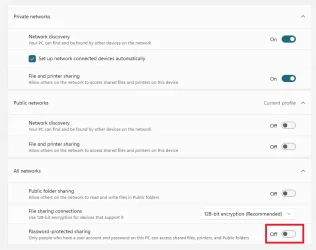
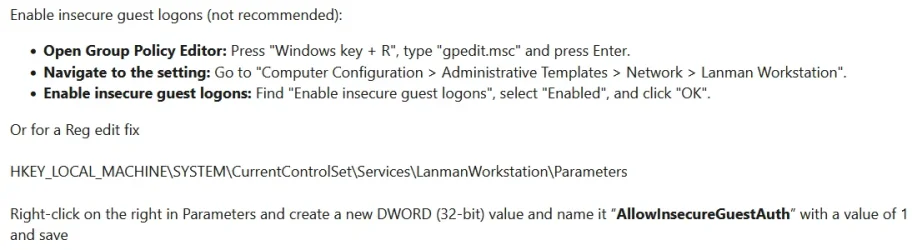
I've turned off Password-Protected Sharing, Ive done the group policy and the registry tweeks and yet it still wants the username and password.

Any ideas on how to disable asking for a password when trying to access a shared folder

TIA
 

Attachments

  • Screenshot 2025-10-26 163743.webp
    Screenshot 2025-10-26 163743.webp
    11.2 KB · Views: 5
  • Screenshot 2025-10-26 164111.webp
    Screenshot 2025-10-26 164111.webp
    28.5 KB · Views: 6
  • Screenshot 2025-10-26 164206.webp
    Screenshot 2025-10-26 164206.webp
    43 KB · Views: 6

My Computer My Computer

At a glance

Windows 11
OS
Windows 11
Computer type
PC/Desktop
Manufacturer/Model
Dell
Please take a look at my post, maybe this give some help.


My Computer My Computer

At a glance

Windows 11 Pro 25H2 26200.8894Intel Core i7-8700KCorsair 32GB 4x DDR4-2998 / PC4-23900 DDR4 SD...AMD RX570
OS
Windows 11 Pro 25H2 26200.8894
Computer type
PC/Desktop
Manufacturer/Model
Self built midi tower
CPU
Intel Core i7-8700K
Motherboard
Gigabyte Z390GX
Memory
Corsair 32GB 4x DDR4-2998 / PC4-23900 DDR4 SDRAM UDIMM
Graphics Card(s)
AMD RX570
Sound Card
Sound Blaster Z
Monitor(s) Displays
2x IIyama Prolite X2380HS
Screen Resolution
1920x1080
Hard Drives
Samsung SSD 970 EVO Plus NVMe 1TB
Samsung SSD 970 EVO Plus NVMe 500GB
PSU
Seasonic 550W
Cooling
Noctua fans
Keyboard
Logitech G213
Mouse
Logitech Marble Mouse
Browser
Chrome
Antivirus
Norton
Other Info
Video/Audio editting machine
This is due to Microsoft tightening security in Windows 11 24h2 and above.

Sharing is more dependable if every machine on the network has a credential built in credential manager for each of the other networked machines. machines.
  1. Open the Credentials Manager from the Windows Control Panel.
  2. Go to Windows Credentials.
  3. Click Add a Windows credential.
  4. In the "Internet or network address" field, enter \\ followed by the computer name or IP address of the computer sharing files or printers.
  5. Enter the username and password for an administrator account for the machine you are trying to access. For example I network 4 computers. In each computer I created a credential for the other 3.
Note: Even if computers use the same user account name and password, even the same MS account, you still need to create a credential for it.
It must be a password, not a pin. While you can still use a pin to log in, you must restart the device and log into it using a password at least once for this to work.
 

My Computers My Computers

  • At a glance

    Windows 11 Pro 25H2 26200.8875i9-10900 10 core 20 threads32 gbnone-Intel UHD Graphics 630
    OS
    Windows 11 Pro 25H2 26200.8875
    Computer type
    PC/Desktop
    Manufacturer/Model
    Dell Optiplex 7080
    CPU
    i9-10900 10 core 20 threads
    Motherboard
    DELL 0J37VM
    Memory
    32 gb
    Graphics Card(s)
    none-Intel UHD Graphics 630
    Sound Card
    Integrated Realtek
    Monitor(s) Displays
    Benq 27
    Screen Resolution
    2560x1440
    Hard Drives
    2x1tb Solidigm m.2 nvme /External drives 512gb Samsung m.2 sata+2tb Kingston m2.nvme
    PSU
    500w
    Case
    MT
    Cooling
    Dell Premium
    Keyboard
    Logitech wired
    Mouse
    Logitech wireless
    Internet Speed
    so slow I'm too embarrassed to tell
    Browser
    #1 Edge #2 Firefox
    Antivirus
    Defender+MWB Premium
  • At a glance

    Windows 11 Pro 24H2 26200.8875AMD Ryzen 7 6800U32 gbintegrated
    Operating System
    Windows 11 Pro 24H2 26200.8875
    Computer type
    PC/Desktop
    Manufacturer/Model
    Beelink Mini PC SER5
    CPU
    AMD Ryzen 7 6800U
    Memory
    32 gb
    Graphics card(s)
    integrated
    Sound Card
    integrated
    Monitor(s) Displays
    Benq 27
    Screen Resolution
    2560x1440
    Hard Drives
    1TB Crucial nvme
    Keyboard
    Logitech wired
    Mouse
    Logitech wireless
    Internet Speed
    still too embarrassed to tell
    Browser
    Firefox
    Antivirus
    Defender
    Other Info
    System 3 is non compliant Dell 9020 i7-4770/24gb ram Win11 PRO 26200.8875
Your second screenshot shows that the Public profile is the current profile, but you have file and printer sharing enabled for the Private profile. You should switch your network connection to the Private profile. You could enable sharing for the Public profile, but that's not a good idea generally. So switch to the private profile.
 

My Computer My Computer

At a glance

Windows 11 Enterprise 25H2 [rev. 8893]
OS
Windows 11 Enterprise 25H2 [rev. 8893]
Are both machines OS installed separately or are they clones?
 

My Computers My Computers

  • At a glance

    Windows 11 Enterprise 25H2 26200 7462Intel XEON E5-2699 v364GB Teamgroup UD4-3600NVIDIA GeForce GTX 1080 Ti
    OS
    Windows 11 Enterprise 25H2 26200 7462
    Computer type
    PC/Desktop
    Manufacturer/Model
    Custom Build
    CPU
    Intel XEON E5-2699 v3
    Motherboard
    ASUS X99-A
    Memory
    64GB Teamgroup UD4-3600
    Graphics Card(s)
    NVIDIA GeForce GTX 1080 Ti
    Sound Card
    Integrated
    Monitor(s) Displays
    ACER X34 Predator
    Screen Resolution
    3440 x 1440
    Hard Drives
    Crucial CT1000P 3P SSD8 1TB
    Crucial CT1000 BX500 SSD 1TB
    PSU
    GameMax Pro
    Case
    Fractal Design
    Cooling
    Corsair H110iGT + 6 140mm Fans
    Keyboard
    Corsair K4
    Mouse
    G-Skill G502
    Internet Speed
    300MBs
    Browser
    Chrome
    Antivirus
    OEM
    Other Info
    ASUS RT-AC87U Router
  • At a glance

    25H2 26200.50748GB
    Operating System
    25H2 26200.5074
    Computer type
    Laptop
    Manufacturer/Model
    ASUS X555LA
    Memory
    8GB
    Browser
    Chrome
    Antivirus
    OEM
Are both machines OS installed separately or are they clones?
I was just about to post the same question. I never would have figured that one out without this forum.
 

My Computer My Computer

At a glance

Windows 11 25H212th Gen i9 -12900K64GBIntel UHD Graphics
OS
Windows 11 25H2
Computer type
PC/Desktop
Manufacturer/Model
Dell
CPU
12th Gen i9 -12900K
Memory
64GB
Graphics Card(s)
Intel UHD Graphics
Monitor(s) Displays
Dual Dell U2717D
Screen Resolution
2560x1440
Hard Drives
2TB Lexar SSD, 2TB Crucial SSD, 2TB Kingston SSD
I was just about to post the same question. I never would have figured that one out without this forum.
That was the cause of my issue, creating new SID for each machine cured my issue at the time although it seems it's broken again after recent updates.
 

My Computers My Computers

  • At a glance

    Windows 11 Enterprise 25H2 26200 7462Intel XEON E5-2699 v364GB Teamgroup UD4-3600NVIDIA GeForce GTX 1080 Ti
    OS
    Windows 11 Enterprise 25H2 26200 7462
    Computer type
    PC/Desktop
    Manufacturer/Model
    Custom Build
    CPU
    Intel XEON E5-2699 v3
    Motherboard
    ASUS X99-A
    Memory
    64GB Teamgroup UD4-3600
    Graphics Card(s)
    NVIDIA GeForce GTX 1080 Ti
    Sound Card
    Integrated
    Monitor(s) Displays
    ACER X34 Predator
    Screen Resolution
    3440 x 1440
    Hard Drives
    Crucial CT1000P 3P SSD8 1TB
    Crucial CT1000 BX500 SSD 1TB
    PSU
    GameMax Pro
    Case
    Fractal Design
    Cooling
    Corsair H110iGT + 6 140mm Fans
    Keyboard
    Corsair K4
    Mouse
    G-Skill G502
    Internet Speed
    300MBs
    Browser
    Chrome
    Antivirus
    OEM
    Other Info
    ASUS RT-AC87U Router
  • At a glance

    25H2 26200.50748GB
    Operating System
    25H2 26200.5074
    Computer type
    Laptop
    Manufacturer/Model
    ASUS X555LA
    Memory
    8GB
    Browser
    Chrome
    Antivirus
    OEM
That was the cause of my issue, creating new SID for each machine cured my issue at the time although it seems it's broken again after recent updates.
I'm still good here. Everything is still seeing everything else.

When I started that thread I was hoping for a solution but was also making plans for a work around. When the genius posted the SID fix, and it worked, I was very relieved. Hope you get things working right again.
 

My Computer My Computer

At a glance

Windows 11 25H212th Gen i9 -12900K64GBIntel UHD Graphics
OS
Windows 11 25H2
Computer type
PC/Desktop
Manufacturer/Model
Dell
CPU
12th Gen i9 -12900K
Memory
64GB
Graphics Card(s)
Intel UHD Graphics
Monitor(s) Displays
Dual Dell U2717D
Screen Resolution
2560x1440
Hard Drives
2TB Lexar SSD, 2TB Crucial SSD, 2TB Kingston SSD
Are both machines OS installed separately or are they clones?
I created this account to say:

You Sir a genius among men. I freaking spent like 3 hours trying to get sharing to work and this was the issue. I have 3 beelink small PCs and they all had the same SID.

Thank you.
 

My Computer My Computer

At a glance

Windows 11
OS
Windows 11
Computer type
PC/Desktop
Manufacturer/Model
Dell

Latest Support Threads

Back
Top Bottom