New build Slow to boot to Windows


scopio

Well-known member
Member
Local time
6:19 PM
Posts
52
Location
Droitwich Worcestershire
OS
Windows 11 Pro 25h2 64bit 26200.8655
I have build my new pc with the following specs;
Mobo - ASUS TUF GAMING B650-PLUS WIFI DDR5 PCIe 4.0 ATX
CPU - AMD Ryzen 7 7700X 8 Core AM5
RAM - Vengeance 32GB 5600MHz AMD EXPO DDR5
SSD - Samsung 990 PRO 2TB M.2 PCIe 4.0 NVMe SSD/Solid State Drive
PSU - Evga 650 Bq, 80+ Bronze 650W, Semi Modular
The issue is that it takes 2 to 3 minutes to boot up to the mobo splash screen and then to Windows lock screen.
I am wondering if the psu is powerful enough to power the CPU or is there another reason why it should take so long to boot?
 

My Computers My Computers

  • At a glance

    Windows 11 Pro 25h2 64bit 26200.8655AMD Ryzen 7 7700X 8 Core AM5Corsair Vengeance 32GB 5600MHz AMD EXPO DDR5Integrated
    OS
    Windows 11 Pro 25h2 64bit 26200.8655
    Computer type
    PC/Desktop
    Manufacturer/Model
    Self-build 09/2023
    CPU
    AMD Ryzen 7 7700X 8 Core AM5
    Motherboard
    ASUS TUF GAMING B650-PLUS WIFI DDR5 PCIe 4.0 ATX
    Memory
    Corsair Vengeance 32GB 5600MHz AMD EXPO DDR5
    Graphics Card(s)
    Integrated
    Sound Card
    Integrated RealTek HD
    Monitor(s) Displays
    ASUS VA24DQ 24" (23.8") Monitor, FHD (1920x1080), IPS, 75Hz,
    Screen Resolution
    1920 x 1080
    Hard Drives
    Samsung 990 PRO 2TB M.2 PCIe 4.0 NVMe SSD/Solid State Drive (C:)
    WDC WD20 EZRX-00D8PB0 SATA 2Tb (E:) Disk Device (VIDEOS)
    WDC WD20 EZRX-22Z5HBO SATA 2Tb (D:) Disk Device (DATA)
    PSU
    Evga 650 Bq, 80+ Bronze 650W, Semi Modular
    Case
    Fractal Design Define 7 Black Mid Tower PC Gaming Case
    Cooling
    3 x 140 case fans
    Keyboard
    Logitech wireless USB
    Mouse
    Logitech wireless USB
    Internet Speed
    74 mbps down 20mbps up
    Browser
    Edge
    Antivirus
    Malwarebytes Premium and Windows Defender
    Other Info
    LG M-DISC WH14NS40 M-DISC Optical drive
  • At a glance

    Windows 11 Home OS build 22621.2134AMD A6-6400K APU (NON WINDOWS 11 COMPLIANT)RAM 8.00 GB (7.19 GB usable)AMD Radeon HD 8470D
    Operating System
    Windows 11 Home OS build 22621.2134
    Computer type
    PC/Desktop
    Manufacturer/Model
    DWT
    CPU
    AMD A6-6400K APU (NON WINDOWS 11 COMPLIANT)
    Motherboard
    ASUS A68HM-K (FM2+ ) (NON WINDOWS 11 COMPLIANT)
    Memory
    RAM 8.00 GB (7.19 GB usable)
    Graphics card(s)
    AMD Radeon HD 8470D
    Sound Card
    Integrated High Definition Audio Device
    Monitor(s) Displays
    TERRA 2447W
    Screen Resolution
    1920x1080 pixels
    Hard Drives
    WDC WDS500G2B0A-00SM50 (SSD) 500GB
    TOSHIBA DT01ACA100 HDD 1TB
    PSU
    300W
    Case
    CiT USB Devil Mesh Gaming Case
    Cooling
    AMD Stock
    Keyboard
    HID Keyboard Device
    Mouse
    HID-compliant mouse
    Internet Speed
    37Mbps down 10Mbps up
    Browser
    Edge
    Antivirus
    Windows Security + Malwarebytes Premium
    Other Info
    Optical Drive ATAPI iHAS124 F DVD Writer
Make sure to install the newest versions of device drivers.

Install latest version of Samsung 990 PRO firmware.


Here's how to fix slow boot startup time on Windows 10 and Windows 11.


My Computer My Computer

At a glance

Windows 11AMD Ryzen 7 5700GMicron Technology DDR4-3200 16GBNVIDIA GeForce RTX 3060
OS
Windows 11
Computer type
PC/Desktop
Manufacturer/Model
HP Pavilion
CPU
AMD Ryzen 7 5700G
Motherboard
Erica6
Memory
Micron Technology DDR4-3200 16GB
Graphics Card(s)
NVIDIA GeForce RTX 3060
Sound Card
Realtek ALC671
Monitor(s) Displays
Samsung SyncMaster U28E590
Screen Resolution
3840 x 2160
Hard Drives
SAMSUNG MZVLQ1T0HALB-000H1
A 650W PSU has much more capacity than you need.

What do you see with the Q-LEDs during bootup? (They're near the corner of the motherboard, behind the RAM slots.)

I have a couple of Asus boards. The only time I've seen a long delay at boot was during the RAM calibration (if that's what it is) after changing settings or doing a firmware update. The orange LED stays lit for a while.
 

My Computers My Computers

  • At a glance

    Windows 11 26200.8728Amd Threadripper 7970X128GB (4 X 32) G.Skill DDR5 6400 (RDIMM)Gigabyte RTX 4090 OC
    OS
    Windows 11 26200.8728
    Computer type
    PC/Desktop
    Manufacturer/Model
    homebuilt
    CPU
    Amd Threadripper 7970X
    Motherboard
    Gigabyte TRX50 Aero D Rev. 1.0
    Memory
    128GB (4 X 32) G.Skill DDR5 6400 (RDIMM)
    Graphics Card(s)
    Gigabyte RTX 4090 OC
    Sound Card
    none (USB to speakers), Realtek
    Monitor(s) Displays
    Innocn 32" OLED
    Screen Resolution
    3840 X 2160 @ 60Hz
    Hard Drives
    Crucial T700 2TB M.2 NVME SSD
    WD 4TB Blue SATA SSD
    Seagate 18TB IronWolf Pro
    PSU
    BeQuiet! Straight Power 12 1500W
    Case
    Lian Li 011 Dynamic Evo XL
    Cooling
    SilverStone Technology XE360-TR5, with 3 Phanteks T30 fans
    Keyboard
    Cherry KC 500 MX LP (mechanical)
    Mouse
    Logitech M500s (wired)
    Internet Speed
    2000/250 Mbps (down/up)
    Other Info
    xFinity gateway
  • At a glance

    windows 11 26200.8728Intel I9-13900K64GB G.Skill DDR5-6000Gigabyte RTX 3090 ti
    Operating System
    windows 11 26200.8728
    Computer type
    PC/Desktop
    Manufacturer/Model
    homebuilt
    CPU
    Intel I9-13900K
    Motherboard
    Asus RoG Strix Z690-E
    Memory
    64GB G.Skill DDR5-6000
    Graphics card(s)
    Gigabyte RTX 3090 ti
    Sound Card
    built in Realtek
    Monitor(s) Displays
    Philips 27E1N8900 27" OLED
    Screen Resolution
    3840 X 2160 @60Hz
    Hard Drives
    WDC SN850 1TB
    8TB Seagate Ironwolf
    4TB Seagate Ironwolf
    PSU
    eVGA SuperNOVA 1300 GT
    Case
    Lian Li 011 Dynamic Evo
    Cooling
    Corsair iCUE H150i ELITE CAPELLIX Liquid CPU Cooler
    Keyboard
    Cherry Streaming (wired)
    Mouse
    Logitech M500s (wired)
A 650W PSU has much more capacity than you need.

What do you see with the Q-LEDs during bootup? (They're near the corner of the motherboard, behind the RAM slots.)

I have a couple of Asus boards. The only time I've seen a long delay at boot was during the RAM calibration (if that's what it is) after changing settings or doing a firmware update. The orange LED stays lit for a while.
I do see the orange light stay on for a while first before the other lights turn on and off much faster than the orange light. I think it is the board's boot up, the post which takes its time not Windows.
 

My Computers My Computers

  • At a glance

    Windows 11 Pro 25h2 64bit 26200.8655AMD Ryzen 7 7700X 8 Core AM5Corsair Vengeance 32GB 5600MHz AMD EXPO DDR5Integrated
    OS
    Windows 11 Pro 25h2 64bit 26200.8655
    Computer type
    PC/Desktop
    Manufacturer/Model
    Self-build 09/2023
    CPU
    AMD Ryzen 7 7700X 8 Core AM5
    Motherboard
    ASUS TUF GAMING B650-PLUS WIFI DDR5 PCIe 4.0 ATX
    Memory
    Corsair Vengeance 32GB 5600MHz AMD EXPO DDR5
    Graphics Card(s)
    Integrated
    Sound Card
    Integrated RealTek HD
    Monitor(s) Displays
    ASUS VA24DQ 24" (23.8") Monitor, FHD (1920x1080), IPS, 75Hz,
    Screen Resolution
    1920 x 1080
    Hard Drives
    Samsung 990 PRO 2TB M.2 PCIe 4.0 NVMe SSD/Solid State Drive (C:)
    WDC WD20 EZRX-00D8PB0 SATA 2Tb (E:) Disk Device (VIDEOS)
    WDC WD20 EZRX-22Z5HBO SATA 2Tb (D:) Disk Device (DATA)
    PSU
    Evga 650 Bq, 80+ Bronze 650W, Semi Modular
    Case
    Fractal Design Define 7 Black Mid Tower PC Gaming Case
    Cooling
    3 x 140 case fans
    Keyboard
    Logitech wireless USB
    Mouse
    Logitech wireless USB
    Internet Speed
    74 mbps down 20mbps up
    Browser
    Edge
    Antivirus
    Malwarebytes Premium and Windows Defender
    Other Info
    LG M-DISC WH14NS40 M-DISC Optical drive
  • At a glance

    Windows 11 Home OS build 22621.2134AMD A6-6400K APU (NON WINDOWS 11 COMPLIANT)RAM 8.00 GB (7.19 GB usable)AMD Radeon HD 8470D
    Operating System
    Windows 11 Home OS build 22621.2134
    Computer type
    PC/Desktop
    Manufacturer/Model
    DWT
    CPU
    AMD A6-6400K APU (NON WINDOWS 11 COMPLIANT)
    Motherboard
    ASUS A68HM-K (FM2+ ) (NON WINDOWS 11 COMPLIANT)
    Memory
    RAM 8.00 GB (7.19 GB usable)
    Graphics card(s)
    AMD Radeon HD 8470D
    Sound Card
    Integrated High Definition Audio Device
    Monitor(s) Displays
    TERRA 2447W
    Screen Resolution
    1920x1080 pixels
    Hard Drives
    WDC WDS500G2B0A-00SM50 (SSD) 500GB
    TOSHIBA DT01ACA100 HDD 1TB
    PSU
    300W
    Case
    CiT USB Devil Mesh Gaming Case
    Cooling
    AMD Stock
    Keyboard
    HID Keyboard Device
    Mouse
    HID-compliant mouse
    Internet Speed
    37Mbps down 10Mbps up
    Browser
    Edge
    Antivirus
    Windows Security + Malwarebytes Premium
    Other Info
    Optical Drive ATAPI iHAS124 F DVD Writer

Install latest version of BIOS firmware.
 

My Computer My Computer

At a glance

Windows 11AMD Ryzen 7 5700GMicron Technology DDR4-3200 16GBNVIDIA GeForce RTX 3060
OS
Windows 11
Computer type
PC/Desktop
Manufacturer/Model
HP Pavilion
CPU
AMD Ryzen 7 5700G
Motherboard
Erica6
Memory
Micron Technology DDR4-3200 16GB
Graphics Card(s)
NVIDIA GeForce RTX 3060
Sound Card
Realtek ALC671
Monitor(s) Displays
Samsung SyncMaster U28E590
Screen Resolution
3840 x 2160
Hard Drives
SAMSUNG MZVLQ1T0HALB-000H1
Install latest version of BIOS firmware.
Yes the latest BIOS was installed when I prepared the motherboard while still out of the case.
I have also now installed Asus Armoury Crate which downloaded and installed various driver updates.
 

My Computers My Computers

  • At a glance

    Windows 11 Pro 25h2 64bit 26200.8655AMD Ryzen 7 7700X 8 Core AM5Corsair Vengeance 32GB 5600MHz AMD EXPO DDR5Integrated
    OS
    Windows 11 Pro 25h2 64bit 26200.8655
    Computer type
    PC/Desktop
    Manufacturer/Model
    Self-build 09/2023
    CPU
    AMD Ryzen 7 7700X 8 Core AM5
    Motherboard
    ASUS TUF GAMING B650-PLUS WIFI DDR5 PCIe 4.0 ATX
    Memory
    Corsair Vengeance 32GB 5600MHz AMD EXPO DDR5
    Graphics Card(s)
    Integrated
    Sound Card
    Integrated RealTek HD
    Monitor(s) Displays
    ASUS VA24DQ 24" (23.8") Monitor, FHD (1920x1080), IPS, 75Hz,
    Screen Resolution
    1920 x 1080
    Hard Drives
    Samsung 990 PRO 2TB M.2 PCIe 4.0 NVMe SSD/Solid State Drive (C:)
    WDC WD20 EZRX-00D8PB0 SATA 2Tb (E:) Disk Device (VIDEOS)
    WDC WD20 EZRX-22Z5HBO SATA 2Tb (D:) Disk Device (DATA)
    PSU
    Evga 650 Bq, 80+ Bronze 650W, Semi Modular
    Case
    Fractal Design Define 7 Black Mid Tower PC Gaming Case
    Cooling
    3 x 140 case fans
    Keyboard
    Logitech wireless USB
    Mouse
    Logitech wireless USB
    Internet Speed
    74 mbps down 20mbps up
    Browser
    Edge
    Antivirus
    Malwarebytes Premium and Windows Defender
    Other Info
    LG M-DISC WH14NS40 M-DISC Optical drive
  • At a glance

    Windows 11 Home OS build 22621.2134AMD A6-6400K APU (NON WINDOWS 11 COMPLIANT)RAM 8.00 GB (7.19 GB usable)AMD Radeon HD 8470D
    Operating System
    Windows 11 Home OS build 22621.2134
    Computer type
    PC/Desktop
    Manufacturer/Model
    DWT
    CPU
    AMD A6-6400K APU (NON WINDOWS 11 COMPLIANT)
    Motherboard
    ASUS A68HM-K (FM2+ ) (NON WINDOWS 11 COMPLIANT)
    Memory
    RAM 8.00 GB (7.19 GB usable)
    Graphics card(s)
    AMD Radeon HD 8470D
    Sound Card
    Integrated High Definition Audio Device
    Monitor(s) Displays
    TERRA 2447W
    Screen Resolution
    1920x1080 pixels
    Hard Drives
    WDC WDS500G2B0A-00SM50 (SSD) 500GB
    TOSHIBA DT01ACA100 HDD 1TB
    PSU
    300W
    Case
    CiT USB Devil Mesh Gaming Case
    Cooling
    AMD Stock
    Keyboard
    HID Keyboard Device
    Mouse
    HID-compliant mouse
    Internet Speed
    37Mbps down 10Mbps up
    Browser
    Edge
    Antivirus
    Windows Security + Malwarebytes Premium
    Other Info
    Optical Drive ATAPI iHAS124 F DVD Writer
Have you followed my suggestions at post #2?
 

My Computer My Computer

At a glance

Windows 11AMD Ryzen 7 5700GMicron Technology DDR4-3200 16GBNVIDIA GeForce RTX 3060
OS
Windows 11
Computer type
PC/Desktop
Manufacturer/Model
HP Pavilion
CPU
AMD Ryzen 7 5700G
Motherboard
Erica6
Memory
Micron Technology DDR4-3200 16GB
Graphics Card(s)
NVIDIA GeForce RTX 3060
Sound Card
Realtek ALC671
Monitor(s) Displays
Samsung SyncMaster U28E590
Screen Resolution
3840 x 2160
Hard Drives
SAMSUNG MZVLQ1T0HALB-000H1
I do see the orange light stay on for a while first before the other lights turn on and off much faster than the orange light. I think it is the board's boot up, the post which takes its time not Windows.
I wonder if your motherboard is running the RAM calibrations on every boot?

That should only be done one time.

What are your RAM settings? Are you using DOCP?
 

My Computers My Computers

  • At a glance

    Windows 11 26200.8728Amd Threadripper 7970X128GB (4 X 32) G.Skill DDR5 6400 (RDIMM)Gigabyte RTX 4090 OC
    OS
    Windows 11 26200.8728
    Computer type
    PC/Desktop
    Manufacturer/Model
    homebuilt
    CPU
    Amd Threadripper 7970X
    Motherboard
    Gigabyte TRX50 Aero D Rev. 1.0
    Memory
    128GB (4 X 32) G.Skill DDR5 6400 (RDIMM)
    Graphics Card(s)
    Gigabyte RTX 4090 OC
    Sound Card
    none (USB to speakers), Realtek
    Monitor(s) Displays
    Innocn 32" OLED
    Screen Resolution
    3840 X 2160 @ 60Hz
    Hard Drives
    Crucial T700 2TB M.2 NVME SSD
    WD 4TB Blue SATA SSD
    Seagate 18TB IronWolf Pro
    PSU
    BeQuiet! Straight Power 12 1500W
    Case
    Lian Li 011 Dynamic Evo XL
    Cooling
    SilverStone Technology XE360-TR5, with 3 Phanteks T30 fans
    Keyboard
    Cherry KC 500 MX LP (mechanical)
    Mouse
    Logitech M500s (wired)
    Internet Speed
    2000/250 Mbps (down/up)
    Other Info
    xFinity gateway
  • At a glance

    windows 11 26200.8728Intel I9-13900K64GB G.Skill DDR5-6000Gigabyte RTX 3090 ti
    Operating System
    windows 11 26200.8728
    Computer type
    PC/Desktop
    Manufacturer/Model
    homebuilt
    CPU
    Intel I9-13900K
    Motherboard
    Asus RoG Strix Z690-E
    Memory
    64GB G.Skill DDR5-6000
    Graphics card(s)
    Gigabyte RTX 3090 ti
    Sound Card
    built in Realtek
    Monitor(s) Displays
    Philips 27E1N8900 27" OLED
    Screen Resolution
    3840 X 2160 @60Hz
    Hard Drives
    WDC SN850 1TB
    8TB Seagate Ironwolf
    4TB Seagate Ironwolf
    PSU
    eVGA SuperNOVA 1300 GT
    Case
    Lian Li 011 Dynamic Evo
    Cooling
    Corsair iCUE H150i ELITE CAPELLIX Liquid CPU Cooler
    Keyboard
    Cherry Streaming (wired)
    Mouse
    Logitech M500s (wired)
Have you followed my suggestions at post #2?
Windows start up time is not the issue, the issue is with power on and getting to the motherboard splash screen which is before Windows start to load in other words with the post.
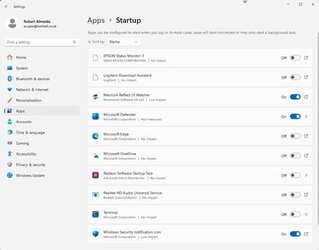
As for Windows I always disable Hibernation, Sleep and Faststartup in the Power options and the only programs I have enabled in Startup are Microsoft Defender, Windows Defender and Macrium Reflect UI Watcher.
2023-10-02_14-42-49.jpg
2023-10-02_14-41-59.jpg
 

My Computers My Computers

  • At a glance

    Windows 11 Pro 25h2 64bit 26200.8655AMD Ryzen 7 7700X 8 Core AM5Corsair Vengeance 32GB 5600MHz AMD EXPO DDR5Integrated
    OS
    Windows 11 Pro 25h2 64bit 26200.8655
    Computer type
    PC/Desktop
    Manufacturer/Model
    Self-build 09/2023
    CPU
    AMD Ryzen 7 7700X 8 Core AM5
    Motherboard
    ASUS TUF GAMING B650-PLUS WIFI DDR5 PCIe 4.0 ATX
    Memory
    Corsair Vengeance 32GB 5600MHz AMD EXPO DDR5
    Graphics Card(s)
    Integrated
    Sound Card
    Integrated RealTek HD
    Monitor(s) Displays
    ASUS VA24DQ 24" (23.8") Monitor, FHD (1920x1080), IPS, 75Hz,
    Screen Resolution
    1920 x 1080
    Hard Drives
    Samsung 990 PRO 2TB M.2 PCIe 4.0 NVMe SSD/Solid State Drive (C:)
    WDC WD20 EZRX-00D8PB0 SATA 2Tb (E:) Disk Device (VIDEOS)
    WDC WD20 EZRX-22Z5HBO SATA 2Tb (D:) Disk Device (DATA)
    PSU
    Evga 650 Bq, 80+ Bronze 650W, Semi Modular
    Case
    Fractal Design Define 7 Black Mid Tower PC Gaming Case
    Cooling
    3 x 140 case fans
    Keyboard
    Logitech wireless USB
    Mouse
    Logitech wireless USB
    Internet Speed
    74 mbps down 20mbps up
    Browser
    Edge
    Antivirus
    Malwarebytes Premium and Windows Defender
    Other Info
    LG M-DISC WH14NS40 M-DISC Optical drive
  • At a glance

    Windows 11 Home OS build 22621.2134AMD A6-6400K APU (NON WINDOWS 11 COMPLIANT)RAM 8.00 GB (7.19 GB usable)AMD Radeon HD 8470D
    Operating System
    Windows 11 Home OS build 22621.2134
    Computer type
    PC/Desktop
    Manufacturer/Model
    DWT
    CPU
    AMD A6-6400K APU (NON WINDOWS 11 COMPLIANT)
    Motherboard
    ASUS A68HM-K (FM2+ ) (NON WINDOWS 11 COMPLIANT)
    Memory
    RAM 8.00 GB (7.19 GB usable)
    Graphics card(s)
    AMD Radeon HD 8470D
    Sound Card
    Integrated High Definition Audio Device
    Monitor(s) Displays
    TERRA 2447W
    Screen Resolution
    1920x1080 pixels
    Hard Drives
    WDC WDS500G2B0A-00SM50 (SSD) 500GB
    TOSHIBA DT01ACA100 HDD 1TB
    PSU
    300W
    Case
    CiT USB Devil Mesh Gaming Case
    Cooling
    AMD Stock
    Keyboard
    HID Keyboard Device
    Mouse
    HID-compliant mouse
    Internet Speed
    37Mbps down 10Mbps up
    Browser
    Edge
    Antivirus
    Windows Security + Malwarebytes Premium
    Other Info
    Optical Drive ATAPI iHAS124 F DVD Writer
I wonder if your motherboard is running the RAM calibrations on every boot?

That should only be done one time.

What are your RAM settings? Are you using DOCP?

I to wondered if the motherboard was running the RAM training every time I powered on.
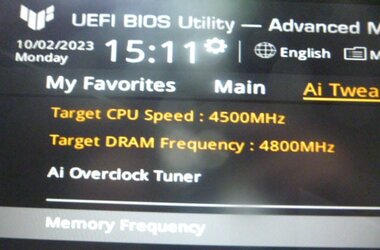
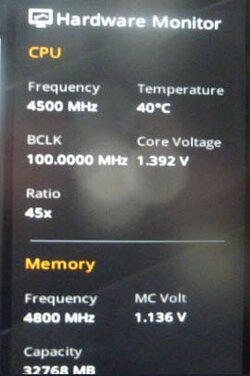
The RAM is as stock 4800MHz and now the pc is at a faster start-up time!
BIOS AI Tweak 1.jpg

BIOS hardware monitor.jpg
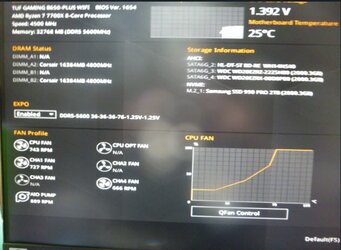
When DOCP/EXPO is enable the RAM settings are DDR5-5600-36-36-36-76-1.25v-1.25v but the pc start-up time is now a bit slower, so I have disabled DOCP/EXPO.
BIOS EXPO enabled.jpg
Not suer if to enable DOCP/EXPO or leave it disabled which means I cannot take advantage of faster memory timing.
 

My Computers My Computers

  • At a glance

    Windows 11 Pro 25h2 64bit 26200.8655AMD Ryzen 7 7700X 8 Core AM5Corsair Vengeance 32GB 5600MHz AMD EXPO DDR5Integrated
    OS
    Windows 11 Pro 25h2 64bit 26200.8655
    Computer type
    PC/Desktop
    Manufacturer/Model
    Self-build 09/2023
    CPU
    AMD Ryzen 7 7700X 8 Core AM5
    Motherboard
    ASUS TUF GAMING B650-PLUS WIFI DDR5 PCIe 4.0 ATX
    Memory
    Corsair Vengeance 32GB 5600MHz AMD EXPO DDR5
    Graphics Card(s)
    Integrated
    Sound Card
    Integrated RealTek HD
    Monitor(s) Displays
    ASUS VA24DQ 24" (23.8") Monitor, FHD (1920x1080), IPS, 75Hz,
    Screen Resolution
    1920 x 1080
    Hard Drives
    Samsung 990 PRO 2TB M.2 PCIe 4.0 NVMe SSD/Solid State Drive (C:)
    WDC WD20 EZRX-00D8PB0 SATA 2Tb (E:) Disk Device (VIDEOS)
    WDC WD20 EZRX-22Z5HBO SATA 2Tb (D:) Disk Device (DATA)
    PSU
    Evga 650 Bq, 80+ Bronze 650W, Semi Modular
    Case
    Fractal Design Define 7 Black Mid Tower PC Gaming Case
    Cooling
    3 x 140 case fans
    Keyboard
    Logitech wireless USB
    Mouse
    Logitech wireless USB
    Internet Speed
    74 mbps down 20mbps up
    Browser
    Edge
    Antivirus
    Malwarebytes Premium and Windows Defender
    Other Info
    LG M-DISC WH14NS40 M-DISC Optical drive
  • At a glance

    Windows 11 Home OS build 22621.2134AMD A6-6400K APU (NON WINDOWS 11 COMPLIANT)RAM 8.00 GB (7.19 GB usable)AMD Radeon HD 8470D
    Operating System
    Windows 11 Home OS build 22621.2134
    Computer type
    PC/Desktop
    Manufacturer/Model
    DWT
    CPU
    AMD A6-6400K APU (NON WINDOWS 11 COMPLIANT)
    Motherboard
    ASUS A68HM-K (FM2+ ) (NON WINDOWS 11 COMPLIANT)
    Memory
    RAM 8.00 GB (7.19 GB usable)
    Graphics card(s)
    AMD Radeon HD 8470D
    Sound Card
    Integrated High Definition Audio Device
    Monitor(s) Displays
    TERRA 2447W
    Screen Resolution
    1920x1080 pixels
    Hard Drives
    WDC WDS500G2B0A-00SM50 (SSD) 500GB
    TOSHIBA DT01ACA100 HDD 1TB
    PSU
    300W
    Case
    CiT USB Devil Mesh Gaming Case
    Cooling
    AMD Stock
    Keyboard
    HID Keyboard Device
    Mouse
    HID-compliant mouse
    Internet Speed
    37Mbps down 10Mbps up
    Browser
    Edge
    Antivirus
    Windows Security + Malwarebytes Premium
    Other Info
    Optical Drive ATAPI iHAS124 F DVD Writer
Have you facture reset BIOS configuration?

Have you enabled Fast Boot in BIOS configuration?

If the BIOS splash screen displaying slow, then this has nothing to do with Windows 11.

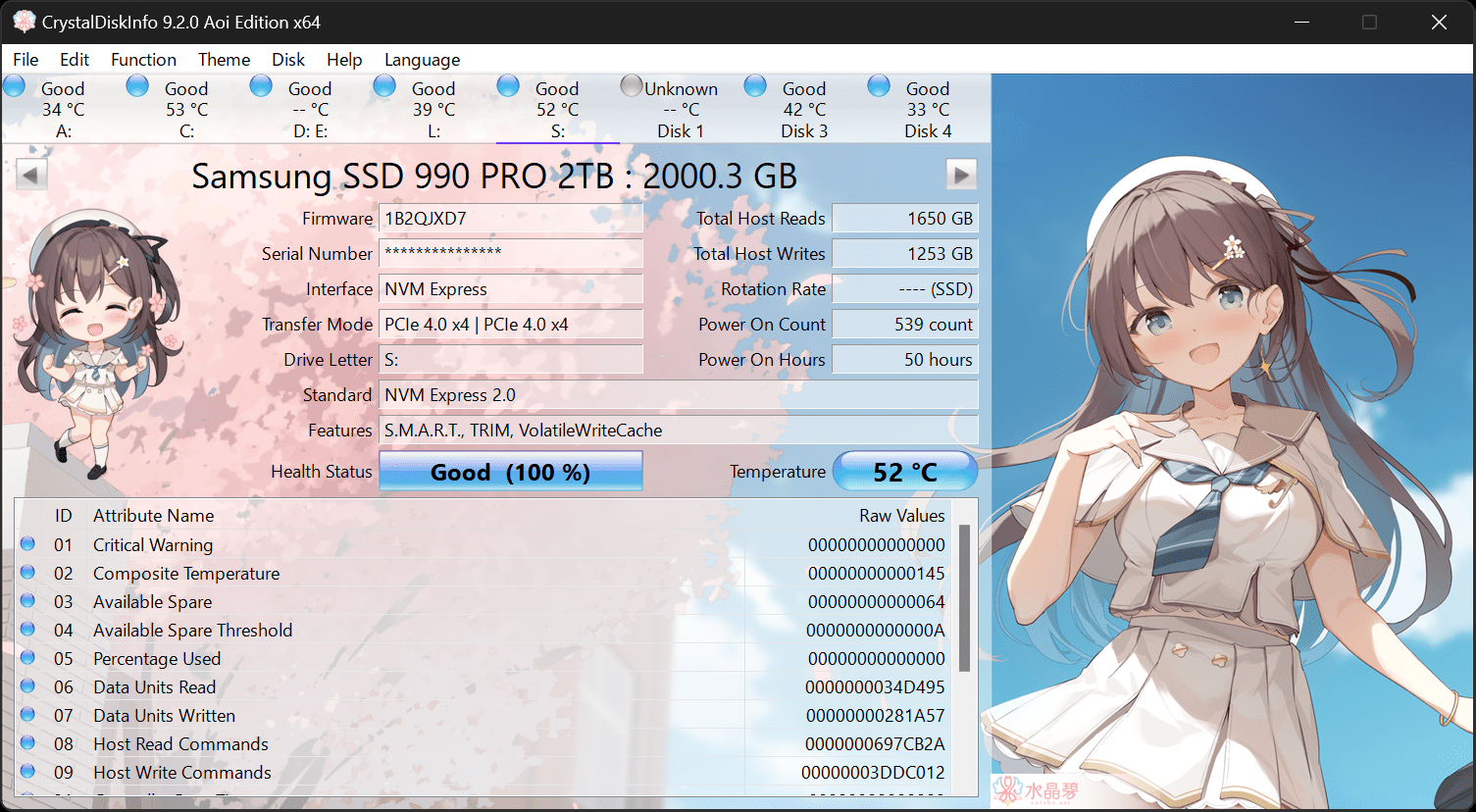
Check your HDD health report with CrystalDiskInfo.


My Computer My Computer

At a glance

Windows 11AMD Ryzen 7 5700GMicron Technology DDR4-3200 16GBNVIDIA GeForce RTX 3060
OS
Windows 11
Computer type
PC/Desktop
Manufacturer/Model
HP Pavilion
CPU
AMD Ryzen 7 5700G
Motherboard
Erica6
Memory
Micron Technology DDR4-3200 16GB
Graphics Card(s)
NVIDIA GeForce RTX 3060
Sound Card
Realtek ALC671
Monitor(s) Displays
Samsung SyncMaster U28E590
Screen Resolution
3840 x 2160
Hard Drives
SAMSUNG MZVLQ1T0HALB-000H1
Have you facture reset BIOS configuration?

Have you enabled Fast Boot in BIOS configuration?

If the BIOS splash screen displaying slow, then this has nothing to do with Windows 11.

Check your HDD health report with CrystalDiskInfo.

Don't have to the pc is now booting quite fast. The SSD is being monitored by HD Sentinel and all are working fine.
 

My Computers My Computers

  • At a glance

    Windows 11 Pro 25h2 64bit 26200.8655AMD Ryzen 7 7700X 8 Core AM5Corsair Vengeance 32GB 5600MHz AMD EXPO DDR5Integrated
    OS
    Windows 11 Pro 25h2 64bit 26200.8655
    Computer type
    PC/Desktop
    Manufacturer/Model
    Self-build 09/2023
    CPU
    AMD Ryzen 7 7700X 8 Core AM5
    Motherboard
    ASUS TUF GAMING B650-PLUS WIFI DDR5 PCIe 4.0 ATX
    Memory
    Corsair Vengeance 32GB 5600MHz AMD EXPO DDR5
    Graphics Card(s)
    Integrated
    Sound Card
    Integrated RealTek HD
    Monitor(s) Displays
    ASUS VA24DQ 24" (23.8") Monitor, FHD (1920x1080), IPS, 75Hz,
    Screen Resolution
    1920 x 1080
    Hard Drives
    Samsung 990 PRO 2TB M.2 PCIe 4.0 NVMe SSD/Solid State Drive (C:)
    WDC WD20 EZRX-00D8PB0 SATA 2Tb (E:) Disk Device (VIDEOS)
    WDC WD20 EZRX-22Z5HBO SATA 2Tb (D:) Disk Device (DATA)
    PSU
    Evga 650 Bq, 80+ Bronze 650W, Semi Modular
    Case
    Fractal Design Define 7 Black Mid Tower PC Gaming Case
    Cooling
    3 x 140 case fans
    Keyboard
    Logitech wireless USB
    Mouse
    Logitech wireless USB
    Internet Speed
    74 mbps down 20mbps up
    Browser
    Edge
    Antivirus
    Malwarebytes Premium and Windows Defender
    Other Info
    LG M-DISC WH14NS40 M-DISC Optical drive
  • At a glance

    Windows 11 Home OS build 22621.2134AMD A6-6400K APU (NON WINDOWS 11 COMPLIANT)RAM 8.00 GB (7.19 GB usable)AMD Radeon HD 8470D
    Operating System
    Windows 11 Home OS build 22621.2134
    Computer type
    PC/Desktop
    Manufacturer/Model
    DWT
    CPU
    AMD A6-6400K APU (NON WINDOWS 11 COMPLIANT)
    Motherboard
    ASUS A68HM-K (FM2+ ) (NON WINDOWS 11 COMPLIANT)
    Memory
    RAM 8.00 GB (7.19 GB usable)
    Graphics card(s)
    AMD Radeon HD 8470D
    Sound Card
    Integrated High Definition Audio Device
    Monitor(s) Displays
    TERRA 2447W
    Screen Resolution
    1920x1080 pixels
    Hard Drives
    WDC WDS500G2B0A-00SM50 (SSD) 500GB
    TOSHIBA DT01ACA100 HDD 1TB
    PSU
    300W
    Case
    CiT USB Devil Mesh Gaming Case
    Cooling
    AMD Stock
    Keyboard
    HID Keyboard Device
    Mouse
    HID-compliant mouse
    Internet Speed
    37Mbps down 10Mbps up
    Browser
    Edge
    Antivirus
    Windows Security + Malwarebytes Premium
    Other Info
    Optical Drive ATAPI iHAS124 F DVD Writer
Latest Support Threads

Back
Top Bottom