Microsoft 365 Insider Blog:
Hi, Insiders! I’m Tobi Solarin, a Product Manager on the Word team. I’m excited to share our newly updated design for comments in Word for the web.
Introducing a fresh new look for comments in Word for the web
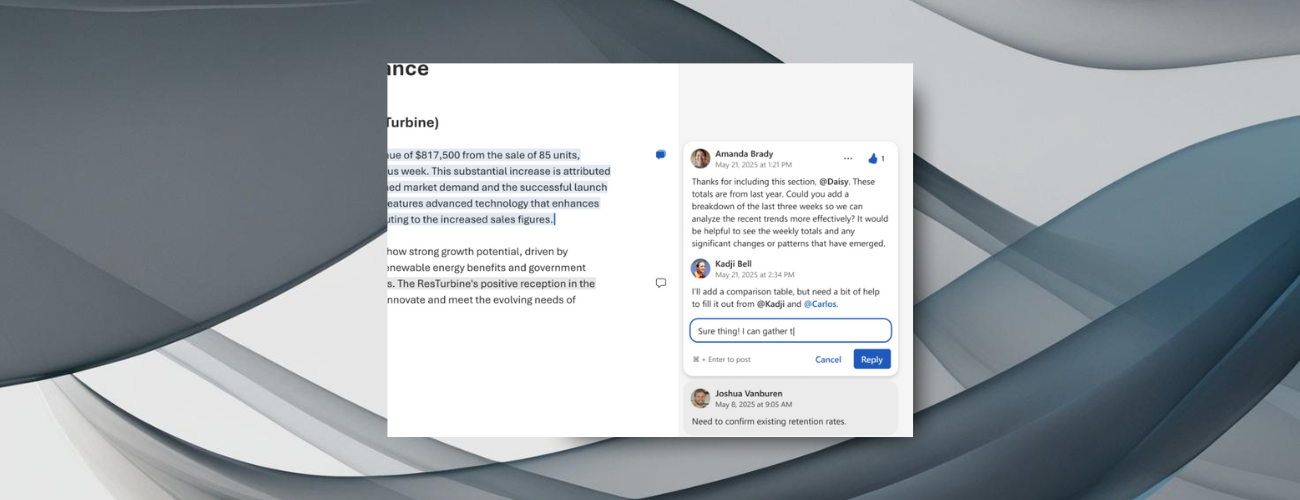
Many of you shared that the previous commenting experience felt outdated. We’ve listened and introduced a cleaner, more modern design featuring refreshed icons, buttons, and an improved layout.The new design also helps you focus on what matters most. Selected comments are highlighted, while unselected ones fade into a subtle gray, making it easier to direct your attention when navigating feedback.
How it works
- Open a new or existing document in Word for the web.
- Highlight text and select New Comment, and notice that your comments and replies have a new look!


Availability
This update is rolling out to all Word for the web users.Feedback
We’d love to hear your feedback! To share your thoughts, select Help > Feedback in Word, and include #NewCommentUX in your responses. Source:
Introducing a fresh new look for comments in Word for the web
Many of you said the previous commenting experience in Microsoft Word felt outdated. We’ve since introduced a cleaner, more modern design in Word for the web...
 techcommunity.microsoft.com