New Outlook: Attach File > Suggested Files List


nuspieds

Well-known member
Member
Local time
8:55 PM
Posts
103
OS
Windows 11 Pro
Hi,

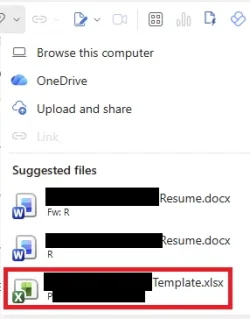
In the new Outlook's Attach File menu, it lists (up to 3) files in the "Suggested files" section.

For me, these suggestions have always been from very old emails that I have sent! This feature would actually be very helpful to me, were it to use my recently-sent emails. But if that's not going to be the case, is there a way I can at least clear this useless suggestions list?

Thanks!
 

My Computer

System One

  • OS
    Windows 11 Pro
    Computer type
    Laptop
    Manufacturer/Model
    Microsoft Surface Laptop Studio
    Memory
    32GB
    Hard Drives
    1TB
Hi,

is there a way I can at least clear this useless suggestions list?

Thanks!
The 'new' Outlook is an APP and as such is more restrictive than 'classic' Outlook as far as personal preferences are concerned.

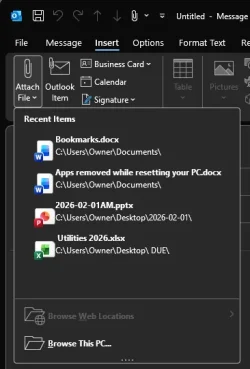
But I must ask : You only trigger the list by clicking on Insert then Attach file, otherwise you never see that list.
You also stated you rarely used that feature. So why is that an inconvenience to you?
Please understand this is not a critique, but it is rather puzzling.
Either way, what you are requesting is not 'yet' an available option, AFAIK.
 

My Computers

System One System Two

  • OS
    All Branches but Release
    Computer type
    Laptop
    Manufacturer/Model
    Acer Nitro ANV15-51
    CPU
    AMD Ryzen 7 7735HS 3200-4500 Mhz 8 cores x 2
    Motherboard
    Sportage_RBH
    Memory
    32 GB DDR5
    Graphics Card(s)
    Radeon Graphic / NVIDIA GeForce RTX 4060 8 GB GDDR6
    Sound Card
    AMD/Realtek(R) Audio
    Monitor(s) Displays
    Integrated Monitor (15.3"vis)
    Screen Resolution
    FHD 1920X1080 16:9 144Hz
    Hard Drives
    KINGSTON OM8SEP4512Q-AA 1TB
    Western Digital 256GB
    PSU
    19V DC 6.32 A 120 W
    Cooling
    Dual Fans
    Mouse
    MS Bluetooth
    Internet Speed
    Fiber 1GB Cox -us & 1GB Orange-fr
    Browser
    Edge Canary- Firefox Nightly-Chrome Dev-Chrome Dev
    Antivirus
    Windows Defender
  • Operating System
    Windows 11 Beta
    Computer type
    Laptop
    Manufacturer/Model
    Asus X751BP
    CPU
    AMD A9-9420
    Memory
    8 GB of DDR4
    Graphics card(s)
    AMD Radeon R5
    Screen Resolution
    1600x900
    Hard Drives
    Seagate 1 TB
The 'new' Outlook is an APP and as such is more restrictive than 'classic' Outlook as far as personal preferences are concerned.

But I must ask : You only trigger the list by clicking on Insert then Attach file, otherwise you never see that list.
You also stated you rarely used that feature. So why is that an inconvenience to you?
Please understand this is not a critique, but it is rather puzzling.
Either way, what you are requesting is not 'yet' an available option, AFAIK.
No worries, I do not see it as a critique. :)

But I didn't state that I rarely used the feature; as a matter of fact, it is the opposite: I am frequently attaching files to sent emails and I want this feature to work and be useful for me. The issue/annoyance is that the "Suggested files" list is referencing attachments from old/obsolete emails.

Let me add some more details that would help further explain my issue/annoyance:
  • I am responding to job postings and submitting my resume;
  • To attach my resume, from the "Attach file" menu I have to click "Browse" and then browse for and select my resume;
  • The "Suggested files" list contains files that are my resume attachments from very old job submission emails I sent;
  • That is, I have tweaked my resume since those very old emails and, consequently, I need to attach this most recent version of my resume to the current job postings to which I am responding;
  • Since the "Suggested files" list references resume attachments from old/obsolete emails, I have to use the "Browse" option instead (i.e., click, click, click, ...);
  • On the other hand, if the "Suggested files" list was current and showed the most-recent attachments from emails sent, then I would just need to click on that file instead of manually browsing for and attaching my resume.
Believe it or not but the oldest file in my "Suggested files" list is from June 2025! Besides my resume submissions, do you know how many other files I have attached to other emails since then?! So, I have no idea how or why the "Suggested files" list is using such an old and outdated reference.
 

My Computer

System One

  • OS
    Windows 11 Pro
    Computer type
    Laptop
    Manufacturer/Model
    Microsoft Surface Laptop Studio
    Memory
    32GB
    Hard Drives
    1TB
  • Like
Reactions: OAT
I see it makes more sense now. I am sorry if I misread.
Yes I get it, it would be a suggestion for the Outlook team and they've been pretty good at adding things.
Of course, you could open the folder where your latest résumé is and keep it open in the background.
Then Drag & Drop could be used.
But it wouldn't update the list.

newoutlook.webp
 

My Computers

System One System Two

  • OS
    All Branches but Release
    Computer type
    Laptop
    Manufacturer/Model
    Acer Nitro ANV15-51
    CPU
    AMD Ryzen 7 7735HS 3200-4500 Mhz 8 cores x 2
    Motherboard
    Sportage_RBH
    Memory
    32 GB DDR5
    Graphics Card(s)
    Radeon Graphic / NVIDIA GeForce RTX 4060 8 GB GDDR6
    Sound Card
    AMD/Realtek(R) Audio
    Monitor(s) Displays
    Integrated Monitor (15.3"vis)
    Screen Resolution
    FHD 1920X1080 16:9 144Hz
    Hard Drives
    KINGSTON OM8SEP4512Q-AA 1TB
    Western Digital 256GB
    PSU
    19V DC 6.32 A 120 W
    Cooling
    Dual Fans
    Mouse
    MS Bluetooth
    Internet Speed
    Fiber 1GB Cox -us & 1GB Orange-fr
    Browser
    Edge Canary- Firefox Nightly-Chrome Dev-Chrome Dev
    Antivirus
    Windows Defender
  • Operating System
    Windows 11 Beta
    Computer type
    Laptop
    Manufacturer/Model
    Asus X751BP
    CPU
    AMD A9-9420
    Memory
    8 GB of DDR4
    Graphics card(s)
    AMD Radeon R5
    Screen Resolution
    1600x900
    Hard Drives
    Seagate 1 TB
I see it makes more sense now. I am sorry if I misread...
Once again, no worries! 😊

Of course, you could open the folder where your latest résumé is and keep it open in the background.
Then Drag & Drop could be used.
But it wouldn't update the list.
Yes, you are correct but that could potentially lead to additional keystrokes/clicks alt-tabbing or finding that window. Again, potentially.

So, what I have done to minimize keystrokes/clicks, since the Browse window opens at the Documents folder, that's where I have my resume saved. Thus, all I ever have to do is scroll down past the folders and select my resume.

When I'm applying to one or two job postings, it's not much of an annoyance, but when there are several, it sure would be a timesaver to click on an entry in the "Suggested files" list.
 

My Computer

System One

  • OS
    Windows 11 Pro
    Computer type
    Laptop
    Manufacturer/Model
    Microsoft Surface Laptop Studio
    Memory
    32GB
    Hard Drives
    1TB
  • Like
Reactions: OAT
Yeah, that was my post.

Her suggestion to use Edge DevTools to clear cache/storage, although the option wasn't there for me, it may work but it seems like a dangerous suggestion as I'm sure such an option will do much more than just clear the "Suggested Files" list.

In addition, she missed my point that the suggestions provided to me were from email attachments and not OneDrive or SharePoint. In the screenshot below, the first line is the filename and the second line (red arrow) is the email subject.

AttachFileSuggestions - Copy.webp

Eventually this list will change, but I don't when, how, or why!
 

My Computer

System One

  • OS
    Windows 11 Pro
    Computer type
    Laptop
    Manufacturer/Model
    Microsoft Surface Laptop Studio
    Memory
    32GB
    Hard Drives
    1TB
Eventually this list will change, but I don't when, how, or why!
The list will change when you clear these lists, each in their respective apps...

12070.webp
 

My Computers

System One System Two

  • OS
    Windows 11 Pro
    Computer type
    PC/Desktop
    Manufacturer/Model
    ASUS ROG Strix
  • Operating System
    Windows 11 Pro
    Computer type
    Laptop
    Manufacturer/Model
    ASUS VivoBook
Hi @Edwin,

For me, New Outlook is referencing file attachments from its Sent emails, not Word or any other app. That's why I emphasized the email subject with the red arrow in my post above: They are all real and valid emails that I sent.

I've actually used its suggested files functionality in the past when my resume hadn't changed and the attachment/email in the list was fine. The problem right now is that the attachment/emails that it suggests are old/outdated versions of my resume from old emails I sent.

Because you never know what buggy code they may have, as a test, I did clear the PowerPoint Recent Files list, cleared cache, rebooted, etc., but there was no change in New Outlook.
 

My Computer

System One

  • OS
    Windows 11 Pro
    Computer type
    Laptop
    Manufacturer/Model
    Microsoft Surface Laptop Studio
    Memory
    32GB
    Hard Drives
    1TB
... but there was no change in New Outlook.
Ah! The New Outlook! I just assumed it worked in the New Outlook as it does in the Classic Outlook! Sorry about that!

12071.webp
 

My Computers

System One System Two

  • OS
    Windows 11 Pro
    Computer type
    PC/Desktop
    Manufacturer/Model
    ASUS ROG Strix
  • Operating System
    Windows 11 Pro
    Computer type
    Laptop
    Manufacturer/Model
    ASUS VivoBook
Ah! The New Outlook! I just assumed it worked in the New Outlook as it does in the Classic Outlook! Sorry about that!
No worries! :giggle:
 

My Computer

System One

  • OS
    Windows 11 Pro
    Computer type
    Laptop
    Manufacturer/Model
    Microsoft Surface Laptop Studio
    Memory
    32GB
    Hard Drives
    1TB
As another test, the PowerPoint file/email in my "Suggested files" list was not an important file/email, so I permanently deleted that email (i.e., it has been completely deleted and is not in the "Deleted Items" folder). If you do a search, there are no results, so it's definitely gone, gone, gone! 😊

Cleared cache, rebooted, and look at my "Suggested files" list now...

AttachFileSuggestions - Copy.webp

Well, whatever checks they are doing, they are current, but the suggestions are old!!! 😒
 

My Computer

System One

  • OS
    Windows 11 Pro
    Computer type
    Laptop
    Manufacturer/Model
    Microsoft Surface Laptop Studio
    Memory
    32GB
    Hard Drives
    1TB
Her suggestion to use Edge DevTools to clear cache/storage, although the option wasn't there for me, it may work but it seems like a dangerous suggestion as I'm sure such an option will do much more than just clear the "Suggested Files" list.
You can also temporarily test with a New Outlook for Windows Profile and switch back.

See the answer by Hornblower409 Dec 11, 2025, 12:11 AM in
Outlook starting error - repair/reinstall/reset doesn't fix - Microsoft Q&A
 

My Computer

System One

  • OS
    Windows 10, Windows 11
    Computer type
    PC/Desktop
... the suggestions are old
As a test, you could try exporting one of the old culprit emails as .eml or .msg, then delete the original permanently.
 

My Computers

System One System Two

  • OS
    Windows 11 Pro
    Computer type
    PC/Desktop
    Manufacturer/Model
    ASUS ROG Strix
  • Operating System
    Windows 11 Pro
    Computer type
    Laptop
    Manufacturer/Model
    ASUS VivoBook
I installed the New Outlook but can't replicate your issue.
Of course, I have nothing tied to my MS account so... 🤷‍♂️
If you have Outlook, Office and perhaps OneDrive tied to your MS account, the issue may be deeply buried in the woodwork.
 

My Computers

System One System Two

  • OS
    Windows 11 Pro
    Computer type
    PC/Desktop
    Manufacturer/Model
    ASUS ROG Strix
  • Operating System
    Windows 11 Pro
    Computer type
    Laptop
    Manufacturer/Model
    ASUS VivoBook
You can also temporarily test with a New Outlook for Windows Profile and switch back.

See the answer by Hornblower409 Dec 11, 2025, 12:11 AM in
Outlook starting error - repair/reinstall/reset doesn't fix - Microsoft Q&A

User Profiles are for Classic Outlook only; that functionality is not supported in the New Outlook.

But the suggestions work at least initially/early on; the problem is that they become stale and as per my post above, if I were to completely remove the Sent email for a suggested file, New Outlook replaces that file with a new suggestion from another Sent email. So, clearly, it is reading/analyzing current data, but they seem to have buggy logic that results in old/outdated suggestions.
 

My Computer

System One

  • OS
    Windows 11 Pro
    Computer type
    Laptop
    Manufacturer/Model
    Microsoft Surface Laptop Studio
    Memory
    32GB
    Hard Drives
    1TB
As a test, you could try exporting one of the old culprit emails as .eml or .msg, then delete the original permanently.
The PowerPoint email I permanently deleted was one of those emails.

I just didn't need to export/save it because it was not an important email.
 

My Computer

System One

  • OS
    Windows 11 Pro
    Computer type
    Laptop
    Manufacturer/Model
    Microsoft Surface Laptop Studio
    Memory
    32GB
    Hard Drives
    1TB
I installed the New Outlook but can't replicate your issue.
Of course, I have nothing tied to my MS account so... 🤷‍♂️
If you have Outlook, Office and perhaps OneDrive tied to your MS account, the issue may be deeply buried in the woodwork.
Yeah, I wouldn't be surprised.

I have an MS Account, but it is for Windows login and administration only.

I use my M365 Account for the apps and services. So, for example, I have a OneDrive Personal account which I never use (and that's connected to the MS Account) and I also have a OneDrive Business account, which is the one I use (and it uses the M365 account).
 

My Computer

System One

  • OS
    Windows 11 Pro
    Computer type
    Laptop
    Manufacturer/Model
    Microsoft Surface Laptop Studio
    Memory
    32GB
    Hard Drives
    1TB
Back
Top Bottom