
New PC with Windows 11


No, there is no default name, you have to supply one. The person who set it up chose it.
Thanks Bree, that is good to know.
 

My Computer My Computer

At a glance

Windows 11 ProfessionalAMD Ryzen™ 9 7950XDOMINATOR® PLATINUM RGB 64GB (2x32GB) DDR5 DR...MSI GeForce RTX™ 3080 Ti SUPRIM X 12GB
OS
Windows 11 Professional
Computer type
PC/Desktop
Manufacturer/Model
Custom build
CPU
AMD Ryzen™ 9 7950X
Motherboard
ASUS ROG Strix X670E-E Gaming WiFi
Memory
DOMINATOR® PLATINUM RGB 64GB (2x32GB) DDR5 DRAM 5200MHz
Graphics Card(s)
MSI GeForce RTX™ 3080 Ti SUPRIM X 12GB
Hard Drives
980 PRO NVMe M.2 SSD 1TB
970 EVO Plus NVMe M.2 SSD 2TB
PSU
Corsair HX1000 1000 W 80+ Platinum
Case
Fractal Design Meshify 2
Cooling
iCUE H150i ELITE LCD Display Liquid CPU Cooler
For removing the two sata drives before the clean install, is it just these two cables that I can unplug? Just making sure;-)
WD_Hard_Drives.jpg
 

My Computer My Computer

At a glance

Windows 11 ProfessionalAMD Ryzen™ 9 7950XDOMINATOR® PLATINUM RGB 64GB (2x32GB) DDR5 DR...MSI GeForce RTX™ 3080 Ti SUPRIM X 12GB
OS
Windows 11 Professional
Computer type
PC/Desktop
Manufacturer/Model
Custom build
CPU
AMD Ryzen™ 9 7950X
Motherboard
ASUS ROG Strix X670E-E Gaming WiFi
Memory
DOMINATOR® PLATINUM RGB 64GB (2x32GB) DDR5 DRAM 5200MHz
Graphics Card(s)
MSI GeForce RTX™ 3080 Ti SUPRIM X 12GB
Hard Drives
980 PRO NVMe M.2 SSD 1TB
970 EVO Plus NVMe M.2 SSD 2TB
PSU
Corsair HX1000 1000 W 80+ Platinum
Case
Fractal Design Meshify 2
Cooling
iCUE H150i ELITE LCD Display Liquid CPU Cooler
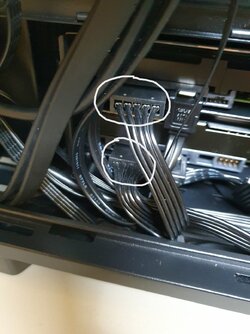
For removing the two sata drives before the clean install, is it just these two cables that I can unplug? Just making sure;-)
View attachment 52251
Yes. Make sure the computer is off.
As an option, instead of unplug the cables you can disable the SATA port on BIOS.
 

My Computers My Computers

  • At a glance

    Windows 11 Pro - Windows 7 HP 64 - Lubuntui5 6600K - 800MHz to 4400MHz4+4G GSkill DDR4 3000IG - Intel 530
    OS
    Windows 11 Pro - Windows 7 HP 64 - Lubuntu
    Computer type
    PC/Desktop
    Manufacturer/Model
    custom build
    CPU
    i5 6600K - 800MHz to 4400MHz
    Motherboard
    GA-Z170-HD3P
    Memory
    4+4G GSkill DDR4 3000
    Graphics Card(s)
    IG - Intel 530
    Monitor(s) Displays
    Samsung 226BW
    Screen Resolution
    1680x1050
    Hard Drives
    (1) -1 SM951 – 128GB M.2 AHCI PCIe SSD drive for Win 11
    (2) -1 WD SATA 3 - 1T for Data
    (3) -1 WD SATA 3 - 1T for backup
    (4) -1 BX500 SSD - 256G for Windows 7 and Lubuntu
    PSU
    Thermaltake 450W TR2 gold
    Keyboard
    Old and good Chicony mechanical keyboard
    Mouse
    Logitech mX performance - 9 buttons (had to disable some)
    Internet Speed
    500 Mb/s
    Browser
    Firefox 64
  • At a glance

    Windows 11 Proi7-4500U 800- 3000MHz(4+4)G DDR3 1600IG intel 4400 + NVIDIA GeForce GT 745M
    Operating System
    Windows 11 Pro
    Computer type
    Laptop
    Manufacturer/Model
    Asus Q550LF
    CPU
    i7-4500U 800- 3000MHz
    Motherboard
    Asus Q550LF
    Memory
    (4+4)G DDR3 1600
    Graphics card(s)
    IG intel 4400 + NVIDIA GeForce GT 745M
    Sound Card
    Realtek
    Monitor(s) Displays
    LG Display LP156WF4-SPH1
    Screen Resolution
    1920 x 1080
    Hard Drives
    BX500 120G SSD for Windows and programs
    & 1T HDD for data
    Internet Speed
    500 Mb/s
    Browser
    Firefox 64
@SIW2 thanks. Yes, the drives on the motherboard are M.2. So maybe I will try hunt down a guide for this specific motherboard about removing that second drive. Would it be general practice to have to take out the while board to add/remove these M.2 drives? Also the GPU, would that need to be taken out? Sorry for these noob questions.

This clean install isn't something I have to do now, but I will have to do so at some stage.
Hi,
Easier to disable the storage m.2 in bios.
 

My Computer My Computer

At a glance

Win-7-10-11Pro's10900k & 9940x & 5930kTrident-Z Royal 4000c16 2x16gb & Trident-Z 36...Titan Xp & 1080ti FTW3 & evga 980ti gaming
OS
Win-7-10-11Pro's
Computer type
PC/Desktop
Manufacturer/Model
Acer 17" Nitro 7840sn/ 2x16gb 5600c40/ 4060/ stock 1tb-os/ 4tb sn850x
CPU
10900k & 9940x & 5930k
Motherboard
z490-Apex & x299-Apex & x99-Sabertooth
Memory
Trident-Z Royal 4000c16 2x16gb & Trident-Z 3600c16 4x8gb & 3200c14 4x8gb
Graphics Card(s)
Titan Xp & 1080ti FTW3 & evga 980ti gaming
Sound Card
Onboard Realtek x3
Monitor(s) Displays
1-AOC G2460PG 24"G-Sync 144Hz/ 2nd 1-ASUS VG248QE 24"/ 3rd LG 43" series
Screen Resolution
1920-1080 not sure what the t.v is besides 43" class scales from 1920-1080 perfectly
Hard Drives
2-WD-sn850x 4tb/ 970evo+500gb/ 980 pro 2tb.
PSU
1000p2 & 1200p2 & 850p2
Case
D450 x2 & 1 Test bench in cherry Entertainment center
Cooling
Custom water loops x3 with 2x mora 360mm rads only 980ti gaming air cooled
Keyboard
G710+x3
Mouse
Redragon x3
Internet Speed
xfinity gigabyte
Browser
Firefox
Antivirus
mbam pro
Even easier to just leave it alone. Hundreds of Windows 10/11 installs here and I have never disconnected or disabled any second, third, or fourth drives.
 

My Computers My Computers

  • At a glance

    Windows 11AMD Ryzen 7 3800XT32GBEVGA GeForce GTX 1080 Ti
    OS
    Windows 11
    Computer type
    PC/Desktop
    Manufacturer/Model
    Homebuilt
    CPU
    AMD Ryzen 7 3800XT
    Motherboard
    ASUS ROG Crosshair VII Hero (WiFi)
    Memory
    32GB
    Graphics Card(s)
    EVGA GeForce GTX 1080 Ti
  • At a glance

    Windows 11 EducationIntel i7-8550U32GBNvidia Geforce MX150
    Operating System
    Windows 11 Education
    Computer type
    Laptop
    Manufacturer/Model
    Dell Inspiron 7773
    CPU
    Intel i7-8550U
    Memory
    32GB
    Graphics card(s)
    Nvidia Geforce MX150
    Sound Card
    Realtek
    Monitor(s) Displays
    17"
    Screen Resolution
    1920 x 1080
    Hard Drives
    Toshiba 512GB NVMe SSD
    SK Hynix 512GB SATA SSD
    Internet Speed
    Fast!
Hi,
Easier to disable the storage m.2 in bios.
That's possible too, I like tha sound of this method. I will look into this.

About that 2nd drive - Is it recommended to format it in Windows before doing the wipe? I have hardly used it at all since I got the PC, just a few DaVinci Resolve exports were sent to the drive. But I would like to reset it to as it was when I forst got it.

I am nearly sure I read somewhere before (maybe on here!) that doing a right click and format on these ssd drives isn't good for them and you should use other tools for doing it? Like Samsung Magician?
 

My Computer My Computer

At a glance

Windows 11 ProfessionalAMD Ryzen™ 9 7950XDOMINATOR® PLATINUM RGB 64GB (2x32GB) DDR5 DR...MSI GeForce RTX™ 3080 Ti SUPRIM X 12GB
OS
Windows 11 Professional
Computer type
PC/Desktop
Manufacturer/Model
Custom build
CPU
AMD Ryzen™ 9 7950X
Motherboard
ASUS ROG Strix X670E-E Gaming WiFi
Memory
DOMINATOR® PLATINUM RGB 64GB (2x32GB) DDR5 DRAM 5200MHz
Graphics Card(s)
MSI GeForce RTX™ 3080 Ti SUPRIM X 12GB
Hard Drives
980 PRO NVMe M.2 SSD 1TB
970 EVO Plus NVMe M.2 SSD 2TB
PSU
Corsair HX1000 1000 W 80+ Platinum
Case
Fractal Design Meshify 2
Cooling
iCUE H150i ELITE LCD Display Liquid CPU Cooler
That's possible too, I like tha sound of this method. I will look into this.

About that 2nd drive - Is it recommended to format it in Windows before doing the wipe? I have hardly used it at all since I got the PC, just a few DaVinci Resolve exports were sent to the drive. But I would like to reset it to as it was when I forst got it.

I am nearly sure I read somewhere before (maybe on here!) that doing a right click and format on these ssd drives isn't good for them and you should use other tools for doing it? Like Samsung Magician?
A quick format won't damage it more than a delete.
If the drive has many partitions you should delete all partitions and then create a new partition and format it.
Please post a whole window Disk Manager image of your drives. Don't forget to expand the columns so we can read them. How to Post a Screenshot of Disk Management
If you have a MiniTool or AOMEI Partition use it instead or Windows disk manager.
 

My Computers My Computers

  • At a glance

    Windows 11 Pro - Windows 7 HP 64 - Lubuntui5 6600K - 800MHz to 4400MHz4+4G GSkill DDR4 3000IG - Intel 530
    OS
    Windows 11 Pro - Windows 7 HP 64 - Lubuntu
    Computer type
    PC/Desktop
    Manufacturer/Model
    custom build
    CPU
    i5 6600K - 800MHz to 4400MHz
    Motherboard
    GA-Z170-HD3P
    Memory
    4+4G GSkill DDR4 3000
    Graphics Card(s)
    IG - Intel 530
    Monitor(s) Displays
    Samsung 226BW
    Screen Resolution
    1680x1050
    Hard Drives
    (1) -1 SM951 – 128GB M.2 AHCI PCIe SSD drive for Win 11
    (2) -1 WD SATA 3 - 1T for Data
    (3) -1 WD SATA 3 - 1T for backup
    (4) -1 BX500 SSD - 256G for Windows 7 and Lubuntu
    PSU
    Thermaltake 450W TR2 gold
    Keyboard
    Old and good Chicony mechanical keyboard
    Mouse
    Logitech mX performance - 9 buttons (had to disable some)
    Internet Speed
    500 Mb/s
    Browser
    Firefox 64
  • At a glance

    Windows 11 Proi7-4500U 800- 3000MHz(4+4)G DDR3 1600IG intel 4400 + NVIDIA GeForce GT 745M
    Operating System
    Windows 11 Pro
    Computer type
    Laptop
    Manufacturer/Model
    Asus Q550LF
    CPU
    i7-4500U 800- 3000MHz
    Motherboard
    Asus Q550LF
    Memory
    (4+4)G DDR3 1600
    Graphics card(s)
    IG intel 4400 + NVIDIA GeForce GT 745M
    Sound Card
    Realtek
    Monitor(s) Displays
    LG Display LP156WF4-SPH1
    Screen Resolution
    1920 x 1080
    Hard Drives
    BX500 120G SSD for Windows and programs
    & 1T HDD for data
    Internet Speed
    500 Mb/s
    Browser
    Firefox 64
Even easier to just leave it alone. Hundreds of Windows 10/11 installs here and I have never disconnected or disabled any second, third, or fourth drives.
Thanks for the reply. But some say that certain installation files can get installed to the second drive it it is left in. Have you never had this happen? I think for peace of mind, I'd just want one drive visible during installation. A bit OCD:-)
 

My Computer My Computer

At a glance

Windows 11 ProfessionalAMD Ryzen™ 9 7950XDOMINATOR® PLATINUM RGB 64GB (2x32GB) DDR5 DR...MSI GeForce RTX™ 3080 Ti SUPRIM X 12GB
OS
Windows 11 Professional
Computer type
PC/Desktop
Manufacturer/Model
Custom build
CPU
AMD Ryzen™ 9 7950X
Motherboard
ASUS ROG Strix X670E-E Gaming WiFi
Memory
DOMINATOR® PLATINUM RGB 64GB (2x32GB) DDR5 DRAM 5200MHz
Graphics Card(s)
MSI GeForce RTX™ 3080 Ti SUPRIM X 12GB
Hard Drives
980 PRO NVMe M.2 SSD 1TB
970 EVO Plus NVMe M.2 SSD 2TB
PSU
Corsair HX1000 1000 W 80+ Platinum
Case
Fractal Design Meshify 2
Cooling
iCUE H150i ELITE LCD Display Liquid CPU Cooler

My Computer My Computer

At a glance

Windows 11 ProfessionalAMD Ryzen™ 9 7950XDOMINATOR® PLATINUM RGB 64GB (2x32GB) DDR5 DR...MSI GeForce RTX™ 3080 Ti SUPRIM X 12GB
OS
Windows 11 Professional
Computer type
PC/Desktop
Manufacturer/Model
Custom build
CPU
AMD Ryzen™ 9 7950X
Motherboard
ASUS ROG Strix X670E-E Gaming WiFi
Memory
DOMINATOR® PLATINUM RGB 64GB (2x32GB) DDR5 DRAM 5200MHz
Graphics Card(s)
MSI GeForce RTX™ 3080 Ti SUPRIM X 12GB
Hard Drives
980 PRO NVMe M.2 SSD 1TB
970 EVO Plus NVMe M.2 SSD 2TB
PSU
Corsair HX1000 1000 W 80+ Platinum
Case
Fractal Design Meshify 2
Cooling
iCUE H150i ELITE LCD Display Liquid CPU Cooler
Drives 3 (D:), drive 0 (E:) or drive 1 (F:) are single partition data drives. Just quick format the one you want to erase.

As Drives 3 (D:), drive 0 (E:) or drive 1 (F:) have no traces of a Windows installation you don't need to detach (SATA or power cable) from the MB during re-installation on drive 2
 

My Computers My Computers

  • At a glance

    Windows 11 Pro - Windows 7 HP 64 - Lubuntui5 6600K - 800MHz to 4400MHz4+4G GSkill DDR4 3000IG - Intel 530
    OS
    Windows 11 Pro - Windows 7 HP 64 - Lubuntu
    Computer type
    PC/Desktop
    Manufacturer/Model
    custom build
    CPU
    i5 6600K - 800MHz to 4400MHz
    Motherboard
    GA-Z170-HD3P
    Memory
    4+4G GSkill DDR4 3000
    Graphics Card(s)
    IG - Intel 530
    Monitor(s) Displays
    Samsung 226BW
    Screen Resolution
    1680x1050
    Hard Drives
    (1) -1 SM951 – 128GB M.2 AHCI PCIe SSD drive for Win 11
    (2) -1 WD SATA 3 - 1T for Data
    (3) -1 WD SATA 3 - 1T for backup
    (4) -1 BX500 SSD - 256G for Windows 7 and Lubuntu
    PSU
    Thermaltake 450W TR2 gold
    Keyboard
    Old and good Chicony mechanical keyboard
    Mouse
    Logitech mX performance - 9 buttons (had to disable some)
    Internet Speed
    500 Mb/s
    Browser
    Firefox 64
  • At a glance

    Windows 11 Proi7-4500U 800- 3000MHz(4+4)G DDR3 1600IG intel 4400 + NVIDIA GeForce GT 745M
    Operating System
    Windows 11 Pro
    Computer type
    Laptop
    Manufacturer/Model
    Asus Q550LF
    CPU
    i7-4500U 800- 3000MHz
    Motherboard
    Asus Q550LF
    Memory
    (4+4)G DDR3 1600
    Graphics card(s)
    IG intel 4400 + NVIDIA GeForce GT 745M
    Sound Card
    Realtek
    Monitor(s) Displays
    LG Display LP156WF4-SPH1
    Screen Resolution
    1920 x 1080
    Hard Drives
    BX500 120G SSD for Windows and programs
    & 1T HDD for data
    Internet Speed
    500 Mb/s
    Browser
    Firefox 64
Good to have you on the forum @RedLad.
How are the rest of you keeping the questions/answers in this thread straight as it keeps jumping from one issue to another within the thread. I'm sorry but I am having a problem following everything. It makes it easier for both the poster and those trying to assist if a thread concerns one (maybe 2)specific issue at a time. It also makes it possible for other users with the same question find answers.
Apologies, but my old mind has become one track in my old age.
 

My Computers My Computers

  • At a glance

    Windows 11 Pro 25H2 26200.8655i9-10900 10 core 20 threads32 gbnone-Intel UHD Graphics 630
    OS
    Windows 11 Pro 25H2 26200.8655
    Computer type
    PC/Desktop
    Manufacturer/Model
    Dell Optiplex 7080
    CPU
    i9-10900 10 core 20 threads
    Motherboard
    DELL 0J37VM
    Memory
    32 gb
    Graphics Card(s)
    none-Intel UHD Graphics 630
    Sound Card
    Integrated Realtek
    Monitor(s) Displays
    Benq 27
    Screen Resolution
    2560x1440
    Hard Drives
    2x1tb Solidigm m.2 nvme /External drives 512gb Samsung m.2 sata+2tb Kingston m2.nvme
    PSU
    500w
    Case
    MT
    Cooling
    Dell Premium
    Keyboard
    Logitech wired
    Mouse
    Logitech wireless
    Internet Speed
    so slow I'm too embarrassed to tell
    Browser
    #1 Edge #2 Firefox
    Antivirus
    Defender+MWB Premium
  • At a glance

    Windows 11 Pro 24H2 26200.8457AMD Ryzen 7 6800U32 gbintegrated
    Operating System
    Windows 11 Pro 24H2 26200.8457
    Computer type
    PC/Desktop
    Manufacturer/Model
    Beelink Mini PC SER5
    CPU
    AMD Ryzen 7 6800U
    Memory
    32 gb
    Graphics card(s)
    integrated
    Sound Card
    integrated
    Monitor(s) Displays
    Benq 27
    Screen Resolution
    2560x1440
    Hard Drives
    1TB Crucial nvme
    Keyboard
    Logitech wired
    Mouse
    Logitech wireless
    Internet Speed
    still too embarrassed to tell
    Browser
    Firefox
    Antivirus
    Defender
    Other Info
    System 3 is non compliant Dell 9020 i7-4770/24gb ram Win11 PRO 26200.8457
Thanks for the reply. But some say that certain installation files can get installed to the second drive it it is left in. Have you never had this happen? I think for peace of mind, I'd just want one drive visible during installation. A bit OCD:-)
Hi,
You usually only have an issue if you get lucky and the drive with boot files dies and os can't boot anymore :oop:
I would usually go into bios and disable all but os if m.2 were used and if sata to unless it was harder than disconnecting the sata data cable.
Better safe than sorry in my book.
 

My Computer My Computer

At a glance

Win-7-10-11Pro's10900k & 9940x & 5930kTrident-Z Royal 4000c16 2x16gb & Trident-Z 36...Titan Xp & 1080ti FTW3 & evga 980ti gaming
OS
Win-7-10-11Pro's
Computer type
PC/Desktop
Manufacturer/Model
Acer 17" Nitro 7840sn/ 2x16gb 5600c40/ 4060/ stock 1tb-os/ 4tb sn850x
CPU
10900k & 9940x & 5930k
Motherboard
z490-Apex & x299-Apex & x99-Sabertooth
Memory
Trident-Z Royal 4000c16 2x16gb & Trident-Z 3600c16 4x8gb & 3200c14 4x8gb
Graphics Card(s)
Titan Xp & 1080ti FTW3 & evga 980ti gaming
Sound Card
Onboard Realtek x3
Monitor(s) Displays
1-AOC G2460PG 24"G-Sync 144Hz/ 2nd 1-ASUS VG248QE 24"/ 3rd LG 43" series
Screen Resolution
1920-1080 not sure what the t.v is besides 43" class scales from 1920-1080 perfectly
Hard Drives
2-WD-sn850x 4tb/ 970evo+500gb/ 980 pro 2tb.
PSU
1000p2 & 1200p2 & 850p2
Case
D450 x2 & 1 Test bench in cherry Entertainment center
Cooling
Custom water loops x3 with 2x mora 360mm rads only 980ti gaming air cooled
Keyboard
G710+x3
Mouse
Redragon x3
Internet Speed
xfinity gigabyte
Browser
Firefox
Antivirus
mbam pro
Thanks for the reply. But some say that certain installation files can get installed to the second drive it it is left in. Have you never had this happen? I think for peace of mind, I'd just want one drive visible during installation. A bit OCD:-)
If by some chance the boot files do get installed on a second drive, it is easier and faster to fix it with diskpart and bcdboot commands than it is to open a case and pull off connections to drive(s) - and much, much easier than pulling out an M.2 slot SSD and risk dropping that tiny little screw that holds it in place. It takes me less than 2 minutes to create a new system partition on an existing drive where Windows is installed and no removing screws, panels or cables to do it.

My desktop computer has 5 physical drives attached via a combination of M.2 slots, SATA ports, and an add-on M.2 PCIE adapter card. I can't image removing 4 out of 5 of those drives just to install Windows. And all three of my laptop computers have two drives. I can't imagine removing the screws from the bottom of the laptop and opening up the bottom panel with a guitar pick like tool just to get to a second drive to remove it in order to install Windows.
 

My Computers My Computers

  • At a glance

    Windows 11AMD Ryzen 7 3800XT32GBEVGA GeForce GTX 1080 Ti
    OS
    Windows 11
    Computer type
    PC/Desktop
    Manufacturer/Model
    Homebuilt
    CPU
    AMD Ryzen 7 3800XT
    Motherboard
    ASUS ROG Crosshair VII Hero (WiFi)
    Memory
    32GB
    Graphics Card(s)
    EVGA GeForce GTX 1080 Ti
  • At a glance

    Windows 11 EducationIntel i7-8550U32GBNvidia Geforce MX150
    Operating System
    Windows 11 Education
    Computer type
    Laptop
    Manufacturer/Model
    Dell Inspiron 7773
    CPU
    Intel i7-8550U
    Memory
    32GB
    Graphics card(s)
    Nvidia Geforce MX150
    Sound Card
    Realtek
    Monitor(s) Displays
    17"
    Screen Resolution
    1920 x 1080
    Hard Drives
    Toshiba 512GB NVMe SSD
    SK Hynix 512GB SATA SSD
    Internet Speed
    Fast!

My Computer My Computer

At a glance

Windows 11 Pro + Win11 Canary VM.I9 13th gen i9-13900H 2.60 GHZ16 GB solderedIntegrated Intel Iris XE
OS
Windows 11 Pro + Win11 Canary VM.
Computer type
Laptop
Manufacturer/Model
ASUS Zenbook 14
CPU
I9 13th gen i9-13900H 2.60 GHZ
Motherboard
Yep, Laptop has one.
Memory
16 GB soldered
Graphics Card(s)
Integrated Intel Iris XE
Sound Card
Realtek built in
Monitor(s) Displays
laptop OLED screen
Screen Resolution
2880x1800 touchscreen
Hard Drives
1 TB NVME SSD (only weakness is only one slot)
PSU
Internal + 65W thunderbolt USB4 charger
Case
Yep, got one
Cooling
Stella Artois (UK pint cans - 568 ml) - extra cost.
Keyboard
Built in UK keybd
Mouse
Bluetooth , wireless dongled, wired
Internet Speed
900 mbs (ethernet), wifi 6 typical 350-450 mb/s both up and down
Browser
Edge
Antivirus
Defender
Other Info
TPM 2.0, 2xUSB4 thunderbolt, 1xUsb3 (usb a), 1xUsb-c, hdmi out, 3.5 mm audio out/in combo, ASUS backlit trackpad (inc. switchable number pad)

Macrium Reflect Home V8
Office 365 Family (6 users each 1TB onedrive space)
Hyper-V (a vm runs almost as fast as my older laptop)
Good to have you on the forum @RedLad.
How are the rest of you keeping the questions/answers in this thread straight as it keeps jumping from one issue to another within the thread. I'm sorry but I am having a problem following everything. It makes it easier for both the poster and those trying to assist if a thread concerns one (maybe 2)specific issue at a time. It also makes it possible for other users with the same question find answers.
Apologies, but my old mind has become one track in my old age.
Hi glassjuter, yeah I understand what you are saying. I kind of wanted to just have one thread instead of lots of them. I'm always having to ask questions and if I had to keep making new threads for them, it would be a bit of a mess I feel.
 

My Computer My Computer

At a glance

Windows 11 ProfessionalAMD Ryzen™ 9 7950XDOMINATOR® PLATINUM RGB 64GB (2x32GB) DDR5 DR...MSI GeForce RTX™ 3080 Ti SUPRIM X 12GB
OS
Windows 11 Professional
Computer type
PC/Desktop
Manufacturer/Model
Custom build
CPU
AMD Ryzen™ 9 7950X
Motherboard
ASUS ROG Strix X670E-E Gaming WiFi
Memory
DOMINATOR® PLATINUM RGB 64GB (2x32GB) DDR5 DRAM 5200MHz
Graphics Card(s)
MSI GeForce RTX™ 3080 Ti SUPRIM X 12GB
Hard Drives
980 PRO NVMe M.2 SSD 1TB
970 EVO Plus NVMe M.2 SSD 2TB
PSU
Corsair HX1000 1000 W 80+ Platinum
Case
Fractal Design Meshify 2
Cooling
iCUE H150i ELITE LCD Display Liquid CPU Cooler
I don't believe this. I'm at the screen where I'm meant to hit Shift + F10 to type in the command oobe\bypassnro

It won't even allow me to type one letter. Me and computers just do not go well together!!!

Any ideas??
 

My Computer My Computer

At a glance

Windows 11 ProfessionalAMD Ryzen™ 9 7950XDOMINATOR® PLATINUM RGB 64GB (2x32GB) DDR5 DR...MSI GeForce RTX™ 3080 Ti SUPRIM X 12GB
OS
Windows 11 Professional
Computer type
PC/Desktop
Manufacturer/Model
Custom build
CPU
AMD Ryzen™ 9 7950X
Motherboard
ASUS ROG Strix X670E-E Gaming WiFi
Memory
DOMINATOR® PLATINUM RGB 64GB (2x32GB) DDR5 DRAM 5200MHz
Graphics Card(s)
MSI GeForce RTX™ 3080 Ti SUPRIM X 12GB
Hard Drives
980 PRO NVMe M.2 SSD 1TB
970 EVO Plus NVMe M.2 SSD 2TB
PSU
Corsair HX1000 1000 W 80+ Platinum
Case
Fractal Design Meshify 2
Cooling
iCUE H150i ELITE LCD Display Liquid CPU Cooler
Please ignore that last post by me. I didn't know you had to click into the window to activate typing. I told you we don't go well together hahaha
 

My Computer My Computer

At a glance

Windows 11 ProfessionalAMD Ryzen™ 9 7950XDOMINATOR® PLATINUM RGB 64GB (2x32GB) DDR5 DR...MSI GeForce RTX™ 3080 Ti SUPRIM X 12GB
OS
Windows 11 Professional
Computer type
PC/Desktop
Manufacturer/Model
Custom build
CPU
AMD Ryzen™ 9 7950X
Motherboard
ASUS ROG Strix X670E-E Gaming WiFi
Memory
DOMINATOR® PLATINUM RGB 64GB (2x32GB) DDR5 DRAM 5200MHz
Graphics Card(s)
MSI GeForce RTX™ 3080 Ti SUPRIM X 12GB
Hard Drives
980 PRO NVMe M.2 SSD 1TB
970 EVO Plus NVMe M.2 SSD 2TB
PSU
Corsair HX1000 1000 W 80+ Platinum
Case
Fractal Design Meshify 2
Cooling
iCUE H150i ELITE LCD Display Liquid CPU Cooler
It won't even allow me to type one letter. Me and computers just do not go well together!!!
Please ignore that last post by me. I didn't know you had to click into the window to activate typing. I told you we don't go well together hahaha
When you opened the command prompt that window didn't have focus yet ('focus' is which window is active and where you typing goes to). Clicking on it switched focus from the setup page to the command prompt. I can't say I've ever noticed that I needed to do that, but then I've been around Windows so long that I probably did it automatically without thinking about it ;)
 

My Computers My Computers

  • At a glance

    Windows 11 HomeAMD Athlon Silver 3050U8GBRadeon Graphics
    OS
    Windows 11 Home
    Computer type
    Laptop
    Manufacturer/Model
    Acer Aspire 3 A315-23-R9VY
    CPU
    AMD Athlon Silver 3050U
    Memory
    8GB
    Graphics Card(s)
    Radeon Graphics
    Monitor(s) Displays
    laptop screen
    Screen Resolution
    1366x768 native resolution, up to 2560x1440 with Radeon Virtual Super Resolution
    Hard Drives
    1TB Samsung EVO 870 SSD (from April 2026: 250GB EVO 850)
    Internet Speed
    150 Mbps
    Browser
    Edge, Firefox
    Antivirus
    Defender
    Other Info
    fully 'Windows 11 ready' laptop. Windows 10 C: partition migrated from my old unsupported 'main machine' then upgraded to 11. A test migration ran Insider builds for 2 months. When 11 was released on 5th October 2021 it was re-imaged back to 10 and was offered the upgrade in Windows Update on 20th October. Windows Update offered the 22H2 Feature Update on 20th September 2022. It got the 23H2 Feature Update on 4th November 2023 through Windows Update, 24H2 on 3rd October 2024 through Windows Update by setting the Target Release Version for 24H2, and 25H2 on 30th September 2025 through Windows Update by setting the Target Release Version for 25H2.

    UPDATE - 11 April 2026: due to mechanical deterioration this PC has been retired from active duty. The OS with all software and files has been migrated to my System Seven in 'Other systems' to carry on as my general purpose 'main machine'.
  • At a glance

    Windows 11 ProIntel® Core™ i5-520M8GB(integrated graphics) Intel HD Graphics
    Operating System
    Windows 11 Pro
    Computer type
    Laptop
    Manufacturer/Model
    Dell Latitude E4310
    CPU
    Intel® Core™ i5-520M
    Motherboard
    0T6M8G
    Memory
    8GB
    Graphics card(s)
    (integrated graphics) Intel HD Graphics
    Screen Resolution
    1366x768
    Hard Drives
    500GB Crucial MX500 SSD
    Browser
    Firefox, Edge
    Antivirus
    Defender
    Other Info
    unsupported machine: Legacy bios, MBR, TPM 1.2, upgraded from W10 to W11 using W10/W11 hybrid install media workaround.

    In-place upgrade to 22H2 using ISO and a workaround.
    Feature Update to 23H2 by manually installing the Enablement Package.
    In-place upgrade to 24H2 using hybrid 23H2/24H2 install media.
    Upgraded to 25H2 by Enablement Package.

    Also running Insider Dev, and Canary builds and Windows 10 as native boot .vhdx.
  • My SYSTEM THREE is a Dell Latitude 5410, i7-10610U, 32GB RAM, 512GB NVMe ssd, supported device running Windows 11 Pro.

    My SYSTEM FOUR is a 2-in-1 convertible Lenovo Yoga 11e 20DA, Celeron N2930, 8GB RAM, 256GB ssd. Unsupported device: currently running Win10 Pro, plus Win11 Pro RTM and Insider Dev, Beta, and RP 24H2 as native boot vhdx.

    My SYSTEM FIVE is a Dell Latitude 3190 2-in-1, Pentium Silver N5030, 8GB RAM, 1TB NVMe ssd, supported device running Windows 11 Pro, plus Insider Beta, Dev, and Canary builds (and a few others) as a native boot .vhdx.

    My SYSTEM SIX is a Dell Latitude 5550, Core Ultra 7 165H, 64GB RAM, 1TB NVMe SSD, supported device, Windows 11 Pro 24H2, Hyper-V host machine. Updated to 25H2 on 30th September 2025.

    My SYSTEM SEVEN is a Lenovo Thinkpad T580, Intel Core i7-8650U, 16GB RAM, 512GB NVMe SSD + 2nd 512GB NVMe SSD, a supported device for Windows 11. This is my current general purpose 'main machine'. The installed Windows 11 Home from my System One has been migrated to this machine.
Sounds like Windows usb booted ok then!
 

My Computers My Computers

  • At a glance

    Windows 11 Home 25H2Core i5-1035G132gb
    OS
    Windows 11 Home 25H2
    Computer type
    Laptop
    Manufacturer/Model
    HP Pavilion 14-ce3606sa
    CPU
    Core i5-1035G1
    Memory
    32gb
    Hard Drives
    Samsung 870 evo sata ssd
    Cooling
    Could be better
    Internet Speed
    50 mbps Starlink
    Browser
    Firefox
    Other Info
    Originally came installed with a 500gb H10 Optane ssd
  • At a glance

    Windows 11 HomeIntel Core i5-1035G116gb
    Operating System
    Windows 11 Home
    Computer type
    Laptop
    Manufacturer/Model
    HP Pavilion ce3606sa
    CPU
    Intel Core i5-1035G1
    Memory
    16gb
    Hard Drives
    Hynix Gold P31 2TB
    Internet Speed
    200mbps Starlink
    Browser
    Firefox
    Antivirus
    Defender
How often will the hdd disks be used ?
If it is just an archive, it may be better to buy "USB 3.0 to SATA III Hard Drive Docking Station".
 

My Computer My Computer

At a glance

Microsoft Windows 11 HomeIntel Core i5-13490F2 x 16 Patriot Memory (PDP Systems) PSD516G56...GIGABYTE GeForce RTX 4070 WINDFORCE OC 12G (G...
OS
Microsoft Windows 11 Home
Computer type
PC/Desktop
Manufacturer/Model
MSI MS-7D98
CPU
Intel Core i5-13490F
Motherboard
MSI B760 GAMING PLUS WIFI
Memory
2 x 16 Patriot Memory (PDP Systems) PSD516G560081 6400MT (32-37-37-74); 1.35V)
Graphics Card(s)
GIGABYTE GeForce RTX 4070 WINDFORCE OC 12G (GV-N4070WF3OC-12GD)
Sound Card
Bluetooth Аудио
Monitor(s) Displays
INNOCN 15K1F
Screen Resolution
1920 x 1080
Hard Drives
WD_BLACK SN770 250GB
KINGSTON SNV2S1000G (ELFK0S.6)
PSU
Thermaltake Toughpower GF3 1000W
Case
CG560 - DeepCool
Cooling
ID-COOLING SE-224-XTS / 2 x 140Mm Fan - rear and top; 3 x 120Mm - front
Keyboard
Corsair K70 RGB TKL
Mouse
Corsair KATAR PRO XT
Internet Speed
100 Mbps
Browser
Firefox
Antivirus
Microsoft Defender Antivirus
Other Info
https://www.userbenchmark.com/UserRun/66553205
Back
Top Bottom


