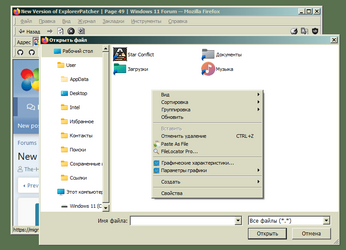
Did that already. Tried the latest EP version from Github, as well as regular and pre-release versions from winget.In that case uninstall Explorer Patcher, restart and try to reinstall it.
My Computer
At a glance
Windows 11 22H2
- OS
- Windows 11 22H2

Follow along with the video below to see how to install our site as a web app on your home screen.
Note: This feature may not be available in some browsers.
Did that already. Tried the latest EP version from Github, as well as regular and pre-release versions from winget.In that case uninstall Explorer Patcher, restart and try to reinstall it.
Thanks for this, it's a step towards my wish of being able to install updates automatically for non privileged users (have this run in Task Scheduler at logon of user with highest privileges)I'm obsessed with creating BAT files that can download and install the latest versions of some of the software I use. I also prepared for ExplorerPatcher. These commands automatically downloads and installs the latest pre-prelease version of ExplorerPatcher.
I am aware that ExplorerPatcher already has an auto-update feature. I wanted to share with the hope of helping those who want to download automatically through the command line (/BAT script) of the latest version of a software in Github.
@echo off
cd /d "%~dp0"
ECHO.
ECHO ::: ExplorerPatcher Updater ::: by PureOcean (2022-10-14)
ECHO.
ECHO Detecting last version...
FOR /F "usebackq tokens=*" %%A in (`powershell -c "$ProgressPreference = 'SilentlyContinue'; (Invoke-WebRequest 'https://api.github.com/repos/valinet/ExplorerPatcher/releases' | ConvertFrom-Json)[0].assets | Select-Object -Property browser_download_url | Format-Table -HideTableHeaders"`) DO set ExplorerPatcherURL=%%A
FOR /F "tokens=7 delims=/_" %%A in ("%ExplorerPatcherURL%") Do set ExplorerPatcherVersion=%%A
ECHO.
ECHO Downloading lastest version...
ECHO.
CURL -# -L -R "%ExplorerPatcherURL%" --output "ExplorerPatcher_%ExplorerPatcherVersion%.exe"
ECHO.
ECHO ExplorerPatcher %ExplorerPatcherVersion% installing...
"ExplorerPatcher_%ExplorerPatcherVersion%.exe" /install
ECHO.
ECHO Done.
pause >nul
exit /b

Probably this question should go on another thread, but I would use another browser (such as Edge or Chrome) to download the latest Firefox offline installer. I would then right-click the file and Run as Administrator. This should upgrade Firefox to the latest version and also fix any issues. No data are lost.Hello! I have a problem with Firefox 105: the context menu lacks text in the file open dialog.
So you are saying that it works when you uninstall Explorer Patcher?This is not due to corrupted Firefox installation.
No. What I say is, this is possibly because EP fails to inject Firefox process. E.g. EP does not act on Firefox as it does on other programs with open/save dialog.So you are saying that it works when you uninstall Explorer Patcher?
You are wrong.What Explorer Patcher has to do with Firefox? It only affects Windows Explorer and the taskbar. Firefox should not be affected.
I guess you have marked "Register as shell extension" within Explorer Patcher? That is the only way to get EP to interact with Open/save dialogs. If that is the case you should remove that setting. It is not recommended to use. Even the developer himself says so.You are wrong.
Sorry, I am not going to remove this essential setting, otherwise, context menus in all dialogs will become empty.I guess you have marked "Register as shell extension" within Explorer Patcher? That is the only way to get EP to interact with Open/save dialogs. If that is the case you should remove that setting. It is not recommended to use. Even the developer himself says so.
Well then you are on your own since it is documented it is not really working. Good luck!Sorry, I am not going to remove this essential setting, otherwise, context menus in all dialogs will become empty.
LOL. Just found I had this option disabled, that's why it did not work. Now works well.Well then you are on your own since it is documented it is not really working. Good luck!