Solved New Windows 11 Computer Setup - User Accounts


Excellent, thank you for all the help!
 

My Computer My Computer

At a glance

Windows 11i7-13700KFCorsair Dominator Platinum RGB - 64GB (32GBx2...ASUS ROG Strix GeForce RTX™ 4080 OC
OS
Windows 11
Computer type
PC/Desktop
Manufacturer/Model
Cyber Power PC
CPU
i7-13700KF
Motherboard
ASUS ROG STRIX Z790-F
Memory
Corsair Dominator Platinum RGB - 64GB (32GBx2) DDR5/5200
Graphics Card(s)
ASUS ROG Strix GeForce RTX™ 4080 OC
Sound Card
PC Panel Pro
Monitor(s) Displays
LG 27GN950-B UltraGear Gaming Monitor 27"
Screen Resolution
3840 x 2160
Hard Drives
4TB Kingston FURY Renegade (PCIe Gen4) NVMe M.2 SSD
PSU
EVGA SuperNOVA 1000 GT 80 Plus Gold
Case
HYTE Y60 Dual Chamber Mid-Tower
Cooling
BitsPower CP HydroFlux 360MM / D5 PUMP
Keyboard
Razer Huntsman v2
Mouse
Razer Naga Left-handed
Internet Speed
300
Browser
Chrome
Antivirus
McAfee
Glad to have helped.
 

My Computers My Computers

  • At a glance

    Win11 Pro RTM Version 24H2 Build 26100.4202Intel Core i5 11th Gen. 2.40GHz12GB
    OS
    Win11 Pro RTM Version 24H2 Build 26100.4202
    Computer type
    Laptop
    Manufacturer/Model
    Dell Vostro 3400
    CPU
    Intel Core i5 11th Gen. 2.40GHz
    Memory
    12GB
    Hard Drives
    256GB SSD NVMe M.2
  • At a glance

    Win11 Pro RTM Version 24H2 Build 26100.4202Intel Core i5 10th Gen. 2.90GHz16GBOnboard, no VGA, using a DisplayPort-to-VGA a...
    Operating System
    Win11 Pro RTM Version 24H2 Build 26100.4202
    Computer type
    PC/Desktop
    Manufacturer/Model
    Dell Vostro 5890
    CPU
    Intel Core i5 10th Gen. 2.90GHz
    Memory
    16GB
    Graphics card(s)
    Onboard, no VGA, using a DisplayPort-to-VGA adapter
    Monitor(s) Displays
    24" Dell
    Hard Drives
    512GB SSD NVMe, 4TB Seagate HDD
    Browser
    Firefox, Edge
    Antivirus
    Windows Defender/Microsoft Security
what controls who Windows 11 defaults to on boot up. If there are three users on PC, when Windows 11 boots up how does it decide which user to prompt?
The last user that was used will be the default. You would have to chose another user if you don't want to log-in to the last user.
 

My Computers My Computers

  • At a glance

    Windows 11 Pro 25H2Intel Core i7-10700K16GB (8GB PC4-19200 DDR4 SDRAM x2)NVIDIA GeForce GTX 1050 TI
    OS
    Windows 11 Pro 25H2
    Computer type
    PC/Desktop
    Manufacturer/Model
    PowerSpec B746
    CPU
    Intel Core i7-10700K
    Motherboard
    ASRock Z490 Phantom Gaming 4/ax
    Memory
    16GB (8GB PC4-19200 DDR4 SDRAM x2)
    Graphics Card(s)
    NVIDIA GeForce GTX 1050 TI
    Sound Card
    Realtek Audio
    Monitor(s) Displays
    #1. LG ULTRAWIDE 34" #2. AOC Q32G2WG3 32"
    Screen Resolution
    #1. 3440 X 1440 #2. 1920 x 1080
    Hard Drives
    NVMe WDC WDS100T2B0C-00PXH0 1TB
    Samsung SSD 860 EVO 1TB
    PSU
    750 Watts (62.5A)
    Case
    PowerSpec/Lian Li ATX 205
    Keyboard
    Logitech K270
    Mouse
    Logitech M185
    Browser
    Microsoft Edge and Firefox
    Antivirus
    Webroot SecureAnywhere CE 26.1
  • At a glance

    Windows 11 Canary ChannelIntel Core i5-8400 CPU @ 2.80GHz16 MB DDR 4-2666
    Operating System
    Windows 11 Canary Channel
    Computer type
    PC/Desktop
    Manufacturer/Model
    PowerSpec G156
    CPU
    Intel Core i5-8400 CPU @ 2.80GHz
    Motherboard
    AsusTeK Prime B360M-A
    Memory
    16 MB DDR 4-2666
    Monitor(s) Displays
    23" Speptre HDMI 75Hz
    Screen Resolution
    1920x1080
    Hard Drives
    Samsung 970 EVO 500GB NVMe
    Keyboard
    Logitek K270
    Mouse
    Logitek M185
    Browser
    Firefox, Edge and Edge Canary
    Antivirus
    Windows Defender
Usually with 2 or more Users they will be listed on the Login screen, have to choose one before startup will proceed.
Only if you want to log-in as a different user.
 

My Computers My Computers

  • At a glance

    Windows 11 Pro 25H2Intel Core i7-10700K16GB (8GB PC4-19200 DDR4 SDRAM x2)NVIDIA GeForce GTX 1050 TI
    OS
    Windows 11 Pro 25H2
    Computer type
    PC/Desktop
    Manufacturer/Model
    PowerSpec B746
    CPU
    Intel Core i7-10700K
    Motherboard
    ASRock Z490 Phantom Gaming 4/ax
    Memory
    16GB (8GB PC4-19200 DDR4 SDRAM x2)
    Graphics Card(s)
    NVIDIA GeForce GTX 1050 TI
    Sound Card
    Realtek Audio
    Monitor(s) Displays
    #1. LG ULTRAWIDE 34" #2. AOC Q32G2WG3 32"
    Screen Resolution
    #1. 3440 X 1440 #2. 1920 x 1080
    Hard Drives
    NVMe WDC WDS100T2B0C-00PXH0 1TB
    Samsung SSD 860 EVO 1TB
    PSU
    750 Watts (62.5A)
    Case
    PowerSpec/Lian Li ATX 205
    Keyboard
    Logitech K270
    Mouse
    Logitech M185
    Browser
    Microsoft Edge and Firefox
    Antivirus
    Webroot SecureAnywhere CE 26.1
  • At a glance

    Windows 11 Canary ChannelIntel Core i5-8400 CPU @ 2.80GHz16 MB DDR 4-2666
    Operating System
    Windows 11 Canary Channel
    Computer type
    PC/Desktop
    Manufacturer/Model
    PowerSpec G156
    CPU
    Intel Core i5-8400 CPU @ 2.80GHz
    Motherboard
    AsusTeK Prime B360M-A
    Memory
    16 MB DDR 4-2666
    Monitor(s) Displays
    23" Speptre HDMI 75Hz
    Screen Resolution
    1920x1080
    Hard Drives
    Samsung 970 EVO 500GB NVMe
    Keyboard
    Logitek K270
    Mouse
    Logitek M185
    Browser
    Firefox, Edge and Edge Canary
    Antivirus
    Windows Defender
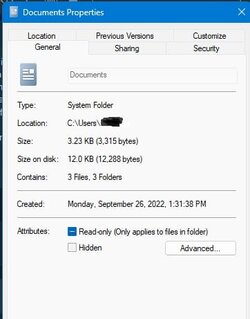
So I got me a Dell laptop 7740 the other day off eBay, works fine, just W11 Pro is a pain to get used to. So I wanted to change some of my "user" folders by changing the picture like I did on 10, well I went to the properties, clicked advance, but nothing there to find an icon, I did some search and found something about looking for "customize" in the profile, well there's none. So more looking, and I found all kinds more of reg stuff on the web, than here I found someone had made a reg file, downloaded it, and ran it, the customize tab is there now, but only when I look at system folders, and when I tried it, it didn't work to change one of the system folder anyway., ( Documents). I than opened the properties for one of my user made folders (Quicken), but in that folders properties there wasn't any customize tab at all.

What I need to know from people that have messed with 11 for a while, is, if someone has come up with a reg file that adds the customize to the user folders in the properties, or is it even possible to change these in 11.

Thanks
 

My Computer My Computer

At a glance

W11Pro 25H2I5-11500H32gIntel on board 630
OS
W11Pro 25H2
Computer type
Laptop
Manufacturer/Model
Dell 7760 Precision
CPU
I5-11500H
Motherboard
Dell
Memory
32g
Graphics Card(s)
Intel on board 630
Sound Card
on board
Monitor(s) Displays
laptop/Samsung 27" external
Screen Resolution
1920x1080
Hard Drives
1TB
PSU
Dell laptop 137.1
Case
Dell
Cooling
Dell laptop
Keyboard
Logitech K120 external USB
Mouse
Logitech N-211 external USB
Internet Speed
100mps
Browser
FF/Chrome/Edge/Firefox
Antivirus
Windows Defender
Other Info
Bought off eBay, working.
So I got me a Dell laptop 7740 the other day off eBay, works fine, just W11 Pro is a pain to get used to. So I wanted to change some of my "user" folders by changing the picture like I did on 10, well I went to the properties, clicked advance, but nothing there to find an icon, I did some search and found something about looking for "customize" in the profile, well there's none. So more looking, and I found all kinds more of reg stuff on the web, than here I found someone had made a reg file, downloaded it, and ran it, the customize tab is there now, but only when I look at system folders, and when I tried it, it didn't work to change one of the system folder anyway., ( Documents). I than opened the properties for one of my user made folders (Quicken), but in that folders properties there wasn't any customize tab at all.

What I need to know from people that have messed with 11 for a while, is, if someone has come up with a reg file that adds the customize to the user folders in the properties, or is it even possible to change these in 11.

Thanks
When I right click on the folder and select Properties, this is the screen I get and I do have the Customize option. You don't have to click on Advanced.
 

Attachments

  • Properties.jpg
    Properties.jpg
    18.8 KB · Views: 4

My Computers My Computers

  • At a glance

    Windows 11 Pro 25H2Intel Core i7-10700K16GB (8GB PC4-19200 DDR4 SDRAM x2)NVIDIA GeForce GTX 1050 TI
    OS
    Windows 11 Pro 25H2
    Computer type
    PC/Desktop
    Manufacturer/Model
    PowerSpec B746
    CPU
    Intel Core i7-10700K
    Motherboard
    ASRock Z490 Phantom Gaming 4/ax
    Memory
    16GB (8GB PC4-19200 DDR4 SDRAM x2)
    Graphics Card(s)
    NVIDIA GeForce GTX 1050 TI
    Sound Card
    Realtek Audio
    Monitor(s) Displays
    #1. LG ULTRAWIDE 34" #2. AOC Q32G2WG3 32"
    Screen Resolution
    #1. 3440 X 1440 #2. 1920 x 1080
    Hard Drives
    NVMe WDC WDS100T2B0C-00PXH0 1TB
    Samsung SSD 860 EVO 1TB
    PSU
    750 Watts (62.5A)
    Case
    PowerSpec/Lian Li ATX 205
    Keyboard
    Logitech K270
    Mouse
    Logitech M185
    Browser
    Microsoft Edge and Firefox
    Antivirus
    Webroot SecureAnywhere CE 26.1
  • At a glance

    Windows 11 Canary ChannelIntel Core i5-8400 CPU @ 2.80GHz16 MB DDR 4-2666
    Operating System
    Windows 11 Canary Channel
    Computer type
    PC/Desktop
    Manufacturer/Model
    PowerSpec G156
    CPU
    Intel Core i5-8400 CPU @ 2.80GHz
    Motherboard
    AsusTeK Prime B360M-A
    Memory
    16 MB DDR 4-2666
    Monitor(s) Displays
    23" Speptre HDMI 75Hz
    Screen Resolution
    1920x1080
    Hard Drives
    Samsung 970 EVO 500GB NVMe
    Keyboard
    Logitek K270
    Mouse
    Logitek M185
    Browser
    Firefox, Edge and Edge Canary
    Antivirus
    Windows Defender
Just thought I should report back on how things it turned out. It's been a month since my computer arrived and I did the setup (posts 19/20) and everything is going well. Thank you for all the help!
 

My Computer My Computer

At a glance

Windows 11i7-13700KFCorsair Dominator Platinum RGB - 64GB (32GBx2...ASUS ROG Strix GeForce RTX™ 4080 OC
OS
Windows 11
Computer type
PC/Desktop
Manufacturer/Model
Cyber Power PC
CPU
i7-13700KF
Motherboard
ASUS ROG STRIX Z790-F
Memory
Corsair Dominator Platinum RGB - 64GB (32GBx2) DDR5/5200
Graphics Card(s)
ASUS ROG Strix GeForce RTX™ 4080 OC
Sound Card
PC Panel Pro
Monitor(s) Displays
LG 27GN950-B UltraGear Gaming Monitor 27"
Screen Resolution
3840 x 2160
Hard Drives
4TB Kingston FURY Renegade (PCIe Gen4) NVMe M.2 SSD
PSU
EVGA SuperNOVA 1000 GT 80 Plus Gold
Case
HYTE Y60 Dual Chamber Mid-Tower
Cooling
BitsPower CP HydroFlux 360MM / D5 PUMP
Keyboard
Razer Huntsman v2
Mouse
Razer Naga Left-handed
Internet Speed
300
Browser
Chrome
Antivirus
McAfee

Latest Support Threads

Back
Top Bottom