Hello All,
again something I cannot solve or find anything on line about.
Got a new laptop just for travel and left everything as is, except immediately uninstalled/deactivated/blocked with registry hack Onedrive ... don't want it / don't need it.
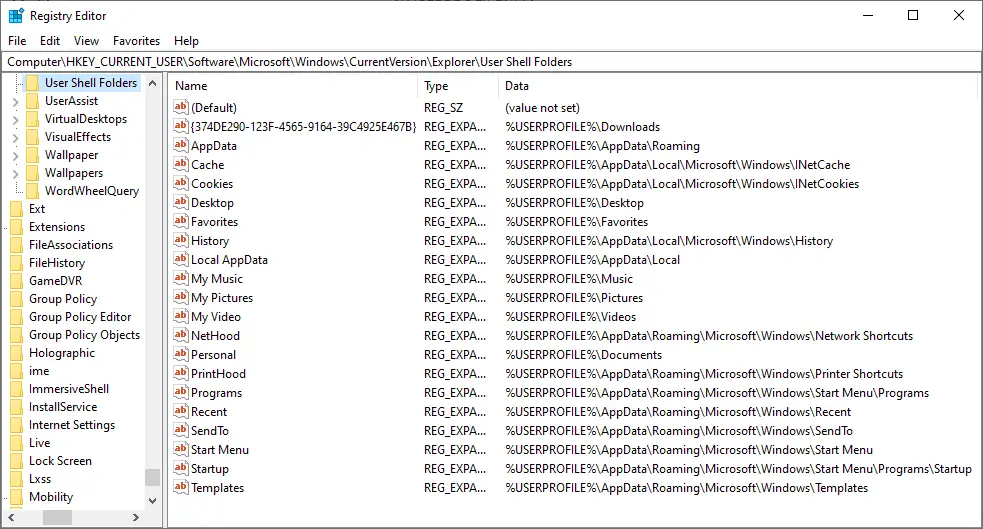
Now I noticed that all saved pictures go by default to a Pictures folder in User/myname > Onedrive ... instead into User/my name > Pictures.
The Pictures folder is only present in Users > Onedrive ... There is NO Pictures folder under my name outside of Onedrive.
The Pictures icon in explorer opens to the Pictures folder in Onedrive.
I read some suggestions how to stop saving to Onedrive by opening it ... also how to re-assign the pictures folder back to default.
Nothing works because: - I don't even have Onedrive installed
- re-directing / restore default, but denied: "there is no folder in the new location - would you like to create it?" -
"can't redirect child into parent" and other weird stuff
So, how, once and for all, get rid of all Onedrive folders and get the Pictures folder as default location out of Onedrive and back under User/my name.
Documents and Desktop are under my name in Users but dont get anything because all goes to Onedrive folders.
The icons in explorer of all three show in properties pointing to Onedrive.
Please help.
Thanks
again something I cannot solve or find anything on line about.
Got a new laptop just for travel and left everything as is, except immediately uninstalled/deactivated/blocked with registry hack Onedrive ... don't want it / don't need it.
Now I noticed that all saved pictures go by default to a Pictures folder in User/myname > Onedrive ... instead into User/my name > Pictures.
The Pictures folder is only present in Users > Onedrive ... There is NO Pictures folder under my name outside of Onedrive.
The Pictures icon in explorer opens to the Pictures folder in Onedrive.
I read some suggestions how to stop saving to Onedrive by opening it ... also how to re-assign the pictures folder back to default.
Nothing works because: - I don't even have Onedrive installed
- re-directing / restore default, but denied: "there is no folder in the new location - would you like to create it?" -
"can't redirect child into parent" and other weird stuff
So, how, once and for all, get rid of all Onedrive folders and get the Pictures folder as default location out of Onedrive and back under User/my name.
Documents and Desktop are under my name in Users but dont get anything because all goes to Onedrive folders.
The icons in explorer of all three show in properties pointing to Onedrive.
Please help.
Thanks
- Windows Build/Version
- Win11- 23H2 - build 22631.6060 - refurbished
My Computer
At a glance
Windows 11 ProIntel(R) Core(TM) i9-10900K CPU @ 3.70GHz 3.7...16.0GB Dual-Channel DDR4 @ 1066MHz (15-15-15-362047MB NVIDIA GeForce RTX 2060
- OS
- Windows 11 Pro
- Computer type
- PC/Desktop
- Manufacturer/Model
- Custom Built
- CPU
- Intel(R) Core(TM) i9-10900K CPU @ 3.70GHz 3.70 GHz
- Motherboard
- Asus TUF GAMING Z590-PLUS (LGA1200)
- Memory
- 16.0GB Dual-Channel DDR4 @ 1066MHz (15-15-15-36
- Graphics Card(s)
- 2047MB NVIDIA GeForce RTX 2060
- Sound Card
- NVIDIA High Definition Audio - Realtek High Definition Audio
- Monitor(s) Displays
- Asus Pro Art PA 246 / Asus VB 195
- Screen Resolution
- 1280 x 1024
- Hard Drives
- 1863GB Seagate ST2000DM001-9YN164 (SATA )
238GB Samsung SSD 850 PRO 256GB (SATA (SSD)
232GB Samsung SSD 970 EVO Plus 250GB (Unknown (SSD))
- Case
- Corsair
- Internet Speed
- 10 / 1
- Browser
- Edge