no synchronization


Thierry 83200

Active member
Member
Local time
11:02 AM
Posts
60
OS
windows 11 25H2
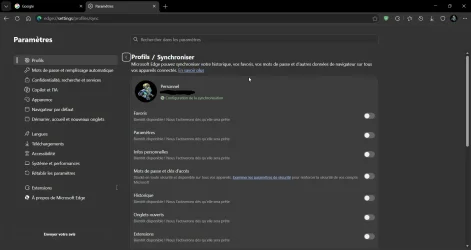
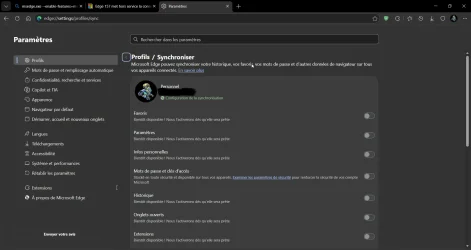
Bonjour, quelqu’un pourrait-il m’aider s’il vous plaît ? J’ai un problème de synchronisation avec la version 26340.9750. J’ai déjà essayé pas mal de choses — changer mon adresse e-mail, me déconnecter et me reconnecter, resynchroniser, etc. Si quelqu’un d’autre rencontre le même problème, pourriez-vous me le dire ? J’aimerais savoir si c’est juste de mon côté ou si c’est un problème répandu. Merci pour vos réponses !
 

Attachments

  • msedge_meaPGZLuaV.webp
    msedge_meaPGZLuaV.webp
    84.9 KB · Views: 1

My Computer My Computer

At a glance

windows 11 25H224GBiris xe
OS
windows 11 25H2
Computer type
Laptop
Manufacturer/Model
ASUS Vivobook 15 (X1504)
Motherboard
Intel Alder Lake-P PCH
Memory
24GB
Graphics Card(s)
iris xe
Sound Card
realtek
Screen Resolution
1920X1080
Hard Drives
Samsung SSD 990 PRO 1TB
Browser
edge
Antivirus
eset anti virus
This is an English language forum.


Denis
 

My Computer My Computer

At a glance

Windows 11 Home x64 Version 26H2 Build 26300....
OS
Windows 11 Home x64 Version 26H2 Build 26300.9457

My Computer My Computer

At a glance

Windows 11 Home x64 Version 26H2 Build 26300....
OS
Windows 11 Home x64 Version 26H2 Build 26300.9457
Your screenshot of edge://settings/profiles/sync shows that you have at least 7 out of 10 synchronization item categories switched off.

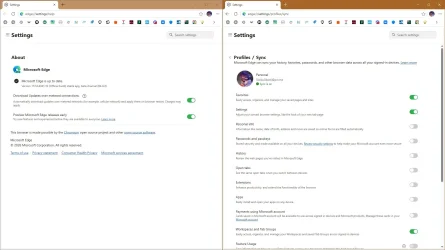
It should look more like this:

Edge sync item categories all on.webp
 

My Computer My Computer

At a glance

Windows 11
OS
Windows 11
Computer type
Laptop
Yes, but as soon as I re-enable them and refresh the page—or close and reopen Microsoft Edge—they disable themselves again.
 

My Computer My Computer

At a glance

windows 11 25H224GBiris xe
OS
windows 11 25H2
Computer type
Laptop
Manufacturer/Model
ASUS Vivobook 15 (X1504)
Motherboard
Intel Alder Lake-P PCH
Memory
24GB
Graphics Card(s)
iris xe
Sound Card
realtek
Screen Resolution
1920X1080
Hard Drives
Samsung SSD 990 PRO 1TB
Browser
edge
Antivirus
eset anti virus

My Computers My Computers

  • At a glance

    Windows 11 Pro 26H2 26300.9457i9-10900 10 core 20 threads32 gbnone-Intel UHD Graphics 630
    OS
    Windows 11 Pro 26H2 26300.9457
    Computer type
    PC/Desktop
    Manufacturer/Model
    Dell Optiplex 7080
    CPU
    i9-10900 10 core 20 threads
    Motherboard
    DELL 0J37VM
    Memory
    32 gb
    Graphics Card(s)
    none-Intel UHD Graphics 630
    Sound Card
    Integrated Realtek
    Monitor(s) Displays
    Benq 27
    Screen Resolution
    2560x1440
    Hard Drives
    2x1tb Solidigm m.2 nvme /External drives 512gb Samsung m.2 sata+2tb Kingston m2.nvme
    PSU
    500w
    Case
    MT
    Cooling
    Dell Premium
    Keyboard
    Logitech wired
    Mouse
    Logitech wireless
    Internet Speed
    so slow I'm too embarrassed to tell
    Browser
    #1 Edge #2 Firefox
    Antivirus
    Defender+MWB Premium
  • At a glance

    Windows 11 Pro 24H2 26200.9457AMD Ryzen 7 6800U32 gbintegrated
    Operating System
    Windows 11 Pro 24H2 26200.9457
    Computer type
    PC/Desktop
    Manufacturer/Model
    Beelink Mini PC SER5
    CPU
    AMD Ryzen 7 6800U
    Memory
    32 gb
    Graphics card(s)
    integrated
    Sound Card
    integrated
    Monitor(s) Displays
    Benq 27
    Screen Resolution
    2560x1440
    Hard Drives
    1TB Crucial nvme
    Keyboard
    Logitech wired
    Mouse
    Logitech wireless
    Internet Speed
    still too embarrassed to tell
    Browser
    Firefox
    Antivirus
    Defender
  • System 3 is non compliant Dell 9020 i7-4770/24gb ram Win11 PRO 26200.9457
happening here to just reverts back to off when enable them..
any fix for this? :)
 

My Computer My Computer

At a glance

Windows 11 Pro (Currently 25H2)Intel Core i7 5820k32GB RAMNvidia RTX 5090
OS
Windows 11 Pro (Currently 25H2)
Computer type
PC/Desktop
CPU
Intel Core i7 5820k
Motherboard
Asus X99A
Memory
32GB RAM
Graphics Card(s)
Nvidia RTX 5090
Sound Card
Intergraded
Monitor(s) Displays
Samsung OdysseyG7
Screen Resolution
4K HDR
Hard Drives
2x Samsung M2 990Pro 4TB
PSU
Corsair RM1000X
Case
Fractal Design
Cooling
In & Outtake Noctua 3000 RPMs
Keyboard
Razer Black widow
Mouse
Razer Naga Trinity
Internet Speed
1000Mbit
Browser
Edge
Antivirus
Custom
@Thanatos @Thierry 83200
This is not happening to me. I am in Edge Version 155.0.4283.62 (Official build) (64-bit)
What version of Edge are you using?

Another thought I had is both of you seem to be in a European time zone. Could this have something to do with the restrictions that certain countries have against Microsoft features? Just thinking out loud with that because I know nothing about the EU rules.

While viewing this thread I put the question to Co-pilot. Here is the answer I got in its entirety. It suggests there may be a bug in that version

(question asked) I am syncing in Edge but am unable to toggle on what I want to sync in my edge profile.

Copilot said:​

Based on the forum thread you're viewing, other users are reporting the same behavior: Edge sync category toggles turn back off after being enabled and after refreshing or restarting Edge. One responder specifically suggested checking whether a policy is disabling sync categories.

Here are the most likely causes and checks:
Check for Edge policiesIn Edge, go to:edge://policyLook for policies such as:SyncDisabledSyncTypesListDisabledIf those appear and are set, they can force sync options off. This was specifically suggested in the thread.

Verify the browser isn't managedOpen:edge://management
If Edge says it's managed by your organization, a policy may be controlling sync settings.Reset Edge syncSign out of Edge.Visit:edge://settings/profiles/syncUse the option to reset sync data (if available), then sign back in.The forum thread links to reset and re-sync procedures as troubleshooting steps

Check for a current Edge issue. Since another user in the same discussion reported the identical symptom ("reverts back to off when enable them"), this may be related to a current Edge bug rather than a problem with your profile.Try a different channel or device. If you use the same Microsoft account on another PC or Edge installation, see whether the sync categories stay enabled there.If they do not, the issue may be account-side If they do, the issue is likely local to that Edge installation.

Can you tell me:Which version of Edge you're running (edge://settings/help)?What appears on edge://policy?Is this a personal Microsoft account or a work/school account?Those details will help narrow down whether this is a policy issue or the same bug being discussed in that thread.

 

My Computers My Computers

  • At a glance

    Windows 11 Pro 26H2 26300.9457i9-10900 10 core 20 threads32 gbnone-Intel UHD Graphics 630
    OS
    Windows 11 Pro 26H2 26300.9457
    Computer type
    PC/Desktop
    Manufacturer/Model
    Dell Optiplex 7080
    CPU
    i9-10900 10 core 20 threads
    Motherboard
    DELL 0J37VM
    Memory
    32 gb
    Graphics Card(s)
    none-Intel UHD Graphics 630
    Sound Card
    Integrated Realtek
    Monitor(s) Displays
    Benq 27
    Screen Resolution
    2560x1440
    Hard Drives
    2x1tb Solidigm m.2 nvme /External drives 512gb Samsung m.2 sata+2tb Kingston m2.nvme
    PSU
    500w
    Case
    MT
    Cooling
    Dell Premium
    Keyboard
    Logitech wired
    Mouse
    Logitech wireless
    Internet Speed
    so slow I'm too embarrassed to tell
    Browser
    #1 Edge #2 Firefox
    Antivirus
    Defender+MWB Premium
  • At a glance

    Windows 11 Pro 24H2 26200.9457AMD Ryzen 7 6800U32 gbintegrated
    Operating System
    Windows 11 Pro 24H2 26200.9457
    Computer type
    PC/Desktop
    Manufacturer/Model
    Beelink Mini PC SER5
    CPU
    AMD Ryzen 7 6800U
    Memory
    32 gb
    Graphics card(s)
    integrated
    Sound Card
    integrated
    Monitor(s) Displays
    Benq 27
    Screen Resolution
    2560x1440
    Hard Drives
    1TB Crucial nvme
    Keyboard
    Logitech wired
    Mouse
    Logitech wireless
    Internet Speed
    still too embarrassed to tell
    Browser
    Firefox
    Antivirus
    Defender
  • System 3 is non compliant Dell 9020 i7-4770/24gb ram Win11 PRO 26200.9457
Hello, and thank you all for your quick replies. I am using a personal computer. As for the version of Edge, I have tried both the stable and beta versions, and the problem persists. Everything appears normal regarding the Edge policies. I’m inclined to agree with what GlassKuter suggested—I also consulted an AI, which mentioned that there might be a bug (though not necessarily on my PC). That said, I think I will wait for an update to be released. I wanted to thank you all for the time you’ve taken to look into my issue. Best regards.
 

My Computer My Computer

At a glance

windows 11 25H224GBiris xe
OS
windows 11 25H2
Computer type
Laptop
Manufacturer/Model
ASUS Vivobook 15 (X1504)
Motherboard
Intel Alder Lake-P PCH
Memory
24GB
Graphics Card(s)
iris xe
Sound Card
realtek
Screen Resolution
1920X1080
Hard Drives
Samsung SSD 990 PRO 1TB
Browser
edge
Antivirus
eset anti virus
This issue happens to me since version 156 and persists in 157 Beta. Maybe it is because of this? :unsure:
  • Retiring legacy sign-in implementation on Windows. Microsoft Edge plans to retire its legacy direct-WAM sign-in implementation on Windows in version 157, completing the transition to OneAuth. OneAuth continues to use Windows Web Account Manager (WAM) internally; WAM itself is not being deprecated.

    The vast majority of users have already transitioned automatically with no interruption. For remaining profiles that have not yet migrated, the transition will complete upon updating to version 157. In rare cases, some users may need to sign in to Microsoft Edge again.

    Action recommended for administrators:
    • Check edge://signin-internals under Edge Auth Library Information → Library to see if any managed profiles still show WAM.
    • Organizations wishing to validate early or test profiles that previously disabled the transition can launch msedge.exe --enable-features=msForceOneAuthWAM after closing all Microsoft Edge processes, including background processes, as the flag won’t take effect if Microsoft Edge is already running.
    • Report any sign-in issues to Microsoft Support prior to the Microsoft Edge 157 release.
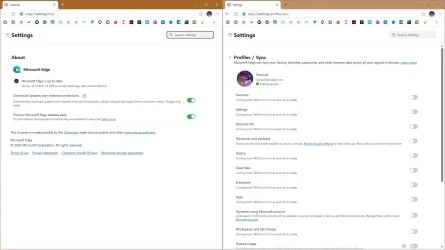
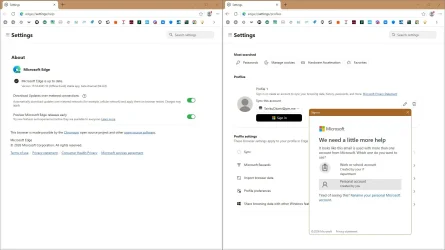
Only thing that helps, is signing out and signing in, it asks whether it is personal PC, then it works fine till Edge is closed.
 

Attachments

  • capture_10222026_084435.webp
    capture_10222026_084435.webp
    98.1 KB · Views: 1
  • capture_10222026_084508.webp
    capture_10222026_084508.webp
    94.7 KB · Views: 1
  • capture_10222026_084528.webp
    capture_10222026_084528.webp
    103.9 KB · Views: 2

My Computer My Computer

At a glance

Home2FH2CanAMD Ryzen 5 8600G (07/24)2x32GB Kingston FURY DDR5 5600 MHz CL36 @5200...ASROCK Radeon RX 6600 Challenger D 8G @48FPS ...
OS
Home2FH2Can
Computer type
PC/Desktop
CPU
AMD Ryzen 5 8600G (07/24)
Motherboard
ASROCK B650M-HDV/M.2 (07/24) BIOS 4.43 AGESA ComboAM5 1.3.0.1b Patch A (07/26)
Memory
2x32GB Kingston FURY DDR5 5600 MHz CL36 @5200 CL40 (07/24)
Graphics Card(s)
ASROCK Radeon RX 6600 Challenger D 8G @48FPS (08/24)
Sound Card
Creative Sound BlasterX AE-5 Plus (05/24)
Monitor(s) Displays
24" Philips 24M1N3200ZS/00 (05/24)
Screen Resolution
1920×1080@165Hz via DP1.4
Hard Drives
Kingston KC3000 NVMe 2TB (05/24)
ADATA XPG GAMMIX S11 Pro 512GB (07/19)
PSU
Seasonic Core GM 550 Gold (04/24)
Case
Fractal Design Define 7 Mini with 3x Noctua NF-P14s/12@555rpm (04/24)
Cooling
Noctua NH-U12S with Noctua NF-P12 (04/24)
Keyboard
HP Pavilion Wired Keyboard 300 (07/24) + Rabalux 76017 Parker (01/24)
Mouse
Logitech M330 Silent Plus (07/26)
Internet Speed
500/100 Mbps via RouterOS (05/21) & TCP Optimizer
Browser
Edge, Brave for YouTube, LibreWolf for FB
Antivirus
NextDNS blocking 50% Traffic
Other Info
Phone: Motorola Moto G86 (02/26)
Backup: Hasleo Backup Suite (PreOS)
Headphones: Sennheiser RS170 (09/10)
Chair: Huzaro Force 4.4 Grey Mesh (05/24)
Notifier: Xiaomi Mi Band 9 Milanese (10/24)
FlexCore USB-C 3.2 Gen 1 (M) to LAN (F) (08/25)
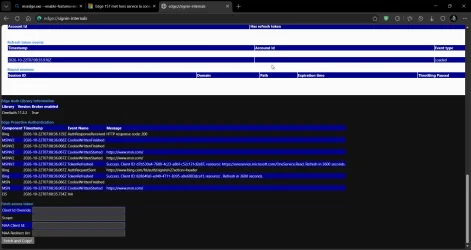
Thanks to TairikuOkami for all this information. I checked the `edge://signin-internals` page (see attached screenshot), but the problem persists. I signed out of Edge and then signed back in; it works the first time I open Edge, but as soon as I close and reopen it, the same issue occurs. It’s quite discouraging.
 

Attachments

  • msedge_gnHlQuvSnL.webp
    msedge_gnHlQuvSnL.webp
    106.4 KB · Views: 1
  • msedge_zaHSqHEr5B.webp
    msedge_zaHSqHEr5B.webp
    89.1 KB · Views: 1

My Computer My Computer

At a glance

windows 11 25H224GBiris xe
OS
windows 11 25H2
Computer type
Laptop
Manufacturer/Model
ASUS Vivobook 15 (X1504)
Motherboard
Intel Alder Lake-P PCH
Memory
24GB
Graphics Card(s)
iris xe
Sound Card
realtek
Screen Resolution
1920X1080
Hard Drives
Samsung SSD 990 PRO 1TB
Browser
edge
Antivirus
eset anti virus
I am experiencing the same synchronization problem.

My system is Windows 11 Pro 26H2, build 26300.9457, and I use Microsoft Edge with a personal account.

When I enable the synchronization categories in Edge settings, some or all of them may switch off again. I have also occasionally experienced being signed out of websites after shutting down my PC, although this did not happen again after a subsequent restart.

It seems that other users are experiencing similar synchronization problems, including on different Windows versions and Edge channels.

Could this be a Microsoft Edge bug, possibly related to the sign-in changes involving OneAuth? It would be helpful if Microsoft investigated this issue.

I hope more affected users will report their experiences here so we can establish whether this is a wider problem.

Thank you.
 

My Computer My Computer

At a glance

Windows 11 Pro 26H2 26300.9711AMD Ryzen 7 7700XRAM: 64 GB DDR5AMD Radeon RX 7800 XT (16 GB)
OS
Windows 11 Pro 26H2 26300.9711
Computer type
PC/Desktop
Manufacturer/Model
Custom build (Gigabyte)
CPU
AMD Ryzen 7 7700X
Motherboard
Gigabyte B650M GAMING X AX
Memory
RAM: 64 GB DDR5
Graphics Card(s)
AMD Radeon RX 7800 XT (16 GB)
Sound Card
Realtek (onboard)
Monitor(s) Displays
Samsung
Screen Resolution
1920 x 1080
Hard Drives
Samsung 990 PRO 1 TB (NVM-e),
Keyboard
Logitech MX Master
Mouse
Logitech MX Master 3S
Internet Speed
13ms/250Mbps/25Mbps
Browser
Microsoft Edge
Antivirus
Bitdefender
Other Info
UEFI, Secure Boot ON, TPM 2.0 ON
Back
Top Bottom