Solved Non-existing HDD appears ...


Haydon

Well-known member
Power User
VIP
Local time
1:32 AM
Posts
1,990
OS
Windows 10 Pro
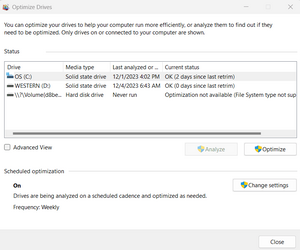
... in 'Optimize Drives', see pic below. but does not appear anywhere else. It does not seem to do anything, but what is it?

Screenshot 2023-12-04 074839.png
 

My Computer My Computer

At a glance

Windows 10 Pro
OS
Windows 10 Pro
It's possibly a symbolic link to another disk or just a virtual volume object created by a driver to support some kind of functionality. I would run WinObj as an administrator and then search for the associated GUID.
 

My Computer My Computer

At a glance

Windows 11, Windows 10, Linux Fedora Cinnamon
OS
Windows 11, Windows 10, Linux Fedora Cinnamon
The \\?\Volume.... is usually a CD/DVD drive and as such, you are unable to defrag/optimise it.
 

My Computer My Computer

At a glance

Windows 11 ProRyzen 9 3900XG-Skill RipjawsV F4-3600C18 (16GB x 2)Gigabyte RX 5700 XT Gaming OC
OS
Windows 11 Pro
Computer type
PC/Desktop
CPU
Ryzen 9 3900X
Motherboard
ASUS ROG Strix X570-E Gaming
Memory
G-Skill RipjawsV F4-3600C18 (16GB x 2)
Graphics Card(s)
Gigabyte RX 5700 XT Gaming OC
Sound Card
Realtek ALC1220P
Monitor(s) Displays
ASUS VE278 (x 2)
Screen Resolution
1920x1080
Hard Drives
Samsung 850 Pro 256GB
Samsung 970 Pro NVMe 512GB (x 2)
ST10000VN0004 10TB (x 2)
ST10000VN0008 10TB (x 2)
ST4000VN000 4TB (x 2)
PSU
Corsair HX1000
Case
Corsair Carbide 400R
Cooling
AMD Wraith Prism (Stock)
Keyboard
Logitech G213
Mouse
Logitech G502
Internet Speed
100Mbps down / 40Mbps up
Browser
Firefox - Chrome - Edge
Antivirus
Windows Defender - Clamwin
... in 'Optimize Drives', see pic below. but does not appear anywhere else. It does not seem to do anything, but what is it?
This a known bug dating before Windows 11 Build(22000.346), dating back 24+ months - see here .
 

My Computer My Computer

At a glance

Windows 11 Pro 25H2 (Build 26200.8728)Intel Core Ultra 9 285 5.6 GHz32.00 GBIntel Integrated Graphics (128 MB)
OS
Windows 11 Pro 25H2 (Build 26200.8728)
Computer type
PC/Desktop
Manufacturer/Model
Dell Pro Max Tower T2 FCT2250
CPU
Intel Core Ultra 9 285 5.6 GHz
Motherboard
64-bit operating system, x64-based processor
Memory
32.00 GB
Graphics Card(s)
Intel Integrated Graphics (128 MB)
Sound Card
Realtek Audio
Monitor(s) Displays
Dell P2714H Monitor
Screen Resolution
1920 x 1080
Hard Drives
1 x 512GB M.2 XG10d SED KIOXIA PCIe solid state drive (Internal)
1 x 2TB Seagate ST2000DM008-2UB102 HDD (Internal)
1 x 1TB Seagate STGX4000400 External HDD
1 x 4TB Seagate STGX4000400 External HDD
1 x 6TB WD Elements AE 2689 External HDD
PSU
500 Watts
Cooling
Air
Keyboard
Microsoft Wired Keyboard 600
Mouse
Microsoft USB Basic Optical Mouse v2.0
Browser
Firefox
Antivirus
Windows Defender + Malwarebytes Premium
Other Info
BaseBoard Manufacturer Dell Inc.
BaseBoard Product 022RY57
BaseBoard Version A01
Some SSD drives may appear as well.

1701704230298.png

The drives shown here are both Samsung M.2 970 Pro drives.
 

My Computer My Computer

At a glance

Windows 11 ProRyzen 9 3900XG-Skill RipjawsV F4-3600C18 (16GB x 2)Gigabyte RX 5700 XT Gaming OC
OS
Windows 11 Pro
Computer type
PC/Desktop
CPU
Ryzen 9 3900X
Motherboard
ASUS ROG Strix X570-E Gaming
Memory
G-Skill RipjawsV F4-3600C18 (16GB x 2)
Graphics Card(s)
Gigabyte RX 5700 XT Gaming OC
Sound Card
Realtek ALC1220P
Monitor(s) Displays
ASUS VE278 (x 2)
Screen Resolution
1920x1080
Hard Drives
Samsung 850 Pro 256GB
Samsung 970 Pro NVMe 512GB (x 2)
ST10000VN0004 10TB (x 2)
ST10000VN0008 10TB (x 2)
ST4000VN000 4TB (x 2)
PSU
Corsair HX1000
Case
Corsair Carbide 400R
Cooling
AMD Wraith Prism (Stock)
Keyboard
Logitech G213
Mouse
Logitech G502
Internet Speed
100Mbps down / 40Mbps up
Browser
Firefox - Chrome - Edge
Antivirus
Windows Defender - Clamwin
Just a random thought, wondering how/if the Optane feature on some computers could be involved.
 

My Computers My Computers

  • At a glance

    Win11 Pro RTM Version 24H2 Build 26100.4202Intel Core i5 11th Gen. 2.40GHz12GB
    OS
    Win11 Pro RTM Version 24H2 Build 26100.4202
    Computer type
    Laptop
    Manufacturer/Model
    Dell Vostro 3400
    CPU
    Intel Core i5 11th Gen. 2.40GHz
    Memory
    12GB
    Hard Drives
    256GB SSD NVMe M.2
  • At a glance

    Win11 Pro RTM Version 24H2 Build 26100.4202Intel Core i5 10th Gen. 2.90GHz16GBOnboard, no VGA, using a DisplayPort-to-VGA a...
    Operating System
    Win11 Pro RTM Version 24H2 Build 26100.4202
    Computer type
    PC/Desktop
    Manufacturer/Model
    Dell Vostro 5890
    CPU
    Intel Core i5 10th Gen. 2.90GHz
    Memory
    16GB
    Graphics card(s)
    Onboard, no VGA, using a DisplayPort-to-VGA adapter
    Monitor(s) Displays
    24" Dell
    Hard Drives
    512GB SSD NVMe, 4TB Seagate HDD
    Browser
    Firefox, Edge
    Antivirus
    Windows Defender/Microsoft Security
My system is all AMD, so I don't think that would be a factor for me at least, but I may be wrong.
 

My Computer My Computer

At a glance

Windows 11 ProRyzen 9 3900XG-Skill RipjawsV F4-3600C18 (16GB x 2)Gigabyte RX 5700 XT Gaming OC
OS
Windows 11 Pro
Computer type
PC/Desktop
CPU
Ryzen 9 3900X
Motherboard
ASUS ROG Strix X570-E Gaming
Memory
G-Skill RipjawsV F4-3600C18 (16GB x 2)
Graphics Card(s)
Gigabyte RX 5700 XT Gaming OC
Sound Card
Realtek ALC1220P
Monitor(s) Displays
ASUS VE278 (x 2)
Screen Resolution
1920x1080
Hard Drives
Samsung 850 Pro 256GB
Samsung 970 Pro NVMe 512GB (x 2)
ST10000VN0004 10TB (x 2)
ST10000VN0008 10TB (x 2)
ST4000VN000 4TB (x 2)
PSU
Corsair HX1000
Case
Corsair Carbide 400R
Cooling
AMD Wraith Prism (Stock)
Keyboard
Logitech G213
Mouse
Logitech G502
Internet Speed
100Mbps down / 40Mbps up
Browser
Firefox - Chrome - Edge
Antivirus
Windows Defender - Clamwin
... in 'Optimize Drives', see pic below. but does not appear anywhere else. It does not seem to do anything, but what is it?


It looks like you have something attached with an "unsupported file system".
CD, USB... something.
 

My Computers My Computers

  • At a glance

    Win 11 Home ♦♦♦26200.8655 ♦♦♦♦♦♦♦25H2AMD Ryzen 7 3700XG.Skill (F4-3200C14D-16GTZKW)EVGA RTX 2070 (08G-P4-2171-KR)
    OS
    Win 11 Home ♦♦♦26200.8655 ♦♦♦♦♦♦♦25H2
    Computer type
    PC/Desktop
    Manufacturer/Model
    Built by Ghot® [May 2020]
    CPU
    AMD Ryzen 7 3700X
    Motherboard
    Asus Pro WS X570-ACE (BIOS 5302)
    Memory
    G.Skill (F4-3200C14D-16GTZKW)
    Graphics Card(s)
    EVGA RTX 2070 (08G-P4-2171-KR)
    Sound Card
    Realtek ALC1220P / ALC S1220A
    Monitor(s) Displays
    Dell U3011 30"
    Screen Resolution
    2560 x 1600
    Hard Drives
    2x Samsung 860 EVO 500GB,
    WD 4TB Black FZBX - SATA III,
    WD 8TB Black FZBX - SATA III,
    DRW-24B1ST CD/DVD Burner
    PSU
    PC Power & Cooling 750W Quad EPS12V
    Case
    Cooler Master ATCS 840 Tower
    Cooling
    CM Hyper 212 EVO (push/pull)
    Keyboard
    Ducky DK9008 Shine II Blue LED
    Mouse
    Logitech Optical M-100
    Internet Speed
    300/300
    Browser
    Firefox (latest)
    Antivirus
    Bitdefender Total Security
    Other Info
    Speakers: Klipsch Pro Media 2.1
  • At a glance

    Windows XP Pro 32bit w/SP3AMD Athlon 64 X2 5000+ (OC'd @ 3.2Ghz)TWIN2X2048-6400C4DHX (2 x 1GB, DDR2 800)EVGA 256-P2-N758-TR GeForce 8600GT SSC
    Operating System
    Windows XP Pro 32bit w/SP3
    Computer type
    PC/Desktop
    Manufacturer/Model
    Built by Ghot® (not in use)
    CPU
    AMD Athlon 64 X2 5000+ (OC'd @ 3.2Ghz)
    Motherboard
    ASUS M2N32-SLI Deluxe Wireless Edition
    Memory
    TWIN2X2048-6400C4DHX (2 x 1GB, DDR2 800)
    Graphics card(s)
    EVGA 256-P2-N758-TR GeForce 8600GT SSC
    Sound Card
    Onboard
    Monitor(s) Displays
    ViewSonic G90FB Black 19" Professional (CRT)
    Screen Resolution
    up to 2048 x 1536
    Hard Drives
    WD 36GB 10,000rpm Raptor SATA
    Seagate 80GB 7200rpm SATA
    Lite-On LTR-52246S CD/RW
    Lite-On LH-18A1P CD/DVD Burner
    PSU
    PC Power & Cooling Silencer 750 Quad EPS12V
    Case
    Generic Beige case, 80mm fans
    Cooling
    ZALMAN 9500A 92mm CPU Cooler
    Keyboard
    Logitech Classic Keybooard 200
    Mouse
    Logitech Optical M-BT96a
    Internet Speed
    300/300
    Browser
    Firefox 3.x ??
    Antivirus
    Symantec (Norton)
    Other Info
    Still assembled, still runs. Haven't turned it on for 15 years?
My system is all AMD, so I don't think that would be a factor for me at least, but I may be wrong.
It seems to me the issue appeared when the SSD drives did, both SATA and NVMe, but that may only be a coincidence.
 

My Computers My Computers

  • At a glance

    Win11 Pro RTM Version 24H2 Build 26100.4202Intel Core i5 11th Gen. 2.40GHz12GB
    OS
    Win11 Pro RTM Version 24H2 Build 26100.4202
    Computer type
    Laptop
    Manufacturer/Model
    Dell Vostro 3400
    CPU
    Intel Core i5 11th Gen. 2.40GHz
    Memory
    12GB
    Hard Drives
    256GB SSD NVMe M.2
  • At a glance

    Win11 Pro RTM Version 24H2 Build 26100.4202Intel Core i5 10th Gen. 2.90GHz16GBOnboard, no VGA, using a DisplayPort-to-VGA a...
    Operating System
    Win11 Pro RTM Version 24H2 Build 26100.4202
    Computer type
    PC/Desktop
    Manufacturer/Model
    Dell Vostro 5890
    CPU
    Intel Core i5 10th Gen. 2.90GHz
    Memory
    16GB
    Graphics card(s)
    Onboard, no VGA, using a DisplayPort-to-VGA adapter
    Monitor(s) Displays
    24" Dell
    Hard Drives
    512GB SSD NVMe, 4TB Seagate HDD
    Browser
    Firefox, Edge
    Antivirus
    Windows Defender/Microsoft Security

My Computer My Computer

At a glance

Windows 11 Pro 25H2 (Build 26200.8728)Intel Core Ultra 9 285 5.6 GHz32.00 GBIntel Integrated Graphics (128 MB)
OS
Windows 11 Pro 25H2 (Build 26200.8728)
Computer type
PC/Desktop
Manufacturer/Model
Dell Pro Max Tower T2 FCT2250
CPU
Intel Core Ultra 9 285 5.6 GHz
Motherboard
64-bit operating system, x64-based processor
Memory
32.00 GB
Graphics Card(s)
Intel Integrated Graphics (128 MB)
Sound Card
Realtek Audio
Monitor(s) Displays
Dell P2714H Monitor
Screen Resolution
1920 x 1080
Hard Drives
1 x 512GB M.2 XG10d SED KIOXIA PCIe solid state drive (Internal)
1 x 2TB Seagate ST2000DM008-2UB102 HDD (Internal)
1 x 1TB Seagate STGX4000400 External HDD
1 x 4TB Seagate STGX4000400 External HDD
1 x 6TB WD Elements AE 2689 External HDD
PSU
500 Watts
Cooling
Air
Keyboard
Microsoft Wired Keyboard 600
Mouse
Microsoft USB Basic Optical Mouse v2.0
Browser
Firefox
Antivirus
Windows Defender + Malwarebytes Premium
Other Info
BaseBoard Manufacturer Dell Inc.
BaseBoard Product 022RY57
BaseBoard Version A01
@Berton
You may be correct. I first saw it with my SAMSUNG MZVPV512HDGL-00000 (SM951) NVMe drive which is an OEM drive, not generally available to the public.

@IanMosley
That was first reported in 2021, however I bought the drive mentioned above back in 2019 when I built my downstairs PC.

That drive does not report correctly in any software, which is why I never suspected this to be an issue.

Of course, I know differently now ... lol
 

My Computer My Computer

At a glance

Windows 11 ProRyzen 9 3900XG-Skill RipjawsV F4-3600C18 (16GB x 2)Gigabyte RX 5700 XT Gaming OC
OS
Windows 11 Pro
Computer type
PC/Desktop
CPU
Ryzen 9 3900X
Motherboard
ASUS ROG Strix X570-E Gaming
Memory
G-Skill RipjawsV F4-3600C18 (16GB x 2)
Graphics Card(s)
Gigabyte RX 5700 XT Gaming OC
Sound Card
Realtek ALC1220P
Monitor(s) Displays
ASUS VE278 (x 2)
Screen Resolution
1920x1080
Hard Drives
Samsung 850 Pro 256GB
Samsung 970 Pro NVMe 512GB (x 2)
ST10000VN0004 10TB (x 2)
ST10000VN0008 10TB (x 2)
ST4000VN000 4TB (x 2)
PSU
Corsair HX1000
Case
Corsair Carbide 400R
Cooling
AMD Wraith Prism (Stock)
Keyboard
Logitech G213
Mouse
Logitech G502
Internet Speed
100Mbps down / 40Mbps up
Browser
Firefox - Chrome - Edge
Antivirus
Windows Defender - Clamwin
... in 'Optimize Drives', see pic below. but does not appear anywhere else. It does not seem to do anything, but what is it?

View attachment 79964
Folks, is it possible that the issue is related to the incompatible driver pxhlpa64.exe from Sonic Solutions (I can't turn on Memory Integrity) that is present in my brand new system (1 week old) although I don't have a CD/DVD drive. I looked for solutions on the net but I get the impression that the medicine is worse :eek1:
 

My Computer My Computer

At a glance

Windows 10 Pro
OS
Windows 10 Pro
I read somewhere that it is virtual drives used by games/Xbox app.
 

My Computer My Computer

At a glance

Windows 11 Pro 25H2 (RP channel)AMD Ryzen 7 9800X3D 8-core64GB Corsair Titanium 6000/CL30MSI Suprim 5080 SOC
OS
Windows 11 Pro 25H2 (RP channel)
Computer type
PC/Desktop
Manufacturer/Model
MSI
CPU
AMD Ryzen 7 9800X3D 8-core
Motherboard
MEG X870E Godlike
Memory
64GB Corsair Titanium 6000/CL30
Graphics Card(s)
MSI Suprim 5080 SOC
Sound Card
Soundblaster AE-9
Monitor(s) Displays
ASUS TUF Gaming VG289Q
Screen Resolution
3840x2160
Hard Drives
Samsung 9100 Pro 4TB (gen 5 x4, system drive/games)
Samsung 990 Pro 2TB
Samsung 980 Pro 2TB
Samsung 870 Evo 4TB
Samsung 870 Evo 2TB
Samsung T9 4TB
PSU
Seasonic PX-2200
Case
Bequiet! Dark Base Pro 901
Cooling
Noctua NH-D15S Chromax black
Keyboard
Logitech G915 X (wired)
Mouse
Logitech G903 with PowerPlay charger
Internet Speed
900Mb/sec
Browser
Microsoft Edge
Antivirus
Windows Defender
Copilot steered me to this Microsoft Community post ... is the Microsoft Reserved Partition (MSR)

I will mark this thread 'Solved' :-) Thanks to all who responded (y)

P.S. The nuisance in post #12 is unrelated and I may start a new thread.
 

My Computer My Computer

At a glance

Windows 10 Pro
OS
Windows 10 Pro
🙌
 

My Computers My Computers

  • At a glance

    Windows 11 Pro 22631.3810/Windows 11 RP 24H2 VMIntel Celeron N4000 @ 1.10GHz Gemini Lake 14nm8GB RamIntel UHD Graphics 600 (Lenovo)
    OS
    Windows 11 Pro 22631.3810/Windows 11 RP 24H2 VM
    Computer type
    Laptop
    Manufacturer/Model
    Lenovo
    CPU
    Intel Celeron N4000 @ 1.10GHz Gemini Lake 14nm
    Motherboard
    LENOVO LNVNB161216 (U3E1)
    Memory
    8GB Ram
    Graphics Card(s)
    Intel UHD Graphics 600 (Lenovo)
    Sound Card
    Realtek High Definition Audio Intel Display Audio
    Monitor(s) Displays
    Generic PnP Monitor (1920x1080@60Hz)
    Screen Resolution
    1920x1080
    Hard Drives
    512GB Western Digital WDC PC SN530 SDBPMPZ-512G-1101 (Unknown (SSD))
    Keyboard
    Laptop Keyboard
    Mouse
    G5 Gaming Mouse
    Internet Speed
    50mbps/50mbps
    Browser
    Chrome/Edge
    Antivirus
    Microsoft Defender
  • At a glance

    Windows 11 RP 24H2 VMIntel Celeron N4000 @ 1.10GHz Gemini Lake 14nm8GB RamIntel UHD Graphics 600 (Lenovo)
    Operating System
    Windows 11 RP 24H2 VM
    Computer type
    Laptop
    Manufacturer/Model
    Lenovo
    CPU
    Intel Celeron N4000 @ 1.10GHz Gemini Lake 14nm
    Motherboard
    LENOVO LNVNB161216 (U3E1)
    Memory
    8GB Ram
    Graphics card(s)
    Intel UHD Graphics 600 (Lenovo)
    Sound Card
    Realtek High Definition Audio Intel Display Audio
    Monitor(s) Displays
    Generic PnP Monitor (1920x1080@60Hz)
    Screen Resolution
    1920x1080
    Keyboard
    Laptop Keyboard
    Mouse
    G5 Gaming Mouse
    Internet Speed
    50mbps/50mbps
    Browser
    Chrome/Edge
    Antivirus
    Microsoft Defender
... in 'Optimize Drives', see pic below. but does not appear anywhere else.
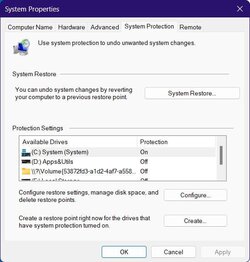
I'll bet that if you check Settings > System > About > Advanced System Settings > System Protection, you'll find the same "drive" listed there. @IanMosley's link suggests it shows up as an artefact after you've mounted an ISO (ever).
Clipboard_01.jpg
 

My Computers My Computers

  • At a glance

    11 Pro 24H2 26100.2454i7-9700 @ 3.00GHz32GBDDR4 @ 2666MHzIntel HD 630 Graphics onboard
    OS
    11 Pro 24H2 26100.2454
    Computer type
    PC/Desktop
    Manufacturer/Model
    Lenovo ThinkCentre M920S SFF
    CPU
    i7-9700 @ 3.00GHz
    Motherboard
    Lenovo 3132
    Memory
    32GBDDR4 @ 2666MHz
    Graphics Card(s)
    Intel HD 630 Graphics onboard
    Sound Card
    Realtek HD Audio
    Monitor(s) Displays
    LG E2442
    Screen Resolution
    1920x1080
    Hard Drives
    1 x Samsung 970 EVO PLUS 500GB NVMe SSD, 1 x WD_BLACK SN770
    250GB NVMe SSD (OS and programs), 1 x WD_BLACK SN770
    500GB NVMe SSD (Data)
    Case
    Lenovo SFF
    Keyboard
    Cherry Stream TKL JK-8600US-2 Wired
    Mouse
    LogiTech M510 wireless
    Internet Speed
    Fast (for fixed wireless!)
    Browser
    Chrome, sometimes Firefox
    Antivirus
    Malwarebytes Premium & Defender (working together beautifully!)
  • At a glance

    11 Pro 24H2 26100.2454i5-8400 @ 2.80GHz32GB DDR4 @ 2600MHzIntel HD 630 Graphics onboard
    Operating System
    11 Pro 24H2 26100.2454
    Computer type
    PC/Desktop
    Manufacturer/Model
    Lenovo ThinkCentre M920S SFF
    CPU
    i5-8400 @ 2.80GHz
    Motherboard
    Lenovo 3132
    Memory
    32GB DDR4 @ 2600MHz
    Graphics card(s)
    Intel HD 630 Graphics onboard
    Sound Card
    Realtek High Definition Audio onboard
    Monitor(s) Displays
    LG FULL HD (1920x1080@59Hz)
    Screen Resolution
    1920 x 1080
    Hard Drives
    1 x Samsung 970 EVO PLUS NVMe; 1 x Samsung 980 NVMe SSD
    Case
    Lenovo Think Centre SFF
    Keyboard
    Cherry Stream TKL JK-8600US-2 Wired
    Mouse
    LogiTech M510 wireless
    Internet Speed
    Fast (for fixed wireless!)
    Browser
    Chrome
    Antivirus
    Malwarebytes Premium and MS Defender, beautiful together
I'll bet that if you check Settings > System > About > Advanced System Settings > System Protection, you'll find the same "drive" listed there. @IanMosley's link suggests it shows up as an artefact after you've mounted an ISO (ever).
View attachment 81408
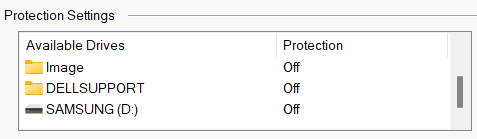
The entry does not appear on my system under Protection Settings, see the screenshots below. I have never mounted an ISO on this new computer. The entry appears on my system under Optimize Drives and nowhere else, see my OP, just like in the linked Microsoft Community post. I thus believe that the entry (that should not be there, not even under Optimize Drives) is the MSR.

Screenshot 2023-12-16 104343.png
Screenshot 2023-12-16 104422.png
 

My Computer My Computer

At a glance

Windows 10 Pro
OS
Windows 10 Pro

Latest Support Threads

Back
Top Bottom