Solved Notepad++


Notepad++ v8.5.7

2023-09-08

This release addresses 4 security issues (CVE-2023-40031, CVE-2023-40036, CVE-2023-40164 & CVE-2023-40166) and introduces several bug-fixes and new features.

1. Fix 4 security issues CVE-2023-40031, CVE-2023-40036, CVE-2023-40164 & CVE-2023-40166.
2. Security enhancement: Sign uninstall.exe.
3. Change the slogan in installer.
4. Fix eventual memory leak while reading Utf8-16 files.
5. Fix dragging tab performance issue while Document List is displayed.
6. Add supperss 2GB file warning option for x64.
7. Fix cloned document disassociated issue after Notepad++ being relaunched.
8. Fix session file saving problem if it's read-only.
9. Fix activating wrong file(s) issue after loading session file.
10. Fix wrong product version value displayed in file's properties.
 
Notepad++ V 8.8.9

Notepad++ v8.8.9 security enhancement, new features, regression fixes & bug-fixes:

1. Security Enhancement: verify certificate & signature on downloaded update installer.
2. Fix corrupted file loading on Windows system using the full UTF-8 code page.
3. Fix crashing when hashing SHA-256 for large files.
4. Fix "Select & Find Next" command not working regression.
5. MSI improvement: Add NOUPDATER option & suppress REBOOT.
6. Fix Perl Function List causes Notepad++ to freeze on tab switch regression.
7. Fix context menu truncated regression on localization change.
8. Add ability to update users' langs.xml & stylers.xml from model XML files.
9. Update to Scintilla 5.5.8 & Lexilla 5.4.6.
10. Add feature to sort lines in a document by length.
11. Undo & redo enhancement: restore vertical scroll position after undo & redo.
12. Fix mouse wheel horizontal scrolling amount not respecting Windows setting.
13. Fix document map regression with keyboard input.
14. Fix wrong system font scaling on Windows 7.
15. Update to nlohman json 3.11.3.


Get more info on


Included plugins:

1. NppExport v0.4
2. Converter v4.7
3. Mime Tool v3.1


Updater (Installer only):

* WinGUp (for Notepad++) v5.3.8
 

My Computers

System One System Two

  • OS
    Windows11 Pro 26200.8655
    Computer type
    PC/Desktop
    Manufacturer/Model
    Dell Alienware Aurora R16
    CPU
    Intel Core i9 14900F (24 -Core, 68 MB Total Cache)
    Motherboard
    Dell Alienware
    Memory
    32GB DDR5
    Graphics Card(s)
    RTX 4080 Super w/581.95
    Sound Card
    Realtec
    Monitor(s) Displays
    Corsair XENEON 32QHD165
    Screen Resolution
    2560 X 1440
    Hard Drives
    1-2TB Samsung 990 Pro PCIe NVMe M2 SSD
    1-4TB Samsung 990 Pro PCIe NVMe M2 SSD
    PSU
    1000 Watt Platinum Dell
    Case
    Alienware
    Cooling
    Liquid Closed Loop
    Keyboard
    Corsair Strafe RGB
    Mouse
    Logitech MK270 Wireless
    Internet Speed
    100Gb's Down-20 Up
    Browser
    Firefox 151.0.4
    Antivirus
    Defender
    Other Info
    Very Quiet And Fast
    CyberPower UPS CP1500PFCLCD
  • Operating System
    PClinuxOS Mate (2025.7)
    Computer type
    PC/Desktop
    Manufacturer/Model
    Intel
    CPU
    13th Gen Inter(R) Core(TM) i3-1315U
    Motherboard
    Intel
    Memory
    64 GB DDR4 @3200 MHz.
    Graphics card(s)
    Internal
    Sound Card
    None
    Monitor(s) Displays
    Dell 2419HGCF
    Screen Resolution
    1920 X 1080
    Hard Drives
    SAMSUNG 980 PRO SSD 2TB, PCIe 4.0 M.2 2280
    PSU
    Chicony 30 Watt
    Case
    Small
    Keyboard
    Dell
    Mouse
    Razor
    Internet Speed
    1GB
    Browser
    Slimjet
Does this update fix the issue, where the right click menu will randomly change between the new and old version if you have Notepad++ added to the right click menu?
 

My Computers

System One System Two

  • OS
    Windows 11 25H2
    Computer type
    PC/Desktop
    Manufacturer/Model
    Custom Built
    CPU
    Intel i9 14900KF
    Motherboard
    ASUS Z790 ProArt Creator WiFi
    Memory
    64GB Corsair Vengeance RGB
    Graphics Card(s)
    MSI 4090 Suprim X
    Sound Card
    Onboard
    Monitor(s) Displays
    1 x Asus 24". 1 x Asus 32"
    Screen Resolution
    1920 x 1080 & 2560 x 1440
    Hard Drives
    Multiple
    PSU
    Corsair 1200HX
    Case
    Corsair 7000D RGB
    Cooling
    Corsair H150I Capellix XT
    Keyboard
    Corsair K70 RGB PRO
    Mouse
    Corsair M55 RGB Pro
    Internet Speed
    1000Mbps
    Browser
    Edge
    Antivirus
    Windows Default
  • Operating System
    Windows 11 25H2
    Computer type
    PC/Desktop
    Manufacturer/Model
    Custom Built
    CPU
    Intel i7 6800K
    Motherboard
    ASUS Z99 Deluxe
    Memory
    32GB DDR4 (Corsair)
    Graphics card(s)
    ASUS GTX 1080ti
    Sound Card
    Onboard
    Monitor(s) Displays
    1x Viewsonic 24" 1x LG 19"
    Screen Resolution
    1920 x 1080 & 1600 x 900
    Hard Drives
    3 x SATA SSD
    PSU
    650W Gigabyte Bronze
    Case
    Coolermaster HAF-X
    Cooling
    Noctua NH-15 Chroma black
    Keyboard
    Generic RGB
    Mouse
    Microsoft Basic
    Internet Speed
    1000Mbps
    Browser
    Edge
    Antivirus
    Windows Default
Does this update fix the issue, where the right click menu will randomly change between the new and old version if you have Notepad++ added to the right click menu?
It works fine for me.
 

My Computers

System One System Two

  • OS
    Windows11 Pro 26200.8655
    Computer type
    PC/Desktop
    Manufacturer/Model
    Dell Alienware Aurora R16
    CPU
    Intel Core i9 14900F (24 -Core, 68 MB Total Cache)
    Motherboard
    Dell Alienware
    Memory
    32GB DDR5
    Graphics Card(s)
    RTX 4080 Super w/581.95
    Sound Card
    Realtec
    Monitor(s) Displays
    Corsair XENEON 32QHD165
    Screen Resolution
    2560 X 1440
    Hard Drives
    1-2TB Samsung 990 Pro PCIe NVMe M2 SSD
    1-4TB Samsung 990 Pro PCIe NVMe M2 SSD
    PSU
    1000 Watt Platinum Dell
    Case
    Alienware
    Cooling
    Liquid Closed Loop
    Keyboard
    Corsair Strafe RGB
    Mouse
    Logitech MK270 Wireless
    Internet Speed
    100Gb's Down-20 Up
    Browser
    Firefox 151.0.4
    Antivirus
    Defender
    Other Info
    Very Quiet And Fast
    CyberPower UPS CP1500PFCLCD
  • Operating System
    PClinuxOS Mate (2025.7)
    Computer type
    PC/Desktop
    Manufacturer/Model
    Intel
    CPU
    13th Gen Inter(R) Core(TM) i3-1315U
    Motherboard
    Intel
    Memory
    64 GB DDR4 @3200 MHz.
    Graphics card(s)
    Internal
    Sound Card
    None
    Monitor(s) Displays
    Dell 2419HGCF
    Screen Resolution
    1920 X 1080
    Hard Drives
    SAMSUNG 980 PRO SSD 2TB, PCIe 4.0 M.2 2280
    PSU
    Chicony 30 Watt
    Case
    Small
    Keyboard
    Dell
    Mouse
    Razor
    Internet Speed
    1GB
    Browser
    Slimjet

Notepad++ 8.9

Notepad++ 8.9 changelog:
  • Remove Notepad++ self-singed certificate signature, use only the certificate issued by GlobalSign. (Fix #16806 )
  • Security enhancement: Log security errors automatically in “%LOCALAPPDATA%\Notepad++\log\securityError.log” (Implement #17305 , #WinGUp )
  • Fix jarring color regression in dark mode (introduced in v8.8.9). (Fix #17289 )
  • Fix “/noUpdater” installer option not working if updater was previously installed. (Fix #17287 )
  • Fix column mode edit undo regression (introduced in v8.8.9). (Fix #17295 , #17272 , #16784 )
  • Fix issue where an empty file opened without encoding under a UTF-8 system codepage. (Fix #17258 )
  • Add makefile function list parser. (Fix #17293 )
  • Improve performance & add missing file ext. from langs.model.xml to langs.xml.(Fix #17290 , implement #17314 , implement #17306 )
  • Improve “Open containing folder in Explorer” command to avoid creating Explorer process. (Fix #17060 )
  • Allow updating mouse scroll amount according to OS settings changes. (Implement #17300 )
 

My Computer

System One

  • OS
    Windows 11 Pro
    Computer type
    PC/Desktop
    Manufacturer/Model
    Custom Build
    CPU
    Intel Core i9 12900KF
    Motherboard
    ASUS ROG Maximus Z690 Hero
    Memory
    Corsair 64GB DDR5 Vengeance C40 5200Mhz
    Graphics Card(s)
    ASUS GeForce RTX 3090 ROG Strix OC 24GB
    Sound Card
    OnBoard
    Monitor(s) Displays
    Acer Predator XB323UGP 32" QHD G-SYNC-C 144Hz 1MS IPS LED
    Screen Resolution
    2560 x 1440
    Hard Drives
    1x Samsung 980 Pro Series Gen4 250GB M.2 NVMe
    1x Samsung 980 Pro Series Gen4 500GB M.2 NVMe
    2x Samsung 980 Pro Series Gen4 2TB M.2 NVMe
    PSU
    Corsair AX1200i 1200W 80PLUS Titanium Modular
    Case
    Corsair 4000D Black Case w/ Tempered Glass Side Panel
    Cooling
    Noctua NH-U12A Chromax Black CPU Cooler, 4x Noctua 120mm Fans
    Keyboard
    Logitech MK545
    Mouse
    Logitech MX Master 3
    Internet Speed
    Fixed Wireless 150mbps/75mbps
    Browser
    Firefox
    Antivirus
    Kaspersky
    Other Info
    Thrustmaster TS-PC RACER
    Fanatec CSL Elite Pedals with the Load Cell Kit
    Yamaha Amp with Bose Speakers
Is there a way to get Notepad++ to remember Snapped positions?
 

My Computers

System One System Two

  • OS
    Windows 11 Pro
    Computer type
    PC/Desktop
    Manufacturer/Model
    ASUS ROG Strix
  • Operating System
    Windows 11 Pro
    Computer type
    Laptop
    Manufacturer/Model
    ASUS VivoBook
Notepad++ 8.9.1 (2026-01-26)

Changelog:

  • Fix EOL duplication regression when playing back old recorded macros. (Fix issue)
  • Remedy search failure for pasted text containing trailing invisible EOL character. (Fix #17124, #17187)
  • Fix customized context menu regression where separator (id=“0”) escapes FolderName submenu. (Fix #17342)
  • Fix issue where a single undo reverted multiple changes after macro execution. (Fix #9426)
  • Fix visual glitch when dragging dockable dialogs on a 2nd monitor. (Fix #16805, #16155, #16077)
  • Fix inconsistent automatic search mode switching (RegEx to Extended) in Find dialog. (Fix #17227)
  • Fix incorrect URL parsing caused by Unicode special spaces. (Fix #16856)
  • Update to Boost 1.90.0. (Implement #17326)
  • Improve update themes feature: fix JavaScript.js edge case. (Fix issue)
  • Update javascript.js to better match javascript (embedded) in all themes. (Fix issue, report)
  • Function List: enhance for Perl & PHP; add for Nim. (Fix #17382, #17327, implement #17377)
  • Fix comments and highlighting in TCL. (Fix #17315)
  • Update perl syntax highliging keywords and autocomplete for 5.42. (Fix #17332)
  • Improvement: display Find dialog status message with invisible characters warning. (Fix #17345)

 
Last edited:

My Computer

System One

  • OS
    Windows 11 Pro
    Computer type
    PC/Desktop
    Manufacturer/Model
    Custom Build
    CPU
    Intel Core i9 12900KF
    Motherboard
    ASUS ROG Maximus Z690 Hero
    Memory
    Corsair 64GB DDR5 Vengeance C40 5200Mhz
    Graphics Card(s)
    ASUS GeForce RTX 3090 ROG Strix OC 24GB
    Sound Card
    OnBoard
    Monitor(s) Displays
    Acer Predator XB323UGP 32" QHD G-SYNC-C 144Hz 1MS IPS LED
    Screen Resolution
    2560 x 1440
    Hard Drives
    1x Samsung 980 Pro Series Gen4 250GB M.2 NVMe
    1x Samsung 980 Pro Series Gen4 500GB M.2 NVMe
    2x Samsung 980 Pro Series Gen4 2TB M.2 NVMe
    PSU
    Corsair AX1200i 1200W 80PLUS Titanium Modular
    Case
    Corsair 4000D Black Case w/ Tempered Glass Side Panel
    Cooling
    Noctua NH-U12A Chromax Black CPU Cooler, 4x Noctua 120mm Fans
    Keyboard
    Logitech MK545
    Mouse
    Logitech MX Master 3
    Internet Speed
    Fixed Wireless 150mbps/75mbps
    Browser
    Firefox
    Antivirus
    Kaspersky
    Other Info
    Thrustmaster TS-PC RACER
    Fanatec CSL Elite Pedals with the Load Cell Kit
    Yamaha Amp with Bose Speakers

Notepad++ 8.9.2

Changelog:
  • Security enhancement: Make updater check interity & authenticity of server-returned XML (XMLDsig). (Implement #17441)
  • Security enhancement: Fix untrusted search path vulnerability by launching explorer.exe (Fix CVE-2026-25926)
  • Security enhancement: Make auto-updater (WinGUp) even more secured. (Remove unsecured options, remove dll dependency, launch only signed program for plugin management)
  • Fix a plugin installation crash due to incorrect processing catch. (Fix #issue)
  • Add redact selection feature - Default: █, Modifier (Shift + Click): ●. (Fix #17363)
  • Fix context menu shortcut localization not aligning to the right regression. (Fix #17467)
 

My Computer

System One

  • OS
    Windows 11 Pro
    Computer type
    PC/Desktop
    Manufacturer/Model
    Custom Build
    CPU
    Intel Core i9 12900KF
    Motherboard
    ASUS ROG Maximus Z690 Hero
    Memory
    Corsair 64GB DDR5 Vengeance C40 5200Mhz
    Graphics Card(s)
    ASUS GeForce RTX 3090 ROG Strix OC 24GB
    Sound Card
    OnBoard
    Monitor(s) Displays
    Acer Predator XB323UGP 32" QHD G-SYNC-C 144Hz 1MS IPS LED
    Screen Resolution
    2560 x 1440
    Hard Drives
    1x Samsung 980 Pro Series Gen4 250GB M.2 NVMe
    1x Samsung 980 Pro Series Gen4 500GB M.2 NVMe
    2x Samsung 980 Pro Series Gen4 2TB M.2 NVMe
    PSU
    Corsair AX1200i 1200W 80PLUS Titanium Modular
    Case
    Corsair 4000D Black Case w/ Tempered Glass Side Panel
    Cooling
    Noctua NH-U12A Chromax Black CPU Cooler, 4x Noctua 120mm Fans
    Keyboard
    Logitech MK545
    Mouse
    Logitech MX Master 3
    Internet Speed
    Fixed Wireless 150mbps/75mbps
    Browser
    Firefox
    Antivirus
    Kaspersky
    Other Info
    Thrustmaster TS-PC RACER
    Fanatec CSL Elite Pedals with the Load Cell Kit
    Yamaha Amp with Bose Speakers
I can't open a blank new session while the while the current session is running. 🤷‍♂️

Nevermind..., it defaulted back to mono-instance, I had to restart the application.
 

My Computers

System One System Two

  • OS
    Windows 11 Pro
    Computer type
    PC/Desktop
    Manufacturer/Model
    ASUS ROG Strix
  • Operating System
    Windows 11 Pro
    Computer type
    Laptop
    Manufacturer/Model
    ASUS VivoBook
I have Windows 11 x64. Since this update, Notepad (Text doc), upon opening, it opens more than one tab. It open 2 or more. The more you open the more tabs it creates. This behaviour is very strange. I had to go to Apps and Uninstall it.
Upon rebooting it went back to the previous version of Notepad (Text doc) with highlighted in yellow at the top; "A new version of Notepad is available. {Install}", At least it works properly with only opening one at a time.
Hope a fix is not too far away.
Hello ybnice,

I have done the same as you did and its working perfectly.

Greetz Browny
 

My Computer

System One

  • OS
    Windows 11 Home Beta 25H2- 11-‎8-‎2026- 26220.8062
    Computer type
    Laptop
    Manufacturer/Model
    Acer/Aspire 17
    CPU
    13th Gen Intel(R) Core(TM) i7-13620H (2.40 GHz)
    Motherboard
    64-bits besturingssysteem, x64-processor
    Memory
    16 gig
    Graphics Card(s)
    Intel(R) Iris(R) Xe Graphics, NVIDIA Geforce MX450
    Sound Card
    Realtek (R) Audio
    Monitor(s) Displays
    17.3
    Screen Resolution
    1920*1080
    Hard Drives
    Micron_2210_MTFDHBA1T0QFD (SSD) 953,86GB C = 247 D = 705
    Mouse
    m220 logitech
    Internet Speed
    1000 Mbps
    Browser
    Edge chromium
    Antivirus
    Windows Defender, Malwarebytes
... back to mono-instance...
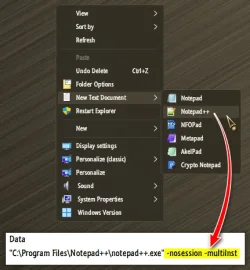
I prefer to keep the default of Mono-Instance, so additional files will automatically open in the current window in a new tab.
However, if I need a one time new instance on demand, the right click string should be
Code:
 -nosession -multiInst
(including spaces.)
Hope it keeps working.
(Saving multiple sessions is a bit complicated at first)

12371.webp
 

My Computers

System One System Two

  • OS
    Windows 11 Pro
    Computer type
    PC/Desktop
    Manufacturer/Model
    ASUS ROG Strix
  • Operating System
    Windows 11 Pro
    Computer type
    Laptop
    Manufacturer/Model
    ASUS VivoBook

Notepad++ 8.9.3​

Regression fixes, bug-fixes & new improvements:**​

  1. Regression fix: a crash in User Defined Language. (Fix #17520)
  2. Regression fix: installing (or removing) plugin re-opens Notepad++ with permanent admin privilege (Fix #17540)
  3. Regression-fix: wrongly added parenthesis for some multi-bytes characters. (Fix #17521, #17802)
  4. Regression-fix: incorrect function list text display for non-UTF8 documents. (Fix #17847)
  5. Regression-fix: ProjectPanel Workspace text localization issue. (Fix community report)
  6. Regression-fix: Change History margin not enabled by default. (Fix comment repport)
  7. Regression-fix: Notepad++ update & plugin download fail behind corporate MITM proxies. (Fix community report)
  8. Security enhancement: Update cURL to v8.19.0 in auto-updater (WinGUp) to fix cURL security issue (CVE-2025-14819). (Fix #17869)
  9. Improve performance by migrating the XML parser from TinyXML to pugixml. (Fix #16175)
  10. Update Scintilla to 5.6.0 & Lexilla to 5.4.7. (Implement #17562)
  11. Fix the issue where printing caused Notepad++ to crash. (Fix #6126, #12645, community report #1, community report #2, community report #3)
  12. Fix Find in Files failing to search file content on disk. (Fix #16177, #17070)
  13. Add disableNppAutoUpdate.xml to disable auto-update when WinGUp (GUP.exe) is present. (Implement #17836)
  14. Fix a memory leak on exit. (Fix #17817)
  15. Fix installed auto-completion files not overwritten after update. (Fix #14749)
  16. Add model capacity of shortcuts.xml & contexMenu.xml for administration. (Fix #17872)
  17. Add an option to disable selected text drag-and-drop. (Fix #2571, #11335)
  18. Fix wrong theme-writing path for non-ProgramFiles installations. (Fix comment repport)
  19. Enhancement: prevent XML config files from being overwritten when updating portable package (copy/paste). (Fix #9755, #14279, #15120)
  20. Fix incomplete Find dialg tab translation when 1st opêned from Project Panels. (Fix community report)
  21. Fix Notepad++ spawning a new Windows Explorer process in Task Manager. (Fix comment repport)
  22. Add Function List & Autocompletion for D language. (Fix #17349)
 

My Computer

System One

  • OS
    Windows 11 Pro
    Computer type
    PC/Desktop
    Manufacturer/Model
    Custom Build
    CPU
    Intel Core i9 12900KF
    Motherboard
    ASUS ROG Maximus Z690 Hero
    Memory
    Corsair 64GB DDR5 Vengeance C40 5200Mhz
    Graphics Card(s)
    ASUS GeForce RTX 3090 ROG Strix OC 24GB
    Sound Card
    OnBoard
    Monitor(s) Displays
    Acer Predator XB323UGP 32" QHD G-SYNC-C 144Hz 1MS IPS LED
    Screen Resolution
    2560 x 1440
    Hard Drives
    1x Samsung 980 Pro Series Gen4 250GB M.2 NVMe
    1x Samsung 980 Pro Series Gen4 500GB M.2 NVMe
    2x Samsung 980 Pro Series Gen4 2TB M.2 NVMe
    PSU
    Corsair AX1200i 1200W 80PLUS Titanium Modular
    Case
    Corsair 4000D Black Case w/ Tempered Glass Side Panel
    Cooling
    Noctua NH-U12A Chromax Black CPU Cooler, 4x Noctua 120mm Fans
    Keyboard
    Logitech MK545
    Mouse
    Logitech MX Master 3
    Internet Speed
    Fixed Wireless 150mbps/75mbps
    Browser
    Firefox
    Antivirus
    Kaspersky
    Other Info
    Thrustmaster TS-PC RACER
    Fanatec CSL Elite Pedals with the Load Cell Kit
    Yamaha Amp with Bose Speakers
One nice change I noticed in this latest release 8.9.3 compared to all its predecessors is the portable .zip file no longer includes config.xml and shortcuts.xml files. I could never simply extract the archive over my existing installation, because it would overwrite those files, which contain my own modifications.
 

My Computer

System One

  • OS
    Windows 11
I just wish the program would remember snapped positions.
 

My Computers

System One System Two

  • OS
    Windows 11 Pro
    Computer type
    PC/Desktop
    Manufacturer/Model
    ASUS ROG Strix
  • Operating System
    Windows 11 Pro
    Computer type
    Laptop
    Manufacturer/Model
    ASUS VivoBook
Notepad++ v8.94

Notepad++ v8.9.4 crash fixes, bug-fixes & new improvements:

1. Fix crashes in FindInFiles when nativeLang.xml's "find-result-hits" contains "%s".
2. Fix drop-file crash when file path length reaches 259 characters.
3. Fix crash caused by undoing column editor bad input in virtual space.
4. Fix bad column editor input in reverse-direction column selection on virtual space.
5. Update to Scintilla 5.6.1 & Lexilla 5.4.8.
6. Fix EOL conversion to Windows format not working (Scintilla update related).
7. Fix rendering corruption in .bat files (Lexilla update related).
8. Fix quote escaping causing incorrect JSON syntax highlighting (Lexilla update related).
9. Fix MSI installation error due to context menu item registration.
10. Fix NSIS installation stalling caused by context menu registration issue.
11. Add NPP_LANG property to install a specific localization file for MSI.
12. Fix MSI installer display random Hexadecimal number as name on UAC.
13. Add version info into MSI file property (as value of "Comments").
14. Fix minimized window not restoring in administrator mode.
15. Fix Unicode search mismatching ANSI character '?'.
16. Fix Column Editor regression with empty fields.
17. Fix floating dialog content not displaying in certain situations.
18. Fix visual glitch when toggling group view in Document List.
19. Support improved C++ 11 raw string literal handling.
20. Fix visual glitch in the Mark dialog.

 

My Computers

System One System Two

  • OS
    Windows11 Pro 26200.8655
    Computer type
    PC/Desktop
    Manufacturer/Model
    Dell Alienware Aurora R16
    CPU
    Intel Core i9 14900F (24 -Core, 68 MB Total Cache)
    Motherboard
    Dell Alienware
    Memory
    32GB DDR5
    Graphics Card(s)
    RTX 4080 Super w/581.95
    Sound Card
    Realtec
    Monitor(s) Displays
    Corsair XENEON 32QHD165
    Screen Resolution
    2560 X 1440
    Hard Drives
    1-2TB Samsung 990 Pro PCIe NVMe M2 SSD
    1-4TB Samsung 990 Pro PCIe NVMe M2 SSD
    PSU
    1000 Watt Platinum Dell
    Case
    Alienware
    Cooling
    Liquid Closed Loop
    Keyboard
    Corsair Strafe RGB
    Mouse
    Logitech MK270 Wireless
    Internet Speed
    100Gb's Down-20 Up
    Browser
    Firefox 151.0.4
    Antivirus
    Defender
    Other Info
    Very Quiet And Fast
    CyberPower UPS CP1500PFCLCD
  • Operating System
    PClinuxOS Mate (2025.7)
    Computer type
    PC/Desktop
    Manufacturer/Model
    Intel
    CPU
    13th Gen Inter(R) Core(TM) i3-1315U
    Motherboard
    Intel
    Memory
    64 GB DDR4 @3200 MHz.
    Graphics card(s)
    Internal
    Sound Card
    None
    Monitor(s) Displays
    Dell 2419HGCF
    Screen Resolution
    1920 X 1080
    Hard Drives
    SAMSUNG 980 PRO SSD 2TB, PCIe 4.0 M.2 2280
    PSU
    Chicony 30 Watt
    Case
    Small
    Keyboard
    Dell
    Mouse
    Razor
    Internet Speed
    1GB
    Browser
    Slimjet
Notepad++ 8.9.5
Changelog:

  • Fix updating issue where using v8.9.4 32-bits installer creates duplicate "Uninstall a program" entries.
  • Fix v8.9.4 64-bits installer error message caused by MSIX on Win10.
  • Fix regression in UDL XML files causing an EOL parsing issue.
  • Update Scintilla to 5.6.2 & Lexilla to 5.4.9.
  • Add option to synchronize zoom level across views.
  • Fix MSI installer writting language info to HKCU instead of HKLM.
  • Fix imported UDLs not appearing in the language menu without restarting Notepad++.
  • Make "(?)" tooltip in preferences & Find in Files dialogs persitant & reduce display delay.
  • Fix visual glitch in Mark dialog when in reduced mode.
 

My Computer

System One

  • OS
    Windows 11 Pro
    Computer type
    PC/Desktop
    Manufacturer/Model
    Custom Build
    CPU
    Intel Core i9 12900KF
    Motherboard
    ASUS ROG Maximus Z690 Hero
    Memory
    Corsair 64GB DDR5 Vengeance C40 5200Mhz
    Graphics Card(s)
    ASUS GeForce RTX 3090 ROG Strix OC 24GB
    Sound Card
    OnBoard
    Monitor(s) Displays
    Acer Predator XB323UGP 32" QHD G-SYNC-C 144Hz 1MS IPS LED
    Screen Resolution
    2560 x 1440
    Hard Drives
    1x Samsung 980 Pro Series Gen4 250GB M.2 NVMe
    1x Samsung 980 Pro Series Gen4 500GB M.2 NVMe
    2x Samsung 980 Pro Series Gen4 2TB M.2 NVMe
    PSU
    Corsair AX1200i 1200W 80PLUS Titanium Modular
    Case
    Corsair 4000D Black Case w/ Tempered Glass Side Panel
    Cooling
    Noctua NH-U12A Chromax Black CPU Cooler, 4x Noctua 120mm Fans
    Keyboard
    Logitech MK545
    Mouse
    Logitech MX Master 3
    Internet Speed
    Fixed Wireless 150mbps/75mbps
    Browser
    Firefox
    Antivirus
    Kaspersky
    Other Info
    Thrustmaster TS-PC RACER
    Fanatec CSL Elite Pedals with the Load Cell Kit
    Yamaha Amp with Bose Speakers
Notepad++ 8.9.6
  • Fix vulnerability (CVE-2026-46710) of v8.9.4 & v8.9.5 installer. (Implement commit)
  • Fix x86 installer regression of not showing installation entry in “Unstall a program” of Control Panel. (Fix community discussion)
  • Fix x86 installer regression where context menu not installed or uninstalled correctly. (Fix community discussion)
  • Fix UAC prompt display regression (“Notepad++ installer” instead of “Notepad++”) for Notepad++ v8.9.5. (Fix GitHub comment)
  • Fix incorrect bevaviour when saving dirty read-only files. (Fix #17956)
  • Fix regression where saving a UDL file removed XML declaration. (Fix GitHub comment)


My Computer

System One

  • OS
    Windows 11 Pro
    Computer type
    PC/Desktop
    Manufacturer/Model
    Custom Build
    CPU
    Intel Core i9 12900KF
    Motherboard
    ASUS ROG Maximus Z690 Hero
    Memory
    Corsair 64GB DDR5 Vengeance C40 5200Mhz
    Graphics Card(s)
    ASUS GeForce RTX 3090 ROG Strix OC 24GB
    Sound Card
    OnBoard
    Monitor(s) Displays
    Acer Predator XB323UGP 32" QHD G-SYNC-C 144Hz 1MS IPS LED
    Screen Resolution
    2560 x 1440
    Hard Drives
    1x Samsung 980 Pro Series Gen4 250GB M.2 NVMe
    1x Samsung 980 Pro Series Gen4 500GB M.2 NVMe
    2x Samsung 980 Pro Series Gen4 2TB M.2 NVMe
    PSU
    Corsair AX1200i 1200W 80PLUS Titanium Modular
    Case
    Corsair 4000D Black Case w/ Tempered Glass Side Panel
    Cooling
    Noctua NH-U12A Chromax Black CPU Cooler, 4x Noctua 120mm Fans
    Keyboard
    Logitech MK545
    Mouse
    Logitech MX Master 3
    Internet Speed
    Fixed Wireless 150mbps/75mbps
    Browser
    Firefox
    Antivirus
    Kaspersky
    Other Info
    Thrustmaster TS-PC RACER
    Fanatec CSL Elite Pedals with the Load Cell Kit
    Yamaha Amp with Bose Speakers


NP ++ 8.9.6.1

Notepad++ v8.9.6.1 vulnerability fixes:

1. Fix bad formed COPYDATASTRUCT makes Notepad++ crash (CVE-2026-48770).
2. Fix arbitrary code execution vulnerability via config.xml (CVE-2026-48778).
3. Fix arbitrary code execution vulnerability via shortcuts.xml (CVE-2026-48778).


Notepad++ v8.9.6 vulnerability fix, regression fixes & bug-fixes:

1. Fix vulnerability (CVE-2026-46710) of v8.9.4 & v8.9.5 installer.
2. Fix x86 installer regression of not showing installation entry in Control Panel's "Unstall a program".
3. Fix x86 installer regression where context menu not installed or uninstalled correctly.
4. Fix UAC prompt display regression (“Notepad++ installer” instead of “Notepad++”) for Notepad++ v8.9.5.
5. Fix incorrect bevaviour when saving dirty read-only files.
6. Fix regression where saving a UDL file removed XML declaration.


Notepad++ v8.9.5 regression fixes, bug-fixes & new improvements:

1. Fix updating issue where using v8.9.4 32-bits installer creates duplicate "Uninstall a program" entries.
2. Fix v8.9.4 64-bits installer error message caused by MSIX on Win10.
3. Fix regression in UDL XML files causing an EOL parsing issue.
4. Update Scintilla to 5.6.2 & Lexilla to 5.4.9.
5. Add option to synchronize zoom level across views.
6. Fix MSI installer writting language info to HKCU instead of HKLM.
7. Fix imported UDLs not appearing in the language menu without restarting Notepad++.
8. Make "(?)" tooltip in preferences & Find in Files dialogs persitant & reduce display delay.
9. Fix visual glitch in Mark dialog when in reduced mode.


Notepad++ v8.9.4 crash fixes, bug-fixes & new improvements:

1. Fix crashes in FindInFiles when nativeLang.xml's "find-result-hits" contains "%s".
2. Fix drop-file crash when file path length reaches 259 characters.
3. Fix crash caused by undoing column editor bad input in virtual space.
4. Fix bad column editor input in reverse-direction column selection on virtual space.
5. Update to Scintilla 5.6.1 & Lexilla 5.4.8.
6. Fix EOL conversion to Windows format not working (Scintilla update related).
7. Fix rendering corruption in .bat files (Lexilla update related).
8. Fix quote escaping causing incorrect JSON syntax highlighting (Lexilla update related).
9. Fix MSI installation error due to context menu item registration.
10. Fix NSIS installation stalling caused by context menu registration issue.
11. Add NPP_LANG property to install a specific localization file for MSI.
12. Fix MSI installer display random Hexadecimal number as name on UAC.
13. Add version info into MSI file property (as value of "Comments").
14. Fix minimized window not restoring in administrator mode.
15. Fix Unicode search mismatching ANSI character '?'.
16. Fix Column Editor regression with empty fields.
17. Fix floating dialog content not displaying in certain situations.
18. Fix visual glitch when toggling group view in Document List.
19. Support improved C++ 11 raw string literal handling.
20. Fix visual glitch in the Mark dialog.


Get more info on
 

My Computers

System One System Two

  • OS
    Windows11 Pro 26200.8655
    Computer type
    PC/Desktop
    Manufacturer/Model
    Dell Alienware Aurora R16
    CPU
    Intel Core i9 14900F (24 -Core, 68 MB Total Cache)
    Motherboard
    Dell Alienware
    Memory
    32GB DDR5
    Graphics Card(s)
    RTX 4080 Super w/581.95
    Sound Card
    Realtec
    Monitor(s) Displays
    Corsair XENEON 32QHD165
    Screen Resolution
    2560 X 1440
    Hard Drives
    1-2TB Samsung 990 Pro PCIe NVMe M2 SSD
    1-4TB Samsung 990 Pro PCIe NVMe M2 SSD
    PSU
    1000 Watt Platinum Dell
    Case
    Alienware
    Cooling
    Liquid Closed Loop
    Keyboard
    Corsair Strafe RGB
    Mouse
    Logitech MK270 Wireless
    Internet Speed
    100Gb's Down-20 Up
    Browser
    Firefox 151.0.4
    Antivirus
    Defender
    Other Info
    Very Quiet And Fast
    CyberPower UPS CP1500PFCLCD
  • Operating System
    PClinuxOS Mate (2025.7)
    Computer type
    PC/Desktop
    Manufacturer/Model
    Intel
    CPU
    13th Gen Inter(R) Core(TM) i3-1315U
    Motherboard
    Intel
    Memory
    64 GB DDR4 @3200 MHz.
    Graphics card(s)
    Internal
    Sound Card
    None
    Monitor(s) Displays
    Dell 2419HGCF
    Screen Resolution
    1920 X 1080
    Hard Drives
    SAMSUNG 980 PRO SSD 2TB, PCIe 4.0 M.2 2280
    PSU
    Chicony 30 Watt
    Case
    Small
    Keyboard
    Dell
    Mouse
    Razor
    Internet Speed
    1GB
    Browser
    Slimjet

Notepad++ v8.9.6.2 vulnerability fixes:

1. Fix a bypass scenario in the previously fixed vulnerability (CVE-2026-48778) that was not fully addressed.


Notepad++ v8.9.6.1 vulnerability fixes:

1. Fix bad formed COPYDATASTRUCT makes Notepad++ crash (CVE-2026-48770).
2. Fix arbitrary code execution vulnerability via config.xml (CVE-2026-48778).
3. Fix arbitrary code execution vulnerability via shortcuts.xml (CVE-2026-48778).


Notepad++ v8.9.6 vulnerability fix, regression fixes & bug-fixes:

1. Fix vulnerability (CVE-2026-46710) of v8.9.4 & v8.9.5 installer.
2. Fix x86 installer regression of not showing installation entry in Control Panel's "Unstall a program".
3. Fix x86 installer regression where context menu not installed or uninstalled correctly.
4. Fix UAC prompt display regression (“Notepad++ installer” instead of “Notepad++”) for Notepad++ v8.9.5.
5. Fix incorrect bevaviour when saving dirty read-only files.
6. Fix regression where saving a UDL file removed XML declaration.


Notepad++ v8.9.5 regression fixes, bug-fixes & new improvements:

1. Fix updating issue where using v8.9.4 32-bits installer creates duplicate "Uninstall a program" entries.
2. Fix v8.9.4 64-bits installer error message caused by MSIX on Win10.
3. Fix regression in UDL XML files causing an EOL parsing issue.
4. Update Scintilla to 5.6.2 & Lexilla to 5.4.9.
5. Add option to synchronize zoom level across views.
6. Fix MSI installer writting language info to HKCU instead of HKLM.
7. Fix imported UDLs not appearing in the language menu without restarting Notepad++.
8. Make "(?)" tooltip in preferences & Find in Files dialogs persitant & reduce display delay.
9. Fix visual glitch in Mark dialog when in reduced mode.


Notepad++ v8.9.4 crash fixes, bug-fixes & new improvements:

1. Fix crashes in FindInFiles when nativeLang.xml's "find-result-hits" contains "%s".
2. Fix drop-file crash when file path length reaches 259 characters.
3. Fix crash caused by undoing column editor bad input in virtual space.
4. Fix bad column editor input in reverse-direction column selection on virtual space.
5. Update to Scintilla 5.6.1 & Lexilla 5.4.8.
6. Fix EOL conversion to Windows format not working (Scintilla update related).
7. Fix rendering corruption in .bat files (Lexilla update related).
8. Fix quote escaping causing incorrect JSON syntax highlighting (Lexilla update related).
9. Fix MSI installation error due to context menu item registration.
10. Fix NSIS installation stalling caused by context menu registration issue.
11. Add NPP_LANG property to install a specific localization file for MSI.
12. Fix MSI installer display random Hexadecimal number as name on UAC.
13. Add version info into MSI file property (as value of "Comments").
14. Fix minimized window not restoring in administrator mode.
15. Fix Unicode search mismatching ANSI character '?'.
16. Fix Column Editor regression with empty fields.
17. Fix floating dialog content not displaying in certain situations.
18. Fix visual glitch when toggling group view in Document List.
19. Support improved C++ 11 raw string literal handling.
20. Fix visual glitch in the Mark dialog.


Get more info on
 

My Computers

System One System Two

  • OS
    Windows11 Pro 26200.8655
    Computer type
    PC/Desktop
    Manufacturer/Model
    Dell Alienware Aurora R16
    CPU
    Intel Core i9 14900F (24 -Core, 68 MB Total Cache)
    Motherboard
    Dell Alienware
    Memory
    32GB DDR5
    Graphics Card(s)
    RTX 4080 Super w/581.95
    Sound Card
    Realtec
    Monitor(s) Displays
    Corsair XENEON 32QHD165
    Screen Resolution
    2560 X 1440
    Hard Drives
    1-2TB Samsung 990 Pro PCIe NVMe M2 SSD
    1-4TB Samsung 990 Pro PCIe NVMe M2 SSD
    PSU
    1000 Watt Platinum Dell
    Case
    Alienware
    Cooling
    Liquid Closed Loop
    Keyboard
    Corsair Strafe RGB
    Mouse
    Logitech MK270 Wireless
    Internet Speed
    100Gb's Down-20 Up
    Browser
    Firefox 151.0.4
    Antivirus
    Defender
    Other Info
    Very Quiet And Fast
    CyberPower UPS CP1500PFCLCD
  • Operating System
    PClinuxOS Mate (2025.7)
    Computer type
    PC/Desktop
    Manufacturer/Model
    Intel
    CPU
    13th Gen Inter(R) Core(TM) i3-1315U
    Motherboard
    Intel
    Memory
    64 GB DDR4 @3200 MHz.
    Graphics card(s)
    Internal
    Sound Card
    None
    Monitor(s) Displays
    Dell 2419HGCF
    Screen Resolution
    1920 X 1080
    Hard Drives
    SAMSUNG 980 PRO SSD 2TB, PCIe 4.0 M.2 2280
    PSU
    Chicony 30 Watt
    Case
    Small
    Keyboard
    Dell
    Mouse
    Razor
    Internet Speed
    1GB
    Browser
    Slimjet

Notepad++ v8.9.6.4 vulnerability fix, regression fix & bug-fix:

1. Fix TOCTOU (Time-of-check to time-of-use) issue in HMAC implementation.
2. Fix MSI installer regression that leaves old version entry in Add/Remove Programs.
3. Fix "Open Containing Folder in Explorer" launching extra explorer processes.


Notepad++ v8.9.6.2 vulnerability fixes:

1. Fix a bypass scenario in the previously fixed vulnerability (CVE-2026-48778) that was not fully addressed.


Notepad++ v8.9.6.1 vulnerability fixes:

1. Fix bad formed COPYDATASTRUCT makes Notepad++ crash (CVE-2026-48770).
2. Fix arbitrary code execution vulnerability via config.xml (CVE-2026-48778).
3. Fix arbitrary code execution vulnerability via shortcuts.xml (CVE-2026-48778).


Notepad++ v8.9.6 vulnerability fix, regression fixes & bug-fixes:

1. Fix vulnerability (CVE-2026-46710) of v8.9.4 & v8.9.5 installer.
2. Fix x86 installer regression of not showing installation entry in Control Panel's "Unstall a program".
3. Fix x86 installer regression where context menu not installed or uninstalled correctly.
4. Fix UAC prompt display regression (“Notepad++ installer” instead of “Notepad++”) for Notepad++ v8.9.5.
5. Fix incorrect bevaviour when saving dirty read-only files.
6. Fix regression where saving a UDL file removed XML declaration.


Notepad++ v8.9.5 regression fixes, bug-fixes & new improvements:

1. Fix updating issue where using v8.9.4 32-bits installer creates duplicate "Uninstall a program" entries.
2. Fix v8.9.4 64-bits installer error message caused by MSIX on Win10.
3. Fix regression in UDL XML files causing an EOL parsing issue.
4. Update Scintilla to 5.6.2 & Lexilla to 5.4.9.
5. Add option to synchronize zoom level across views.
6. Fix MSI installer writting language info to HKCU instead of HKLM.
7. Fix imported UDLs not appearing in the language menu without restarting Notepad++.
8. Make "(?)" tooltip in preferences & Find in Files dialogs persitant & reduce display delay.
9. Fix visual glitch in Mark dialog when in reduced mode.


Notepad++ v8.9.4 crash fixes, bug-fixes & new improvements:

1. Fix crashes in FindInFiles when nativeLang.xml's "find-result-hits" contains "%s".
2. Fix drop-file crash when file path length reaches 259 characters.
3. Fix crash caused by undoing column editor bad input in virtual space.
4. Fix bad column editor input in reverse-direction column selection on virtual space.
5. Update to Scintilla 5.6.1 & Lexilla 5.4.8.
6. Fix EOL conversion to Windows format not working (Scintilla update related).
7. Fix rendering corruption in .bat files (Lexilla update related).
8. Fix quote escaping causing incorrect JSON syntax highlighting (Lexilla update related).
9. Fix MSI installation error due to context menu item registration.
10. Fix NSIS installation stalling caused by context menu registration issue.
11. Add NPP_LANG property to install a specific localization file for MSI.
12. Fix MSI installer display random Hexadecimal number as name on UAC.
13. Add version info into MSI file property (as value of "Comments").
14. Fix minimized window not restoring in administrator mode.
15. Fix Unicode search mismatching ANSI character '?'.
16. Fix Column Editor regression with empty fields.
17. Fix floating dialog content not displaying in certain situations.
18. Fix visual glitch when toggling group view in Document List.
19. Support improved C++ 11 raw string literal handling.
20. Fix visual glitch in the Mark dialog.
 

My Computers

System One System Two

  • OS
    Windows11 Pro 26200.8655
    Computer type
    PC/Desktop
    Manufacturer/Model
    Dell Alienware Aurora R16
    CPU
    Intel Core i9 14900F (24 -Core, 68 MB Total Cache)
    Motherboard
    Dell Alienware
    Memory
    32GB DDR5
    Graphics Card(s)
    RTX 4080 Super w/581.95
    Sound Card
    Realtec
    Monitor(s) Displays
    Corsair XENEON 32QHD165
    Screen Resolution
    2560 X 1440
    Hard Drives
    1-2TB Samsung 990 Pro PCIe NVMe M2 SSD
    1-4TB Samsung 990 Pro PCIe NVMe M2 SSD
    PSU
    1000 Watt Platinum Dell
    Case
    Alienware
    Cooling
    Liquid Closed Loop
    Keyboard
    Corsair Strafe RGB
    Mouse
    Logitech MK270 Wireless
    Internet Speed
    100Gb's Down-20 Up
    Browser
    Firefox 151.0.4
    Antivirus
    Defender
    Other Info
    Very Quiet And Fast
    CyberPower UPS CP1500PFCLCD
  • Operating System
    PClinuxOS Mate (2025.7)
    Computer type
    PC/Desktop
    Manufacturer/Model
    Intel
    CPU
    13th Gen Inter(R) Core(TM) i3-1315U
    Motherboard
    Intel
    Memory
    64 GB DDR4 @3200 MHz.
    Graphics card(s)
    Internal
    Sound Card
    None
    Monitor(s) Displays
    Dell 2419HGCF
    Screen Resolution
    1920 X 1080
    Hard Drives
    SAMSUNG 980 PRO SSD 2TB, PCIe 4.0 M.2 2280
    PSU
    Chicony 30 Watt
    Case
    Small
    Keyboard
    Dell
    Mouse
    Razor
    Internet Speed
    1GB
    Browser
    Slimjet
Back
Top Bottom