
Office 2003 vs. Windows 11


KLJ2025

New member
Local time
1:11 PM
Posts
5
OS
Windows 11
When I attempt to install Office Professional 2003 on Windows 11 Pro 24H2, I consistently receive an error of "installation source corrupted" shortly after I enter the product key. I have tried two different installation media with the same results. This Post suggests "... install office 2003 in compatibility mode for Win 7." However, no Compatibility tab is shown in the properties for 'Setup.exe'. The MSI file for the Office install only shows a 'previous version of Windows' option on the compatibility tab, and setting it doesn't change the observed symptom.

Thoughts, anyone?

(This system is for an older person, and installing the same version they are accustomed to would be the most helpful.)
 

My Computer My Computer

At a glance

Windows 11Intel i7-1185G732GB
OS
Windows 11
Computer type
Laptop
Manufacturer/Model
Lenovo/Thinkpad P15s
CPU
Intel i7-1185G7
Memory
32GB
Monitor(s) Displays
built-in
Hard Drives
nvme 500GB
Thanks. One of the suggestions in that link is to update MSXML, but no update is provided past Windows 7.

Performing cleanup or removal of previously installed version of Office doesn't apply -- this is a fresh install on a new system.

Perhaps I should mention that I have been able to install Office 2003 on Windows 7 and Windows 10 without difficulty.
 

My Computer My Computer

At a glance

Windows 11Intel i7-1185G732GB
OS
Windows 11
Computer type
Laptop
Manufacturer/Model
Lenovo/Thinkpad P15s
CPU
Intel i7-1185G7
Memory
32GB
Monitor(s) Displays
built-in
Hard Drives
nvme 500GB
but try the clean boot installation method
uninstall your installation of 2003 and then follow the other steps:

"Try installing Office 2003 in the Windows Clean boot.
Refer the link below to boot the computer in clean boot mode:
.http://support.microsoft.com/kb/929135
Note: Ensure you start computer in normal mode once Office 2003 is installed."
 

My Computer My Computer

At a glance

Windows 11 Pro
OS
Windows 11 Pro
I have somehow failed to make clear that I have no installation of Office 2003. The prompt for the product key happens almost immediately after the installation procedure begins, and the error message happens as soon as the product key is entered. It doesn't get far enough to start writing files or even creating a folder in Program Files X86. Likewise, under HKEY_LOCAL_MACHINE\SOFTWARE\MICROSOFT there is nothing for Office.

Clean boot doesn't help either, by the way.

Any other thoughts?
 

My Computer My Computer

At a glance

Windows 11Intel i7-1185G732GB
OS
Windows 11
Computer type
Laptop
Manufacturer/Model
Lenovo/Thinkpad P15s
CPU
Intel i7-1185G7
Memory
32GB
Monitor(s) Displays
built-in
Hard Drives
nvme 500GB
right click the setup.exe and run it in compatibility for windows 7 to install it
 

My Computer My Computer

At a glance

Windows 11 Pro
OS
Windows 11 Pro
Does your system offer 'compatibility mode for windows 7' as an option in the right-click menu on .EXE files? If so, is it a Windows 11 24H2 system? That option is not available on the system I was working on.
 

My Computer My Computer

At a glance

Windows 11Intel i7-1185G732GB
OS
Windows 11
Computer type
Laptop
Manufacturer/Model
Lenovo/Thinkpad P15s
CPU
Intel i7-1185G7
Memory
32GB
Monitor(s) Displays
built-in
Hard Drives
nvme 500GB
if it's an .exe > right click > properties > compatibility tab
1739920189785.webp

if it's an .iso > mount it > copy all content to a folder on your desktop (or use 7z to extract it somewhere, or whatever means you want to use)
do same procedure as above
 

My Computer My Computer

At a glance

Windows 11 Pro
OS
Windows 11 Pro
Quoting from the original post: "However, no Compatibility tab is shown in the properties for 'Setup.exe'. The MSI file for the Office install only shows a 'previous version of Windows' option on the compatibility tab, and setting it doesn't change the observed symptom."

Cheers,

K
 

My Computer My Computer

At a glance

Windows 11Intel i7-1185G732GB
OS
Windows 11
Computer type
Laptop
Manufacturer/Model
Lenovo/Thinkpad P15s
CPU
Intel i7-1185G7
Memory
32GB
Monitor(s) Displays
built-in
Hard Drives
nvme 500GB
Quoting from the original post: "However, no Compatibility tab is shown in the properties for 'Setup.exe'. The MSI file for the Office install only shows a 'previous version of Windows' option on the compatibility tab, and setting it doesn't change the observed symptom."

Cheers,

K
command prompt as admin:

Code:
msiexec /a C:\path\to\.MSI /qb TARGETDIR=C:\path\target\folder

obviously replace the source to msi path and the desired target extraction path with your needs
 

My Computer My Computer

At a glance

Windows 11 Pro
OS
Windows 11 Pro
please have a look at this to change the compatibility install mode for an MSI program.
its a bit different from an .exe file/program.

best of luck, Steve ..
 

My Computers My Computers

  • At a glance

    Windows 11 HomeRyzen 7 5825u64GB DDR4 3200Ryzen 7 5825u
    OS
    Windows 11 Home
    Computer type
    PC/Desktop
    Manufacturer/Model
    HP 24" AiO
    CPU
    Ryzen 7 5825u
    Motherboard
    HP
    Memory
    64GB DDR4 3200
    Graphics Card(s)
    Ryzen 7 5825u
    Sound Card
    RealTek
    Monitor(s) Displays
    24" HP AiO
    Screen Resolution
    1920 x 1080 @60 Hz
    Hard Drives
    1TB WD Blue SN580 M2 SSD Partitioned.
    2x 1TB USB HDD External Backup/Storage.
    PSU
    90W external power brick
    Case
    24" All in One
    Cooling
    Default Air Cooling
    Keyboard
    HP WiFi UK extended
    Mouse
    HP WiFi 3 Button
    Internet Speed
    1GB full fibre
    Browser
    Edge & Firefox
    Antivirus
    AVG Internet Security/Windows Defender
    Other Info
    Mainly Open Source Software
  • At a glance

    Ubuntu 22.04.5 LTSi5 7200u16GB DDR4Intel
    Operating System
    Ubuntu 22.04.5 LTS
    Computer type
    Laptop
    Manufacturer/Model
    Dell 13" Latitude 2017
    CPU
    i5 7200u
    Motherboard
    Dell
    Memory
    16GB DDR4
    Graphics card(s)
    Intel
    Sound Card
    Intel
    Monitor(s) Displays
    13" Dell Laptop
    Hard Drives
    250GB Crucial 2.5" SSD
    Mouse
    Generic WiFi 3 button
    Internet Speed
    WiFi only
    Browser
    Firefox
    Antivirus
    ClamAV TK
    Other Info
    Mainly Open Source Software
Well here's the thing - Office 2003 is very old and no longer supported, and is a real security risk.

You are not doing your friend any favours by reinstalling such an old version.

The newer versions are not that different, and plenty of online guides to assist.

Sorry to sound harsh but better to be safe than sorry?
 

My Computer My Computer

At a glance

Windows 11 Pro + Win11 Canary VM.I9 13th gen i9-13900H 2.60 GHZ16 GB solderedIntegrated Intel Iris XE
OS
Windows 11 Pro + Win11 Canary VM.
Computer type
Laptop
Manufacturer/Model
ASUS Zenbook 14
CPU
I9 13th gen i9-13900H 2.60 GHZ
Motherboard
Yep, Laptop has one.
Memory
16 GB soldered
Graphics Card(s)
Integrated Intel Iris XE
Sound Card
Realtek built in
Monitor(s) Displays
laptop OLED screen
Screen Resolution
2880x1800 touchscreen
Hard Drives
1 TB NVME SSD (only weakness is only one slot)
PSU
Internal + 65W thunderbolt USB4 charger
Case
Yep, got one
Cooling
Stella Artois (UK pint cans - 568 ml) - extra cost.
Keyboard
Built in UK keybd
Mouse
Bluetooth , wireless dongled, wired
Internet Speed
900 mbs (ethernet), wifi 6 typical 350-450 mb/s both up and down
Browser
Edge
Antivirus
Defender
Other Info
TPM 2.0, 2xUSB4 thunderbolt, 1xUsb3 (usb a), 1xUsb-c, hdmi out, 3.5 mm audio out/in combo, ASUS backlit trackpad (inc. switchable number pad)

Macrium Reflect Home V8
Office 365 Family (6 users each 1TB onedrive space)
Hyper-V (a vm runs almost as fast as my older laptop)
She would be better off using one of the free office suites-LibreOffice or OpenOffice. Take a look at their screenshots and choose the one that looks closest to Ofc2003. There's very little learning curve in either of them and both will open Ofc2003 files.
 

My Computers My Computers

  • At a glance

    Windows 11 Pro 25H2 26200.8875i9-10900 10 core 20 threads32 gbnone-Intel UHD Graphics 630
    OS
    Windows 11 Pro 25H2 26200.8875
    Computer type
    PC/Desktop
    Manufacturer/Model
    Dell Optiplex 7080
    CPU
    i9-10900 10 core 20 threads
    Motherboard
    DELL 0J37VM
    Memory
    32 gb
    Graphics Card(s)
    none-Intel UHD Graphics 630
    Sound Card
    Integrated Realtek
    Monitor(s) Displays
    Benq 27
    Screen Resolution
    2560x1440
    Hard Drives
    2x1tb Solidigm m.2 nvme /External drives 512gb Samsung m.2 sata+2tb Kingston m2.nvme
    PSU
    500w
    Case
    MT
    Cooling
    Dell Premium
    Keyboard
    Logitech wired
    Mouse
    Logitech wireless
    Internet Speed
    so slow I'm too embarrassed to tell
    Browser
    #1 Edge #2 Firefox
    Antivirus
    Defender+MWB Premium
  • At a glance

    Windows 11 Pro 24H2 26200.8875AMD Ryzen 7 6800U32 gbintegrated
    Operating System
    Windows 11 Pro 24H2 26200.8875
    Computer type
    PC/Desktop
    Manufacturer/Model
    Beelink Mini PC SER5
    CPU
    AMD Ryzen 7 6800U
    Memory
    32 gb
    Graphics card(s)
    integrated
    Sound Card
    integrated
    Monitor(s) Displays
    Benq 27
    Screen Resolution
    2560x1440
    Hard Drives
    1TB Crucial nvme
    Keyboard
    Logitech wired
    Mouse
    Logitech wireless
    Internet Speed
    still too embarrassed to tell
    Browser
    Firefox
    Antivirus
    Defender
    Other Info
    System 3 is non compliant Dell 9020 i7-4770/24gb ram Win11 PRO 26200.8875
I am experiencing spookiness with Office 2003 on different W11 pc's. The first PC is a Lenovo M75Q which I bought about 1 year ago, with freshly installed W11 from the dealer. I immediately installed my beloved Office 2003, which installed and runs perfectly and has continued to do so as all the updates have come in over the last year :-).

So, imagine my outrage :mad: when I recently bought an old HP400, also with freshly installed W11. This machine seemed to install Office 2003, but won't actually do much with it; I can type a document in Word, but cannot store it. Going on the net and finding this thread, I am told that I won't get 2003 to run on 24H2..... and I don't on the HP but I do on the Lenovo! Can anyone offer an explanation for why this might be. Is my 'Tiny' Pc defying the laws of computing? I'm 72 and fairly averse to adopting anything new!
 

My Computer My Computer

At a glance

Windows 11
OS
Windows 11
Computer type
PC/Desktop
Manufacturer/Model
Lenovo M75
I am experiencing spookiness with Office 2003 on different W11 pc's. The first PC is a Lenovo M75Q which I bought about 1 year ago, with freshly installed W11 from the dealer. I immediately installed my beloved Office 2003, which installed and runs perfectly and has continued to do so as all the updates have come in over the last year :-).

So, imagine my outrage :mad: when I recently bought an old HP400, also with freshly installed W11. This machine seemed to install Office 2003, but won't actually do much with it; I can type a document in Word, but cannot store it. Going on the net and finding this thread, I am told that I won't get 2003 to run on 24H2..... and I don't on the HP but I do on the Lenovo! Can anyone offer an explanation for why this might be. Is my 'Tiny' Pc defying the laws of computing? I'm 72 and fairly averse to adopting anything new!

did you install Office 2003 in compatibility mode
remove the current install of Office 2003 then re-install it in compatibility mode.

ie. right click the Office 2003 installer.exe file, then click properties. on that menu at the top is compatibility
within the compatibility window there is a drop down menu,
click Windows 7 and/or compatibility

see how that works
best of luck Steve ..
 

My Computers My Computers

  • At a glance

    Windows 11 HomeRyzen 7 5825u64GB DDR4 3200Ryzen 7 5825u
    OS
    Windows 11 Home
    Computer type
    PC/Desktop
    Manufacturer/Model
    HP 24" AiO
    CPU
    Ryzen 7 5825u
    Motherboard
    HP
    Memory
    64GB DDR4 3200
    Graphics Card(s)
    Ryzen 7 5825u
    Sound Card
    RealTek
    Monitor(s) Displays
    24" HP AiO
    Screen Resolution
    1920 x 1080 @60 Hz
    Hard Drives
    1TB WD Blue SN580 M2 SSD Partitioned.
    2x 1TB USB HDD External Backup/Storage.
    PSU
    90W external power brick
    Case
    24" All in One
    Cooling
    Default Air Cooling
    Keyboard
    HP WiFi UK extended
    Mouse
    HP WiFi 3 Button
    Internet Speed
    1GB full fibre
    Browser
    Edge & Firefox
    Antivirus
    AVG Internet Security/Windows Defender
    Other Info
    Mainly Open Source Software
  • At a glance

    Ubuntu 22.04.5 LTSi5 7200u16GB DDR4Intel
    Operating System
    Ubuntu 22.04.5 LTS
    Computer type
    Laptop
    Manufacturer/Model
    Dell 13" Latitude 2017
    CPU
    i5 7200u
    Motherboard
    Dell
    Memory
    16GB DDR4
    Graphics card(s)
    Intel
    Sound Card
    Intel
    Monitor(s) Displays
    13" Dell Laptop
    Hard Drives
    250GB Crucial 2.5" SSD
    Mouse
    Generic WiFi 3 button
    Internet Speed
    WiFi only
    Browser
    Firefox
    Antivirus
    ClamAV TK
    Other Info
    Mainly Open Source Software
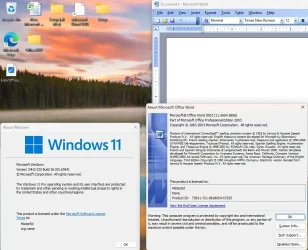
I copied the contents of a Office 2003 Pro CD into a file on a flash drive. I already have have Office 2021 Pro Plus on my laptop so don't want to try to install it there. However, I started a virtual machine for Windows 11 Pro on VMWare Workstation. I copied the folder with Office 2003 Pro onto the desktop. I right-clicked on Setup.exe and selected Properties. To my surprise there was no Compatibility Tab there. I went forward anyways and ran the setup.exe program. It installed Office 2003 Pro OK. Note there was an error during setup but it was about Visual FoxPro. I selected to ignore it.

Office2003_Win11Pro.webp
 

My Computers My Computers

  • At a glance

    Windows 11 Pro 25H2 (26200.6901)AMD Ryzen 7 6800H with Radeon 680M GPU (486MB...Crucial DDR5-4800 (2400MHz) 32GB (2 x 16GB)NVIDIA RTX 3060 Laptop (6GB RAM)
    OS
    Windows 11 Pro 25H2 (26200.6901)
    Computer type
    Laptop
    Manufacturer/Model
    ASUS TUF Gaming A15 (2022)
    CPU
    AMD Ryzen 7 6800H with Radeon 680M GPU (486MB RAM)
    Memory
    Crucial DDR5-4800 (2400MHz) 32GB (2 x 16GB)
    Graphics Card(s)
    NVIDIA RTX 3060 Laptop (6GB RAM)
    Sound Card
    n/a
    Monitor(s) Displays
    15.6-inch
    Screen Resolution
    1920x1080 300Hz
    Hard Drives
    2 x Samsung 990 Evo Plus (2TB M.2 NVME SSD)
    PSU
    n/a
    Mouse
    Wireless Mouse M510
    Internet Speed
    2100Mbps/300Mbps
    Browser
    Firefox
    Antivirus
    Malwarebytes
  • At a glance

    Windows 11 Pro 25H2 (26200.8246)AMD Ryzen 7 5700X3DG.SKILL Flare X 32GB (2x16GB) DDR4ASUS ROG-STRIX-RTX3060TI-08G-V2-GAMING (RTX 3...
    Operating System
    Windows 11 Pro 25H2 (26200.8246)
    Computer type
    PC/Desktop
    Manufacturer/Model
    Custom build
    CPU
    AMD Ryzen 7 5700X3D
    Motherboard
    ASUS ROG Strix B550-F Gaming WiFi II
    Memory
    G.SKILL Flare X 32GB (2x16GB) DDR4
    Graphics card(s)
    ASUS ROG-STRIX-RTX3060TI-08G-V2-GAMING (RTX 3060-Ti, 8GB RAM)
    Monitor(s) Displays
    Samsung G50D IPS 27"
    Screen Resolution
    1440p/180Hz
    Hard Drives
    SAMSUNG 990 EVO Plus (2TB] M.2 NVME SSD
    SAMSUNG 990 EVO Plus (4TB) M.2 NVME SSD
    PSU
    Corsair RM750x (750 watts)
    Case
    Cooler Master MasterCase 5
    Cooling
    Scythe Mugen 6
    Keyboard
    Logitech K520 (MK540 keyboard/mouse combo)
    Mouse
    Logitech M310 (MK540 keyboard/mouse combo)
    Internet Speed
    2100 Mbps down / 300 Mbps up
    Browser
    Firefox, Edge, Chrome
    Antivirus
    Malwarebytes (Premium)
    Other Info
    ASUS Blu-ray Burner BW-16D1HT (SATA) || Western Digital Easystore 20TB USB 3.0 external hard drive used with Acronis True Image 2025 backup software || HP OfficeJet Pro 6975 Printer/Scanner
I copied the contents of a Office 2003 Pro CD into a file on a flash drive. I already have have Office 2021 Pro Plus on my laptop so don't want to try to install it there. However, I started a virtual machine for Windows 11 Pro on VMWare Workstation. I copied the folder with Office 2003 Pro onto the desktop. I right-clicked on Setup.exe and selected Properties. To my surprise there was no Compatibility Tab there. I went forward anyways and ran the setup.exe program. It installed Office 2003 Pro OK. Note there was an error during setup but it was about Visual FoxPro. I selected to ignore it.

View attachment 176012
Using a Virtual Machine is IMHO the best way to run legacy soft (and often hardware) since the VM's Virtual Bios has to support zillions of different types of machines and the paravirtualisation software has to be as compatible as possible accoss the range. Older copies of Office for example may well on real hardware look for CPU instructions or other special hardware in the real Bios which may not exist on your machine any more due to incompatibilities with modern kit.

Office 2007 still runs perfectly on a VM and Office 2010 still actually runs on a physical machine !!!.
Cheers
jimbo.
 

My Computer My Computer

At a glance

Windows XP,11 Linux Fedora Rawhide pre-releas...2 X Intel i7
OS
Windows XP,11 Linux Fedora Rawhide pre-release 45
Computer type
PC/Desktop
CPU
2 X Intel i7
Screen Resolution
4KUHD X 2
Many thanks for those replies; I'll uninstall 2003 from the HP and make another attempt to install it.

I had got the impression from the early comments on this thread, and comment made elsewhere on the net that the arrival of 25H2 was the end of the line for 2003 on W11, but my Lenovo proves for sure that 2003 can run with that update.

A friend has suggested that I buy a copy of Office 2016, saying that it is not much different at all from 2003 and runs very well on W11; worth considering if 2003 refuses to work on the HP400. Approaches like running a VM machine are a bit a above my paygrade I think :eek1:
 

My Computer My Computer

At a glance

Windows 11
OS
Windows 11
Computer type
PC/Desktop
Manufacturer/Model
Lenovo M75
She would be better off using one of the free office suites-LibreOffice or OpenOffice. Take a look at their screenshots and choose the one that looks closest to Ofc2003. There's very little learning curve in either of them and both will open Ofc2003 files.

Agree. I use LibreOffice Writer on occasions for Word's .doc and .docx files, which is all I need.


My Computers My Computers

  • At a glance

    Windows 11 Pro 25H2 build: (26200.7623)32GB
    OS
    Windows 11 Pro 25H2 build: (26200.7623)
    Computer type
    Laptop
    Manufacturer/Model
    Microsoft Surface Pro
    Memory
    32GB
  • At a glance

    Microsoft 25H2 ProIntel Core Ultra 764GBIntel Integrated Graphics
    Operating System
    Microsoft 25H2 Pro
    Computer type
    Laptop
    Manufacturer/Model
    Dell Pro 14 - PC14250
    CPU
    Intel Core Ultra 7
    Memory
    64GB
    Graphics card(s)
    Intel Integrated Graphics
    Hard Drives
    Micron 1TB SSD

My Computer My Computer

At a glance

Windows 7/11Intel i7-11800H32GB DDR4 3200MHzNVIDIA GeForce RTX 3070
OS
Windows 7/11
Computer type
PC/Desktop
Manufacturer/Model
HP/Lenovo/Asus
CPU
Intel i7-11800H
Motherboard
Lenovo Legion 5i Pro Gen 6
Memory
32GB DDR4 3200MHz
Graphics Card(s)
NVIDIA GeForce RTX 3070
Monitor(s) Displays
LG 35WN65C-B
Screen Resolution
3440 x 1440
Hard Drives
1TB PCIe SSD
Other Info
Edition Windows 11 Pro
Version 25H2
Installed on ‎12/‎12/‎2025
OS build 26200.7462
Back
Top Bottom




