Please excuse my ignorance here.
My wife purchased me Home and Office 2024 for Christmas. She did not know or was unaware I already have the 2021 version. I didn't want her to feel bad about getting it for me as I really didn't need it. She always has a hard time buying me gifts....
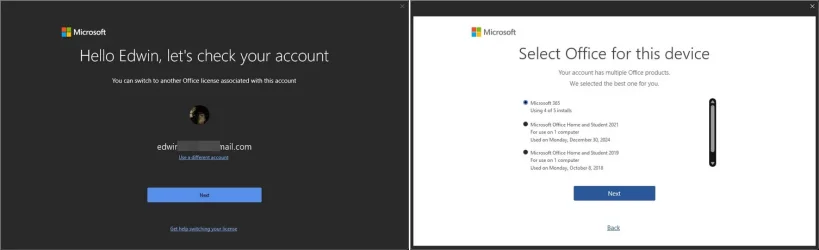
Anyhow, I went thru the install process and entered the code etc. Everything seemed fine but when I clicked on the About in Office to check the version my frustration level exceeded what it should be at 8:00 AM. As you can see in the image it shows 365 and Office 2024. How or where did 365 get loaded?
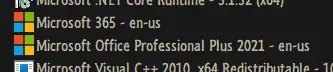
My next question is when i look at the version #s for 2021 and 2024 they are the same on Microsoft's web site. Also, is it normal for under installed programs to still show 2021 is installed along with 2024 on my computer?
Why must MS be so confusing with this? Thanks for any help ya'll can provide.
My wife purchased me Home and Office 2024 for Christmas. She did not know or was unaware I already have the 2021 version. I didn't want her to feel bad about getting it for me as I really didn't need it. She always has a hard time buying me gifts....
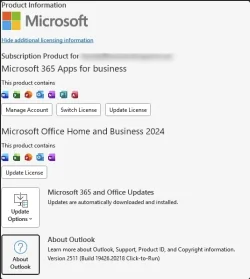
Anyhow, I went thru the install process and entered the code etc. Everything seemed fine but when I clicked on the About in Office to check the version my frustration level exceeded what it should be at 8:00 AM. As you can see in the image it shows 365 and Office 2024. How or where did 365 get loaded?
My next question is when i look at the version #s for 2021 and 2024 they are the same on Microsoft's web site. Also, is it normal for under installed programs to still show 2021 is installed along with 2024 on my computer?
Why must MS be so confusing with this? Thanks for any help ya'll can provide.
My Computer
At a glance
Windows 11 Pro 25H2Intel Core i7-1370P vPro32GB DDR4-3200MhzIntel Iris Xe Graphics
- OS
- Windows 11 Pro 25H2
- Computer type
- Laptop
- Manufacturer/Model
- Panasonic Toughbook FZ-55 MK-3
- CPU
- Intel Core i7-1370P vPro
- Motherboard
- Panasonic
- Memory
- 32GB DDR4-3200Mhz
- Graphics Card(s)
- Intel Iris Xe Graphics
- Monitor(s) Displays
- ASUS
- Hard Drives
- 1st Samsung SSD 990 PRO 2TB
2nd Panasonic Opal 1Tb Quick Release
- Keyboard
- Logitech MX Keys
- Mouse
- LogiTech MX-3
- Browser
- Chrome
- Antivirus
- Malwarebytes
- Other Info
- Logitech BRIO Webcam