Old Game Security problem


And i uninstalled it, reinstalled to a different folder, and it retained my selections and settings.
 

My Computer

System One

  • OS
    windows 10
    Computer type
    PC/Desktop
    Manufacturer/Model
    self nade
No I just installed Steam on my second Drive, I did that since back in Windows 7 . Programs can be installed on a second NVME drive.
I installed it to a different directory. But it is still the same. How do I now uninstall it as it doesn't show up in Apps
 

My Computer

System One

  • OS
    windows 10
    Computer type
    PC/Desktop
    Manufacturer/Model
    self nade
I installed it to a different directory. But it is still the same. How do I now uninstall it as it doesn't show up in Apps
I use REVO Uninstaller , it also should show up in the Control Panel add & remove programs section.
 

My Computers

System One System Two

  • OS
    Windows11 Pro 26200.8524
    Computer type
    PC/Desktop
    Manufacturer/Model
    Dell Alienware Aurora R16
    CPU
    Intel Core i9 14900F (24 -Core, 68 MB Total Cache)
    Motherboard
    Dell Alienware
    Memory
    32GB DDR5
    Graphics Card(s)
    RTX 4080 Super w/581.95
    Sound Card
    Realtec
    Monitor(s) Displays
    Corsair XENEON 32QHD165
    Screen Resolution
    2560 X 1440
    Hard Drives
    1-2TB Samsung 990 Pro PCIe NVMe M2 SSD
    1-4TB Samsung 990 Pro PCIe NVMe M2 SSD
    PSU
    1000 Watt Platinum Dell
    Case
    Alienware
    Cooling
    Liquid Closed Loop
    Keyboard
    Logitech MK270 Wireless Keyboard
    Mouse
    Logitech MK270 Wireless
    Internet Speed
    100Gb's Down-20 Up
    Browser
    Firefox 151.0.2
    Antivirus
    Defender
    Other Info
    Very Quiet And Fast
    CyberPower UPS CP1500PFCLCD
  • Operating System
    PClinuxOS Mate (2025.7)
    Computer type
    PC/Desktop
    Manufacturer/Model
    Intel
    CPU
    13th Gen Inter(R) Core(TM) i3-1315U
    Motherboard
    Intel
    Memory
    64 GB DDR4 @3200 MHz.
    Graphics card(s)
    Internal
    Sound Card
    None
    Monitor(s) Displays
    Dell 2419HGCF
    Screen Resolution
    1920 X 1080
    Hard Drives
    SAMSUNG 980 PRO SSD 2TB, PCIe 4.0 M.2 2280
    PSU
    Chicony 30 Watt
    Case
    Small
    Keyboard
    Dell
    Mouse
    Razor
    Internet Speed
    1GB
    Browser
    Slimjet
  • Like
Reactions: ne5
Another way around this is to install modified apps to a folder other than the default "program files" folders and create an exception in Defender for the application.
OK, I've done this, and it still doesn't save. But still runs perfectly. How do I uninstall it, because it is not in the "apps" list in windows security ?
 

My Computer

System One

  • OS
    windows 10
    Computer type
    PC/Desktop
    Manufacturer/Model
    self nade
Here are 3 comments I've managed to find, they are both from years ago when the game was newer thougher. How could I tackle this, or should I just give this up and write the game off.


1. Save game failed. The Game Could Not Be Saved

This is the message I KEEP getting every time I try and save my game and I have no idea why. I have even tried deleting the game and re-installing it. And still I keep getting this message, every time I set up and try to save a new game

2.
Just had the same problem, head battered with it all started trawling through fm2010 forums. Mine turned out to be not enough free space on the drive (3 file rolling save 500mb per file) some sort of error code would have helped though! If not that try deleting fm2012 folder found in appdata\roaming\sports interactive.
Cheers
3.

Everytime I click save on FM 2012, it comes up with a box saying unable to save, I've tried deleting the Football manager 2012 folder in AppData, but it won't let me, and also I have room on my drive, so space isn't an issue, can someone please help as I want my careers to be saved

 

My Computer

System One

  • OS
    windows 10
    Computer type
    PC/Desktop
    Manufacturer/Model
    self nade


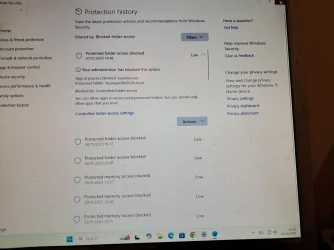
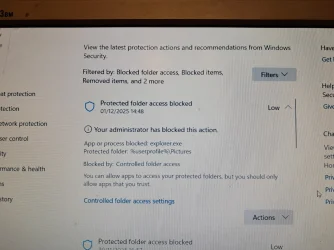
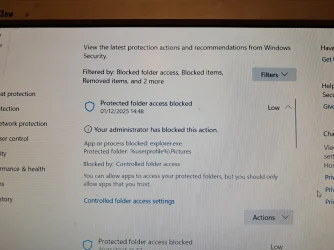
I have now found, through accident and searching, that in the Ransomware control folder, that it was blocking my %userprofile%\pictures and blocked process was explorer.exe

So i followed what i had found earlier, and enabled the Actions Tab (which is the first time anything gave me that option at all) to allow on the device.

The save game now works.

Is thos all safe please, or should i reverse what has happened here, or what should I do, if anything.

Its all very confusing.
 

My Computer

System One

  • OS
    windows 10
    Computer type
    PC/Desktop
    Manufacturer/Model
    self nade
Heres a photo.
 

Attachments

  • 20251201_154115.webp
    20251201_154115.webp
    576.8 KB · Views: 1

My Computer

System One

  • OS
    windows 10
    Computer type
    PC/Desktop
    Manufacturer/Model
    self nade
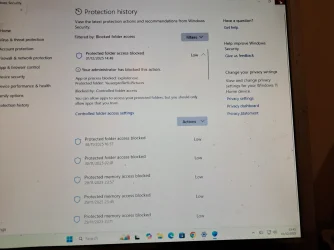
Again, not blurred
 

Attachments

  • 20251201_154115.webp
    20251201_154115.webp
    576.8 KB · Views: 2

My Computer

System One

  • OS
    windows 10
    Computer type
    PC/Desktop
    Manufacturer/Model
    self nade
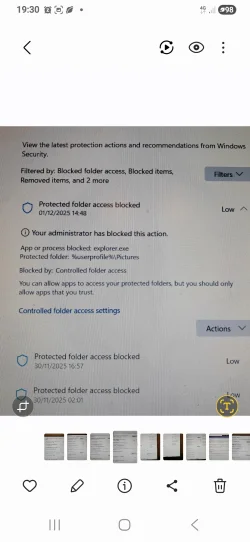
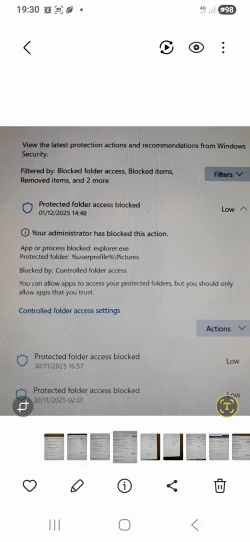
Ive now got these two
 

My Computer

System One

  • OS
    windows 10
    Computer type
    PC/Desktop
    Manufacturer/Model
    self nade
Ive now got this
 

Attachments

  • 20251202_191338.webp
    20251202_191338.webp
    2 MB · Views: 2
  • 20251202_191338.webp
    20251202_191338.webp
    2 MB · Views: 1

My Computer

System One

  • OS
    windows 10
    Computer type
    PC/Desktop
    Manufacturer/Model
    self nade
Under actions there, just allow it for each notification there for the game.

Or,


My Computers

System One System Two

  • OS
    Windows 11 Pro
    Computer type
    PC/Desktop
    Manufacturer/Model
    Custom Built
    CPU
    Ryzen 7 5700 X3D
    Motherboard
    MSI MPG B550 GAMING PLUS
    Memory
    64 GB DDR4 3600mhz Gskill Ripjaws V
    Graphics Card(s)
    RTX 4070 Super , 12GB VRAM Asus EVO Overclock
    Monitor(s) Displays
    Gigabyte M27Q (rev. 2.0) 2560 x 1440 @ 170hz HDR
    Hard Drives
    2TB Samsung nvme ssd
    4TB Western Digital nvme ssd
    PSU
    CORSAIR RMx SHIFT Series™ RM750x 80 PLUS Gold Fully Modular ATX Power Supply
    Case
    CORSAIR 3500X ARGB Mid-Tower ATX PC Case – Black
    Cooling
    ID-COOLING FROSTFLOW X 240 CPU Water Cooler
    Keyboard
    Logitech G213
    Mouse
    Logitech G203
    Internet Speed
    1.2gbps Fiber 😎
  • Operating System
    Chrome OS
    Computer type
    Laptop
    Manufacturer/Model
    HP Chromebook
    CPU
    Intel Pentium Quad Core
    Memory
    4GB LPDDR4
    Monitor(s) Displays
    14 Inch HD SVA anti glare micro edge display
    Hard Drives
    64 GB emmc
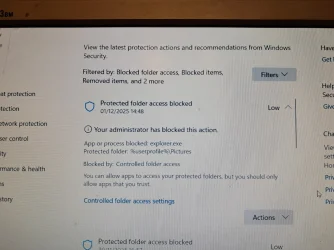
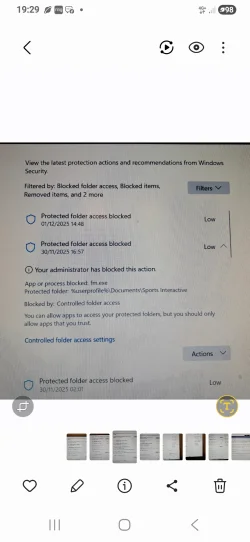
And this one gor gm.exe the othet one pics
 

Attachments

  • 20251202_191338.webp
    20251202_191338.webp
    2 MB · Views: 1
  • Screenshot_20251202_193005_Gallery.webp
    Screenshot_20251202_193005_Gallery.webp
    283.9 KB · Views: 1

My Computer

System One

  • OS
    windows 10
    Computer type
    PC/Desktop
    Manufacturer/Model
    self nade
And these for more blocks, one for fm.exe
 

Attachments

  • Screenshot_20251202_193005_Gallery.webp
    Screenshot_20251202_193005_Gallery.webp
    283.9 KB · Views: 0

My Computer

System One

  • OS
    windows 10
    Computer type
    PC/Desktop
    Manufacturer/Model
    self nade
And another
 

Attachments

  • Screenshot_20251202_192951_Gallery.webp
    Screenshot_20251202_192951_Gallery.webp
    247.6 KB · Views: 2

My Computer

System One

  • OS
    windows 10
    Computer type
    PC/Desktop
    Manufacturer/Model
    self nade
Under actions there, just allow it for each notification there for the game.

Or,

OK, but the fm.exe one is obviously correct, and the pictures explorer.exe one is what I don't understand.

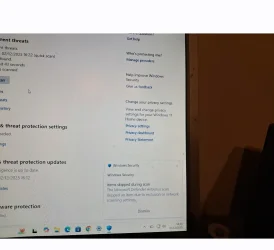
Can I not reverse the pictures one ? Is this leaving a loophole in my security ? Because when I do a scan now, I am getting this at the end (although the scan also reports clear)
 

My Computer

System One

  • OS
    windows 10
    Computer type
    PC/Desktop
    Manufacturer/Model
    self nade
OK, but the fm.exe one is obviously correct, and the pictures explorer.exe one is what I don't understand.

Can I not reverse the pictures one ? Is this leaving a loophole in my security ? Because when I do a scan now, I am getting this at the end (although the scan also reports clear)
This
 

Attachments

  • Screenshot_20251203_133317_Gallery.webp
    Screenshot_20251203_133317_Gallery.webp
    62.5 KB · Views: 1

My Computer

System One

  • OS
    windows 10
    Computer type
    PC/Desktop
    Manufacturer/Model
    self nade
Update.

I ran a DISM, but it stopped on 53% (i think) and so i found a file called Get-MpComputerStatus and renamed it.

This all seems to have cured the problem above, as it doesn't appear anymore, and I presume it has reset Windows Defender.

But how can I be sure ? Should I run a DISM again ? And let it run until if gets to 100% ? If it stops again at 53% do i have the same problem ? Or a SFC/SCan etc to check ? Or would it be best now if I leave it all as it is ?
 

My Computer

System One

  • OS
    windows 10
    Computer type
    PC/Desktop
    Manufacturer/Model
    self nade
I would run: sfc /scannow from an elevated command prompt.

It only checks Windows files.


I would also look into a more modern version, like... Football Manager 2018, or similar.
 

My Computers

System One System Two

  • OS
    Win 11 Home ♦♦♦26200.8457 ♦♦♦♦♦♦♦25H2
    Computer type
    PC/Desktop
    Manufacturer/Model
    Built by Ghot® [May 2020]
    CPU
    AMD Ryzen 7 3700X
    Motherboard
    Asus Pro WS X570-ACE (BIOS 5302)
    Memory
    G.Skill (F4-3200C14D-16GTZKW)
    Graphics Card(s)
    EVGA RTX 2070 (08G-P4-2171-KR)
    Sound Card
    Realtek ALC1220P / ALC S1220A
    Monitor(s) Displays
    Dell U3011 30"
    Screen Resolution
    2560 x 1600
    Hard Drives
    2x Samsung 860 EVO 500GB,
    WD 4TB Black FZBX - SATA III,
    WD 8TB Black FZBX - SATA III,
    DRW-24B1ST CD/DVD Burner
    PSU
    PC Power & Cooling 750W Quad EPS12V
    Case
    Cooler Master ATCS 840 Tower
    Cooling
    CM Hyper 212 EVO (push/pull)
    Keyboard
    Ducky DK9008 Shine II Blue LED
    Mouse
    Logitech Optical M-100
    Internet Speed
    300/300
    Browser
    Firefox (latest)
    Antivirus
    Bitdefender Total Security
    Other Info
    Speakers: Klipsch Pro Media 2.1
  • Operating System
    Windows XP Pro 32bit w/SP3
    Computer type
    PC/Desktop
    Manufacturer/Model
    Built by Ghot® (not in use)
    CPU
    AMD Athlon 64 X2 5000+ (OC'd @ 3.2Ghz)
    Motherboard
    ASUS M2N32-SLI Deluxe Wireless Edition
    Memory
    TWIN2X2048-6400C4DHX (2 x 1GB, DDR2 800)
    Graphics card(s)
    EVGA 256-P2-N758-TR GeForce 8600GT SSC
    Sound Card
    Onboard
    Monitor(s) Displays
    ViewSonic G90FB Black 19" Professional (CRT)
    Screen Resolution
    up to 2048 x 1536
    Hard Drives
    WD 36GB 10,000rpm Raptor SATA
    Seagate 80GB 7200rpm SATA
    Lite-On LTR-52246S CD/RW
    Lite-On LH-18A1P CD/DVD Burner
    PSU
    PC Power & Cooling Silencer 750 Quad EPS12V
    Case
    Generic Beige case, 80mm fans
    Cooling
    ZALMAN 9500A 92mm CPU Cooler
    Keyboard
    Logitech Classic Keybooard 200
    Mouse
    Logitech Optical M-BT96a
    Internet Speed
    300/300
    Browser
    Firefox 3.x ??
    Antivirus
    Symantec (Norton)
    Other Info
    Still assembled, still runs. Haven't turned it on for 15 years?
I would run: sfc /scannow from an elevated command prompt.

It only checks Windows files.


I would also look into a more modern version, like... Football Manager 2018, or similar.
What will i find, what will it tell me ?
 

My Computer

System One

  • OS
    windows 10
    Computer type
    PC/Desktop
    Manufacturer/Model
    self nade
What will i find, what will it tell me ?


SFC stands for System File Checker.

It checks that you have all the Windows files, as they should be.
If it finds any errors, it repairs them.
 

My Computers

System One System Two

  • OS
    Win 11 Home ♦♦♦26200.8457 ♦♦♦♦♦♦♦25H2
    Computer type
    PC/Desktop
    Manufacturer/Model
    Built by Ghot® [May 2020]
    CPU
    AMD Ryzen 7 3700X
    Motherboard
    Asus Pro WS X570-ACE (BIOS 5302)
    Memory
    G.Skill (F4-3200C14D-16GTZKW)
    Graphics Card(s)
    EVGA RTX 2070 (08G-P4-2171-KR)
    Sound Card
    Realtek ALC1220P / ALC S1220A
    Monitor(s) Displays
    Dell U3011 30"
    Screen Resolution
    2560 x 1600
    Hard Drives
    2x Samsung 860 EVO 500GB,
    WD 4TB Black FZBX - SATA III,
    WD 8TB Black FZBX - SATA III,
    DRW-24B1ST CD/DVD Burner
    PSU
    PC Power & Cooling 750W Quad EPS12V
    Case
    Cooler Master ATCS 840 Tower
    Cooling
    CM Hyper 212 EVO (push/pull)
    Keyboard
    Ducky DK9008 Shine II Blue LED
    Mouse
    Logitech Optical M-100
    Internet Speed
    300/300
    Browser
    Firefox (latest)
    Antivirus
    Bitdefender Total Security
    Other Info
    Speakers: Klipsch Pro Media 2.1
  • Operating System
    Windows XP Pro 32bit w/SP3
    Computer type
    PC/Desktop
    Manufacturer/Model
    Built by Ghot® (not in use)
    CPU
    AMD Athlon 64 X2 5000+ (OC'd @ 3.2Ghz)
    Motherboard
    ASUS M2N32-SLI Deluxe Wireless Edition
    Memory
    TWIN2X2048-6400C4DHX (2 x 1GB, DDR2 800)
    Graphics card(s)
    EVGA 256-P2-N758-TR GeForce 8600GT SSC
    Sound Card
    Onboard
    Monitor(s) Displays
    ViewSonic G90FB Black 19" Professional (CRT)
    Screen Resolution
    up to 2048 x 1536
    Hard Drives
    WD 36GB 10,000rpm Raptor SATA
    Seagate 80GB 7200rpm SATA
    Lite-On LTR-52246S CD/RW
    Lite-On LH-18A1P CD/DVD Burner
    PSU
    PC Power & Cooling Silencer 750 Quad EPS12V
    Case
    Generic Beige case, 80mm fans
    Cooling
    ZALMAN 9500A 92mm CPU Cooler
    Keyboard
    Logitech Classic Keybooard 200
    Mouse
    Logitech Optical M-BT96a
    Internet Speed
    300/300
    Browser
    Firefox 3.x ??
    Antivirus
    Symantec (Norton)
    Other Info
    Still assembled, still runs. Haven't turned it on for 15 years?
Back
Top Bottom