Old Laptop


Timmy 2 toes

Well-known member
Member
Local time
8:00 AM
Posts
465
OS
win11
Hi
What is the easiest way to see if i can update from windows 10 to 11 on my old laptop? LENOVO
Thank you
TIMMY 2TOES
 

My Computers My Computers

  • At a glance

    win1113TH GEN INTEL
    OS
    win11
    Computer type
    PC/Desktop
    Manufacturer/Model
    DELL INSPRON
    CPU
    13TH GEN INTEL
    Monitor(s) Displays
    DELL
    Keyboard
    AMZN
    Browser
    EDGE
    Antivirus
    NONE
  • Computer type
    PC/Desktop
    Manufacturer/Model
    DELL
Hi
What is the easiest way to see if i can update from windows 10 to 11 on my old laptop? LENOVO
Thank you
TIMMY 2TOES
What are the laptop specs?
Related to win 11, there are 3 categories depending on the hardware:
- Those that cant have Win 11
- Those not on the MS list but can have Win 11 (with a workaround)
- Those on the MS list and can officially have Win 11
 

My Computers My Computers

  • At a glance

    Windows 11 Pro - Windows 7 HP 64 - Lubuntui5 6600K - 800MHz to 4400MHz4+4G GSkill DDR4 3000IG - Intel 530
    OS
    Windows 11 Pro - Windows 7 HP 64 - Lubuntu
    Computer type
    PC/Desktop
    Manufacturer/Model
    custom build
    CPU
    i5 6600K - 800MHz to 4400MHz
    Motherboard
    GA-Z170-HD3P
    Memory
    4+4G GSkill DDR4 3000
    Graphics Card(s)
    IG - Intel 530
    Monitor(s) Displays
    Samsung 226BW
    Screen Resolution
    1680x1050
    Hard Drives
    (1) -1 SM951 – 128GB M.2 AHCI PCIe SSD drive for Win 11
    (2) -1 WD SATA 3 - 1T for Data
    (3) -1 WD SATA 3 - 1T for backup
    (4) -1 BX500 SSD - 256G for Windows 7 and Lubuntu
    PSU
    Thermaltake 450W TR2 gold
    Keyboard
    Old and good Chicony mechanical keyboard
    Mouse
    Logitech mX performance - 9 buttons (had to disable some)
    Internet Speed
    500 Mb/s
    Browser
    Firefox 64
  • At a glance

    Windows 11 Proi7-4500U 800- 3000MHz(4+4)G DDR3 1600IG intel 4400 + NVIDIA GeForce GT 745M
    Operating System
    Windows 11 Pro
    Computer type
    Laptop
    Manufacturer/Model
    Asus Q550LF
    CPU
    i7-4500U 800- 3000MHz
    Motherboard
    Asus Q550LF
    Memory
    (4+4)G DDR3 1600
    Graphics card(s)
    IG intel 4400 + NVIDIA GeForce GT 745M
    Sound Card
    Realtek
    Monitor(s) Displays
    LG Display LP156WF4-SPH1
    Screen Resolution
    1920 x 1080
    Hard Drives
    BX500 120G SSD for Windows and programs
    & 1T HDD for data
    Internet Speed
    500 Mb/s
    Browser
    Firefox 64
What is the easiest way to see if i can update from windows 10 to 11 on my old laptop? LENOVO
There are many workarounds to bypass the checks and upgrade an old unsupported PC to Windows 11. I use Option Three here:

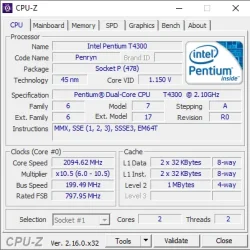
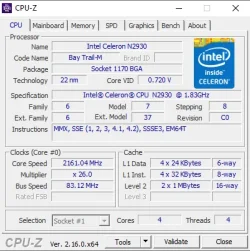
But there is one requirement from 24H2 on that cannot be bypassed. The CPU must support the SSE4.2 instruction set. You can check your CPU's capabilities with CPU-Z, a standalone .zip version is here: DOWNLOADING CPU-Z_2.16-EN.ZIP | CPUID

For example, this Pentium T4300 cannot run 24H2 or above, the Celeron N2930 has SSE4.2 and can.

1754322602500.webp 1754323021893.webp
 

My Computers My Computers

  • At a glance

    Windows 11 HomeAMD Athlon Silver 3050U8GBRadeon Graphics
    OS
    Windows 11 Home
    Computer type
    Laptop
    Manufacturer/Model
    Acer Aspire 3 A315-23-R9VY
    CPU
    AMD Athlon Silver 3050U
    Memory
    8GB
    Graphics Card(s)
    Radeon Graphics
    Monitor(s) Displays
    laptop screen
    Screen Resolution
    1366x768 native resolution, up to 2560x1440 with Radeon Virtual Super Resolution
    Hard Drives
    1TB Samsung EVO 870 SSD (from April 2026: 250GB EVO 850)
    Internet Speed
    150 Mbps
    Browser
    Edge, Firefox
    Antivirus
    Defender
    Other Info
    fully 'Windows 11 ready' laptop. Windows 10 C: partition migrated from my old unsupported 'main machine' then upgraded to 11. A test migration ran Insider builds for 2 months. When 11 was released on 5th October 2021 it was re-imaged back to 10 and was offered the upgrade in Windows Update on 20th October. Windows Update offered the 22H2 Feature Update on 20th September 2022. It got the 23H2 Feature Update on 4th November 2023 through Windows Update, 24H2 on 3rd October 2024 through Windows Update by setting the Target Release Version for 24H2, and 25H2 on 30th September 2025 through Windows Update by setting the Target Release Version for 25H2.

    UPDATE - 11 April 2026: due to mechanical deterioration this PC has been retired from active duty. The OS with all software and files has been migrated to my System Seven in 'Other systems' to carry on as my general purpose 'main machine'.
  • At a glance

    Windows 11 ProIntel® Core™ i5-520M8GB(integrated graphics) Intel HD Graphics
    Operating System
    Windows 11 Pro
    Computer type
    Laptop
    Manufacturer/Model
    Dell Latitude E4310
    CPU
    Intel® Core™ i5-520M
    Motherboard
    0T6M8G
    Memory
    8GB
    Graphics card(s)
    (integrated graphics) Intel HD Graphics
    Screen Resolution
    1366x768
    Hard Drives
    500GB Crucial MX500 SSD
    Browser
    Firefox, Edge
    Antivirus
    Defender
    Other Info
    unsupported machine: Legacy bios, MBR, TPM 1.2, upgraded from W10 to W11 using W10/W11 hybrid install media workaround.

    In-place upgrade to 22H2 using ISO and a workaround.
    Feature Update to 23H2 by manually installing the Enablement Package.
    In-place upgrade to 24H2 using hybrid 23H2/24H2 install media.
    Upgraded to 25H2 by Enablement Package.

    Also running Insider Dev, and Canary builds and Windows 10 as native boot .vhdx.
  • My SYSTEM THREE is a Dell Latitude 5410, i7-10610U, 32GB RAM, 512GB NVMe ssd, supported device running Windows 11 Pro.

    My SYSTEM FOUR is a 2-in-1 convertible Lenovo Yoga 11e 20DA, Celeron N2930, 8GB RAM, 256GB ssd. Unsupported device: currently running Win10 Pro, plus Win11 Pro RTM and Insider Dev, Beta, and RP 24H2 as native boot vhdx.

    My SYSTEM FIVE is a Dell Latitude 3190 2-in-1, Pentium Silver N5030, 8GB RAM, 1TB NVMe ssd, supported device running Windows 11 Pro, plus Insider Beta, Dev, and Canary builds (and a few others) as a native boot .vhdx.

    My SYSTEM SIX is a Dell Latitude 5550, Core Ultra 7 165H, 64GB RAM, 1TB NVMe SSD, supported device, Windows 11 Pro 24H2, Hyper-V host machine. Updated to 25H2 on 30th September 2025.

    My SYSTEM SEVEN is a Lenovo Thinkpad T580, Intel Core i7-8650U, 16GB RAM, 512GB NVMe SSD + 2nd 512GB NVMe SSD, a supported device for Windows 11. This is my current general purpose 'main machine'. The installed Windows 11 Home from my System One has been migrated to this machine.
Try Windows 11 23H2 if 24H2 install failed. This is pretty common for old CPUs without SSE4.2
 

My Computer My Computer

At a glance

Windows 11Intel i5 7500Kingston 8 GB DDR4Intel Graphics HD 630
OS
Windows 11
Computer type
PC/Desktop
Manufacturer/Model
DIY
CPU
Intel i5 7500
Motherboard
ASRock B250M
Memory
Kingston 8 GB DDR4
Graphics Card(s)
Intel Graphics HD 630
Monitor(s) Displays
HKC M242
Hard Drives
SanDisk SSD PLus 240
Browser
Chrome
Any 64-bit system (except first generation AMD 64 CPUs that lack some specific instructions) can run Windows 11 21H2, 22H2 and 23H2. Obviously you want to use the newest possible version for better compatibility with current hardware and software and to be as much future-proof as possible. Don't mind Microsoft ending support of Windows 11 23H2. Windows Defender will continue to receive definitions updates, like Microsoft Security Essentials for Windows 7 still does.

Any Intel or AMD CPU with SSE4.2 instructions (this is at least first generation Intel Core-i3 or equivalent AMD) can also run Windows 11 24H2 and 25H2 coming this October as it has the same hardware requirements. So all of us with unsupported computers and SSE4.2 capable CPU can install/upgrade to Windows 11 25H2 and get all Windows Updates at least up to October 2026.

Any 8th generation Intel CPU or AMD Ryzen 2 or higher can officially run any Windows 11 versions without bypassing compatibility checks.

For details how to bypass compatibility check and install Windows 11 see this stick thread:


To save you the the trouble to read through all the threads, to upgrade an unsupported PC to Windows 11 23H2 or 24H2 download the respective ISO. Use Rufus to create a patched USB flash drive automatically bypassing compatibility check. Disconnect from the internet (important) and run Setup to upgrade. If you don't want to use Rufus, you can mount the ISO directly (open with File Explorer). This will create a virtual DVD and open the ISO contents. Check the drive letter of the virtual DVD in File Explorer, say D: Then press WIN+R to open a Run box and execute this code:

D:\setup /product server

This tells Setup we are installing a "Server" version of Windows and doesn't check compatibility. Replace D: with the appropriate drive letter. Don't forget to disconnect from the internet and STAY offline until the upgrade is complete. Connect after upgrading to activate. Also systems with two or more disks may fail while upgrading. Disconnect all other disks before upgrading, just in case. If you have a third-party antivirus or other protection software, either disable it permanently or temporarily uninstall it. You can enable or reinstall it after the upgrade. I would also disable any startup application, just in case. Open Task Manager and see at the Startup section.

PS: Unsupported computers receive ALL updates except those upgrading to a newer version. This means if you run 24H2 you are not going to be offered the 25H2 Enablement Package automatically this October, you will need to manually download it from Microsoft Update Catalog when available to upgrade to 25H2. Minor inconvenience to use the latest Windows version on our older systems.
 
Last edited:

My Computers My Computers

  • At a glance

    Windows 11 Pro 23H2 (5699), 25H2 (8655)Mobile DualCore Intel Core 2 Duo T7250, 2000 MHz4GBMobile Intel(R) GMA 4500M (Mobile 4 series)
    OS
    Windows 11 Pro 23H2 (5699), 25H2 (8655)
    Computer type
    Laptop
    Manufacturer/Model
    Acer Extensa 5630EZ
    CPU
    Mobile DualCore Intel Core 2 Duo T7250, 2000 MHz
    Motherboard
    Acer Extensa 5630
    Memory
    4GB
    Graphics Card(s)
    Mobile Intel(R) GMA 4500M (Mobile 4 series)
    Sound Card
    Realtek ALC268 @ Intel 82801IB ICH9 - High Definition Audio Controller
    Monitor(s) Displays
    1
    Screen Resolution
    1280x800
    Hard Drives
    Samsung SSD 850 EVO 250GB SATA Device (250 GB, SATA-III)
    Internet Speed
    VDSL 50 Mbps
    Browser
    MICROSOFT EDGE
    Antivirus
    WINDOWS DEFENDER
    Other Info
    Legacy MBR installation, no TPM, no Secure Boot, no WDDM 2.0 graphics drivers, no SSE4.2, cannot get more unsupported ;) This is only my test laptop. I had installed Windows 11 here before upgrading my main PC. For my main PC I use everyday see my 2nd system specs.
  • At a glance

    Windows 11 Pro v25H2 (build 26200.8655)Intel Core-i7 3770 3.40GHz s1155 (3rd generat...2x Kingston Hyper-X Blu 8GB DDR3-1600GIGABYTE GeForce RTX 3050 WINDFORCE OC V2 6GB...
    Operating System
    Windows 11 Pro v25H2 (build 26200.8655)
    Computer type
    PC/Desktop
    Manufacturer/Model
    Custom-built PC
    CPU
    Intel Core-i7 3770 3.40GHz s1155 (3rd generation)
    Motherboard
    Asus P8H61 s1155 ATX
    Memory
    2x Kingston Hyper-X Blu 8GB DDR3-1600
    Graphics card(s)
    GIGABYTE GeForce RTX 3050 WINDFORCE OC V2 6GB (GV-N3050WF2OCV2-6GD)
    Sound Card
    Realtek HD audio (ALC887)
    Monitor(s) Displays
    Sony Bravia KDL-19L4000 19" LCD TV via VGA
    Screen Resolution
    1440x900 32-bit 60Hz
    Hard Drives
    WD Blue SA510 2.5 1000GB SSD as system disk, Western Digital Caviar Purple 4TB SATA III (WD40PURZ) as second
    PSU
    Thermaltake Litepower RGB 550W Full Wired
    Case
    SUPERCASE MIDI-TOWER
    Cooling
    Deepcool Gamma Archer CPU cooler, 1x 8cm fan at the back
    Keyboard
    Mitsumi 101-key PS/2
    Mouse
    Sunnyline OptiEye PS/2
    Internet Speed
    100Mbps
    Browser
    Microsoft Edge, Mozilla Firefox
    Antivirus
    Microsoft Windows Defender
    Other Info
    Legacy BIOS (MBR) installation, no TPM, no Secure Boot, WDDM 3.0 graphics drivers, WEI score 7.4

Latest Support Threads

Back
Top Bottom