OneDrive causing problems


Demby

Member
Local time
7:37 AM
Posts
10
OS
win11
Hi.
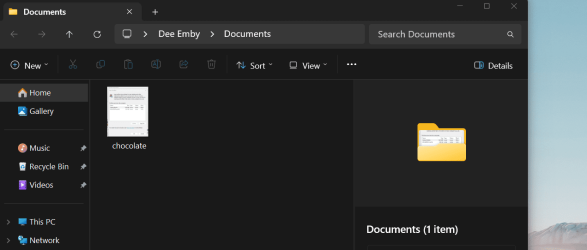
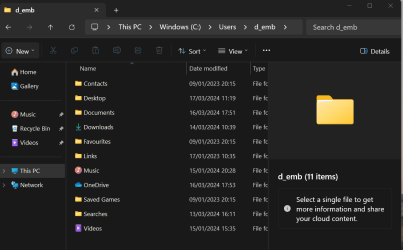
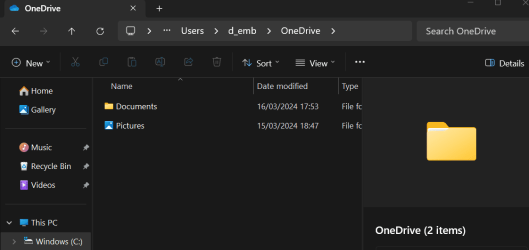
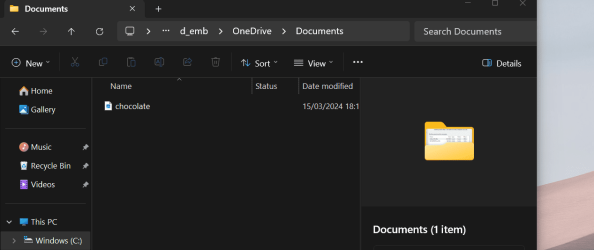
I used one drive so that I could work between PC and Laptop. I wasnt happy with it and was able to uninstall it from my PC. I believe than I have uninstalled it from my laptop , (there is no evidence of it in apps or file explorer) but a onedrive folder still remains in my user folder containing a second documents folder. When I save to docs, new files appear here.
I can manually place files in correct folder, but the shortcut is hit and miss, following two different paths. I hope the screen shots explain. What I want is one shortcut on my desktop that will always take the correct path. Would appreciate any fixes.
Thank you
 

Attachments

  • version 1.png
    version 1.png
    31.6 KB · Views: 2
  • Version 2.png
    Version 2.png
    36 KB · Views: 2
  • location of docs file.png
    location of docs file.png
    30.4 KB · Views: 2
  • second path to docs.png
    second path to docs.png
    17.4 KB · Views: 2
  • contents of second docs folder.png
    contents of second docs folder.png
    32.9 KB · Views: 2

My Computer My Computer

At a glance

win11Intel(R) Core(TM) i3-10105 CPU @ 3.70GHz 3.70...
OS
win11
Computer type
PC/Desktop
Manufacturer/Model
shop built
CPU
Intel(R) Core(TM) i3-10105 CPU @ 3.70GHz 3.70 GHz
Hi,
I would modify the string value of Personal subkey using Regedit in:
Modify other subkeys to match the chosen path.

Code:
HKEY_CURRENT_USER\Software\Microsoft\Windows\CurrentVersion\Explorer\Shell Folders

As always, trigger a restore point/backup prior to modifying the reg.
An Explorer restart or signing out is required for the changes to take place.
 

My Computers My Computers

  • At a glance

    All Branches but ReleaseAMD Ryzen 7 7735HS 3200-4500 Mhz 8 cores x 232 GB DDR5Radeon Graphic / NVIDIA GeForce RTX 4060 8 GB...
    OS
    All Branches but Release
    Computer type
    Laptop
    Manufacturer/Model
    Acer Nitro ANV15-51
    CPU
    AMD Ryzen 7 7735HS 3200-4500 Mhz 8 cores x 2
    Motherboard
    Sportage_RBH
    Memory
    32 GB DDR5
    Graphics Card(s)
    Radeon Graphic / NVIDIA GeForce RTX 4060 8 GB GDDR6
    Sound Card
    AMD/Realtek(R) Audio
    Monitor(s) Displays
    Integrated Monitor (15.3"vis)
    Screen Resolution
    FHD 1920X1080 16:9 144Hz
    Hard Drives
    KINGSTON OM8SEP4512Q-AA 1TB
    Western Digital 256GB
    PSU
    19V DC 6.32 A 120 W
    Cooling
    Dual Fans
    Mouse
    MS Bluetooth
    Internet Speed
    Fiber 1GB Cox -us & 1GB Orange-fr
    Browser
    Edge Canary- Firefox Nightly-Chrome Dev-Chrome Dev
    Antivirus
    Windows Defender
  • At a glance

    Windows 11 BetaAMD A9-94208 GB of DDR4AMD Radeon R5
    Operating System
    Windows 11 Beta
    Computer type
    Laptop
    Manufacturer/Model
    Asus X751BP
    CPU
    AMD A9-9420
    Memory
    8 GB of DDR4
    Graphics card(s)
    AMD Radeon R5
    Screen Resolution
    1600x900
    Hard Drives
    Seagate 1 TB
Hello Demby, :alien:

If you like, you can use option three in the tutorials below for any folder you need to restore the default location for. It'll make it a lot easier to do so with a BAT file.


My Computers My Computers

  • At a glance

    Windows 11 Pro for WorkstationsIntel i7-8700K 5 GHz64 GB (4x16GB) G.SKILL TridentZ RGB DDR4 3600...ASUS ROG-STRIX-GTX1080TI-O11G-GAMING (11GB GD...
    OS
    Windows 11 Pro for Workstations
    Computer type
    PC/Desktop
    Manufacturer/Model
    Custom self build
    CPU
    Intel i7-8700K 5 GHz
    Motherboard
    ASUS ROG Maximus XI Formula Z390
    Memory
    64 GB (4x16GB) G.SKILL TridentZ RGB DDR4 3600 MHz (F4-3600C18D-32GTZR)
    Graphics Card(s)
    ASUS ROG-STRIX-GTX1080TI-O11G-GAMING (11GB GDDR5X)
    Sound Card
    Integrated Digital Audio (S/PDIF)
    Monitor(s) Displays
    2 x Samsung Odyssey G75 27"
    Screen Resolution
    2560x1440
    Hard Drives
    1TB Samsung 990 PRO M.2,
    4TB Samsung 990 PRO M.2,
    TerraMaster F8 SSD Plus NAS
    PSU
    Seasonic Prime Titanium 850W
    Case
    Thermaltake Core P3 wall mounted
    Cooling
    Corsair Hydro H115i
    Keyboard
    Amazon Basics Wired Full Keyboard MD005
    Mouse
    Logitech MX Master 4
    Internet Speed
    2 Gbps Download and 100 Mbps Upload
    Browser
    Chrome and Edge
    Antivirus
    Microsoft Defender
    Other Info
    Logitech Z625 speaker system,
    Logitech BRIO 4K Pro webcam,
    HP Color LaserJet Pro MFP M477fdn,
    CyberPower CP1500PFCLCD
    Galaxy S23 Plus phone
  • At a glance

    Windows 11 ProSnapdragon X Elite (12 core) 3.42 GHz16 GB LPDDR5x-7467 MHz
    Operating System
    Windows 11 Pro
    Computer type
    Laptop
    Manufacturer/Model
    Surface Laptop 7 Copilot+ PC
    CPU
    Snapdragon X Elite (12 core) 3.42 GHz
    Memory
    16 GB LPDDR5x-7467 MHz
    Monitor(s) Displays
    15" HDR
    Screen Resolution
    2496 x 1664
    Hard Drives
    1 TB SSD
    Internet Speed
    Wi-Fi 7 and Bluetooth 5.4
    Browser
    Chrome and Edge
    Antivirus
    Microsoft Defender
Hi
Thanks to Brink for helpful guidance. I ran the BAT file so my documents shortcut on desk top takes me to where I expected , and the "save to" command puts files in the same place. Bizarrely, it also copies file to the second documents folder in the Onedrive folder. I cannot unlink as suggested because I no longer have one drive one my laptop. It doesnt seem to be causing a problem but I would rather be rid. I cannot, uninstall, delete or otherwise dispose of it
 

My Computer My Computer

At a glance

win11Intel(R) Core(TM) i3-10105 CPU @ 3.70GHz 3.70...
OS
win11
Computer type
PC/Desktop
Manufacturer/Model
shop built
CPU
Intel(R) Core(TM) i3-10105 CPU @ 3.70GHz 3.70 GHz
If you like, you could temporarily reinstall OneDrive, and sign in to it with your Microsoft account.


Afterwards, turn off backing up the folders to OneDrive.


Once everything checks out ok, you can uninstall OneDrive again.
 

My Computers My Computers

  • At a glance

    Windows 11 Pro for WorkstationsIntel i7-8700K 5 GHz64 GB (4x16GB) G.SKILL TridentZ RGB DDR4 3600...ASUS ROG-STRIX-GTX1080TI-O11G-GAMING (11GB GD...
    OS
    Windows 11 Pro for Workstations
    Computer type
    PC/Desktop
    Manufacturer/Model
    Custom self build
    CPU
    Intel i7-8700K 5 GHz
    Motherboard
    ASUS ROG Maximus XI Formula Z390
    Memory
    64 GB (4x16GB) G.SKILL TridentZ RGB DDR4 3600 MHz (F4-3600C18D-32GTZR)
    Graphics Card(s)
    ASUS ROG-STRIX-GTX1080TI-O11G-GAMING (11GB GDDR5X)
    Sound Card
    Integrated Digital Audio (S/PDIF)
    Monitor(s) Displays
    2 x Samsung Odyssey G75 27"
    Screen Resolution
    2560x1440
    Hard Drives
    1TB Samsung 990 PRO M.2,
    4TB Samsung 990 PRO M.2,
    TerraMaster F8 SSD Plus NAS
    PSU
    Seasonic Prime Titanium 850W
    Case
    Thermaltake Core P3 wall mounted
    Cooling
    Corsair Hydro H115i
    Keyboard
    Amazon Basics Wired Full Keyboard MD005
    Mouse
    Logitech MX Master 4
    Internet Speed
    2 Gbps Download and 100 Mbps Upload
    Browser
    Chrome and Edge
    Antivirus
    Microsoft Defender
    Other Info
    Logitech Z625 speaker system,
    Logitech BRIO 4K Pro webcam,
    HP Color LaserJet Pro MFP M477fdn,
    CyberPower CP1500PFCLCD
    Galaxy S23 Plus phone
  • At a glance

    Windows 11 ProSnapdragon X Elite (12 core) 3.42 GHz16 GB LPDDR5x-7467 MHz
    Operating System
    Windows 11 Pro
    Computer type
    Laptop
    Manufacturer/Model
    Surface Laptop 7 Copilot+ PC
    CPU
    Snapdragon X Elite (12 core) 3.42 GHz
    Memory
    16 GB LPDDR5x-7467 MHz
    Monitor(s) Displays
    15" HDR
    Screen Resolution
    2496 x 1664
    Hard Drives
    1 TB SSD
    Internet Speed
    Wi-Fi 7 and Bluetooth 5.4
    Browser
    Chrome and Edge
    Antivirus
    Microsoft Defender
Thanks again Brink
I ran everything as described. After I had uninstalled OneDrive again, the folder was still there with an empty pictures folder inside. No matter what I do, it remains. Clicking delete tends to make it disappear, but it reappears when I revisit the page. but now nothing is saved to it so its doing no harm. Maybe a win folder that cannot delete even as an administrator.
Thanks again
 

My Computer My Computer

At a glance

win11Intel(R) Core(TM) i3-10105 CPU @ 3.70GHz 3.70...
OS
win11
Computer type
PC/Desktop
Manufacturer/Model
shop built
CPU
Intel(R) Core(TM) i3-10105 CPU @ 3.70GHz 3.70 GHz
Do you have OneDrive on any other device? You would need to signout of all instances, and log into OneDrive from a browser and delete the folder there.
 

My Computer My Computer

At a glance

Windows 11 ProIntel Core Ultra16GBIntel(R) Arc Graphics
OS
Windows 11 Pro
Computer type
Laptop
Manufacturer/Model
ASUS Zenbook 14 OLED
CPU
Intel Core Ultra
Memory
16GB
Graphics Card(s)
Intel(R) Arc Graphics
Sound Card
Realtek High Definition Audio(SST)
Screen Resolution
2880 x 1800
Hard Drives
500 GB NVMe SSD
Internet Speed
1,500Mbps
Browser
Firefox, Edge
Antivirus
Windows Defender

Latest Support Threads

Back
Top Bottom