Solved Onedrive - file explorer search; duplicate file


aaron106

Well-known member
Local time
4:08 PM
Posts
106
OS
Windows 11
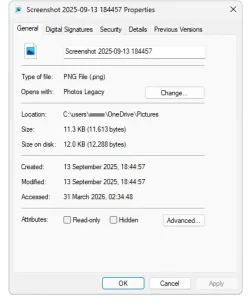
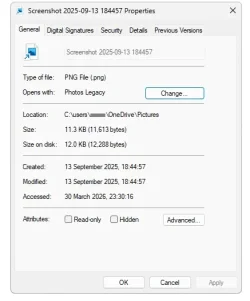
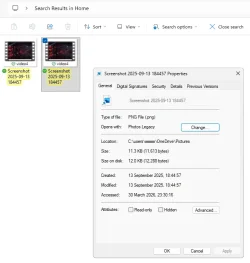
when I search for a file in File Explorer - Home, I will open the file and this shortcut file will appear, however when I search for a file in the Pictures folder (still linked to Onedrive) and open it i won't get the shortcut file. Can someone please help
1774911668273.webp
 
Last edited:

My Computers

System One System Two

  • OS
    Windows 11
I'm really not sure what your question is. If you are trying to open one of those screenshots which are in .png format, you probably do not have an app associated with that file type. Right click on one of them, select "open with". A list of apps will pop up. Select "Photos" in the list.
If that is not what your question is about, please elaborate.
 

My Computers

System One System Two

  • OS
    Windows 11 Pro 25H2
    Computer type
    PC/Desktop
    Manufacturer/Model
    Dell Optiplex 7080
    CPU
    i9-10900 10 core 20 threads
    Motherboard
    DELL 0J37VM
    Memory
    32 gb
    Graphics Card(s)
    none-Intel UHD Graphics 630
    Sound Card
    Integrated Realtek
    Monitor(s) Displays
    Benq 27
    Screen Resolution
    2560x1440
    Hard Drives
    2x1tb Solidigm m.2 nvme /External drives 512gb Samsung m.2 sata+2tb Kingston m2.nvme
    PSU
    500w
    Case
    MT
    Cooling
    Dell Premium
    Keyboard
    Logitech wired
    Mouse
    Logitech wireless
    Internet Speed
    so slow I'm too embarrassed to tell
    Browser
    #1 Edge #2 Firefox
    Antivirus
    Defender+MWB Premium
  • Operating System
    Windows 11 Pro 24H2 26200.8457
    Computer type
    PC/Desktop
    Manufacturer/Model
    Beelink Mini PC SER5
    CPU
    AMD Ryzen 7 6800U
    Memory
    32 gb
    Graphics card(s)
    integrated
    Sound Card
    integrated
    Monitor(s) Displays
    Benq 27
    Screen Resolution
    2560x1440
    Hard Drives
    1TB Crucial nvme
    Keyboard
    Logitech wired
    Mouse
    Logitech wireless
    Internet Speed
    still too embarrassed to tell
    Browser
    Firefox
    Antivirus
    Defender
    Other Info
    System 3 is non compliant Dell 9020 i7-4770/24gb ram Win11 PRO 26200.8457
I can open up that file, that's not my issue. When I open File Explorer and go to 1774919610650.webp
When I open a file and it creates a shortcut file next to it, that's shown in the first pic, but when i do the same search in the Pictures folder for a file, and it opens up it does not make a shortcut file. That's my problem
 
Last edited:

My Computers

System One System Two

  • OS
    Windows 11
It's a little confusing, because you're showing a PNG file, not a shortcut.

But when you search from Home and open the file, Windows is likely creating a shortcut to the opened file in the Recents folder, because it is now a recently-opened item. When you search the Pictures folder and open a file, the shortcut file is still created, but it's not showing in the search results because you're searching Pictures; you're not searching in a folder that contains the Recent folder.

Change the view (in the menu bar at the top) to Details, so you can see the path of the files.
 

My Computer

System One

  • OS
    Windows 11 Pro 25H2
    Computer type
    PC/Desktop
    Manufacturer/Model
    Intel NUC12WSHi7
    CPU
    12th Gen Core i7-1260P
    Motherboard
    NUC12WSBi7
    Memory
    64 GB Micron PC4-25600
    Graphics Card(s)
    Intel Iris Xe Graphics
    Sound Card
    on-board Realtek HD Audio
    Monitor(s) Displays
    Dell U3219Q
    Screen Resolution
    3840 x 2160
    Hard Drives
    Samsung SSD 990 PRO 1TB
    Crucial MX500 2 TB
    Antivirus
    Microsoft Defender
@pseymour This started recently happening, before I could search in Home on File Explorer and I wouldn't get a second file appearing with a arrow on the thumbnail and the title blanked out
 

My Computers

System One System Two

  • OS
    Windows 11
Windows has had a recent item folder for many, many years now. A couple of decades maybe.

It's still not entirely clear what your screenshot is showing, and it won't be unless we can see the paths. If the newly-created shortcut is in the recent items folder, then what I said is correct.
 

My Computer

System One

  • OS
    Windows 11 Pro 25H2
    Computer type
    PC/Desktop
    Manufacturer/Model
    Intel NUC12WSHi7
    CPU
    12th Gen Core i7-1260P
    Motherboard
    NUC12WSBi7
    Memory
    64 GB Micron PC4-25600
    Graphics Card(s)
    Intel Iris Xe Graphics
    Sound Card
    on-board Realtek HD Audio
    Monitor(s) Displays
    Dell U3219Q
    Screen Resolution
    3840 x 2160
    Hard Drives
    Samsung SSD 990 PRO 1TB
    Crucial MX500 2 TB
    Antivirus
    Microsoft Defender
I have fixed this. In file explorer go to options, privacy uncheck show files from office.com, It seems this option being enabled causes a file you click on to be listed twice in search results on Home - File Explorer
 

My Computers

System One System Two

  • OS
    Windows 11

Latest Support Threads

Back
Top Bottom