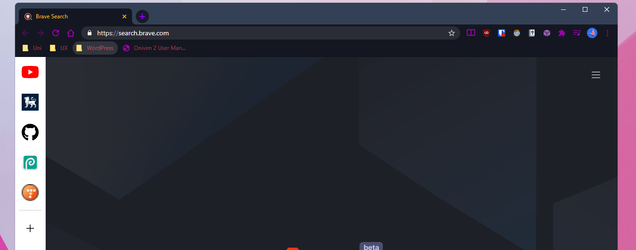
Option list is opening in the background


fx1111

Active member
Local time
8:03 PM
Posts
17
OS
Windows 11 Pro
As you can see the option liss opens in the background. If the app or window is in full-screen, I can see the option list at all. Any help would be appreciated.
explorer_VIMQbBV0bC.png
 
Windows Build/Version
22000.100

Attachments

  • explorer_yioWl3eWFp.png
    explorer_yioWl3eWFp.png
    35 KB · Views: 5

My Computer My Computer

At a glance

Windows 11 ProAMD Ryzen 5 5600X32GB (2x16GB) Corsair DDR4 Vengeance LPX - 32...NVIDIA GeForce RTX 3070 (EVGA)
OS
Windows 11 Pro
Computer type
PC/Desktop
Manufacturer/Model
3XS Gamer 3080
CPU
AMD Ryzen 5 5600X
Motherboard
MAG B550 TOMAHAWK
Memory
32GB (2x16GB) Corsair DDR4 Vengeance LPX - 3200MHz
Graphics Card(s)
NVIDIA GeForce RTX 3070 (EVGA)
Monitor(s) Displays
ASUS TUF 27" WQHD
Screen Resolution
2560x1440
Hard Drives
Nvme - Sabrent 1TB Rocket Nvme PCIe 4.0 M.2
SSD - Samsung 870 QV0 1TB
HDD - Seagate BarraCuda 3TB Internal Hard Drive HDD
PSU
Corsair RM750x, Modular, Silent, 80PLUS GOLD
Case
Corsair Carbide 275R Airflow [Black]
Cooling
Corsair Hydro H100x -
Keyboard
GMMK Pro
Mouse
Logictech G Pro Superlight Wireless
Internet Speed
100MB
Browser
Firefox
Antivirus
MalwareBytes
As you can see the option liss opens in the background. If the app or window is in full-screen, I can see the option list at all. Any help would be appreciated.
It's a bug. Restart Explorer or Reboot..., either of those should fix it..., (temporarily, perhaps!)
 

My Computers My Computers

  • At a glance

    Windows 11 Pro
    OS
    Windows 11 Pro
    Computer type
    PC/Desktop
    Manufacturer/Model
    ASUS ROG Strix
  • At a glance

    Windows 11 Pro
    Operating System
    Windows 11 Pro
    Computer type
    Laptop
    Manufacturer/Model
    ASUS VivoBook
  • ASUS VivoBook 'Lite' ~ Windows 11 Home
It's a bug. Restart Explorer or Reboot..., either of those should fix it..., (temporarily, perhaps!)
As you said, it's temporary. It happens every time I'm on my pc.
 

My Computer My Computer

At a glance

Windows 11 ProAMD Ryzen 5 5600X32GB (2x16GB) Corsair DDR4 Vengeance LPX - 32...NVIDIA GeForce RTX 3070 (EVGA)
OS
Windows 11 Pro
Computer type
PC/Desktop
Manufacturer/Model
3XS Gamer 3080
CPU
AMD Ryzen 5 5600X
Motherboard
MAG B550 TOMAHAWK
Memory
32GB (2x16GB) Corsair DDR4 Vengeance LPX - 3200MHz
Graphics Card(s)
NVIDIA GeForce RTX 3070 (EVGA)
Monitor(s) Displays
ASUS TUF 27" WQHD
Screen Resolution
2560x1440
Hard Drives
Nvme - Sabrent 1TB Rocket Nvme PCIe 4.0 M.2
SSD - Samsung 870 QV0 1TB
HDD - Seagate BarraCuda 3TB Internal Hard Drive HDD
PSU
Corsair RM750x, Modular, Silent, 80PLUS GOLD
Case
Corsair Carbide 275R Airflow [Black]
Cooling
Corsair Hydro H100x -
Keyboard
GMMK Pro
Mouse
Logictech G Pro Superlight Wireless
Internet Speed
100MB
Browser
Firefox
Antivirus
MalwareBytes

My Computers My Computers

  • At a glance

    Windows 11 Pro
    OS
    Windows 11 Pro
    Computer type
    PC/Desktop
    Manufacturer/Model
    ASUS ROG Strix
  • At a glance

    Windows 11 Pro
    Operating System
    Windows 11 Pro
    Computer type
    Laptop
    Manufacturer/Model
    ASUS VivoBook
  • ASUS VivoBook 'Lite' ~ Windows 11 Home
I don't have that problem.
 

My Computer My Computer

At a glance

Windows 11AMD Ryzen 7 5700GMicron Technology DDR4-3200 16GBNVIDIA GeForce RTX 3060
OS
Windows 11
Computer type
PC/Desktop
Manufacturer/Model
HP Pavilion
CPU
AMD Ryzen 7 5700G
Motherboard
Erica6
Memory
Micron Technology DDR4-3200 16GB
Graphics Card(s)
NVIDIA GeForce RTX 3060
Sound Card
Realtek ALC671
Monitor(s) Displays
Samsung SyncMaster U28E590
Screen Resolution
3840 x 2160
Hard Drives
SAMSUNG MZVLQ1T0HALB-000H1

Latest Support Threads

Back
Top Bottom