
Solved Oracle VirtualBox

  • Thread starter Thread starter Deleted member 33416
  • Start date Start date

D

Deleted member 33416

Guest
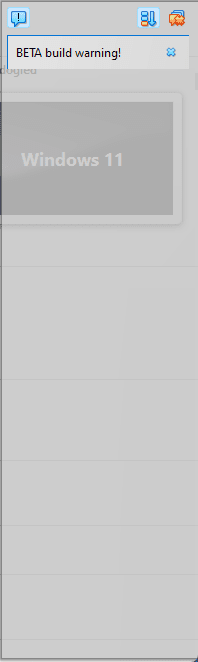
How to disable this window in Oracle VirtualBox?
 

Attachments

  • 2024-07-30_114905.png
    2024-07-30_114905.png
    3.9 KB · Views: 7
That is the Notification Center window. I know it can be annoying at times but I just click on the X and close it.
 

My Computers My Computers

  • At a glance

    Windows 11 Pro 25H2 (26200.6901)AMD Ryzen 7 6800H with Radeon 680M GPU (486MB...Crucial DDR5-4800 (2400MHz) 32GB (2 x 16GB)NVIDIA RTX 3060 Laptop (6GB RAM)
    OS
    Windows 11 Pro 25H2 (26200.6901)
    Computer type
    Laptop
    Manufacturer/Model
    ASUS TUF Gaming A15 (2022)
    CPU
    AMD Ryzen 7 6800H with Radeon 680M GPU (486MB RAM)
    Memory
    Crucial DDR5-4800 (2400MHz) 32GB (2 x 16GB)
    Graphics Card(s)
    NVIDIA RTX 3060 Laptop (6GB RAM)
    Sound Card
    n/a
    Monitor(s) Displays
    15.6-inch
    Screen Resolution
    1920x1080 300Hz
    Hard Drives
    2 x Samsung 990 Evo Plus (2TB M.2 NVME SSD)
    PSU
    n/a
    Mouse
    Wireless Mouse M510
    Internet Speed
    2100Mbps/300Mbps
    Browser
    Firefox
    Antivirus
    Malwarebytes
  • At a glance

    Windows 11 Pro 25H2 (26200.8246)AMD Ryzen 7 5700X3DG.SKILL Flare X 32GB (2x16GB) DDR4ASUS ROG-STRIX-RTX3060TI-08G-V2-GAMING (RTX 3...
    Operating System
    Windows 11 Pro 25H2 (26200.8246)
    Computer type
    PC/Desktop
    Manufacturer/Model
    Custom build
    CPU
    AMD Ryzen 7 5700X3D
    Motherboard
    ASUS ROG Strix B550-F Gaming WiFi II
    Memory
    G.SKILL Flare X 32GB (2x16GB) DDR4
    Graphics card(s)
    ASUS ROG-STRIX-RTX3060TI-08G-V2-GAMING (RTX 3060-Ti, 8GB RAM)
    Monitor(s) Displays
    Samsung G50D IPS 27"
    Screen Resolution
    1440p/180Hz
    Hard Drives
    SAMSUNG 990 EVO Plus (2TB] M.2 NVME SSD
    SAMSUNG 990 EVO Plus (4TB) M.2 NVME SSD
    PSU
    Corsair RM750x (750 watts)
    Case
    Cooler Master MasterCase 5
    Cooling
    Scythe Mugen 6
    Keyboard
    Logitech K520 (MK540 keyboard/mouse combo)
    Mouse
    Logitech M310 (MK540 keyboard/mouse combo)
    Internet Speed
    2100 Mbps down / 300 Mbps up
    Browser
    Firefox, Edge, Chrome
    Antivirus
    Malwarebytes (Premium)
    Other Info
    ASUS Blu-ray Burner BW-16D1HT (SATA) || Western Digital Easystore 20TB USB 3.0 external hard drive used with Acronis True Image 2025 backup software || HP OfficeJet Pro 6975 Printer/Scanner
Is that a BETA release?
In that case, BETA or pre-release version, it might not be possible to disable via interface settings.
The message is needed as to note user this is "not suitable for production use".
Just use the stable edition to avoid this message.
 

My Computers My Computers

  • At a glance

    Windows 11 Proi3 8109U16GB DDR4 @2400Intel Iris Plus Graphics 655
    OS
    Windows 11 Pro
    Computer type
    PC/Desktop
    Manufacturer/Model
    Intel NUC
    CPU
    i3 8109U
    Motherboard
    Intel
    Memory
    16GB DDR4 @2400
    Graphics Card(s)
    Intel Iris Plus Graphics 655
    Sound Card
    Intel / Realtek HD Audio
    Monitor(s) Displays
    LG-32ML600M
    Screen Resolution
    1920x1080
    Hard Drives
    Intel SSD 250GB + Samsung QVO SSD 1TB
    PSU
    Adapter
    Cooling
    The usual NUC airflow
    Keyboard
    Logitech Orion G610
    Mouse
    SteelSeries Rival 100 Red
    Internet Speed
    Good enough
    Browser
    Chromium, Edge, Firefox
    Antivirus
    Windows Defender
  • At a glance

    CentOS 9 Stream / Alma / Rocky / FedoraIntel i7 4800MQ32GB DDR3 @1600NVIDIA Quadro K2100M
    Operating System
    CentOS 9 Stream / Alma / Rocky / Fedora
    Computer type
    Laptop
    Manufacturer/Model
    TOSHIBA
    CPU
    Intel i7 4800MQ
    Motherboard
    TOSHIBA
    Memory
    32GB DDR3 @1600
    Graphics card(s)
    NVIDIA Quadro K2100M
    Sound Card
    Realtek HD Audio
    Monitor(s) Displays
    Built-in
    Screen Resolution
    1920x1080
In C:\Users\yourUser\.VirtualBox
Edit: VirtualBox.xml
put "all" to this value:

<ExtraDataItem name="GUI/SuppressMessages" value="all"/>

That resolved the issue.
 

My Computer My Computer

At a glance

Windows 11AMD Ryzen 5 3600 6-Core Processor32680MB(3200)NVIDIA GeForce GT 740
OS
Windows 11
Computer type
PC/Desktop
Manufacturer/Model
Custom Built
CPU
AMD Ryzen 5 3600 6-Core Processor
Motherboard
PRIME B450M-A
Memory
32680MB(3200)
Graphics Card(s)
NVIDIA GeForce GT 740
Sound Card
Realtek Audio
Monitor(s) Displays
Samsung 34"
Screen Resolution
3072x1728
Mouse
Logitech G502 Hero
Internet Speed
300Mbps
Browser
Chrome, Firefox, Edge, Brave
Antivirus
Malwares Bytes
Hey Deleted member 33416,

Showing gratitude is important in online communities. Use the "like" button to appreciate helpful content. This motivates people to keep sharing knowledge. A "like" gives 1 point, "Helpful" gives 5 points, and "Great support" gives 10 points for exceptional help.

Back
Top Bottom




