Solved Other than Macrium, what is your recommendation for a backup/clone software for PC


therealsimpsons

Active member
Member
Local time
10:07 AM
Posts
66
OS
Win 11 64-Bit Home
I purchased Macrium when it was free, and then I was forced to buy it when the discontinued the free version. Now they want an annual subscription, that is a huge increase in price over the original cost. I'm done. Looking for a replacement recommendation. Thank you.

Edit, didn't purchase the free addition, downloaded it..
 
Windows Build/Version
23H2 Build 22631.3880
Last edited:

My Computer

System One

  • OS
    Win 11 64-Bit Home
    Computer type
    PC/Desktop
    Manufacturer/Model
    Custom Build
    CPU
    12 Gen Intel i7-12700K 360 GHz
    Motherboard
    Gigabyte B760M
    Memory
    32 GB
    Graphics Card(s)
    EVGA Nividia GeForce RTX 3060 12GB
    Sound Card
    None
    Monitor(s) Displays
    Dell 32in curved
    Screen Resolution
    2560 x 1440
    Hard Drives
    Samsung 1 TB SSD M.2 970 EVO Nvme PicIe 3.0 x 4
    Seagate 2 TB SATA 7200 RPM 64MB
    PSU
    Apevia 800W GOLD
    Case
    Apevia ENZO
    Cooling
    2 Case Fans, ZeroTherm ZT100 Thermal Grease
    Keyboard
    Logitech K360
    Mouse
    Logitech GS 502 Hero
    Internet Speed
    650 mbps
    Browser
    Duck Duck Go
    Antivirus
    Webroot Anywhere

I purchased Macrium when it was free, and then I was forced to buy it when the discontinued the free version……..
I don’t understand. You bought it when it was free?
 

My Computer

System One

  • OS
    Windows 11 Pro 25H2 (26200.8457)
    Computer type
    PC/Desktop
    Manufacturer/Model
    CLX Intel Battlebox Ultimate (RA)
    CPU
    Intel® Core™ i9-13900KS 3.20GHz
    Motherboard
    ASUS ROG Maximus Z790 Hero WIFI - ATX
    Memory
    128GB DDR5-5200 Kingston Fury Beast RGB
    Graphics Card(s)
    Zotac Trinity NVIDIA® GeForce® RTX 4090 24GB GDDR6X
    Sound Card
    Realtek USB Audio
    Monitor(s) Displays
    Dell G3223Q 32" 4K Ultra HD
    Screen Resolution
    3840x2160 @144hz
    Hard Drives
    2TB x 2 Samsung 990 Pro 2280 NVMe M.2 SSD's
    2TB x 1 Samsung 980 Pro 2280 NVMe M.2 SSD
    4 TB x 1 My Passport Ultra External USB
    PSU
    1200W Corsair HX Ser HX1200 80+ Platinum
    Case
    Lian Li / Der Bauer 011DXL ROG
    Cooling
    Phanteks Glacier One 360 RGB AIO LC
    Keyboard
    Logitech K330 Wireless
    Mouse
    Logitech M310 Wireless
    Internet Speed
    1GB Fiber : 945/57
    Browser
    Firefox - Brave
    Antivirus
    Bitdefender Premium Personal
    Other Info
    Macrium Reflect X
Hasleo Backup Suite (and it's free)!
 

My Computer

System One

  • OS
    Windows 11 Pro 24H2
    Computer type
    PC/Desktop
    Manufacturer/Model
    MinisForum / UM790-Pro
    CPU
    AMD Ryzen™ 9 7940HS Processor, 8 Cores/16 Threads
    Motherboard
    MinisForum
    Memory
    32Gb DDR5 5600MHz SODIMM
    Graphics Card(s)
    Integrated AMD Radeon 780M
    Sound Card
    Onboard
    Monitor(s) Displays
    LG 32" 4K
    Screen Resolution
    3840 X 2160
    Hard Drives
    1 Gb WD - Black SN850X PCIe Gen4 NVMe SSD
    1 Gb Kingston OMPGP41024Q-A0 Gen4 NVMe SSD
    Keyboard
    Logitech K800
    Mouse
    Logitech MX Master 3
I purchased Macrium when it was free, and then I was forced to buy it when the discontinued the free version. Now they want an annual subscription, that is a huge increase in price over the original cost. I'm done. Looking for a replacement recommendation. Thank you.
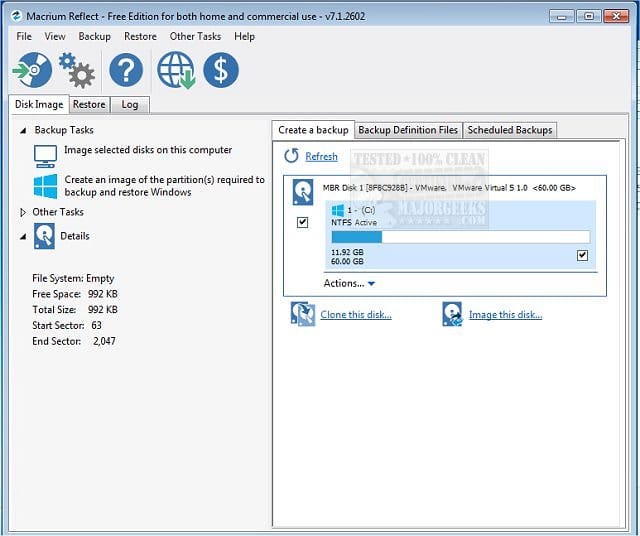
you can still get the free version of Macruim Reflect from Major Geeks.

hope this is of help, best of luck. Steve ..
 

My Computers

System One System Two

  • OS
    Windows 11 Home
    Computer type
    PC/Desktop
    Manufacturer/Model
    HP 24" AiO
    CPU
    Ryzen 7 5825u
    Motherboard
    HP
    Memory
    64GB DDR4 3200
    Graphics Card(s)
    Ryzen 7 5825u
    Sound Card
    RealTek
    Monitor(s) Displays
    24" HP AiO
    Screen Resolution
    1920 x 1080 @60 Hz
    Hard Drives
    1TB WD Blue SN580 M2 SSD Partitioned.
    2x 1TB USB HDD External Backup/Storage.
    PSU
    90W external power brick
    Case
    24" All in One
    Cooling
    Default Air Cooling
    Keyboard
    HP WiFi UK extended
    Mouse
    HP WiFi 3 Button
    Internet Speed
    1GB full fibre
    Browser
    Edge & Firefox
    Antivirus
    AVG Internet Security/Windows Defender
    Other Info
    Mainly Open Source Software
  • Operating System
    Ubuntu 22.04.5 LTS
    Computer type
    Laptop
    Manufacturer/Model
    Dell 13" Latitude 2017
    CPU
    i5 7200u
    Motherboard
    Dell
    Memory
    16GB DDR4
    Graphics card(s)
    Intel
    Sound Card
    Intel
    Monitor(s) Displays
    13" Dell Laptop
    Hard Drives
    250GB Crucial 2.5" SSD
    Mouse
    Generic WiFi 3 button
    Internet Speed
    WiFi only
    Browser
    Firefox
    Antivirus
    ClamAV TK
    Other Info
    Mainly Open Source Software
Hi @therealsimpsons and welcome to Elevenforum

There are already numerous threads at Elevenforum about backup software and which one is 'best'. In particular this one which has a poll and much discussion which may be useful.


My Computers

System One System Two

  • OS
    Windows 11 Pro 25H2
    Computer type
    PC/Desktop
    Manufacturer/Model
    Homebuilt
    CPU
    Intel Core i9 13900K
    Motherboard
    Asus ProArt Z790 Creator WiFi - Bios 3107
    Memory
    Corsair Dominator Platinum 64gb 5600MT/s DDR5 Dual Channel
    Graphics Card(s)
    Sapphire NITRO+ AMD Radeon RX 7900 XTX Vapor-X 24GB
    Sound Card
    External DAC: Cambridge Audio DACMagic200M - Headphone Amp: Topping L50
    Monitor(s) Displays
    Panasonic MX950 Mini LED 55" TV 120hz
    Screen Resolution
    3840 x 2160 120hz
    Hard Drives
    Samsung 980 Pro 2TB (OS)
    Samsung 980 Pro 1TB (Files)
    Lexar NZ790 4TB
    LaCie d2 Professional 6TB external - USB 3.1
    Seagate Expansion 16TB external - USB 3.2
    Seagate One Touch 18TB external HD - USB 3.0
    PSU
    Corsair RM1200x Shift
    Case
    Corsair RGB Smart Case 5000x (white)
    Cooling
    Corsair iCue H150i Elite Capellix XT
    Keyboard
    Incase Ergonomic USB (Microsoft clone)
    Mouse
    Logitech MX Master 3S
    Internet Speed
    Fibre 900/500 Mbps
    Browser
    Microsoft Edge Chromium
    Antivirus
    Bitdefender Total Security
    Other Info
    AMD Radeon Software & Drivers 26.1.1
    Hasleo Backup Suite
    Dashlane password manager
    Kensington Verimark fingerprint reader
    Logitech Brio 4K webcam
    Orico 10-port powered USB 3.0 hub
  • Operating System
    Windows 11 Pro 25H2
    Computer type
    Laptop
    Manufacturer/Model
    Asus Vivobook X1605VA
    CPU
    Intel® Core™ i9-13900H
    Motherboard
    Asus X1605VA bios 309
    Memory
    32GB DDR4-3200 Dual channel
    Graphics card(s)
    *Intel Iris Xᵉ Graphics G7
    Sound Card
    Realtek | Intel SST Bluetooth & USB
    Monitor(s) Displays
    16.0-inch, WUXGA 16:10 aspect ratio, IPS-level Panel
    Screen Resolution
    1920 x 1200 60hz
    Hard Drives
    512GB M.2 NVMe™ PCIe® 3.0 SSD
    Mouse
    Logitech MX Ergo Trackball
    Antivirus
    Bitdefender Total Security
    Other Info
    720p Webcam
    WiFi & USB to ethernet
I purchased Macrium when it was free, and then I was forced to buy it when the discontinued the free version. Now they want an annual subscription, that is a huge increase in price over the original cost. I'm done. Looking for a replacement recommendation. Thank you.

Edit, didn't purchase the free addition, downloaded it..
Welcome to Eleven Forum.

Just because Reflect Free has reached end of development and support doesn't mean that it will stop working. You have a perpetual licence and can continue using it for as long as it still works. The only thing that could stop it working would be a significant change in Windows, but that's unlikely any time soon. I know from personal testing that it will still work in the forthcoming Windows 11 version 24H2 (come to that, so does Reflect Free v7).

Although Macrium are pushing their subscription model, they currently still offer a one-time purchase option. If you have bought a v8 license then that too is perpetual, and entitles you to updates for v8, which will continue to be supported until one year after the next version of Reflect is released. After that it should continue to work until if/when a major change in Windows breaks it.

But if you really want a free alternative, then the Hasleo Backup Suite seems to be the one many members on this site would recommend.


My Computers

System One System Two

  • OS
    Windows 11 Home
    Computer type
    Laptop
    Manufacturer/Model
    Acer Aspire 3 A315-23-R9VY
    CPU
    AMD Athlon Silver 3050U
    Memory
    8GB
    Graphics Card(s)
    Radeon Graphics
    Monitor(s) Displays
    laptop screen
    Screen Resolution
    1366x768 native resolution, up to 2560x1440 with Radeon Virtual Super Resolution
    Hard Drives
    1TB Samsung EVO 870 SSD (from April 2026: 250GB EVO 850)
    Internet Speed
    150 Mbps
    Browser
    Edge, Firefox
    Antivirus
    Defender
    Other Info
    fully 'Windows 11 ready' laptop. Windows 10 C: partition migrated from my old unsupported 'main machine' then upgraded to 11. A test migration ran Insider builds for 2 months. When 11 was released on 5th October 2021 it was re-imaged back to 10 and was offered the upgrade in Windows Update on 20th October. Windows Update offered the 22H2 Feature Update on 20th September 2022. It got the 23H2 Feature Update on 4th November 2023 through Windows Update, 24H2 on 3rd October 2024 through Windows Update by setting the Target Release Version for 24H2, and 25H2 on 30th September 2025 through Windows Update by setting the Target Release Version for 25H2.

    UPDATE - 11 April 2026: due to mechanical deterioration this PC has been retired from active duty. The OS with all software and files has been migrated to my System Seven below to carry on as my general purpose 'main machine'.

    My SYSTEM THREE is a Dell Latitude 5410, i7-10610U, 32GB RAM, 512GB NVMe ssd, supported device running Windows 11 Pro.

    My SYSTEM FOUR is a 2-in-1 convertible Lenovo Yoga 11e 20DA, Celeron N2930, 8GB RAM, 256GB ssd. Unsupported device: currently running Win10 Pro, plus Win11 Pro RTM and Insider Dev, Beta, and RP 24H2 as native boot vhdx.

    My SYSTEM FIVE is a Dell Latitude 3190 2-in-1, Pentium Silver N5030, 8GB RAM, 1TB NVMe ssd, supported device running Windows 11 Pro, plus Insider Beta, Dev, and Canary builds (and a few others) as a native boot .vhdx.

    My SYSTEM SIX is a Dell Latitude 5550, Core Ultra 7 165H, 64GB RAM, 1TB NVMe SSD, supported device, Windows 11 Pro 24H2, Hyper-V host machine. Updated to 25H2 on 30th September 2025.

    My SYSTEM SEVEN is a Lenovo Thinkpad T580, Intel Core i7-8650U, 16GB RAM, 512GB NVMe SSD + 2nd 512GB NVMe SSD, a supported device for Windows 11. This is my current general purpose 'main machine'. The installed Windows 11 Home from my System One has been migrated to this machine.
  • Operating System
    Windows 11 Pro
    Computer type
    Laptop
    Manufacturer/Model
    Dell Latitude E4310
    CPU
    Intel® Core™ i5-520M
    Motherboard
    0T6M8G
    Memory
    8GB
    Graphics card(s)
    (integrated graphics) Intel HD Graphics
    Screen Resolution
    1366x768
    Hard Drives
    500GB Crucial MX500 SSD
    Browser
    Firefox, Edge
    Antivirus
    Defender
    Other Info
    unsupported machine: Legacy bios, MBR, TPM 1.2, upgraded from W10 to W11 using W10/W11 hybrid install media workaround. In-place upgrade to 22H2 using ISO and a workaround. Feature Update to 23H2 by manually installing the Enablement Package. In-place upgrade to 24H2 using hybrid 23H2/24H2 install media. Upgraded to 25H2 by Enablement Package. Also running Insider Dev, and Canary builds and Windows 10 as native boot .vhdx.

    My SYSTEM THREE is a Dell Latitude 5410, i7-10610U, 32GB RAM, 512GB NVMe ssd, supported device running Windows 11 Pro.

    My SYSTEM FOUR is a 2-in-1 convertible Lenovo Yoga 11e 20DA, Celeron N2930, 8GB RAM, 256GB ssd. Unsupported device: currently running Win10 Pro, plus Win11 Pro RTM and Insider Dev, Beta, and RP 24H2 as native boot vhdx.

    My SYSTEM FIVE is a Dell Latitude 3190 2-in-1, Pentium Silver N5030, 8GB RAM, 1TB NVMe ssd, supported device running Windows 11 Pro, plus Insider Beta, Dev, and Canary builds (and a few others) as a native boot .vhdx.

    My SYSTEM SIX is a Dell Latitude 5550, Core Ultra 7 165H, 64GB RAM, 1TB NVMe SSD, supported device, Windows 11 Pro 24H2, Hyper-V host machine. Updated to 25H2 on 30th September 2025.

    My SYSTEM SEVEN is a Lenovo Thinkpad T580, Intel Core i7-8650U, 16GB RAM, 512GB NVMe SSD + 2nd 512GB NVMe SSD, a supported device for Windows 11. This is my current general purpose 'main machine'. The installed Windows 11 Home from my System One has been migrated to this machine.
You have a perpetual licence and can continue using it for as long as it still works.

I don't think I do. They have sent me several messages that the annual prescription payment is due in August.
 

My Computer

System One

  • OS
    Win 11 64-Bit Home
    Computer type
    PC/Desktop
    Manufacturer/Model
    Custom Build
    CPU
    12 Gen Intel i7-12700K 360 GHz
    Motherboard
    Gigabyte B760M
    Memory
    32 GB
    Graphics Card(s)
    EVGA Nividia GeForce RTX 3060 12GB
    Sound Card
    None
    Monitor(s) Displays
    Dell 32in curved
    Screen Resolution
    2560 x 1440
    Hard Drives
    Samsung 1 TB SSD M.2 970 EVO Nvme PicIe 3.0 x 4
    Seagate 2 TB SATA 7200 RPM 64MB
    PSU
    Apevia 800W GOLD
    Case
    Apevia ENZO
    Cooling
    2 Case Fans, ZeroTherm ZT100 Thermal Grease
    Keyboard
    Logitech K360
    Mouse
    Logitech GS 502 Hero
    Internet Speed
    650 mbps
    Browser
    Duck Duck Go
    Antivirus
    Webroot Anywhere

You have a perpetual licence and can continue using it for as long as it still works.

I don't think I do. They have sent me several messages that the annual prescription payment is due in August.
I did say "If you have bought a v8 license", sounds like you took the cheaper subscription option rather than a one-time purchase. If you don't renew then your Reflect will fall back to a 'Restore Only' version.

You could go back to using Reflect Free, it can read and restore any image made by your current version. Reflect Free v8.0 is still available to download direct from Macrium if you know where to look.

Hint: look at the bottom of post #1 here:
 

My Computers

System One System Two

  • OS
    Windows 11 Home
    Computer type
    Laptop
    Manufacturer/Model
    Acer Aspire 3 A315-23-R9VY
    CPU
    AMD Athlon Silver 3050U
    Memory
    8GB
    Graphics Card(s)
    Radeon Graphics
    Monitor(s) Displays
    laptop screen
    Screen Resolution
    1366x768 native resolution, up to 2560x1440 with Radeon Virtual Super Resolution
    Hard Drives
    1TB Samsung EVO 870 SSD (from April 2026: 250GB EVO 850)
    Internet Speed
    150 Mbps
    Browser
    Edge, Firefox
    Antivirus
    Defender
    Other Info
    fully 'Windows 11 ready' laptop. Windows 10 C: partition migrated from my old unsupported 'main machine' then upgraded to 11. A test migration ran Insider builds for 2 months. When 11 was released on 5th October 2021 it was re-imaged back to 10 and was offered the upgrade in Windows Update on 20th October. Windows Update offered the 22H2 Feature Update on 20th September 2022. It got the 23H2 Feature Update on 4th November 2023 through Windows Update, 24H2 on 3rd October 2024 through Windows Update by setting the Target Release Version for 24H2, and 25H2 on 30th September 2025 through Windows Update by setting the Target Release Version for 25H2.

    UPDATE - 11 April 2026: due to mechanical deterioration this PC has been retired from active duty. The OS with all software and files has been migrated to my System Seven below to carry on as my general purpose 'main machine'.

    My SYSTEM THREE is a Dell Latitude 5410, i7-10610U, 32GB RAM, 512GB NVMe ssd, supported device running Windows 11 Pro.

    My SYSTEM FOUR is a 2-in-1 convertible Lenovo Yoga 11e 20DA, Celeron N2930, 8GB RAM, 256GB ssd. Unsupported device: currently running Win10 Pro, plus Win11 Pro RTM and Insider Dev, Beta, and RP 24H2 as native boot vhdx.

    My SYSTEM FIVE is a Dell Latitude 3190 2-in-1, Pentium Silver N5030, 8GB RAM, 1TB NVMe ssd, supported device running Windows 11 Pro, plus Insider Beta, Dev, and Canary builds (and a few others) as a native boot .vhdx.

    My SYSTEM SIX is a Dell Latitude 5550, Core Ultra 7 165H, 64GB RAM, 1TB NVMe SSD, supported device, Windows 11 Pro 24H2, Hyper-V host machine. Updated to 25H2 on 30th September 2025.

    My SYSTEM SEVEN is a Lenovo Thinkpad T580, Intel Core i7-8650U, 16GB RAM, 512GB NVMe SSD + 2nd 512GB NVMe SSD, a supported device for Windows 11. This is my current general purpose 'main machine'. The installed Windows 11 Home from my System One has been migrated to this machine.
  • Operating System
    Windows 11 Pro
    Computer type
    Laptop
    Manufacturer/Model
    Dell Latitude E4310
    CPU
    Intel® Core™ i5-520M
    Motherboard
    0T6M8G
    Memory
    8GB
    Graphics card(s)
    (integrated graphics) Intel HD Graphics
    Screen Resolution
    1366x768
    Hard Drives
    500GB Crucial MX500 SSD
    Browser
    Firefox, Edge
    Antivirus
    Defender
    Other Info
    unsupported machine: Legacy bios, MBR, TPM 1.2, upgraded from W10 to W11 using W10/W11 hybrid install media workaround. In-place upgrade to 22H2 using ISO and a workaround. Feature Update to 23H2 by manually installing the Enablement Package. In-place upgrade to 24H2 using hybrid 23H2/24H2 install media. Upgraded to 25H2 by Enablement Package. Also running Insider Dev, and Canary builds and Windows 10 as native boot .vhdx.

    My SYSTEM THREE is a Dell Latitude 5410, i7-10610U, 32GB RAM, 512GB NVMe ssd, supported device running Windows 11 Pro.

    My SYSTEM FOUR is a 2-in-1 convertible Lenovo Yoga 11e 20DA, Celeron N2930, 8GB RAM, 256GB ssd. Unsupported device: currently running Win10 Pro, plus Win11 Pro RTM and Insider Dev, Beta, and RP 24H2 as native boot vhdx.

    My SYSTEM FIVE is a Dell Latitude 3190 2-in-1, Pentium Silver N5030, 8GB RAM, 1TB NVMe ssd, supported device running Windows 11 Pro, plus Insider Beta, Dev, and Canary builds (and a few others) as a native boot .vhdx.

    My SYSTEM SIX is a Dell Latitude 5550, Core Ultra 7 165H, 64GB RAM, 1TB NVMe SSD, supported device, Windows 11 Pro 24H2, Hyper-V host machine. Updated to 25H2 on 30th September 2025.

    My SYSTEM SEVEN is a Lenovo Thinkpad T580, Intel Core i7-8650U, 16GB RAM, 512GB NVMe SSD + 2nd 512GB NVMe SSD, a supported device for Windows 11. This is my current general purpose 'main machine'. The installed Windows 11 Home from my System One has been migrated to this machine.
I did say "If you have bought a v8 license", sounds like you took the cheaper subscription option rather than a one-time purchase. If you don't renew then your Reflect will fall back to a 'Restore Only' version.

You could go back to using Reflect Free, it can read and restore any image made by your current version. Reflect Free v8.0 is still available to download direct from Macrium if you know where to look.

Hint: look at the bottom of post #1 here:
 

My Computer

System One

  • OS
    Win 11 64-Bit Home
    Computer type
    PC/Desktop
    Manufacturer/Model
    Custom Build
    CPU
    12 Gen Intel i7-12700K 360 GHz
    Motherboard
    Gigabyte B760M
    Memory
    32 GB
    Graphics Card(s)
    EVGA Nividia GeForce RTX 3060 12GB
    Sound Card
    None
    Monitor(s) Displays
    Dell 32in curved
    Screen Resolution
    2560 x 1440
    Hard Drives
    Samsung 1 TB SSD M.2 970 EVO Nvme PicIe 3.0 x 4
    Seagate 2 TB SATA 7200 RPM 64MB
    PSU
    Apevia 800W GOLD
    Case
    Apevia ENZO
    Cooling
    2 Case Fans, ZeroTherm ZT100 Thermal Grease
    Keyboard
    Logitech K360
    Mouse
    Logitech GS 502 Hero
    Internet Speed
    650 mbps
    Browser
    Duck Duck Go
    Antivirus
    Webroot Anywhere

Your comment in this thread is the first time I have ever heard of a one-time purchase. It certainly was not offered to me when I received notice that the free edition would no longer be supported, and that I had to purchase a subscription. If there was any mention of one-time purchase, I would have jumped all over it.
 

My Computer

System One

  • OS
    Win 11 64-Bit Home
    Computer type
    PC/Desktop
    Manufacturer/Model
    Custom Build
    CPU
    12 Gen Intel i7-12700K 360 GHz
    Motherboard
    Gigabyte B760M
    Memory
    32 GB
    Graphics Card(s)
    EVGA Nividia GeForce RTX 3060 12GB
    Sound Card
    None
    Monitor(s) Displays
    Dell 32in curved
    Screen Resolution
    2560 x 1440
    Hard Drives
    Samsung 1 TB SSD M.2 970 EVO Nvme PicIe 3.0 x 4
    Seagate 2 TB SATA 7200 RPM 64MB
    PSU
    Apevia 800W GOLD
    Case
    Apevia ENZO
    Cooling
    2 Case Fans, ZeroTherm ZT100 Thermal Grease
    Keyboard
    Logitech K360
    Mouse
    Logitech GS 502 Hero
    Internet Speed
    650 mbps
    Browser
    Duck Duck Go
    Antivirus
    Webroot Anywhere
Your comment in this thread is the first time I have ever heard of a one-time purchase. It certainly was not offered to me when I received notice that the free edition would no longer be supported, and that I had to purchase a subscription. If there was any mention of one-time purchase, I would have jumped all over it.
The one-time purchase was once the only option. As I said, Macrium are pushing their new subscription model hard. But both options are still available.

1721947695590.png
https://www.macrium.com/products/home#buy-reflect-home

The next version of Reflect (v10) is currently in Beta testing. Whether on release that will also be available as a one-time purchase remains to be seen. I bought v7, and on release of v8 was offered a 50% discount on upgrading to v8. Whether that will hold true for v10 also remains to be seen.

The subscription model does at least include the upgrade to the next version at no extra cost.
 

My Computers

System One System Two

  • OS
    Windows 11 Home
    Computer type
    Laptop
    Manufacturer/Model
    Acer Aspire 3 A315-23-R9VY
    CPU
    AMD Athlon Silver 3050U
    Memory
    8GB
    Graphics Card(s)
    Radeon Graphics
    Monitor(s) Displays
    laptop screen
    Screen Resolution
    1366x768 native resolution, up to 2560x1440 with Radeon Virtual Super Resolution
    Hard Drives
    1TB Samsung EVO 870 SSD (from April 2026: 250GB EVO 850)
    Internet Speed
    150 Mbps
    Browser
    Edge, Firefox
    Antivirus
    Defender
    Other Info
    fully 'Windows 11 ready' laptop. Windows 10 C: partition migrated from my old unsupported 'main machine' then upgraded to 11. A test migration ran Insider builds for 2 months. When 11 was released on 5th October 2021 it was re-imaged back to 10 and was offered the upgrade in Windows Update on 20th October. Windows Update offered the 22H2 Feature Update on 20th September 2022. It got the 23H2 Feature Update on 4th November 2023 through Windows Update, 24H2 on 3rd October 2024 through Windows Update by setting the Target Release Version for 24H2, and 25H2 on 30th September 2025 through Windows Update by setting the Target Release Version for 25H2.

    UPDATE - 11 April 2026: due to mechanical deterioration this PC has been retired from active duty. The OS with all software and files has been migrated to my System Seven below to carry on as my general purpose 'main machine'.

    My SYSTEM THREE is a Dell Latitude 5410, i7-10610U, 32GB RAM, 512GB NVMe ssd, supported device running Windows 11 Pro.

    My SYSTEM FOUR is a 2-in-1 convertible Lenovo Yoga 11e 20DA, Celeron N2930, 8GB RAM, 256GB ssd. Unsupported device: currently running Win10 Pro, plus Win11 Pro RTM and Insider Dev, Beta, and RP 24H2 as native boot vhdx.

    My SYSTEM FIVE is a Dell Latitude 3190 2-in-1, Pentium Silver N5030, 8GB RAM, 1TB NVMe ssd, supported device running Windows 11 Pro, plus Insider Beta, Dev, and Canary builds (and a few others) as a native boot .vhdx.

    My SYSTEM SIX is a Dell Latitude 5550, Core Ultra 7 165H, 64GB RAM, 1TB NVMe SSD, supported device, Windows 11 Pro 24H2, Hyper-V host machine. Updated to 25H2 on 30th September 2025.

    My SYSTEM SEVEN is a Lenovo Thinkpad T580, Intel Core i7-8650U, 16GB RAM, 512GB NVMe SSD + 2nd 512GB NVMe SSD, a supported device for Windows 11. This is my current general purpose 'main machine'. The installed Windows 11 Home from my System One has been migrated to this machine.
  • Operating System
    Windows 11 Pro
    Computer type
    Laptop
    Manufacturer/Model
    Dell Latitude E4310
    CPU
    Intel® Core™ i5-520M
    Motherboard
    0T6M8G
    Memory
    8GB
    Graphics card(s)
    (integrated graphics) Intel HD Graphics
    Screen Resolution
    1366x768
    Hard Drives
    500GB Crucial MX500 SSD
    Browser
    Firefox, Edge
    Antivirus
    Defender
    Other Info
    unsupported machine: Legacy bios, MBR, TPM 1.2, upgraded from W10 to W11 using W10/W11 hybrid install media workaround. In-place upgrade to 22H2 using ISO and a workaround. Feature Update to 23H2 by manually installing the Enablement Package. In-place upgrade to 24H2 using hybrid 23H2/24H2 install media. Upgraded to 25H2 by Enablement Package. Also running Insider Dev, and Canary builds and Windows 10 as native boot .vhdx.

    My SYSTEM THREE is a Dell Latitude 5410, i7-10610U, 32GB RAM, 512GB NVMe ssd, supported device running Windows 11 Pro.

    My SYSTEM FOUR is a 2-in-1 convertible Lenovo Yoga 11e 20DA, Celeron N2930, 8GB RAM, 256GB ssd. Unsupported device: currently running Win10 Pro, plus Win11 Pro RTM and Insider Dev, Beta, and RP 24H2 as native boot vhdx.

    My SYSTEM FIVE is a Dell Latitude 3190 2-in-1, Pentium Silver N5030, 8GB RAM, 1TB NVMe ssd, supported device running Windows 11 Pro, plus Insider Beta, Dev, and Canary builds (and a few others) as a native boot .vhdx.

    My SYSTEM SIX is a Dell Latitude 5550, Core Ultra 7 165H, 64GB RAM, 1TB NVMe SSD, supported device, Windows 11 Pro 24H2, Hyper-V host machine. Updated to 25H2 on 30th September 2025.

    My SYSTEM SEVEN is a Lenovo Thinkpad T580, Intel Core i7-8650U, 16GB RAM, 512GB NVMe SSD + 2nd 512GB NVMe SSD, a supported device for Windows 11. This is my current general purpose 'main machine'. The installed Windows 11 Home from my System One has been migrated to this machine.
Hasleo.
 

My Computers

System One System Two

  • OS
    Windows 11 Pro 25H2 Build 26200.8524
    Computer type
    PC/Desktop
    Manufacturer/Model
    Sin-built 2013
    CPU
    Intel(R) Core(TM) i7-4770K CPU @ 3.50GHz
    Motherboard
    ASUS ROG Maximus VI Formula
    Memory
    32.0 GB of I forget and the box is in storage.
    Graphics Card(s)
    Gigabyte nVidia GeForce GTX 1660 Super OC 6GB
    Sound Card
    Onboard thingy
    Monitor(s) Displays
    5 x LG 25MS500-B - 1 x 24MK430H-B - 1 x Wacom Pro 22" Touch Screen Tablet
    Screen Resolution
    All over the place
    Hard Drives
    Too many to list.
    OS on Samsung 1TB 870 QVO SATA
    PSU
    Silverstone 1500
    Case
    NZXT Phantom 820 Full-Tower Case
    Cooling
    Noctua NH-D15 Elite Class Dual Tower CPU Cooler / 6 x EziDIY 120mm / 2 x Corsair 140mm somethings / 1 x 140mm Thermaltake something / 2 x 200mm Corsair.
    Keyboard
    Corsair K95 / Logitech diNovo Edge Wireless
    Mouse
    Logitech: G402 / G502 / Mx Masters / Mx Air Cordless
    Internet Speed
    2000/500Mbps
    Browser
    All sorts
    Antivirus
    Kaspersky Premium
    Other Info
    ㅤㅤㅤㅤㅤㅤㅤㅤㅤㅤㅤㅤㅤㅤㅤㅤㅤㅤㅤㅤㅤㅤㅤㅤㅤㅤㅤㅤㅤㅤㅤㅤㅤㅤㅤㅤㅤㅤㅤㅤ⠀⠀⠀⠀⠀⠀⠀⠀⠀⠀
    TP-Link BE9300 WiFi 7 Bluetooth 5.4 (Archer TBE550E)
    TP-Link TX201 V1 2.5GB Lan

    Grandstream HT812 - VoIP
    ASUS DSL-AX82U - Mesh
    ASUS RT-AC68U - Mesh
    ASUS RT-BE88U Router

    Brother MFC-L2880DW Printer

    I’m on a horse.
  • Operating System
    Windows 11 Pro 25H2 Build 26200.8524
    Computer type
    Laptop
    Manufacturer/Model
    LENOVO Yoga 7 14IRL8 - 7i EVO OLED 14" Touchscreen i5 12 Core 16GB/512GB
    CPU
    Intel Core 12th Gen i5-1240P Processor (1.7 - 4.4GHz)
    Memory
    16GB LPDDR5 RAM
    Graphics card(s)
    Intel Iris Xe Graphics Processor
    Sound Card
    Optimized with Dolby Atmos®
    Screen Resolution
    QHD 2880 x 1800 OLED
    Hard Drives
    M.2 512GB
    Antivirus
    Defender / Malwarebytes
    Other Info
    …still on a horse.
Trying out Acronis, but maybe i should've kept using Macrium Reflect 8 Home Edition after all, and once the new version launched then decided what i wanted to do lol, i guess i'll keep Acronis for now, continue to work with support to try to fix the current errors, then decide once error fixed & support case closed if i wanna stick with it or not
 

My Computers

System One System Two

  • OS
    Windows 11 Pro 25H2 26200.8037
    Computer type
    PC/Desktop
    Manufacturer/Model
    PreBuilt
    CPU
    AMD Ryzen 7700X
    Motherboard
    MSI B650 VC WIfi Rev 1.0
    Memory
    32GB DDR 5 RGB 5600Mhz
    Graphics Card(s)
    Radeon 7800XT
    Sound Card
    Onboard Audio
    Monitor(s) Displays
    Asus VG245H
    Screen Resolution
    1920x1080
    Hard Drives
    Samsung 990 Evo Plus NVMe Boot
    Samsung 990 Pro 1TB Game NVMe


    External
    Western Digital Elements 500GB
    Western Digital My Passport 2TB Blue
    Western Digital My Passport 2TB Red
    Toshiba 2TB in External Enclosure
    Seagate 8TB in External Enclosure
    Seagate 1TB Portable USB 3 External Drive
    Western Digital My Book 8TB (Primary Backup drive)
    Western Digital Black 4TB In External Enclosure
    PSU
    750 Watt High Power
    Case
    Lian Li Lan Cool 216 ARGB Airflow
    Cooling
    2 160MM Front, 1 140MM Rear Exhaust
    Keyboard
    Logitech G513
    Mouse
    Logitech G502 X
    Internet Speed
    Gigabit 1100Mb/35 Upload
    Browser
    MS Edge Chromium and Bing Search
    Antivirus
    Windows Defender, Malwarebytes Premium
    Other Info
    UEFI, Secure Boot, TPM 2.0, Macrium Reflect X
  • Operating System
    Windows 11 Pro 25H2 26200.8037
    Computer type
    Laptop
    Manufacturer/Model
    Asus TUF A16 Advantage Edition FA617NT.A16.R7700
    CPU
    Ryzen 7 7735HS
    Motherboard
    OEM Asus Motherboard
    Memory
    16GB DDR 5
    Graphics card(s)
    AMD Radeon™ 680M & Radeon 7700S
    Sound Card
    Onboard
    Monitor(s) Displays
    16inch FHD 165hz
    Screen Resolution
    1920x1080
    Hard Drives
    512GB NVMe Boot Drive
    PSU
    Laptop PSU
    Case
    Laptop Case
    Cooling
    OEM Cooling
    Keyboard
    OEM Laptop Keyboard
    Mouse
    Touchpad & G502 Hero
    Internet Speed
    Gigabit 1100 Download/35 Upload
    Browser
    MS Edge with Bing search
    Antivirus
    Windows Defender & Malwarebytes Premium
    Other Info
    Macrium Reflect X
I purchased Macrium when it was free, and then I was forced to buy it when the discontinued the free version. Now they want an annual subscription, that is a huge increase in price over the original cost. I'm done. Looking for a replacement recommendation. Thank you.

Edit, didn't purchase the free addition, downloaded it..
You can buy Reflect outright without a subscription which is only for technical support most people don't need.
 

My Computer

System One

  • OS
    Windows 11 Pro
    Computer type
    PC/Desktop
    Manufacturer/Model
    Self build
    CPU
    Core i7-13700K
    Motherboard
    Asus TUF Gaming Plus WiFi Z790
    Memory
    64 GB Kingston Fury Beast DDR5
    Graphics Card(s)
    Gigabyte GeForce RTX 2060 Super Gaming OC 8G
    Sound Card
    Realtek S1200A
    Monitor(s) Displays
    Viewsonic VP2770 & Dell (secondary)
    Screen Resolution
    2560 x 1440
    Hard Drives
    Kingston KC3000 2TB NVME SSD & SATA HDDs & SSD
    PSU
    EVGA SuperNova G2 850W
    Case
    Nanoxia Deep Silence 1
    Cooling
    Noctua NH-D14
    Keyboard
    Microsoft Digital Media Pro
    Mouse
    Logitech Wireless
    Internet Speed
    80 Mb / s
    Browser
    Chrome
    Antivirus
    Defender, Malwarebytes Free & AdwCleaner
You have a perpetual licence and can continue using it for as long as it still works.

I don't think I do. They have sent me several messages that the annual prescription payment is due in August.
It seems you bought the wrong version then.
 

My Computer

System One

  • OS
    Windows 11 Pro
    Computer type
    PC/Desktop
    Manufacturer/Model
    Self build
    CPU
    Core i7-13700K
    Motherboard
    Asus TUF Gaming Plus WiFi Z790
    Memory
    64 GB Kingston Fury Beast DDR5
    Graphics Card(s)
    Gigabyte GeForce RTX 2060 Super Gaming OC 8G
    Sound Card
    Realtek S1200A
    Monitor(s) Displays
    Viewsonic VP2770 & Dell (secondary)
    Screen Resolution
    2560 x 1440
    Hard Drives
    Kingston KC3000 2TB NVME SSD & SATA HDDs & SSD
    PSU
    EVGA SuperNova G2 850W
    Case
    Nanoxia Deep Silence 1
    Cooling
    Noctua NH-D14
    Keyboard
    Microsoft Digital Media Pro
    Mouse
    Logitech Wireless
    Internet Speed
    80 Mb / s
    Browser
    Chrome
    Antivirus
    Defender, Malwarebytes Free & AdwCleaner
Trying out Acronis, but maybe i should've kept using Macrium Reflect 8 Home Edition after all, and once the new version launched then decided what i wanted to do lol, i guess i'll keep Acronis for now, continue to work with support to try to fix the current errors, then decide once error fixed & support case closed if i wanna stick with it or not
I tried Acronis software a while ago and found it poorly engineered since was very difficult to uninstall all traces of it and their support was poor.
 

My Computer

System One

  • OS
    Windows 11 Pro
    Computer type
    PC/Desktop
    Manufacturer/Model
    Self build
    CPU
    Core i7-13700K
    Motherboard
    Asus TUF Gaming Plus WiFi Z790
    Memory
    64 GB Kingston Fury Beast DDR5
    Graphics Card(s)
    Gigabyte GeForce RTX 2060 Super Gaming OC 8G
    Sound Card
    Realtek S1200A
    Monitor(s) Displays
    Viewsonic VP2770 & Dell (secondary)
    Screen Resolution
    2560 x 1440
    Hard Drives
    Kingston KC3000 2TB NVME SSD & SATA HDDs & SSD
    PSU
    EVGA SuperNova G2 850W
    Case
    Nanoxia Deep Silence 1
    Cooling
    Noctua NH-D14
    Keyboard
    Microsoft Digital Media Pro
    Mouse
    Logitech Wireless
    Internet Speed
    80 Mb / s
    Browser
    Chrome
    Antivirus
    Defender, Malwarebytes Free & AdwCleaner
Hi folks

All Free software here:

Stand alone bootable version (GUI) of Gparted -- great for cloning or install on any Linux distro rsync (usually included by default) and its GUI Grsync which is pretty good for data backup.

In command line the DD command is pretty good too.

I don't need any paid software for data backup / disk imaging or cloning.

To transfer data to cloud or other remote servers the Free filezilla program (works on Windows too) is pretty good -- uses the sftp:// protocol so decently secure as well.

These days Windows users shouldn't be scared of Linux for dping one or 2 basic tasks -- these days there's loads of "Live distros" which just boot with GUI's even more Windows like than Windows itself so most people would have no trouble using things like a partition manager, the DD command, Grsync etc.

Save yourself a load of dosh -- some Windows software for these functions is either already Paid or even worse subscription software. Even more annoying are the nags to "Go Pro" i.e PAY and if you don't the actual features you want are not in the "free" version.

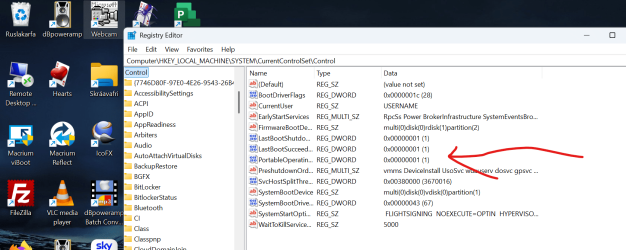
Some Windows software doesn't even do what it says on the tin -- for example Hasleo says it can restore a current Windows2GO system back to an internal HDD -- (in the paid version) -- this is really fiddly and I|'ve never got it to work -- but all you actually have to do is simply "DD" the Windows2Go system back to your HDD having first made a simple Registry key change.

Simply change the marked key to '0' before cloning back to internal disk.


Skjámynd 2024-08-04 080126.png


And to copy a running OS to a Windows2Go disk simply DD the disk to the external device and then boot a Windows install disk into command mode ("repair system") and then re-install the boot loader on to the efi partition (bcdboot.exe)

Cheers
jimbo
 
Last edited:

My Computer

System One

  • OS
    Windows XP,11 Linux Fedora Rawhide pre-release 45
    Computer type
    PC/Desktop
    CPU
    2 X Intel i7
    Screen Resolution
    4KUHD X 2
If you're lucky enough to have a (fairly new) Western Digital disk on your system you could use the free provided Acronis True Image software. It's a follow-on of the WD Backup utility which I always found somewhat problematic. The new version seems to work pretty well and provides options for generation of both file/folder backups and the ability to image a drive and "Clone" a drive (not sure what the difference is). you can find it at . It will only work if it detects a Western Digital drive attached to your system. That includes external USB drives. The website states it's a 5 year license, but I've used it longer than that. Be aware Acronis tends to sprinkle software (drivers etc.) kind of all over the place, so removing it can be somewhat complicated. It also tends to want to load elements at windows startup which is not necessary (I guess it makes for a faster startup). Acronis has been around for a long time and works.
 

My Computers

System One System Two

  • OS
    Host: Windows 11 Pro 24H2
    Computer type
    PC/Desktop
    Manufacturer/Model
    Custom User Build
    CPU
    AMD Ryzen 9 7945HX
    Motherboard
    Minisforum BD795i SE
    Memory
    2X 16GB DDR5-5200MTs (32GB)
    Graphics Card(s)
    AMD Radeon Pro WX5100 Workstation
    Sound Card
    Integrated AMD High Definition Audio CODEC
    Monitor(s) Displays
    2X LG 32UN880-A
    Screen Resolution
    3840x2160
    Hard Drives
    2X NVMe 1TB SSDs
    PSU
    Corsair SF450
    Case
    Fractal Design Terra
    Cooling
    Noctua FS-A12
    Keyboard
    Logitech K270 KB/Mouse Combo
    Mouse
    Logitech K270 KB/Mouse Combo
    Internet Speed
    800Mb
    Browser
    Firefox, Edge, Edge Chromium
    Antivirus
    MalwareBytes, MS Defender
    Other Info
    2x Seagate 2TB external USB HDD, 1x 5TB external USB WD Passport HDD, 1x externql USB WD SATA 1TB Green SATA SSD
  • Operating System
    Windows 11 Home
    Computer type
    Laptop
    Manufacturer/Model
    Acer Swift 3 SF314-42 R3U5
    CPU
    Ryzen 7 4700U @ 2GHz-->4.2GHz Boost
    Motherboard
    RO Kona_RN
    Memory
    16GB LPD DDR4X
    Graphics card(s)
    AMD Radeon (Renoir) Vega
    Sound Card
    ATI/AMD Renoir/Van Gough/Cezanne/Rembrandt HD Audio Controller
    Monitor(s) Displays
    IPS LCD Integrated Chi Mei CMN14D4
    Screen Resolution
    1920x1080
    Hard Drives
    Hynix 512GB NVMe (PCIe 4.0)
    PSU
    Ext 19v
    Case
    Integrated Magnesium
    Cooling
    Therm internal fan
    Keyboard
    Integrated
    Mouse
    Jellycomb
    Internet Speed
    800MB
    Browser
    Firefox, Edge Chromium
    Antivirus
    Malwarebytes, MS Defender
    Other Info
    External USB-C 1Gb Ethernet connection
PARAGON Hard Disk Manager
there are free and paid versions
 

My Computer

System One

  • OS
    Windows 11 Pro 64-bit
    Computer type
    PC/Desktop
    Manufacturer/Model
    Alienware Aurora R16
    CPU
    Intel Core i9-14900KF
    Motherboard
    Alienware 0RF96M (U3E1)
    Memory
    64 GB
    Graphics Card(s)
    4083MB NVIDIA GeForce RTX 4090
    Monitor(s) Displays
    ROG XG43UQ 43 inch monitor
    Screen Resolution
    (3840x2160@120Hz)
    Hard Drives
    Samsung SSD 870 EVO 2TB
    NVMe Samsung 2048GB
Trying out Acronis, but maybe i should've kept using Macrium Reflect 8 Home Edition after all, and once the new version launched then decided what i wanted to do lol, i guess i'll keep Acronis for now, continue to work with support to try to fix the current errors, then decide once error fixed & support case closed if i wanna stick with it or not
I once tried Macrium Reflect Free, but found that it has close to zero engineering. To make a backup of your Windows system partition so as to avoid having to do a clean install of Windows which causes all your apps, settings, etc. to be lost e.g. if the internal SSD breaks so it needs to be replaced or if the partition gets so badly corrupted that every attempt to fix it (like doing a repair install of Windows with an in-place upgrade or etc.) doesn't help, Macrium Reflect Free doesn't really add anything useful when compared to merely running the DISM command.

To avoid any and all problems with Acronis, I use only a WinPE-based bootable media of True Image 2021. It's easy to build with the Custom WinPE-based Media Builder community tool. Once built, I simply copied it onto my USB flash drive that I had previously already formatted with Ventoy. After I tested that the bootable media works, I uninstalled True Image from Windows by using the uninstall feature, and I also verified that none of the services from True Image still remained on Windows. They were all gone permanently, and so there no longer was any negative impact on the system performance nor any other type of problems. This was on a very old Intel Core i5-2320 machine w/ 8GB RAM and a 2TB Seagate 3.5″ HDD @ 7200rpm. If you don't believe, you could always decide to back up your Windows system partition with DISM before choosing to install Acronis. It's not exactly rocket science IMO........

To copy files/folders, imaging software is not necessary, and should actually even be avoided IMO because, for that, FastCopy is your friend.
 

My Computers

System One System Two

  • OS
    11 Home
    Computer type
    Laptop
    Manufacturer/Model
    Asus TUF Gaming F16 (2024)
    CPU
    i7 13650HX
    Memory
    16GB DDR5
    Graphics Card(s)
    GeForce RTX 4060 Mobile
    Sound Card
    Eastern Electric MiniMax DAC Supreme; Emotiva UMC-200; Astell & Kern AK240
    Monitor(s) Displays
    Sony Bravia XR-55X90J
    Screen Resolution
    3840×2160
    Hard Drives
    512GB SSD internal
    37TB external
    PSU
    Li-ion
    Cooling
    2× Arc Flow Fans, 4× exhaust vents, 5× heatpipes
    Keyboard
    Logitech K800
    Mouse
    Logitech G402
    Internet Speed
    30Mbit/s up, 500Mbit/s down
    Browser
    FF
    Antivirus
    What's an antivirus?
  • Operating System
    11 Home
    Computer type
    Laptop
    Manufacturer/Model
    Medion S15450
    CPU
    i5 1135G7
    Memory
    16GB DDR4
    Graphics card(s)
    Intel Iris Xe
    Sound Card
    Eastern Electric MiniMax DAC Supreme; Emotiva UMC-200; Astell & Kern AK240
    Monitor(s) Displays
    Sony Bravia XR-55X90J
    Screen Resolution
    3840×2160
    Hard Drives
    2TB SSD internal
    37TB external
    PSU
    Li-ion
    Keyboard
    Logitech K800
    Mouse
    Logitech G402
    Internet Speed
    30Mbit/s up, 500Mbit/s down
    Browser
    FF

Latest Support Threads

Back
Top Bottom