Hi,
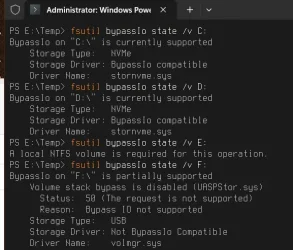
I'm trying to get Direct Storage to work. When I run "fsutil bypassIo state d:\" I get the following,
BypassIo on "d:\" is partially supported
Volume stack bypass is disabled (ntfs.sys)
Storage Type: Spaces
Storage Driver: Not BypassIo Compatible
Anyone know what this means?
I have updated BIOS, CPU and GPU drivers.
I'm trying to get Direct Storage to work. When I run "fsutil bypassIo state d:\" I get the following,
BypassIo on "d:\" is partially supported
Volume stack bypass is disabled (ntfs.sys)
Storage Type: Spaces
Storage Driver: Not BypassIo Compatible
Anyone know what this means?
I have updated BIOS, CPU and GPU drivers.
- Windows Build/Version
- Version 24H2 Build 26100.4652
My Computer
At a glance
Windows 11Ryzen 5 7500F32Gb DDR5RTX 4070 Ti Super
- OS
- Windows 11
- Computer type
- PC/Desktop
- Manufacturer/Model
- MSI
- CPU
- Ryzen 5 7500F
- Motherboard
- B650M Gaming Plus
- Memory
- 32Gb DDR5
- Graphics Card(s)
- RTX 4070 Ti Super
- Monitor(s) Displays
- Sony Bravia 8 MkII
- Screen Resolution
- 3840x2160
- Hard Drives
- M460 1TB
- PSU
- A750GL
- Case
- Forge M100R mATX
- Cooling
- Core A13 Liquid
- Keyboard
- Logitech K850
- Mouse
- Logitech M720
- Internet Speed
- 250-400mbs
- Browser
- Firefox