Patch Tuesday update problem


Image1.webp

Image1.webp
 

My Computers My Computers

  • At a glance

    Win 11 Home ♦♦♦26300.9711 ♦♦♦♦♦♦♦26H2AMD Ryzen 7 3700XG.Skill (F4-3200C14D-16GTZKW)EVGA RTX 2070 (08G-P4-2171-KR)
    OS
    Win 11 Home ♦♦♦26300.9711 ♦♦♦♦♦♦♦26H2
    Computer type
    PC/Desktop
    Manufacturer/Model
    Built by Ghot® [May 2020]
    CPU
    AMD Ryzen 7 3700X
    Motherboard
    Asus Pro WS X570-ACE (BIOS 5302)
    Memory
    G.Skill (F4-3200C14D-16GTZKW)
    Graphics Card(s)
    EVGA RTX 2070 (08G-P4-2171-KR)
    Sound Card
    Realtek ALC1220P / ALC S1220A
    Monitor(s) Displays
    Dell U3011 30"
    Screen Resolution
    2560 x 1600
    Hard Drives
    2x Samsung 860 EVO 500GB,
    WD 4TB Black FZBX - SATA III,
    WD 8TB Black FZBX - SATA III,
    DRW-24B1ST CD/DVD Burner
    PSU
    PC Power & Cooling 750W Quad EPS12V
    Case
    Cooler Master ATCS 840 Tower
    Cooling
    CM Hyper 212 EVO (push/pull)
    Keyboard
    Ducky DK9008 Shine II Blue LED
    Mouse
    Logitech Optical M-100
    Internet Speed
    300/300
    Browser
    Firefox (latest)
    Antivirus
    Bitdefender Total Security
    Other Info
    Speakers: Klipsch Pro Media 2.1
  • At a glance

    Windows XP Pro 32bit w/SP3AMD Athlon 64 X2 5000+ (OC'd @ 3.2Ghz)TWIN2X2048-6400C4DHX (2 x 1GB, DDR2 800)EVGA 256-P2-N758-TR GeForce 8600GT SSC
    Operating System
    Windows XP Pro 32bit w/SP3
    Computer type
    PC/Desktop
    Manufacturer/Model
    Built by Ghot® (not in use)
    CPU
    AMD Athlon 64 X2 5000+ (OC'd @ 3.2Ghz)
    Motherboard
    ASUS M2N32-SLI Deluxe Wireless Edition
    Memory
    TWIN2X2048-6400C4DHX (2 x 1GB, DDR2 800)
    Graphics card(s)
    EVGA 256-P2-N758-TR GeForce 8600GT SSC
    Sound Card
    Onboard
    Monitor(s) Displays
    ViewSonic G90FB Black 19" Professional (CRT)
    Screen Resolution
    up to 2048 x 1536
    Hard Drives
    WD 36GB 10,000rpm Raptor SATA
    Seagate 80GB 7200rpm SATA
    Lite-On LTR-52246S CD/RW
    Lite-On LH-18A1P CD/DVD Burner
    PSU
    PC Power & Cooling Silencer 750 Quad EPS12V
    Case
    Generic Beige case, 80mm fans
    Cooling
    ZALMAN 9500A 92mm CPU Cooler
    Keyboard
    Logitech Classic Keybooard 200
    Mouse
    Logitech Optical M-BT96a
    Internet Speed
    300/300
    Browser
    Firefox 3.x ??
    Antivirus
    Symantec (Norton)
    Other Info
    Still assembled, still runs. Haven't turned it on for 15 years?
That's great...

However, all I can tell you is what I saw in testing...and what worked.

It's Windows...some stuff works just fine...while it fails repeatedly for others.

(DISM /RestoreHealth, File History, add your favorite feature)

A sample of one is not a declaration...and as usual, YMMV.
 

My Computer My Computer

At a glance

Windows 11 Pro 26H2
OS
Windows 11 Pro 26H2
Computer type
Laptop
Manufacturer/Model
Toshiba
Antivirus
Defender
@mrmatt


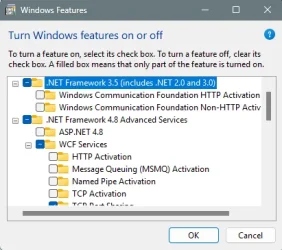
So I have an idea what is causing the .NET update failure...I think it's related to the .NET 3.5 Framework setting being turned on.

I found a reference to that framework and it's changed relationship with 26H2...


.NET Framework 3.5 (Crucial Change for 26H2)

Starting with modern Windows 11 builds (26H1 and later), .NET Framework 3.5 has been completely removed as an optional component from the Windows Features menu. [1, 2]

  • The Old Methods Do Not Work: You cannot check a box in "Turn Windows features on or off", and traditional DISM offline commands using an ISO (/FeatureName:NetFx3) will fail. [1, 2]
  • The New Official Method: Microsoft now requires you to use an official standalone installer package to add .NET 3.5 to the operating system. [1, 2]
How to Install .NET 3.5 on Windows 11 26H2:

Because 26H2 relies on a distinct build branch (Build 26300.x), you need to ensure you apply the matching update package rather than the 26H1 variant (Build 28000), which throws an OS mismatch error 0x81F40001. [1]


  1. Go to the Microsoft Learn .NET 3.5 Windows 11 Guide or check the Microsoft .NET 3.5 SP1 Portal to fetch the standalone .msu or .exe installer explicitly designated for Windows 11 releases. [1, 2]
  2. Run the downloaded installer package.
  3. For enterprise or automated deployments, you can execute a silent installation by opening Command Prompt as an administrator and running: [1]

    cmd

    NDP35SP1-KBxxxxxxx.exe /quiet
    Use code with caution.
  4. Note on OS Updates: If you upgrade your Windows 11 version in the future, .NET Framework 3.5 may not persist across the OS-version upgrade, and you will need to re-run the standalone installer on the new build. [1, 2]

Except...that on my systems, and obviously yours as well, the .NET 3.5 Framework checkbox has not been completely removed in 26H2.

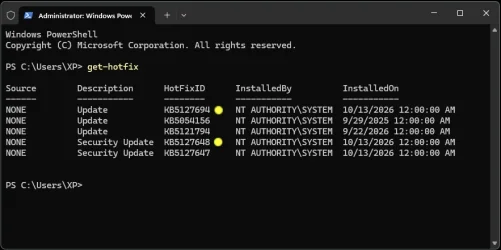
I tested with three different drive images, one that I was currently using today, one from 2 days ago, and one from an In-Place Upgrade I did late this evening.

In all three cases, leaving the .NET 3.5 Framework checkbox unchecked, resulted in a successful install of KB5127694.

I'm not exactly sure why the first two updates installed, and the third and fourth failed, but my suspicions are that some sort of corruption happened to Windows Update after the second update installed...which failed the third and fourth updates.

When you ran the commands to "reset" Windows Update, it cleared up the issue for the third update, but the fourth update kept failing because the .NET Framework 3.5 selection was turned on.

So you could try the combination of .NET 3.5 off, .NET 4.8 on, reboot, run Windows Update.

If it fails again, I would suggest following @Ghot's suggestion of an In-Place Upgrade in post #8.

You should not be getting errors when using the Windows Update Troubleshooter.

However, the Get Help app must be installed in order to run it.

Are you sure? I currently run Windows 11 26H2 26300.9550 and Microsoft .NET framework 3.5 is still available in Windows Features and I have it enabled. If it will be removed it will screw many old applications using it including good old DirectX 9.0c runtime. This would mean that older games and video applications depending on DirectX 9.0c would stop working! Let's hope it won't be removed as long as we already have it and it is enabled. Or that good fellow Winaero will figure out how to get it back.

To the OP: If you don't have any old games or old applications using .NET 3.5 you can disable it. If you have, just ignore that specific update. A future update to .NET 3.5 framework will render that obsolete anyway.
 

My Computers My Computers

  • At a glance

    Windows 11 Pro 23H2 (7584), 26H2 (9711)Mobile DualCore Intel Core 2 Duo T7250, 2000 MHz4GBMobile Intel(R) GMA 4500M (Mobile 4 series)
    OS
    Windows 11 Pro 23H2 (7584), 26H2 (9711)
    Computer type
    Laptop
    Manufacturer/Model
    Acer Extensa 5630EZ
    CPU
    Mobile DualCore Intel Core 2 Duo T7250, 2000 MHz
    Motherboard
    Acer Extensa 5630
    Memory
    4GB
    Graphics Card(s)
    Mobile Intel(R) GMA 4500M (Mobile 4 series)
    Sound Card
    Realtek ALC268 @ Intel 82801IB ICH9 - High Definition Audio Controller
    Monitor(s) Displays
    1
    Screen Resolution
    1280x800
    Hard Drives
    Samsung SSD 850 EVO 250GB SATA Device (250 GB, SATA-III)
    Internet Speed
    802.11g wireless 54 Mbps
    Browser
    MICROSOFT EDGE
    Antivirus
    WINDOWS DEFENDER
    Other Info
    Legacy MBR installation, no TPM, no Secure Boot, no WDDM 2.0 graphics drivers, no SSE4.2, cannot get more unsupported ;) This is only my test laptop. I had installed Windows 11 here before upgrading my main PC. For my main PC I use everyday see my 2nd system specs.
  • At a glance

    Windows 11 Pro 26H2 (build 26300.9711)Intel Core-i7 3770 3.40GHz s1155 (3rd generat...2x Kingston Hyper-X Blu 8GB DDR3-1600GIGABYTE GeForce RTX 3050 WINDFORCE OC V2 6GB...
    Operating System
    Windows 11 Pro 26H2 (build 26300.9711)
    Computer type
    PC/Desktop
    Manufacturer/Model
    Custom-built PC
    CPU
    Intel Core-i7 3770 3.40GHz s1155 (3rd generation)
    Motherboard
    Asus P8H61 s1155 ATX
    Memory
    2x Kingston Hyper-X Blu 8GB DDR3-1600
    Graphics card(s)
    GIGABYTE GeForce RTX 3050 WINDFORCE OC V2 6GB (GV-N3050WF2OCV2-6GD)
    Sound Card
    Realtek HD audio (ALC887)
    Monitor(s) Displays
    Sony Bravia KDL-19L4000 19" LCD TV via VGA
    Screen Resolution
    1440x900 32-bit 60Hz
    Hard Drives
    WD Blue SA510 2.5 1000GB SSD as system disk, Western Digital Caviar Purple 4TB SATA III (WD40PURZ) as second
    PSU
    Thermaltake Litepower RGB 550W Full Wired
    Case
    SUPERCASE MIDI-TOWER
    Cooling
    Deepcool Gamma Archer CPU cooler, 1x 8cm fan at the back
    Keyboard
    Mitsumi 101-key PS/2
    Mouse
    Microsoft Compact Optical Mouse
    Internet Speed
    802.11ac 5GHz wireless 260Mpbs
    Browser
    Microsoft Edge, Mozilla Firefox
    Antivirus
    Microsoft Windows Defender
    Other Info
    Legacy BIOS (MBR) installation, no TPM, no Secure Boot, WDDM 3.0 graphics drivers, WEI score 7.4
Right, just tried unchecking NET 3.5, followed by retrying KB5127694, and rebooted.

Still same message, didn't seem to make a difference.
 

My Computer My Computer

At a glance

Windows 11 Home 26H2 26300.9711
OS
Windows 11 Home 26H2 26300.9711
Computer type
PC/Desktop
Manufacturer/Model
HP
Then go to the next suggested step...
 

My Computer My Computer

At a glance

Windows 11 Pro 26H2
OS
Windows 11 Pro 26H2
Computer type
Laptop
Manufacturer/Model
Toshiba
Antivirus
Defender

My Computer My Computer

At a glance

Windows 11 Home 26H2 26300.9711
OS
Windows 11 Home 26H2 26300.9711
Computer type
PC/Desktop
Manufacturer/Model
HP
Post #20
 

My Computer My Computer

At a glance

Windows 11 Pro 26H2
OS
Windows 11 Pro 26H2
Computer type
Laptop
Manufacturer/Model
Toshiba
Antivirus
Defender
OK, so a brief lookup of KB5127694 indicates that it applies to 26H2.
I'm not an expert but I would imaging it might not be applicable to "25H2" or older builds?

FWIW - I'm on 26H2 and it installed OK!
 

My Computer My Computer

At a glance

Win11 Pro 25H2 Latest GA buildIntel(R) Core(TM) i9-14900KF 3.20 GHzG.Skill DDR5-5600 / PC5-44800 DDR5 SDRAM UDIMMGIGABYTE GeForce RTX 4070 Ti WINDFORCE OC 12G...
OS
Win11 Pro 25H2 Latest GA build
Computer type
PC/Desktop
Manufacturer/Model
Powerspec
CPU
Intel(R) Core(TM) i9-14900KF 3.20 GHz
Motherboard
MSI PRO Z690-A WIFI (latest BIOS)
Memory
G.Skill DDR5-5600 / PC5-44800 DDR5 SDRAM UDIMM
Graphics Card(s)
GIGABYTE GeForce RTX 4070 Ti WINDFORCE OC 12G (GV-N407TWF3OC-12GD)
Sound Card
OnBoard
Monitor(s) Displays
Dell - various (3)
Screen Resolution
1920x1080
Hard Drives
SSD/HDD/NVME
PSU
850 Watt 80+ Gold Modular
Case
PowerSpec/Lian Li ATX 205 Mesh
Cooling
Coolermaster MASTERLIQUID ML240L V2 RGB
Keyboard
Logi MX Keys S
Mouse
MX Master 3S
Internet Speed
600 mbps
Browser
various (Opera, Vivaldi, Edge, Brave, Chrome)
Antivirus
anitmalwarebytes; superantispyware; defender
Other Info
Windows Feature Experience Pack 1000.26100.36.0
Back
Top Bottom