@mrmatt
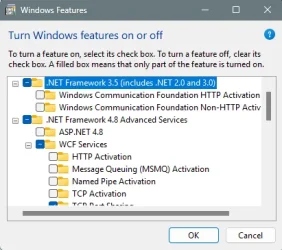
So I have an idea what is causing the .NET update failure...I think it's related to the .NET 3.5 Framework setting being turned on.
I found a reference to that framework and it's changed relationship with 26H2...
.NET Framework 3.5 (Crucial Change for 26H2)
Starting with modern Windows 11 builds (26H1 and later), .NET Framework 3.5 has been completely removed as an optional component from the Windows Features menu. [1, 2]
- The Old Methods Do Not Work: You cannot check a box in "Turn Windows features on or off", and traditional DISM offline commands using an ISO (/FeatureName:NetFx3) will fail. [1, 2]
- The New Official Method: Microsoft now requires you to use an official standalone installer package to add .NET 3.5 to the operating system. [1, 2]
How to Install .NET 3.5 on Windows 11 26H2:
Because 26H2 relies on a distinct build branch (Build 26300.x), you need to ensure you apply the matching update package rather than the 26H1 variant (Build 28000), which throws an OS mismatch error 0x81F40001. [1]
- Go to the Microsoft Learn .NET 3.5 Windows 11 Guide or check the Microsoft .NET 3.5 SP1 Portal to fetch the standalone .msu or .exe installer explicitly designated for Windows 11 releases. [1, 2]
- Run the downloaded installer package.
- For enterprise or automated deployments, you can execute a silent installation by opening Command Prompt as an administrator and running: [1]
cmd
NDP35SP1-KBxxxxxxx.exe /quiet
Use code with caution.
- Note on OS Updates: If you upgrade your Windows 11 version in the future, .NET Framework 3.5 may not persist across the OS-version upgrade, and you will need to re-run the standalone installer on the new build. [1, 2]
Except...that on my systems, and obviously yours as well, the .NET 3.5 Framework checkbox
has not been completely removed in 26H2.
I tested with three different drive images, one that I was currently using today, one from 2 days ago, and one from an In-Place Upgrade I did late this evening.
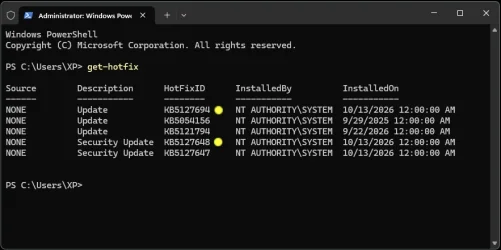
In all three cases, leaving the .NET 3.5 Framework checkbox unchecked, resulted in a successful install of KB5127694.
I'm not exactly sure why the first two updates installed, and the third and fourth failed, but my suspicions are that some sort of corruption happened to Windows Update after the second update installed...which failed the third and fourth updates.
When you ran the commands to "reset" Windows Update, it cleared up the issue for the third update, but the fourth update kept failing because the .NET Framework 3.5 selection was turned on.
So you could try the combination of .NET 3.5 off, .NET 4.8 on, reboot, run Windows Update.
If it fails again, I would suggest following
@Ghot's suggestion of an In-Place Upgrade in post #8.
You should not be getting errors when using the Windows Update Troubleshooter.
However, the Get Help app must be installed in order to run it.