Patch Tuesday update problem


mrmatt

Member
Member
Local time
4:17 AM
Posts
120
Location
UK
OS
Windows 11 Home 26H2 26300.9711
Have tried running October Patch Tuesday updates.

KB 5130035 has installed.
KB 890830 has installed.

However, for some reason the following haven't:

KB 5127694
KB 5127648


When attempting them, the following message has come up on the screen:

"Something didn't go as planned. No need to worry - undoing changes. Please keep your computer on.'


(I didn't bother with the preview update issued last month, don't whether that's related)


KB 5127694 has been attempted twice now. On the second try, that was when I was informed of KB 5127648 as well.


Can anyone help please ?

Thank you.
 

My Computer My Computer

At a glance

Windows 11 Home 26H2 26300.9711
OS
Windows 11 Home 26H2 26300.9711
Computer type
PC/Desktop
Manufacturer/Model
HP

My Computers My Computers

  • At a glance

    Win 11 Home ♦♦♦26300.9711 ♦♦♦♦♦♦♦26H2AMD Ryzen 7 3700XG.Skill (F4-3200C14D-16GTZKW)EVGA RTX 2070 (08G-P4-2171-KR)
    OS
    Win 11 Home ♦♦♦26300.9711 ♦♦♦♦♦♦♦26H2
    Computer type
    PC/Desktop
    Manufacturer/Model
    Built by Ghot® [May 2020]
    CPU
    AMD Ryzen 7 3700X
    Motherboard
    Asus Pro WS X570-ACE (BIOS 5302)
    Memory
    G.Skill (F4-3200C14D-16GTZKW)
    Graphics Card(s)
    EVGA RTX 2070 (08G-P4-2171-KR)
    Sound Card
    Realtek ALC1220P / ALC S1220A
    Monitor(s) Displays
    Dell U3011 30"
    Screen Resolution
    2560 x 1600
    Hard Drives
    2x Samsung 860 EVO 500GB,
    WD 4TB Black FZBX - SATA III,
    WD 8TB Black FZBX - SATA III,
    DRW-24B1ST CD/DVD Burner
    PSU
    PC Power & Cooling 750W Quad EPS12V
    Case
    Cooler Master ATCS 840 Tower
    Cooling
    CM Hyper 212 EVO (push/pull)
    Keyboard
    Ducky DK9008 Shine II Blue LED
    Mouse
    Logitech Optical M-100
    Internet Speed
    300/300
    Browser
    Firefox (latest)
    Antivirus
    Bitdefender Total Security
    Other Info
    Speakers: Klipsch Pro Media 2.1
  • At a glance

    Windows XP Pro 32bit w/SP3AMD Athlon 64 X2 5000+ (OC'd @ 3.2Ghz)TWIN2X2048-6400C4DHX (2 x 1GB, DDR2 800)EVGA 256-P2-N758-TR GeForce 8600GT SSC
    Operating System
    Windows XP Pro 32bit w/SP3
    Computer type
    PC/Desktop
    Manufacturer/Model
    Built by Ghot® (not in use)
    CPU
    AMD Athlon 64 X2 5000+ (OC'd @ 3.2Ghz)
    Motherboard
    ASUS M2N32-SLI Deluxe Wireless Edition
    Memory
    TWIN2X2048-6400C4DHX (2 x 1GB, DDR2 800)
    Graphics card(s)
    EVGA 256-P2-N758-TR GeForce 8600GT SSC
    Sound Card
    Onboard
    Monitor(s) Displays
    ViewSonic G90FB Black 19" Professional (CRT)
    Screen Resolution
    up to 2048 x 1536
    Hard Drives
    WD 36GB 10,000rpm Raptor SATA
    Seagate 80GB 7200rpm SATA
    Lite-On LTR-52246S CD/RW
    Lite-On LH-18A1P CD/DVD Burner
    PSU
    PC Power & Cooling Silencer 750 Quad EPS12V
    Case
    Generic Beige case, 80mm fans
    Cooling
    ZALMAN 9500A 92mm CPU Cooler
    Keyboard
    Logitech Classic Keybooard 200
    Mouse
    Logitech Optical M-BT96a
    Internet Speed
    300/300
    Browser
    Firefox 3.x ??
    Antivirus
    Symantec (Norton)
    Other Info
    Still assembled, still runs. Haven't turned it on for 15 years?
What error did you get? You can find update error number at settings>windows update>update history
 

My Computers My Computers

  • At a glance

    Windows 11 Pro 26H2 26300.9457i9-10900 10 core 20 threads32 gbnone-Intel UHD Graphics 630
    OS
    Windows 11 Pro 26H2 26300.9457
    Computer type
    PC/Desktop
    Manufacturer/Model
    Dell Optiplex 7080
    CPU
    i9-10900 10 core 20 threads
    Motherboard
    DELL 0J37VM
    Memory
    32 gb
    Graphics Card(s)
    none-Intel UHD Graphics 630
    Sound Card
    Integrated Realtek
    Monitor(s) Displays
    Benq 27
    Screen Resolution
    2560x1440
    Hard Drives
    2x1tb Solidigm m.2 nvme /External drives 512gb Samsung m.2 sata+2tb Kingston m2.nvme
    PSU
    500w
    Case
    MT
    Cooling
    Dell Premium
    Keyboard
    Logitech wired
    Mouse
    Logitech wireless
    Internet Speed
    so slow I'm too embarrassed to tell
    Browser
    #1 Edge #2 Firefox
    Antivirus
    Defender+MWB Premium
  • At a glance

    Windows 11 Pro 24H2 26200.9457AMD Ryzen 7 6800U32 gbintegrated
    Operating System
    Windows 11 Pro 24H2 26200.9457
    Computer type
    PC/Desktop
    Manufacturer/Model
    Beelink Mini PC SER5
    CPU
    AMD Ryzen 7 6800U
    Memory
    32 gb
    Graphics card(s)
    integrated
    Sound Card
    integrated
    Monitor(s) Displays
    Benq 27
    Screen Resolution
    2560x1440
    Hard Drives
    1TB Crucial nvme
    Keyboard
    Logitech wired
    Mouse
    Logitech wireless
    Internet Speed
    still too embarrassed to tell
    Browser
    Firefox
    Antivirus
    Defender
  • System 3 is non compliant Dell 9020 i7-4770/24gb ram Win11 PRO 26200.9457
However, for some reason the following haven't:

KB 5127694
KB 5127648

Try the Troubleshooter

1791932292332.webp
 

My Computers My Computers

  • At a glance

    Win 11 Pro 26H2 26300.9711Intel® Core™ i7-14700KG.SKILL Ripjaws S5 Series 64GB (2 x 32GB) DDR5ASUS GeForce RTX 4070 Super 12GB
    OS
    Win 11 Pro 26H2 26300.9711
    Computer type
    PC/Desktop
    Manufacturer/Model
    Self Built
    CPU
    Intel® Core™ i7-14700K
    Motherboard
    ASUS TUF Z690-PLUS WIFI (BIOS 4601)
    Memory
    G.SKILL Ripjaws S5 Series 64GB (2 x 32GB) DDR5
    Graphics Card(s)
    ASUS GeForce RTX 4070 Super 12GB
    Sound Card
    Sound Blaster AE-5 Plus
    Monitor(s) Displays
    ASUS TUF Gaming 27" 2K HDR Gaming
    Screen Resolution
    2560 x 1440
    Hard Drives
    Samsung 990 Pro 1TB NVMe (Win 11 25H2)
    SK hynix P41 500GB NVMe
    SK hynix P41 2TB NVMe (x3)
    Crucial P3 Plus 4TB
    PSU
    Corsair RM850x Shift
    Case
    Antec Dark Phantom DP502 FLUX
    Cooling
    Corsair Nautilus 360 RS AIO
    Keyboard
    Logitech MK 320
    Mouse
    Razer Basilisk V3
    Internet Speed
    750Mbs
    Browser
    Firefox
    Antivirus
    Winows Security
    Other Info
    MR 8.1 Home
  • At a glance

    Win 11 Pro 25H2 26300.9711Intel Core i5-1140064 GB DDR4MSI GeForce RTX 3060 Ventus 2X 12GB
    Operating System
    Win 11 Pro 25H2 26300.9711
    Computer type
    PC/Desktop
    Manufacturer/Model
    Self Built
    CPU
    Intel Core i5-11400
    Motherboard
    Asus TUF Gaming Z590 Plus WiFi (BIOS 2803)
    Memory
    64 GB DDR4
    Graphics card(s)
    MSI GeForce RTX 3060 Ventus 2X 12GB
    Sound Card
    SoundBlaster Audigy Fx V2
    Monitor(s) Displays
    Samsung F27T350
    Screen Resolution
    1920x1080
    Hard Drives
    Samsung 980 Pro 1TB
    Samsung 970 EVO Plus 2TB
    Samsung 870 EVO 500GB SSD
    PSU
    Corsair HX750
    Case
    Cougar MX330-G Window
    Cooling
    Thermalright Frozen Edge 240 Black AIO
    Internet Speed
    350Mbps
    Browser
    Firefox
    Antivirus
    Windows Security
  • System Three
    Win 11 Pro 25H2 26300.9711
    ASUS PRIME Z370-P II BIOS 3004 7/12/21
    Intel Core i7-8700 CPU @ 3.20GHz
    32GB DDR4 RAM (4x8)
    Samsung 980 Pro 500 GB
    SK hynix P41 1 TB
    EVGA RTX 2060 (used)
    iGPU Intel UHD Graphics 630 (backup)
    Cooler Master Hyper 212
    Mid-Tower Desktop
I did try the troubleshooter and for some reason couldn't even do that.

The error message number was: 0x800f0922.

Just done a DISM /online /cleanup-image /restorehealth. Followed by a sfc /scannow (as advised by Google). Then a restart.

Also as recommended by Google:

Win + R, appwiz.cpl. Then turn Win Features on (Net Framework 3.5, and Net Framework 4.8). Which I've just done.

Now I'm having another go at applying the two updates (KB 5127694 and KB 5127648) again.
 

My Computer My Computer

At a glance

Windows 11 Home 26H2 26300.9711
OS
Windows 11 Home 26H2 26300.9711
Computer type
PC/Desktop
Manufacturer/Model
HP
Image2.webp
 

My Computers My Computers

  • At a glance

    Win 11 Home ♦♦♦26300.9711 ♦♦♦♦♦♦♦26H2AMD Ryzen 7 3700XG.Skill (F4-3200C14D-16GTZKW)EVGA RTX 2070 (08G-P4-2171-KR)
    OS
    Win 11 Home ♦♦♦26300.9711 ♦♦♦♦♦♦♦26H2
    Computer type
    PC/Desktop
    Manufacturer/Model
    Built by Ghot® [May 2020]
    CPU
    AMD Ryzen 7 3700X
    Motherboard
    Asus Pro WS X570-ACE (BIOS 5302)
    Memory
    G.Skill (F4-3200C14D-16GTZKW)
    Graphics Card(s)
    EVGA RTX 2070 (08G-P4-2171-KR)
    Sound Card
    Realtek ALC1220P / ALC S1220A
    Monitor(s) Displays
    Dell U3011 30"
    Screen Resolution
    2560 x 1600
    Hard Drives
    2x Samsung 860 EVO 500GB,
    WD 4TB Black FZBX - SATA III,
    WD 8TB Black FZBX - SATA III,
    DRW-24B1ST CD/DVD Burner
    PSU
    PC Power & Cooling 750W Quad EPS12V
    Case
    Cooler Master ATCS 840 Tower
    Cooling
    CM Hyper 212 EVO (push/pull)
    Keyboard
    Ducky DK9008 Shine II Blue LED
    Mouse
    Logitech Optical M-100
    Internet Speed
    300/300
    Browser
    Firefox (latest)
    Antivirus
    Bitdefender Total Security
    Other Info
    Speakers: Klipsch Pro Media 2.1
  • At a glance

    Windows XP Pro 32bit w/SP3AMD Athlon 64 X2 5000+ (OC'd @ 3.2Ghz)TWIN2X2048-6400C4DHX (2 x 1GB, DDR2 800)EVGA 256-P2-N758-TR GeForce 8600GT SSC
    Operating System
    Windows XP Pro 32bit w/SP3
    Computer type
    PC/Desktop
    Manufacturer/Model
    Built by Ghot® (not in use)
    CPU
    AMD Athlon 64 X2 5000+ (OC'd @ 3.2Ghz)
    Motherboard
    ASUS M2N32-SLI Deluxe Wireless Edition
    Memory
    TWIN2X2048-6400C4DHX (2 x 1GB, DDR2 800)
    Graphics card(s)
    EVGA 256-P2-N758-TR GeForce 8600GT SSC
    Sound Card
    Onboard
    Monitor(s) Displays
    ViewSonic G90FB Black 19" Professional (CRT)
    Screen Resolution
    up to 2048 x 1536
    Hard Drives
    WD 36GB 10,000rpm Raptor SATA
    Seagate 80GB 7200rpm SATA
    Lite-On LTR-52246S CD/RW
    Lite-On LH-18A1P CD/DVD Burner
    PSU
    PC Power & Cooling Silencer 750 Quad EPS12V
    Case
    Generic Beige case, 80mm fans
    Cooling
    ZALMAN 9500A 92mm CPU Cooler
    Keyboard
    Logitech Classic Keybooard 200
    Mouse
    Logitech Optical M-BT96a
    Internet Speed
    300/300
    Browser
    Firefox 3.x ??
    Antivirus
    Symantec (Norton)
    Other Info
    Still assembled, still runs. Haven't turned it on for 15 years?
Just tried to apply those two updates again.

And got the same message as before ("Something didn't go as planned....................")

Couldn't even run the Windows Update troubleshooter again.


Don't know what to do now.

Going to have to go to bed though.

Thanks.
 

My Computer My Computer

At a glance

Windows 11 Home 26H2 26300.9711
OS
Windows 11 Home 26H2 26300.9711
Computer type
PC/Desktop
Manufacturer/Model
HP
@mrmatt

If nothing else works, there's always this... (use Option Two, the ISO method)


It just fixes Windows. You won't lose any files , programs, etc.
 

My Computers My Computers

  • At a glance

    Win 11 Home ♦♦♦26300.9711 ♦♦♦♦♦♦♦26H2AMD Ryzen 7 3700XG.Skill (F4-3200C14D-16GTZKW)EVGA RTX 2070 (08G-P4-2171-KR)
    OS
    Win 11 Home ♦♦♦26300.9711 ♦♦♦♦♦♦♦26H2
    Computer type
    PC/Desktop
    Manufacturer/Model
    Built by Ghot® [May 2020]
    CPU
    AMD Ryzen 7 3700X
    Motherboard
    Asus Pro WS X570-ACE (BIOS 5302)
    Memory
    G.Skill (F4-3200C14D-16GTZKW)
    Graphics Card(s)
    EVGA RTX 2070 (08G-P4-2171-KR)
    Sound Card
    Realtek ALC1220P / ALC S1220A
    Monitor(s) Displays
    Dell U3011 30"
    Screen Resolution
    2560 x 1600
    Hard Drives
    2x Samsung 860 EVO 500GB,
    WD 4TB Black FZBX - SATA III,
    WD 8TB Black FZBX - SATA III,
    DRW-24B1ST CD/DVD Burner
    PSU
    PC Power & Cooling 750W Quad EPS12V
    Case
    Cooler Master ATCS 840 Tower
    Cooling
    CM Hyper 212 EVO (push/pull)
    Keyboard
    Ducky DK9008 Shine II Blue LED
    Mouse
    Logitech Optical M-100
    Internet Speed
    300/300
    Browser
    Firefox (latest)
    Antivirus
    Bitdefender Total Security
    Other Info
    Speakers: Klipsch Pro Media 2.1
  • At a glance

    Windows XP Pro 32bit w/SP3AMD Athlon 64 X2 5000+ (OC'd @ 3.2Ghz)TWIN2X2048-6400C4DHX (2 x 1GB, DDR2 800)EVGA 256-P2-N758-TR GeForce 8600GT SSC
    Operating System
    Windows XP Pro 32bit w/SP3
    Computer type
    PC/Desktop
    Manufacturer/Model
    Built by Ghot® (not in use)
    CPU
    AMD Athlon 64 X2 5000+ (OC'd @ 3.2Ghz)
    Motherboard
    ASUS M2N32-SLI Deluxe Wireless Edition
    Memory
    TWIN2X2048-6400C4DHX (2 x 1GB, DDR2 800)
    Graphics card(s)
    EVGA 256-P2-N758-TR GeForce 8600GT SSC
    Sound Card
    Onboard
    Monitor(s) Displays
    ViewSonic G90FB Black 19" Professional (CRT)
    Screen Resolution
    up to 2048 x 1536
    Hard Drives
    WD 36GB 10,000rpm Raptor SATA
    Seagate 80GB 7200rpm SATA
    Lite-On LTR-52246S CD/RW
    Lite-On LH-18A1P CD/DVD Burner
    PSU
    PC Power & Cooling Silencer 750 Quad EPS12V
    Case
    Generic Beige case, 80mm fans
    Cooling
    ZALMAN 9500A 92mm CPU Cooler
    Keyboard
    Logitech Classic Keybooard 200
    Mouse
    Logitech Optical M-BT96a
    Internet Speed
    300/300
    Browser
    Firefox 3.x ??
    Antivirus
    Symantec (Norton)
    Other Info
    Still assembled, still runs. Haven't turned it on for 15 years?
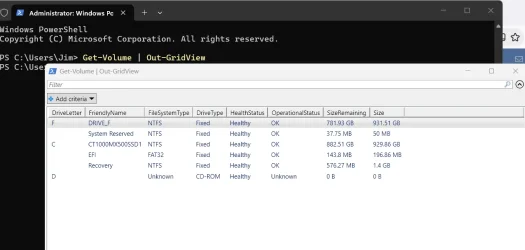
Could be not enough space on the EFI partition.

Open an elevated (Run as administrator) PowerShell prompt, and copy/paste and run the following command...

Get-Volume | Out-GridView

Take a screenshot of the grid view output, and post.

Should look something like this...

Screenshot 2026-10-13 172524.webp
 
Last edited:

My Computer My Computer

At a glance

Windows 11 Pro 26H2
OS
Windows 11 Pro 26H2
Computer type
Laptop
Manufacturer/Model
Toshiba
Antivirus
Defender
Could be not enough space on the EFI partition.

Open an elevated (Run as administrator) PowerShell prompt, and copy/paste and run the following command...

Get-Volume | Out-GridView

Take a screenshot of the grid view output, and post.

Should look something like this...

View attachment 186530


As requested:

1791937600686.webp
 

My Computer My Computer

At a glance

Windows 11 Home 26H2 26300.9711
OS
Windows 11 Home 26H2 26300.9711
Computer type
PC/Desktop
Manufacturer/Model
HP
Open an elevated (Run as administrator) Command prompt, and copy/paste run each command...one by one -

net stop bits
net stop wuauserv
net stop cryptsvc
net stop msiserver

ren C:\Windows\SoftwareDistribution SoftwareDistribution.old
ren C:\Windows\System32\catroot2 Catroot2.old

net start bits
net start wuauserv
net start cryptsvc
net start msiserver


When completed, reboot and run Windows Update again.
 

My Computer My Computer

At a glance

Windows 11 Pro 26H2
OS
Windows 11 Pro 26H2
Computer type
Laptop
Manufacturer/Model
Toshiba
Antivirus
Defender
Update:

I've just managed to install the main security update (KB 5127648), although that involved only selecting that one, not the other one at the same time.

Beforehand I checked services.msc, to see if BITS and Windows Update were started (I think I had to start BITS)

The other one wil have to be applied later (KB 5127694).
 

My Computer My Computer

At a glance

Windows 11 Home 26H2 26300.9711
OS
Windows 11 Home 26H2 26300.9711
Computer type
PC/Desktop
Manufacturer/Model
HP
Open an elevated (Run as administrator) Command prompt, and copy/paste run each command...one by one -

net stop bits
net stop wuauserv
net stop cryptsvc
net stop msiserver

ren C:\Windows\SoftwareDistribution SoftwareDistribution.old
ren C:\Windows\System32\catroot2 Catroot2.old

net start bits
net start wuauserv
net start cryptsvc
net start msiserver


When completed, reboot and run Windows Update again.


1791939517067.webp
 

My Computer My Computer

At a glance

Windows 11 Home 26H2 26300.9711
OS
Windows 11 Home 26H2 26300.9711
Computer type
PC/Desktop
Manufacturer/Model
HP
Again just tried to re-install KB 5127694 (the NET Framework update).

Same messages as before (0x800f0922), and "Something didn't go as planned..................."


At least the other update (the main security update is applied).

Not sure what to do now though. As long as I am able to update the virus protection definitions (which I can via Privacy and Security).

I will have to leave it here for now as it is getting late.

If someone can advise though.

Thank you all very much for your help so far.
 

My Computer My Computer

At a glance

Windows 11 Home 26H2 26300.9711
OS
Windows 11 Home 26H2 26300.9711
Computer type
PC/Desktop
Manufacturer/Model
HP
Win + R, appwiz.cpl. Then turn Win Features on (Net Framework 3.5, and Net Framework 4.8). Which I've just done.
Try unchecking the .Net Framework entries, rebooting, and then checking them again.

Then run Windows Update.
 

My Computer My Computer

At a glance

Windows 11 Pro 26H2
OS
Windows 11 Pro 26H2
Computer type
Laptop
Manufacturer/Model
Toshiba
Antivirus
Defender
Try unchecking the .Net Framework entries, rebooting, and then checking them again.

Then run Windows Update.

I am already in the process of doing that.
 

My Computer My Computer

At a glance

Windows 11 Home 26H2 26300.9711
OS
Windows 11 Home 26H2 26300.9711
Computer type
PC/Desktop
Manufacturer/Model
HP
Now trying again. Will try and let you know outcome.

Could this be anything to do with the earlier update that was applied successfully ? (KB5130035, one of the first to be applied)
 

My Computer My Computer

At a glance

Windows 11 Home 26H2 26300.9711
OS
Windows 11 Home 26H2 26300.9711
Computer type
PC/Desktop
Manufacturer/Model
HP
OK, so just received the "Something didn't go as planned..................." message (as before).

Also the same install error message in Windows Update (0x800f0922).

Right, sorry but I think I'll have to leave it there for now anyway as I'm tired, and a busy day ahead.

Any suggestions gratefully received though.

Thank you.
 

My Computer My Computer

At a glance

Windows 11 Home 26H2 26300.9711
OS
Windows 11 Home 26H2 26300.9711
Computer type
PC/Desktop
Manufacturer/Model
HP
I'm following the same steps that I gave you, and noticing some issues with 5127694 as well.

No other updates were installed prior, so I don't think that is the issue.

Windows Update was working fine before this.

I'll hold off until I can do a deeper dive.
 

My Computer My Computer

At a glance

Windows 11 Pro 26H2
OS
Windows 11 Pro 26H2
Computer type
Laptop
Manufacturer/Model
Toshiba
Antivirus
Defender
Back
Top Bottom