PC doesn't meet win 11 system requirements error during install wizard


I also had a personal experience. Now that you mentioned it, my other drives are GPT because they are larger than 2TB and I want a single partition occupying the whole space. So it doesn't make any difference if they are Windows drives or data drives. As long as you have two or more GPT drives, a clean installation or upgrade fails. There is no point arguing, just disconnect the other drives and check for yourself. Installation or upgrade will succeed. Been there done that. That's what this forum is for. To share experiences and help each other. Since we already discovered a bug and warn others about it, there is no point trying to prove us wrong. Just follow our advice, just in case. I agree that it might not be applicable to all computers, but I would take any precaution just in case.
 

My Computers My Computers

  • At a glance

    Windows 11 Pro 23H2 (5699), 25H2 (8875)Mobile DualCore Intel Core 2 Duo T7250, 2000 MHz4GBMobile Intel(R) GMA 4500M (Mobile 4 series)
    OS
    Windows 11 Pro 23H2 (5699), 25H2 (8875)
    Computer type
    Laptop
    Manufacturer/Model
    Acer Extensa 5630EZ
    CPU
    Mobile DualCore Intel Core 2 Duo T7250, 2000 MHz
    Motherboard
    Acer Extensa 5630
    Memory
    4GB
    Graphics Card(s)
    Mobile Intel(R) GMA 4500M (Mobile 4 series)
    Sound Card
    Realtek ALC268 @ Intel 82801IB ICH9 - High Definition Audio Controller
    Monitor(s) Displays
    1
    Screen Resolution
    1280x800
    Hard Drives
    Samsung SSD 850 EVO 250GB SATA Device (250 GB, SATA-III)
    Internet Speed
    VDSL 50 Mbps
    Browser
    MICROSOFT EDGE
    Antivirus
    WINDOWS DEFENDER
    Other Info
    Legacy MBR installation, no TPM, no Secure Boot, no WDDM 2.0 graphics drivers, no SSE4.2, cannot get more unsupported ;) This is only my test laptop. I had installed Windows 11 here before upgrading my main PC. For my main PC I use everyday see my 2nd system specs.
  • At a glance

    Windows 11 Pro v25H2 (build 26200.8875)Intel Core-i7 3770 3.40GHz s1155 (3rd generat...2x Kingston Hyper-X Blu 8GB DDR3-1600GIGABYTE GeForce RTX 3050 WINDFORCE OC V2 6GB...
    Operating System
    Windows 11 Pro v25H2 (build 26200.8875)
    Computer type
    PC/Desktop
    Manufacturer/Model
    Custom-built PC
    CPU
    Intel Core-i7 3770 3.40GHz s1155 (3rd generation)
    Motherboard
    Asus P8H61 s1155 ATX
    Memory
    2x Kingston Hyper-X Blu 8GB DDR3-1600
    Graphics card(s)
    GIGABYTE GeForce RTX 3050 WINDFORCE OC V2 6GB (GV-N3050WF2OCV2-6GD)
    Sound Card
    Realtek HD audio (ALC887)
    Monitor(s) Displays
    Sony Bravia KDL-19L4000 19" LCD TV via VGA
    Screen Resolution
    1440x900 32-bit 60Hz
    Hard Drives
    WD Blue SA510 2.5 1000GB SSD as system disk, Western Digital Caviar Purple 4TB SATA III (WD40PURZ) as second
    PSU
    Thermaltake Litepower RGB 550W Full Wired
    Case
    SUPERCASE MIDI-TOWER
    Cooling
    Deepcool Gamma Archer CPU cooler, 1x 8cm fan at the back
    Keyboard
    Mitsumi 101-key PS/2
    Mouse
    Sunnyline OptiEye PS/2
    Internet Speed
    100Mbps
    Browser
    Microsoft Edge, Mozilla Firefox
    Antivirus
    Microsoft Windows Defender
    Other Info
    Legacy BIOS (MBR) installation, no TPM, no Secure Boot, WDDM 3.0 graphics drivers, WEI score 7.4
I fixed that problem. Cost 5Gs.
 

My Computer My Computer

At a glance

windows 11pro
OS
windows 11pro
Computer type
PC/Desktop
If you run setupprep.exe /product server from the DVD (it's in the /sources directory), it should install without an issue. It will show that it's installing Windows Server, but it's not. Just a helpful trick for installing on hardware that technically isn't supported.
 

My Computers My Computers

  • At a glance

    Windows 11 ProIntel Core i7 10700KIntel UHD Graphics 630
    OS
    Windows 11 Pro
    Computer type
    PC/Desktop
    Manufacturer/Model
    built myself
    CPU
    Intel Core i7 10700K
    Motherboard
    MSI Z490-A Pro
    Graphics Card(s)
    Intel UHD Graphics 630
    Antivirus
    Microsoft Defender
    Other Info
    TPM 2.0
  • At a glance

    Windows 11 ProIntel Core i7 6800KNVIDIA GeForce GTX 1050 Ti
    Operating System
    Windows 11 Pro
    Computer type
    PC/Desktop
    Manufacturer/Model
    built myself
    CPU
    Intel Core i7 6800K
    Motherboard
    Asus X99-E
    Graphics card(s)
    NVIDIA GeForce GTX 1050 Ti
    Antivirus
    Microsoft Defender
    Other Info
    no TPM
The setup.exe in the root folder is the "new" setup version. The setupprep.exe in the sources folder is the old setup. I always use the setup /product server (from the root folder) to upgrade. I always works, provided I take all precautions, that is update all drivers in advance, have only my Windows disk connected, disable most devices, disable all startup applications and non-Microsoft services and of course make sure I am disconnected from the internet until completed. If any computer has a third-party antivirus, antimalware or firewall, I make sure I disable them all at least until restart or permanently. Also if there are any customization utilities installed (Open Shell, Explorer Patcher, Mica for Everyone, StartIsBack etc) they all must be disabled or uninstalled.
 

My Computers My Computers

  • At a glance

    Windows 11 Pro 23H2 (5699), 25H2 (8875)Mobile DualCore Intel Core 2 Duo T7250, 2000 MHz4GBMobile Intel(R) GMA 4500M (Mobile 4 series)
    OS
    Windows 11 Pro 23H2 (5699), 25H2 (8875)
    Computer type
    Laptop
    Manufacturer/Model
    Acer Extensa 5630EZ
    CPU
    Mobile DualCore Intel Core 2 Duo T7250, 2000 MHz
    Motherboard
    Acer Extensa 5630
    Memory
    4GB
    Graphics Card(s)
    Mobile Intel(R) GMA 4500M (Mobile 4 series)
    Sound Card
    Realtek ALC268 @ Intel 82801IB ICH9 - High Definition Audio Controller
    Monitor(s) Displays
    1
    Screen Resolution
    1280x800
    Hard Drives
    Samsung SSD 850 EVO 250GB SATA Device (250 GB, SATA-III)
    Internet Speed
    VDSL 50 Mbps
    Browser
    MICROSOFT EDGE
    Antivirus
    WINDOWS DEFENDER
    Other Info
    Legacy MBR installation, no TPM, no Secure Boot, no WDDM 2.0 graphics drivers, no SSE4.2, cannot get more unsupported ;) This is only my test laptop. I had installed Windows 11 here before upgrading my main PC. For my main PC I use everyday see my 2nd system specs.
  • At a glance

    Windows 11 Pro v25H2 (build 26200.8875)Intel Core-i7 3770 3.40GHz s1155 (3rd generat...2x Kingston Hyper-X Blu 8GB DDR3-1600GIGABYTE GeForce RTX 3050 WINDFORCE OC V2 6GB...
    Operating System
    Windows 11 Pro v25H2 (build 26200.8875)
    Computer type
    PC/Desktop
    Manufacturer/Model
    Custom-built PC
    CPU
    Intel Core-i7 3770 3.40GHz s1155 (3rd generation)
    Motherboard
    Asus P8H61 s1155 ATX
    Memory
    2x Kingston Hyper-X Blu 8GB DDR3-1600
    Graphics card(s)
    GIGABYTE GeForce RTX 3050 WINDFORCE OC V2 6GB (GV-N3050WF2OCV2-6GD)
    Sound Card
    Realtek HD audio (ALC887)
    Monitor(s) Displays
    Sony Bravia KDL-19L4000 19" LCD TV via VGA
    Screen Resolution
    1440x900 32-bit 60Hz
    Hard Drives
    WD Blue SA510 2.5 1000GB SSD as system disk, Western Digital Caviar Purple 4TB SATA III (WD40PURZ) as second
    PSU
    Thermaltake Litepower RGB 550W Full Wired
    Case
    SUPERCASE MIDI-TOWER
    Cooling
    Deepcool Gamma Archer CPU cooler, 1x 8cm fan at the back
    Keyboard
    Mitsumi 101-key PS/2
    Mouse
    Sunnyline OptiEye PS/2
    Internet Speed
    100Mbps
    Browser
    Microsoft Edge, Mozilla Firefox
    Antivirus
    Microsoft Windows Defender
    Other Info
    Legacy BIOS (MBR) installation, no TPM, no Secure Boot, WDDM 3.0 graphics drivers, WEI score 7.4
I fixed that problem. Cost 5Gs.
Congratulations! This is the worst solution, abandon hope and just buy a new computer. This is exactly what Microsoft is trying to do. Scare us that our old computer is "useless" and we must replace it ASAP. BS! My current PC (see 2nd system specs) might be only 3rd generation Intel Core-i7, but is must faster than I actually need. I wouldn't call it "useless". It could even play some games with my former nVidia Geforce GTX 1050 Ti. With my new nVidia Geforce RTX 3050 I dare to say it can even play modern games. It might not be in all high or all ultra settings, but I don't care about image quality as in a fast action game nobody can notice the difference between the "high" and "ultra" settings. As I suspect many other posters have a similarly worthy system, so we don't waste our time trying to upgrade it to latest Windows 11 version. Our "obsolete" computers still have 5+ years of life. The more we upgrade the software the more years we add. Until they are really outdated and we can no longer use them for what we need, we would give the same amount of money to buy 5 times faster computer than we can afford today. For example, I kept my old Intel Pentium 4 3GB RAM 250GB HDD 256MB nVidia Geforce FX 5 computer as much as I could. I didn't go to Pentium D, then Core 2 Duo etc. I went directly to my former 3rd generation Intel Core-i3 with 8GB RAM, 500GB mechanical HDD, nVidia Geforce GTS 610, for the same cost I would go to the earlier versions and that was a huge step forward in terms of performance. Since I could not afford changing it again, I gradually upgraded it part by part, and now I have a much faster 3rd generation Core-i7, 16GB RAM, 1TB SSD, Geforce RTX 3050 graphics. This will be "junk" in 10+ years, based on my current needs. Even if sometime there is a version of Windows 11 I cannot upgrade to, I will stick with the latest compatible version and keep Windows Defender updated. Good news is that 25H2 has exactly the same hardware requirements than 24H2, so I already know I can upgrade to it. The 25H2 Enablement Package makes the upgrade even easier since it won't check compatibility, just enable the 25H2 features. According to rumors, unsupported computers might not be able to clean install 25H2 (I don't believe it). Even it this is true, no big deal, just install 24H2 and use the 25H2 Enablement package.
 
Last edited:

My Computers My Computers

  • At a glance

    Windows 11 Pro 23H2 (5699), 25H2 (8875)Mobile DualCore Intel Core 2 Duo T7250, 2000 MHz4GBMobile Intel(R) GMA 4500M (Mobile 4 series)
    OS
    Windows 11 Pro 23H2 (5699), 25H2 (8875)
    Computer type
    Laptop
    Manufacturer/Model
    Acer Extensa 5630EZ
    CPU
    Mobile DualCore Intel Core 2 Duo T7250, 2000 MHz
    Motherboard
    Acer Extensa 5630
    Memory
    4GB
    Graphics Card(s)
    Mobile Intel(R) GMA 4500M (Mobile 4 series)
    Sound Card
    Realtek ALC268 @ Intel 82801IB ICH9 - High Definition Audio Controller
    Monitor(s) Displays
    1
    Screen Resolution
    1280x800
    Hard Drives
    Samsung SSD 850 EVO 250GB SATA Device (250 GB, SATA-III)
    Internet Speed
    VDSL 50 Mbps
    Browser
    MICROSOFT EDGE
    Antivirus
    WINDOWS DEFENDER
    Other Info
    Legacy MBR installation, no TPM, no Secure Boot, no WDDM 2.0 graphics drivers, no SSE4.2, cannot get more unsupported ;) This is only my test laptop. I had installed Windows 11 here before upgrading my main PC. For my main PC I use everyday see my 2nd system specs.
  • At a glance

    Windows 11 Pro v25H2 (build 26200.8875)Intel Core-i7 3770 3.40GHz s1155 (3rd generat...2x Kingston Hyper-X Blu 8GB DDR3-1600GIGABYTE GeForce RTX 3050 WINDFORCE OC V2 6GB...
    Operating System
    Windows 11 Pro v25H2 (build 26200.8875)
    Computer type
    PC/Desktop
    Manufacturer/Model
    Custom-built PC
    CPU
    Intel Core-i7 3770 3.40GHz s1155 (3rd generation)
    Motherboard
    Asus P8H61 s1155 ATX
    Memory
    2x Kingston Hyper-X Blu 8GB DDR3-1600
    Graphics card(s)
    GIGABYTE GeForce RTX 3050 WINDFORCE OC V2 6GB (GV-N3050WF2OCV2-6GD)
    Sound Card
    Realtek HD audio (ALC887)
    Monitor(s) Displays
    Sony Bravia KDL-19L4000 19" LCD TV via VGA
    Screen Resolution
    1440x900 32-bit 60Hz
    Hard Drives
    WD Blue SA510 2.5 1000GB SSD as system disk, Western Digital Caviar Purple 4TB SATA III (WD40PURZ) as second
    PSU
    Thermaltake Litepower RGB 550W Full Wired
    Case
    SUPERCASE MIDI-TOWER
    Cooling
    Deepcool Gamma Archer CPU cooler, 1x 8cm fan at the back
    Keyboard
    Mitsumi 101-key PS/2
    Mouse
    Sunnyline OptiEye PS/2
    Internet Speed
    100Mbps
    Browser
    Microsoft Edge, Mozilla Firefox
    Antivirus
    Microsoft Windows Defender
    Other Info
    Legacy BIOS (MBR) installation, no TPM, no Secure Boot, WDDM 3.0 graphics drivers, WEI score 7.4
Hi all,

I hope you are well.

I've come across a slight problem which I've never come across.

I'm trying to install windows 11 pro on my new pc build.

I used the Microsoft Media Creation tool which created my bootable usb 3.0 pen without any issues; 24H2

I boot into the wizard but I am presented with a screen "Your PC doesn't meet the windows 11 system requirements"; even though my system does meet these requirements.

Please help. PC specs are in my profile.

Thank you kindly in advance.
Peter

Try the install again and when you get to the "doesn't meet requirements" screen, press the shift and F10 keys simultaneously, carefully type "notepad \windows\panther\setuperr.log" into the command prompt and press "Enter". When Notepad opens, scroll to the right and you should see the primary cause of the failure. Don't leave out the backslash before "windows" in the command line.

Ben
 

My Computers My Computers

  • At a glance

    Windows 10 HomeIntel Core 2 Duo [email protected] GHz2 GB
    OS
    Windows 10 Home
    Computer type
    Laptop
    Manufacturer/Model
    HP Elitebook 2530p
    CPU
    Intel Core 2 Duo [email protected] GHz
    Memory
    2 GB
  • At a glance

    Windows 11 HomeIntel Core 2 Duo E75004 GB
    Operating System
    Windows 11 Home
    Computer type
    PC/Desktop
    Manufacturer/Model
    Dell Optiplex 330
    CPU
    Intel Core 2 Duo E7500
    Memory
    4 GB
I boot into the wizard but I am presented with a screen "Your PC doesn't meet the windows 11 system requirements"; even though my system does meet these requirements.
You have booted the Windows USB flash drive in BIOS mode (i.e., without the UEFI prefix). You need to boot the USB flash drive in UEFI mode (i.e., with the UEFI prefix).

GIGABYTE.webp

Alternatively, you can disable CSM (Compatibility Support Module) in the BIOS settings.

- "CSM > Enabled" means that both UEFI and Legacy BIOS mode are enabled.
- "CSM > Disabled" means that only UEFI mode is enabled.

When CSM is disabled, the Windows USB flash drive appears in the boot menu and BIOS settings only with the UEFI prefix i.e. booting in BIOS mode is not possible.

GIGABYTE 2.webp
 
Last edited:

My Computers My Computers

  • At a glance

    Windows 11 ProAMD Ryzen 9 9950X3DKingston FURY Beast 64GB (2x32GB) DDR5 6000MT/sASUS TUF Gaming Radeon RX 9070 OC Edition 16G...
    OS
    Windows 11 Pro
    Computer type
    PC/Desktop
    CPU
    AMD Ryzen 9 9950X3D
    Motherboard
    ASRock B650E Taichi Lite
    Memory
    Kingston FURY Beast 64GB (2x32GB) DDR5 6000MT/s
    Graphics Card(s)
    ASUS TUF Gaming Radeon RX 9070 OC Edition 16GB GDDR6
    Hard Drives
    Solidigm P44 Pro 2TB M.2 NVMe SSD
  • At a glance

    Windows 11 HomeIntel Core Ultra 9 275HX64GB (2x 32GB) DDR5-6400NVIDIA GeForce RTX 5080 16GB GDDR7 Laptop GPU
    Operating System
    Windows 11 Home
    Computer type
    Laptop
    Manufacturer/Model
    Lenovo Legion Pro 7i Gen 10 16"
    CPU
    Intel Core Ultra 9 275HX
    Memory
    64GB (2x 32GB) DDR5-6400
    Graphics card(s)
    NVIDIA GeForce RTX 5080 16GB GDDR7 Laptop GPU
    Hard Drives
    2x 1TB M.2 NVMe SSD (SK Hynix)
Hi all,

I disconnected all drives so that only my gen 5 nvme os drive is plugged in.

I enabled uefi only mode for boot devices. Although when I see the devices listed, the bootable usb pen does not have the uefi option (is this normal for gigabyte boards?).

TPM was set as should be.

Rebooted, wizard loads but as soon as I get passed selecting the os version, it gives me the same error.

PXL_20250913_151205374.webp
 
Last edited:

My Computer My Computer

At a glance

Win 11 ProAMD 9700XG.SKILL Flare X5 32GB(16GB x2) DDR5 F5-6000J3...Sapphire AMD 7800XT 16GB Pulse
OS
Win 11 Pro
Computer type
PC/Desktop
Manufacturer/Model
Custom built
CPU
AMD 9700X
Motherboard
Gigabyte X870 Auros Elite Wifi7
Memory
G.SKILL Flare X5 32GB(16GB x2) DDR5 F5-6000J3038F16GX2-FX5
Graphics Card(s)
Sapphire AMD 7800XT 16GB Pulse
Sound Card
Onboard motherboard ALC1220
Monitor(s) Displays
Samsung 1080p led FHD
Screen Resolution
1080p
Hard Drives
1x 1TB Samsung 9100 PRO, M.2 2280, PCIe 5.0 (x4)
1x Samsung 970 Evo M.2 2280 PCIe 3.0 (x4)
1x Crucial mx500 2TB SSD
1x Samsung 870 QVO 8TB SSD
PSU
SeaSonic FOCUS PX 850 W 80+ Platinum Certified Fully Modular ATX
Case
Phanteks Enthoo Pro Tempered Glass
Cooling
DeepCool AK400 ZERO DARK, 4x 140mm Noctua cooling fans
Keyboard
Dell MultiMedia
Mouse
Razor Deathadder v2
Antivirus
Kaspersky
Never had a problem installing windows 11 from an iso using RUFUS, no matter how many drives the target system has, as long as I remember to clear the TPM first. Forgetting to do that almost always results in failure, even with secure boot turned off or in audit mode.
 

My Computer My Computer

At a glance

Windows 11 22H2 Pro (X-lite Micro 11 version)i7 13850HX (20 cores, 28 threads)32GB DDR5Intel UHD/ RTX 1000 ADA
OS
Windows 11 22H2 Pro (X-lite Micro 11 version)
Computer type
Laptop
Manufacturer/Model
Dell/ Precision 7680
CPU
i7 13850HX (20 cores, 28 threads)
Motherboard
Dell
Memory
32GB DDR5
Graphics Card(s)
Intel UHD/ RTX 1000 ADA
Sound Card
Realtek
Monitor(s) Displays
4K UHD Touchscreen
Screen Resolution
3840 x 2400
Hard Drives
Samsung 512GB system drive
WD Blue 1TB game drive
PSU
240W AC adapter, 1800W when docked
Internet Speed
1 gigabit symmetrical
Browser
Firefox, Librewolf
Antivirus
None. Manully configured so nobody except me can change any critical system files. (Don't ask how, it's probably against some rule somewhere)
It is a new setup and I did try clearing TPM. Still the same result.
 

My Computer My Computer

At a glance

Win 11 ProAMD 9700XG.SKILL Flare X5 32GB(16GB x2) DDR5 F5-6000J3...Sapphire AMD 7800XT 16GB Pulse
OS
Win 11 Pro
Computer type
PC/Desktop
Manufacturer/Model
Custom built
CPU
AMD 9700X
Motherboard
Gigabyte X870 Auros Elite Wifi7
Memory
G.SKILL Flare X5 32GB(16GB x2) DDR5 F5-6000J3038F16GX2-FX5
Graphics Card(s)
Sapphire AMD 7800XT 16GB Pulse
Sound Card
Onboard motherboard ALC1220
Monitor(s) Displays
Samsung 1080p led FHD
Screen Resolution
1080p
Hard Drives
1x 1TB Samsung 9100 PRO, M.2 2280, PCIe 5.0 (x4)
1x Samsung 970 Evo M.2 2280 PCIe 3.0 (x4)
1x Crucial mx500 2TB SSD
1x Samsung 870 QVO 8TB SSD
PSU
SeaSonic FOCUS PX 850 W 80+ Platinum Certified Fully Modular ATX
Case
Phanteks Enthoo Pro Tempered Glass
Cooling
DeepCool AK400 ZERO DARK, 4x 140mm Noctua cooling fans
Keyboard
Dell MultiMedia
Mouse
Razor Deathadder v2
Antivirus
Kaspersky
You must have created a USB flash drive that boots in Legacy BIOS (MBR). Use Rufus to create it again and make sure you select GPT to create it booting in UEFI mode. This should list in Boot menu. If it is not detected the first time, press CTRL+ALT+DEL to restart the computer and try again or connect it to a different USB port. If you have an old computer with both USB 2.0 ports (black plastic) and USB 3.0 ports (blue plastic), connect it to a USB 2.0 port for better compatibility. Some computers don't boot from the USB 3.0 ports.
 

My Computers My Computers

  • At a glance

    Windows 11 Pro 23H2 (5699), 25H2 (8875)Mobile DualCore Intel Core 2 Duo T7250, 2000 MHz4GBMobile Intel(R) GMA 4500M (Mobile 4 series)
    OS
    Windows 11 Pro 23H2 (5699), 25H2 (8875)
    Computer type
    Laptop
    Manufacturer/Model
    Acer Extensa 5630EZ
    CPU
    Mobile DualCore Intel Core 2 Duo T7250, 2000 MHz
    Motherboard
    Acer Extensa 5630
    Memory
    4GB
    Graphics Card(s)
    Mobile Intel(R) GMA 4500M (Mobile 4 series)
    Sound Card
    Realtek ALC268 @ Intel 82801IB ICH9 - High Definition Audio Controller
    Monitor(s) Displays
    1
    Screen Resolution
    1280x800
    Hard Drives
    Samsung SSD 850 EVO 250GB SATA Device (250 GB, SATA-III)
    Internet Speed
    VDSL 50 Mbps
    Browser
    MICROSOFT EDGE
    Antivirus
    WINDOWS DEFENDER
    Other Info
    Legacy MBR installation, no TPM, no Secure Boot, no WDDM 2.0 graphics drivers, no SSE4.2, cannot get more unsupported ;) This is only my test laptop. I had installed Windows 11 here before upgrading my main PC. For my main PC I use everyday see my 2nd system specs.
  • At a glance

    Windows 11 Pro v25H2 (build 26200.8875)Intel Core-i7 3770 3.40GHz s1155 (3rd generat...2x Kingston Hyper-X Blu 8GB DDR3-1600GIGABYTE GeForce RTX 3050 WINDFORCE OC V2 6GB...
    Operating System
    Windows 11 Pro v25H2 (build 26200.8875)
    Computer type
    PC/Desktop
    Manufacturer/Model
    Custom-built PC
    CPU
    Intel Core-i7 3770 3.40GHz s1155 (3rd generation)
    Motherboard
    Asus P8H61 s1155 ATX
    Memory
    2x Kingston Hyper-X Blu 8GB DDR3-1600
    Graphics card(s)
    GIGABYTE GeForce RTX 3050 WINDFORCE OC V2 6GB (GV-N3050WF2OCV2-6GD)
    Sound Card
    Realtek HD audio (ALC887)
    Monitor(s) Displays
    Sony Bravia KDL-19L4000 19" LCD TV via VGA
    Screen Resolution
    1440x900 32-bit 60Hz
    Hard Drives
    WD Blue SA510 2.5 1000GB SSD as system disk, Western Digital Caviar Purple 4TB SATA III (WD40PURZ) as second
    PSU
    Thermaltake Litepower RGB 550W Full Wired
    Case
    SUPERCASE MIDI-TOWER
    Cooling
    Deepcool Gamma Archer CPU cooler, 1x 8cm fan at the back
    Keyboard
    Mitsumi 101-key PS/2
    Mouse
    Sunnyline OptiEye PS/2
    Internet Speed
    100Mbps
    Browser
    Microsoft Edge, Mozilla Firefox
    Antivirus
    Microsoft Windows Defender
    Other Info
    Legacy BIOS (MBR) installation, no TPM, no Secure Boot, WDDM 3.0 graphics drivers, WEI score 7.4
I used the Microsoft media creation tool. Never had issues with them before.
 

My Computer My Computer

At a glance

Win 11 ProAMD 9700XG.SKILL Flare X5 32GB(16GB x2) DDR5 F5-6000J3...Sapphire AMD 7800XT 16GB Pulse
OS
Win 11 Pro
Computer type
PC/Desktop
Manufacturer/Model
Custom built
CPU
AMD 9700X
Motherboard
Gigabyte X870 Auros Elite Wifi7
Memory
G.SKILL Flare X5 32GB(16GB x2) DDR5 F5-6000J3038F16GX2-FX5
Graphics Card(s)
Sapphire AMD 7800XT 16GB Pulse
Sound Card
Onboard motherboard ALC1220
Monitor(s) Displays
Samsung 1080p led FHD
Screen Resolution
1080p
Hard Drives
1x 1TB Samsung 9100 PRO, M.2 2280, PCIe 5.0 (x4)
1x Samsung 970 Evo M.2 2280 PCIe 3.0 (x4)
1x Crucial mx500 2TB SSD
1x Samsung 870 QVO 8TB SSD
PSU
SeaSonic FOCUS PX 850 W 80+ Platinum Certified Fully Modular ATX
Case
Phanteks Enthoo Pro Tempered Glass
Cooling
DeepCool AK400 ZERO DARK, 4x 140mm Noctua cooling fans
Keyboard
Dell MultiMedia
Mouse
Razor Deathadder v2
Antivirus
Kaspersky
Then the USB flash drive might have not been created properly or corrupt. Create it again.
 

My Computers My Computers

  • At a glance

    Windows 11 Pro 23H2 (5699), 25H2 (8875)Mobile DualCore Intel Core 2 Duo T7250, 2000 MHz4GBMobile Intel(R) GMA 4500M (Mobile 4 series)
    OS
    Windows 11 Pro 23H2 (5699), 25H2 (8875)
    Computer type
    Laptop
    Manufacturer/Model
    Acer Extensa 5630EZ
    CPU
    Mobile DualCore Intel Core 2 Duo T7250, 2000 MHz
    Motherboard
    Acer Extensa 5630
    Memory
    4GB
    Graphics Card(s)
    Mobile Intel(R) GMA 4500M (Mobile 4 series)
    Sound Card
    Realtek ALC268 @ Intel 82801IB ICH9 - High Definition Audio Controller
    Monitor(s) Displays
    1
    Screen Resolution
    1280x800
    Hard Drives
    Samsung SSD 850 EVO 250GB SATA Device (250 GB, SATA-III)
    Internet Speed
    VDSL 50 Mbps
    Browser
    MICROSOFT EDGE
    Antivirus
    WINDOWS DEFENDER
    Other Info
    Legacy MBR installation, no TPM, no Secure Boot, no WDDM 2.0 graphics drivers, no SSE4.2, cannot get more unsupported ;) This is only my test laptop. I had installed Windows 11 here before upgrading my main PC. For my main PC I use everyday see my 2nd system specs.
  • At a glance

    Windows 11 Pro v25H2 (build 26200.8875)Intel Core-i7 3770 3.40GHz s1155 (3rd generat...2x Kingston Hyper-X Blu 8GB DDR3-1600GIGABYTE GeForce RTX 3050 WINDFORCE OC V2 6GB...
    Operating System
    Windows 11 Pro v25H2 (build 26200.8875)
    Computer type
    PC/Desktop
    Manufacturer/Model
    Custom-built PC
    CPU
    Intel Core-i7 3770 3.40GHz s1155 (3rd generation)
    Motherboard
    Asus P8H61 s1155 ATX
    Memory
    2x Kingston Hyper-X Blu 8GB DDR3-1600
    Graphics card(s)
    GIGABYTE GeForce RTX 3050 WINDFORCE OC V2 6GB (GV-N3050WF2OCV2-6GD)
    Sound Card
    Realtek HD audio (ALC887)
    Monitor(s) Displays
    Sony Bravia KDL-19L4000 19" LCD TV via VGA
    Screen Resolution
    1440x900 32-bit 60Hz
    Hard Drives
    WD Blue SA510 2.5 1000GB SSD as system disk, Western Digital Caviar Purple 4TB SATA III (WD40PURZ) as second
    PSU
    Thermaltake Litepower RGB 550W Full Wired
    Case
    SUPERCASE MIDI-TOWER
    Cooling
    Deepcool Gamma Archer CPU cooler, 1x 8cm fan at the back
    Keyboard
    Mitsumi 101-key PS/2
    Mouse
    Sunnyline OptiEye PS/2
    Internet Speed
    100Mbps
    Browser
    Microsoft Edge, Mozilla Firefox
    Antivirus
    Microsoft Windows Defender
    Other Info
    Legacy BIOS (MBR) installation, no TPM, no Secure Boot, WDDM 3.0 graphics drivers, WEI score 7.4
Tried 3x already, once with Rufus. Still the same issue.
 

My Computer My Computer

At a glance

Win 11 ProAMD 9700XG.SKILL Flare X5 32GB(16GB x2) DDR5 F5-6000J3...Sapphire AMD 7800XT 16GB Pulse
OS
Win 11 Pro
Computer type
PC/Desktop
Manufacturer/Model
Custom built
CPU
AMD 9700X
Motherboard
Gigabyte X870 Auros Elite Wifi7
Memory
G.SKILL Flare X5 32GB(16GB x2) DDR5 F5-6000J3038F16GX2-FX5
Graphics Card(s)
Sapphire AMD 7800XT 16GB Pulse
Sound Card
Onboard motherboard ALC1220
Monitor(s) Displays
Samsung 1080p led FHD
Screen Resolution
1080p
Hard Drives
1x 1TB Samsung 9100 PRO, M.2 2280, PCIe 5.0 (x4)
1x Samsung 970 Evo M.2 2280 PCIe 3.0 (x4)
1x Crucial mx500 2TB SSD
1x Samsung 870 QVO 8TB SSD
PSU
SeaSonic FOCUS PX 850 W 80+ Platinum Certified Fully Modular ATX
Case
Phanteks Enthoo Pro Tempered Glass
Cooling
DeepCool AK400 ZERO DARK, 4x 140mm Noctua cooling fans
Keyboard
Dell MultiMedia
Mouse
Razor Deathadder v2
Antivirus
Kaspersky
(I used ChatGPT for grammar checking and phrasing assistance in this post.)

By default, Rufus creates a USB flash drive that only boots in UEFI mode, so it should appear in the boot menu with the UEFI prefix, allowing Windows 11 to be installed on a GPT disk.

The Microsoft Media Creation Tool creates a USB flash drive that can boot both in UEFI and BIOS modes. However, Windows 11 installation will fail if you select the USB flash drive in the boot menu without the UEFI prefix, as you’ve noticed.

You have a new Gigabyte motherboard, and with its default settings, Windows 11 installation on a GPT disk should work.
 

My Computers My Computers

  • At a glance

    Windows 11 ProAMD Ryzen 9 9950X3DKingston FURY Beast 64GB (2x32GB) DDR5 6000MT/sASUS TUF Gaming Radeon RX 9070 OC Edition 16G...
    OS
    Windows 11 Pro
    Computer type
    PC/Desktop
    CPU
    AMD Ryzen 9 9950X3D
    Motherboard
    ASRock B650E Taichi Lite
    Memory
    Kingston FURY Beast 64GB (2x32GB) DDR5 6000MT/s
    Graphics Card(s)
    ASUS TUF Gaming Radeon RX 9070 OC Edition 16GB GDDR6
    Hard Drives
    Solidigm P44 Pro 2TB M.2 NVMe SSD
  • At a glance

    Windows 11 HomeIntel Core Ultra 9 275HX64GB (2x 32GB) DDR5-6400NVIDIA GeForce RTX 5080 16GB GDDR7 Laptop GPU
    Operating System
    Windows 11 Home
    Computer type
    Laptop
    Manufacturer/Model
    Lenovo Legion Pro 7i Gen 10 16"
    CPU
    Intel Core Ultra 9 275HX
    Memory
    64GB (2x 32GB) DDR5-6400
    Graphics card(s)
    NVIDIA GeForce RTX 5080 16GB GDDR7 Laptop GPU
    Hard Drives
    2x 1TB M.2 NVMe SSD (SK Hynix)
Just a thought. Go in BIOS, storage section and make sure the disk controller is set to AHCI (in some systems the default is RAID). This will make sure the disk works with the known AHCI protocol, rather than some RAID one that requires drivers, such as Intel IRST. Windows have the AHCI drivers built-in and communicate without issues with the disk, but not the IRST which you must manually download and insert during Setup.
 

My Computers My Computers

  • At a glance

    Windows 11 Pro 23H2 (5699), 25H2 (8875)Mobile DualCore Intel Core 2 Duo T7250, 2000 MHz4GBMobile Intel(R) GMA 4500M (Mobile 4 series)
    OS
    Windows 11 Pro 23H2 (5699), 25H2 (8875)
    Computer type
    Laptop
    Manufacturer/Model
    Acer Extensa 5630EZ
    CPU
    Mobile DualCore Intel Core 2 Duo T7250, 2000 MHz
    Motherboard
    Acer Extensa 5630
    Memory
    4GB
    Graphics Card(s)
    Mobile Intel(R) GMA 4500M (Mobile 4 series)
    Sound Card
    Realtek ALC268 @ Intel 82801IB ICH9 - High Definition Audio Controller
    Monitor(s) Displays
    1
    Screen Resolution
    1280x800
    Hard Drives
    Samsung SSD 850 EVO 250GB SATA Device (250 GB, SATA-III)
    Internet Speed
    VDSL 50 Mbps
    Browser
    MICROSOFT EDGE
    Antivirus
    WINDOWS DEFENDER
    Other Info
    Legacy MBR installation, no TPM, no Secure Boot, no WDDM 2.0 graphics drivers, no SSE4.2, cannot get more unsupported ;) This is only my test laptop. I had installed Windows 11 here before upgrading my main PC. For my main PC I use everyday see my 2nd system specs.
  • At a glance

    Windows 11 Pro v25H2 (build 26200.8875)Intel Core-i7 3770 3.40GHz s1155 (3rd generat...2x Kingston Hyper-X Blu 8GB DDR3-1600GIGABYTE GeForce RTX 3050 WINDFORCE OC V2 6GB...
    Operating System
    Windows 11 Pro v25H2 (build 26200.8875)
    Computer type
    PC/Desktop
    Manufacturer/Model
    Custom-built PC
    CPU
    Intel Core-i7 3770 3.40GHz s1155 (3rd generation)
    Motherboard
    Asus P8H61 s1155 ATX
    Memory
    2x Kingston Hyper-X Blu 8GB DDR3-1600
    Graphics card(s)
    GIGABYTE GeForce RTX 3050 WINDFORCE OC V2 6GB (GV-N3050WF2OCV2-6GD)
    Sound Card
    Realtek HD audio (ALC887)
    Monitor(s) Displays
    Sony Bravia KDL-19L4000 19" LCD TV via VGA
    Screen Resolution
    1440x900 32-bit 60Hz
    Hard Drives
    WD Blue SA510 2.5 1000GB SSD as system disk, Western Digital Caviar Purple 4TB SATA III (WD40PURZ) as second
    PSU
    Thermaltake Litepower RGB 550W Full Wired
    Case
    SUPERCASE MIDI-TOWER
    Cooling
    Deepcool Gamma Archer CPU cooler, 1x 8cm fan at the back
    Keyboard
    Mitsumi 101-key PS/2
    Mouse
    Sunnyline OptiEye PS/2
    Internet Speed
    100Mbps
    Browser
    Microsoft Edge, Mozilla Firefox
    Antivirus
    Microsoft Windows Defender
    Other Info
    Legacy BIOS (MBR) installation, no TPM, no Secure Boot, WDDM 3.0 graphics drivers, WEI score 7.4
AHCI was set by default.
 

My Computer My Computer

At a glance

Win 11 ProAMD 9700XG.SKILL Flare X5 32GB(16GB x2) DDR5 F5-6000J3...Sapphire AMD 7800XT 16GB Pulse
OS
Win 11 Pro
Computer type
PC/Desktop
Manufacturer/Model
Custom built
CPU
AMD 9700X
Motherboard
Gigabyte X870 Auros Elite Wifi7
Memory
G.SKILL Flare X5 32GB(16GB x2) DDR5 F5-6000J3038F16GX2-FX5
Graphics Card(s)
Sapphire AMD 7800XT 16GB Pulse
Sound Card
Onboard motherboard ALC1220
Monitor(s) Displays
Samsung 1080p led FHD
Screen Resolution
1080p
Hard Drives
1x 1TB Samsung 9100 PRO, M.2 2280, PCIe 5.0 (x4)
1x Samsung 970 Evo M.2 2280 PCIe 3.0 (x4)
1x Crucial mx500 2TB SSD
1x Samsung 870 QVO 8TB SSD
PSU
SeaSonic FOCUS PX 850 W 80+ Platinum Certified Fully Modular ATX
Case
Phanteks Enthoo Pro Tempered Glass
Cooling
DeepCool AK400 ZERO DARK, 4x 140mm Noctua cooling fans
Keyboard
Dell MultiMedia
Mouse
Razor Deathadder v2
Antivirus
Kaspersky
I take it you already tried to delete all partitions, leave all the disk space unallocated and then click Next to proceed.
 

My Computers My Computers

  • At a glance

    Windows 11 Pro 23H2 (5699), 25H2 (8875)Mobile DualCore Intel Core 2 Duo T7250, 2000 MHz4GBMobile Intel(R) GMA 4500M (Mobile 4 series)
    OS
    Windows 11 Pro 23H2 (5699), 25H2 (8875)
    Computer type
    Laptop
    Manufacturer/Model
    Acer Extensa 5630EZ
    CPU
    Mobile DualCore Intel Core 2 Duo T7250, 2000 MHz
    Motherboard
    Acer Extensa 5630
    Memory
    4GB
    Graphics Card(s)
    Mobile Intel(R) GMA 4500M (Mobile 4 series)
    Sound Card
    Realtek ALC268 @ Intel 82801IB ICH9 - High Definition Audio Controller
    Monitor(s) Displays
    1
    Screen Resolution
    1280x800
    Hard Drives
    Samsung SSD 850 EVO 250GB SATA Device (250 GB, SATA-III)
    Internet Speed
    VDSL 50 Mbps
    Browser
    MICROSOFT EDGE
    Antivirus
    WINDOWS DEFENDER
    Other Info
    Legacy MBR installation, no TPM, no Secure Boot, no WDDM 2.0 graphics drivers, no SSE4.2, cannot get more unsupported ;) This is only my test laptop. I had installed Windows 11 here before upgrading my main PC. For my main PC I use everyday see my 2nd system specs.
  • At a glance

    Windows 11 Pro v25H2 (build 26200.8875)Intel Core-i7 3770 3.40GHz s1155 (3rd generat...2x Kingston Hyper-X Blu 8GB DDR3-1600GIGABYTE GeForce RTX 3050 WINDFORCE OC V2 6GB...
    Operating System
    Windows 11 Pro v25H2 (build 26200.8875)
    Computer type
    PC/Desktop
    Manufacturer/Model
    Custom-built PC
    CPU
    Intel Core-i7 3770 3.40GHz s1155 (3rd generation)
    Motherboard
    Asus P8H61 s1155 ATX
    Memory
    2x Kingston Hyper-X Blu 8GB DDR3-1600
    Graphics card(s)
    GIGABYTE GeForce RTX 3050 WINDFORCE OC V2 6GB (GV-N3050WF2OCV2-6GD)
    Sound Card
    Realtek HD audio (ALC887)
    Monitor(s) Displays
    Sony Bravia KDL-19L4000 19" LCD TV via VGA
    Screen Resolution
    1440x900 32-bit 60Hz
    Hard Drives
    WD Blue SA510 2.5 1000GB SSD as system disk, Western Digital Caviar Purple 4TB SATA III (WD40PURZ) as second
    PSU
    Thermaltake Litepower RGB 550W Full Wired
    Case
    SUPERCASE MIDI-TOWER
    Cooling
    Deepcool Gamma Archer CPU cooler, 1x 8cm fan at the back
    Keyboard
    Mitsumi 101-key PS/2
    Mouse
    Sunnyline OptiEye PS/2
    Internet Speed
    100Mbps
    Browser
    Microsoft Edge, Mozilla Firefox
    Antivirus
    Microsoft Windows Defender
    Other Info
    Legacy BIOS (MBR) installation, no TPM, no Secure Boot, WDDM 3.0 graphics drivers, WEI score 7.4
Some trial and error steps:


1) Please reset the BIOS:

How to Clear Your Computers CMOS to Reset BIOS Settings:

3 Ways to Reset Your BIOS - wikiHow:


2) Attempt clean install Windows 11


3) If the above fail then clean install Windows 10
 

My Computer My Computer

At a glance

Windows 10Intel(R) Core(TM) i7-4800MQ CPU @ 2.70GHz16 GB Total: Manufacturer : Samsung MemoryTyp...NVIDIA Quadro K3100M; Intel(R) HD Graphics 4600
OS
Windows 10
Computer type
Laptop
Manufacturer/Model
HP
CPU
Intel(R) Core(TM) i7-4800MQ CPU @ 2.70GHz
Motherboard
Product : 190A Version : KBC Version 94.56
Memory
16 GB Total: Manufacturer : Samsung MemoryType : DDR3 FormFactor : SODIMM Capacity : 8GB Speed : 1600
Graphics Card(s)
NVIDIA Quadro K3100M; Intel(R) HD Graphics 4600
Sound Card
IDT High Definition Audio CODEC; PNP Device ID HDAUDIO\FUNC_01&VEN_111D&DEV_76E0
Hard Drives
Model Hitachi HTS727575A9E364
Antivirus
Microsoft Defender
Other Info
Mobile Workstation
If you want a temporary solution to the problem:

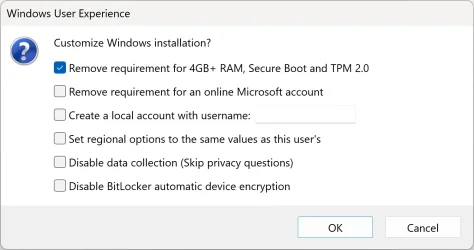
How to bypass the Windows 11 system requirements and install it on an MBR disk.

Rufus settings to create BIOS bootable USB flash drive.

- Partition scheme: MBR

edit: The Target system and File system options will change automatically.

- Check the "Remove requirement for 4GB+ RAM, Secure Boot and TPM 2.0" option.

Boot the USB flash drive using BIOS mode (in the boot menu, select your USB without the UEFI prefix).

Rufus.webp
 
Last edited:

My Computers My Computers

  • At a glance

    Windows 11 ProAMD Ryzen 9 9950X3DKingston FURY Beast 64GB (2x32GB) DDR5 6000MT/sASUS TUF Gaming Radeon RX 9070 OC Edition 16G...
    OS
    Windows 11 Pro
    Computer type
    PC/Desktop
    CPU
    AMD Ryzen 9 9950X3D
    Motherboard
    ASRock B650E Taichi Lite
    Memory
    Kingston FURY Beast 64GB (2x32GB) DDR5 6000MT/s
    Graphics Card(s)
    ASUS TUF Gaming Radeon RX 9070 OC Edition 16GB GDDR6
    Hard Drives
    Solidigm P44 Pro 2TB M.2 NVMe SSD
  • At a glance

    Windows 11 HomeIntel Core Ultra 9 275HX64GB (2x 32GB) DDR5-6400NVIDIA GeForce RTX 5080 16GB GDDR7 Laptop GPU
    Operating System
    Windows 11 Home
    Computer type
    Laptop
    Manufacturer/Model
    Lenovo Legion Pro 7i Gen 10 16"
    CPU
    Intel Core Ultra 9 275HX
    Memory
    64GB (2x 32GB) DDR5-6400
    Graphics card(s)
    NVIDIA GeForce RTX 5080 16GB GDDR7 Laptop GPU
    Hard Drives
    2x 1TB M.2 NVMe SSD (SK Hynix)

Latest Support Threads

Back
Top Bottom