PC doesn't meet win 11 system requirements error during install wizard


This is what it looks like in the BIOS when the USB flash drive has been created with the Media Creation Tool and "CSM Support" is set to "Disabled" (which is probably the default setting).
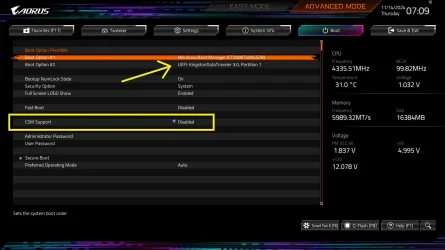
x870e-aorus-master-bios-13.webp
 

My Computers

System One System Two

  • OS
    Windows 11 Pro
    Computer type
    PC/Desktop
    CPU
    AMD Ryzen 9 9950X3D
    Motherboard
    ASRock B650E Taichi Lite
    Memory
    Kingston FURY Beast 64GB (2x32GB) DDR5 6000MT/s
    Graphics Card(s)
    ASUS TUF Gaming Radeon RX 9070 OC Edition 16GB GDDR6
    Hard Drives
    Solidigm P44 Pro 2TB M.2 NVMe SSD
  • Operating System
    Windows 11 Home
    Computer type
    Laptop
    Manufacturer/Model
    Lenovo Legion Pro 7i Gen 10 16"
    CPU
    Intel Core Ultra 9 275HX
    Memory
    64GB (2x 32GB) DDR5-6400
    Graphics card(s)
    NVIDIA GeForce RTX 5080 16GB GDDR7 Laptop GPU
    Hard Drives
    2x 1TB M.2 NVMe SSD (SK Hynix)
This is what it looks like in the BIOS when the USB flash drive has been created with the Media Creation Tool and "CSM Support" is set to "Disabled" (which is probably the default setting).

View attachment 145404

Mine is missing the "uefi:" for my bootable usb pen drive. Ergo, this is my issue. I'm on the latest bios, f8c.

What would be a cause to this?

Is it a hacked bios?

Hacked win 11 os install files?
 

My Computer

System One

  • OS
    Win 11 Pro
    Computer type
    PC/Desktop
    Manufacturer/Model
    Custom built
    CPU
    AMD 9700X
    Motherboard
    Gigabyte X870 Auros Elite Wifi7
    Memory
    G.SKILL Flare X5 32GB(16GB x2) DDR5 F5-6000J3038F16GX2-FX5
    Graphics Card(s)
    Sapphire AMD 7800XT 16GB Pulse
    Sound Card
    Onboard motherboard ALC1220
    Monitor(s) Displays
    Samsung 1080p led FHD
    Screen Resolution
    1080p
    Hard Drives
    1x 1TB Samsung 9100 PRO, M.2 2280, PCIe 5.0 (x4)
    1x Samsung 970 Evo M.2 2280 PCIe 3.0 (x4)
    1x Crucial mx500 2TB SSD
    1x Samsung 870 QVO 8TB SSD
    PSU
    SeaSonic FOCUS PX 850 W 80+ Platinum Certified Fully Modular ATX
    Case
    Phanteks Enthoo Pro Tempered Glass
    Cooling
    DeepCool AK400 ZERO DARK, 4x 140mm Noctua cooling fans
    Keyboard
    Dell MultiMedia
    Mouse
    Razor Deathadder v2
    Antivirus
    Kaspersky
Mine is missing the "uefi:" for my bootable usb pen drive. Ergo, this is my issue. I'm on the latest bios, f8c.

What would be a cause to this?

Is it a hacked bios?

Hacked win 11 os install files?


Please run the V2 log collector > post a share link


If Windows is not yet installed then boot to an iso > command prompt:

Code:
reg query HKLM\\System\\CurrentControlSet\\Control /v PEFirmwareType

Post a share link.
 

My Computer

System One

  • OS
    Windows 10
    Computer type
    Laptop
    Manufacturer/Model
    HP
    CPU
    Intel(R) Core(TM) i7-4800MQ CPU @ 2.70GHz
    Motherboard
    Product : 190A Version : KBC Version 94.56
    Memory
    16 GB Total: Manufacturer : Samsung MemoryType : DDR3 FormFactor : SODIMM Capacity : 8GB Speed : 1600
    Graphics Card(s)
    NVIDIA Quadro K3100M; Intel(R) HD Graphics 4600
    Sound Card
    IDT High Definition Audio CODEC; PNP Device ID HDAUDIO\FUNC_01&VEN_111D&DEV_76E0
    Hard Drives
    Model Hitachi HTS727575A9E364
    Antivirus
    Microsoft Defender
    Other Info
    Mobile Workstation
What is the v2 log controller and how do I do that?
 

My Computer

System One

  • OS
    Win 11 Pro
    Computer type
    PC/Desktop
    Manufacturer/Model
    Custom built
    CPU
    AMD 9700X
    Motherboard
    Gigabyte X870 Auros Elite Wifi7
    Memory
    G.SKILL Flare X5 32GB(16GB x2) DDR5 F5-6000J3038F16GX2-FX5
    Graphics Card(s)
    Sapphire AMD 7800XT 16GB Pulse
    Sound Card
    Onboard motherboard ALC1220
    Monitor(s) Displays
    Samsung 1080p led FHD
    Screen Resolution
    1080p
    Hard Drives
    1x 1TB Samsung 9100 PRO, M.2 2280, PCIe 5.0 (x4)
    1x Samsung 970 Evo M.2 2280 PCIe 3.0 (x4)
    1x Crucial mx500 2TB SSD
    1x Samsung 870 QVO 8TB SSD
    PSU
    SeaSonic FOCUS PX 850 W 80+ Platinum Certified Fully Modular ATX
    Case
    Phanteks Enthoo Pro Tempered Glass
    Cooling
    DeepCool AK400 ZERO DARK, 4x 140mm Noctua cooling fans
    Keyboard
    Dell MultiMedia
    Mouse
    Razor Deathadder v2
    Antivirus
    Kaspersky
 

My Computer

System One

  • OS
    Windows 10
    Computer type
    Laptop
    Manufacturer/Model
    HP
    CPU
    Intel(R) Core(TM) i7-4800MQ CPU @ 2.70GHz
    Motherboard
    Product : 190A Version : KBC Version 94.56
    Memory
    16 GB Total: Manufacturer : Samsung MemoryType : DDR3 FormFactor : SODIMM Capacity : 8GB Speed : 1600
    Graphics Card(s)
    NVIDIA Quadro K3100M; Intel(R) HD Graphics 4600
    Sound Card
    IDT High Definition Audio CODEC; PNP Device ID HDAUDIO\FUNC_01&VEN_111D&DEV_76E0
    Hard Drives
    Model Hitachi HTS727575A9E364
    Antivirus
    Microsoft Defender
    Other Info
    Mobile Workstation
Don't waste more time trying to boot a Legacy BIOS (MBR) USB flash drive in UEFI mode. Even if it could boot in both Legacy BIOS and UEFI mode, obviously it has not been created successfully and therefore it is not detected as UEFI bootable. Just wipe the USB flash drive and create it again. Using Rufus helps making sure you create it in GPT so it boots in UEFI mode. You can also remove compatibility check and create a local account instead of using your Microsoft account to login.
 

My Computers

System One System Two

  • OS
    Windows 11 Pro 23H2 (5699), 25H2 (8655)
    Computer type
    Laptop
    Manufacturer/Model
    Acer Extensa 5630EZ
    CPU
    Mobile DualCore Intel Core 2 Duo T7250, 2000 MHz
    Motherboard
    Acer Extensa 5630
    Memory
    4GB
    Graphics Card(s)
    Mobile Intel(R) GMA 4500M (Mobile 4 series)
    Sound Card
    Realtek ALC268 @ Intel 82801IB ICH9 - High Definition Audio Controller
    Monitor(s) Displays
    1
    Screen Resolution
    1280x800
    Hard Drives
    Samsung SSD 850 EVO 250GB SATA Device (250 GB, SATA-III)
    Internet Speed
    VDSL 50 Mbps
    Browser
    MICROSOFT EDGE
    Antivirus
    WINDOWS DEFENDER
    Other Info
    Legacy MBR installation, no TPM, no Secure Boot, no WDDM 2.0 graphics drivers, no SSE4.2, cannot get more unsupported ;) This is only my test laptop. I had installed Windows 11 here before upgrading my main PC. For my main PC I use everyday see my 2nd system specs.
  • Operating System
    Windows 11 Pro v25H2 (build 26200.8655)
    Computer type
    PC/Desktop
    Manufacturer/Model
    Custom-built PC
    CPU
    Intel Core-i7 3770 3.40GHz s1155 (3rd generation)
    Motherboard
    Asus P8H61 s1155 ATX
    Memory
    2x Kingston Hyper-X Blu 8GB DDR3-1600
    Graphics card(s)
    GIGABYTE GeForce RTX 3050 WINDFORCE OC V2 6GB (GV-N3050WF2OCV2-6GD)
    Sound Card
    Realtek HD audio (ALC887)
    Monitor(s) Displays
    Sony Bravia KDL-19L4000 19" LCD TV via VGA
    Screen Resolution
    1440x900 32-bit 60Hz
    Hard Drives
    WD Blue SA510 2.5 1000GB SSD as system disk, Western Digital Caviar Purple 4TB SATA III (WD40PURZ) as second
    PSU
    Thermaltake Litepower RGB 550W Full Wired
    Case
    SUPERCASE MIDI-TOWER
    Cooling
    Deepcool Gamma Archer CPU cooler, 1x 8cm fan at the back
    Keyboard
    Mitsumi 101-key PS/2
    Mouse
    Sunnyline OptiEye PS/2
    Internet Speed
    100Mbps
    Browser
    Microsoft Edge, Mozilla Firefox
    Antivirus
    Microsoft Windows Defender
    Other Info
    Legacy BIOS (MBR) installation, no TPM, no Secure Boot, WDDM 3.0 graphics drivers, WEI score 7.4
These are boot from iso links

Option 7:

Option 5:
 

My Computer

System One

  • OS
    Windows 10
    Computer type
    Laptop
    Manufacturer/Model
    HP
    CPU
    Intel(R) Core(TM) i7-4800MQ CPU @ 2.70GHz
    Motherboard
    Product : 190A Version : KBC Version 94.56
    Memory
    16 GB Total: Manufacturer : Samsung MemoryType : DDR3 FormFactor : SODIMM Capacity : 8GB Speed : 1600
    Graphics Card(s)
    NVIDIA Quadro K3100M; Intel(R) HD Graphics 4600
    Sound Card
    IDT High Definition Audio CODEC; PNP Device ID HDAUDIO\FUNC_01&VEN_111D&DEV_76E0
    Hard Drives
    Model Hitachi HTS727575A9E364
    Antivirus
    Microsoft Defender
    Other Info
    Mobile Workstation
Tried Rufus but that created usb pen in NTFS format rather than fat32. It didn't get listed in my bootable devices.

Why does Rufus create both FAT and NTFS partitions on a Windows 11 USB flash drive when ‘Partition scheme: GPT’ is selected in Rufus?

Rufus creates two partitions (FAT32 + NTFS) when making a Windows 11 bootable USB with GPT because of UEFI boot requirements and install.wim file size limits:


  • UEFI boot compatibility:
    UEFI firmware requires the boot partition to be FAT32, since most UEFI implementations can’t boot directly from NTFS. That’s why Rufus always includes a small FAT32 partition containing the bootloader and necessary EFI files.
  • install.wim size issue:
    The install.wim (or install.esd) file in Windows 11 is often larger than 4 GB. FAT32 cannot hold files larger than 4 GB, so Rufus creates an NTFS partition to store these larger files.
  • How it works in practice:
    • The system boots from the small FAT32 partition (via UEFI).
    • Once the Windows installer is running, it can access the NTFS partition to read the larger install.wim file and complete installation.

So, Rufus uses FAT32 for booting and NTFS for installation files—that’s why you see both partitions.

"Would you like me to also explain why this only happens with GPT + UEFI (and not MBR/BIOS) in Rufus? That detail makes the reasoning even clearer."

Why this only happens with GPT + UEFI​


  • UEFI requirement (with GPT):
    When you choose GPT partition scheme, Rufus assumes you’re going to boot in pure UEFI mode (no legacy BIOS/CSM).
    UEFI firmware specs require the boot partition to be FAT32, otherwise most UEFI implementations won’t recognize it. That’s why Rufus must include a FAT32 partition when GPT is selected.
  • MBR with BIOS (or UEFI-CSM):
    If you instead select MBR, Rufus assumes the target system might boot in legacy BIOS mode, which doesn’t require FAT32. BIOS can boot directly from an NTFS partition, so Rufus usually only makes a single NTFS partition in that case.
  • The special case with large install.wim:
    When GPT is chosen, FAT32 must exist for booting, but FAT32 can’t hold install.wim (>4 GB). That’s why Rufus adds a second NTFS partition to store it.
    If MBR is chosen, NTFS is fine for both bootloader and large files, so Rufus doesn’t need a split.

Why doesn’t the Media Creation Tool create both FAT and NTFS partitions on a Windows 11 USB flash drive?

The Media Creation Tool (MCT) behaves differently from Rufus because it avoids the >4 GB FAT32 limitation in a different way:


  • MCT automatically splits the install.wim file:
    Instead of leaving install.wim as one large file (often >4 GB), the Media Creation Tool breaks it into smaller install.swm files, each under 4 GB.
  • This allows everything to fit on a single FAT32 partition:
    Since all files are below the 4 GB limit, the USB can be formatted entirely as FAT32, which is fully UEFI-bootable.

Mine is missing the "uefi:" for my bootable usb pen drive. Ergo, this is my issue.
We understand your issue, but we don't know how to solve it.
 

My Computers

System One System Two

  • OS
    Windows 11 Pro
    Computer type
    PC/Desktop
    CPU
    AMD Ryzen 9 9950X3D
    Motherboard
    ASRock B650E Taichi Lite
    Memory
    Kingston FURY Beast 64GB (2x32GB) DDR5 6000MT/s
    Graphics Card(s)
    ASUS TUF Gaming Radeon RX 9070 OC Edition 16GB GDDR6
    Hard Drives
    Solidigm P44 Pro 2TB M.2 NVMe SSD
  • Operating System
    Windows 11 Home
    Computer type
    Laptop
    Manufacturer/Model
    Lenovo Legion Pro 7i Gen 10 16"
    CPU
    Intel Core Ultra 9 275HX
    Memory
    64GB (2x 32GB) DDR5-6400
    Graphics card(s)
    NVIDIA GeForce RTX 5080 16GB GDDR7 Laptop GPU
    Hard Drives
    2x 1TB M.2 NVMe SSD (SK Hynix)
Old versions of Rufus created an MBR-NTFS USB flash drive (Legacy BIOS bootable) while newer versions create GPT-FAT32 (UEFI bootable) by default. Download latest Rufus version, open it, load the Windows 11 ISO and make sure you select GPT. Don't change anything else. Click to start and you should see a popup window to bypass compatibility check. Select all options, just in case. Here you can also select to automatically create a local account (if you are doing a new installation).
 

My Computers

System One System Two

  • OS
    Windows 11 Pro 23H2 (5699), 25H2 (8655)
    Computer type
    Laptop
    Manufacturer/Model
    Acer Extensa 5630EZ
    CPU
    Mobile DualCore Intel Core 2 Duo T7250, 2000 MHz
    Motherboard
    Acer Extensa 5630
    Memory
    4GB
    Graphics Card(s)
    Mobile Intel(R) GMA 4500M (Mobile 4 series)
    Sound Card
    Realtek ALC268 @ Intel 82801IB ICH9 - High Definition Audio Controller
    Monitor(s) Displays
    1
    Screen Resolution
    1280x800
    Hard Drives
    Samsung SSD 850 EVO 250GB SATA Device (250 GB, SATA-III)
    Internet Speed
    VDSL 50 Mbps
    Browser
    MICROSOFT EDGE
    Antivirus
    WINDOWS DEFENDER
    Other Info
    Legacy MBR installation, no TPM, no Secure Boot, no WDDM 2.0 graphics drivers, no SSE4.2, cannot get more unsupported ;) This is only my test laptop. I had installed Windows 11 here before upgrading my main PC. For my main PC I use everyday see my 2nd system specs.
  • Operating System
    Windows 11 Pro v25H2 (build 26200.8655)
    Computer type
    PC/Desktop
    Manufacturer/Model
    Custom-built PC
    CPU
    Intel Core-i7 3770 3.40GHz s1155 (3rd generation)
    Motherboard
    Asus P8H61 s1155 ATX
    Memory
    2x Kingston Hyper-X Blu 8GB DDR3-1600
    Graphics card(s)
    GIGABYTE GeForce RTX 3050 WINDFORCE OC V2 6GB (GV-N3050WF2OCV2-6GD)
    Sound Card
    Realtek HD audio (ALC887)
    Monitor(s) Displays
    Sony Bravia KDL-19L4000 19" LCD TV via VGA
    Screen Resolution
    1440x900 32-bit 60Hz
    Hard Drives
    WD Blue SA510 2.5 1000GB SSD as system disk, Western Digital Caviar Purple 4TB SATA III (WD40PURZ) as second
    PSU
    Thermaltake Litepower RGB 550W Full Wired
    Case
    SUPERCASE MIDI-TOWER
    Cooling
    Deepcool Gamma Archer CPU cooler, 1x 8cm fan at the back
    Keyboard
    Mitsumi 101-key PS/2
    Mouse
    Sunnyline OptiEye PS/2
    Internet Speed
    100Mbps
    Browser
    Microsoft Edge, Mozilla Firefox
    Antivirus
    Microsoft Windows Defender
    Other Info
    Legacy BIOS (MBR) installation, no TPM, no Secure Boot, WDDM 3.0 graphics drivers, WEI score 7.4
We understand your issue, but we don't know how to solve it.
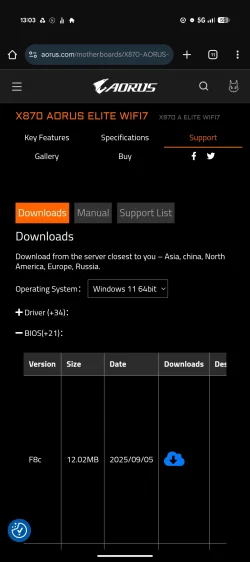
I'll contact gigabyte directly for aid and see if they have an answer.

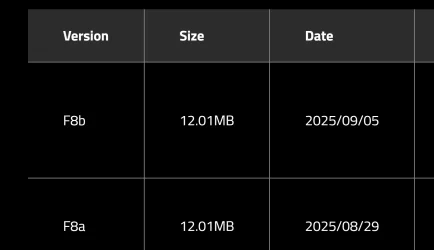
I suspect someone is providing me a fake bios download link.

Please could someone upload the most recent bios file to here for me (Gigabyte Auros Elite Wifi7)?
 

My Computer

System One

  • OS
    Win 11 Pro
    Computer type
    PC/Desktop
    Manufacturer/Model
    Custom built
    CPU
    AMD 9700X
    Motherboard
    Gigabyte X870 Auros Elite Wifi7
    Memory
    G.SKILL Flare X5 32GB(16GB x2) DDR5 F5-6000J3038F16GX2-FX5
    Graphics Card(s)
    Sapphire AMD 7800XT 16GB Pulse
    Sound Card
    Onboard motherboard ALC1220
    Monitor(s) Displays
    Samsung 1080p led FHD
    Screen Resolution
    1080p
    Hard Drives
    1x 1TB Samsung 9100 PRO, M.2 2280, PCIe 5.0 (x4)
    1x Samsung 970 Evo M.2 2280 PCIe 3.0 (x4)
    1x Crucial mx500 2TB SSD
    1x Samsung 870 QVO 8TB SSD
    PSU
    SeaSonic FOCUS PX 850 W 80+ Platinum Certified Fully Modular ATX
    Case
    Phanteks Enthoo Pro Tempered Glass
    Cooling
    DeepCool AK400 ZERO DARK, 4x 140mm Noctua cooling fans
    Keyboard
    Dell MultiMedia
    Mouse
    Razor Deathadder v2
    Antivirus
    Kaspersky

My Computers

System One System Two

  • OS
    Windows 11 Pro
    Computer type
    PC/Desktop
    CPU
    AMD Ryzen 9 9950X3D
    Motherboard
    ASRock B650E Taichi Lite
    Memory
    Kingston FURY Beast 64GB (2x32GB) DDR5 6000MT/s
    Graphics Card(s)
    ASUS TUF Gaming Radeon RX 9070 OC Edition 16GB GDDR6
    Hard Drives
    Solidigm P44 Pro 2TB M.2 NVMe SSD
  • Operating System
    Windows 11 Home
    Computer type
    Laptop
    Manufacturer/Model
    Lenovo Legion Pro 7i Gen 10 16"
    CPU
    Intel Core Ultra 9 275HX
    Memory
    64GB (2x 32GB) DDR5-6400
    Graphics card(s)
    NVIDIA GeForce RTX 5080 16GB GDDR7 Laptop GPU
    Hard Drives
    2x 1TB M.2 NVMe SSD (SK Hynix)

My Computer

System One

  • OS
    Win 11 Pro
    Computer type
    PC/Desktop
    Manufacturer/Model
    Custom built
    CPU
    AMD 9700X
    Motherboard
    Gigabyte X870 Auros Elite Wifi7
    Memory
    G.SKILL Flare X5 32GB(16GB x2) DDR5 F5-6000J3038F16GX2-FX5
    Graphics Card(s)
    Sapphire AMD 7800XT 16GB Pulse
    Sound Card
    Onboard motherboard ALC1220
    Monitor(s) Displays
    Samsung 1080p led FHD
    Screen Resolution
    1080p
    Hard Drives
    1x 1TB Samsung 9100 PRO, M.2 2280, PCIe 5.0 (x4)
    1x Samsung 970 Evo M.2 2280 PCIe 3.0 (x4)
    1x Crucial mx500 2TB SSD
    1x Samsung 870 QVO 8TB SSD
    PSU
    SeaSonic FOCUS PX 850 W 80+ Platinum Certified Fully Modular ATX
    Case
    Phanteks Enthoo Pro Tempered Glass
    Cooling
    DeepCool AK400 ZERO DARK, 4x 140mm Noctua cooling fans
    Keyboard
    Dell MultiMedia
    Mouse
    Razor Deathadder v2
    Antivirus
    Kaspersky

My Computers

System One System Two

  • OS
    Windows 11 Pro
    Computer type
    PC/Desktop
    CPU
    AMD Ryzen 9 9950X3D
    Motherboard
    ASRock B650E Taichi Lite
    Memory
    Kingston FURY Beast 64GB (2x32GB) DDR5 6000MT/s
    Graphics Card(s)
    ASUS TUF Gaming Radeon RX 9070 OC Edition 16GB GDDR6
    Hard Drives
    Solidigm P44 Pro 2TB M.2 NVMe SSD
  • Operating System
    Windows 11 Home
    Computer type
    Laptop
    Manufacturer/Model
    Lenovo Legion Pro 7i Gen 10 16"
    CPU
    Intel Core Ultra 9 275HX
    Memory
    64GB (2x 32GB) DDR5-6400
    Graphics card(s)
    NVIDIA GeForce RTX 5080 16GB GDDR7 Laptop GPU
    Hard Drives
    2x 1TB M.2 NVMe SSD (SK Hynix)
I have v1.1
 

My Computer

System One

  • OS
    Win 11 Pro
    Computer type
    PC/Desktop
    Manufacturer/Model
    Custom built
    CPU
    AMD 9700X
    Motherboard
    Gigabyte X870 Auros Elite Wifi7
    Memory
    G.SKILL Flare X5 32GB(16GB x2) DDR5 F5-6000J3038F16GX2-FX5
    Graphics Card(s)
    Sapphire AMD 7800XT 16GB Pulse
    Sound Card
    Onboard motherboard ALC1220
    Monitor(s) Displays
    Samsung 1080p led FHD
    Screen Resolution
    1080p
    Hard Drives
    1x 1TB Samsung 9100 PRO, M.2 2280, PCIe 5.0 (x4)
    1x Samsung 970 Evo M.2 2280 PCIe 3.0 (x4)
    1x Crucial mx500 2TB SSD
    1x Samsung 870 QVO 8TB SSD
    PSU
    SeaSonic FOCUS PX 850 W 80+ Platinum Certified Fully Modular ATX
    Case
    Phanteks Enthoo Pro Tempered Glass
    Cooling
    DeepCool AK400 ZERO DARK, 4x 140mm Noctua cooling fans
    Keyboard
    Dell MultiMedia
    Mouse
    Razor Deathadder v2
    Antivirus
    Kaspersky

My Computers

System One System Two

  • OS
    Windows 11 Pro
    Computer type
    PC/Desktop
    CPU
    AMD Ryzen 9 9950X3D
    Motherboard
    ASRock B650E Taichi Lite
    Memory
    Kingston FURY Beast 64GB (2x32GB) DDR5 6000MT/s
    Graphics Card(s)
    ASUS TUF Gaming Radeon RX 9070 OC Edition 16GB GDDR6
    Hard Drives
    Solidigm P44 Pro 2TB M.2 NVMe SSD
  • Operating System
    Windows 11 Home
    Computer type
    Laptop
    Manufacturer/Model
    Lenovo Legion Pro 7i Gen 10 16"
    CPU
    Intel Core Ultra 9 275HX
    Memory
    64GB (2x 32GB) DDR5-6400
    Graphics card(s)
    NVIDIA GeForce RTX 5080 16GB GDDR7 Laptop GPU
    Hard Drives
    2x 1TB M.2 NVMe SSD (SK Hynix)
Respectfully, I disagree.,,not if that data drive is GPT. Especially in OEM systems, the drive where windows resides is not always recognized as drive 0.
Right on
 

My Computers

System One System Two

  • OS
    25H2 10.0.26200 26200.8655
    Computer type
    PC/Desktop
    Manufacturer/Model
    Beelink SER8 Mini
    CPU
    AMD Ryzen 7 8845HS
    Motherboard
    AZW SER8 AMD Promontory/Bixby FCH
    Memory
    DDR5-5600 / PC5-44800 DDR5 SDRAM SO-DIMM32G
    Graphics Card(s)
    AMD Radeon 780M
    Sound Card
    AMD Zen - Audio Processor - HD Audio Controller
    Monitor(s) Displays
    1 LG HDR 32"
    Screen Resolution
    2560x1440
    Hard Drives
    1TB Crucial NVMe
    2TB Crucial NVME
    WD 1TB SSD SATA to USB3
    1 Seagate BUP Slim 2TB SATA to USB3
    1 Seagate BUP Slim 4TB SATA to USB3
    Samsung SSD 1TB SATA to USB3
    Samsung 500G SATA to USB3
    500G Crucial SSD to USB3
    PSU
    Beelink Proprietary
    Case
    Beelink Proprietary
    Cooling
    Beelink Proprietary
    Keyboard
    Logitech Backlit USB
    Mouse
    Logitech M510
    Internet Speed
    T-Mobile 5G 500 T-Mobile Home Internet -Asus ZenWifi AX Mesh
    Browser
    Edge, Firefox, Chrome
    Antivirus
    Microsoft Security 1.451.235.0 version created 6-2-2026
    Other Info
    Macrium X Build 10.0.8843
    Minitool Pro Ultimate 13.6
    REVO Pro 5.5.0.0 Portable
    JAM Treesize 9.7.2.2203 Perpetual Outdated.
    JAM Ultrasearch Pro 4.9.1.1204 Perpetual Outdated.
    Malwarebytes Pro 5.5.7.255 Update 1.0.110434 Component 157.0.5633
    Screenpresso Pro 2.2.12.3 beta (.Net 4.8) 2026-5-026
    Hamrick Vue Scan Pro 9.8.51.13
    Visio 2021 Pro 2021 MSO (Version 2605 Build 16.0.20026.20076) 64-bit
    Droid Transfer-Android 26.2.26.0
    Thunderbird 151.0.1
    em Client 10.4.5326
    Affinity Suite 3.2.1
    Microsoft 365 MSO (Version 2605 Build 16.0.20026.20076) 64-bit
    Adobe Creative cloud Version 6911 Apps 6.9.0.618 CCLibrary 4.16.2 (Photo subscription)
    HXD Hex Editor Version 2.5.0.0
    DAW Software Reaper-Izotope Plugins
    TGRMN Software ViceVersa Pro Build 6015 and VVEngine 3 Build 3000
    ISOBuster Pro 5.8.0.0
    Microsoft Visio Pro 2021 Version 2605 Build 16.0.20026.20076
    Many Other free and paid applications
    WYSIWYG Web Builder 21.07
    Filezilla 3.70.5
    Putty .83 and Putty Gen .83
    System Informer 4.0.26144.416 Stable
    O&O Regedit Version12 Build 2172
    WINRAR 7.22
    Lockhunter 3.4.3.146. x64
    Advanced IP Scanner 2.5.1
    Epson Eco Tank Printers and Epson Scanners.
    Bluestacks for Ring Cameras
    PEAK DCA Transistor Graphical USB Interface for Viewing Transistor Operational Curves. Win 10 Version and has functioneded on Win11 perfectly. Version 1.1.1963.
    Games - Card Games -Microsoft FSX "Pro Gold Flight Sim with add ons. Still works perfectly.
    Still run a few older onese successfully on win11 as well with no graphic issue.
  • Operating System
    Win11 Pro OEM 25H2 OS Build 26200.7019
    Computer type
    PC/Desktop
    Manufacturer/Model
    Beelink
    CPU
    AMD Ryzen 7 8845HS
    Motherboard
    AMD
    Memory
    DDR5 32G
    Graphics card(s)
    Beelink SER7
    Sound Card
    Beelink SER7
    Monitor(s) Displays
    Dell
    Screen Resolution
    Native
    Hard Drives
    1TB Crucial NVMe SSD 2G SATA
    PSU
    Beelink Proprietary
    Case
    Beelink Proprietary
    Cooling
    Beelink Proprietary
    Keyboard
    gaming keyboard
    Mouse
    MS
    Internet Speed
    T-Mobile 5G
    Antivirus
    Defender Malwarebytes
    Other Info
    Microsoft 365 Family Office
    Macrium X Subscription1 Version 10
    Mini-Tool Ultimate 13.0 Lifetime
    Malwarebytes Premium w/VPN 5
    Revo Pro Portable Pro 5
    Roboform 9.7.7.
    Others. (All legit)

My Computer

System One

  • OS
    Win 11 Pro
    Computer type
    PC/Desktop
    Manufacturer/Model
    Custom built
    CPU
    AMD 9700X
    Motherboard
    Gigabyte X870 Auros Elite Wifi7
    Memory
    G.SKILL Flare X5 32GB(16GB x2) DDR5 F5-6000J3038F16GX2-FX5
    Graphics Card(s)
    Sapphire AMD 7800XT 16GB Pulse
    Sound Card
    Onboard motherboard ALC1220
    Monitor(s) Displays
    Samsung 1080p led FHD
    Screen Resolution
    1080p
    Hard Drives
    1x 1TB Samsung 9100 PRO, M.2 2280, PCIe 5.0 (x4)
    1x Samsung 970 Evo M.2 2280 PCIe 3.0 (x4)
    1x Crucial mx500 2TB SSD
    1x Samsung 870 QVO 8TB SSD
    PSU
    SeaSonic FOCUS PX 850 W 80+ Platinum Certified Fully Modular ATX
    Case
    Phanteks Enthoo Pro Tempered Glass
    Cooling
    DeepCool AK400 ZERO DARK, 4x 140mm Noctua cooling fans
    Keyboard
    Dell MultiMedia
    Mouse
    Razor Deathadder v2
    Antivirus
    Kaspersky

My Computers

System One System Two

  • OS
    Windows 11 Pro
    Computer type
    PC/Desktop
    CPU
    AMD Ryzen 9 9950X3D
    Motherboard
    ASRock B650E Taichi Lite
    Memory
    Kingston FURY Beast 64GB (2x32GB) DDR5 6000MT/s
    Graphics Card(s)
    ASUS TUF Gaming Radeon RX 9070 OC Edition 16GB GDDR6
    Hard Drives
    Solidigm P44 Pro 2TB M.2 NVMe SSD
  • Operating System
    Windows 11 Home
    Computer type
    Laptop
    Manufacturer/Model
    Lenovo Legion Pro 7i Gen 10 16"
    CPU
    Intel Core Ultra 9 275HX
    Memory
    64GB (2x 32GB) DDR5-6400
    Graphics card(s)
    NVIDIA GeForce RTX 5080 16GB GDDR7 Laptop GPU
    Hard Drives
    2x 1TB M.2 NVMe SSD (SK Hynix)

My Computer

System One

  • OS
    Win 11 Pro
    Computer type
    PC/Desktop
    Manufacturer/Model
    Custom built
    CPU
    AMD 9700X
    Motherboard
    Gigabyte X870 Auros Elite Wifi7
    Memory
    G.SKILL Flare X5 32GB(16GB x2) DDR5 F5-6000J3038F16GX2-FX5
    Graphics Card(s)
    Sapphire AMD 7800XT 16GB Pulse
    Sound Card
    Onboard motherboard ALC1220
    Monitor(s) Displays
    Samsung 1080p led FHD
    Screen Resolution
    1080p
    Hard Drives
    1x 1TB Samsung 9100 PRO, M.2 2280, PCIe 5.0 (x4)
    1x Samsung 970 Evo M.2 2280 PCIe 3.0 (x4)
    1x Crucial mx500 2TB SSD
    1x Samsung 870 QVO 8TB SSD
    PSU
    SeaSonic FOCUS PX 850 W 80+ Platinum Certified Fully Modular ATX
    Case
    Phanteks Enthoo Pro Tempered Glass
    Cooling
    DeepCool AK400 ZERO DARK, 4x 140mm Noctua cooling fans
    Keyboard
    Dell MultiMedia
    Mouse
    Razor Deathadder v2
    Antivirus
    Kaspersky
Back
Top Bottom