PC has Error: 0xc0000098 and not going in recovery environment


Mukul

New member
Local time
8:20 AM
Posts
3
OS
Windows 11
So I was playing game when midgame I put my laptop to sleep by closing the lid, when I opened it again kt crashed and turned off. Now when I turn it on it goes to this error where it says Your PC needs to be repaired.
File: \bcd
Error code: 0x0000098
It says esc for uefi firmware settings and f1 for recovery environment, which for some reason doesn't work and brings me back to the same thing. Pls help me with this thing.
 

My Computer My Computer

At a glance

Windows 11
OS
Windows 11
Computer type
Laptop
Manufacturer/Model
Dell G-15
If you can boot your computer with Windows 11 installation media, that way you can access recovery environment.

In this video, i will guide you on how to fix boot error 0xc0000098 on Windows 10 or Windows 11.


My Computer My Computer

At a glance

Windows 11AMD Ryzen 7 5700GMicron Technology DDR4-3200 16GBNVIDIA GeForce RTX 3060
OS
Windows 11
Computer type
PC/Desktop
Manufacturer/Model
HP Pavilion
CPU
AMD Ryzen 7 5700G
Motherboard
Erica6
Memory
Micron Technology DDR4-3200 16GB
Graphics Card(s)
NVIDIA GeForce RTX 3060
Sound Card
Realtek ALC671
Monitor(s) Displays
Samsung SyncMaster U28E590
Screen Resolution
3840 x 2160
Hard Drives
SAMSUNG MZVLQ1T0HALB-000H1
If you can boot your computer with Windows 11 installation media, that way you can access recovery environment.

In this video, i will guide you on how to fix boot error 0xc0000098 on Windows 10 or Windows 11.

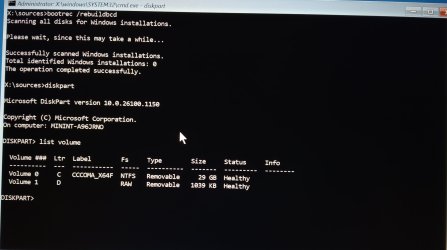
Thanks a lot for the video, I used a 32gb usb to use the troubleshooting and the command prompt, I used all the commands in the video in the same order, but at list volumes command, results that came in my laptop were very different and I am going to need guidance again for this.
 

Attachments

  • 1000073396.jpg
    1000073396.jpg
    192.9 KB · Views: 5

My Computer My Computer

At a glance

Windows 11
OS
Windows 11
Computer type
Laptop
Manufacturer/Model
Dell G-15
Looks like your computer hard drive not detected as it's not listed check the cable connections.
 

My Computer My Computer

At a glance

Windows 11AMD Ryzen 7 5700GMicron Technology DDR4-3200 16GBNVIDIA GeForce RTX 3060
OS
Windows 11
Computer type
PC/Desktop
Manufacturer/Model
HP Pavilion
CPU
AMD Ryzen 7 5700G
Motherboard
Erica6
Memory
Micron Technology DDR4-3200 16GB
Graphics Card(s)
NVIDIA GeForce RTX 3060
Sound Card
Realtek ALC671
Monitor(s) Displays
Samsung SyncMaster U28E590
Screen Resolution
3840 x 2160
Hard Drives
SAMSUNG MZVLQ1T0HALB-000H1
Looks like your computer hard drive not detected as it's not listed check the cable connections.
Well I used a bootable ubuntu usb to transfer my important data like just now and all the data was there so I think the nvme is working fine, it also shows up in the menu where we have to select which drive to boot from, it seems only windows is not detecting it. Also since I transferred the data, I tried doing a reinstall but it also doesn't detect the nvme for it. Just the usb from which I boot the windows re.
 

My Computer My Computer

At a glance

Windows 11
OS
Windows 11
Computer type
Laptop
Manufacturer/Model
Dell G-15
So I was playing game when midgame I put my laptop to sleep by closing the lid, when I opened it again kt crashed and turned off. Now when I turn it on it goes to this error where it says Your PC needs to be repaired.
File: \bcd
Error code: 0x0000098
It says esc for uefi firmware settings and f1 for recovery environment, which for some reason doesn't work and brings me back to the same thing. Pls help me with this thing.
please can try -Type the commands bootrec /fixmbr, bootrec /fixboot, and bootrec /scanos or repair your OS .
 

My Computer My Computer

At a glance

Window11 24h2AMD RYZON16 GBAMD
OS
Window11 24h2
Computer type
Laptop
Manufacturer/Model
HP
CPU
AMD RYZON
Motherboard
HP
Memory
16 GB
Graphics Card(s)
AMD
Sound Card
Yes
Monitor(s) Displays
Yes
please can try -Type the commands bootrec /fixmbr, bootrec /fixboot, and bootrec /scanos or repair your OS .
Well thank you for the response, I did try that yesterday, with many other commands and nothing worked. BUT, while getting bored in the boot menu, I saw the repair option in dell BIOS, which took like 10-15 minutes and said there were problems in disk partition and boot, and also automatically fixed them, thanks to Dell, my laptop is working again.
 

My Computer My Computer

At a glance

Windows 11
OS
Windows 11
Computer type
Laptop
Manufacturer/Model
Dell G-15
I'm glad to know your computer working again!
 

My Computer My Computer

At a glance

Windows 11AMD Ryzen 7 5700GMicron Technology DDR4-3200 16GBNVIDIA GeForce RTX 3060
OS
Windows 11
Computer type
PC/Desktop
Manufacturer/Model
HP Pavilion
CPU
AMD Ryzen 7 5700G
Motherboard
Erica6
Memory
Micron Technology DDR4-3200 16GB
Graphics Card(s)
NVIDIA GeForce RTX 3060
Sound Card
Realtek ALC671
Monitor(s) Displays
Samsung SyncMaster U28E590
Screen Resolution
3840 x 2160
Hard Drives
SAMSUNG MZVLQ1T0HALB-000H1

Latest Support Threads

Back
Top Bottom