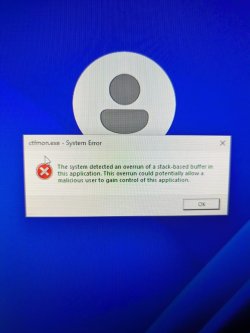
Pc is unusable because of crashes.


hello , i have uninstalled mbam , these are my latest minidumps
 

My Computer My Computer

At a glance

Windows 11Amd Ryzen 5 3500xKingston fury 16gb 3200mhzRadeon 5500xt 8gb asus
OS
Windows 11
Computer type
PC/Desktop
CPU
Amd Ryzen 5 3500x
Motherboard
Gigabyte b450m s2h
Memory
Kingston fury 16gb 3200mhz
Graphics Card(s)
Radeon 5500xt 8gb asus
Hard Drives
Seagate 1tb hdd , Kingston a2000 ssd nvme 250gb
PSU
aerocool cylon 600w
Case
Aqirys Canopus
Keyboard
Razer ornata v2
Mouse
razee viper
Browser
Opera gx
Antivirus
Windows antivirus
Hmm, your crashes seem a little less consistent now, I would suggest booting into Safe Mode w/ Networking for a few days or until the next crash happens. It will help to establish if there is any underlying hardware issues.
 

My Computer My Computer

At a glance

Windows 11, Windows 10, Linux Fedora Cinnamon
OS
Windows 11, Windows 10, Linux Fedora Cinnamon
Hello , my new psu just came through , Tommorow im gonna put it in my pc and test it a bit , if it does not make a difference im gonna boot in safe mode for a few days as you said , The crashes seem less to you because i ve used my pc less these days. I had a lot of work .
 

My Computer My Computer

At a glance

Windows 11Amd Ryzen 5 3500xKingston fury 16gb 3200mhzRadeon 5500xt 8gb asus
OS
Windows 11
Computer type
PC/Desktop
CPU
Amd Ryzen 5 3500x
Motherboard
Gigabyte b450m s2h
Memory
Kingston fury 16gb 3200mhz
Graphics Card(s)
Radeon 5500xt 8gb asus
Hard Drives
Seagate 1tb hdd , Kingston a2000 ssd nvme 250gb
PSU
aerocool cylon 600w
Case
Aqirys Canopus
Keyboard
Razer ornata v2
Mouse
razee viper
Browser
Opera gx
Antivirus
Windows antivirus
hi, unfortunately , i dont think the psu was the problem. Im trying to find a pattern to these crashes but i just cant , they re so random. And i ve also noticed browser tabs start crashing . i ve played some roblox earlier and it froze like 2 times and crashed another 3. next thing im gonna do im thinking about changing my gpu its the most logical thing to me idk. also i want to upload my mini dump files right now but onedrive doesnt work. the files just dont get uploaded it just loads endlessly.
 

My Computer My Computer

At a glance

Windows 11Amd Ryzen 5 3500xKingston fury 16gb 3200mhzRadeon 5500xt 8gb asus
OS
Windows 11
Computer type
PC/Desktop
CPU
Amd Ryzen 5 3500x
Motherboard
Gigabyte b450m s2h
Memory
Kingston fury 16gb 3200mhz
Graphics Card(s)
Radeon 5500xt 8gb asus
Hard Drives
Seagate 1tb hdd , Kingston a2000 ssd nvme 250gb
PSU
aerocool cylon 600w
Case
Aqirys Canopus
Keyboard
Razer ornata v2
Mouse
razee viper
Browser
Opera gx
Antivirus
Windows antivirus
I would suggest following the posting instructions again to get a new .zip with the rest of the system information and then just attach that to your next post. It should be small enough without having to upload it to OneDrive first.

I would refrain from making any hardware changes, especially the graphics card since I doubt that is the issue. Please boot into Safe Mode w/ Networking and then see if it crashes or freezes there.
 

My Computer My Computer

At a glance

Windows 11, Windows 10, Linux Fedora Cinnamon
OS
Windows 11, Windows 10, Linux Fedora Cinnamon
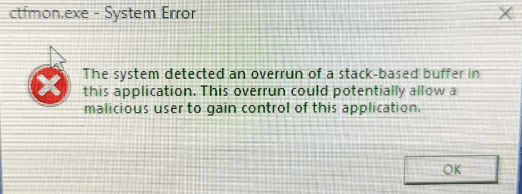
Ok , im literally gonna cry my pc is actually Unusable . I cant do anything on it for more than 2 minutes. I cannot send the minidumps files i cannot do anything , I have booted in safe mode w networking and an error popped up like 1000 times and then my pc crashed . Either my browser freezes or my pc freezes or it crashes or a certain tab crashes its like someone is praying on my downfall. Im gonna upload a photo with the error but i dont think i can upload any minidump files. also my night time filter wears off for no reason. also i ve gotten a new error that said something like dxgmms2.sys


update : OneDrive
 

Attachments

  • WhatsApp Image 2024-02-01 at 10.00.31 PM.jpeg
    WhatsApp Image 2024-02-01 at 10.00.31 PM.jpeg
    206.6 KB · Views: 1
Last edited:

My Computer My Computer

At a glance

Windows 11Amd Ryzen 5 3500xKingston fury 16gb 3200mhzRadeon 5500xt 8gb asus
OS
Windows 11
Computer type
PC/Desktop
CPU
Amd Ryzen 5 3500x
Motherboard
Gigabyte b450m s2h
Memory
Kingston fury 16gb 3200mhz
Graphics Card(s)
Radeon 5500xt 8gb asus
Hard Drives
Seagate 1tb hdd , Kingston a2000 ssd nvme 250gb
PSU
aerocool cylon 600w
Case
Aqirys Canopus
Keyboard
Razer ornata v2
Mouse
razee viper
Browser
Opera gx
Antivirus
Windows antivirus
i really do need help guys please
 

My Computer My Computer

At a glance

Windows 11Amd Ryzen 5 3500xKingston fury 16gb 3200mhzRadeon 5500xt 8gb asus
OS
Windows 11
Computer type
PC/Desktop
CPU
Amd Ryzen 5 3500x
Motherboard
Gigabyte b450m s2h
Memory
Kingston fury 16gb 3200mhz
Graphics Card(s)
Radeon 5500xt 8gb asus
Hard Drives
Seagate 1tb hdd , Kingston a2000 ssd nvme 250gb
PSU
aerocool cylon 600w
Case
Aqirys Canopus
Keyboard
Razer ornata v2
Mouse
razee viper
Browser
Opera gx
Antivirus
Windows antivirus
Please disconnect all your RAM sticks bar one and then try and boot again into Safe Mode without Networking.
 

My Computer My Computer

At a glance

Windows 11, Windows 10, Linux Fedora Cinnamon
OS
Windows 11, Windows 10, Linux Fedora Cinnamon
Please disconnect all your RAM sticks bar one and then try and boot again into Safe Mode without Networking.
What do you mean disconnect all ram sticks ? i have 2 . hows my pc going to run with no ram
 

My Computer My Computer

At a glance

Windows 11Amd Ryzen 5 3500xKingston fury 16gb 3200mhzRadeon 5500xt 8gb asus
OS
Windows 11
Computer type
PC/Desktop
CPU
Amd Ryzen 5 3500x
Motherboard
Gigabyte b450m s2h
Memory
Kingston fury 16gb 3200mhz
Graphics Card(s)
Radeon 5500xt 8gb asus
Hard Drives
Seagate 1tb hdd , Kingston a2000 ssd nvme 250gb
PSU
aerocool cylon 600w
Case
Aqirys Canopus
Keyboard
Razer ornata v2
Mouse
razee viper
Browser
Opera gx
Antivirus
Windows antivirus
Please disconnect all your RAM sticks bar one
You'll need to run with one RAM stick, if that doesn't help, then try the other one or a different slot.
 

My Computer My Computer

At a glance

Windows 11, Windows 10, Linux Fedora Cinnamon
OS
Windows 11, Windows 10, Linux Fedora Cinnamon
What do you mean disconnect all ram sticks ? i have 2 . hows my pc going to run with no ram
I haven't read the entire thread, but I suspect that x BlueRobot is trying to see if your problem is faulty RAM. Running with only one stick will be a good start.
 

My Computers My Computers

  • At a glance

    Windows 11 ProIntel Core i9-10900XCorsair 64 GB (4 x 16 GB) CMW64GX4M4C3000C15 ...GIGABYTE GeForce GTX 1660 Super Mini ITX 6 GB OC
    OS
    Windows 11 Pro
    Computer type
    PC/Desktop
    Manufacturer/Model
    Stigg's Build
    CPU
    Intel Core i9-10900X
    Motherboard
    GIGABYTE X299X DESIGNARE 10G
    Memory
    Corsair 64 GB (4 x 16 GB) CMW64GX4M4C3000C15 Vengeance RGB Pro 3000Mhz DDR4
    Graphics Card(s)
    GIGABYTE GeForce GTX 1660 Super Mini ITX 6 GB OC
    Sound Card
    Realtek ALC1220
    Monitor(s) Displays
    Samsung 27" FHD LED FreeSync Gaming Monitor (LS27F350FHEXXY)
    Screen Resolution
    1920 x 1080
    Hard Drives
    Samsung 970 Pro Series 1TB M.2 2280 NVMe SSD
    Western Digital Red Pro WD8003FFBX-68B9AN0 8 TB, 7200 RPM, SATA-III
    Western Digital Red Pro WD8003FFBX-68B9AN0 8 TB, 7200 RPM, SATA-III
    PSU
    Corsair HX1200 1200W 80 Plus Platinum
    Case
    Fractal Design Define 7 Black Solid Case
    Cooling
    Noctua NH-D15 Chromax Black
    Keyboard
    Razer Ornata V2
    Mouse
    Razer DeathAdder Essential
    Internet Speed
    FTTN 100Mbps / 40Mbps
    Browser
    Mozilla Firefox
    Antivirus
    N/A
    Other Info
    Logitech BRIO 4k Ultra HD USB-C Webcam
  • At a glance

    Windows 10 ProCore i7-8750HSK Hynix 32 GB (2 x 16 GB) HMA82GS6CJR8N-VK 1...NVIDIA GeForce GTX 1070
    Operating System
    Windows 10 Pro
    Computer type
    Laptop
    Manufacturer/Model
    ASUS ROG Zephyrus M GM501GS
    CPU
    Core i7-8750H
    Motherboard
    Zephyrus M GM501GS
    Memory
    SK Hynix 32 GB (2 x 16 GB) HMA82GS6CJR8N-VK 16 GB DDR4-2666 DDR4 SDRAM
    Graphics card(s)
    NVIDIA GeForce GTX 1070
    Sound Card
    Realtek ALC294
    Monitor(s) Displays
    AU Optronics B156HAN07.1 [15.6" LCD]
    Screen Resolution
    1920 x 1080
    Hard Drives
    Samsung MZVKW512HMJP-00000 512 GB, PCI-E 3.0 x4
    Samsung SSD 860 QVO 4TB 4 TB, SATA-III
    PSU
    N/A
    Case
    N/A
    Cooling
    N/A
    Keyboard
    PC/AT Enhanced PS2 Keyboard (101/102-Key)
    Mouse
    Razer DeathAdder Essential
    Internet Speed
    FTTN 100Mbps / 40Mbps
    Browser
    Mozilla Firefox
    Antivirus
    N/A
    Other Info
    USB2.0 HD UVC Webcam
ok so i have tested both of the ram sticks in every ram slot in every possible situation in safe mode , the same error pops up and everything is the same. a thing i noticed is i think when i use network my pc gets bluescreen, when i was in normal safe mode without network, it just popped that error but no crash 1706959222195.png
 

My Computer My Computer

At a glance

Windows 11Amd Ryzen 5 3500xKingston fury 16gb 3200mhzRadeon 5500xt 8gb asus
OS
Windows 11
Computer type
PC/Desktop
CPU
Amd Ryzen 5 3500x
Motherboard
Gigabyte b450m s2h
Memory
Kingston fury 16gb 3200mhz
Graphics Card(s)
Radeon 5500xt 8gb asus
Hard Drives
Seagate 1tb hdd , Kingston a2000 ssd nvme 250gb
PSU
aerocool cylon 600w
Case
Aqirys Canopus
Keyboard
Razer ornata v2
Mouse
razee viper
Browser
Opera gx
Antivirus
Windows antivirus
Have you tried booting from a Live CD?
 

My Computer My Computer

At a glance

Windows 11, Windows 10, Linux Fedora Cinnamon
OS
Windows 11, Windows 10, Linux Fedora Cinnamon
Have you tried booting from a Live CD?
i dont know what that is and i dont have a cd tray. im starting to think it has something to do with the browser idk. when im idle in clean boot mode only task manager open its ok, once i open the browser after 2 3 mins it crashes i think thats a pattern not sure
 

My Computer My Computer

At a glance

Windows 11Amd Ryzen 5 3500xKingston fury 16gb 3200mhzRadeon 5500xt 8gb asus
OS
Windows 11
Computer type
PC/Desktop
CPU
Amd Ryzen 5 3500x
Motherboard
Gigabyte b450m s2h
Memory
Kingston fury 16gb 3200mhz
Graphics Card(s)
Radeon 5500xt 8gb asus
Hard Drives
Seagate 1tb hdd , Kingston a2000 ssd nvme 250gb
PSU
aerocool cylon 600w
Case
Aqirys Canopus
Keyboard
Razer ornata v2
Mouse
razee viper
Browser
Opera gx
Antivirus
Windows antivirus
i dont know what that is and i dont have a cd tray. im starting to think it has something to do with the browser idk. when im idle in clean boot mode only task manager open its ok, once i open the browser after 2 3 mins it crashes i think thats a pattern not sure
Do you realize that with every crash, you run the risk of (further) corrupting your user/system hives and having SSD/HDD issues?
If I were you, I would wipe the drive clean and do an installation from scratch.
Running a modern browser in safe mode, -I am assuming it is what you mean by clean boot mode -
may lead to crashes as resources are lacking.
It is not the reason why your system is crashing; safe mode is not to be your daily driver, it is a debug mode.
 
Last edited:

My Computers My Computers

  • At a glance

    All Branches but ReleaseAMD Ryzen 7 7735HS 3200-4500 Mhz 8 cores x 232 GB DDR5Radeon Graphic / NVIDIA GeForce RTX 4060 8 GB...
    OS
    All Branches but Release
    Computer type
    Laptop
    Manufacturer/Model
    Acer Nitro ANV15-51
    CPU
    AMD Ryzen 7 7735HS 3200-4500 Mhz 8 cores x 2
    Motherboard
    Sportage_RBH
    Memory
    32 GB DDR5
    Graphics Card(s)
    Radeon Graphic / NVIDIA GeForce RTX 4060 8 GB GDDR6
    Sound Card
    AMD/Realtek(R) Audio
    Monitor(s) Displays
    Integrated Monitor (15.3"vis)
    Screen Resolution
    FHD 1920X1080 16:9 144Hz
    Hard Drives
    KINGSTON OM8SEP4512Q-AA 1TB
    Western Digital 256GB
    PSU
    19V DC 6.32 A 120 W
    Cooling
    Dual Fans
    Mouse
    MS Bluetooth
    Internet Speed
    Fiber 1GB Cox -us & 1GB Orange-fr
    Browser
    Edge Canary- Firefox Nightly-Chrome Dev-Chrome Dev
    Antivirus
    Windows Defender
  • At a glance

    Windows 11 BetaAMD A9-94208 GB of DDR4AMD Radeon R5
    Operating System
    Windows 11 Beta
    Computer type
    Laptop
    Manufacturer/Model
    Asus X751BP
    CPU
    AMD A9-9420
    Memory
    8 GB of DDR4
    Graphics card(s)
    AMD Radeon R5
    Screen Resolution
    1600x900
    Hard Drives
    Seagate 1 TB
Do you realize that with every crash, you run the risk of (further) corrupting your user/system hives and having SSD/HDD issues?
If I were you, I would wipe the drive clean and do an installation from scratch.
Running a modern browser in safe mode, -I am assuming it is what you mean by clean boot mode -
may lead to crashes as resources are lacking.
It is not the reason why your system is crashing; safe modet is not to be your daily driver, it is a debug mode.
i am not that much into technology and operating systems so i dont know much about this im just doing my best in trying to fix this problem . By clean boot mode i meant the fact that i have no apps running in the background and no startup apps . Ok , tommorow im going to reset my pc and start from scratch i will keep you updated
 

My Computer My Computer

At a glance

Windows 11Amd Ryzen 5 3500xKingston fury 16gb 3200mhzRadeon 5500xt 8gb asus
OS
Windows 11
Computer type
PC/Desktop
CPU
Amd Ryzen 5 3500x
Motherboard
Gigabyte b450m s2h
Memory
Kingston fury 16gb 3200mhz
Graphics Card(s)
Radeon 5500xt 8gb asus
Hard Drives
Seagate 1tb hdd , Kingston a2000 ssd nvme 250gb
PSU
aerocool cylon 600w
Case
Aqirys Canopus
Keyboard
Razer ornata v2
Mouse
razee viper
Browser
Opera gx
Antivirus
Windows antivirus
I have tried to reinstall windows but it crashes every time it starts downloading. i have unplugged the ssd and the hdd side by side and still does not work
 

My Computer My Computer

At a glance

Windows 11Amd Ryzen 5 3500xKingston fury 16gb 3200mhzRadeon 5500xt 8gb asus
OS
Windows 11
Computer type
PC/Desktop
CPU
Amd Ryzen 5 3500x
Motherboard
Gigabyte b450m s2h
Memory
Kingston fury 16gb 3200mhz
Graphics Card(s)
Radeon 5500xt 8gb asus
Hard Drives
Seagate 1tb hdd , Kingston a2000 ssd nvme 250gb
PSU
aerocool cylon 600w
Case
Aqirys Canopus
Keyboard
Razer ornata v2
Mouse
razee viper
Browser
Opera gx
Antivirus
Windows antivirus
If OS keeps crashing. likely the OS SSD is dying off. Did it start from brand-new? or used?

have you run CrystalDiskInfo to see the SSD info?
 

My Computer My Computer

At a glance

Windows 7/11Intel i7-11800H32GB DDR4 3200MHzNVIDIA GeForce RTX 3070
OS
Windows 7/11
Computer type
PC/Desktop
Manufacturer/Model
HP/Lenovo/Asus
CPU
Intel i7-11800H
Motherboard
Lenovo Legion 5i Pro Gen 6
Memory
32GB DDR4 3200MHz
Graphics Card(s)
NVIDIA GeForce RTX 3070
Monitor(s) Displays
LG 35WN65C-B
Screen Resolution
3440 x 1440
Hard Drives
1TB PCIe SSD
Other Info
Edition Windows 11 Pro
Version 25H2
Installed on ‎12/‎12/‎2025
OS build 26200.7462
If OS keeps crashing. likely the OS SSD is dying off. Did it start from brand-new? or used?

have you run CrystalDiskInfo to see the SSD info?
I have deleted everything off my pc , and i have formated everything. I tried to install windows on my hdd after seeing that on ssd it crashes. So i unplugged my ssd and just used my hard disk , and it still crashed ( and ive changed the gpt setting in cmd) i have not run crystaldiskinfo since i cannot run anything and i dont know what that is but my ssd is not the problem
 

My Computer My Computer

At a glance

Windows 11Amd Ryzen 5 3500xKingston fury 16gb 3200mhzRadeon 5500xt 8gb asus
OS
Windows 11
Computer type
PC/Desktop
CPU
Amd Ryzen 5 3500x
Motherboard
Gigabyte b450m s2h
Memory
Kingston fury 16gb 3200mhz
Graphics Card(s)
Radeon 5500xt 8gb asus
Hard Drives
Seagate 1tb hdd , Kingston a2000 ssd nvme 250gb
PSU
aerocool cylon 600w
Case
Aqirys Canopus
Keyboard
Razer ornata v2
Mouse
razee viper
Browser
Opera gx
Antivirus
Windows antivirus
hmm, likely a BIOS issue.

You can get a professional help. reflash the BIOS. (it may be risky if DIY)
 

My Computer My Computer

At a glance

Windows 7/11Intel i7-11800H32GB DDR4 3200MHzNVIDIA GeForce RTX 3070
OS
Windows 7/11
Computer type
PC/Desktop
Manufacturer/Model
HP/Lenovo/Asus
CPU
Intel i7-11800H
Motherboard
Lenovo Legion 5i Pro Gen 6
Memory
32GB DDR4 3200MHz
Graphics Card(s)
NVIDIA GeForce RTX 3070
Monitor(s) Displays
LG 35WN65C-B
Screen Resolution
3440 x 1440
Hard Drives
1TB PCIe SSD
Other Info
Edition Windows 11 Pro
Version 25H2
Installed on ‎12/‎12/‎2025
OS build 26200.7462

Latest Support Threads

Back
Top Bottom